Production Reflection
Alisha Harrison
Process
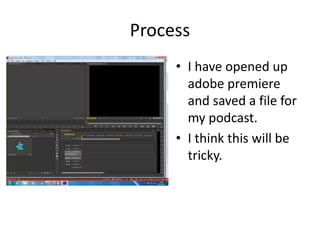
• I have opened up
adobe premiere
and saved a file for
my podcast.
• I think this will be
tricky.
Process
• I have imported
some audio clips of
a car for sound
affects.
• I like these sounds
of the car I like that
I am using it as a
sound effect.
Process
• I have imported
some recordings I
have done into my
adobe premiere
file.
• I am happy to be
using these
recordings.
Process
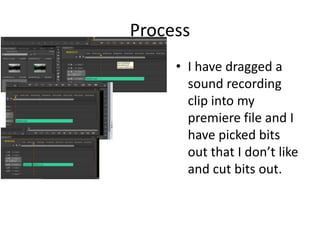
• I have dragged a
sound recording
clip into my
premiere file and I
have picked bits
out that I don’t like
and cut bits out.
Process
• I have cut out the parts
I don’t want from the
talking, I still need to
do a little bit more
recording.
• I have chosen not go
onto the internet for
sound effects I think
the only sound effect I
really need is henrys
car which I have
recorded my self.
Process
• I have added in a
sound effect I
recorded of henrys
Subaru that he
talks about during
the podcast, I have
left a gap for some
more recording I
need to do which
will fill in that gap.
Process
• I am experimenting with
music I am seeing which
music fits better I have
chosen tracks from fast
and furious.
• I listened to this over
and thought it doesn’t
sound to good I need
another song o go with
the other topic so I have
gone onto YouTube to
get another song for
background music.
Process
• I have chosen the
song I like which will
be played in the
background, I have
added an effect
which makes the
music fade in at the
beginning, I have
also changed the
volume in order to
hear the talking over
the music.
Process
• I have recorded some
more talking which I
have converted into an
mp3 instead of a video
I did this by opening a
new adobe premiere
pro up and exported
each clip to mp3 I did
this with 3 new clips. I
thought this went well
Process
• After I exported
the 3 clips to mp3 I
then imported
them as a mp3 file
into my premiere
file I have started
for my podcast.
• Doing this was easy
and quick
Process
• I have added in
another song which
goes with the film
topic as its played in
the films
• I have changed the
volume of the song
so you can hear the
talking over I as I
just wanted it to be
background music.
Process
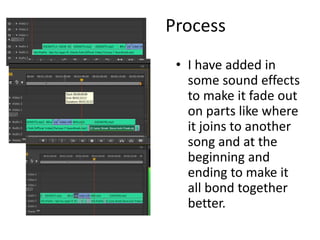
• I have added in
some sound effects
to make it fade out
on parts like where
it joins to another
song and at the
beginning and
ending to make it
all bond together
better.
Process
Process
Process
Process
Process

6. production reflection audio

  • 1.
  • 2.
    Process • I haveopened up adobe premiere and saved a file for my podcast. • I think this will be tricky.
  • 3.
    Process • I haveimported some audio clips of a car for sound affects. • I like these sounds of the car I like that I am using it as a sound effect.
  • 4.
    Process • I haveimported some recordings I have done into my adobe premiere file. • I am happy to be using these recordings.
  • 5.
    Process • I havedragged a sound recording clip into my premiere file and I have picked bits out that I don’t like and cut bits out.
  • 6.
    Process • I havecut out the parts I don’t want from the talking, I still need to do a little bit more recording. • I have chosen not go onto the internet for sound effects I think the only sound effect I really need is henrys car which I have recorded my self.
  • 7.
    Process • I haveadded in a sound effect I recorded of henrys Subaru that he talks about during the podcast, I have left a gap for some more recording I need to do which will fill in that gap.
  • 8.
    Process • I amexperimenting with music I am seeing which music fits better I have chosen tracks from fast and furious. • I listened to this over and thought it doesn’t sound to good I need another song o go with the other topic so I have gone onto YouTube to get another song for background music.
  • 9.
    Process • I havechosen the song I like which will be played in the background, I have added an effect which makes the music fade in at the beginning, I have also changed the volume in order to hear the talking over the music.
  • 10.
    Process • I haverecorded some more talking which I have converted into an mp3 instead of a video I did this by opening a new adobe premiere pro up and exported each clip to mp3 I did this with 3 new clips. I thought this went well
  • 11.
    Process • After Iexported the 3 clips to mp3 I then imported them as a mp3 file into my premiere file I have started for my podcast. • Doing this was easy and quick
  • 12.
    Process • I haveadded in another song which goes with the film topic as its played in the films • I have changed the volume of the song so you can hear the talking over I as I just wanted it to be background music.
  • 13.
    Process • I haveadded in some sound effects to make it fade out on parts like where it joins to another song and at the beginning and ending to make it all bond together better.
  • 14.
  • 15.
  • 16.
  • 17.
  • 18.

Editor's Notes

  • #3 Discuss the tools and processes used in your production. Log your thoughts and feelings about your work.
  • #4 Discuss the tools and processes used in your production. Log your thoughts and feelings about your work.
  • #5 Discuss the tools and processes used in your production. Log your thoughts and feelings about your work.
  • #6 Discuss the tools and processes used in your production. Log your thoughts and feelings about your work.
  • #7 Discuss the tools and processes used in your production. Log your thoughts and feelings about your work.
  • #8 Discuss the tools and processes used in your production. Log your thoughts and feelings about your work.
  • #9 Discuss the tools and processes used in your production. Log your thoughts and feelings about your work.
  • #10 Discuss the tools and processes used in your production. Log your thoughts and feelings about your work.
  • #11 Discuss the tools and processes used in your production. Log your thoughts and feelings about your work.
  • #12 Discuss the tools and processes used in your production. Log your thoughts and feelings about your work.
  • #13 Discuss the tools and processes used in your production. Log your thoughts and feelings about your work.
  • #14 Discuss the tools and processes used in your production. Log your thoughts and feelings about your work.
  • #15 Discuss the tools and processes used in your production. Log your thoughts and feelings about your work.
  • #16 Discuss the tools and processes used in your production. Log your thoughts and feelings about your work.
  • #17 Discuss the tools and processes used in your production. Log your thoughts and feelings about your work.
  • #18 Discuss the tools and processes used in your production. Log your thoughts and feelings about your work.
  • #19 Discuss the tools and processes used in your production. Log your thoughts and feelings about your work.