Production Reflection
Rebecca Edwards
Process
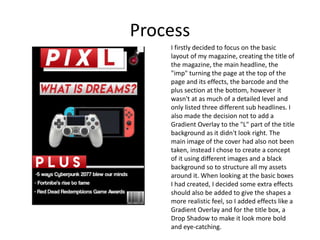
I firstly decided to focus on the basic
layout of my magazine, creating the title of
the magazine, the main headline, the
"imp" turning the page at the top of the
page and its effects, the barcode and the
plus section at the bottom, however it
wasn't at as much of a detailed level and
only listed three different sub headlines. I
also made the decision not to add a
Gradient Overlay to the "L" part of the title
background as it didn't look right. The
main image of the cover had also not been
taken, instead I chose to create a concept
of it using different images and a black
background so to structure all my assets
around it. When looking at the basic boxes
I had created, I decided some extra effects
should also be added to give the shapes a
more realistic feel, so I added effects like a
Gradient Overlay and for the title box, a
Drop Shadow to make it look more bold
and eye-catching.
Process
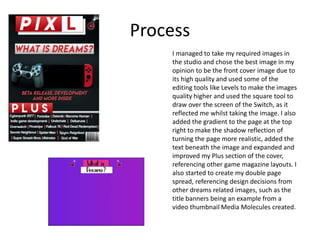
I managed to take my required images in
the studio and chose the best image in my
opinion to be the front cover image due to
its high quality and used some of the
editing tools like Levels to make the images
quality higher and used the square tool to
draw over the screen of the Switch, as it
reflected me whilst taking the image. I also
added the gradient to the page at the top
right to make the shadow reflection of
turning the page more realistic, added the
text beneath the image and expanded and
improved my Plus section of the cover,
referencing other game magazine layouts. I
also started to create my double page
spread, referencing design decisions from
other dreams related images, such as the
title banners being an example from a
video thumbnail Media Molecules created.
Process
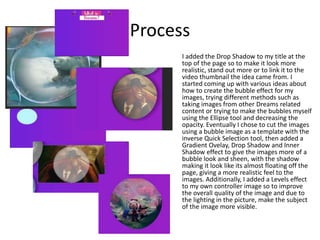
I added the Drop Shadow to my title at the
top of the page so to make it look more
realistic, stand out more or to link it to the
video thumbnail the idea came from. I
started coming up with various ideas about
how to create the bubble effect for my
images, trying different methods such as
taking images from other Dreams related
content or trying to make the bubbles myself
using the Ellipse tool and decreasing the
opacity. Eventually I chose to cut the images
using a bubble image as a template with the
inverse Quick Selection tool, then added a
Gradient Ovelay, Drop Shadow and Inner
Shadow effect to give the images more of a
bubble look and sheen, with the shadow
making it look like its almost floating off the
page, giving a more realistic feel to the
images. Additionally, I added a Levels effect
to my own controller image so to improve
the overall quality of the image and due to
the lighting in the picture, make the subject
of the image more visible.
Process
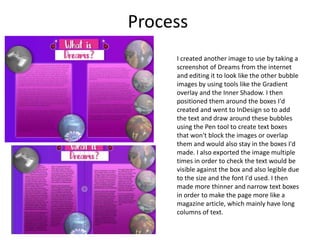
I created another image to use by taking a
screenshot of Dreams from the internet
and editing it to look like the other bubble
images by using tools like the Gradient
overlay and the Inner Shadow. I then
positioned them around the boxes I'd
created and went to InDesign so to add
the text and draw around these bubbles
using the Pen tool to create text boxes
that won't block the images or overlap
them and would also stay in the boxes I'd
made. I also exported the image multiple
times in order to check the text would be
visible against the box and also legible due
to the size and the font I'd used. I then
made more thinner and narrow text boxes
in order to make the page more like a
magazine article, which mainly have long
columns of text.
Process
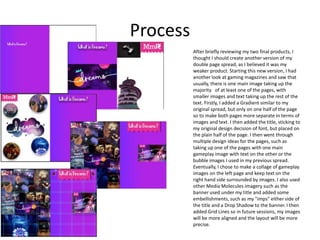
After briefly reviewing my two final products, I
thought I should create another version of my
double page spread, as I believed it was my
weaker product. Starting this new version, I had
another look at gaming magazines and saw that
usually, there is one main image taking up the
majority of at least one of the pages, with
smaller images and text taking up the rest of the
text. Firstly, I added a Gradient similar to my
original spread, but only on one half of the page
so to make both pages more separate in terms of
images and text. I then added the title, sticking to
my original design decision of font, but placed on
the plain half of the page. I then went through
multiple design ideas for the pages, such as
taking up one of the pages with one main
gameplay image with text on the other or the
bubble images I used in my previous spread.
Eventually, I chose to make a collage of gameplay
images on the left page and keep text on the
right hand side surrounded by images. I also used
other Media Molecules imagery such as the
banner used under my title and added some
embellishments, such as my "imps" either side of
the title and a Drop Shadow to the banner. I then
added Grid Lines so in future sessions, my images
will be more aligned and the layout will be more
precise.
Process
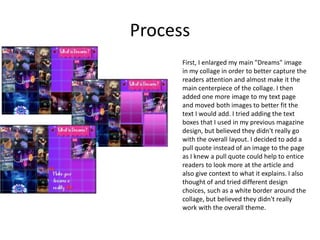
First, I enlarged my main "Dreams" image
in my collage in order to better capture the
readers attention and almost make it the
main centerpiece of the collage. I then
added one more image to my text page
and moved both images to better fit the
text I would add. I tried adding the text
boxes that I used in my previous magazine
design, but believed they didn't really go
with the overall layout. I decided to add a
pull quote instead of an image to the page
as I knew a pull quote could help to entice
readers to look more at the article and
also give context to what it explains. I also
thought of and tried different design
choices, such as a white border around the
collage, but believed they didn't really
work with the overall theme.
Process
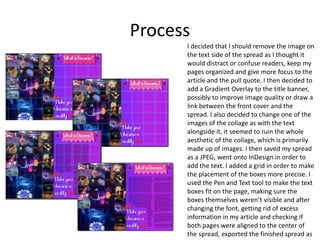
I decided that I should remove the image on
the text side of the spread as I thought it
would distract or confuse readers, keep my
pages organized and give more focus to the
article and the pull quote. I then decided to
add a Gradient Overlay to the title banner,
possibly to improve image quality or draw a
link between the front cover and the
spread. I also decided to change one of the
images of the collage as with the text
alongside it, it seemed to ruin the whole
aesthetic of the collage, which is primarily
made up of images. I then saved my spread
as a JPEG, went onto InDesign in order to
add the text. I added a grid in order to make
the placement of the boxes more precise. I
used the Pen and Text tool to make the text
boxes fit on the page, making sure the
boxes themselves weren’t visible and after
changing the font, getting rid of excess
information in my article and checking if
both pages were aligned to the center of
the spread, exported the finished spread as

6. Production Reflection

  • 1.
  • 2.
    Process I firstly decidedto focus on the basic layout of my magazine, creating the title of the magazine, the main headline, the "imp" turning the page at the top of the page and its effects, the barcode and the plus section at the bottom, however it wasn't at as much of a detailed level and only listed three different sub headlines. I also made the decision not to add a Gradient Overlay to the "L" part of the title background as it didn't look right. The main image of the cover had also not been taken, instead I chose to create a concept of it using different images and a black background so to structure all my assets around it. When looking at the basic boxes I had created, I decided some extra effects should also be added to give the shapes a more realistic feel, so I added effects like a Gradient Overlay and for the title box, a Drop Shadow to make it look more bold and eye-catching.
  • 3.
    Process I managed totake my required images in the studio and chose the best image in my opinion to be the front cover image due to its high quality and used some of the editing tools like Levels to make the images quality higher and used the square tool to draw over the screen of the Switch, as it reflected me whilst taking the image. I also added the gradient to the page at the top right to make the shadow reflection of turning the page more realistic, added the text beneath the image and expanded and improved my Plus section of the cover, referencing other game magazine layouts. I also started to create my double page spread, referencing design decisions from other dreams related images, such as the title banners being an example from a video thumbnail Media Molecules created.
  • 4.
    Process I added theDrop Shadow to my title at the top of the page so to make it look more realistic, stand out more or to link it to the video thumbnail the idea came from. I started coming up with various ideas about how to create the bubble effect for my images, trying different methods such as taking images from other Dreams related content or trying to make the bubbles myself using the Ellipse tool and decreasing the opacity. Eventually I chose to cut the images using a bubble image as a template with the inverse Quick Selection tool, then added a Gradient Ovelay, Drop Shadow and Inner Shadow effect to give the images more of a bubble look and sheen, with the shadow making it look like its almost floating off the page, giving a more realistic feel to the images. Additionally, I added a Levels effect to my own controller image so to improve the overall quality of the image and due to the lighting in the picture, make the subject of the image more visible.
  • 5.
    Process I created anotherimage to use by taking a screenshot of Dreams from the internet and editing it to look like the other bubble images by using tools like the Gradient overlay and the Inner Shadow. I then positioned them around the boxes I'd created and went to InDesign so to add the text and draw around these bubbles using the Pen tool to create text boxes that won't block the images or overlap them and would also stay in the boxes I'd made. I also exported the image multiple times in order to check the text would be visible against the box and also legible due to the size and the font I'd used. I then made more thinner and narrow text boxes in order to make the page more like a magazine article, which mainly have long columns of text.
  • 6.
    Process After briefly reviewingmy two final products, I thought I should create another version of my double page spread, as I believed it was my weaker product. Starting this new version, I had another look at gaming magazines and saw that usually, there is one main image taking up the majority of at least one of the pages, with smaller images and text taking up the rest of the text. Firstly, I added a Gradient similar to my original spread, but only on one half of the page so to make both pages more separate in terms of images and text. I then added the title, sticking to my original design decision of font, but placed on the plain half of the page. I then went through multiple design ideas for the pages, such as taking up one of the pages with one main gameplay image with text on the other or the bubble images I used in my previous spread. Eventually, I chose to make a collage of gameplay images on the left page and keep text on the right hand side surrounded by images. I also used other Media Molecules imagery such as the banner used under my title and added some embellishments, such as my "imps" either side of the title and a Drop Shadow to the banner. I then added Grid Lines so in future sessions, my images will be more aligned and the layout will be more precise.
  • 7.
    Process First, I enlargedmy main "Dreams" image in my collage in order to better capture the readers attention and almost make it the main centerpiece of the collage. I then added one more image to my text page and moved both images to better fit the text I would add. I tried adding the text boxes that I used in my previous magazine design, but believed they didn't really go with the overall layout. I decided to add a pull quote instead of an image to the page as I knew a pull quote could help to entice readers to look more at the article and also give context to what it explains. I also thought of and tried different design choices, such as a white border around the collage, but believed they didn't really work with the overall theme.
  • 8.
    Process I decided thatI should remove the image on the text side of the spread as I thought it would distract or confuse readers, keep my pages organized and give more focus to the article and the pull quote. I then decided to add a Gradient Overlay to the title banner, possibly to improve image quality or draw a link between the front cover and the spread. I also decided to change one of the images of the collage as with the text alongside it, it seemed to ruin the whole aesthetic of the collage, which is primarily made up of images. I then saved my spread as a JPEG, went onto InDesign in order to add the text. I added a grid in order to make the placement of the boxes more precise. I used the Pen and Text tool to make the text boxes fit on the page, making sure the boxes themselves weren’t visible and after changing the font, getting rid of excess information in my article and checking if both pages were aligned to the center of the spread, exported the finished spread as

Editor's Notes

  • #3 Discuss the tools and processes used in your production. Log your thoughts and feelings about your work.
  • #4 Discuss the tools and processes used in your production. Log your thoughts and feelings about your work.
  • #5 Discuss the tools and processes used in your production. Log your thoughts and feelings about your work.
  • #6 Discuss the tools and processes used in your production. Log your thoughts and feelings about your work.
  • #7 Discuss the tools and processes used in your production. Log your thoughts and feelings about your work.
  • #8 Discuss the tools and processes used in your production. Log your thoughts and feelings about your work.
  • #9 Discuss the tools and processes used in your production. Log your thoughts and feelings about your work.