Portfolio
Morgan Rial
Contacts
Name	 Morgan Rial
Phone	503.336.5492
Email	morgan.rial9@gmail.com
Table of
Contents
Page 3. 		 Magazine Cover
Page 5. 		 Photography
Page 7. 		 Photodesign
Page 9.		 Montage
Page 11.		 Business Identity
Page 13.		 Infographic
Page 15. 	 HTML & CSS Coding
Page 17. 	 Web Page Mock Up
Page 19.		 Brochure
Page 21.		 Bonus: Montage
Magazine
Cover
Description
Date		
Course 	
Intructor		
Programs Used
Objective	
	
Process	
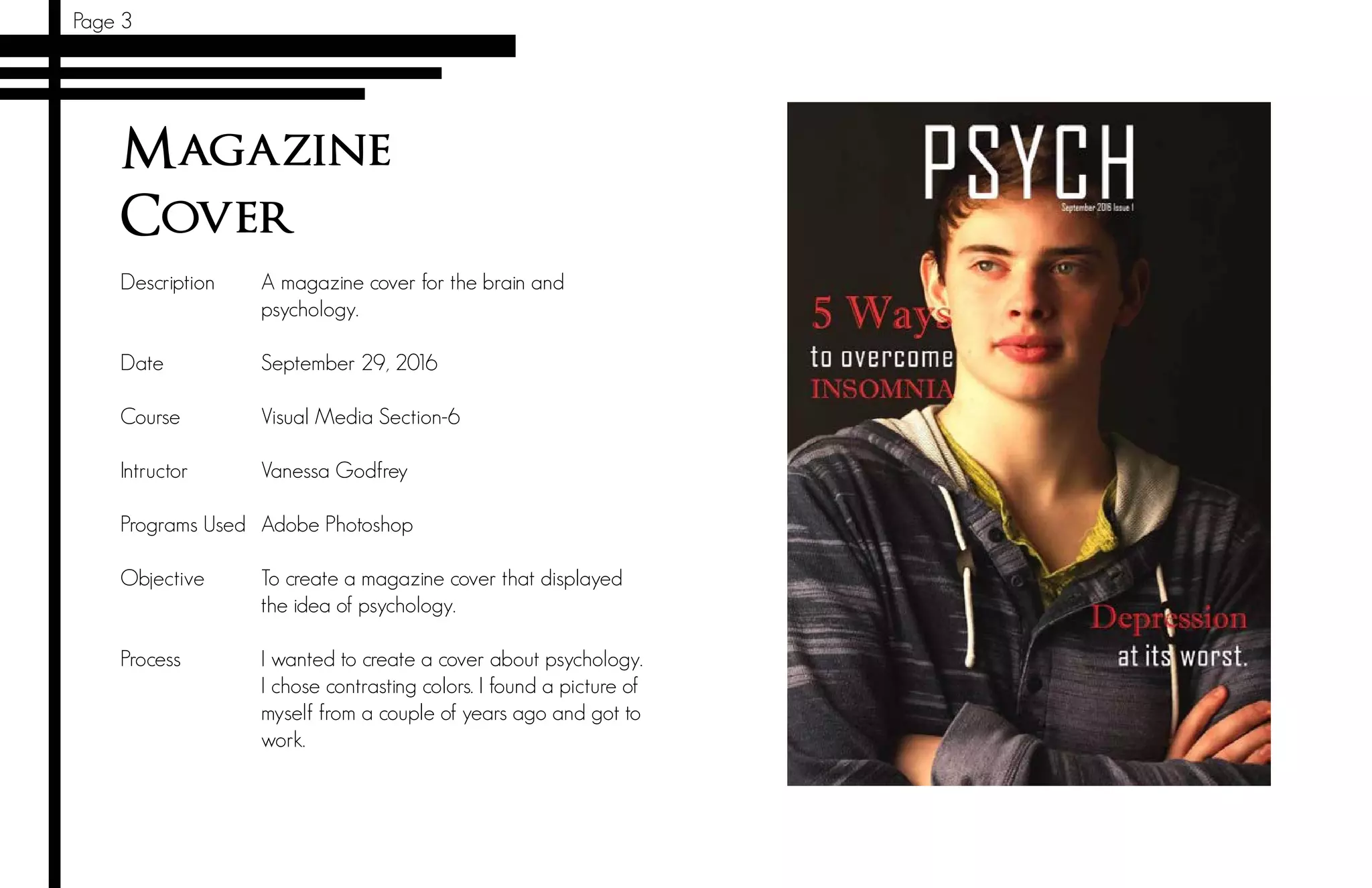
A magazine cover for the brain and
psychology.
September 29, 2016
Visual Media Section-6
Vanessa Godfrey
Adobe Photoshop
To create a magazine cover that displayed
the idea of psychology.
I wanted to create a cover about psychology.
I chose contrasting colors. I found a picture of
myself from a couple of years ago and got to
work.
Page 3
Page 5
Photography
Description
Date		
Course 	
Intructor		
Programs Used
Objective	
	
Process	
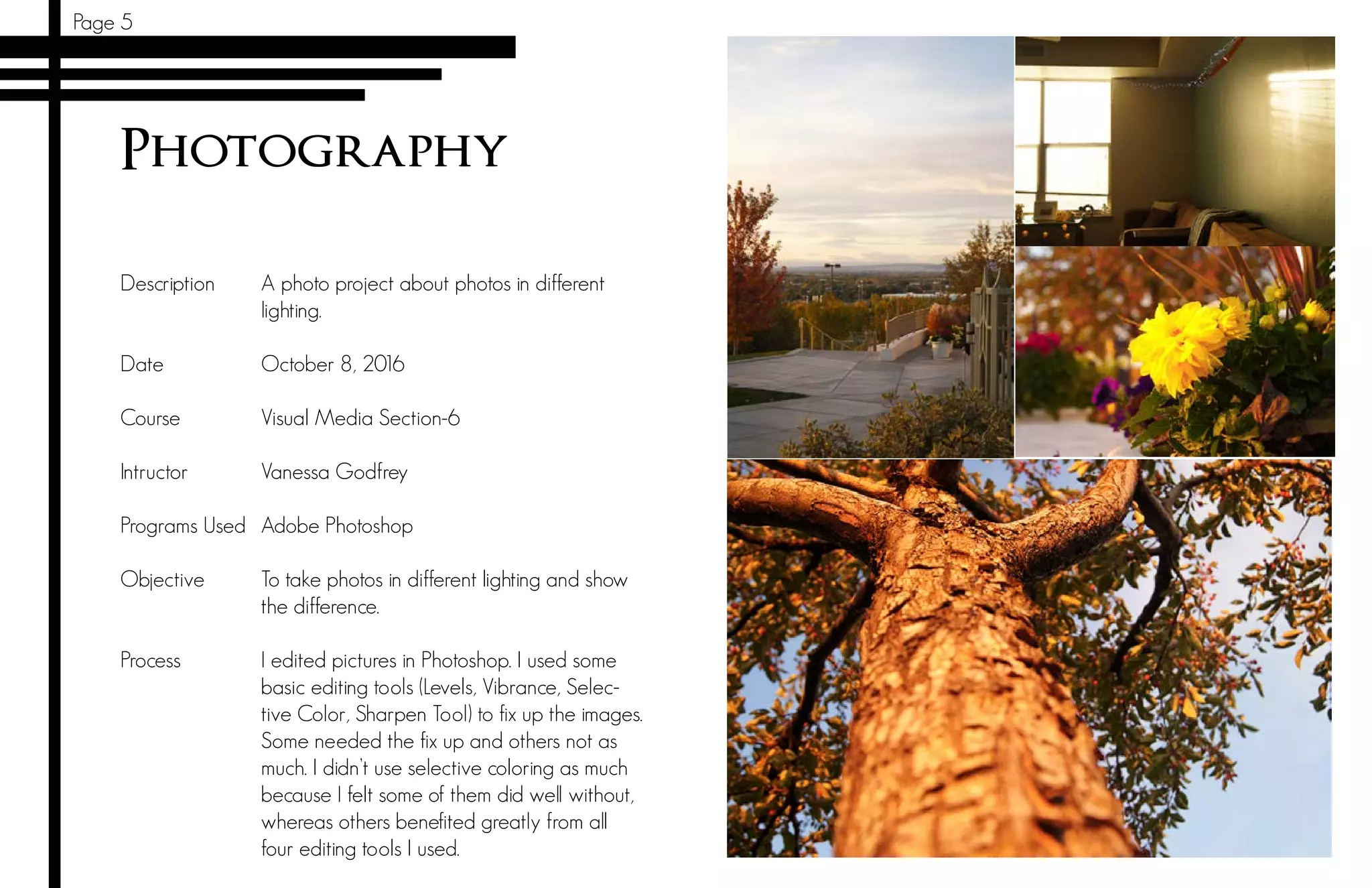
A photo project about photos in different
lighting.
October 8, 2016
Visual Media Section-6
Vanessa Godfrey
Adobe Photoshop
To take photos in different lighting and show
the difference.
I edited pictures in Photoshop. I used some
basic editing tools (Levels, Vibrance, Selec-
tive Color, Sharpen Tool) to fix up the images.
Some needed the fix up and others not as
much. I didn’t use selective coloring as much
because I felt some of them did well without,
whereas others benefited greatly from all
four editing tools I used.
Page 7
Photodesign
Description
Date		
Course 	
Intructor		
Programs Used
Objective	
	
Process	
A photo with a pattern and color design.
October 12, 2016
Visual Media Section-6
Vanessa Godfrey
Adobe Photoshop
To take photos in different lighting and show
the difference.
I wanted to have a autumn color scheme so
I chose a location with trees. In Photoshop
I made the more dark parts a more deep
dark. I gave some more color to the trees
in the picture. I sharpened up the wooden
bridge so that it stuck out among the trees
and greenery. I made my picture so that it
fit to the right size. I then crated my bars and
text. I felt that it flowed well. I tried to keep
simple main colors. I checked it all to make
sure it was good and now it’s done!
Page 9
Montage
Description
Date		
Course 	
Intructor		
Programs Used
Objective	
	
Process	
A spiritual themed montage.
October 20, 2016
Visual Media Section-6
Vanessa Godfrey
Adobe Photoshop
To learn how to use the masking tool and
fade photos.
I wanted to create something involving clouds.
I searched for pictures involving clouds and
eventually I found what I wanted. I found
a picture of a dude the first time but then I
changed it to a girl on the skateboard. I cre-
ated my own quote about reaching beyond
the usual.
Page 11
Business Identity
Description
Date		
Course 	
Intructor		
Programs Used
Objective	
	
Process	
Imagine and create a recognizable design for
the business.
October 27, 2016
Visual Media Section-6
Vanessa Godfrey
Adobe Illustrator
To create a professional looking Letterhead
and business card.
I first drew a bunch of ideas for what I could make or
design later on. I found a picture of an eagle on a
public domain website. I traced (Illustrator) the eagle’s
head and used that for my logo. I created three dif-
ferent ideas for logos. I then went to work on what
my letterhead and business cards would look like.
I received good insight on what looked good and
where I should place objects and text. I then refined
it more. I took a new picture of an eagle’s head and
traced it. This picture was found on public domain as
well. I made some squares to give the pictures more
flare and I repeated it to have similarity.
Page 13
Infographic
Description
Date		
Course 	
Intructor		
Programs Used
Objective	
	
Process	
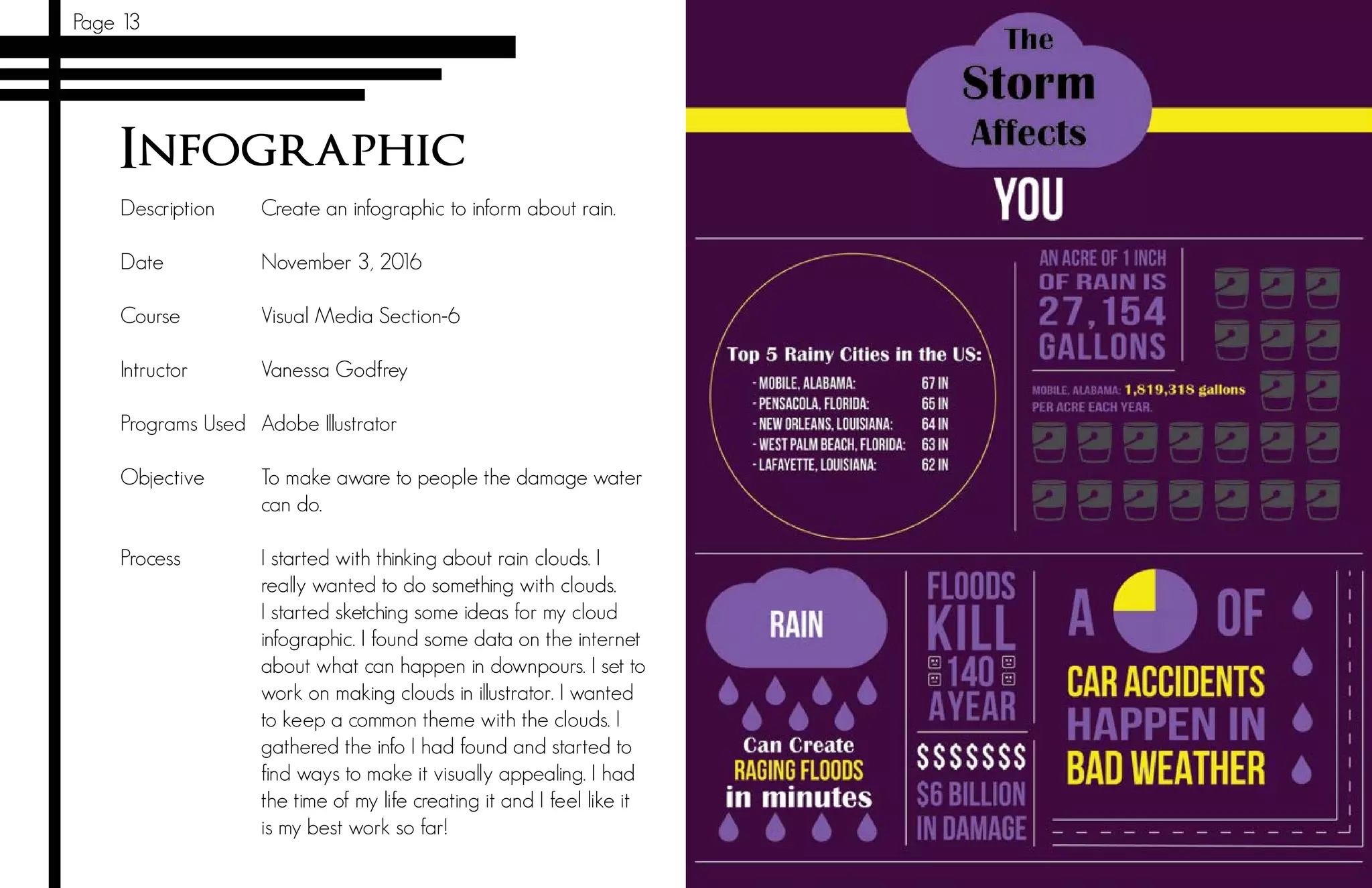
Create an infographic to inform about rain.
November 3, 2016
Visual Media Section-6
Vanessa Godfrey
Adobe Illustrator
To make aware to people the damage water
can do.
I started with thinking about rain clouds. I
really wanted to do something with clouds.
I started sketching some ideas for my cloud
infographic. I found some data on the internet
about what can happen in downpours. I set to
work on making clouds in illustrator. I wanted
to keep a common theme with the clouds. I
gathered the info I had found and started to
find ways to make it visually appealing. I had
the time of my life creating it and I feel like it
is my best work so far!
Page 15
HTML & CSS Coding
Description
Date		
Course 	
Intructor		
Programs Used
Objective	
	
Process	
Code a personalized webpage for a compa-
ny using HTML and CSS.
November 10, 2016
Visual Media Section-6
Vanessa Godfrey
Notepad++
To create a website that could be used in a
professional setting.
I created a eagle logo in Illustrator. I decided on
the eagle because that is my dad’s company. I
resized my logo to be about 300 px on the long
side. I started my HTML document and begin work-
ing on the basics. I then created a folder for my
HTML and then added my CSS to the mix. I creat-
ed my background image on Illustrator using only
triangles. I then customized my CSS to the style I
wanted and brought the color scheme into it. After
all of that crazy work of trying to figure how to do
coding again after not doing it for two years I vali-
dated it and got the green light!
Page 17
Web Page Mockup
Description
Date		
Course 	
Intructor		
Programs Used
Objective	
	
Process	
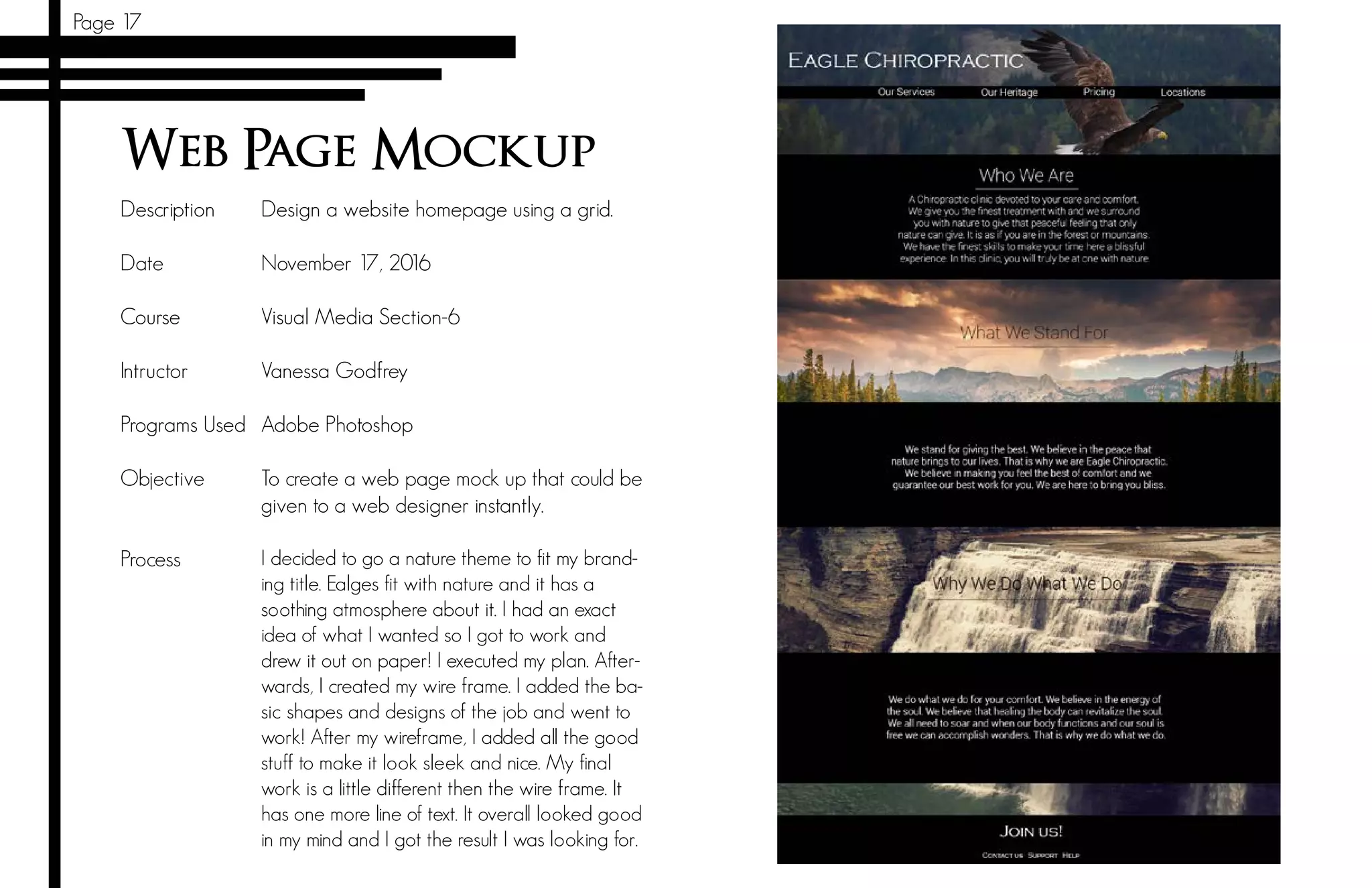
Design a website homepage using a grid.
November 17, 2016
Visual Media Section-6
Vanessa Godfrey
Adobe Photoshop
To create a web page mock up that could be
given to a web designer instantly.
I decided to go a nature theme to fit my brand-
ing title. Ealges fit with nature and it has a
soothing atmosphere about it. I had an exact
idea of what I wanted so I got to work and
drew it out on paper! I executed my plan. After-
wards, I created my wire frame. I added the ba-
sic shapes and designs of the job and went to
work! After my wireframe, I added all the good
stuff to make it look sleek and nice. My final
work is a little different then the wire frame. It
has one more line of text. It overall looked good
in my mind and I got the result I was looking for.
Page 19
Brochure
Description
Date		
Course 	
Intructor		
Programs Used
Objective	
	
Process	
Design a brochure in my own style for a com-
pany.
December 1, 2016
Visual Media Section-6
Vanessa Godfrey
Adobe Photoshop
To make a brochure that sends a message to
inform about a company.
I first made my Logo in Illustrator. I kept my
eagle theme. InDesign was next up and cret-
ed my layout for the brochure. I started my
design and I made it similar to my website.
I found pictures on royalty-free websites.
A coupke that would fit my color scheme. I
made triangles to add some flare to the sec-
ond page. I then exported the brochure doc-
ument as JPEGS. I printed the brochure out as
a demo/preview to see how it looked. Even-
tually I did the finished project.
Page 21
Bonus: Montage
Description
Date		
Course 	
Intructor		
Programs Used
Objective	
	
Process	
A photo montage done with a theme of
Christmas.
December 6, 2016
Visual Media Section-6
Vanessa Godfrey
Adobe Photoshop
To make a photo montage that brings the
spirit of Christmas.
I wanted to create a new project based around Christ-
mas. I decided on a Christmas montage. I first found the
photos I wanted to use online from Pexels.com and lds.org
and put everything in a folder. Then opened Photoshop
to get started on my project. I masked Mary and Baby
Jesus to make them faded. I then placed Mary and Baby
Jesus in the ornament. After that I found a picture of men
riding camels and put the picture into Photoshop. I then
masked them. I zoomed in a ton to get rid of everything
but the silhouettes. Removing excess and then shadowing
the men and camels again. I did some incredibly detailed
masking work that took me forever to do. Choosing the
fonts were not that hard. I found a quote about Christ-
mas and then I was done!

My Portfolio for Visual Media

  • 1.
  • 2.
    Contacts Name Morgan Rial Phone 503.336.5492 Email morgan.rial9@gmail.com Tableof Contents Page 3. Magazine Cover Page 5. Photography Page 7. Photodesign Page 9. Montage Page 11. Business Identity Page 13. Infographic Page 15. HTML & CSS Coding Page 17. Web Page Mock Up Page 19. Brochure Page 21. Bonus: Montage
  • 3.
    Magazine Cover Description Date Course Intructor Programs Used Objective Process Amagazine cover for the brain and psychology. September 29, 2016 Visual Media Section-6 Vanessa Godfrey Adobe Photoshop To create a magazine cover that displayed the idea of psychology. I wanted to create a cover about psychology. I chose contrasting colors. I found a picture of myself from a couple of years ago and got to work. Page 3
  • 4.
    Page 5 Photography Description Date Course Intructor ProgramsUsed Objective Process A photo project about photos in different lighting. October 8, 2016 Visual Media Section-6 Vanessa Godfrey Adobe Photoshop To take photos in different lighting and show the difference. I edited pictures in Photoshop. I used some basic editing tools (Levels, Vibrance, Selec- tive Color, Sharpen Tool) to fix up the images. Some needed the fix up and others not as much. I didn’t use selective coloring as much because I felt some of them did well without, whereas others benefited greatly from all four editing tools I used.
  • 5.
    Page 7 Photodesign Description Date Course Intructor ProgramsUsed Objective Process A photo with a pattern and color design. October 12, 2016 Visual Media Section-6 Vanessa Godfrey Adobe Photoshop To take photos in different lighting and show the difference. I wanted to have a autumn color scheme so I chose a location with trees. In Photoshop I made the more dark parts a more deep dark. I gave some more color to the trees in the picture. I sharpened up the wooden bridge so that it stuck out among the trees and greenery. I made my picture so that it fit to the right size. I then crated my bars and text. I felt that it flowed well. I tried to keep simple main colors. I checked it all to make sure it was good and now it’s done!
  • 6.
    Page 9 Montage Description Date Course Intructor ProgramsUsed Objective Process A spiritual themed montage. October 20, 2016 Visual Media Section-6 Vanessa Godfrey Adobe Photoshop To learn how to use the masking tool and fade photos. I wanted to create something involving clouds. I searched for pictures involving clouds and eventually I found what I wanted. I found a picture of a dude the first time but then I changed it to a girl on the skateboard. I cre- ated my own quote about reaching beyond the usual.
  • 7.
    Page 11 Business Identity Description Date Course Intructor Programs Used Objective Process Imagine and create a recognizable design for the business. October 27, 2016 Visual Media Section-6 Vanessa Godfrey Adobe Illustrator To create a professional looking Letterhead and business card. I first drew a bunch of ideas for what I could make or design later on. I found a picture of an eagle on a public domain website. I traced (Illustrator) the eagle’s head and used that for my logo. I created three dif- ferent ideas for logos. I then went to work on what my letterhead and business cards would look like. I received good insight on what looked good and where I should place objects and text. I then refined it more. I took a new picture of an eagle’s head and traced it. This picture was found on public domain as well. I made some squares to give the pictures more flare and I repeated it to have similarity.
  • 8.
    Page 13 Infographic Description Date Course Intructor ProgramsUsed Objective Process Create an infographic to inform about rain. November 3, 2016 Visual Media Section-6 Vanessa Godfrey Adobe Illustrator To make aware to people the damage water can do. I started with thinking about rain clouds. I really wanted to do something with clouds. I started sketching some ideas for my cloud infographic. I found some data on the internet about what can happen in downpours. I set to work on making clouds in illustrator. I wanted to keep a common theme with the clouds. I gathered the info I had found and started to find ways to make it visually appealing. I had the time of my life creating it and I feel like it is my best work so far!
  • 9.
    Page 15 HTML &CSS Coding Description Date Course Intructor Programs Used Objective Process Code a personalized webpage for a compa- ny using HTML and CSS. November 10, 2016 Visual Media Section-6 Vanessa Godfrey Notepad++ To create a website that could be used in a professional setting. I created a eagle logo in Illustrator. I decided on the eagle because that is my dad’s company. I resized my logo to be about 300 px on the long side. I started my HTML document and begin work- ing on the basics. I then created a folder for my HTML and then added my CSS to the mix. I creat- ed my background image on Illustrator using only triangles. I then customized my CSS to the style I wanted and brought the color scheme into it. After all of that crazy work of trying to figure how to do coding again after not doing it for two years I vali- dated it and got the green light!
  • 10.
    Page 17 Web PageMockup Description Date Course Intructor Programs Used Objective Process Design a website homepage using a grid. November 17, 2016 Visual Media Section-6 Vanessa Godfrey Adobe Photoshop To create a web page mock up that could be given to a web designer instantly. I decided to go a nature theme to fit my brand- ing title. Ealges fit with nature and it has a soothing atmosphere about it. I had an exact idea of what I wanted so I got to work and drew it out on paper! I executed my plan. After- wards, I created my wire frame. I added the ba- sic shapes and designs of the job and went to work! After my wireframe, I added all the good stuff to make it look sleek and nice. My final work is a little different then the wire frame. It has one more line of text. It overall looked good in my mind and I got the result I was looking for.
  • 11.
    Page 19 Brochure Description Date Course Intructor ProgramsUsed Objective Process Design a brochure in my own style for a com- pany. December 1, 2016 Visual Media Section-6 Vanessa Godfrey Adobe Photoshop To make a brochure that sends a message to inform about a company. I first made my Logo in Illustrator. I kept my eagle theme. InDesign was next up and cret- ed my layout for the brochure. I started my design and I made it similar to my website. I found pictures on royalty-free websites. A coupke that would fit my color scheme. I made triangles to add some flare to the sec- ond page. I then exported the brochure doc- ument as JPEGS. I printed the brochure out as a demo/preview to see how it looked. Even- tually I did the finished project.
  • 12.
    Page 21 Bonus: Montage Description Date Course Intructor Programs Used Objective Process A photo montage done with a theme of Christmas. December 6, 2016 Visual Media Section-6 Vanessa Godfrey Adobe Photoshop To make a photo montage that brings the spirit of Christmas. I wanted to create a new project based around Christ- mas. I decided on a Christmas montage. I first found the photos I wanted to use online from Pexels.com and lds.org and put everything in a folder. Then opened Photoshop to get started on my project. I masked Mary and Baby Jesus to make them faded. I then placed Mary and Baby Jesus in the ornament. After that I found a picture of men riding camels and put the picture into Photoshop. I then masked them. I zoomed in a ton to get rid of everything but the silhouettes. Removing excess and then shadowing the men and camels again. I did some incredibly detailed masking work that took me forever to do. Choosing the fonts were not that hard. I found a quote about Christ- mas and then I was done!