Module 5: Digital Techniques and
Electronic Instrument Systems
5.6 Basic Computer Structure
5.7 Microprocessors
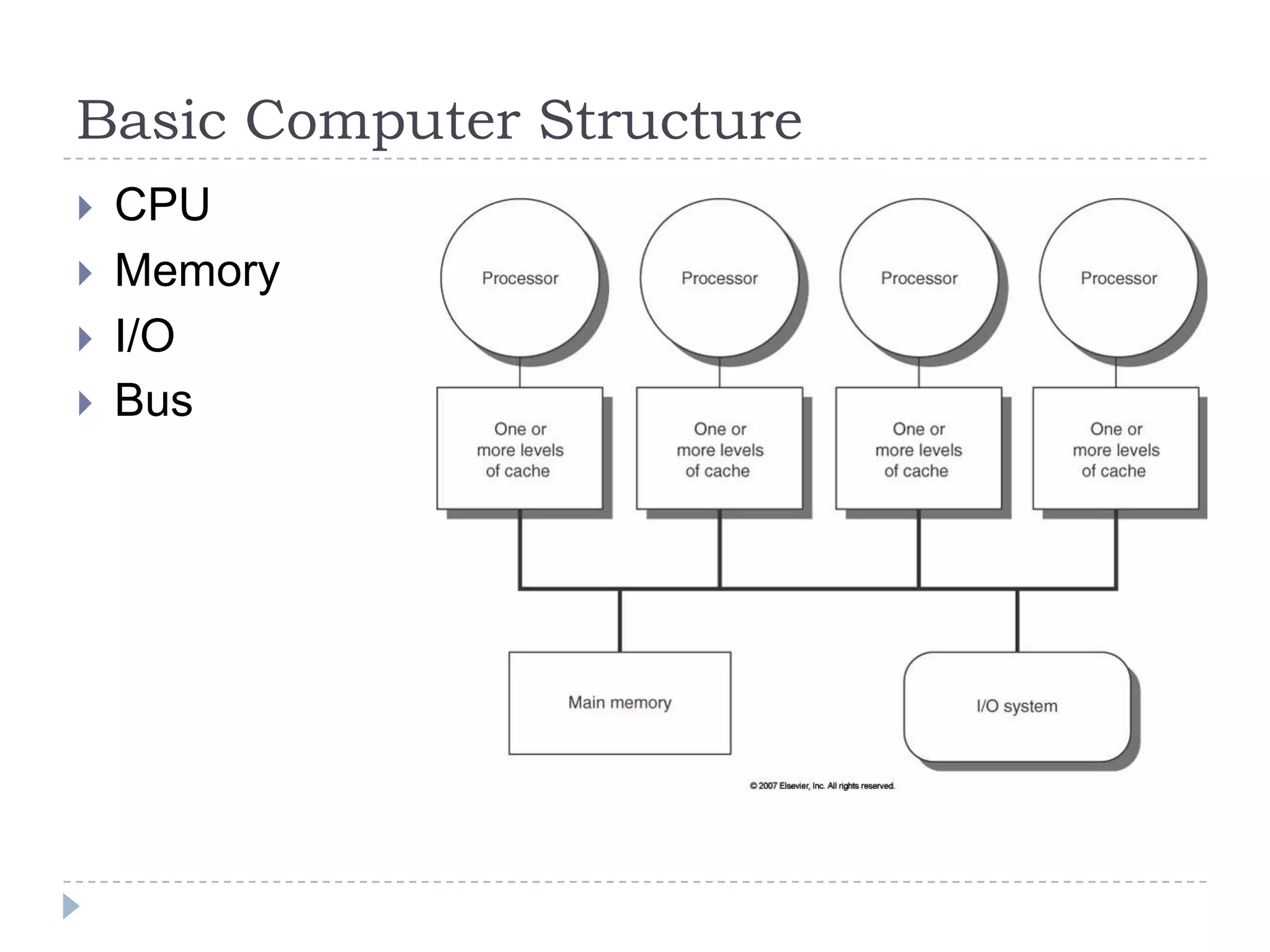
Basic Computer Structure
 CPU
 Memory
 I/O
 Bus
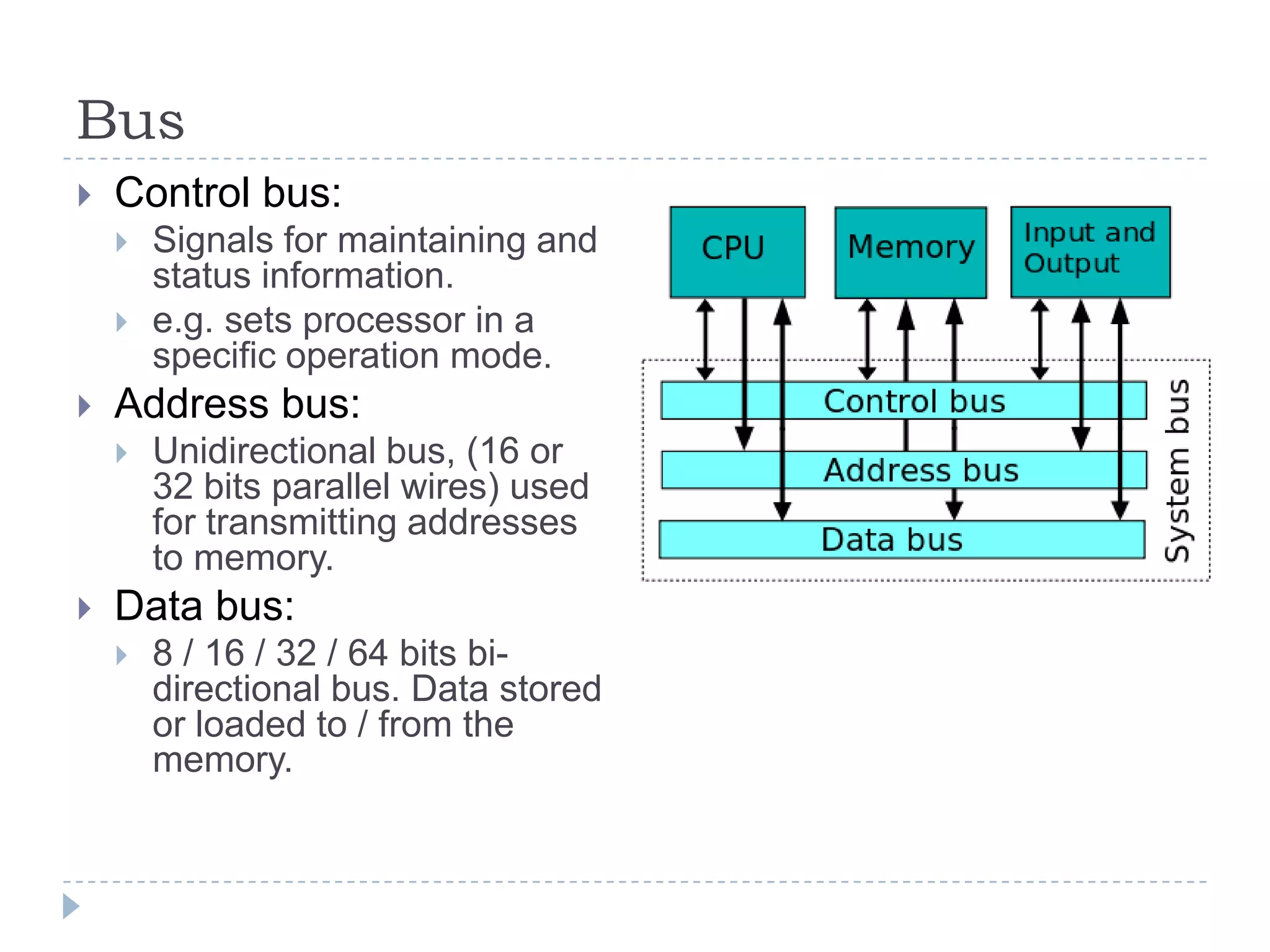
Bus
 Control bus:
 Signals for maintaining and
status information.
 e.g. sets processor in a
specific operation mode.
 Address bus:
 Unidirectional bus, (16 or
32 bits parallel wires) used
for transmitting addresses
to memory.
 Data bus:
 8 / 16 / 32 / 64 bits bi-
directional bus. Data stored
or loaded to / from the
memory.
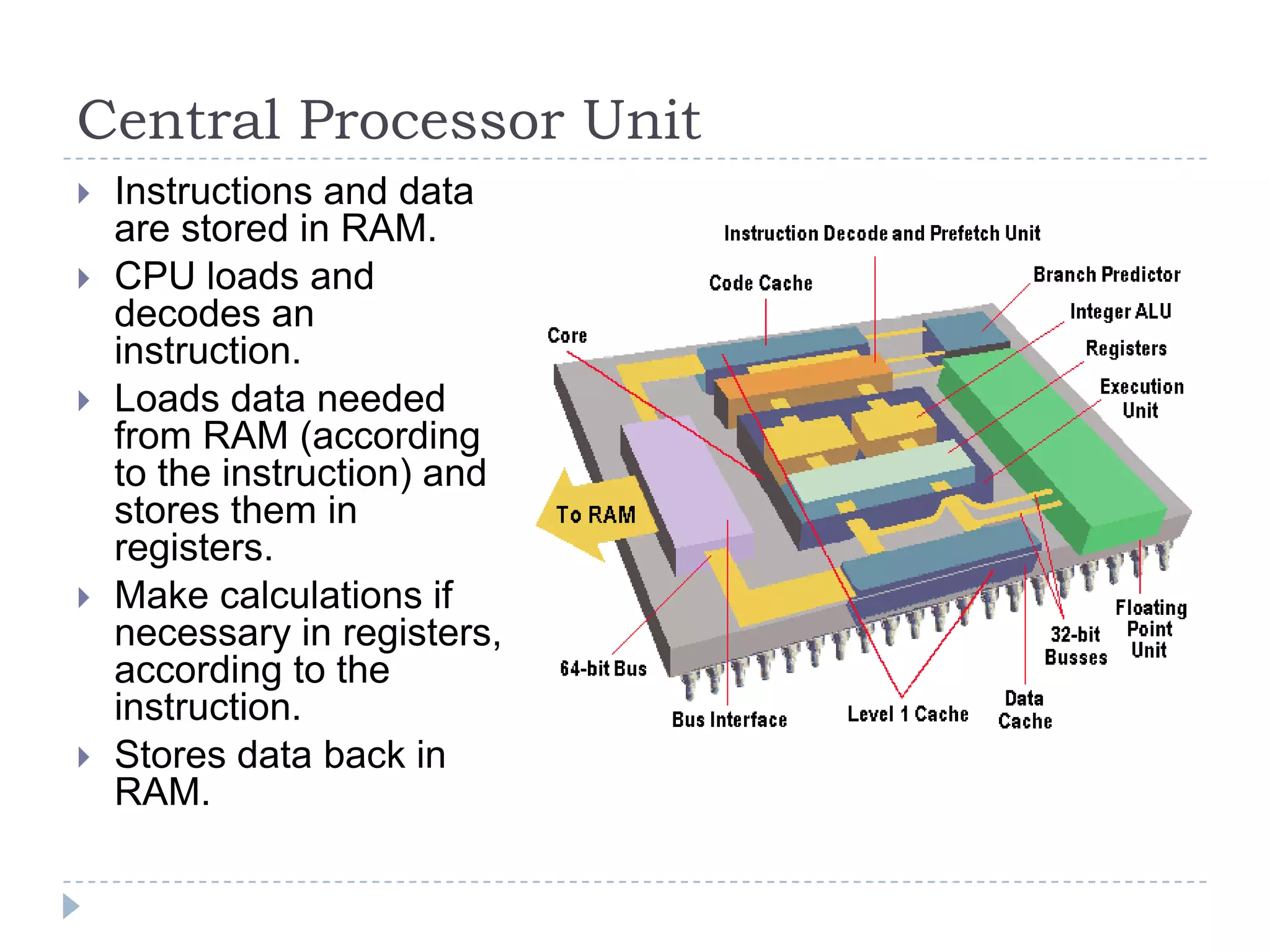
Central Processor Unit
 Instructions and data
are stored in RAM.
 CPU loads and
decodes an
instruction.
 Loads data needed
from RAM (according
to the instruction) and
stores them in
registers.
 Make calculations if
necessary in registers,
according to the
instruction.
 Stores data back in
RAM.
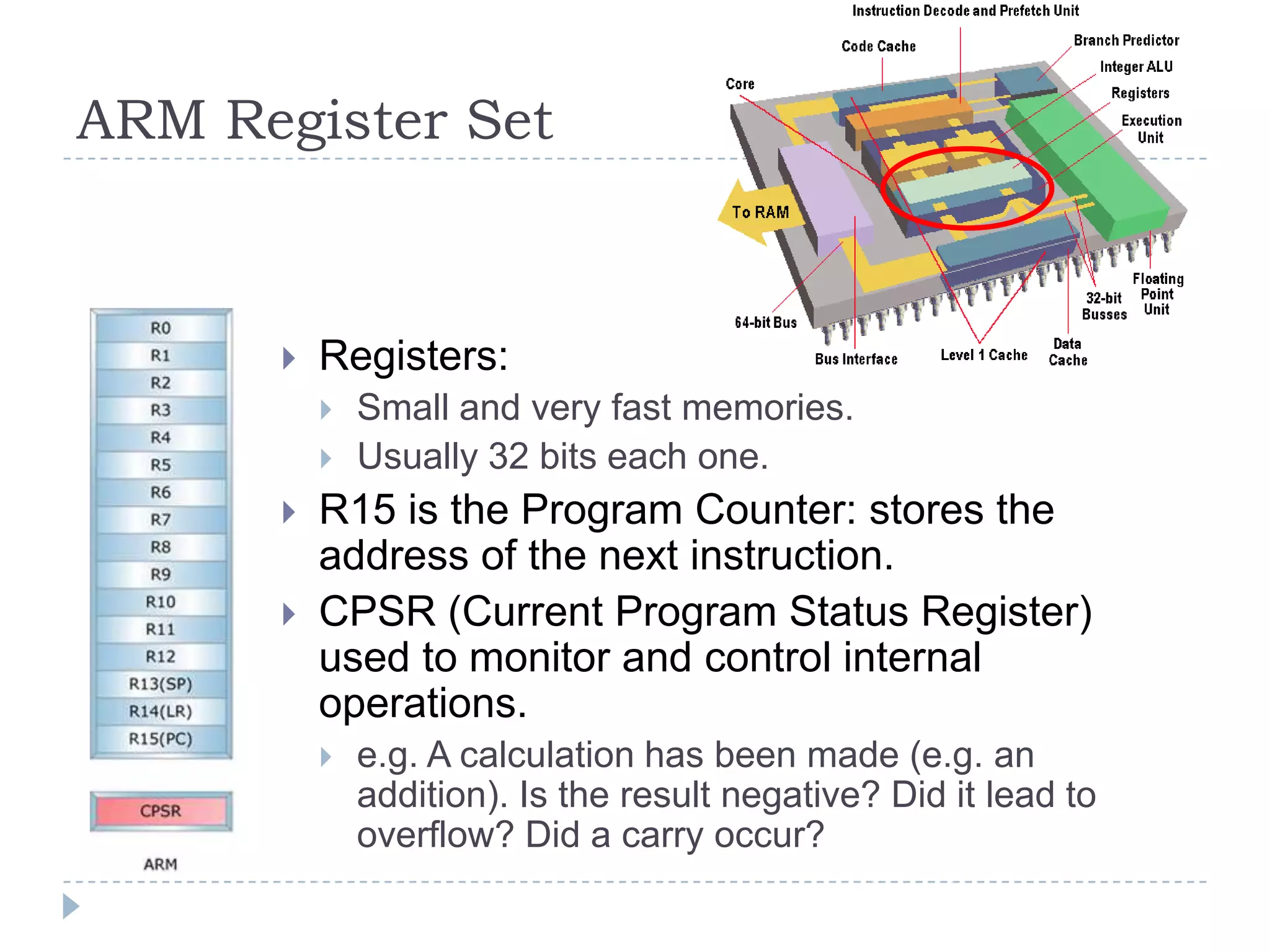
ARM Register Set
 Registers:
 Small and very fast memories.
 Usually 32 bits each one.
 R15 is the Program Counter: stores the
address of the next instruction.
 CPSR (Current Program Status Register)
used to monitor and control internal
operations.
 e.g. A calculation has been made (e.g. an
addition). Is the result negative? Did it lead to
overflow? Did a carry occur?
ARM Assembly Example
 Very simple and low level commands.
 The CPU decodes them to machine language (i.e.
binary).
 Each instruction requires a different number of CPU
cycles.
CPU Instruction Set
 Each different kind of CPU has each own set of
instructions.
 4 types of instructions:
 Transfer: e.g. Load data from memory to a CPU register for
processing.
 Arithmetic: e.g. add data stored in two registers and put the
result to a 3rd register.
 Logic: e.g. compare data stored in two registers and set the
appropriate flag in the Status Register.
 Control: Set the program counter to a specific memory address.
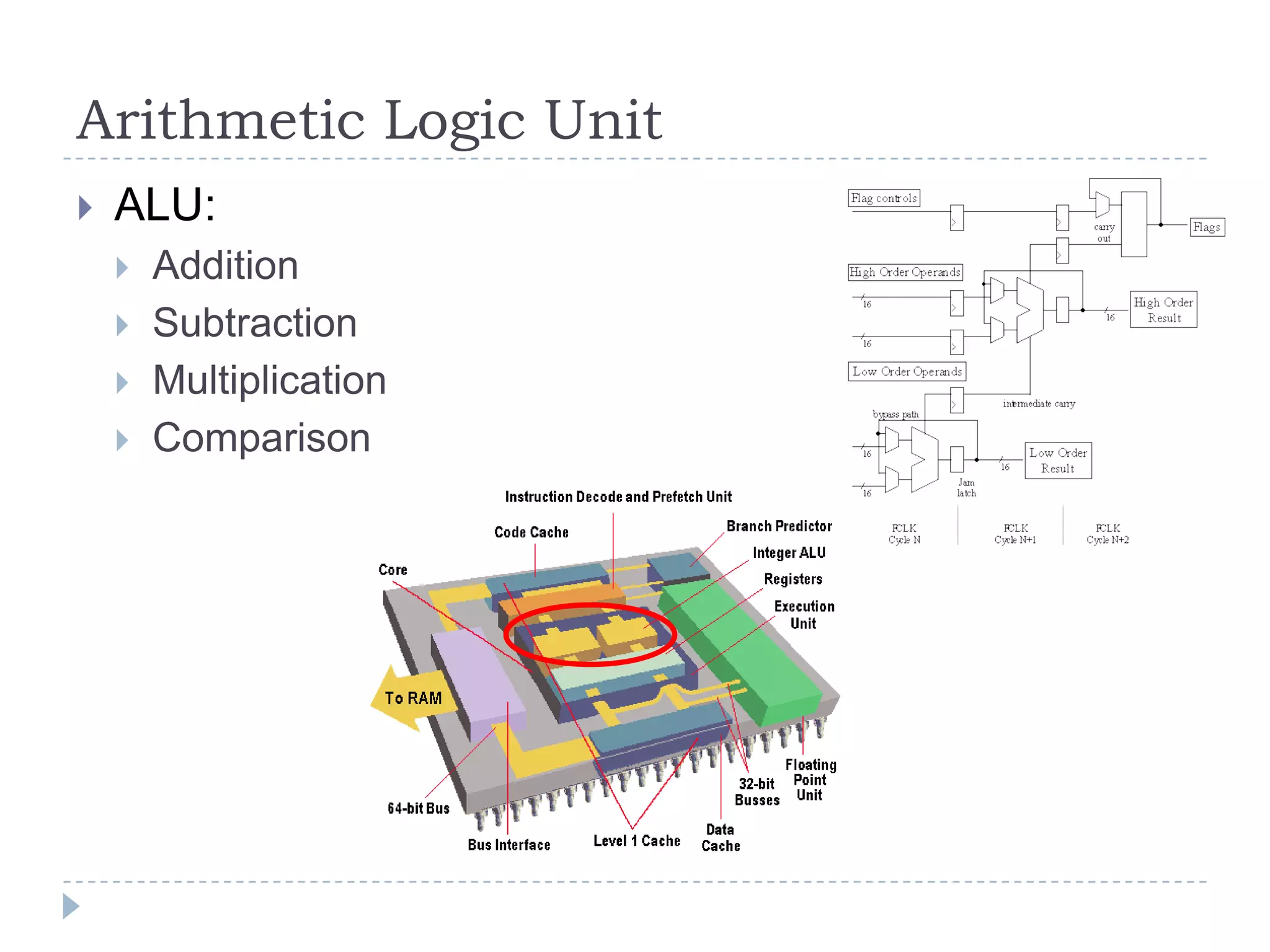
Arithmetic Logic Unit
 ALU:
 Addition
 Subtraction
 Multiplication
 Comparison
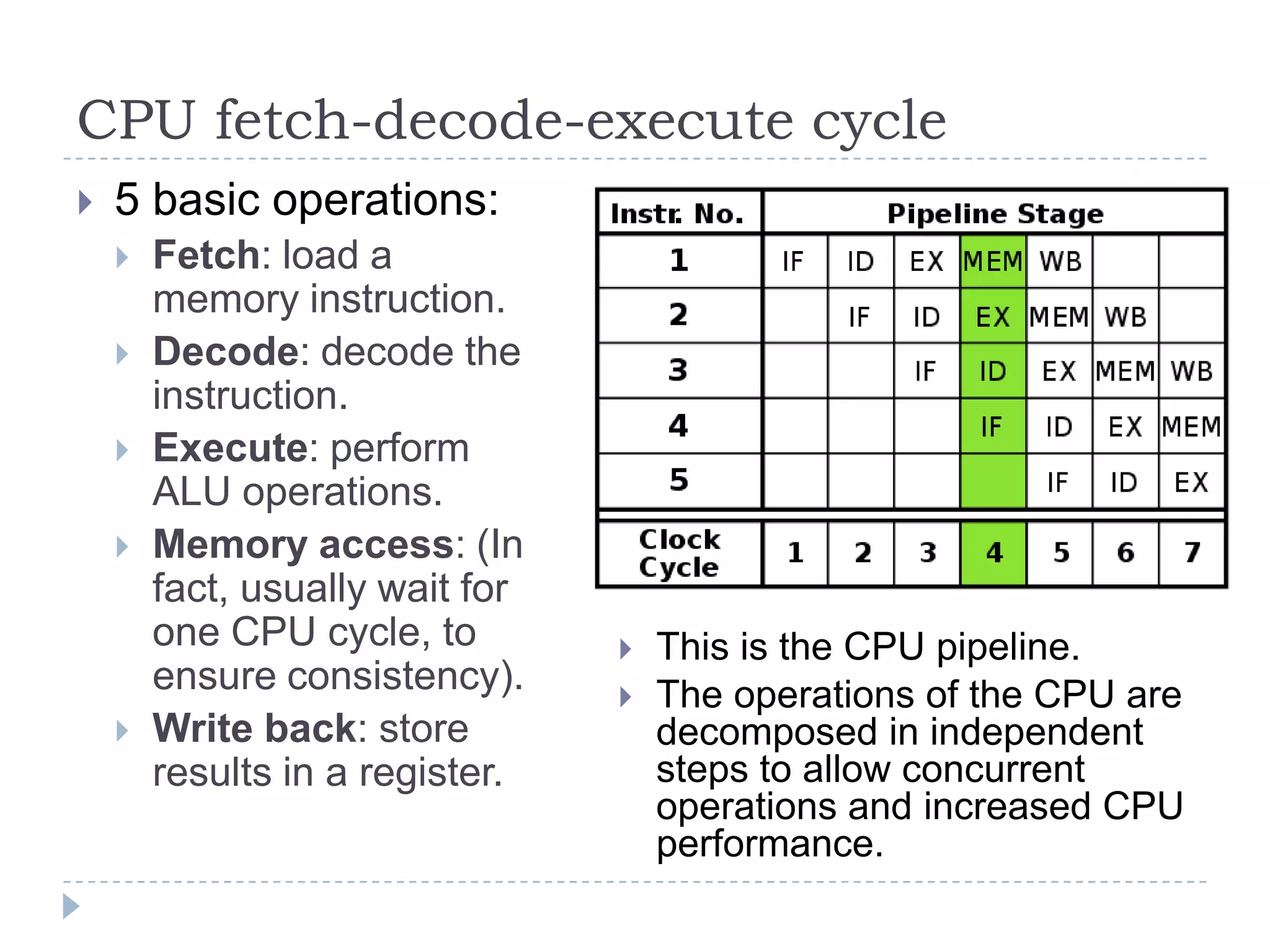
CPU fetch-decode-execute cycle
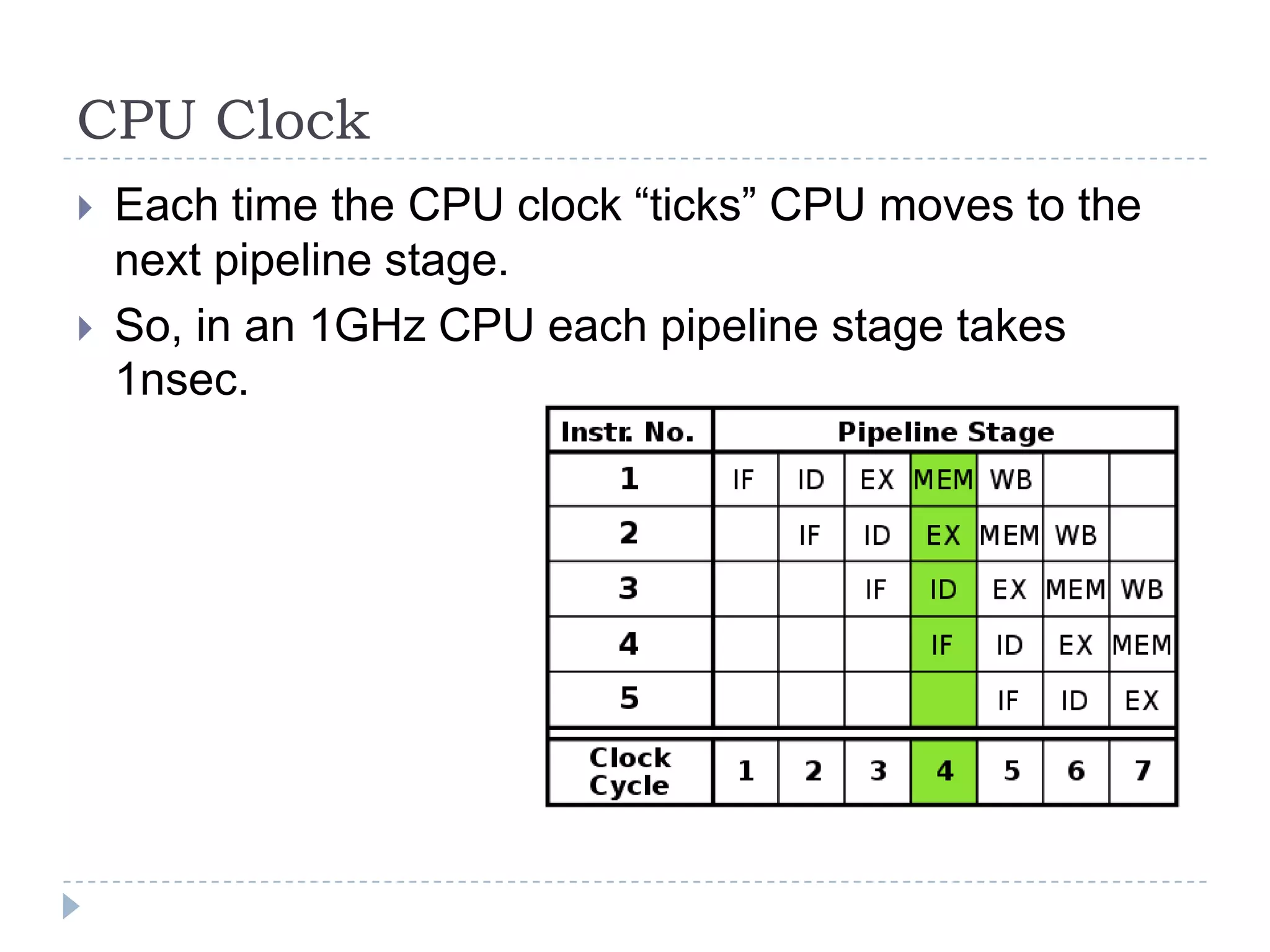
 5 basic operations:
 Fetch: load a
memory instruction.
 Decode: decode the
instruction.
 Execute: perform
ALU operations.
 Memory access: (In
fact, usually wait for
one CPU cycle, to
ensure consistency).
 Write back: store
results in a register.
 This is the CPU pipeline.
 The operations of the CPU are
decomposed in independent
steps to allow concurrent
operations and increased CPU
performance.
CPU Clock
 Each time the CPU clock “ticks” CPU moves to the
next pipeline stage.
 So, in an 1GHz CPU each pipeline stage takes
1nsec.
Memory
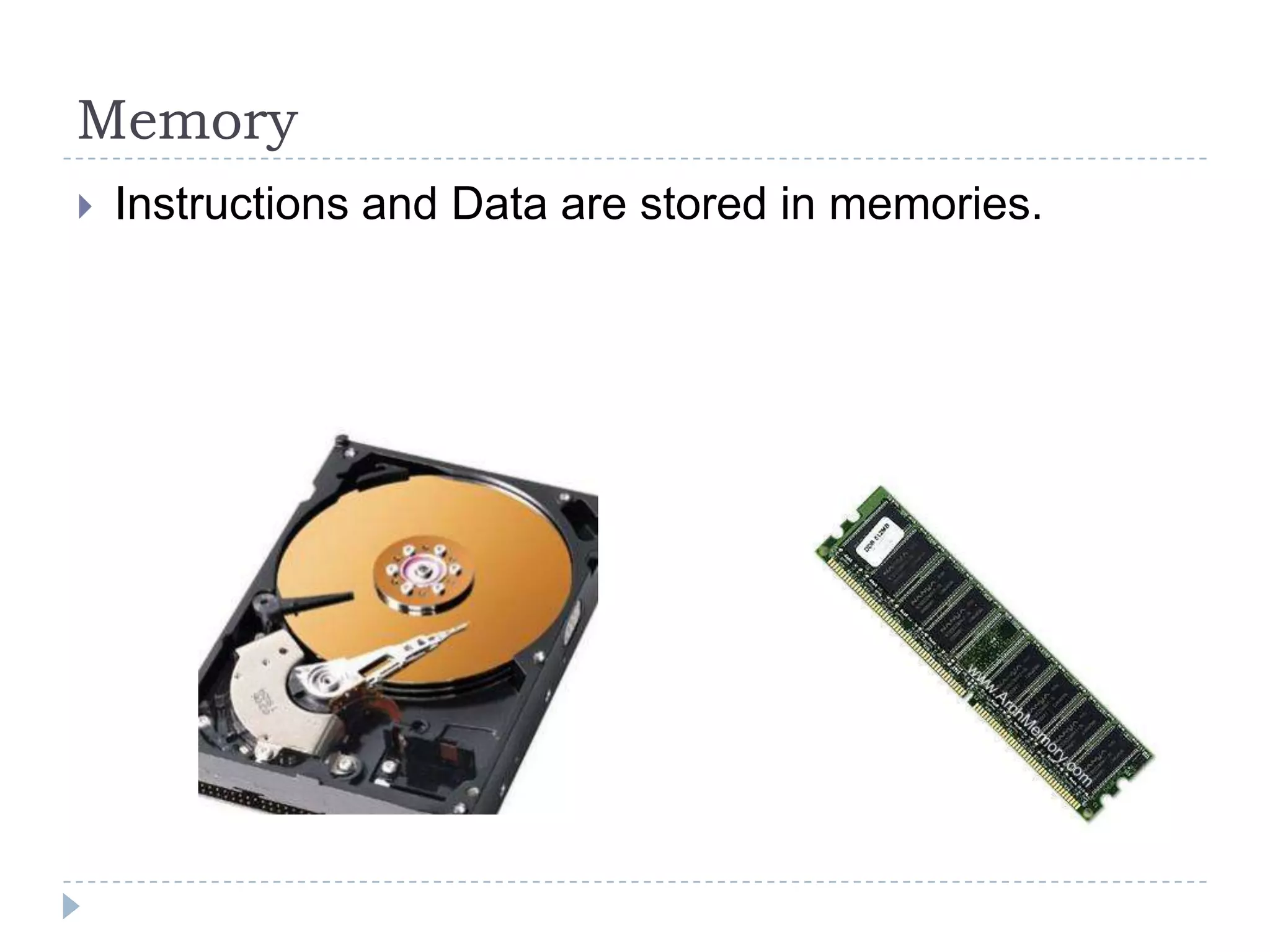
 Instructions and Data are stored in memories.
Types of Memories
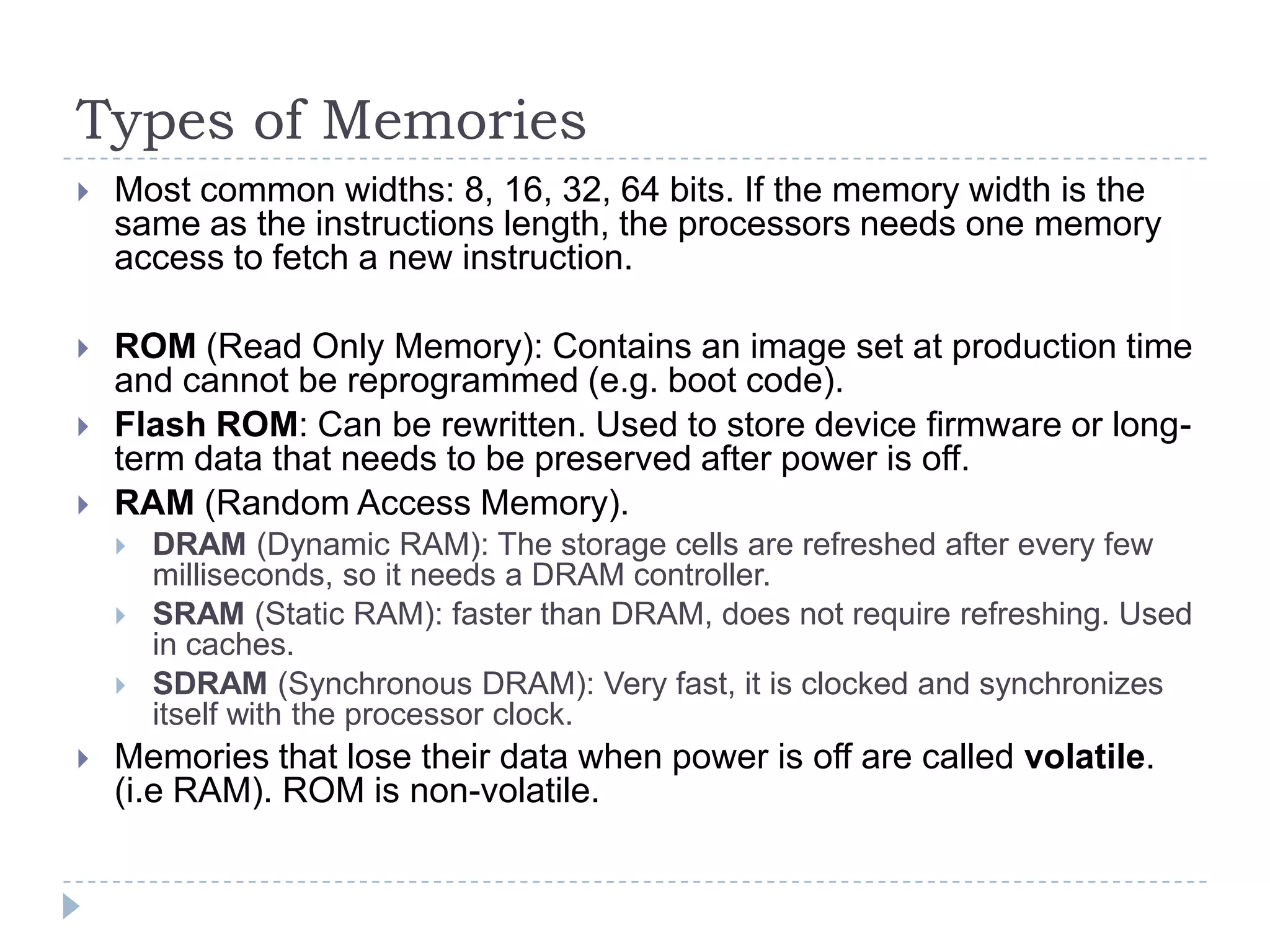
 Most common widths: 8, 16, 32, 64 bits. If the memory width is the
same as the instructions length, the processors needs one memory
access to fetch a new instruction.
 ROM (Read Only Memory): Contains an image set at production time
and cannot be reprogrammed (e.g. boot code).
 Flash ROM: Can be rewritten. Used to store device firmware or long-
term data that needs to be preserved after power is off.
 RAM (Random Access Memory).
 DRAM (Dynamic RAM): The storage cells are refreshed after every few
milliseconds, so it needs a DRAM controller.
 SRAM (Static RAM): faster than DRAM, does not require refreshing. Used
in caches.
 SDRAM (Synchronous DRAM): Very fast, it is clocked and synchronizes
itself with the processor clock.
 Memories that lose their data when power is off are called volatile.
(i.e RAM). ROM is non-volatile.
Read Only Memory
 ROM
 PROM (Programmable ROM):
It’s purchased already
programmed. Once
programmed, can never be
reprogrammed.
 EPROM (Erasable PROM):
 Can be reprogrammed using UV
light.
 EEPROM (Electrically EPROM)
are reprogrammed electrically.
(Flash Memories)
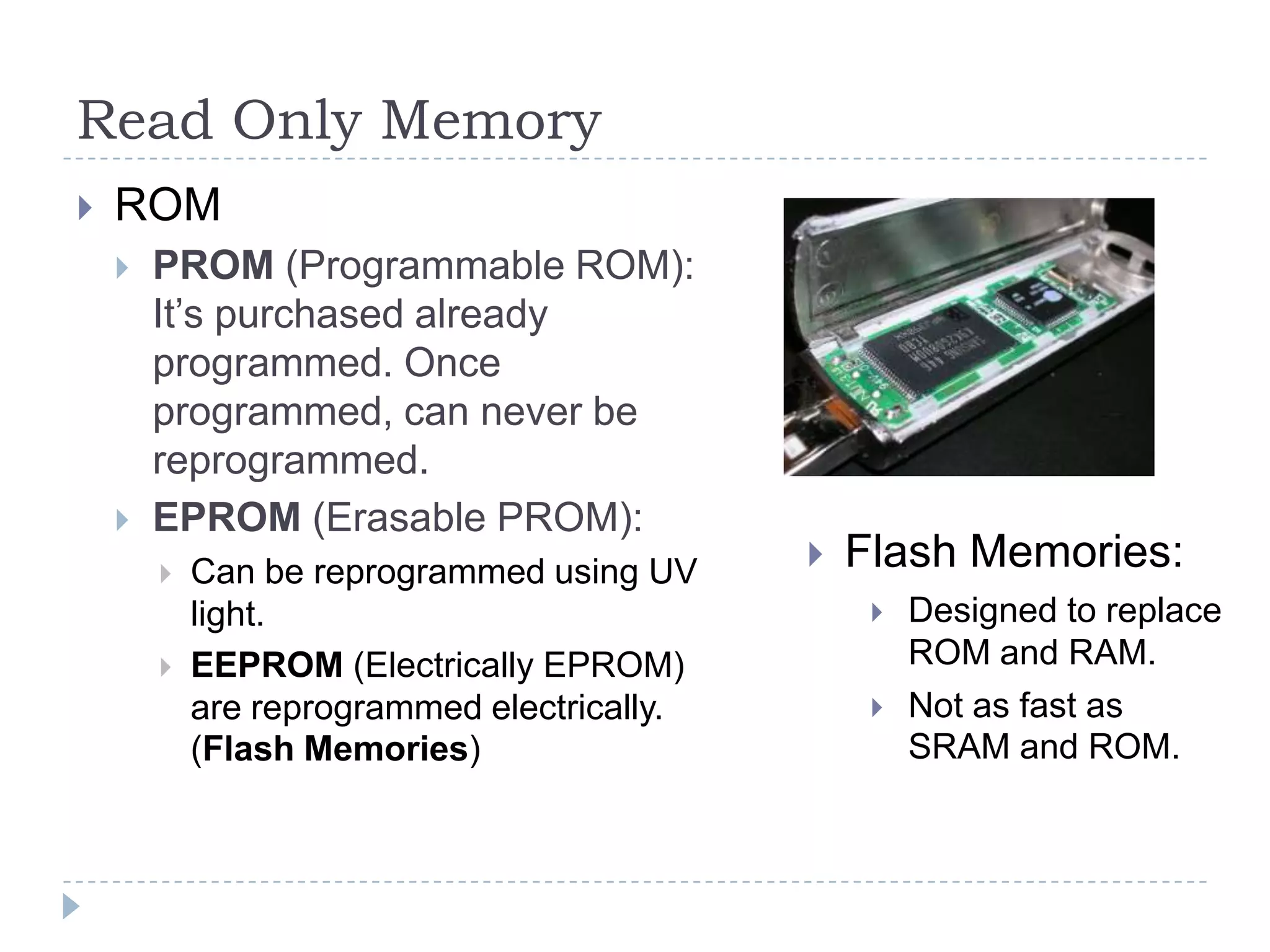
 Flash Memories:
 Designed to replace
ROM and RAM.
 Not as fast as
SRAM and ROM.
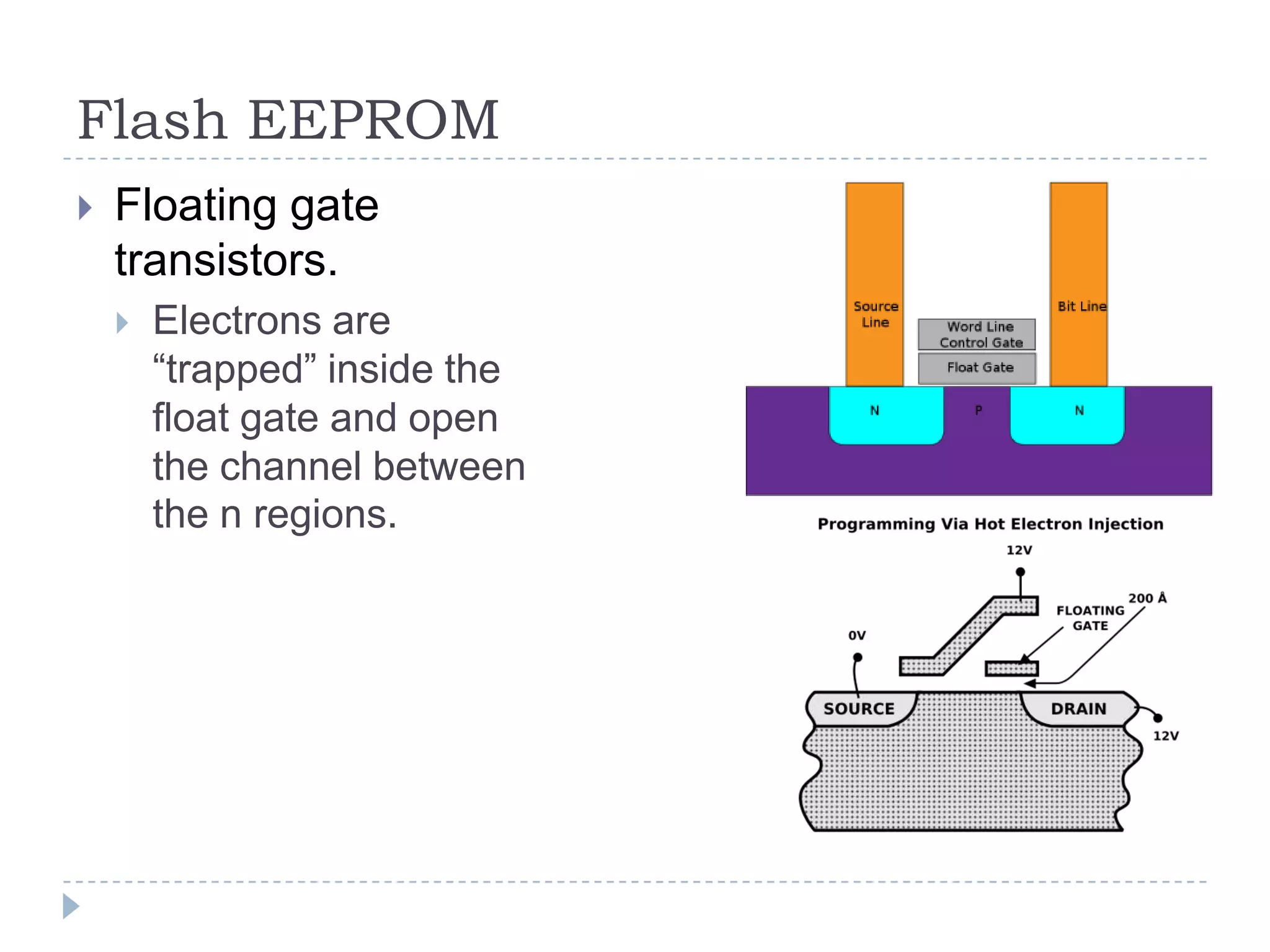
Flash EEPROM
 Floating gate
transistors.
 Electrons are
“trapped” inside the
float gate and open
the channel between
the n regions.
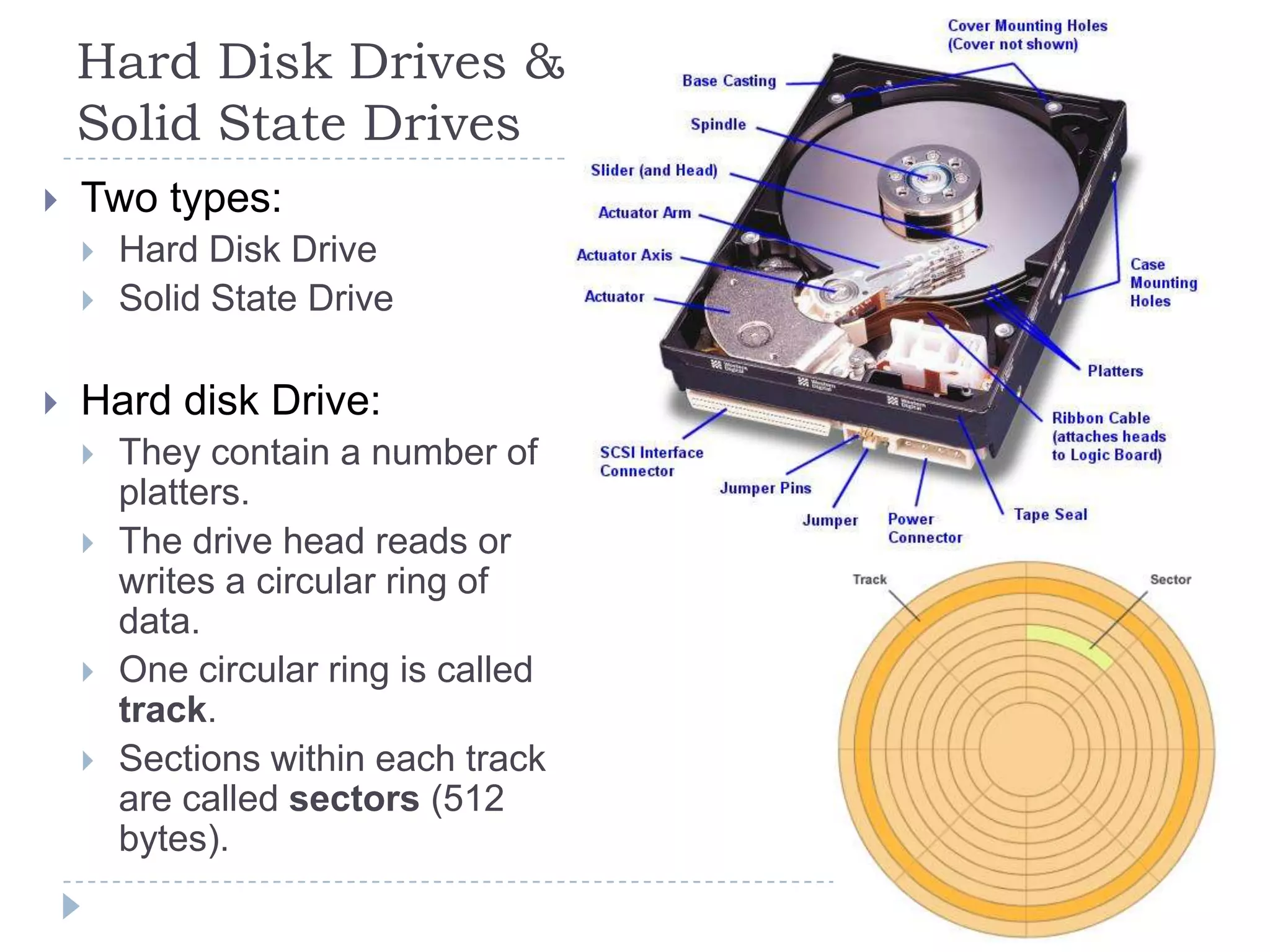
Hard Disk Drives &
Solid State Drives
 Two types:
 Hard Disk Drive
 Solid State Drive
 Hard disk Drive:
 They contain a number of
platters.
 The drive head reads or
writes a circular ring of
data.
 One circular ring is called
track.
 Sections within each track
are called sectors (512
bytes).
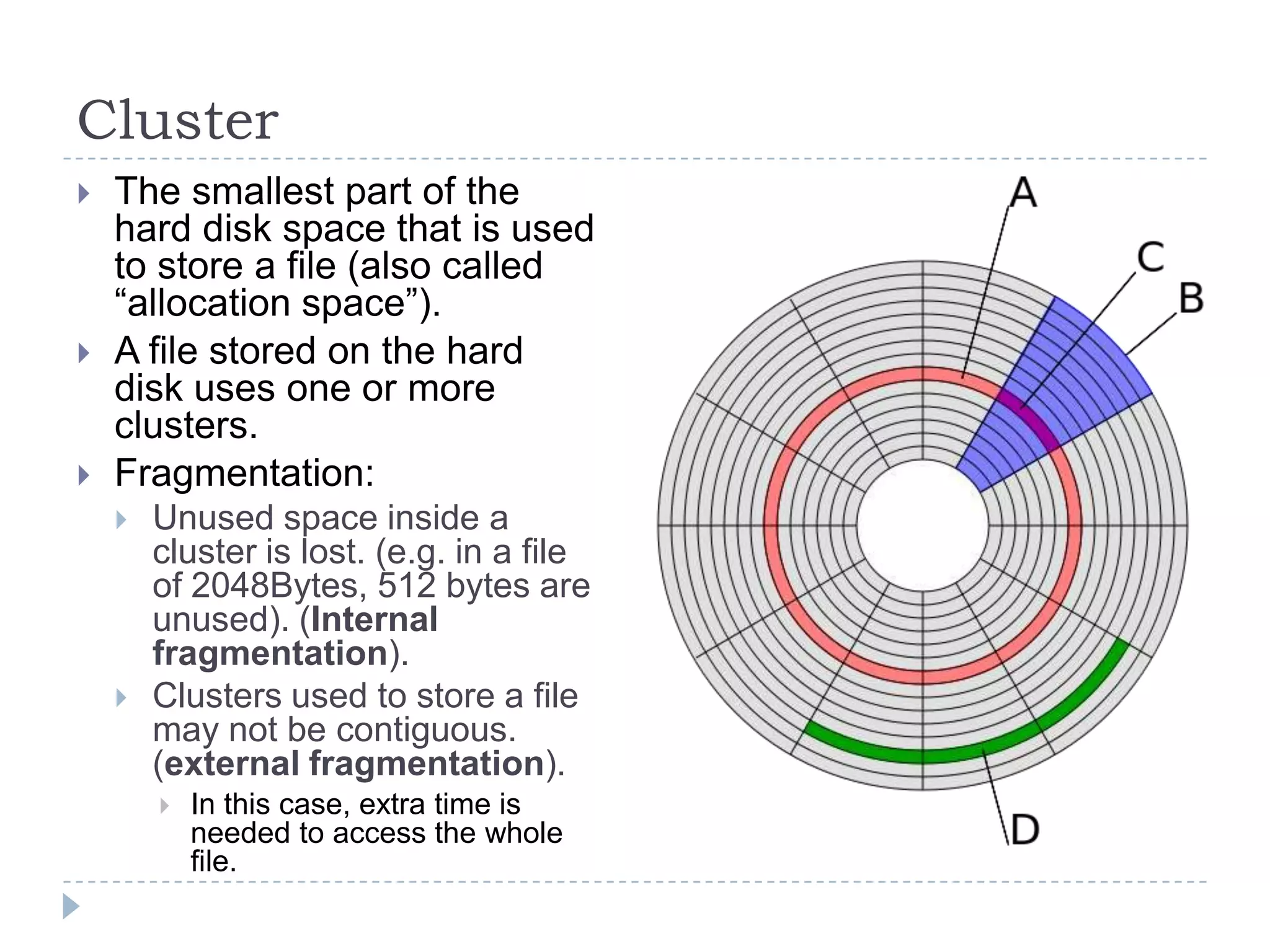
Cluster
 The smallest part of the
hard disk space that is used
to store a file (also called
“allocation space”).
 A file stored on the hard
disk uses one or more
clusters.
 Fragmentation:
 Unused space inside a
cluster is lost. (e.g. in a file
of 2048Bytes, 512 bytes are
unused). (Internal
fragmentation).
 Clusters used to store a file
may not be contiguous.
(external fragmentation).
 In this case, extra time is
needed to access the whole
file.
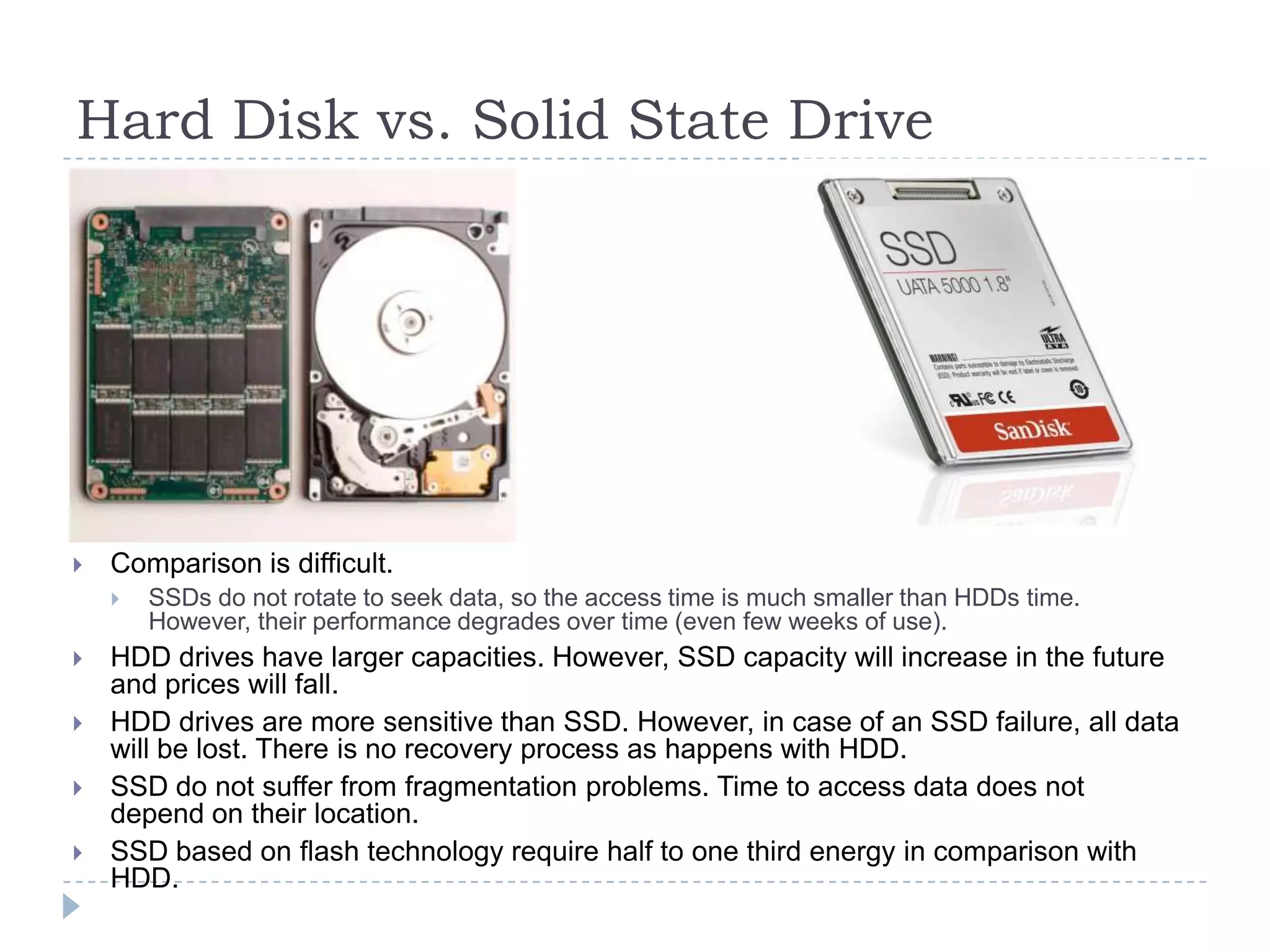
Hard Disk vs. Solid State Drive
 Comparison is difficult.
 SSDs do not rotate to seek data, so the access time is much smaller than HDDs time.
However, their performance degrades over time (even few weeks of use).
 HDD drives have larger capacities. However, SSD capacity will increase in the future
and prices will fall.
 HDD drives are more sensitive than SSD. However, in case of an SSD failure, all data
will be lost. There is no recovery process as happens with HDD.
 SSD do not suffer from fragmentation problems. Time to access data does not
depend on their location.
 SSD based on flash technology require half to one third energy in comparison with
HDD.
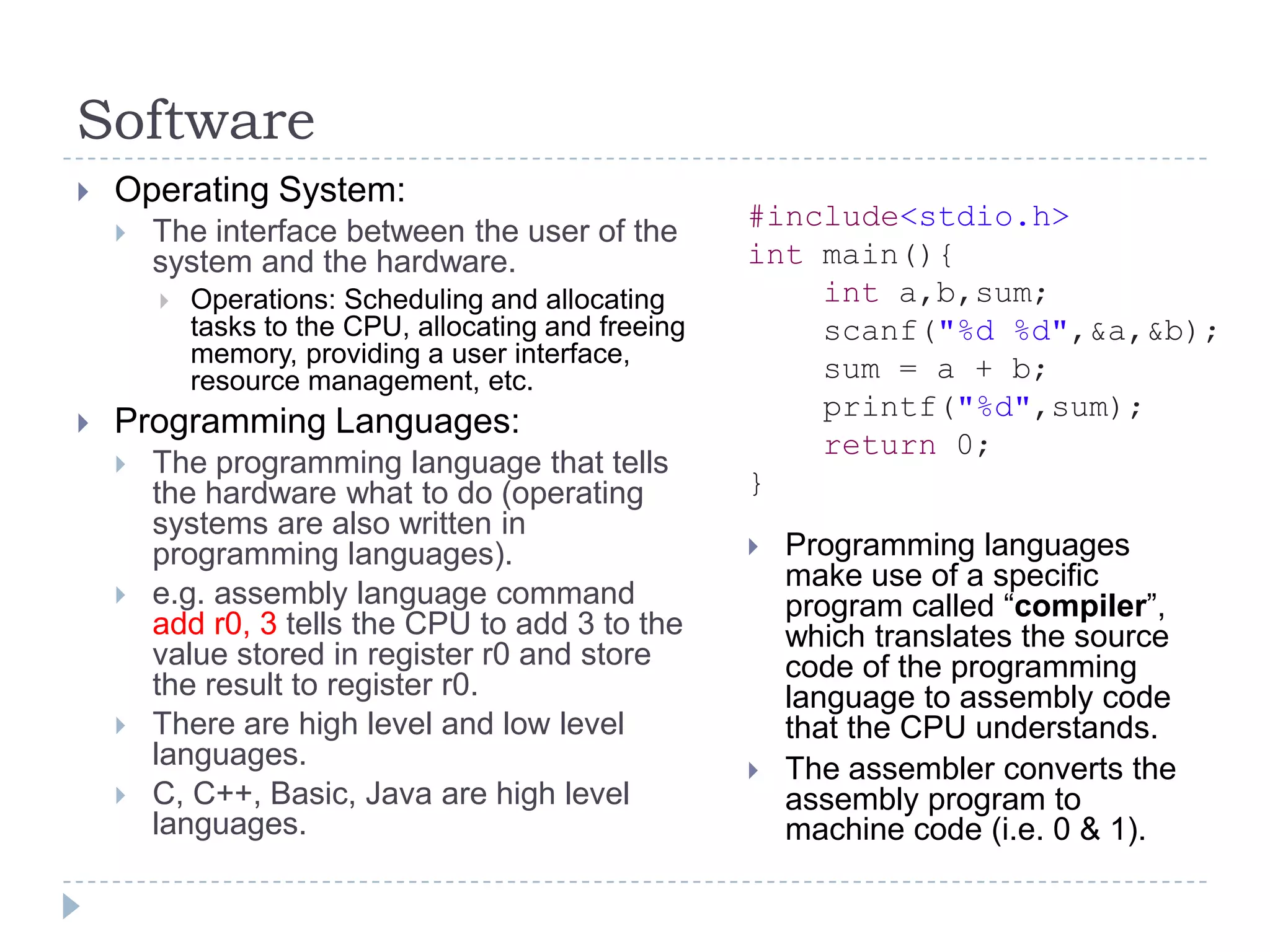
Software
 Operating System:
 The interface between the user of the
system and the hardware.
 Operations: Scheduling and allocating
tasks to the CPU, allocating and freeing
memory, providing a user interface,
resource management, etc.
 Programming Languages:
 The programming language that tells
the hardware what to do (operating
systems are also written in
programming languages).
 e.g. assembly language command
add r0, 3 tells the CPU to add 3 to the
value stored in register r0 and store
the result to register r0.
 There are high level and low level
languages.
 C, C++, Basic, Java are high level
languages.
#include<stdio.h>
int main(){
int a,b,sum;
scanf("%d %d",&a,&b);
sum = a + b;
printf("%d",sum);
return 0;
}
 Programming languages
make use of a specific
program called “compiler”,
which translates the source
code of the programming
language to assembly code
that the CPU understands.
 The assembler converts the
assembly program to
machine code (i.e. 0 & 1).
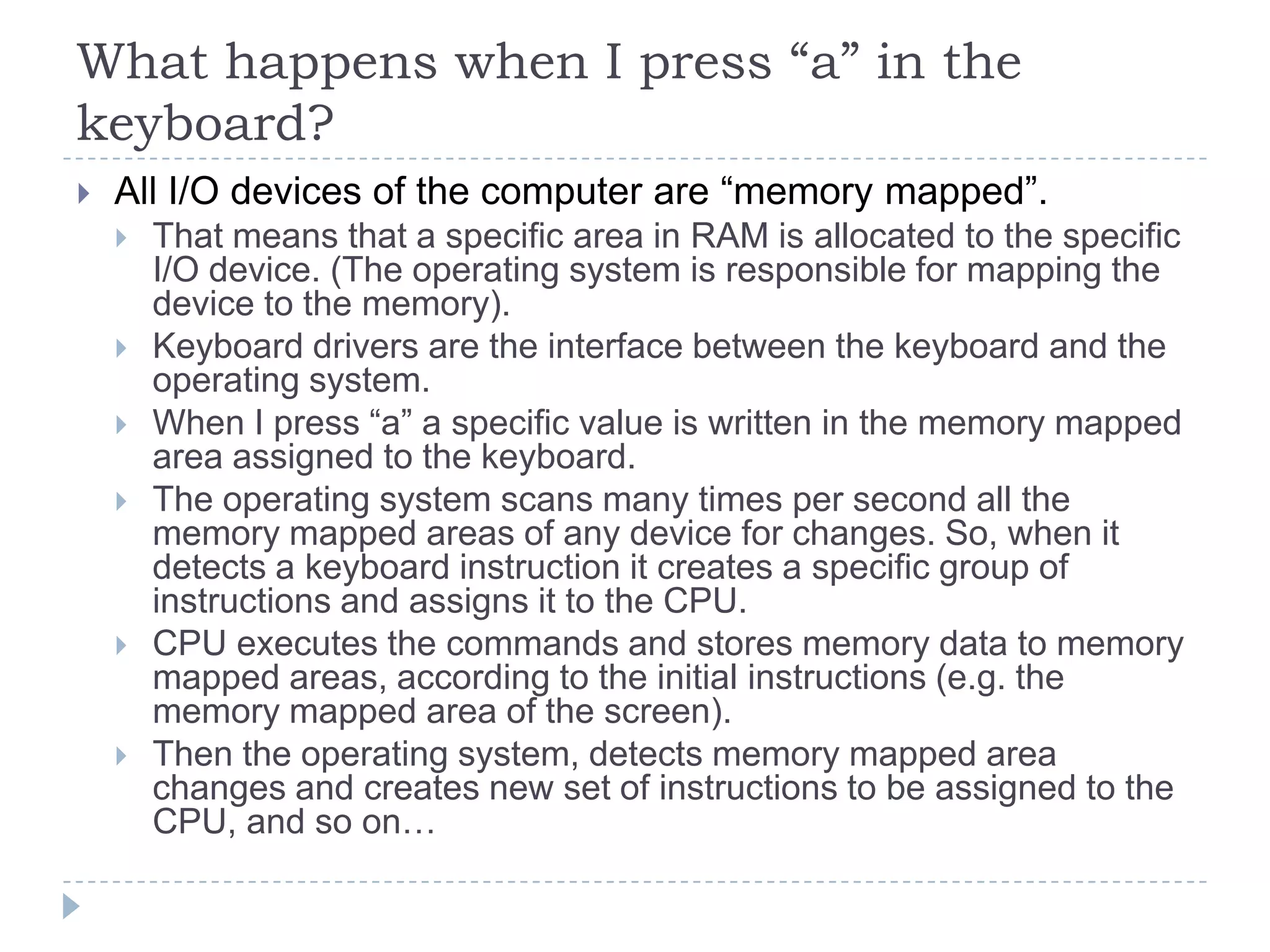
What happens when I press “a” in the
keyboard?
 All I/O devices of the computer are “memory mapped”.
 That means that a specific area in RAM is allocated to the specific
I/O device. (The operating system is responsible for mapping the
device to the memory).
 Keyboard drivers are the interface between the keyboard and the
operating system.
 When I press “a” a specific value is written in the memory mapped
area assigned to the keyboard.
 The operating system scans many times per second all the
memory mapped areas of any device for changes. So, when it
detects a keyboard instruction it creates a specific group of
instructions and assigns it to the CPU.
 CPU executes the commands and stores memory data to memory
mapped areas, according to the initial instructions (e.g. the
memory mapped area of the screen).
 Then the operating system, detects memory mapped area
changes and creates new set of instructions to be assigned to the
CPU, and so on…

5.6 Basic computer structure microprocessors

  • 1.
    Module 5: DigitalTechniques and Electronic Instrument Systems 5.6 Basic Computer Structure 5.7 Microprocessors
  • 2.
    Basic Computer Structure CPU  Memory  I/O  Bus
  • 3.
    Bus  Control bus: Signals for maintaining and status information.  e.g. sets processor in a specific operation mode.  Address bus:  Unidirectional bus, (16 or 32 bits parallel wires) used for transmitting addresses to memory.  Data bus:  8 / 16 / 32 / 64 bits bi- directional bus. Data stored or loaded to / from the memory.
  • 4.
    Central Processor Unit Instructions and data are stored in RAM.  CPU loads and decodes an instruction.  Loads data needed from RAM (according to the instruction) and stores them in registers.  Make calculations if necessary in registers, according to the instruction.  Stores data back in RAM.
  • 5.
    ARM Register Set Registers:  Small and very fast memories.  Usually 32 bits each one.  R15 is the Program Counter: stores the address of the next instruction.  CPSR (Current Program Status Register) used to monitor and control internal operations.  e.g. A calculation has been made (e.g. an addition). Is the result negative? Did it lead to overflow? Did a carry occur?
  • 6.
    ARM Assembly Example Very simple and low level commands.  The CPU decodes them to machine language (i.e. binary).  Each instruction requires a different number of CPU cycles.
  • 7.
    CPU Instruction Set Each different kind of CPU has each own set of instructions.  4 types of instructions:  Transfer: e.g. Load data from memory to a CPU register for processing.  Arithmetic: e.g. add data stored in two registers and put the result to a 3rd register.  Logic: e.g. compare data stored in two registers and set the appropriate flag in the Status Register.  Control: Set the program counter to a specific memory address.
  • 8.
    Arithmetic Logic Unit ALU:  Addition  Subtraction  Multiplication  Comparison
  • 9.
    CPU fetch-decode-execute cycle 5 basic operations:  Fetch: load a memory instruction.  Decode: decode the instruction.  Execute: perform ALU operations.  Memory access: (In fact, usually wait for one CPU cycle, to ensure consistency).  Write back: store results in a register.  This is the CPU pipeline.  The operations of the CPU are decomposed in independent steps to allow concurrent operations and increased CPU performance.
  • 10.
    CPU Clock  Eachtime the CPU clock “ticks” CPU moves to the next pipeline stage.  So, in an 1GHz CPU each pipeline stage takes 1nsec.
  • 11.
    Memory  Instructions andData are stored in memories.
  • 12.
    Types of Memories Most common widths: 8, 16, 32, 64 bits. If the memory width is the same as the instructions length, the processors needs one memory access to fetch a new instruction.  ROM (Read Only Memory): Contains an image set at production time and cannot be reprogrammed (e.g. boot code).  Flash ROM: Can be rewritten. Used to store device firmware or long- term data that needs to be preserved after power is off.  RAM (Random Access Memory).  DRAM (Dynamic RAM): The storage cells are refreshed after every few milliseconds, so it needs a DRAM controller.  SRAM (Static RAM): faster than DRAM, does not require refreshing. Used in caches.  SDRAM (Synchronous DRAM): Very fast, it is clocked and synchronizes itself with the processor clock.  Memories that lose their data when power is off are called volatile. (i.e RAM). ROM is non-volatile.
  • 13.
    Read Only Memory ROM  PROM (Programmable ROM): It’s purchased already programmed. Once programmed, can never be reprogrammed.  EPROM (Erasable PROM):  Can be reprogrammed using UV light.  EEPROM (Electrically EPROM) are reprogrammed electrically. (Flash Memories)  Flash Memories:  Designed to replace ROM and RAM.  Not as fast as SRAM and ROM.
  • 14.
    Flash EEPROM  Floatinggate transistors.  Electrons are “trapped” inside the float gate and open the channel between the n regions.
  • 15.
    Hard Disk Drives& Solid State Drives  Two types:  Hard Disk Drive  Solid State Drive  Hard disk Drive:  They contain a number of platters.  The drive head reads or writes a circular ring of data.  One circular ring is called track.  Sections within each track are called sectors (512 bytes).
  • 16.
    Cluster  The smallestpart of the hard disk space that is used to store a file (also called “allocation space”).  A file stored on the hard disk uses one or more clusters.  Fragmentation:  Unused space inside a cluster is lost. (e.g. in a file of 2048Bytes, 512 bytes are unused). (Internal fragmentation).  Clusters used to store a file may not be contiguous. (external fragmentation).  In this case, extra time is needed to access the whole file.
  • 17.
    Hard Disk vs.Solid State Drive  Comparison is difficult.  SSDs do not rotate to seek data, so the access time is much smaller than HDDs time. However, their performance degrades over time (even few weeks of use).  HDD drives have larger capacities. However, SSD capacity will increase in the future and prices will fall.  HDD drives are more sensitive than SSD. However, in case of an SSD failure, all data will be lost. There is no recovery process as happens with HDD.  SSD do not suffer from fragmentation problems. Time to access data does not depend on their location.  SSD based on flash technology require half to one third energy in comparison with HDD.
  • 18.
    Software  Operating System: The interface between the user of the system and the hardware.  Operations: Scheduling and allocating tasks to the CPU, allocating and freeing memory, providing a user interface, resource management, etc.  Programming Languages:  The programming language that tells the hardware what to do (operating systems are also written in programming languages).  e.g. assembly language command add r0, 3 tells the CPU to add 3 to the value stored in register r0 and store the result to register r0.  There are high level and low level languages.  C, C++, Basic, Java are high level languages. #include<stdio.h> int main(){ int a,b,sum; scanf("%d %d",&a,&b); sum = a + b; printf("%d",sum); return 0; }  Programming languages make use of a specific program called “compiler”, which translates the source code of the programming language to assembly code that the CPU understands.  The assembler converts the assembly program to machine code (i.e. 0 & 1).
  • 19.
    What happens whenI press “a” in the keyboard?  All I/O devices of the computer are “memory mapped”.  That means that a specific area in RAM is allocated to the specific I/O device. (The operating system is responsible for mapping the device to the memory).  Keyboard drivers are the interface between the keyboard and the operating system.  When I press “a” a specific value is written in the memory mapped area assigned to the keyboard.  The operating system scans many times per second all the memory mapped areas of any device for changes. So, when it detects a keyboard instruction it creates a specific group of instructions and assigns it to the CPU.  CPU executes the commands and stores memory data to memory mapped areas, according to the initial instructions (e.g. the memory mapped area of the screen).  Then the operating system, detects memory mapped area changes and creates new set of instructions to be assigned to the CPU, and so on…