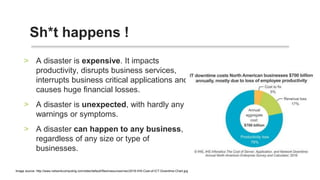
• A disaster is expensive. It impacts
productivity, disrupts business services,
interrupts business critical applications and
causes huge financial losses.
• A disaster is unexpected, with hardly any
warnings or symptoms.
• A disaster can happen to any business,
regardless of any size or type of
businesses.
Sh*t happens !
Image source: http://www.networkcomputing.com/sites/default/files/resources/nwc/2016-IHS-Cost-of-ICT-Downtime-Chart.jpg
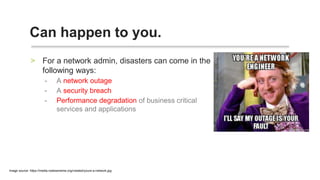
For a network admin, disasters can come in the
following ways:
- A network outage
- A security breach
- Performance degradation of business critical
services and applications
Can happen to you.
Image source: https://media.makeameme.org/created/youre-a-network.jpg
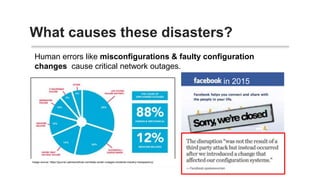
What causes these disasters?
Human errors like misconfigurations & faulty configuration
changes cause critical network outages.
in 2015
Image source: https://journal.uptimeinstitute.com/data-center-outages-incidents-industry-transparency/
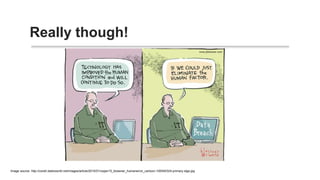
Image courtesy John Klossner, © Computerworld
Really though!
ImagecourtesyJohnKlossner,©Computerw
How to be prepared.
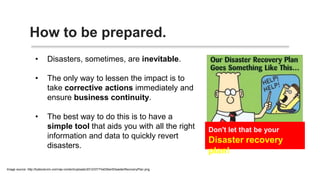
• Disasters, sometimes, are inevitable.
• The only way to lessen the impact is
to take corrective actions
immediately and ensure business
continuity.
• The best way to do this is to have a
simple tool that aids you with all the
right information and data to quickly
revert disasters.
• Network Configuration Manager is a simple tool that gives a complete
detailed view into your network devices and its configuration.
• These telecom & communication companies trust their network with NCM:
Why Network Configuration
Manager.
• AT&T MOBILITY AFFILIATES
Puerto Rico
• Ericsson Magyarorsz‫ב‬g Kft
• Essar Services India Ltd.
• Lightyear Network Solutions
• Telecom Italia S.p.A.
• TeleCommunication System
• Telecel S.A.
WAYS NCM
CAN SAVE
YOU FROM A
DISASTER.
• A disaster could mean critical data loss and
re-building your network from scratch. A task
that will take long enough to cause major
dents in your business.
• With backups, you can rebuild your network in
a jiffy.
• NCM allows backup in 3 different ways:
• Syslog based automated backups
• Scheduled backups
• Manual backups
#1 AUTOMATED BACKUPS
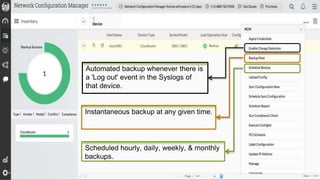
Scheduled hourly, daily, weekly, & monthly
backups.
Instantaneous backup at any given time.
Automated backup whenever there is
a 'Log out' event in the Syslogs of
that device.
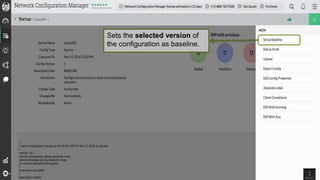
• Baseline configuration is the best working
configuration of a device.
• The trusted configuration is restored into the
device when something goes wrong.
• Having a trusted configuration enables a quick
fallback to bring business continuity
immediately.
• NCM allows labelling of a configuration as
'Baseline' in just a click.
#2 Restore configuration
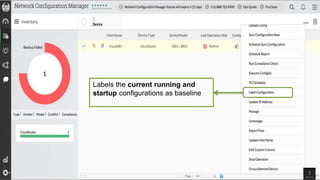
Labels the current running and
startup configurations as baseline
Sets the selected version of
the configuration as baseline.
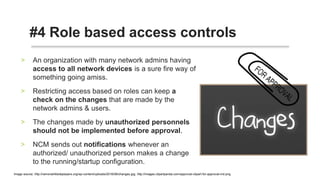
• An organization with many network admins
having access to all network devices is a
sure fire way of something going amiss.
• Restricting access based on roles can keep
a check on the changes that are made by
the network admins & users.
• The changes made by unauthorized
personnels should not be implemented
before approval.
• NCM sends out notifications whenever an
authorized/ unauthorized person makes a
change to the running/startup configuration.
#3 Change management - Role
based access controls
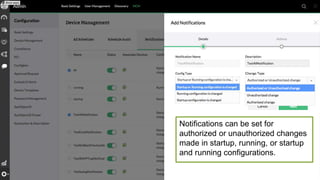
Notifications can be set for
authorized or unauthorized changes
made in startup, running, or startup
and running configurations.
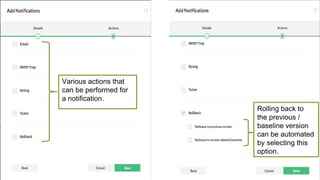
Various actions that
can be performed for
a notification.
Rolling back to
the previous /
baseline version
can be automated
by selecting this
option.
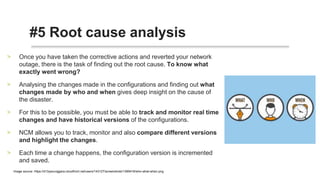
• Once you have taken the corrective actions and
reverted your network outage, there is the task of finding
out the root cause. To know what exactly went
wrong?
• Analysing the changes made in the configurations and
finding out what changes were made by who and
when gives deep insight on the cause of the disaster.
• For this to be possible, you must be able to track and
monitor real time changes and have historical
versions of the configurations.
• NCM allows you to track, monitor and also compare
different versions and highlight the changes.
• Each time a change happens, the configuration version
is incremented and saved.
#3.a Change management -
Root cause analysis
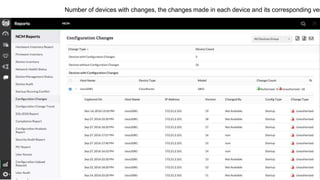
Number of devices with changes, the changes made in each device and its corresponding versions.
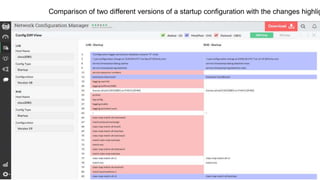
Comparison of two different versions of a startup configuration with the changes highlighted.
#4 Compliance
• Staying compliant to the industry standards is
mission critical to any business. Non-compliance
may lead to vulnerabilities, disruption of
service/operation and damage to reputation.
• If you have web applications in which users leave
their card data, it is imperative that you stay PCI
compliant.
• With PCI DSS compliance policy in NCM, protect
your cardholders data and provide a secure
platform.
• NCM also monitors for HIPAA and SOX
compliance standards.
• You can custom create policies and upon violation
of any, can have the remediation executed via
configlets.
PCI compliance schedules and reviews in one page.
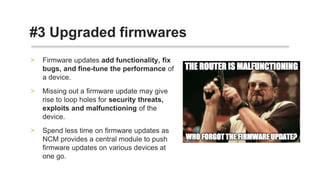
• Firmware updates add functionality, fix bugs, and
fine-tune the performance of a device.
• Missing out a firmware update may give rise to loop
holes for security threats, exploits and
malfunctioning of the device.
• Spend less time on firmware updates as NCM
provides a central module to push firmware updates
on various devices at one go.
#5 Upgraded firmwares
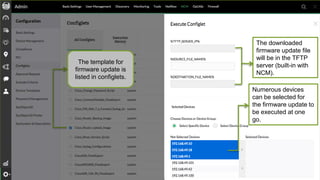
The template for
firmware update is
listed in configlets.
Numerous devices
can be selected for
the firmware update to
be executed at one
go.
The downloaded
firmware update file
will be in the TFTP
server (built-in with
NCM).
 Website: https://www.manageengine.com/network-configuration-manager/
 Product download: https://www.manageengine.com/network-configuration-
manager/download.html
 Forums: https://forums.manageengine.com/network-configuration-manager
 Support: ncm-support@manageengine.com
 Youtube: https://www.youtube.com/channel/UCHLusaahd4nS9esD3xBVeUQ
So, what do you think?
Get a free one-on-one DEMO
THANK YOU!
HEMALAKSHMI.B
Marketing analyst
ManageEngine Network Configuration Manager

5 Ways NCM Can Save You From A Disaster

  • 2.
    • A disasteris expensive. It impacts productivity, disrupts business services, interrupts business critical applications and causes huge financial losses. • A disaster is unexpected, with hardly any warnings or symptoms. • A disaster can happen to any business, regardless of any size or type of businesses. Sh*t happens ! Image source: http://www.networkcomputing.com/sites/default/files/resources/nwc/2016-IHS-Cost-of-ICT-Downtime-Chart.jpg
  • 3.
    For a networkadmin, disasters can come in the following ways: - A network outage - A security breach - Performance degradation of business critical services and applications Can happen to you. Image source: https://media.makeameme.org/created/youre-a-network.jpg
  • 4.
    What causes thesedisasters? Human errors like misconfigurations & faulty configuration changes cause critical network outages. in 2015 Image source: https://journal.uptimeinstitute.com/data-center-outages-incidents-industry-transparency/
  • 5.
    Image courtesy JohnKlossner, © Computerworld Really though! ImagecourtesyJohnKlossner,©Computerw
  • 6.
    How to beprepared. • Disasters, sometimes, are inevitable. • The only way to lessen the impact is to take corrective actions immediately and ensure business continuity. • The best way to do this is to have a simple tool that aids you with all the right information and data to quickly revert disasters.
  • 7.
    • Network ConfigurationManager is a simple tool that gives a complete detailed view into your network devices and its configuration. • These telecom & communication companies trust their network with NCM: Why Network Configuration Manager. • AT&T MOBILITY AFFILIATES Puerto Rico • Ericsson Magyarorsz‫ב‬g Kft • Essar Services India Ltd. • Lightyear Network Solutions • Telecom Italia S.p.A. • TeleCommunication System • Telecel S.A.
  • 8.
    WAYS NCM CAN SAVE YOUFROM A DISASTER.
  • 9.
    • A disastercould mean critical data loss and re-building your network from scratch. A task that will take long enough to cause major dents in your business. • With backups, you can rebuild your network in a jiffy. • NCM allows backup in 3 different ways: • Syslog based automated backups • Scheduled backups • Manual backups #1 AUTOMATED BACKUPS
  • 10.
    Scheduled hourly, daily,weekly, & monthly backups. Instantaneous backup at any given time. Automated backup whenever there is a 'Log out' event in the Syslogs of that device.
  • 11.
    • Baseline configurationis the best working configuration of a device. • The trusted configuration is restored into the device when something goes wrong. • Having a trusted configuration enables a quick fallback to bring business continuity immediately. • NCM allows labelling of a configuration as 'Baseline' in just a click. #2 Restore configuration
  • 12.
    Labels the currentrunning and startup configurations as baseline
  • 13.
    Sets the selectedversion of the configuration as baseline.
  • 14.
    • An organizationwith many network admins having access to all network devices is a sure fire way of something going amiss. • Restricting access based on roles can keep a check on the changes that are made by the network admins & users. • The changes made by unauthorized personnels should not be implemented before approval. • NCM sends out notifications whenever an authorized/ unauthorized person makes a change to the running/startup configuration. #3 Change management - Role based access controls
  • 15.
    Notifications can beset for authorized or unauthorized changes made in startup, running, or startup and running configurations.
  • 16.
    Various actions that canbe performed for a notification. Rolling back to the previous / baseline version can be automated by selecting this option.
  • 17.
    • Once youhave taken the corrective actions and reverted your network outage, there is the task of finding out the root cause. To know what exactly went wrong? • Analysing the changes made in the configurations and finding out what changes were made by who and when gives deep insight on the cause of the disaster. • For this to be possible, you must be able to track and monitor real time changes and have historical versions of the configurations. • NCM allows you to track, monitor and also compare different versions and highlight the changes. • Each time a change happens, the configuration version is incremented and saved. #3.a Change management - Root cause analysis
  • 18.
    Number of deviceswith changes, the changes made in each device and its corresponding versions.
  • 19.
    Comparison of twodifferent versions of a startup configuration with the changes highlighted.
  • 20.
    #4 Compliance • Stayingcompliant to the industry standards is mission critical to any business. Non-compliance may lead to vulnerabilities, disruption of service/operation and damage to reputation. • If you have web applications in which users leave their card data, it is imperative that you stay PCI compliant. • With PCI DSS compliance policy in NCM, protect your cardholders data and provide a secure platform. • NCM also monitors for HIPAA and SOX compliance standards. • You can custom create policies and upon violation of any, can have the remediation executed via configlets.
  • 21.
    PCI compliance schedulesand reviews in one page.
  • 22.
    • Firmware updatesadd functionality, fix bugs, and fine-tune the performance of a device. • Missing out a firmware update may give rise to loop holes for security threats, exploits and malfunctioning of the device. • Spend less time on firmware updates as NCM provides a central module to push firmware updates on various devices at one go. #5 Upgraded firmwares
  • 23.
    The template for firmwareupdate is listed in configlets. Numerous devices can be selected for the firmware update to be executed at one go. The downloaded firmware update file will be in the TFTP server (built-in with NCM).
  • 24.
     Website: https://www.manageengine.com/network-configuration-manager/ Product download: https://www.manageengine.com/network-configuration- manager/download.html  Forums: https://forums.manageengine.com/network-configuration-manager  Support: ncm-support@manageengine.com  Youtube: https://www.youtube.com/channel/UCHLusaahd4nS9esD3xBVeUQ So, what do you think?
  • 25.
    Get a freeone-on-one DEMO
  • 26.