Introduction to Networking
Monitoring and Management
AfNOG 2010 Network Monitoring and
Management Tutorial
Part I: Overview
Core concepts presented:
– What is network monitoring
– What is network management
– Getting started
– Why network management
– Attack detection
– Consolidating the data
– The big picture
What is network monitoring?
Anyone have some ideas?
Monitoring an active communications network in order to
diagnose problems and gather statistics for
administration and fine tuning.
The term network monitoring describes the use of a
system that constantly monitors a computer network for
slow or failing components and that notifies the network
administrator in case of outages via email, pager or
other alarms. It is a subset of the functions involved in
network management.
What is network management?
Refers to the broad subject of managing computer
networks. There exists a wide variety of software and
hardware products that help network system
administrators manage a network. Network
management covers a wide area, including:
- Security: Ensuring that the network is protected from
unauthorized users.
- Performance: Eliminating bottlenecks in the network.
- Reliability: Making sure the network is available to users and
responding to hardware and software malfunctions.
 System & Service monitoring
 Reachability, availability
 Resource measurement/monitoring
 Capacity planning, availability
 Performance monitoring (RTT, throughput)
 Statistics & Accounting/Metering
 Fault Management (Intrusion Detection)
 Fault detection, troubleshooting, and tracking
 Ticketing systems, help desk
 Change management and configuration
monitoring
What is network management?
Make sure that the network is up and running.
Thus, we need to monitor it:
 Deliver projected SLAs (Service Level
Agreements)
 Depends on policy
 What does your management expect?
 What do your users expect?
 What do your customers expect?
 What does the rest of the Internet expect?
 Is 24x7 good enough?
 There's no such thing as 100% uptime (as we’ll see) 
Getting started
What does it take to deliver 99.9 % uptime?
30.5 x 24 = 762 hours a month
(762 – (762 x .999)) x 60 = 45 minutes
only 45 minutes of downtime a month!
Need to shutdown 1 hour / week?
(762 - 4) / 762 x 100 = 99.4 %
Remember to take planned maintenance into
account in your calculations, and inform your
users/customers if they are included/excluded
in the SLA
How is availability measured?
In the core? End-to-end? From the Internet?
Getting started: “Uptime”
Getting started: Baselining
What is normal for your network?
If you’ve never measured or monitored your
network you need to know things like:
– Load on links
– Jitter between endpoints
– Percent usage of resources
– Amount of “noise”:
• Network scans
• Dropped data
• Reported errors or failures
Know when to upgrade
 Is your bandwidth usage too high?
 Where is your traffic going?
 Do you need to get a faster line, or more providers?
 Is the equipment too old?
Keep an audit trace of changes
 Record all changes
 Makes it easier to find cause of problems due to
upgrades and configuration changes
Keep a history of your network operations
– Using a ticket system let you keep a history of events.
– Allows you to defend yourself and verify what happened
Why network management?
Accounting
– Track usage of resources
– Bill customers according to usage
Know when you have problems
 Stay ahead of your users! Makes you look good.
 Monitoring software can generate tickets and auto-
matically notify staff of issues.
Trends
– All of this information can be used to view trends
across your network.
– This is part of baselining, capacity planning and
attack detection.
Why network management?
• Trends and automation allow you to know
when you are under attack.
• The tools in use can help you to mitigate
attacks:
– Flows across network interfaces
– Load on specific servers and/or services
– Multiple service failures
Attack Detection
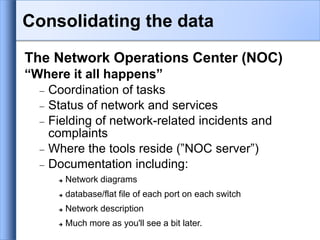
Consolidating the data
The Network Operations Center (NOC)
“Where it all happens”
 Coordination of tasks
 Status of network and services
 Fielding of network-related incidents and
complaints
 Where the tools reside (”NOC server”)
 Documentation including:
 Network diagrams
 database/flat file of each port on each switch
 Network description
 Much more as you'll see a bit later.
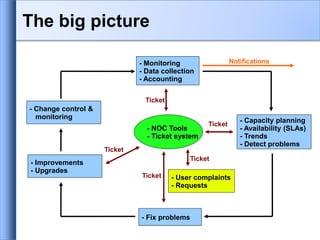
- Monitoring
- Data collection
- Accounting
- Capacity planning
- Availability (SLAs)
- Trends
- Detect problems
- Change control &
monitoring
- Improvements
- Upgrades
- Fix problems
- User complaints
- Requests
- NOC Tools
- Ticket system
Ticket
Ticket
Ticket
Ticket
Ticket
Notifications
The big picture
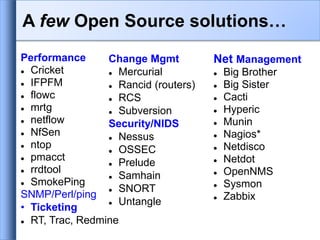
Performance
 Cricket
 IFPFM
 flowc
 mrtg
 netflow
 NfSen
 ntop
 pmacct
 rrdtool
 SmokePing
SNMP/Perl/ping
• Ticketing
 RT, Trac, Redmine
Net Management
 Big Brother
 Big Sister
 Cacti
 Hyperic
 Munin
 Nagios*
 Netdisco
 Netdot
 OpenNMS
 Sysmon
 Zabbix
Change Mgmt
 Mercurial
 Rancid (routers)
 RCS
 Subversion
Security/NIDS
 Nessus
 OSSEC
 Prelude
 Samhain
 SNORT
 Untangle
A few Open Source solutions…
Questions?
?
Part II: Details
Some details on the core concepts:
• Network documentation
• Diagnostic tools
• Monitoring tools
• Performance tools
• Active and passive tools
• SNMP
• Ticket systems
• Configuration and change management
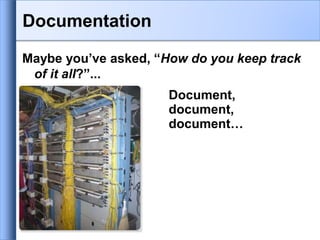
Maybe you’ve asked, “How do you keep track
of it all?”...
Document,
document,
document…
Documentation
Basics, such as documenting your switches...
– What is each port connected to?
– Can be simple text file with one line for every port in a
switch:
• health-switch1, port 1, Room 29 – Director’s office
• health-switch1, port 2, Room 43 – Receptionist
• health-switch1, port 3, Room 100 – Classroom
• health-switch1, port 4, Room 105 – Professors Office
• …..
• health-switch1, port 25, uplink to health-backbone
– This information might be available to your network staff,
help desk staff, via a wiki, software interface, etc.
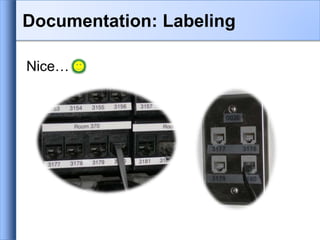
– Remember to label your ports!
Documentation
Nice…
Documentation: Labeling
Network Documentation
More automation might be needed. An
automated network documentation system
is something to consider.
– You can write local scripts to do this.
– You can consider some automated
documentation systems.
– You’ll probably end up doing both.
Automated Systems
There are quite a few automated network
documentation systems. Each tends to do
something different:
– IPplan:
http://iptrack.sourceforge.net/
– Netdisco:
http://netdisco.org/
– Netdot:
https://netdot.uoregon.edu/
IPplan:
From the IPplan web page:
“IPplan is a free (GPL), web based, multilingual, TCP IP address management
(IPAM) software and tracking tool written in php 4, simplifying the
administration of your IP address space. IPplan goes beyond TCPIP address
management including DNS administration, configuration file management,
circuit management (customizable via templates) and storing of hardware
information (customizable via templates).”
Lots of screenshots:
http://iptrack.sourceforge.net/doku.php?id=screenshots
Netdisco:
• Project launched 2003. Version 1.0
released October 2009.
• Some popular uses of Netdisco:
– Locate a machine on the network by MAC or IP and
show the switch port it lives at.
– Turn Off a switch port while leaving an audit trail.
Admins log why a port was shut down.
– Inventory your network hardware by model, vendor,
switch-card, firmware and operating system.
– Report on IP address and switch port usage: historical
and current.
– Pretty pictures of your network.
Netdot:
Includes functionality of IPplan and Netdisco
and more. Core functionality includes:
– Device discovery via SNMP
– Layer2 topology discovery and graphs, using:
• CDP/LLDP
• Spanning Tree Protocol
• Switch forwarding tables
• Router point-to-point subnets
– IPv4 and IPv6 address space management (IPAM)
• Address space visualization
• DNS/DHCP config management
• IP and MAC address tracking
Continued 
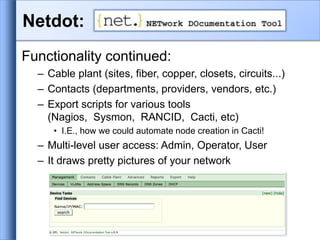
Netdot:
Functionality continued:
– Cable plant (sites, fiber, copper, closets, circuits...)
– Contacts (departments, providers, vendors, etc.)
– Export scripts for various tools
(Nagios, Sysmon, RANCID, Cacti, etc)
• I.E., how we could automate node creation in Cacti!
– Multi-level user access: Admin, Operator, User
– It draws pretty pictures of your network
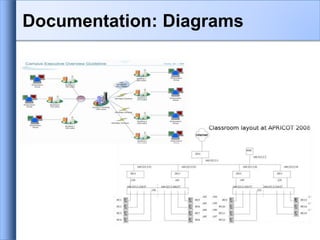
Documentation: Diagrams
Windows Diagramming Software
- Visio:
http://office.microsoft.com/en-us/visio/FX100487861033.aspx
- Ezdraw:
http://www.edrawsoft.com/
Open Source Diagramming Software
- Dia:
http://live.gnome.org/Dia
- Cisco reference icons:
http://www.cisco.com/web/about/ac50/ac47/2.html
- Nagios Exchange:
http://www.nagiosexchange.org/
Diagramming Software
Three kinds of tools
1. Diagnostic tools – used to test connectivity,
ascertain that a location is reachable, or a
device is up – usually active tools
2. Monitoring tools – tools running in the
background (”daemons” or services), which
collect events, but can also initiate their own
probes (using diagnostic tools), and recording
the output, in a scheduled fashion.
Network monitoring systems & tools
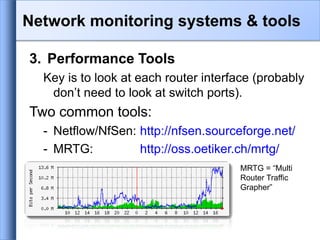
3. Performance Tools
Key is to look at each router interface (probably
don’t need to look at switch ports).
Two common tools:
- Netflow/NfSen: http://nfsen.sourceforge.net/
- MRTG: http://oss.oetiker.ch/mrtg/
MRTG = “Multi
Router Traffic
Grapher”
Network monitoring systems & tools
Active tools
 Ping – test connectivity to a host
 Traceroute – show path to a host
 MTR – combination of ping + traceroute
 SNMP collectors (polling)
Passive tools
 log monitoring, SNMP trap receivers, NetFlow
Automated tools
 SmokePing – record and graph latency to a set of hosts,
using ICMP (Ping) or other protocols
 MRTG/RRD – record and graph bandwidth usage on a
switch port or network link, at regular intervals
Network monitoring systems & tools
Network & Service Monitoring tools
 Nagios – server and service monitor
 Can monitor pretty much anything
 HTTP, SMTP, DNS, Disk space, CPU usage, ...
 Easy to write new plugins (extensions)
 Basic scripting skills are required to develop simple
monitoring jobs – Perl, Shell scripts, php, etc...
 Many good Open Source tools
 Zabbix, ZenOSS, Hyperic, OpenNMS ...
Use them to monitor reachability and
latency in your network
 Parent-child dependency mechanisms are very useful!
Network monitoring systems & tools
Monitor your critical Network Services
 DNS/Web/Email
 Radius/LDAP/SQL
 SSH to routers
How will you be notified?
Don't forget log collection!
 Every network device (and UNIX and Windows servers
as well) can report system events using syslog
 You MUST collect and monitor your logs!
 Not doing so is one of the most common mistakes
when
doing network monitoring
Network monitoring systems & tools
SNMP – Simple Network Management
Protocol
 Industry standard, hundreds of tools exist to exploit it
 Present on any decent network equipment
 Network throughput, errors, CPU load, temperature, ...
 UNIX and Windows implement this as well
 Disk space, running processes, ...
SSH and telnet
 It is also possible to use scripting to automate
monitoring of hosts and services
Network management protocols
Net SNMP tool set
- http://net-snmp.sourceforge.net/
Very simple to build simple tools
 One that builds snapshots of which IP is used by which
Ethernet address
 Another that builds shapshots of which Ethernet
addresses exist on which port on which switch.
 Query remote RAID array for state.
 Query server, switches and routers for temperatures.
 Etc…
SNMP tools
Traffic accounting and analysis
 What is your network used for, and how much
 Useful for Quality of Service, detecting abuses,
and billing (metering)
 Dedicated protocol: NetFlow
 Identify traffic ”flows”: protocol, source,
destination, bytes
 Different tools exist to process the information
 Flowtools, flowc
 NFSen
 Many more: http://www.networkuptime.com/tools/netflow/
Statistics and accounting tools
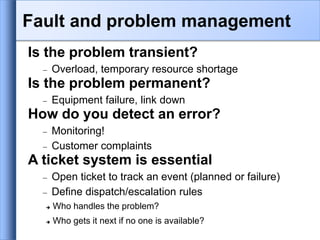
Is the problem transient?
 Overload, temporary resource shortage
Is the problem permanent?
 Equipment failure, link down
How do you detect an error?
 Monitoring!
 Customer complaints
A ticket system is essential
 Open ticket to track an event (planned or failure)
 Define dispatch/escalation rules
 Who handles the problem?
 Who gets it next if no one is available?
Fault and problem management
Why are they important?
 Track all events, failures and issues
Focal point for helpdesk communication
Use it to track all communications
 Both internal and external
Events originating from the outside:
 customer complaints
Events originating from the inside:
 System outages (direct or indirect)
 Planned maintenances or upgrades – Remember to
notify your customers!
Ticketing systems
 Use ticket system to follow each case,
including internal communication between
technicians
 Each case is assigned a case number
 Each case goes through a similar life cycle:
 New
 Open
 ...
 Resolved
 Closed
Ticketing systems
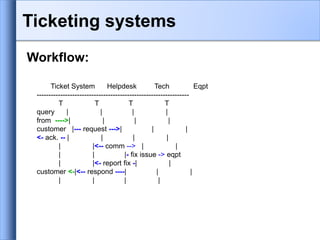
Workflow:
Ticket System Helpdesk Tech Eqpt
----------------------------------------------------------------
T T T T
query | | | |
from ---->| | | |
customer |--- request --->| | |
<- ack. -- | | | |
| |<-- comm --> | |
| | |- fix issue -> eqpt
| |<- report fix -| |
customer <-|<-- respond ----| | |
| | | |
Ticketing systems
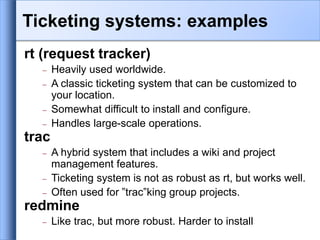
rt (request tracker)
 Heavily used worldwide.
 A classic ticketing system that can be customized to
your location.
 Somewhat difficult to install and configure.
 Handles large-scale operations.
trac
 A hybrid system that includes a wiki and project
management features.
 Ticketing system is not as robust as rt, but works well.
 Often used for ”trac”king group projects.
redmine
 Like trac, but more robust. Harder to install
Ticketing systems: examples
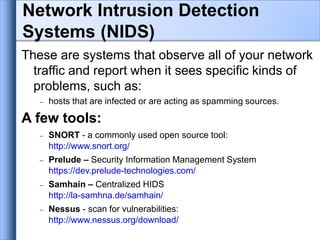
These are systems that observe all of your network
traffic and report when it sees specific kinds of
problems, such as:
 hosts that are infected or are acting as spamming sources.
A few tools:
 SNORT - a commonly used open source tool:
http://www.snort.org/
 Prelude – Security Information Management System
https://dev.prelude-technologies.com/
 Samhain – Centralized HIDS
http://la-samhna.de/samhain/
 Nessus - scan for vulnerabilities:
http://www.nessus.org/download/
Network Intrusion Detection
Systems (NIDS)
 Record changes to equipment configuration using
revision control (also for configuration files)
 Inventory management (equipment, IPs,
interfaces)
 Use versioning control
 As simple as:
”cp named.conf named.conf.20070827-01”
 For plain configuration files:
 CVS, Subversion (SVN)
 Mercurial
• For routers:
- RANCID
Configuration mgmt & monitoring
 Traditionally, used for source code (programs)
 Works well for any text-based configuration files
 Also for binary files, but less easy to see differences
 For network equipment:
 RANCID (Automatic Cisco configuration retrieval and
archiving, also for other equipment types)
 Built-in to Project Management Software like:
 Trac
 Redmine
 And, many other wiki products. Excellent for
documenting your network.
Configuration mgmt & monitoring
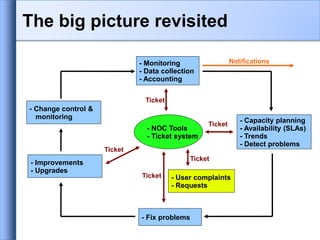
- Monitoring
- Data collection
- Accounting
- Capacity planning
- Availability (SLAs)
- Trends
- Detect problems
- Change control &
monitoring
- Improvements
- Upgrades
- Fix problems
- User complaints
- Requests
- NOC Tools
- Ticket system
Ticket
Ticket
Ticket
Ticket
Ticket
Notifications
The big picture revisited
Questions
?

network-management Web base.ppt

  • 1.
    Introduction to Networking Monitoringand Management AfNOG 2010 Network Monitoring and Management Tutorial
  • 2.
    Part I: Overview Coreconcepts presented: – What is network monitoring – What is network management – Getting started – Why network management – Attack detection – Consolidating the data – The big picture
  • 3.
    What is networkmonitoring? Anyone have some ideas? Monitoring an active communications network in order to diagnose problems and gather statistics for administration and fine tuning. The term network monitoring describes the use of a system that constantly monitors a computer network for slow or failing components and that notifies the network administrator in case of outages via email, pager or other alarms. It is a subset of the functions involved in network management.
  • 4.
    What is networkmanagement? Refers to the broad subject of managing computer networks. There exists a wide variety of software and hardware products that help network system administrators manage a network. Network management covers a wide area, including: - Security: Ensuring that the network is protected from unauthorized users. - Performance: Eliminating bottlenecks in the network. - Reliability: Making sure the network is available to users and responding to hardware and software malfunctions.
  • 5.
     System &Service monitoring  Reachability, availability  Resource measurement/monitoring  Capacity planning, availability  Performance monitoring (RTT, throughput)  Statistics & Accounting/Metering  Fault Management (Intrusion Detection)  Fault detection, troubleshooting, and tracking  Ticketing systems, help desk  Change management and configuration monitoring What is network management?
  • 6.
    Make sure thatthe network is up and running. Thus, we need to monitor it:  Deliver projected SLAs (Service Level Agreements)  Depends on policy  What does your management expect?  What do your users expect?  What do your customers expect?  What does the rest of the Internet expect?  Is 24x7 good enough?  There's no such thing as 100% uptime (as we’ll see)  Getting started
  • 7.
    What does ittake to deliver 99.9 % uptime? 30.5 x 24 = 762 hours a month (762 – (762 x .999)) x 60 = 45 minutes only 45 minutes of downtime a month! Need to shutdown 1 hour / week? (762 - 4) / 762 x 100 = 99.4 % Remember to take planned maintenance into account in your calculations, and inform your users/customers if they are included/excluded in the SLA How is availability measured? In the core? End-to-end? From the Internet? Getting started: “Uptime”
  • 8.
    Getting started: Baselining Whatis normal for your network? If you’ve never measured or monitored your network you need to know things like: – Load on links – Jitter between endpoints – Percent usage of resources – Amount of “noise”: • Network scans • Dropped data • Reported errors or failures
  • 9.
    Know when toupgrade  Is your bandwidth usage too high?  Where is your traffic going?  Do you need to get a faster line, or more providers?  Is the equipment too old? Keep an audit trace of changes  Record all changes  Makes it easier to find cause of problems due to upgrades and configuration changes Keep a history of your network operations – Using a ticket system let you keep a history of events. – Allows you to defend yourself and verify what happened Why network management?
  • 10.
    Accounting – Track usageof resources – Bill customers according to usage Know when you have problems  Stay ahead of your users! Makes you look good.  Monitoring software can generate tickets and auto- matically notify staff of issues. Trends – All of this information can be used to view trends across your network. – This is part of baselining, capacity planning and attack detection. Why network management?
  • 11.
    • Trends andautomation allow you to know when you are under attack. • The tools in use can help you to mitigate attacks: – Flows across network interfaces – Load on specific servers and/or services – Multiple service failures Attack Detection
  • 12.
    Consolidating the data TheNetwork Operations Center (NOC) “Where it all happens”  Coordination of tasks  Status of network and services  Fielding of network-related incidents and complaints  Where the tools reside (”NOC server”)  Documentation including:  Network diagrams  database/flat file of each port on each switch  Network description  Much more as you'll see a bit later.
  • 13.
    - Monitoring - Datacollection - Accounting - Capacity planning - Availability (SLAs) - Trends - Detect problems - Change control & monitoring - Improvements - Upgrades - Fix problems - User complaints - Requests - NOC Tools - Ticket system Ticket Ticket Ticket Ticket Ticket Notifications The big picture
  • 14.
    Performance  Cricket  IFPFM flowc  mrtg  netflow  NfSen  ntop  pmacct  rrdtool  SmokePing SNMP/Perl/ping • Ticketing  RT, Trac, Redmine Net Management  Big Brother  Big Sister  Cacti  Hyperic  Munin  Nagios*  Netdisco  Netdot  OpenNMS  Sysmon  Zabbix Change Mgmt  Mercurial  Rancid (routers)  RCS  Subversion Security/NIDS  Nessus  OSSEC  Prelude  Samhain  SNORT  Untangle A few Open Source solutions…
  • 15.
  • 16.
    Part II: Details Somedetails on the core concepts: • Network documentation • Diagnostic tools • Monitoring tools • Performance tools • Active and passive tools • SNMP • Ticket systems • Configuration and change management
  • 17.
    Maybe you’ve asked,“How do you keep track of it all?”... Document, document, document… Documentation
  • 18.
    Basics, such asdocumenting your switches... – What is each port connected to? – Can be simple text file with one line for every port in a switch: • health-switch1, port 1, Room 29 – Director’s office • health-switch1, port 2, Room 43 – Receptionist • health-switch1, port 3, Room 100 – Classroom • health-switch1, port 4, Room 105 – Professors Office • ….. • health-switch1, port 25, uplink to health-backbone – This information might be available to your network staff, help desk staff, via a wiki, software interface, etc. – Remember to label your ports! Documentation
  • 19.
  • 20.
    Network Documentation More automationmight be needed. An automated network documentation system is something to consider. – You can write local scripts to do this. – You can consider some automated documentation systems. – You’ll probably end up doing both.
  • 21.
    Automated Systems There arequite a few automated network documentation systems. Each tends to do something different: – IPplan: http://iptrack.sourceforge.net/ – Netdisco: http://netdisco.org/ – Netdot: https://netdot.uoregon.edu/
  • 22.
    IPplan: From the IPplanweb page: “IPplan is a free (GPL), web based, multilingual, TCP IP address management (IPAM) software and tracking tool written in php 4, simplifying the administration of your IP address space. IPplan goes beyond TCPIP address management including DNS administration, configuration file management, circuit management (customizable via templates) and storing of hardware information (customizable via templates).” Lots of screenshots: http://iptrack.sourceforge.net/doku.php?id=screenshots
  • 23.
    Netdisco: • Project launched2003. Version 1.0 released October 2009. • Some popular uses of Netdisco: – Locate a machine on the network by MAC or IP and show the switch port it lives at. – Turn Off a switch port while leaving an audit trail. Admins log why a port was shut down. – Inventory your network hardware by model, vendor, switch-card, firmware and operating system. – Report on IP address and switch port usage: historical and current. – Pretty pictures of your network.
  • 24.
    Netdot: Includes functionality ofIPplan and Netdisco and more. Core functionality includes: – Device discovery via SNMP – Layer2 topology discovery and graphs, using: • CDP/LLDP • Spanning Tree Protocol • Switch forwarding tables • Router point-to-point subnets – IPv4 and IPv6 address space management (IPAM) • Address space visualization • DNS/DHCP config management • IP and MAC address tracking Continued 
  • 25.
    Netdot: Functionality continued: – Cableplant (sites, fiber, copper, closets, circuits...) – Contacts (departments, providers, vendors, etc.) – Export scripts for various tools (Nagios, Sysmon, RANCID, Cacti, etc) • I.E., how we could automate node creation in Cacti! – Multi-level user access: Admin, Operator, User – It draws pretty pictures of your network
  • 26.
  • 27.
    Windows Diagramming Software -Visio: http://office.microsoft.com/en-us/visio/FX100487861033.aspx - Ezdraw: http://www.edrawsoft.com/ Open Source Diagramming Software - Dia: http://live.gnome.org/Dia - Cisco reference icons: http://www.cisco.com/web/about/ac50/ac47/2.html - Nagios Exchange: http://www.nagiosexchange.org/ Diagramming Software
  • 28.
    Three kinds oftools 1. Diagnostic tools – used to test connectivity, ascertain that a location is reachable, or a device is up – usually active tools 2. Monitoring tools – tools running in the background (”daemons” or services), which collect events, but can also initiate their own probes (using diagnostic tools), and recording the output, in a scheduled fashion. Network monitoring systems & tools
  • 29.
    3. Performance Tools Keyis to look at each router interface (probably don’t need to look at switch ports). Two common tools: - Netflow/NfSen: http://nfsen.sourceforge.net/ - MRTG: http://oss.oetiker.ch/mrtg/ MRTG = “Multi Router Traffic Grapher” Network monitoring systems & tools
  • 30.
    Active tools  Ping– test connectivity to a host  Traceroute – show path to a host  MTR – combination of ping + traceroute  SNMP collectors (polling) Passive tools  log monitoring, SNMP trap receivers, NetFlow Automated tools  SmokePing – record and graph latency to a set of hosts, using ICMP (Ping) or other protocols  MRTG/RRD – record and graph bandwidth usage on a switch port or network link, at regular intervals Network monitoring systems & tools
  • 31.
    Network & ServiceMonitoring tools  Nagios – server and service monitor  Can monitor pretty much anything  HTTP, SMTP, DNS, Disk space, CPU usage, ...  Easy to write new plugins (extensions)  Basic scripting skills are required to develop simple monitoring jobs – Perl, Shell scripts, php, etc...  Many good Open Source tools  Zabbix, ZenOSS, Hyperic, OpenNMS ... Use them to monitor reachability and latency in your network  Parent-child dependency mechanisms are very useful! Network monitoring systems & tools
  • 32.
    Monitor your criticalNetwork Services  DNS/Web/Email  Radius/LDAP/SQL  SSH to routers How will you be notified? Don't forget log collection!  Every network device (and UNIX and Windows servers as well) can report system events using syslog  You MUST collect and monitor your logs!  Not doing so is one of the most common mistakes when doing network monitoring Network monitoring systems & tools
  • 33.
    SNMP – SimpleNetwork Management Protocol  Industry standard, hundreds of tools exist to exploit it  Present on any decent network equipment  Network throughput, errors, CPU load, temperature, ...  UNIX and Windows implement this as well  Disk space, running processes, ... SSH and telnet  It is also possible to use scripting to automate monitoring of hosts and services Network management protocols
  • 34.
    Net SNMP toolset - http://net-snmp.sourceforge.net/ Very simple to build simple tools  One that builds snapshots of which IP is used by which Ethernet address  Another that builds shapshots of which Ethernet addresses exist on which port on which switch.  Query remote RAID array for state.  Query server, switches and routers for temperatures.  Etc… SNMP tools
  • 35.
    Traffic accounting andanalysis  What is your network used for, and how much  Useful for Quality of Service, detecting abuses, and billing (metering)  Dedicated protocol: NetFlow  Identify traffic ”flows”: protocol, source, destination, bytes  Different tools exist to process the information  Flowtools, flowc  NFSen  Many more: http://www.networkuptime.com/tools/netflow/ Statistics and accounting tools
  • 36.
    Is the problemtransient?  Overload, temporary resource shortage Is the problem permanent?  Equipment failure, link down How do you detect an error?  Monitoring!  Customer complaints A ticket system is essential  Open ticket to track an event (planned or failure)  Define dispatch/escalation rules  Who handles the problem?  Who gets it next if no one is available? Fault and problem management
  • 37.
    Why are theyimportant?  Track all events, failures and issues Focal point for helpdesk communication Use it to track all communications  Both internal and external Events originating from the outside:  customer complaints Events originating from the inside:  System outages (direct or indirect)  Planned maintenances or upgrades – Remember to notify your customers! Ticketing systems
  • 38.
     Use ticketsystem to follow each case, including internal communication between technicians  Each case is assigned a case number  Each case goes through a similar life cycle:  New  Open  ...  Resolved  Closed Ticketing systems
  • 39.
    Workflow: Ticket System HelpdeskTech Eqpt ---------------------------------------------------------------- T T T T query | | | | from ---->| | | | customer |--- request --->| | | <- ack. -- | | | | | |<-- comm --> | | | | |- fix issue -> eqpt | |<- report fix -| | customer <-|<-- respond ----| | | | | | | Ticketing systems
  • 40.
    rt (request tracker) Heavily used worldwide.  A classic ticketing system that can be customized to your location.  Somewhat difficult to install and configure.  Handles large-scale operations. trac  A hybrid system that includes a wiki and project management features.  Ticketing system is not as robust as rt, but works well.  Often used for ”trac”king group projects. redmine  Like trac, but more robust. Harder to install Ticketing systems: examples
  • 41.
    These are systemsthat observe all of your network traffic and report when it sees specific kinds of problems, such as:  hosts that are infected or are acting as spamming sources. A few tools:  SNORT - a commonly used open source tool: http://www.snort.org/  Prelude – Security Information Management System https://dev.prelude-technologies.com/  Samhain – Centralized HIDS http://la-samhna.de/samhain/  Nessus - scan for vulnerabilities: http://www.nessus.org/download/ Network Intrusion Detection Systems (NIDS)
  • 42.
     Record changesto equipment configuration using revision control (also for configuration files)  Inventory management (equipment, IPs, interfaces)  Use versioning control  As simple as: ”cp named.conf named.conf.20070827-01”  For plain configuration files:  CVS, Subversion (SVN)  Mercurial • For routers: - RANCID Configuration mgmt & monitoring
  • 43.
     Traditionally, usedfor source code (programs)  Works well for any text-based configuration files  Also for binary files, but less easy to see differences  For network equipment:  RANCID (Automatic Cisco configuration retrieval and archiving, also for other equipment types)  Built-in to Project Management Software like:  Trac  Redmine  And, many other wiki products. Excellent for documenting your network. Configuration mgmt & monitoring
  • 44.
    - Monitoring - Datacollection - Accounting - Capacity planning - Availability (SLAs) - Trends - Detect problems - Change control & monitoring - Improvements - Upgrades - Fix problems - User complaints - Requests - NOC Tools - Ticket system Ticket Ticket Ticket Ticket Ticket Notifications The big picture revisited
  • 45.