


A comprehensive configuration, change, and
compliance management tool.
Network Configuration Manager
Fact #1 Configuration management tool is an
essential to organizations of any size.
Myth #1 Configuration management
tool is a luxury
• No visibility into the status of device configurations.
• Repetitive configuration changes to meet the business needs.
• Productivity loss while reverting a faulty device.
• Configuration errors due to manual execution.
Drawbacks of not having a NCM tool.
What can NCM do to your business?
• Increased efficiency, stability, and control of your network.
• Enhanced system reliability through preventive detection of faulty changes.
• Better quality of service owing to faster troubleshooting.
• Faster restoration of service using pre-configured remedies.
42% of ransomware victims were able to restore their network. Thanks
to their network admins for having updated backups. (source)
Fact #2 Backups are an everyday activity.
Myth #2 Backups are required only
when there is an outage
• Save time and effort with scheduled & automated backup.
• Protect critical devices with reliable backups of device configurations. Label
the best working version of the configuration as 'Baseline'.
• Quickly recover from failed configuration changes by restoring the baseline
configuration.
How do backups help your network?
• Long hours spent in manually fetching the backup of each device.
• Unencrypted local storage of config files opening the network to
vulnerabilities.
• Consumption of human resource to perform backups for several
devices.
• Risk of missing a backup operation of a critical device.
What are the challenges in procuring config
backups?
36% of network outages are caused by configuration errors. (source)
Fact #3 Big disasters come disguised as small stray changes.
Myth #3 Config. changes are no big
deal
How do you capture, analyze & revert a
change?
• Detect & track changes in real-time.
• Be notified of the config changes with change notifications.
• Spot the erroneous change with the side-by-side diff view of config
files.
• Know who makes what change using role-based access control.
• Restrict access to critical device configuration by setting the scope for
each user.
• Nuke network issues at the beginning by reverting faulty changes in
critical devices.
Employee negligence is the root cause of 68% of security breaches. (source)
Fact #4 Compliance violations create loop holes and increase vulnerabilities.
Myth #4 Compliance violations pose no
threat
How would you be compliant?
• Out-of-the-box support for SOX, HIPAA, PCI, & Cisco IOS policies.
• Custom policies to suit your business
• Go beyond compliance and set rules for monitoring as well!
How would you check the traffic
visibility of your network?
• The interface speed in a router has to be set for proper traffic allocation and visibility.
• Using the custom rule in NCM, you can check if the speed is set in all the interfaces of a router.
In a config file, Interface starts with 'interface'
In a config file, Interface ends with '!'
To exclude the interfaces that are shut down
To check if the speed is set
Working overtime increases the risk of illness by 61%.
Fact #5 Automate configuration commands and remediation actions
using configlets.
Myth #5 Troubleshooting is always
complex, manual & time consuming
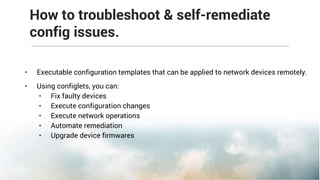
How to troubleshoot & self-remediate
config issues.
• Executable configuration templates that can be applied to network devices remotely.
• Using configlets, you can:
• Fix faulty devices
• Execute configuration changes
• Execute network operations
• Automate remediation
• Upgrade device firmwares
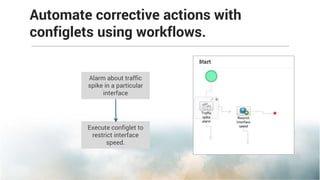
Automate corrective actions with
configlets using workflows.
Alarm about traffic
spike in a particular
interface
Execute configlet to
restrict interface
speed.
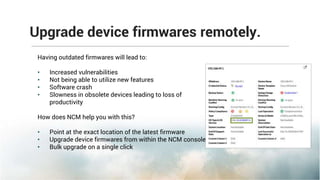
Upgrade device firmwares remotely.
Having outdated firmwares will lead to:
• Increased vulnerabilities
• Not being able to utilize new features
• Software crash
• Slowness in obsolete devices leading to loss of
productivity
How does NCM help you with this?
• Point at the exact location of the latest firmware
• Upgrade device firmwares from within the NCM console
• Bulk upgrade on a single click
Auditing is post-mortem. Start using reports for real-time monitoring.
Fact #7 Reports provide a comprehensive status of the network for day-
to-day monitoring.
Myth #6 Reports are only for audit
• Understand your network in a glance with graphical representation
of the status of your network.
• Find the root cause of a problem by drilling down the reports.
• Be ready for an audit anytime with updated reports right in your
inbox.
Learn about the change & compliance
status in real-time
• Easy-to-deploy and use
• Intuitive UI
• Add-on to NetFlow Analyzer and OpManager
• Dynamic device groups
How does ManageEngine Network Configuration
Manager stand out?
What's the ROI of Network Configuration Manager to
your business?
• IT staff productivity increase.
Automate redundant IT operations & free up valuable resources for business-related
initiatives.
• User productivity increase.
Reduce user downtime caused by unannounced system outages owing to faulty
config changes.
• IT cost reduction.
Reduce IT costs with increased infrastructure efficiency and better software
management.
Look who trust us!
How much does it cost to keep your
network configurations intact?
It is based on the number of devices in your network.
NCM starts @ $595 to manage 10
network devices.
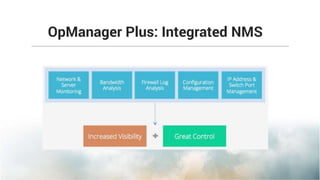
OpManager Plus: Integrated NMS
Thank you

Network Configuration Management - Mumbai Seminar

  • 1.
    A comprehensive configuration,change, and compliance management tool. Network Configuration Manager
  • 3.
    Fact #1 Configurationmanagement tool is an essential to organizations of any size. Myth #1 Configuration management tool is a luxury
  • 4.
    • No visibilityinto the status of device configurations. • Repetitive configuration changes to meet the business needs. • Productivity loss while reverting a faulty device. • Configuration errors due to manual execution. Drawbacks of not having a NCM tool.
  • 5.
    What can NCMdo to your business? • Increased efficiency, stability, and control of your network. • Enhanced system reliability through preventive detection of faulty changes. • Better quality of service owing to faster troubleshooting. • Faster restoration of service using pre-configured remedies.
  • 6.
    42% of ransomwarevictims were able to restore their network. Thanks to their network admins for having updated backups. (source) Fact #2 Backups are an everyday activity. Myth #2 Backups are required only when there is an outage
  • 7.
    • Save timeand effort with scheduled & automated backup. • Protect critical devices with reliable backups of device configurations. Label the best working version of the configuration as 'Baseline'. • Quickly recover from failed configuration changes by restoring the baseline configuration. How do backups help your network?
  • 8.
    • Long hoursspent in manually fetching the backup of each device. • Unencrypted local storage of config files opening the network to vulnerabilities. • Consumption of human resource to perform backups for several devices. • Risk of missing a backup operation of a critical device. What are the challenges in procuring config backups?
  • 9.
    36% of networkoutages are caused by configuration errors. (source) Fact #3 Big disasters come disguised as small stray changes. Myth #3 Config. changes are no big deal
  • 10.
    How do youcapture, analyze & revert a change? • Detect & track changes in real-time. • Be notified of the config changes with change notifications. • Spot the erroneous change with the side-by-side diff view of config files. • Know who makes what change using role-based access control. • Restrict access to critical device configuration by setting the scope for each user. • Nuke network issues at the beginning by reverting faulty changes in critical devices.
  • 11.
    Employee negligence isthe root cause of 68% of security breaches. (source) Fact #4 Compliance violations create loop holes and increase vulnerabilities. Myth #4 Compliance violations pose no threat
  • 12.
    How would yoube compliant? • Out-of-the-box support for SOX, HIPAA, PCI, & Cisco IOS policies. • Custom policies to suit your business • Go beyond compliance and set rules for monitoring as well!
  • 13.
    How would youcheck the traffic visibility of your network? • The interface speed in a router has to be set for proper traffic allocation and visibility. • Using the custom rule in NCM, you can check if the speed is set in all the interfaces of a router. In a config file, Interface starts with 'interface' In a config file, Interface ends with '!' To exclude the interfaces that are shut down To check if the speed is set
  • 14.
    Working overtime increasesthe risk of illness by 61%. Fact #5 Automate configuration commands and remediation actions using configlets. Myth #5 Troubleshooting is always complex, manual & time consuming
  • 15.
    How to troubleshoot& self-remediate config issues. • Executable configuration templates that can be applied to network devices remotely. • Using configlets, you can: • Fix faulty devices • Execute configuration changes • Execute network operations • Automate remediation • Upgrade device firmwares
  • 16.
    Automate corrective actionswith configlets using workflows. Alarm about traffic spike in a particular interface Execute configlet to restrict interface speed.
  • 17.
    Upgrade device firmwaresremotely. Having outdated firmwares will lead to: • Increased vulnerabilities • Not being able to utilize new features • Software crash • Slowness in obsolete devices leading to loss of productivity How does NCM help you with this? • Point at the exact location of the latest firmware • Upgrade device firmwares from within the NCM console • Bulk upgrade on a single click
  • 18.
    Auditing is post-mortem.Start using reports for real-time monitoring. Fact #7 Reports provide a comprehensive status of the network for day- to-day monitoring. Myth #6 Reports are only for audit
  • 19.
    • Understand yournetwork in a glance with graphical representation of the status of your network. • Find the root cause of a problem by drilling down the reports. • Be ready for an audit anytime with updated reports right in your inbox. Learn about the change & compliance status in real-time
  • 20.
    • Easy-to-deploy anduse • Intuitive UI • Add-on to NetFlow Analyzer and OpManager • Dynamic device groups How does ManageEngine Network Configuration Manager stand out?
  • 21.
    What's the ROIof Network Configuration Manager to your business? • IT staff productivity increase. Automate redundant IT operations & free up valuable resources for business-related initiatives. • User productivity increase. Reduce user downtime caused by unannounced system outages owing to faulty config changes. • IT cost reduction. Reduce IT costs with increased infrastructure efficiency and better software management.
  • 22.
  • 23.
    How much doesit cost to keep your network configurations intact? It is based on the number of devices in your network. NCM starts @ $595 to manage 10 network devices.
  • 24.
  • 25.