Applications Manager
Building the right Website Monitoring Strategy
2. Optimizing individual URLs for better user
experience
4. Detect unauthorized content changes in
your website
AGENDA
1. Track key metrics of Apache, IIS, NginX,
Nginx Plus.
3. Simulate web transactions with synthetic
monitoring
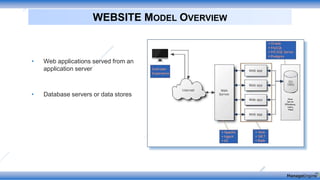
• Web applications served from an
application server
• Database servers or data stores
WEBSITE MODEL OVERVIEW
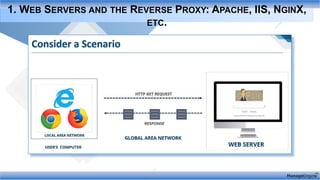
1. WEB SERVERS AND THE REVERSE PROXY: APACHE, IIS, NGINX,
ETC.
Web Server Monitoring All You Should
Know
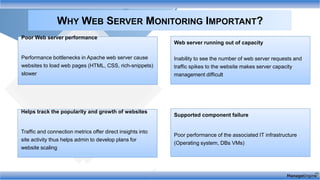
WHY WEB SERVER MONITORING IMPORTANT?
Poor Web server performance
Performance bottlenecks in Apache web server cause
websites to load web pages (HTML, CSS, rich-snippets)
slower
Web server running out of capacity
Inability to see the number of web server requests and
traffic spikes to the website makes server capacity
management difficult
Supported component failure
Poor performance of the associated IT infrastructure
(Operating system, DBs VMs)
Helps track the popularity and growth of websites
Traffic and connection metrics offer direct insights into
site activity thus helps admin to develop plans for
website scaling
SUPPORTED WEB SERVERS
Web servers are responsible for loading and delivering web pages to the end user. In order to make sure
your websites and web servers are always available, webserver monitoring is crucial.
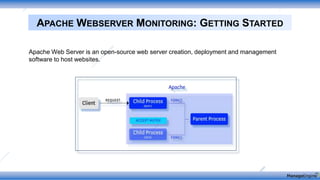
APACHE WEBSERVER MONITORING: GETTING STARTED
Apache Web Server is an open-source web server creation, deployment and management
software to host websites.
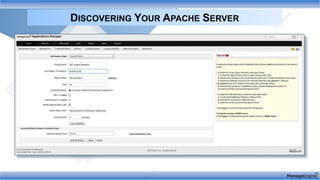
DISCOVERING YOUR APACHE SERVER
Application
availability
Error count
Request
Rate
Application &
Server CPU
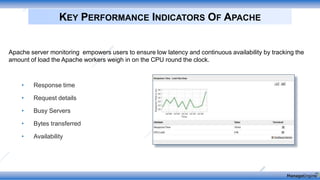
• Response time
• Request details
• Busy Servers
• Bytes transferred
• Availability
KEY PERFORMANCE INDICATORS OF APACHE
Apache server monitoring empowers users to ensure low latency and continuous availability by tracking the
amount of load the Apache workers weigh in on the CPU round the clock.
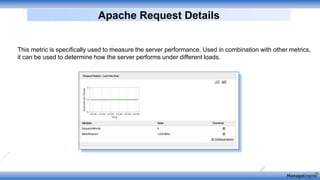
Apache Request Details
This metric is specifically used to measure the server performance. Used in combination with other metrics,
it can be used to determine how the server performs under different loads.
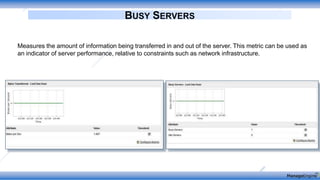
BUSY SERVERS
Measures the amount of information being transferred in and out of the server. This metric can be used as
an indicator of server performance, relative to constraints such as network infrastructure.
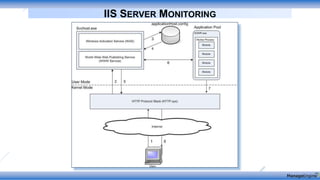
IIS SERVER MONITORING
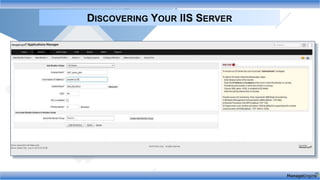
DISCOVERING YOUR IIS SERVER
Application
availability
Error count
Request
Rate
Application &
Server CPU
• Response time
• Application pools
• Website statistics
• Worker Process
• Availability
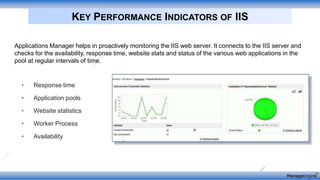
KEY PERFORMANCE INDICATORS OF IIS
Applications Manager helps in proactively monitoring the IIS web server. It connects to the IIS server and
checks for the availability, response time, website stats and status of the various web applications in the
pool at regular intervals of time.
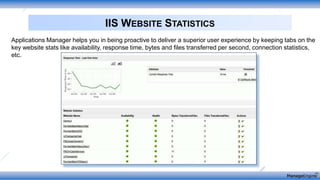
IIS WEBSITE STATISTICS
Applications Manager helps you in being proactive to deliver a superior user experience by keeping tabs on the
key website stats like availability, response time, bytes and files transferred per second, connection statistics,
etc.
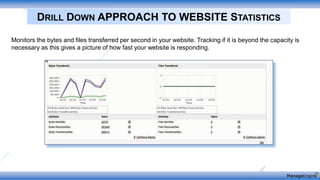
DRILL DOWN APPROACH TO WEBSITE STATISTICS
Monitors the bytes and files transferred per second in your website. Tracking if it is beyond the capacity is
necessary as this gives a picture of how fast your website is responding.
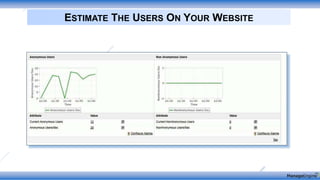
ESTIMATE THE USERS ON YOUR WEBSITE
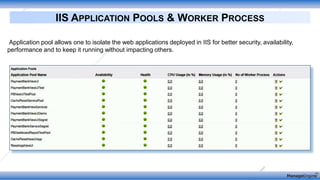
IIS APPLICATION POOLS & WORKER PROCESS
Application pool allows one to isolate the web applications deployed in IIS for better security, availability,
performance and to keep it running without impacting others.
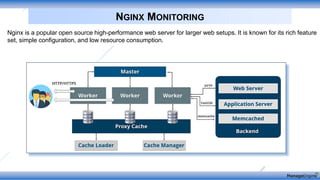
NGINX MONITORING
Nginx is a popular open source high-performance web server for larger web setups. It is known for its rich feature
set, simple configuration, and low resource consumption.
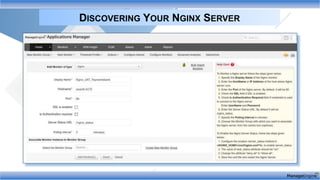
DISCOVERING YOUR NGINX SERVER
Application
availability
Error count
Request
Rate
Application &
Server CPU
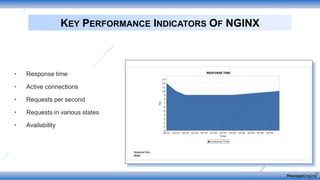
• Response time
• Active connections
• Requests per second
• Requests in various states
• Availability
KEY PERFORMANCE INDICATORS OF NGINX
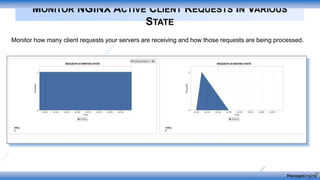
MONITOR NGINX ACTIVE CLIENT REQUESTS IN VARIOUS
STATE
Monitor how many client requests your servers are receiving and how those requests are being processed.
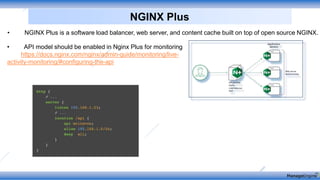
• NGINX Plus is a software load balancer, web server, and content cache built on top of open source NGINX.
• API model should be enabled in Nginx Plus for monitoring
https://docs.nginx.com/nginx/admin-guide/monitoring/live-
activity-monitoring/#configuring-the-api
NGINX Plus
NginxPlus Functioning
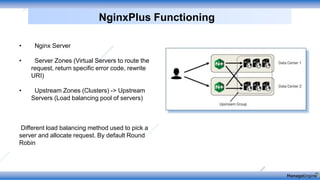
• Nginx Server
• Server Zones (Virtual Servers to route the
request, return specific error code, rewrite
URI)
• Upstream Zones (Clusters) -> Upstream
Servers (Load balancing pool of servers)
Different load balancing method used to pick a
server and allocate request. By default Round
Robin
METRICS MONITORED IN APM
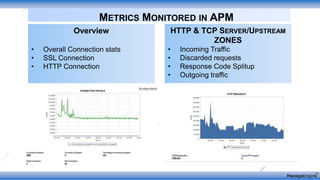
Overview
• Overall Connection stats
• SSL Connection
• HTTP Connection
HTTP & TCP SERVER/UPSTREAM
ZONES
• Incoming Traffic
• Discarded requests
• Response Code Splitup
• Outgoing traffic
METRICS MONITORED IN APM
HTTP & TCP Upstream Server
• Response Time
• Throughput
• Health (Checks Failed &
Status)
Caches
• Hit Ratio
• Cache Size
• Responses Read (Valid &
Expired) Responses Written
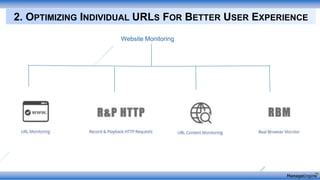
2. OPTIMIZING INDIVIDUAL URLS FOR BETTER USER EXPERIENCE
Website Monitoring
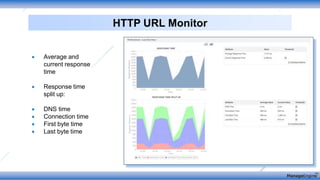
HTTP URL Monitor
 Average and
current response
time
 Response time
split up:
 DNS time
 Connection time
 First byte time
 Last byte time
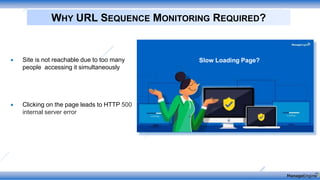
WHY URL SEQUENCE MONITORING REQUIRED?
 Site is not reachable due to too many
people accessing it simultaneously
 Clicking on the page leads to HTTP 500
internal server error
Slow Loading Page?
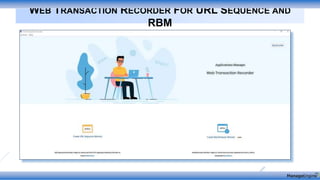
WEB TRANSACTION RECORDER FOR URL SEQUENCE AND
RBM
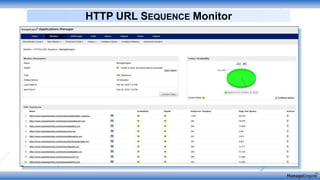
HTTP URL SEQUENCE Monitor
• Capture errors, network
requests, page load details and
other metrics in your web
applications
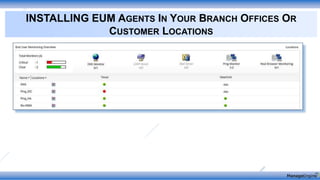
• Set up end user monitoring
agents in branch facilities to
check the availability and
performance of your distributed
applications
3. SYNTHETIC TRANSACTIONS MONITORING FOR DYNAMIC
WEBPAGES
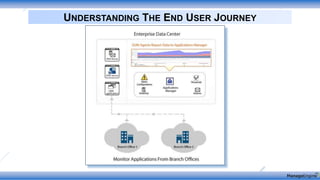
UNDERSTANDING THE END USER JOURNEY
INSTALLING EUM AGENTS IN YOUR BRANCH OFFICES OR
CUSTOMER LOCATIONS
REAL BROWSER MONITORING
Mimic User Interaction
Monitor the Real Website
performance around the world
Reduce blame game between
application and network team
• Launch the web
transaction recorder
• Enter the host and SSL
port of Applications
Manager
• Enter the Applications
Manager credentials and
proceed with the
recording
RECORDING A WEB SCRIPT
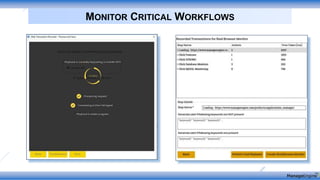
MONITOR CRITICAL WORKFLOWS
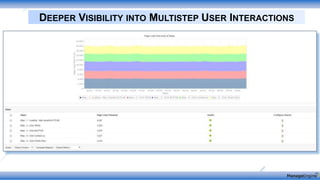
DEEPER VISIBILITY INTO MULTISTEP USER INTERACTIONS
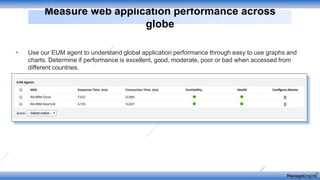
• Use our EUM agent to understand global application performance through easy to use graphs and
charts. Determine if performance is excellent, good, moderate, poor or bad when accessed from
different countries.
Measure web application performance across
globe
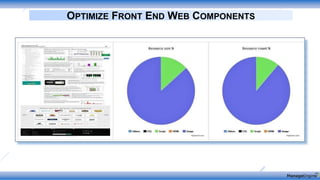
OPTIMIZE FRONT END WEB COMPONENTS
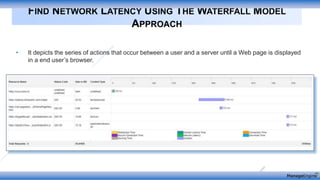
• It depicts the series of actions that occur between a user and a server until a Web page is displayed
in a end user’s browser.
FIND NETWORK LATENCY USING THE WATERFALL MODEL
APPROACH
• Playback scripts including
screen, keyboard, and
mouse interactions
performed by users
• Meet SLAs by ensuring
accurate performance of
your web applications from
all geographical locations
THE NEED FOR SYNTHETIC TRANSACTION MONITORING
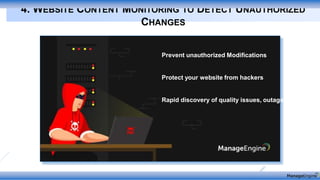
4. WEBSITE CONTENT MONITORING TO DETECT UNAUTHORIZED
CHANGES
Prevent unauthorized Modifications
Protect your website from hackers
Rapid discovery of quality issues, outages
WEBSITE DEFACEMENT
 Website
defacement refers
to unauthorized
hacks on your web
page or entire
website
 Negate any impact
on search engine
page rank and
traffic due to web
page defacement.
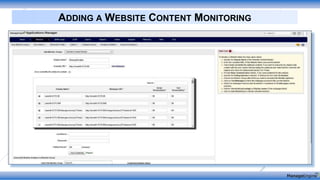
ADDING A WEBSITE CONTENT MONITORING
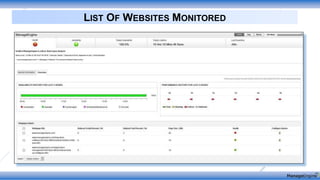
LIST OF WEBSITES MONITORED
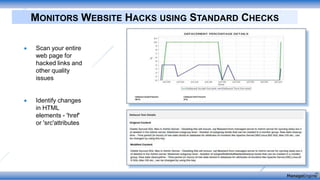
MONITORS WEBSITE HACKS USING STANDARD CHECKS
 Scan your entire
web page for
hacked links and
other quality
issues
 Identify changes
in HTML
elements - 'href'
or 'src'attributes
Contact : eval-apm@manageengine.com
Online Demo : demo.appmanager.com
1. Webserver monitoring in a nutshell
2. Optimize website performance to deliver better user experience
3. Synthetic transaction monitoring for modern webpages
4. Preventing unauthorized website hacks
QUICK RECAP:
Contact : eval-apm@manageengine.com
Online Demo : demo.appmanager.com

Building the right website monitoring strategy

  • 1.
    Applications Manager Building theright Website Monitoring Strategy
  • 2.
    2. Optimizing individualURLs for better user experience 4. Detect unauthorized content changes in your website AGENDA 1. Track key metrics of Apache, IIS, NginX, Nginx Plus. 3. Simulate web transactions with synthetic monitoring
  • 3.
    • Web applicationsserved from an application server • Database servers or data stores WEBSITE MODEL OVERVIEW
  • 4.
    1. WEB SERVERSAND THE REVERSE PROXY: APACHE, IIS, NGINX, ETC. Web Server Monitoring All You Should Know
  • 5.
    WHY WEB SERVERMONITORING IMPORTANT? Poor Web server performance Performance bottlenecks in Apache web server cause websites to load web pages (HTML, CSS, rich-snippets) slower Web server running out of capacity Inability to see the number of web server requests and traffic spikes to the website makes server capacity management difficult Supported component failure Poor performance of the associated IT infrastructure (Operating system, DBs VMs) Helps track the popularity and growth of websites Traffic and connection metrics offer direct insights into site activity thus helps admin to develop plans for website scaling
  • 6.
    SUPPORTED WEB SERVERS Webservers are responsible for loading and delivering web pages to the end user. In order to make sure your websites and web servers are always available, webserver monitoring is crucial.
  • 7.
    APACHE WEBSERVER MONITORING:GETTING STARTED Apache Web Server is an open-source web server creation, deployment and management software to host websites.
  • 8.
    DISCOVERING YOUR APACHESERVER Application availability Error count Request Rate Application & Server CPU
  • 9.
    • Response time •Request details • Busy Servers • Bytes transferred • Availability KEY PERFORMANCE INDICATORS OF APACHE Apache server monitoring empowers users to ensure low latency and continuous availability by tracking the amount of load the Apache workers weigh in on the CPU round the clock.
  • 10.
    Apache Request Details Thismetric is specifically used to measure the server performance. Used in combination with other metrics, it can be used to determine how the server performs under different loads.
  • 11.
    BUSY SERVERS Measures theamount of information being transferred in and out of the server. This metric can be used as an indicator of server performance, relative to constraints such as network infrastructure.
  • 12.
  • 13.
    DISCOVERING YOUR IISSERVER Application availability Error count Request Rate Application & Server CPU
  • 14.
    • Response time •Application pools • Website statistics • Worker Process • Availability KEY PERFORMANCE INDICATORS OF IIS Applications Manager helps in proactively monitoring the IIS web server. It connects to the IIS server and checks for the availability, response time, website stats and status of the various web applications in the pool at regular intervals of time.
  • 15.
    IIS WEBSITE STATISTICS ApplicationsManager helps you in being proactive to deliver a superior user experience by keeping tabs on the key website stats like availability, response time, bytes and files transferred per second, connection statistics, etc.
  • 16.
    DRILL DOWN APPROACHTO WEBSITE STATISTICS Monitors the bytes and files transferred per second in your website. Tracking if it is beyond the capacity is necessary as this gives a picture of how fast your website is responding.
  • 17.
    ESTIMATE THE USERSON YOUR WEBSITE
  • 18.
    IIS APPLICATION POOLS& WORKER PROCESS Application pool allows one to isolate the web applications deployed in IIS for better security, availability, performance and to keep it running without impacting others.
  • 19.
    NGINX MONITORING Nginx isa popular open source high-performance web server for larger web setups. It is known for its rich feature set, simple configuration, and low resource consumption.
  • 20.
    DISCOVERING YOUR NGINXSERVER Application availability Error count Request Rate Application & Server CPU
  • 21.
    • Response time •Active connections • Requests per second • Requests in various states • Availability KEY PERFORMANCE INDICATORS OF NGINX
  • 22.
    MONITOR NGINX ACTIVECLIENT REQUESTS IN VARIOUS STATE Monitor how many client requests your servers are receiving and how those requests are being processed.
  • 23.
    • NGINX Plusis a software load balancer, web server, and content cache built on top of open source NGINX. • API model should be enabled in Nginx Plus for monitoring https://docs.nginx.com/nginx/admin-guide/monitoring/live- activity-monitoring/#configuring-the-api NGINX Plus
  • 24.
    NginxPlus Functioning • NginxServer • Server Zones (Virtual Servers to route the request, return specific error code, rewrite URI) • Upstream Zones (Clusters) -> Upstream Servers (Load balancing pool of servers) Different load balancing method used to pick a server and allocate request. By default Round Robin
  • 25.
    METRICS MONITORED INAPM Overview • Overall Connection stats • SSL Connection • HTTP Connection HTTP & TCP SERVER/UPSTREAM ZONES • Incoming Traffic • Discarded requests • Response Code Splitup • Outgoing traffic
  • 26.
    METRICS MONITORED INAPM HTTP & TCP Upstream Server • Response Time • Throughput • Health (Checks Failed & Status) Caches • Hit Ratio • Cache Size • Responses Read (Valid & Expired) Responses Written
  • 27.
    2. OPTIMIZING INDIVIDUALURLS FOR BETTER USER EXPERIENCE Website Monitoring
  • 28.
    HTTP URL Monitor Average and current response time  Response time split up:  DNS time  Connection time  First byte time  Last byte time
  • 29.
    WHY URL SEQUENCEMONITORING REQUIRED?  Site is not reachable due to too many people accessing it simultaneously  Clicking on the page leads to HTTP 500 internal server error Slow Loading Page?
  • 30.
    WEB TRANSACTION RECORDERFOR URL SEQUENCE AND RBM
  • 31.
  • 32.
    • Capture errors,network requests, page load details and other metrics in your web applications • Set up end user monitoring agents in branch facilities to check the availability and performance of your distributed applications 3. SYNTHETIC TRANSACTIONS MONITORING FOR DYNAMIC WEBPAGES
  • 33.
  • 34.
    INSTALLING EUM AGENTSIN YOUR BRANCH OFFICES OR CUSTOMER LOCATIONS
  • 35.
    REAL BROWSER MONITORING MimicUser Interaction Monitor the Real Website performance around the world Reduce blame game between application and network team
  • 36.
    • Launch theweb transaction recorder • Enter the host and SSL port of Applications Manager • Enter the Applications Manager credentials and proceed with the recording RECORDING A WEB SCRIPT
  • 37.
  • 38.
    DEEPER VISIBILITY INTOMULTISTEP USER INTERACTIONS
  • 39.
    • Use ourEUM agent to understand global application performance through easy to use graphs and charts. Determine if performance is excellent, good, moderate, poor or bad when accessed from different countries. Measure web application performance across globe
  • 40.
    OPTIMIZE FRONT ENDWEB COMPONENTS
  • 41.
    • It depictsthe series of actions that occur between a user and a server until a Web page is displayed in a end user’s browser. FIND NETWORK LATENCY USING THE WATERFALL MODEL APPROACH
  • 42.
    • Playback scriptsincluding screen, keyboard, and mouse interactions performed by users • Meet SLAs by ensuring accurate performance of your web applications from all geographical locations THE NEED FOR SYNTHETIC TRANSACTION MONITORING
  • 43.
    4. WEBSITE CONTENTMONITORING TO DETECT UNAUTHORIZED CHANGES Prevent unauthorized Modifications Protect your website from hackers Rapid discovery of quality issues, outages
  • 44.
    WEBSITE DEFACEMENT  Website defacementrefers to unauthorized hacks on your web page or entire website  Negate any impact on search engine page rank and traffic due to web page defacement.
  • 45.
    ADDING A WEBSITECONTENT MONITORING
  • 46.
  • 47.
    MONITORS WEBSITE HACKSUSING STANDARD CHECKS  Scan your entire web page for hacked links and other quality issues  Identify changes in HTML elements - 'href' or 'src'attributes
  • 48.
    Contact : eval-apm@manageengine.com OnlineDemo : demo.appmanager.com 1. Webserver monitoring in a nutshell 2. Optimize website performance to deliver better user experience 3. Synthetic transaction monitoring for modern webpages 4. Preventing unauthorized website hacks QUICK RECAP:
  • 49.