Pre-Production
Madeleine Ross
Audience
Profile
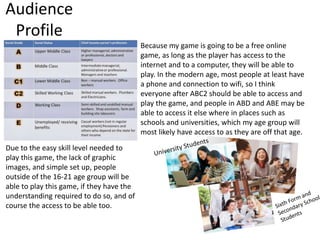
Because my game is going to be a free online
game, as long as the player has access to the
internet and to a computer, they will be able to
play. In the modern age, most people at least have
a phone and connection to wifi, so I think
everyone after ABC2 should be able to access and
play the game, and people in ABD and ABE may be
able to access it else where in places such as
schools and universities, which my age group will
most likely have access to as they are off that age.
Due to the easy skill level needed to
play this game, the lack of graphic
images, and simple set up, people
outside of the 16-21 age group will be
able to play this game, if they have the
understanding required to do so, and of
course the access to be able too.
Style Sheet
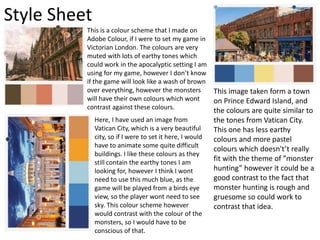
This is a colour scheme that I made on
Adobe Colour, if I were to set my game in
Victorian London. The colours are very
muted with lots of earthy tones which
could work in the apocalyptic setting I am
using for my game, however I don’t know
if the game will look like a wash of brown
over everything, however the monsters
will have their own colours which wont
contrast against these colours.
Here, I have used an image from
Vatican City, which is a very beautiful
city, so if I were to set it here, I would
have to animate some quite difficult
buildings. I like these colours as they
still contain the earthy tones I am
looking for, however I think I wont
need to use this much blue, as the
game will be played from a birds eye
view, so the player wont need to see
sky. This colour scheme however
would contrast with the colour of the
monsters, so I would have to be
conscious of that.
This image taken form a town
on Prince Edward Island, and
the colours are quite similar to
the tones from Vatican City.
This one has less earthy
colours and more pastel
colours which doesn't’t really
fit with the theme of ”monster
hunting” however it could be a
good contrast to the fact that
monster hunting is rough and
gruesome so could work to
contrast that idea.
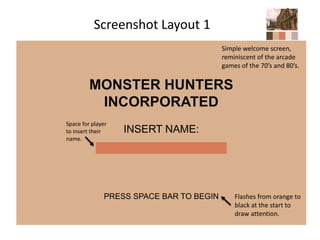
Screenshot Layout 1
MONSTER HUNTERS
INCORPORATED
INSERT NAME:
PRESS SPACE BAR TO BEGIN Flashes from orange to
black at the start to
draw attention.
Space for player
to insert their
name.
Simple welcome screen,
reminiscent of the arcade
games of the 70’s and 80’s.
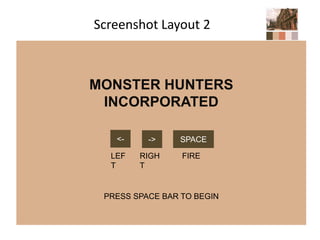
Screenshot Layout 2
MONSTER HUNTERS
INCORPORATED
PRESS SPACE BAR TO BEGIN
<- -> SPACE
LEF
T
RIGH
T
FIRE
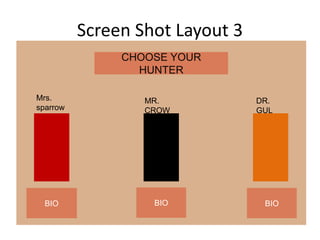
Screen Shot Layout 3
CHOOSE YOUR
HUNTER
Mrs.
sparrow
MR.
CROW
DR.
GUL
BIO BIO BIO
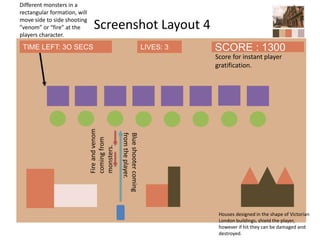
Screenshot Layout 4
Different monsters in a
rectangular formation, will
move side to side shooting
”venom” or “fire” at the
players character.
Houses designed in the shape of Victorian
London buildings, shield the player,
however if hit they can be damaged and
destroyed.
SCORE : 1300TIME LEFT: 3O SECS
Score for instant player
gratification.
Fireandvenom
comingfrom
monsters.
Blueshootercoming
fromtheplayer.
LIVES: 3
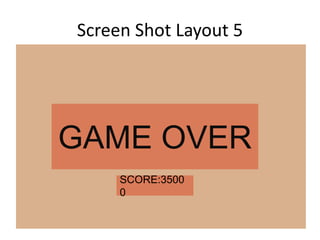
Screen Shot Layout 5
GAME OVER
SCORE:3500
0
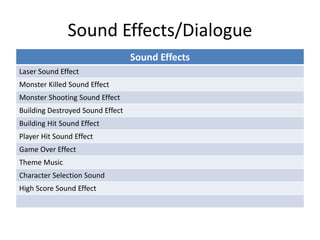
Sound Effects/Dialogue
Sound Effects
Laser Sound Effect
Monster Killed Sound Effect
Monster Shooting Sound Effect
Building Destroyed Sound Effect
Building Hit Sound Effect
Player Hit Sound Effect
Game Over Effect
Theme Music
Character Selection Sound
High Score Sound Effect
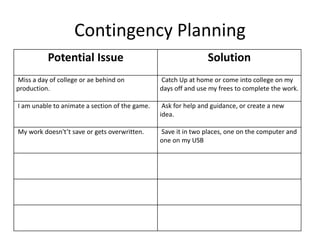
Contingency Planning
Potential Issue Solution
Miss a day of college or ae behind on
production.
Catch Up at home or come into college on my
days off and use my frees to complete the work.
I am unable to animate a section of the game. Ask for help and guidance, or create a new
idea.
My work doesn't’t save or gets overwritten. Save it in two places, one on the computer and
one on my USB
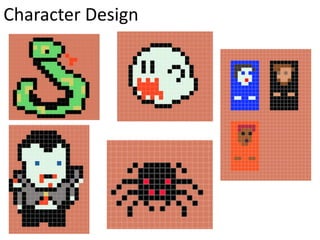
Character Design

5. pre production

  • 1.
  • 2.
    Audience Profile Because my gameis going to be a free online game, as long as the player has access to the internet and to a computer, they will be able to play. In the modern age, most people at least have a phone and connection to wifi, so I think everyone after ABC2 should be able to access and play the game, and people in ABD and ABE may be able to access it else where in places such as schools and universities, which my age group will most likely have access to as they are off that age. Due to the easy skill level needed to play this game, the lack of graphic images, and simple set up, people outside of the 16-21 age group will be able to play this game, if they have the understanding required to do so, and of course the access to be able too.
  • 3.
    Style Sheet This isa colour scheme that I made on Adobe Colour, if I were to set my game in Victorian London. The colours are very muted with lots of earthy tones which could work in the apocalyptic setting I am using for my game, however I don’t know if the game will look like a wash of brown over everything, however the monsters will have their own colours which wont contrast against these colours. Here, I have used an image from Vatican City, which is a very beautiful city, so if I were to set it here, I would have to animate some quite difficult buildings. I like these colours as they still contain the earthy tones I am looking for, however I think I wont need to use this much blue, as the game will be played from a birds eye view, so the player wont need to see sky. This colour scheme however would contrast with the colour of the monsters, so I would have to be conscious of that. This image taken form a town on Prince Edward Island, and the colours are quite similar to the tones from Vatican City. This one has less earthy colours and more pastel colours which doesn't’t really fit with the theme of ”monster hunting” however it could be a good contrast to the fact that monster hunting is rough and gruesome so could work to contrast that idea.
  • 4.
    Screenshot Layout 1 MONSTERHUNTERS INCORPORATED INSERT NAME: PRESS SPACE BAR TO BEGIN Flashes from orange to black at the start to draw attention. Space for player to insert their name. Simple welcome screen, reminiscent of the arcade games of the 70’s and 80’s.
  • 5.
    Screenshot Layout 2 MONSTERHUNTERS INCORPORATED PRESS SPACE BAR TO BEGIN <- -> SPACE LEF T RIGH T FIRE
  • 6.
    Screen Shot Layout3 CHOOSE YOUR HUNTER Mrs. sparrow MR. CROW DR. GUL BIO BIO BIO
  • 7.
    Screenshot Layout 4 Differentmonsters in a rectangular formation, will move side to side shooting ”venom” or “fire” at the players character. Houses designed in the shape of Victorian London buildings, shield the player, however if hit they can be damaged and destroyed. SCORE : 1300TIME LEFT: 3O SECS Score for instant player gratification. Fireandvenom comingfrom monsters. Blueshootercoming fromtheplayer. LIVES: 3
  • 8.
    Screen Shot Layout5 GAME OVER SCORE:3500 0
  • 9.
    Sound Effects/Dialogue Sound Effects LaserSound Effect Monster Killed Sound Effect Monster Shooting Sound Effect Building Destroyed Sound Effect Building Hit Sound Effect Player Hit Sound Effect Game Over Effect Theme Music Character Selection Sound High Score Sound Effect
  • 10.
    Contingency Planning Potential IssueSolution Miss a day of college or ae behind on production. Catch Up at home or come into college on my days off and use my frees to complete the work. I am unable to animate a section of the game. Ask for help and guidance, or create a new idea. My work doesn't’t save or gets overwritten. Save it in two places, one on the computer and one on my USB
  • 11.

Editor's Notes

  • #3 List age, gender, ABC1/C2DE etc (as appropriate). Include images as appropriate to illustrate your target audience Use https://yougov.co.uk/profileslite#/ for similar games to list audience desires/interests and how you will appeal to them through your game.
  • #4 Explore colours and pixel art styles similar to what you want to produce. Discuss these elements in relation to why you chose them and where you may use them in your project. Go over as many pages as you need to.
  • #5 Mock up of a potential design using the colours and sourced images. Alter this slide to make it appropriate for your planned product types. Use the content established in your style sheet to do this.
  • #6 Mock up of a potential design using the colours and sourced images. Alter this slide to make it appropriate for your planned product types. Use the content established in your style sheet to do this.
  • #8 Mock up of a potential design using the colours and sourced images. Alter this slide to make it appropriate for your planned product types. Use the content established in your style sheet to do this.
  • #10 What sound effects might you need for your animated screenshot? How could you make them?