Pre-Production
Audience Profile
• My target age range for my audience is older teens to
young adults, around 17 to 25 years old. This is
because video games are primarily for a young
audience, but the horror genre isn’t intended for
anyone who is younger than a teenager. My target
audience’s social status is middle class, as that is the
largest amount of people, and most young people tend
to be middle class. My target gender audience is males
because more men play video games than women. I
will appeal to this audience by including common
motifs from horror games and horror rpgs, such as
enemies and jumpscares.
Style sheet
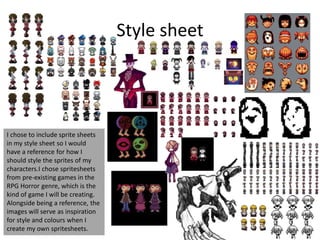
I chose to include sprite sheets
in my style sheet so I would
have a reference for how I
should style the sprites of my
characters.I chose spritesheets
from pre-existing games in the
RPG Horror genre, which is the
kind of game I will be creating.
Alongside being a reference, the
images will serve as inspiration
for style and colours when I
create my own spritesheets.
Style sheet
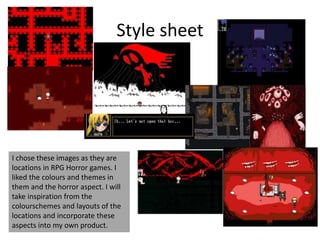
I chose these images as they are
locations in RPG Horror games. I
liked the colours and themes in
them and the horror aspect. I will
take inspiration from the
colourschemes and layouts of the
locations and incorporate these
aspects into my own product.
Style sheet
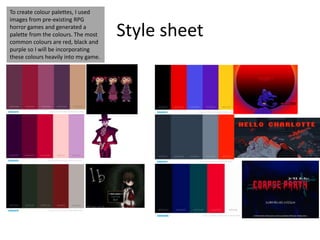
To create colour palettes, I used
images from pre-existing RPG
horror games and generated a
palette from the colours. The most
common colours are red, black and
purple so I will be incorporating
these colours heavily into my game.
Style sheet
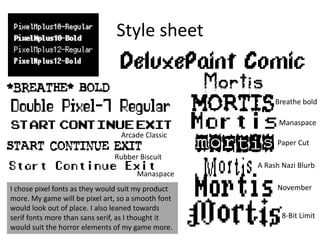
Breathe bold
Paper Cut
Manaspace
A Rash Nazi Blurb
November
8-Bit Limit
Arcade Classic
Rubber Biscuit
Manaspace
I chose pixel fonts as they would suit my product
more. My game will be pixel art, so a smooth font
would look out of place. I also leaned towards
serif fonts more than sans serif, as I thought it
would suit the horror elements of my game more.
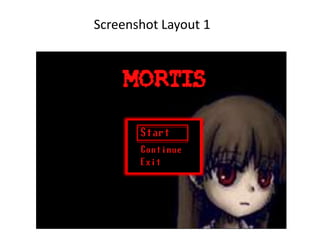
Screenshot Layout 1
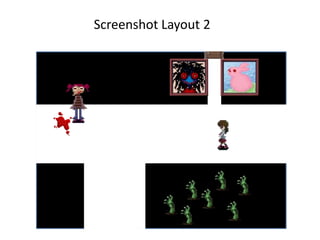
Screenshot Layout 2
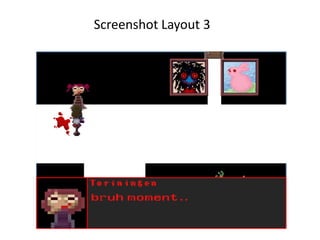
Screenshot Layout 3
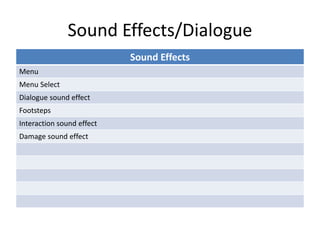
Sound Effects/Dialogue
Sound Effects
Menu
Menu Select
Dialogue sound effect
Footsteps
Interaction sound effect
Damage sound effect
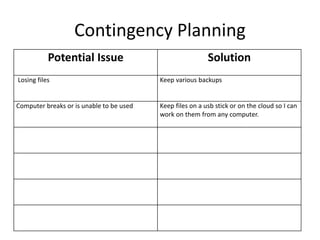
Contingency Planning
Potential Issue Solution
Losing files Keep various backups
Computer breaks or is unable to be used Keep files on a usb stick or on the cloud so I can
work on them from any computer.
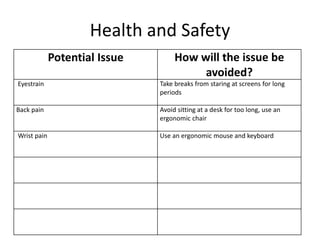
Health and Safety
Potential Issue How will the issue be
avoided?
Eyestrain Take breaks from staring at screens for long
periods
Back pain Avoid sitting at a desk for too long, use an
ergonomic chair
Wrist pain Use an ergonomic mouse and keyboard

5. pre production (1)

  • 1.
  • 2.
    Audience Profile • Mytarget age range for my audience is older teens to young adults, around 17 to 25 years old. This is because video games are primarily for a young audience, but the horror genre isn’t intended for anyone who is younger than a teenager. My target audience’s social status is middle class, as that is the largest amount of people, and most young people tend to be middle class. My target gender audience is males because more men play video games than women. I will appeal to this audience by including common motifs from horror games and horror rpgs, such as enemies and jumpscares.
  • 3.
    Style sheet I choseto include sprite sheets in my style sheet so I would have a reference for how I should style the sprites of my characters.I chose spritesheets from pre-existing games in the RPG Horror genre, which is the kind of game I will be creating. Alongside being a reference, the images will serve as inspiration for style and colours when I create my own spritesheets.
  • 4.
    Style sheet I chosethese images as they are locations in RPG Horror games. I liked the colours and themes in them and the horror aspect. I will take inspiration from the colourschemes and layouts of the locations and incorporate these aspects into my own product.
  • 5.
    Style sheet To createcolour palettes, I used images from pre-existing RPG horror games and generated a palette from the colours. The most common colours are red, black and purple so I will be incorporating these colours heavily into my game.
  • 6.
    Style sheet Breathe bold PaperCut Manaspace A Rash Nazi Blurb November 8-Bit Limit Arcade Classic Rubber Biscuit Manaspace I chose pixel fonts as they would suit my product more. My game will be pixel art, so a smooth font would look out of place. I also leaned towards serif fonts more than sans serif, as I thought it would suit the horror elements of my game more.
  • 7.
  • 8.
  • 9.
  • 10.
    Sound Effects/Dialogue Sound Effects Menu MenuSelect Dialogue sound effect Footsteps Interaction sound effect Damage sound effect
  • 11.
    Contingency Planning Potential IssueSolution Losing files Keep various backups Computer breaks or is unable to be used Keep files on a usb stick or on the cloud so I can work on them from any computer.
  • 12.
    Health and Safety PotentialIssue How will the issue be avoided? Eyestrain Take breaks from staring at screens for long periods Back pain Avoid sitting at a desk for too long, use an ergonomic chair Wrist pain Use an ergonomic mouse and keyboard

Editor's Notes

  • #3 List age, gender, ABC1/C2DE etc (as appropriate). Include images as appropriate to illustrate your target audience Use https://yougov.co.uk/profileslite#/ for similar games to list audience desires/interests and how you will appeal to them through your game.
  • #4 Explore colours and pixel art styles similar to what you want to produce. Discuss these elements in relation to why you chose them and where you may use them in your project. Go over as many pages as you need to.
  • #5 Explore colours and pixel art styles similar to what you want to produce. Discuss these elements in relation to why you chose them and where you may use them in your project. Go over as many pages as you need to.
  • #6 Explore colours and pixel art styles similar to what you want to produce. Discuss these elements in relation to why you chose them and where you may use them in your project. Go over as many pages as you need to.
  • #7 Explore colours and pixel art styles similar to what you want to produce. Discuss these elements in relation to why you chose them and where you may use them in your project. Go over as many pages as you need to.
  • #8 Mock up of a potential design using the colours and sourced images. Alter this slide to make it appropriate for your planned product types. Use the content established in your style sheet to do this.
  • #9 Mock up of a potential design using the colours and sourced images. Alter this slide to make it appropriate for your planned product types. Use the content established in your style sheet to do this.
  • #10 Mock up of a potential design using the colours and sourced images. Alter this slide to make it appropriate for your planned product types. Use the content established in your style sheet to do this.
  • #11 What sound effects might you need for your animated screenshot? How could you make them?