GARY BAHADUR KRAA SECURITY WWW.KRAASECURITY.COM 5 Myths About Data Loss Prevention
What is the DLP Risk? Survey Says Many companies have lost confidential data through removable media Organizations rely mainly on paper-based controls (policies, NDAs, goodwill, paper cuts) Intellectual property, customer data and company financials - the top three concerns Data loss via USB drives and other removable media is the top concern Trojans, spyware and other hacker threats are secondary Confidential data stored on desktops and laptops are a major concern Mobile phones have a lot of confidential information, Blackberry, Iphone, Windows Mobile phones, etc No controls over audit, monitoring and logging of data into and out of the network
What is Data Loss? Typical data loss scenarios are email, Usb key, burning a CD/DVD Other options are Instant Messaging, paper, FTP, fax, phone conversations, mind melds Data at rest (stored on file servers, harddrives) Data in motion (being sent across the network somehow) Data destruction (lack of destroying data in unprotected environments) Endpoint security has moved beyond the home user
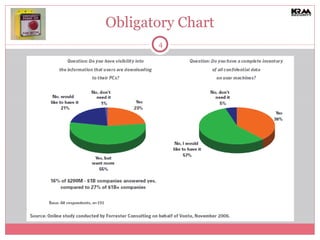
Obligatory Chart
Top 5 Myths about DLP Solutions Myth 1  – We are too small for a DLP solution Myth 2  – I have to purchase an expensive third party DLP solution Myth 3  - We cannot track and classify our data Myth 4  – The IT Department will handle data loss prevention with technology Myth 5 – My company isn’t really exposed to the Internet
Myth 1- Too Small for a DLP suite Example, small/medium sized law firm, 100 lawyers,, 30 staff, a couple offices, confidential data, a website, 50 gigs of data storage A DLP suite is too complex and time consuming We have legal controls in place We have an “IT Guy” who handles everything Our lawyers know not to send out emails to anyone that should not receive it  We have firewall, antivirus and malware protection in place
Myth 1- Too Small for a DLP Suite Any SMB company that has confidential data is at risk. What can the small law firm do about it? The hype generated by the big companies (McAfee, Symantec etc) should not scare you away from smaller, focused solutions. Many tactical solutions are available that are not too complex Technological controls have to complement legal controls, to protect employees from themselves as well as from outside evil-doers IT staff are rarely the same as Security Staff, augment with either outsourced security staff or with robust technology controls Do not rely on employees actually understanding what security means, technology controls are needed to offset “stupid” mistakes DLP is evolved far beyond simple security controls, looking at actual data is the key to implement technology correctly
Myth 2 – Expensive Third Party Solution For the small law firm, implementing a $100,000 Symantec or McAfee solution is impossible We cant afford the consulting and software costs Our IT staff are not experts in these DLP solutions and we cannot hire any new staff We have already invested in a lot of security technology, no approval for more enterprise suites
Myth 2 – Expensive Third Party Solution Tactical solutions available vs a full enterprise suite, a number of freeware tools are available Smaller tools do not require intensive training in security or the products You do not have to replace security technology you already have in place, augment your security DLP gaps
Myth 3 – Data classification challenge Our example law firm probably has client confidential files labeled and not much else  Most companies, especially SMBs, have never classified all their data and have no plans to do this, its to difficult. We do not have the resources to go back and classify all old documents We do not need classification standards other than Confidential Our employees do not know enough to classify data and our managers are too busy to look at every document
Myth 3 – Data classification challenge To avoid the high and costly rate of false positives and negatives, use technology with accurate detection capabilities (structured, unstructured data) A tiered classification standard such as Confidential, Private, Company Use and Public  used with DLP will minimize false positives With a process in place to educate employees and to force data classification on all newly created documents, a DLP solution can easily manage files based on classification in the future
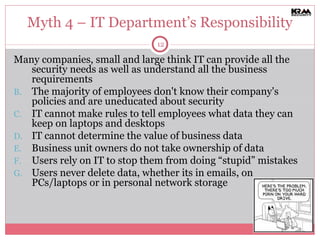
Myth 4 – IT Department’s Responsibility Many companies, small and large think IT can provide all the security needs as well as understand all the business requirements The majority of employees don't know their company's policies and are uneducated about security IT cannot make rules to tell employees what data they can keep on laptops and desktops IT cannot determine the value of business data Business unit owners do not take ownership of data Users rely on IT to stop them from doing “stupid” mistakes Users never delete data, whether its in emails, on PCs/laptops or in personal network storage
Myth 4 – IT Department’s Responsibility User education, focus on data security, privacy and confidentiality Look at Data at rest, where does sensitive data reside outside of secure databases and file servers, develop business rules for saving data to laptops/PCs Become content aware, read through data looking for sensitive information Business units must provide guidance on data value, and access rights to data, Centralized policy management Protecting data in motion by monitoring, logging and auditing (typically email, web, FTP, USB), Perform some blocking, network based Provide automated data destruction capabilities that IT does not have to “manage”
Myth 5 – What Internet? The example law firm may not do any processing or have interaction through their website so do not think Internet data transmission is a risk We only send emails out and we have email security in place Our staff encrypt data on their laptops so we do not worry Our firewall protects us from attacks and data theft We do not conduct business via our website
Myth 5 -  What Internet? 1 in 400 emails contains confidential information, in a law firm that will be a much higher percentage. Antivirus needs help for content checking software 4 out of 5 companies have lost confidential data when a laptop was lost, encrypted data is great but its usually transferred unencrypted, use technology to force encryption or other checks before sending out files 1 in 2 USB drives contains confidential information, a firewall will not stop data from Leaving. Insider attacks are more prevalent than external hacker attacks, protect data in the internal environment through blocking, monitoring and auditing access Over 35 states have enacted security breach notification laws, you don’t have to do web based business to loose data via the Internet. Use DLP to meet regulatory requirements.
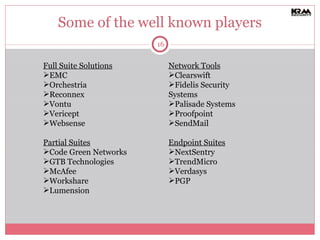
Some of the well known players Full Suite Solutions EMC Orchestria Reconnex Vontu Vericept Websense Partial Suites Code Green Networks GTB Technologies McAfee Workshare Lumension Network Tools Clearswift Fidelis Security Systems Palisade Systems Proofpoint SendMail Endpoint Suites NextSentry TrendMicro Verdasys PGP
Gary Bahadur CEO KRAA Security www.kraasecurity.com [email_address] Blog.kraasecurity.com Consulting Services | Managed Security Services

5 Myths About Data Loss Prevention

  • 1.
    GARY BAHADUR KRAASECURITY WWW.KRAASECURITY.COM 5 Myths About Data Loss Prevention
  • 2.
    What is theDLP Risk? Survey Says Many companies have lost confidential data through removable media Organizations rely mainly on paper-based controls (policies, NDAs, goodwill, paper cuts) Intellectual property, customer data and company financials - the top three concerns Data loss via USB drives and other removable media is the top concern Trojans, spyware and other hacker threats are secondary Confidential data stored on desktops and laptops are a major concern Mobile phones have a lot of confidential information, Blackberry, Iphone, Windows Mobile phones, etc No controls over audit, monitoring and logging of data into and out of the network
  • 3.
    What is DataLoss? Typical data loss scenarios are email, Usb key, burning a CD/DVD Other options are Instant Messaging, paper, FTP, fax, phone conversations, mind melds Data at rest (stored on file servers, harddrives) Data in motion (being sent across the network somehow) Data destruction (lack of destroying data in unprotected environments) Endpoint security has moved beyond the home user
  • 4.
  • 5.
    Top 5 Mythsabout DLP Solutions Myth 1 – We are too small for a DLP solution Myth 2 – I have to purchase an expensive third party DLP solution Myth 3 - We cannot track and classify our data Myth 4 – The IT Department will handle data loss prevention with technology Myth 5 – My company isn’t really exposed to the Internet
  • 6.
    Myth 1- TooSmall for a DLP suite Example, small/medium sized law firm, 100 lawyers,, 30 staff, a couple offices, confidential data, a website, 50 gigs of data storage A DLP suite is too complex and time consuming We have legal controls in place We have an “IT Guy” who handles everything Our lawyers know not to send out emails to anyone that should not receive it We have firewall, antivirus and malware protection in place
  • 7.
    Myth 1- TooSmall for a DLP Suite Any SMB company that has confidential data is at risk. What can the small law firm do about it? The hype generated by the big companies (McAfee, Symantec etc) should not scare you away from smaller, focused solutions. Many tactical solutions are available that are not too complex Technological controls have to complement legal controls, to protect employees from themselves as well as from outside evil-doers IT staff are rarely the same as Security Staff, augment with either outsourced security staff or with robust technology controls Do not rely on employees actually understanding what security means, technology controls are needed to offset “stupid” mistakes DLP is evolved far beyond simple security controls, looking at actual data is the key to implement technology correctly
  • 8.
    Myth 2 –Expensive Third Party Solution For the small law firm, implementing a $100,000 Symantec or McAfee solution is impossible We cant afford the consulting and software costs Our IT staff are not experts in these DLP solutions and we cannot hire any new staff We have already invested in a lot of security technology, no approval for more enterprise suites
  • 9.
    Myth 2 –Expensive Third Party Solution Tactical solutions available vs a full enterprise suite, a number of freeware tools are available Smaller tools do not require intensive training in security or the products You do not have to replace security technology you already have in place, augment your security DLP gaps
  • 10.
    Myth 3 –Data classification challenge Our example law firm probably has client confidential files labeled and not much else Most companies, especially SMBs, have never classified all their data and have no plans to do this, its to difficult. We do not have the resources to go back and classify all old documents We do not need classification standards other than Confidential Our employees do not know enough to classify data and our managers are too busy to look at every document
  • 11.
    Myth 3 –Data classification challenge To avoid the high and costly rate of false positives and negatives, use technology with accurate detection capabilities (structured, unstructured data) A tiered classification standard such as Confidential, Private, Company Use and Public used with DLP will minimize false positives With a process in place to educate employees and to force data classification on all newly created documents, a DLP solution can easily manage files based on classification in the future
  • 12.
    Myth 4 –IT Department’s Responsibility Many companies, small and large think IT can provide all the security needs as well as understand all the business requirements The majority of employees don't know their company's policies and are uneducated about security IT cannot make rules to tell employees what data they can keep on laptops and desktops IT cannot determine the value of business data Business unit owners do not take ownership of data Users rely on IT to stop them from doing “stupid” mistakes Users never delete data, whether its in emails, on PCs/laptops or in personal network storage
  • 13.
    Myth 4 –IT Department’s Responsibility User education, focus on data security, privacy and confidentiality Look at Data at rest, where does sensitive data reside outside of secure databases and file servers, develop business rules for saving data to laptops/PCs Become content aware, read through data looking for sensitive information Business units must provide guidance on data value, and access rights to data, Centralized policy management Protecting data in motion by monitoring, logging and auditing (typically email, web, FTP, USB), Perform some blocking, network based Provide automated data destruction capabilities that IT does not have to “manage”
  • 14.
    Myth 5 –What Internet? The example law firm may not do any processing or have interaction through their website so do not think Internet data transmission is a risk We only send emails out and we have email security in place Our staff encrypt data on their laptops so we do not worry Our firewall protects us from attacks and data theft We do not conduct business via our website
  • 15.
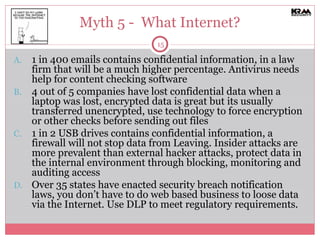
    Myth 5 - What Internet? 1 in 400 emails contains confidential information, in a law firm that will be a much higher percentage. Antivirus needs help for content checking software 4 out of 5 companies have lost confidential data when a laptop was lost, encrypted data is great but its usually transferred unencrypted, use technology to force encryption or other checks before sending out files 1 in 2 USB drives contains confidential information, a firewall will not stop data from Leaving. Insider attacks are more prevalent than external hacker attacks, protect data in the internal environment through blocking, monitoring and auditing access Over 35 states have enacted security breach notification laws, you don’t have to do web based business to loose data via the Internet. Use DLP to meet regulatory requirements.
  • 16.
    Some of thewell known players Full Suite Solutions EMC Orchestria Reconnex Vontu Vericept Websense Partial Suites Code Green Networks GTB Technologies McAfee Workshare Lumension Network Tools Clearswift Fidelis Security Systems Palisade Systems Proofpoint SendMail Endpoint Suites NextSentry TrendMicro Verdasys PGP
  • 17.
    Gary Bahadur CEOKRAA Security www.kraasecurity.com [email_address] Blog.kraasecurity.com Consulting Services | Managed Security Services