Data Loss
Threats and Mitigations
April Mardock, CISSP
Who is April?
Security Certifications
CISSP (12 years)
Other
Masters in Information Technology
Adjunct professor EdTech @CityU Seattle
InfoSec Manager @SPS
Experience
Computer forensics (12 years)
Disaster Recovery (12 years)
Network Intrusion (5 years)
Audits (5 years)
Network Operations & Architecture (20 years)
What is DLP?
Definition
Data loss prevention (DLP) is the strategy used to
ensure that sensitive content is not lost, misused,
or accessed by unauthorized users
Common Examples of protected content
-Credit Card numbers leaving the system
-Social Security numbers leaving the system
But it’s really about classification & Policy
-What does your org need to protect?
-What is the risk tolerance for loss
*to organization
*to impacted customers/partners
DLP is dead.
Long live DLP.
Encryption & IPv6 is perceived as a “problem”
ü Inspection is hard to do on at rest & in flight encrypted
data- Become MITM
ü Protect and actively manage your encryption keys
ü Upgrade your tools (or block IPv6)
False Positives are dangerous and disruptive
ü New tools are context aware
ü Signatures & Tools tuned to YOUR risks
ü It’s not just about string matches
There is no perimeter
ü DLP agents can run on mobile clients
ü DLP agents can run against enterprise cloud services
(O365, etc)
The Four Pillars
Managing Data Loss
is an exercise in Risk Management
1 -DLP Awareness (users and admins)
2 -Classify and Evaluate the Risk
3 -Control (Choose, Install and Monitor)
4 -Respond to threats immediately
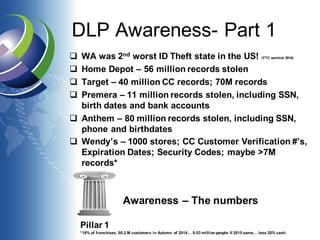
DLP Awareness- Part 1
q WA was 2nd worst ID Theft state in the US! (FTC sentinel 2014)
q Home Depot – 56 million records stolen
q Target – 40 million CC records; 70M records
q Premera – 11 million records stolen, including SSN,
birth dates and bank accounts
q Anthem – 80 million records stolen, including SSN,
phone and birthdates
q Wendy’s – 1000 stores; CC Customer Verification #’s,
Expiration Dates; Security Codes; maybe >7M
records*
Awareness – The numbers
Pillar 1
*18% of franchises, 50.2 M customers in Autumn of 2014… 9.03 million people if 2015 same… less 20% cash.
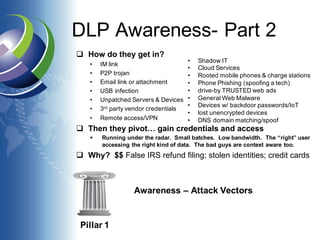
DLP Awareness- Part 2
q How do they get in?
• IM link
• P2P trojan
• Email link or attachment
• USB infection
• Unpatched Servers & Devices
• 3rd party vendor credentials
• Remote access/VPN
q Then they pivot… gain credentials and access
§ Running under the radar. Small batches. Low bandwidth. The “right” user
accessing the right kind of data. The bad guys are context aware too.
q Why? $$ False IRS refund filing; stolen identities; credit cards
Awareness – Attack Vectors
Pillar 1
• Shadow IT
• Cloud Services
• Rooted mobile phones & charge stations
• Phone Phishing (spoofing a tech)
• drive-by TRUSTED web ads
• General Web Malware
• Devices w/ backdoor passwords/IoT
• lost unencrypted devices
• DNS domain matching/spoof
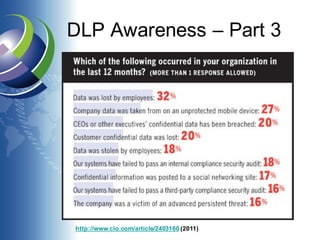
DLP Awareness – Part 3
http://www.cio.com/article/2403160 (2011)
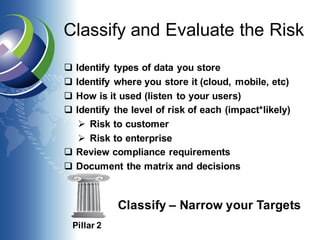
Classify and Evaluate the Risk
q Identify types of data you store
q Identify where you store it (cloud, mobile, etc)
q How is it used (listen to your users)
q Identify the level of risk of each (impact*likely)
Ø Risk to customer
Ø Risk to enterprise
q Review compliance requirements
q Document the matrix and decisions
Pillar 2
Classify – Narrow your Targets
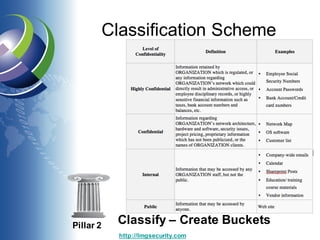
Classification Scheme
Pillar 2
Classify – Create Buckets
http://lmgsecurity.com
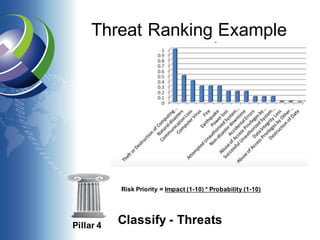
Threat Ranking Example
Pillar 4
Classify - Threats
Risk Priority = Impact (1-10) * Probability (1-10)
Choosing DLP Tools
q Detection or Detection + Response; false
positives need to be actively managed
q Context Aware
q Actions & Integrations possible (wipe? Block?)
q Notifications and Escalation options
q Cloud and Local
q IPv6 and SSL inspection concerns
q You May already have DLP options! (email, web
filtering & AV vendors)
Pillar 3
Controls - Start small, but start!
Install Controls
q Control using end point agent (mobile, etc)
q Control using egress filters (O365, etc)
q Control using inline appliance
q Control using scripts and AI agents
q Encryption is a two edged sword
Ø harder to see SSN/Credit Card as it egresses
Ø harder to index and track
Ø harder for criminals to leverage
Pillar 3
Controls – Know what normal Looks like
Monitor
q Other monitoring – plant unique data, and then
track egress (honey tokens)
q Monitor your tools & logs; Retain/Correlate logs
q Practice and Tune!
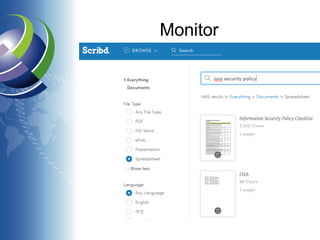
q Search content via web (eg. scribd.com)
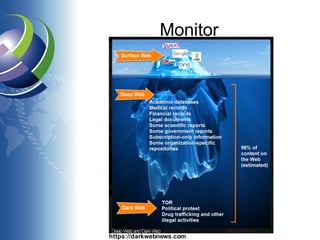
q Searching the Deep and Dark Web
Ø Paid and Free Services like http://holdsecurity.com/ &
https://haveibeenpwned.com/
Ø Search deep web (non indexed, not standard google) -
deeperweb.com
Ø Tread carefully with your tools - torproject.org
§ Could Install TOR browser; anon VPN; then proxy search.
§ Sandbox your host (Can you use a cloud/temp VM?)
§ https://zqktlwi4fecvo6ri.onion.to/wiki/Main_Page
§ Beware of Malware and Traps.
Ø Capture traffic to misnamed Typosquatting DNS hosts
Pillar 3
Monitor –
How will u know when you’ve been pwned?
Monitor
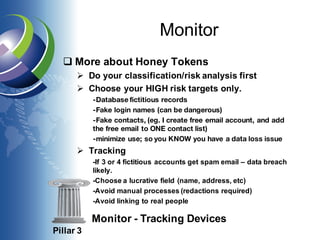
q More about Honey Tokens
Ø Do your classification/risk analysis first
Ø Choose your HIGH risk targets only.
-Database fictitious records
-Fake login names (can be dangerous)
-Fake contacts, (eg. I create free email account, and add
the free email to ONE contact list)
-minimize use; so you KNOW you have a data loss issue
Ø Tracking
-If 3 or 4 fictitious accounts get spam email – data breach
likely.
-Choose a lucrative field (name, address, etc)
-Avoid manual processes (redactions required)
-Avoid linking to real people
Pillar 3
Monitor - Tracking Devices
Monitor
https://darkwebnews.com
Monitor
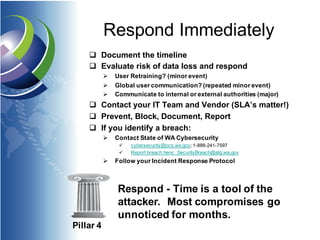
Respond Immediately
q Document the timeline
q Evaluate risk of data loss and respond
Ø User Retraining? (minor event)
Ø Global user communication? (repeated minor event)
Ø Communicate to internal or external authorities (major)
q Contact your IT Team and Vendor (SLA’s matter!)
q Prevent, Block, Document, Report
q If you identify a breach:
Ø Contact State of WA Cybersecurity
ü cybersecurity@ocs.wa.gov; 1-888-241-7597
ü Report breach here: SecurityBreach@atg.wa.gov
Ø Follow your Incident Response Protocol
Pillar 4
Respond - Time is a tool of the
attacker. Most compromises go
unnoticed for months.
Data Loss Costs
q Higher insurance rates
q (related) increased cost to raise bonds/investment
q Future lawsuits & fees – negligence
q Loss of reputation and public trust
q Future fraud risks
q Operational or Business disruption
q Liability for affected consumer protections
q Increased costs of mitigation & interventions
q Opportunity Cost – where $$ could have gone
Pillar 4
Respond – Failure to Response
is Expensive
Next Steps?
q You can’t lose what you don’t have. Delete!
ü Leverage document lifecycles automatically w/ ECM
q Classification matters! Lowers costs.
q Know what normal looks like
q Investigate the tools you already have (O365?)
q Keep watch for YOUR data. Plant honey tokens.
ü Don’t forget social media
q There is no silver bullet. Multiple Vendors and
multi-layered defenses are your friend.
q The human element – training users & admins*
Pillar 4
Respond – Be Proactive
What does the future of DLP look like?
q People patterns, not just machine patterns
q Cloud and mobile create more egress points.
q The tools are becoming context aware
q It’s not just a copy of data; think ransomware
q It’s not always malicious users; think Manning
q Artificial Intelligence is here to help
q Data Classification/ECM systems will auto-
integrate with your security systems to protect
high risk content
Pillar 4
Respond – Plan for the future
NOW
Together we make a difference
For later reading:
http://www.atg.wa.gov/identity-theft-and-privacy-guide-
businesses#Report
https://www2.deloitte.com/content/dam/Deloitte/us/Documents/risk/us-
risk-beneath-the-surface-of-a-cyber-attack.pdf
Under a new law enacted in 2015, any business,
individual, or public agency that is required to issue a
security breach notification to more than 500
Washington residents as a result of a single security
breach shall electronically submit a single sample copy
of that security breach notification, excluding any
personally identifiable information, to the Attorney
General.
START TODAY
Credits:
Sindre Rosvik (template)
FTC Sentinel
cio.com
searchsecurity.com
Verizon.com
Infoworld.com
iansresearch.com
krebsonsecurity.com
Digitalguardian.com
DarkWebNews.com
Lmgsecurity.com
Questions?

Data Loss Threats and Mitigations

  • 1.
    Data Loss Threats andMitigations April Mardock, CISSP
  • 2.
    Who is April? SecurityCertifications CISSP (12 years) Other Masters in Information Technology Adjunct professor EdTech @CityU Seattle InfoSec Manager @SPS Experience Computer forensics (12 years) Disaster Recovery (12 years) Network Intrusion (5 years) Audits (5 years) Network Operations & Architecture (20 years)
  • 3.
    What is DLP? Definition Dataloss prevention (DLP) is the strategy used to ensure that sensitive content is not lost, misused, or accessed by unauthorized users Common Examples of protected content -Credit Card numbers leaving the system -Social Security numbers leaving the system But it’s really about classification & Policy -What does your org need to protect? -What is the risk tolerance for loss *to organization *to impacted customers/partners
  • 4.
    DLP is dead. Longlive DLP. Encryption & IPv6 is perceived as a “problem” ü Inspection is hard to do on at rest & in flight encrypted data- Become MITM ü Protect and actively manage your encryption keys ü Upgrade your tools (or block IPv6) False Positives are dangerous and disruptive ü New tools are context aware ü Signatures & Tools tuned to YOUR risks ü It’s not just about string matches There is no perimeter ü DLP agents can run on mobile clients ü DLP agents can run against enterprise cloud services (O365, etc)
  • 5.
    The Four Pillars ManagingData Loss is an exercise in Risk Management 1 -DLP Awareness (users and admins) 2 -Classify and Evaluate the Risk 3 -Control (Choose, Install and Monitor) 4 -Respond to threats immediately
  • 6.
    DLP Awareness- Part1 q WA was 2nd worst ID Theft state in the US! (FTC sentinel 2014) q Home Depot – 56 million records stolen q Target – 40 million CC records; 70M records q Premera – 11 million records stolen, including SSN, birth dates and bank accounts q Anthem – 80 million records stolen, including SSN, phone and birthdates q Wendy’s – 1000 stores; CC Customer Verification #’s, Expiration Dates; Security Codes; maybe >7M records* Awareness – The numbers Pillar 1 *18% of franchises, 50.2 M customers in Autumn of 2014… 9.03 million people if 2015 same… less 20% cash.
  • 7.
    DLP Awareness- Part2 q How do they get in? • IM link • P2P trojan • Email link or attachment • USB infection • Unpatched Servers & Devices • 3rd party vendor credentials • Remote access/VPN q Then they pivot… gain credentials and access § Running under the radar. Small batches. Low bandwidth. The “right” user accessing the right kind of data. The bad guys are context aware too. q Why? $$ False IRS refund filing; stolen identities; credit cards Awareness – Attack Vectors Pillar 1 • Shadow IT • Cloud Services • Rooted mobile phones & charge stations • Phone Phishing (spoofing a tech) • drive-by TRUSTED web ads • General Web Malware • Devices w/ backdoor passwords/IoT • lost unencrypted devices • DNS domain matching/spoof
  • 8.
    DLP Awareness –Part 3 http://www.cio.com/article/2403160 (2011)
  • 9.
    Classify and Evaluatethe Risk q Identify types of data you store q Identify where you store it (cloud, mobile, etc) q How is it used (listen to your users) q Identify the level of risk of each (impact*likely) Ø Risk to customer Ø Risk to enterprise q Review compliance requirements q Document the matrix and decisions Pillar 2 Classify – Narrow your Targets
  • 10.
    Classification Scheme Pillar 2 Classify– Create Buckets http://lmgsecurity.com
  • 11.
    Threat Ranking Example Pillar4 Classify - Threats Risk Priority = Impact (1-10) * Probability (1-10)
  • 12.
    Choosing DLP Tools qDetection or Detection + Response; false positives need to be actively managed q Context Aware q Actions & Integrations possible (wipe? Block?) q Notifications and Escalation options q Cloud and Local q IPv6 and SSL inspection concerns q You May already have DLP options! (email, web filtering & AV vendors) Pillar 3 Controls - Start small, but start!
  • 13.
    Install Controls q Controlusing end point agent (mobile, etc) q Control using egress filters (O365, etc) q Control using inline appliance q Control using scripts and AI agents q Encryption is a two edged sword Ø harder to see SSN/Credit Card as it egresses Ø harder to index and track Ø harder for criminals to leverage Pillar 3 Controls – Know what normal Looks like
  • 14.
    Monitor q Other monitoring– plant unique data, and then track egress (honey tokens) q Monitor your tools & logs; Retain/Correlate logs q Practice and Tune! q Search content via web (eg. scribd.com) q Searching the Deep and Dark Web Ø Paid and Free Services like http://holdsecurity.com/ & https://haveibeenpwned.com/ Ø Search deep web (non indexed, not standard google) - deeperweb.com Ø Tread carefully with your tools - torproject.org § Could Install TOR browser; anon VPN; then proxy search. § Sandbox your host (Can you use a cloud/temp VM?) § https://zqktlwi4fecvo6ri.onion.to/wiki/Main_Page § Beware of Malware and Traps. Ø Capture traffic to misnamed Typosquatting DNS hosts Pillar 3 Monitor – How will u know when you’ve been pwned?
  • 15.
    Monitor q More aboutHoney Tokens Ø Do your classification/risk analysis first Ø Choose your HIGH risk targets only. -Database fictitious records -Fake login names (can be dangerous) -Fake contacts, (eg. I create free email account, and add the free email to ONE contact list) -minimize use; so you KNOW you have a data loss issue Ø Tracking -If 3 or 4 fictitious accounts get spam email – data breach likely. -Choose a lucrative field (name, address, etc) -Avoid manual processes (redactions required) -Avoid linking to real people Pillar 3 Monitor - Tracking Devices
  • 16.
  • 17.
  • 18.
    Respond Immediately q Documentthe timeline q Evaluate risk of data loss and respond Ø User Retraining? (minor event) Ø Global user communication? (repeated minor event) Ø Communicate to internal or external authorities (major) q Contact your IT Team and Vendor (SLA’s matter!) q Prevent, Block, Document, Report q If you identify a breach: Ø Contact State of WA Cybersecurity ü cybersecurity@ocs.wa.gov; 1-888-241-7597 ü Report breach here: SecurityBreach@atg.wa.gov Ø Follow your Incident Response Protocol Pillar 4 Respond - Time is a tool of the attacker. Most compromises go unnoticed for months.
  • 19.
    Data Loss Costs qHigher insurance rates q (related) increased cost to raise bonds/investment q Future lawsuits & fees – negligence q Loss of reputation and public trust q Future fraud risks q Operational or Business disruption q Liability for affected consumer protections q Increased costs of mitigation & interventions q Opportunity Cost – where $$ could have gone Pillar 4 Respond – Failure to Response is Expensive
  • 20.
    Next Steps? q Youcan’t lose what you don’t have. Delete! ü Leverage document lifecycles automatically w/ ECM q Classification matters! Lowers costs. q Know what normal looks like q Investigate the tools you already have (O365?) q Keep watch for YOUR data. Plant honey tokens. ü Don’t forget social media q There is no silver bullet. Multiple Vendors and multi-layered defenses are your friend. q The human element – training users & admins* Pillar 4 Respond – Be Proactive
  • 21.
    What does thefuture of DLP look like? q People patterns, not just machine patterns q Cloud and mobile create more egress points. q The tools are becoming context aware q It’s not just a copy of data; think ransomware q It’s not always malicious users; think Manning q Artificial Intelligence is here to help q Data Classification/ECM systems will auto- integrate with your security systems to protect high risk content Pillar 4 Respond – Plan for the future NOW
  • 22.
    Together we makea difference For later reading: http://www.atg.wa.gov/identity-theft-and-privacy-guide- businesses#Report https://www2.deloitte.com/content/dam/Deloitte/us/Documents/risk/us- risk-beneath-the-surface-of-a-cyber-attack.pdf Under a new law enacted in 2015, any business, individual, or public agency that is required to issue a security breach notification to more than 500 Washington residents as a result of a single security breach shall electronically submit a single sample copy of that security breach notification, excluding any personally identifiable information, to the Attorney General. START TODAY
  • 23.
    Credits: Sindre Rosvik (template) FTCSentinel cio.com searchsecurity.com Verizon.com Infoworld.com iansresearch.com krebsonsecurity.com Digitalguardian.com DarkWebNews.com Lmgsecurity.com Questions?