eZ Publish cluster unleashed Bertrand Dunogier, eZ Systems Using the eZ Publish cluster in your projects
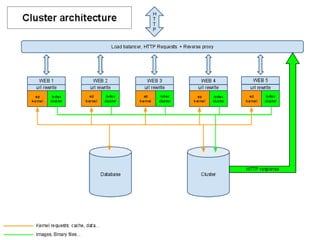
Goal and history One eZ Publish on multiple servers, for: Performance Redundancy Created for eZ Publish 3.8, vastly improved since then: 3.10: huge schema & feature improvements 4.2: new eZDFS cluster handler for NFS 4.2: Stalecaching mechanism for eZDB and eZDFS Matches the shared database for filesystem operations: Inserting new data, expiring/deleting obsolete data serving files through HTTP
 
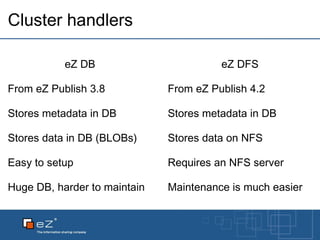
Cluster handlers eZ DB From eZ Publish 3.8 Stores metadata in DB Stores data in DB (BLOBs) Easy to setup Huge DB, harder to maintain eZ DFS From eZ Publish 4.2 Stores metadata in DB Stores data on NFS Requires an NFS server Maintenance is much easier
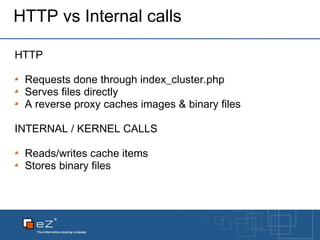
HTTP vs Internal calls HTTP Requests done through index_cluster.php Serves files directly A reverse proxy caches images & binary files INTERNAL / KERNEL CALLS Reads/writes cache items Stores binary files
Configuration #1: file.ini A cluster handler must be configured in a file.ini override: [ClusteringSettings] FileHandler = eZDFSFileHandler   # DFS Cluster Handler settings [eZDFSClusteringSettings] MountPointPath = var/nfs DBBackend = eZDFSFileHandlerMySQLBackend DBHost = localhost DBName = labs_ezpublish_trunk_cluster DBUser = root DBPassword = root
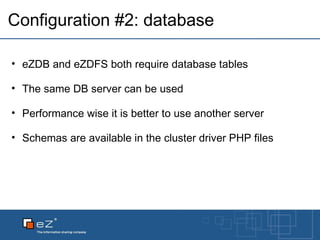
Configuration #2: database eZDB and eZDFS both require database tables The same DB server can be used Performance wise it is better to use another server Schemas are available in the cluster driver PHP files
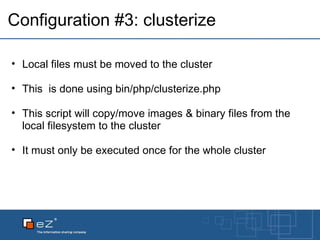
Configuration #3: clusterize Local files must be moved to the cluster This  is done using bin/php/clusterize.php This script will copy/move images & binary files from the local filesystem to the cluster It must only be executed once for the whole cluster
Configuration #4: mod_rewrite URL rewriting is required to "stream" clusterized binary files to visitors: Images Binary files They only affect known path for these types of files To stream different files, new rules must be added RewriteEngine On Rewriterule ^/var/([^/]+/)?storage/original/.* /index_cluster.php [L]   Rewriterule ^/var/([^/]+/)?storage/images/.*   /index_cluster.php [L]   # Standard eZ Publish rewrite rules # ...
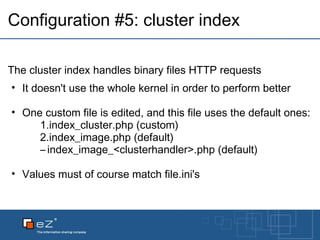
Configuration #5: cluster index The cluster index handles binary files HTTP requests It doesn't use the whole kernel in order to perform better One custom file is edited, and this file uses the default ones: index_cluster.php (custom) index_image.php (default) index_image_<clusterhandler>.php (default) Values must of course match file.ini's
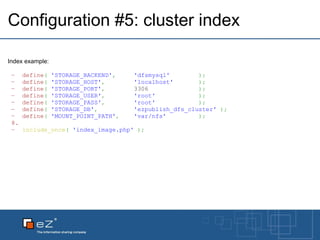
Configuration #5: cluster index Index example: define (   'STORAGE_BACKEND' ,       'dfsmysql'          ) ; define (   'STORAGE_HOST' ,          'localhost'         ) ; define (   'STORAGE_PORT' ,         3306               ) ; define (   'STORAGE_USER' ,          'root'              ) ; define (   'STORAGE_PASS' ,          'root'              ) ; define (   'STORAGE_DB' ,            'ezpublish_dfs_cluster'   ) ; define (   'MOUNT_POINT_PATH' ,      'var/nfs'           ) ;   include_once (   'index_image.php'   ) ;
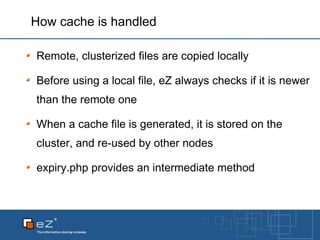
How cache is handled Remote, clusterized files are copied locally Before using a local file, eZ always checks if it is newer than the remote one When a cache file is generated, it is stored on the cluster, and re-used by other nodes expiry.php provides an intermediate method
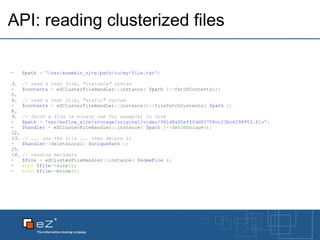
API: reading clusterized files $path   =   '/var/ezwebin_site/path/to/my/file.txt' ; // read a text file, &quot;instance&quot; syntax $contents   =  eZClusterFileHandler :: instance (   $path   ) -> fetchContents () ;   // read a text file, &quot;static&quot; syntax $contents   =  eZClusterFileHandler :: instance () -> fileFetchContents (   $path   ) ;   // fetch a file (a binary one for example) to disk $path   =   'var/ezflow_site/storage/original/video/961d8a65efffdd93708cc23bc6398953.flv' ; $handler   =  eZClusterFileHandler :: instance (   $path   ) -> fetchUnique () ;   // ... use the file ... then delete it $handler -> deleteLocal (   $uniquePath   ) ;   // reading metadata $file   =  eZClusterFileHandler :: instance (   $someFile   ) ; echo   $file -> size () ; echo   $file -> mtime () ;
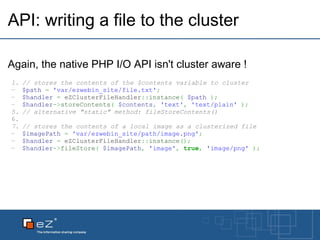
API: writing a file to the cluster Again, the native PHP I/O API isn't cluster aware ! // stores the contents of the $contents variable to cluster $path   =   'var/ezwebin_site/file.txt' ; $handler   =  eZClusterFileHandler :: instance (   $path   ) ; $handler -> storeContents (   $contents ,   'text' ,   'text/plain'   ) ; // alternative &quot;static&quot; method: fileStoreContents()   // stores the contents of a local image as a clusterized file $imagePath   =   'var/ezwebin_site/path/image.png' ; $handler   =  eZClusterFileHandler :: instance () ; $handler -> fileStore (   $imagePath ,   'image' ,   true ,   'image/png'   ) ;
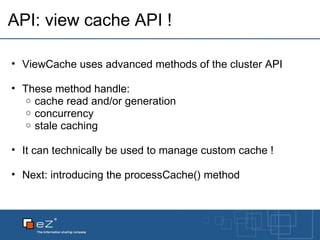
API: view cache API ! ViewCache uses advanced methods of the cluster API These method handle: cache read and/or generation concurrency stale caching It can technically be used to manage custom cache ! Next: introducing the processCache() method
API: The processCache() method can be used for custom developements too ! It will let you implement caching on custom modules/views It uses: a generate callback that generates the dynamic content a retrieve callback that retrieves valid cached content
processCache(): view $Module   =   $Params [ &quot;Module&quot; ] ; $cacheFilePath   =  eZCachedModule :: cacheFilePath (   $Params   ) ; $cacheFile   =  eZClusterFileHandler :: instance (   $cacheFilePath   ); $Result   =   $cacheFile -> processCache ( array (   'eZCachedModule' ,   'retrieve'   ) , array (   'eZCachedModule' ,   'generate'   ) , n ull , n ull , compact (   'Params'   )   ) ; return   $Result ;
processCache(): handler class  eZCachedModule { public  static  function  generate (   $file ,   $args   )      {          extract (   $args   ) ;            $tpl   =  templateInit () ;          $tpl -> setVariable (   'value' ,   $Params [ 'Value' ]   ) ;          $Result [ 'content' ]   =   $tpl -> fetch (   &quot;design:cachedmodule/view.tpl&quot;   ) ;          $Result [ 'path' ]   =   array (   array (   'url'   =>   '/cachedmodule/view/' ,                                          'text'   =>   'Cached module testing'   )   ) ;          $retval   =   array (   'content'   =>   $Result ,                           'scope'     =>   'cachedmodule'   ) ;          return   $retval ;      }      public  static  function  retrieve (   $file ,   $mtime ,   $args   )      { return   include (   $file   ) ;      }        public  static  function  cacheFilePath (   $params   )      {          $currentSiteAccess   =   $GLOBALS [ 'eZCurrentAccess' ][ 'name' ] ;          $cacheFile   =   $params [ 'Value' ]   .   '.php' $cachePath   =  eZDir :: path (   array (  eZSys :: cacheDirectory () , 'cachedmodule' ,   $currentSiteAccess ,   $cacheFile   )   ) ;          return   $cachePath ;      } }
Questions ?
Thank you  for listening Documentation http://ez.no/doc/ez_publish/technical_manual/4_x/features/clustering Contact [email_address] share.ez.no ;)

eZ Publish Cluster Unleashed

  • 1.
    eZ Publish clusterunleashed Bertrand Dunogier, eZ Systems Using the eZ Publish cluster in your projects
  • 2.
    Goal and historyOne eZ Publish on multiple servers, for: Performance Redundancy Created for eZ Publish 3.8, vastly improved since then: 3.10: huge schema & feature improvements 4.2: new eZDFS cluster handler for NFS 4.2: Stalecaching mechanism for eZDB and eZDFS Matches the shared database for filesystem operations: Inserting new data, expiring/deleting obsolete data serving files through HTTP
  • 3.
  • 4.
    Cluster handlers eZDB From eZ Publish 3.8 Stores metadata in DB Stores data in DB (BLOBs) Easy to setup Huge DB, harder to maintain eZ DFS From eZ Publish 4.2 Stores metadata in DB Stores data on NFS Requires an NFS server Maintenance is much easier
  • 5.
    HTTP vs Internalcalls HTTP Requests done through index_cluster.php Serves files directly A reverse proxy caches images & binary files INTERNAL / KERNEL CALLS Reads/writes cache items Stores binary files
  • 6.
    Configuration #1: file.iniA cluster handler must be configured in a file.ini override: [ClusteringSettings] FileHandler = eZDFSFileHandler   # DFS Cluster Handler settings [eZDFSClusteringSettings] MountPointPath = var/nfs DBBackend = eZDFSFileHandlerMySQLBackend DBHost = localhost DBName = labs_ezpublish_trunk_cluster DBUser = root DBPassword = root
  • 7.
    Configuration #2: databaseeZDB and eZDFS both require database tables The same DB server can be used Performance wise it is better to use another server Schemas are available in the cluster driver PHP files
  • 8.
    Configuration #3: clusterizeLocal files must be moved to the cluster This  is done using bin/php/clusterize.php This script will copy/move images & binary files from the local filesystem to the cluster It must only be executed once for the whole cluster
  • 9.
    Configuration #4: mod_rewriteURL rewriting is required to &quot;stream&quot; clusterized binary files to visitors: Images Binary files They only affect known path for these types of files To stream different files, new rules must be added RewriteEngine On Rewriterule ^/var/([^/]+/)?storage/original/.* /index_cluster.php [L] Rewriterule ^/var/([^/]+/)?storage/images/.*   /index_cluster.php [L] # Standard eZ Publish rewrite rules # ...
  • 10.
    Configuration #5: clusterindex The cluster index handles binary files HTTP requests It doesn't use the whole kernel in order to perform better One custom file is edited, and this file uses the default ones: index_cluster.php (custom) index_image.php (default) index_image_<clusterhandler>.php (default) Values must of course match file.ini's
  • 11.
    Configuration #5: clusterindex Index example: define (   'STORAGE_BACKEND' ,       'dfsmysql'          ) ; define (   'STORAGE_HOST' ,          'localhost'         ) ; define (   'STORAGE_PORT' ,         3306               ) ; define (   'STORAGE_USER' ,          'root'              ) ; define (   'STORAGE_PASS' ,          'root'             ) ; define (   'STORAGE_DB' ,            'ezpublish_dfs_cluster'   ) ; define (   'MOUNT_POINT_PATH' ,      'var/nfs'          ) ;   include_once (   'index_image.php'   ) ;
  • 12.
    How cache ishandled Remote, clusterized files are copied locally Before using a local file, eZ always checks if it is newer than the remote one When a cache file is generated, it is stored on the cluster, and re-used by other nodes expiry.php provides an intermediate method
  • 13.
    API: reading clusterizedfiles $path   =   '/var/ezwebin_site/path/to/my/file.txt' ; // read a text file, &quot;instance&quot; syntax $contents   =  eZClusterFileHandler :: instance (   $path   ) -> fetchContents () ;   // read a text file, &quot;static&quot; syntax $contents   =  eZClusterFileHandler :: instance () -> fileFetchContents (   $path   ) ;   // fetch a file (a binary one for example) to disk $path   =   'var/ezflow_site/storage/original/video/961d8a65efffdd93708cc23bc6398953.flv' ; $handler   =  eZClusterFileHandler :: instance (   $path   ) -> fetchUnique () ;   // ... use the file ... then delete it $handler -> deleteLocal (   $uniquePath   ) ;   // reading metadata $file   =  eZClusterFileHandler :: instance (   $someFile   ) ; echo   $file -> size () ; echo   $file -> mtime () ;
  • 14.
    API: writing afile to the cluster Again, the native PHP I/O API isn't cluster aware ! // stores the contents of the $contents variable to cluster $path   =   'var/ezwebin_site/file.txt' ; $handler   =  eZClusterFileHandler :: instance (   $path   ) ; $handler -> storeContents (   $contents ,   'text' ,   'text/plain'   ) ; // alternative &quot;static&quot; method: fileStoreContents()   // stores the contents of a local image as a clusterized file $imagePath   =   'var/ezwebin_site/path/image.png' ; $handler   =  eZClusterFileHandler :: instance () ; $handler -> fileStore (   $imagePath ,   'image' ,   true ,   'image/png'   ) ;
  • 15.
    API: view cacheAPI ! ViewCache uses advanced methods of the cluster API These method handle: cache read and/or generation concurrency stale caching It can technically be used to manage custom cache ! Next: introducing the processCache() method
  • 16.
    API: The processCache()method can be used for custom developements too ! It will let you implement caching on custom modules/views It uses: a generate callback that generates the dynamic content a retrieve callback that retrieves valid cached content
  • 17.
    API: The processCache()method can be used for custom developements too ! It will let you implement caching on custom modules/views It uses: a generate callback that generates the dynamic content a retrieve callback that retrieves valid cached content
  • 18.
    processCache(): view $Module  =   $Params [ &quot;Module&quot; ] ; $cacheFilePath   =  eZCachedModule :: cacheFilePath (   $Params   ) ; $cacheFile   =  eZClusterFileHandler :: instance (   $cacheFilePath   ); $Result   =   $cacheFile -> processCache ( array (   'eZCachedModule' ,   'retrieve'   ) , array (   'eZCachedModule' ,   'generate'   ) , n ull , n ull , compact (   'Params'   )   ) ; return   $Result ;
  • 19.
    processCache(): handler class eZCachedModule { public  static  function  generate (   $file ,   $args   )      {          extract (   $args   ) ;            $tpl   =  templateInit () ;          $tpl -> setVariable (   'value' ,   $Params [ 'Value' ]   ) ;          $Result [ 'content' ]   =   $tpl -> fetch (   &quot;design:cachedmodule/view.tpl&quot;   ) ;          $Result [ 'path' ]   =   array (   array (   'url'   =>   '/cachedmodule/view/' ,                                          'text'   =>   'Cached module testing'   )   ) ;          $retval   =   array (   'content'   =>   $Result ,                           'scope'     =>   'cachedmodule'   ) ;          return   $retval ;      }      public  static  function  retrieve (   $file ,   $mtime ,   $args   )      { return   include (   $file   ) ;      }        public  static  function  cacheFilePath (   $params   )      {          $currentSiteAccess   =   $GLOBALS [ 'eZCurrentAccess' ][ 'name' ] ;          $cacheFile   =   $params [ 'Value' ]   .   '.php' $cachePath   =  eZDir :: path (   array (  eZSys :: cacheDirectory () , 'cachedmodule' ,   $currentSiteAccess ,   $cacheFile   )   ) ;          return   $cachePath ;      } }
  • 20.
  • 21.
    Thank you for listening Documentation http://ez.no/doc/ez_publish/technical_manual/4_x/features/clustering Contact [email_address] share.ez.no ;)

Editor's Notes

  • #10 Mention the addition of new rules for ezjscore&apos;s generated CSS as an example of a custom rule
  • #11 Example on the next page
  • #14 Explain the « static » / « dynamic » thing: Most cluster methods can be used in two ways: - by instanciating the handler with the file&apos;s path and using the xxx() methods - or « statically » by calling fileXxx( &apos;path&apos; ) on an empty instance It is usually more efficient to load the file in a handler if multiple sequential operations will be performed on it.
  • #15 The 3 rd parameter of storeContents() / 4 th parameter of fileStoreContents() will be used by the cluster index as the file&apos;s Content-Type. It is critical for files that will be made available over HTTP. This is one of the issues that was actually affecting ezjscore back a few weeks ago.
  • #19 View purpose: display the &apos;value&apos; view parameter using a template. The generation logic is moved to the generate callback and doesn&apos;t belong to the view processCache parameters: - two callbacks: retrieve and generate - the null parameters are ttl and expiry. Not covered here. - an array of custom parameters received by both handlers. A template name could have been dynamically added here and used in generate. TTL and expiry can be automatically handled using the 3rd and 4th parameter of processCache.
  • #20 generate: gets the cache file ($file) and all arguments ($args) as parameters It generates the HTML just like the view would have. processCache will first call retrieve(), then fall back to generate() if no cache file exists It would have checked for expiry and/or ttl if they had been provided. It will also handle the stalecache aspect, and serve an old cache file while the new one is being generated.