Java
rudalson@gmail.com
Table Of Contents
1. Coding convention
2. JAVA 7
a. Project Coin
b. NIO
3. JAVA 8
4. Language type
5. JVM
Coding Convention
• Indentation
• Tab VS Space ?
• 2 VS 4 VS 8 ?
• Brace location
• Next VS Current ?
• 변수 명
• Eclipse formatter 부터
Java 7
• Project Coin
• JDK 7 In Action - Learn With Java Tutorials and Developer Guides
• Using New Core Platform Features In Real Code
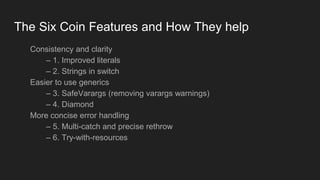
The Six Coin Features and How They help
Consistency and clarity
– 1. Improved literals
– 2. Strings in switch
Easier to use generics
– 3. SafeVarargs (removing varargs warnings)
– 4. Diamond
More concise error handling
– 5. Multi-catch and precise rethrow
– 6. Try-with-resources
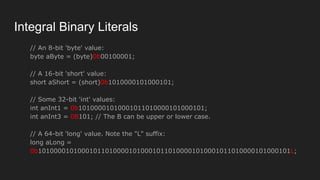
Integral Binary Literals
// An 8-bit 'byte' value:
byte aByte = (byte)0b00100001;
// A 16-bit 'short' value:
short aShort = (short)0b1010000101000101;
// Some 32-bit 'int' values:
int anInt1 = 0b10100001010001011010000101000101;
int anInt3 = 0B101; // The B can be upper or lower case.
// A 64-bit 'long' value. Note the "L" suffix:
long aLong =
0b1010000101000101101000010100010110100001010001011010000101000101L;
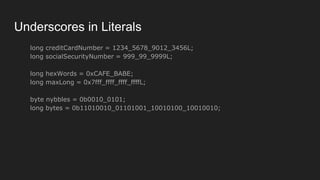
Underscores in Literals
long creditCardNumber = 1234_5678_9012_3456L;
long socialSecurityNumber = 999_99_9999L;
long hexWords = 0xCAFE_BABE;
long maxLong = 0x7fff_ffff_ffff_ffffL;
byte nybbles = 0b0010_0101;
long bytes = 0b11010010_01101001_10010100_10010010;
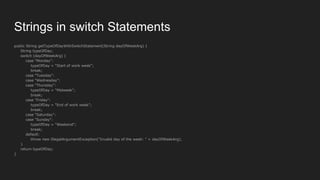
Strings in switch Statements
public String getTypeOfDayWithSwitchStatement(String dayOfWeekArg) {
String typeOfDay;
switch (dayOfWeekArg) {
case "Monday":
typeOfDay = "Start of work week";
break;
case "Tuesday":
case "Wednesday":
case "Thursday":
typeOfDay = "Midweek";
break;
case "Friday":
typeOfDay = "End of work week";
break;
case "Saturday":
case "Sunday":
typeOfDay = "Weekend";
break;
default:
throw new IllegalArgumentException("Invalid day of the week: " + dayOfWeekArg);
}
return typeOfDay;
}
Strings in switch Statements
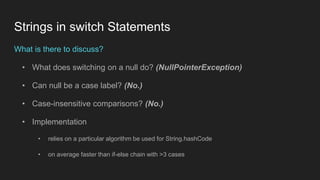
What is there to discuss?
• What does switching on a null do? (NullPointerException)
• Can null be a case label? (No.)
• Case-insensitive comparisons? (No.)
• Implementation
• relies on a particular algorithm be used for String.hashCode
• on average faster than if-else chain with >3 cases
Safe Varargs
아 몰랑 ~
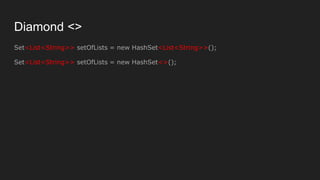
Diamond <>
Set<List<String>> setOfLists = new HashSet<List<String>>();
Set<List<String>> setOfLists = new HashSet<>();
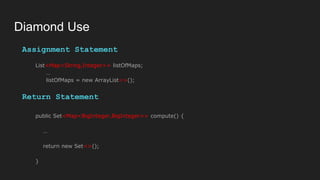
Diamond Use
Assignment Statement
List<Map<String,Integer>> listOfMaps;
…
listOfMaps = new ArrayList<>();
Return Statement
public Set<Map<BigInteger,BigInteger>> compute() {
…
return new Set<>();
}
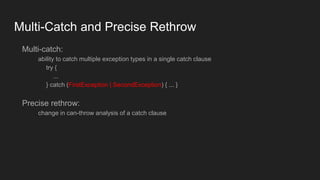
Multi-Catch and Precise Rethrow
Multi-catch:
ability to catch multiple exception types in a single catch clause
try {
...
} catch (FirstException | SecondException) { ... }
Precise rethrow:
change in can-throw analysis of a catch clause
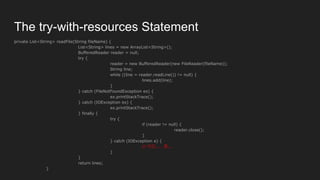
private List<String> readFile(String fileName) {
List<String> lines = new ArrayList<String>();
BufferedReader reader = null;
try {
reader = new BufferedReader(new FileReader(fileName));
String line;
while ((line = reader.readLine()) != null) {
lines.add(line);
}
} catch (FileNotFoundException ex) {
ex.printStackTrace();
} catch (IOException ex) {
ex.printStackTrace();
} finally {
try {
if (reader != null) {
reader.close();
}
} catch (IOException e) {
// 이건..... 쫌...
}
}
return lines;
}
The try-with-resources Statement
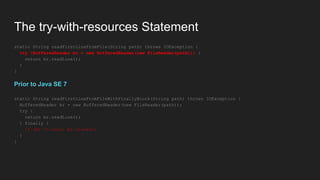
static String readFirstLineFromFile(String path) throws IOException {
try (BufferedReader br = new BufferedReader(new FileReader(path))) {
return br.readLine();
}
}
Prior to Java SE 7
static String readFirstLineFromFileWithFinallyBlock(String path) throws IOException {
BufferedReader br = new BufferedReader(new FileReader(path));
try {
return br.readLine();
} finally {
if (br != null) br.close();
}
}
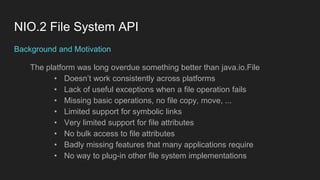
NIO.2 File System API
Background and Motivation
The platform was long overdue something better than java.io.File
• Doesn’t work consistently across platforms
• Lack of useful exceptions when a file operation fails
• Missing basic operations, no file copy, move, ...
• Limited support for symbolic links
• Very limited support for file attributes
• No bulk access to file attributes
• Badly missing features that many applications require
• No way to plug-in other file system implementations
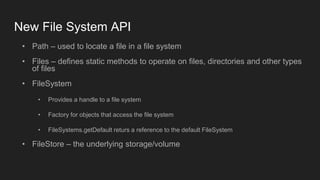
New File System API
• Path – used to locate a file in a file system
• Files – defines static methods to operate on files, directories and other types
of files
• FileSystem
• Provides a handle to a file system
• Factory for objects that access the file system
• FileSystems.getDefault returs a reference to the default FileSystem
• FileStore – the underlying storage/volume
public class Test {
public static void main(String[] args) {
FileSystem fileSystem = FileSystems.getDefault();
FileSystemProvider provider = fileSystem.provider();
System.out.println("Provider: " + provider.toString());
System.out.println("Open: " + fileSystem.isOpen());
System.out.println("Read Only: " + fileSystem.isReadOnly());
Iterable<Path> rootDirectories = fileSystem.getRootDirectories();
System.out.println();
System.out.println("Root Directories");
for (Path path : rootDirectories) {
System.out.println(path);
}
Iterable<FileStore> fileStores = fileSystem.getFileStores();
System.out.println();
System.out.println("File Stores");
for (FileStore fileStore : fileStores) {
System.out.println(fileStore.name());
}
}
}
Provider: sun.nio.fs.WindowsFileSystemProvider@1db9742
Open: true
Read Only: false
Root Directories
C:
D:
E:
F:
G:
H:
I:
File Stores
ssd1
ssd2
data
ssd3
Samsung1TB
public class FileSystemExampleV {
public static void main(String[] args) throws Exception {
FileSystem fileSystem = FileSystems.getDefault();
for (FileStore store : fileSystem.getFileStores()) {
System.out.println("드라이버명: " + store.name());
System.out.println("파일시스템: " + store.type());
System.out.println("전체 공간: " + store.getTotalSpace() + " 바이트");
System.out.println("사용 중인 공간: " + (store.getTotalSpace() - store.getUnallocatedSpace()) + " 바이트");
System.out.println("사용 가능한 공간: " + (store.getTotalSpace() - store.getUsableSpace()) + " 바이트");
System.out.println();
}
System.out.println("파일 구분자: " + fileSystem.getSeparator());
System.out.println();
for (Path path : fileSystem.getRootDirectories()) {
System.out.println(path.toString());
}
}
}
드라이버명:
파일시스템: NTFS
전체 공간: 127666221056 바이트
사용 중인 공간: 114883612672 바이트
사용 가능한 공간: 114883612672 바이트
드라이버명: ssd1
파일시스템: NTFS
전체 공간: 256058060800 바이트
사용 중인 공간: 193507590144 바이트
사용 가능한 공간: 193507590144 바이트
드라이버명: ssd2
파일시스템: NTFS
전체 공간: 256058060800 바이트
사용 중인 공간: 114384744448 바이트
사용 가능한 공간: 114384744448 바이트
드라이버명: data
파일시스템: NTFS
전체 공간: 2000396742656 바이트
사용 중인 공간: 953533616128 바이트
사용 가능한 공간: 953533616128 바이트
드라이버명: ssd3
파일시스템: NTFS
전체 공간: 500104687616 바이트
사용 중인 공간: 239441858560 바이트
사용 가능한 공간: 239441858560 바이트
드라이버명: Samsung1TB
파일시스템: NTFS
전체 공간: 1000194011136 바이트
사용 중인 공간: 841152049152 바이트
사용 가능한 공간: 841152049152 바이트
파일 구분자: 
C:
D:
E:
F:
G:
H:
I:
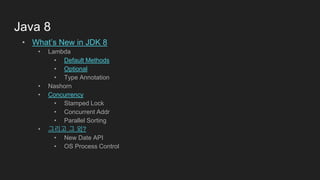
Java 8
• What’s New in JDK 8
• Lambda
• Default Methods
• Optional
• Type Annotation
• Nashorn
• Concurrency
• Stamped Lock
• Concurrent Addr
• Parallel Sorting
• 그리고 그 외?
• New Date API
• OS Process Control
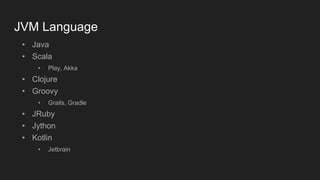
JVM Language
• Java
• Scala
• Play, Akka
• Clojure
• Groovy
• Grails, Gradle
• JRuby
• Jython
• Kotlin
• Jetbrain
CLR
• C#
• Visual Basic
• F#
• Iron Python
• Iron Ruby
• Power Shell
• Java
• J#
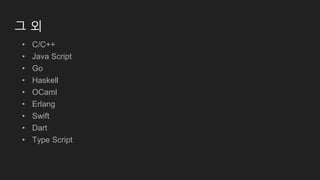
그 외
• C/C++
• Java Script
• Go
• Haskell
• OCaml
• Erlang
• Swift
• Dart
• Type Script
앞으로...
• 함수 패러다임
• 메타 프로그래밍
• Concurrent 프로그래밍
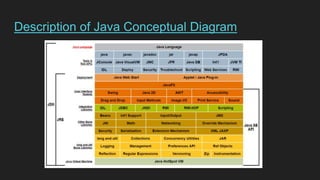
Description of Java Conceptual Diagram
JVM
• 스택 기반의 가상 머신 (NOT Register 기반)
• Dalvik VM은???
• 심볼릭 레퍼런스(NOT Address 기반)
• 가비지 컬렉션
• 기본 자료형을 명확하게 정의해 플랫폼 독립성 보장
• 네트워크 바이트 순서
• Little endian vs Big endian
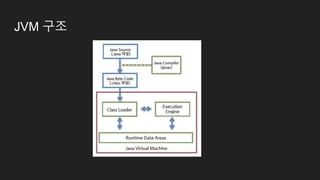
JVM 구조
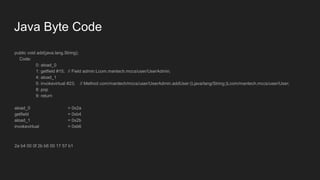
Java Byte Code
public void add(java.lang.String);
Code:
0: aload_0
1: getfield #15; // Field admin:Lcom.mantech.mccs/user/UserAdmin;
4: aload_1
5: invokevirtual #23; // Method com/mantech/mccs/user/UserAdmin.addUser:(Ljava/lang/String;)Lcom/mantech.mccs/user/User;
8: pop
9: return
aload_0 = 0x2a
getfield = 0xb4
aload_1 = 0x2b
invokevirtual = 0xb6
2a b4 00 0f 2b b6 00 17 57 b1
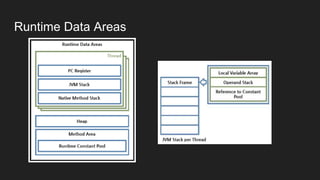
Runtime Data Areas
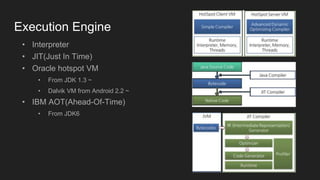
Execution Engine
• Interpreter
• JIT(Just In Time)
• Oracle hotspot VM
• From JDK 1.3 ~
• Dalvik VM from Android 2.2 ~
• IBM AOT(Ahead-Of-Time)
• From JDK6
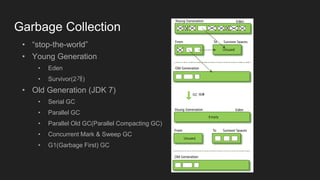
Garbage Collection
• “stop-the-world”
• Young Generation
• Eden
• Survivor(2개)
• Old Generation (JDK 7)
• Serial GC
• Parallel GC
• Parallel Old GC(Parallel Compacting GC)
• Concurrent Mark & Sweep GC
• G1(Garbage First) GC
And more...
BTrace
Multithread
Concurrent VS Paralle
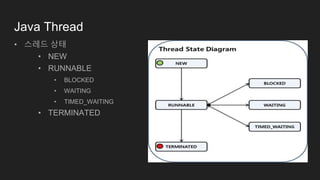
Java Thread
• 스레드 상태
• NEW
• RUNNABLE
• BLOCKED
• WAITING
• TIMED_WAITING
• TERMINATED
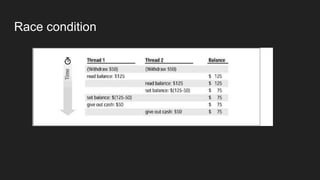
Race condition
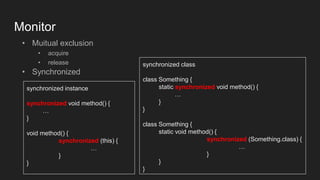
Monitor
• Muitual exclusion
• acquire
• release
• Synchronized
synchronized instance
synchronized void method() {
…
}
void method() {
synchronized (this) {
…
}
}
synchronized class
class Something {
static synchronized void method() {
…
}
}
class Something {
static void method() {
synchronized (Something.class) {
…
}
}
}
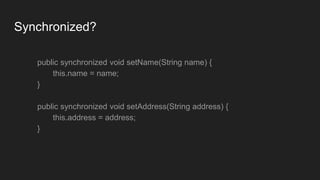
Synchronized?
public synchronized void setName(String name) {
this.name = name;
}
public synchronized void setAddress(String address) {
this.address = address;
}
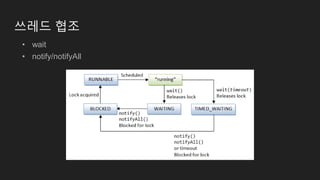
쓰레드 협조
• wait
• notify/notifyAll
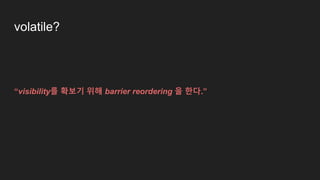
volatile?
“visibility를 확보기 위해 barrier reordering 을 한다.”
Reorder
class Something {
private int x = 0;
private int y = 0;
public void write() {
x = 100;
y = 50;
}
public void read() {
if (x < y) {
System.out.println("x < y");
}
}
}
public class Reorder {
public static void main(String[] args) {
final Something obj = new Something();
new Thread() { // Thread A
public void run() {
obj.write();
}
}.start();
new Thread() { // Thread B
public void run() {
obj.read();
}
}.start();
}
}
x < y가 출력될 수 있을까?
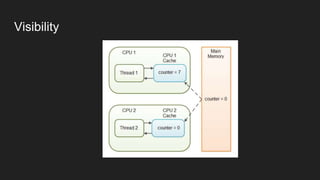
Visibility
volatile
java의 volatile은 2가지 기능
1. 변수의 동기화
2. long, double 을 atomic 단위 취급

Java

  • 1.
  • 2.
    Table Of Contents 1.Coding convention 2. JAVA 7 a. Project Coin b. NIO 3. JAVA 8 4. Language type 5. JVM
  • 3.
    Coding Convention • Indentation •Tab VS Space ? • 2 VS 4 VS 8 ? • Brace location • Next VS Current ? • 변수 명 • Eclipse formatter 부터
  • 4.
    Java 7 • ProjectCoin • JDK 7 In Action - Learn With Java Tutorials and Developer Guides • Using New Core Platform Features In Real Code
  • 5.
    The Six CoinFeatures and How They help Consistency and clarity – 1. Improved literals – 2. Strings in switch Easier to use generics – 3. SafeVarargs (removing varargs warnings) – 4. Diamond More concise error handling – 5. Multi-catch and precise rethrow – 6. Try-with-resources
  • 6.
    Integral Binary Literals //An 8-bit 'byte' value: byte aByte = (byte)0b00100001; // A 16-bit 'short' value: short aShort = (short)0b1010000101000101; // Some 32-bit 'int' values: int anInt1 = 0b10100001010001011010000101000101; int anInt3 = 0B101; // The B can be upper or lower case. // A 64-bit 'long' value. Note the "L" suffix: long aLong = 0b1010000101000101101000010100010110100001010001011010000101000101L;
  • 7.
    Underscores in Literals longcreditCardNumber = 1234_5678_9012_3456L; long socialSecurityNumber = 999_99_9999L; long hexWords = 0xCAFE_BABE; long maxLong = 0x7fff_ffff_ffff_ffffL; byte nybbles = 0b0010_0101; long bytes = 0b11010010_01101001_10010100_10010010;
  • 9.
    Strings in switchStatements public String getTypeOfDayWithSwitchStatement(String dayOfWeekArg) { String typeOfDay; switch (dayOfWeekArg) { case "Monday": typeOfDay = "Start of work week"; break; case "Tuesday": case "Wednesday": case "Thursday": typeOfDay = "Midweek"; break; case "Friday": typeOfDay = "End of work week"; break; case "Saturday": case "Sunday": typeOfDay = "Weekend"; break; default: throw new IllegalArgumentException("Invalid day of the week: " + dayOfWeekArg); } return typeOfDay; }
  • 10.
    Strings in switchStatements What is there to discuss? • What does switching on a null do? (NullPointerException) • Can null be a case label? (No.) • Case-insensitive comparisons? (No.) • Implementation • relies on a particular algorithm be used for String.hashCode • on average faster than if-else chain with >3 cases
  • 11.
  • 12.
    Diamond <> Set<List<String>> setOfLists= new HashSet<List<String>>(); Set<List<String>> setOfLists = new HashSet<>();
  • 13.
    Diamond Use Assignment Statement List<Map<String,Integer>>listOfMaps; … listOfMaps = new ArrayList<>(); Return Statement public Set<Map<BigInteger,BigInteger>> compute() { … return new Set<>(); }
  • 14.
    Multi-Catch and PreciseRethrow Multi-catch: ability to catch multiple exception types in a single catch clause try { ... } catch (FirstException | SecondException) { ... } Precise rethrow: change in can-throw analysis of a catch clause
  • 15.
    private List<String> readFile(StringfileName) { List<String> lines = new ArrayList<String>(); BufferedReader reader = null; try { reader = new BufferedReader(new FileReader(fileName)); String line; while ((line = reader.readLine()) != null) { lines.add(line); } } catch (FileNotFoundException ex) { ex.printStackTrace(); } catch (IOException ex) { ex.printStackTrace(); } finally { try { if (reader != null) { reader.close(); } } catch (IOException e) { // 이건..... 쫌... } } return lines; } The try-with-resources Statement
  • 16.
    The try-with-resources Statement staticString readFirstLineFromFile(String path) throws IOException { try (BufferedReader br = new BufferedReader(new FileReader(path))) { return br.readLine(); } } Prior to Java SE 7 static String readFirstLineFromFileWithFinallyBlock(String path) throws IOException { BufferedReader br = new BufferedReader(new FileReader(path)); try { return br.readLine(); } finally { if (br != null) br.close(); } }
  • 17.
    NIO.2 File SystemAPI Background and Motivation The platform was long overdue something better than java.io.File • Doesn’t work consistently across platforms • Lack of useful exceptions when a file operation fails • Missing basic operations, no file copy, move, ... • Limited support for symbolic links • Very limited support for file attributes • No bulk access to file attributes • Badly missing features that many applications require • No way to plug-in other file system implementations
  • 18.
    New File SystemAPI • Path – used to locate a file in a file system • Files – defines static methods to operate on files, directories and other types of files • FileSystem • Provides a handle to a file system • Factory for objects that access the file system • FileSystems.getDefault returs a reference to the default FileSystem • FileStore – the underlying storage/volume
  • 19.
    public class Test{ public static void main(String[] args) { FileSystem fileSystem = FileSystems.getDefault(); FileSystemProvider provider = fileSystem.provider(); System.out.println("Provider: " + provider.toString()); System.out.println("Open: " + fileSystem.isOpen()); System.out.println("Read Only: " + fileSystem.isReadOnly()); Iterable<Path> rootDirectories = fileSystem.getRootDirectories(); System.out.println(); System.out.println("Root Directories"); for (Path path : rootDirectories) { System.out.println(path); } Iterable<FileStore> fileStores = fileSystem.getFileStores(); System.out.println(); System.out.println("File Stores"); for (FileStore fileStore : fileStores) { System.out.println(fileStore.name()); } } } Provider: sun.nio.fs.WindowsFileSystemProvider@1db9742 Open: true Read Only: false Root Directories C: D: E: F: G: H: I: File Stores ssd1 ssd2 data ssd3 Samsung1TB
  • 20.
    public class FileSystemExampleV{ public static void main(String[] args) throws Exception { FileSystem fileSystem = FileSystems.getDefault(); for (FileStore store : fileSystem.getFileStores()) { System.out.println("드라이버명: " + store.name()); System.out.println("파일시스템: " + store.type()); System.out.println("전체 공간: " + store.getTotalSpace() + " 바이트"); System.out.println("사용 중인 공간: " + (store.getTotalSpace() - store.getUnallocatedSpace()) + " 바이트"); System.out.println("사용 가능한 공간: " + (store.getTotalSpace() - store.getUsableSpace()) + " 바이트"); System.out.println(); } System.out.println("파일 구분자: " + fileSystem.getSeparator()); System.out.println(); for (Path path : fileSystem.getRootDirectories()) { System.out.println(path.toString()); } } } 드라이버명: 파일시스템: NTFS 전체 공간: 127666221056 바이트 사용 중인 공간: 114883612672 바이트 사용 가능한 공간: 114883612672 바이트 드라이버명: ssd1 파일시스템: NTFS 전체 공간: 256058060800 바이트 사용 중인 공간: 193507590144 바이트 사용 가능한 공간: 193507590144 바이트 드라이버명: ssd2 파일시스템: NTFS 전체 공간: 256058060800 바이트 사용 중인 공간: 114384744448 바이트 사용 가능한 공간: 114384744448 바이트 드라이버명: data 파일시스템: NTFS 전체 공간: 2000396742656 바이트 사용 중인 공간: 953533616128 바이트 사용 가능한 공간: 953533616128 바이트 드라이버명: ssd3 파일시스템: NTFS 전체 공간: 500104687616 바이트 사용 중인 공간: 239441858560 바이트 사용 가능한 공간: 239441858560 바이트 드라이버명: Samsung1TB 파일시스템: NTFS 전체 공간: 1000194011136 바이트 사용 중인 공간: 841152049152 바이트 사용 가능한 공간: 841152049152 바이트 파일 구분자: C: D: E: F: G: H: I:
  • 21.
    Java 8 • What’sNew in JDK 8 • Lambda • Default Methods • Optional • Type Annotation • Nashorn • Concurrency • Stamped Lock • Concurrent Addr • Parallel Sorting • 그리고 그 외? • New Date API • OS Process Control
  • 22.
    JVM Language • Java •Scala • Play, Akka • Clojure • Groovy • Grails, Gradle • JRuby • Jython • Kotlin • Jetbrain
  • 23.
    CLR • C# • VisualBasic • F# • Iron Python • Iron Ruby • Power Shell • Java • J#
  • 24.
    그 외 • C/C++ •Java Script • Go • Haskell • OCaml • Erlang • Swift • Dart • Type Script
  • 25.
    앞으로... • 함수 패러다임 •메타 프로그래밍 • Concurrent 프로그래밍
  • 26.
    Description of JavaConceptual Diagram
  • 27.
    JVM • 스택 기반의가상 머신 (NOT Register 기반) • Dalvik VM은??? • 심볼릭 레퍼런스(NOT Address 기반) • 가비지 컬렉션 • 기본 자료형을 명확하게 정의해 플랫폼 독립성 보장 • 네트워크 바이트 순서 • Little endian vs Big endian
  • 28.
  • 29.
    Java Byte Code publicvoid add(java.lang.String); Code: 0: aload_0 1: getfield #15; // Field admin:Lcom.mantech.mccs/user/UserAdmin; 4: aload_1 5: invokevirtual #23; // Method com/mantech/mccs/user/UserAdmin.addUser:(Ljava/lang/String;)Lcom/mantech.mccs/user/User; 8: pop 9: return aload_0 = 0x2a getfield = 0xb4 aload_1 = 0x2b invokevirtual = 0xb6 2a b4 00 0f 2b b6 00 17 57 b1
  • 30.
  • 31.
    Execution Engine • Interpreter •JIT(Just In Time) • Oracle hotspot VM • From JDK 1.3 ~ • Dalvik VM from Android 2.2 ~ • IBM AOT(Ahead-Of-Time) • From JDK6
  • 32.
    Garbage Collection • “stop-the-world” •Young Generation • Eden • Survivor(2개) • Old Generation (JDK 7) • Serial GC • Parallel GC • Parallel Old GC(Parallel Compacting GC) • Concurrent Mark & Sweep GC • G1(Garbage First) GC
  • 33.
  • 34.
  • 35.
  • 36.
    Java Thread • 스레드상태 • NEW • RUNNABLE • BLOCKED • WAITING • TIMED_WAITING • TERMINATED
  • 37.
  • 38.
    Monitor • Muitual exclusion •acquire • release • Synchronized synchronized instance synchronized void method() { … } void method() { synchronized (this) { … } } synchronized class class Something { static synchronized void method() { … } } class Something { static void method() { synchronized (Something.class) { … } } }
  • 39.
    Synchronized? public synchronized voidsetName(String name) { this.name = name; } public synchronized void setAddress(String address) { this.address = address; }
  • 40.
  • 41.
    volatile? “visibility를 확보기 위해barrier reordering 을 한다.”
  • 42.
    Reorder class Something { privateint x = 0; private int y = 0; public void write() { x = 100; y = 50; } public void read() { if (x < y) { System.out.println("x < y"); } } } public class Reorder { public static void main(String[] args) { final Something obj = new Something(); new Thread() { // Thread A public void run() { obj.write(); } }.start(); new Thread() { // Thread B public void run() { obj.read(); } }.start(); } } x < y가 출력될 수 있을까?
  • 43.
  • 44.
    volatile java의 volatile은 2가지기능 1. 변수의 동기화 2. long, double 을 atomic 단위 취급