Mapping in EnviroInsite
EnviroInsite Training Workshop
HydroAnalysis, Inc.
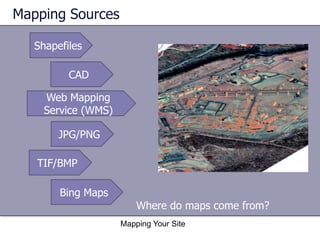
Mapping Sources
Shapefiles
CAD
Web Mapping
Service (WMS)
JPG/PNG
TIF/BMP
Bing Maps
Where do maps come from?
Mapping Your Site
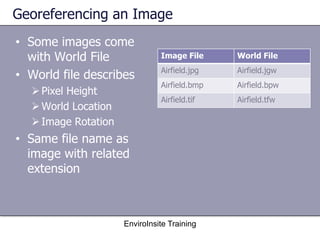
Georeferencing an Image
• Some images come
with World File
• World file describes

World File

Airfield.jpg

Airfield.jgw

Airfield.bmp

Airfield.bpw

Airfield.tif

 Pixel Height
 World Location
 Image Rotation

Image File

Airfield.tfw

• Same file name as
image with related
extension

EnviroInsite Training
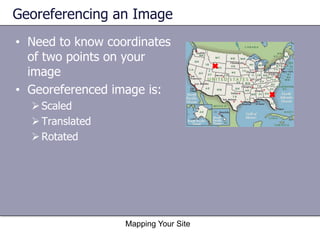
Georeferencing an Image
• Need to know coordinates
of two points on your
image
• Georeferenced image is:
 Scaled
 Translated
 Rotated

Mapping Your Site
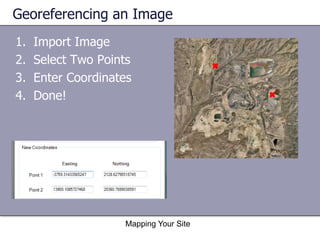
Georeferencing an Image
1.
2.
3.
4.

Import Image
Select Two Points
Enter Coordinates
Done!

Mapping Your Site
Web Mapping Server

Obtain images from
sources on web
• USGS
• State GIS departments

Uses standard protocol
for requesting map image
EnviroInsite Training
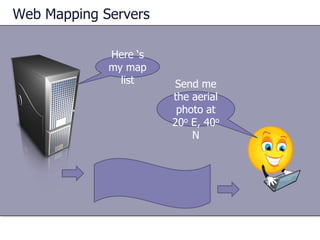
Web Mapping Servers
Here ‘s
my map
list

Send me
the aerial
photo at
20o E, 40o
N
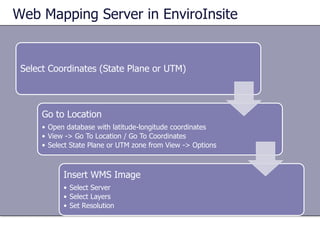
Web Mapping Server in EnviroInsite

Select Coordinates (State Plane or UTM)

Go to Location
• Open database with latitude-longitude coordinates
• View -> Go To Location / Go To Coordinates
• Select State Plane or UTM zone from View -> Options

Insert WMS Image
• Select Server
• Select Layers
• Set Resolution
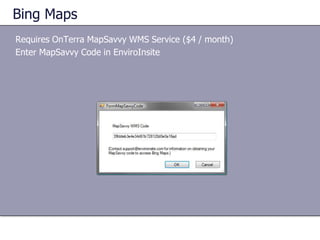
Bing Maps
Requires OnTerra MapSavvy WMS Service ($4 / month)
Enter MapSavvy Code in EnviroInsite
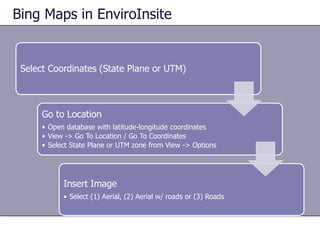
Bing Maps in EnviroInsite

Select Coordinates (State Plane or UTM)

Go to Location
• Open database with latitude-longitude coordinates
• View -> Go To Location / Go To Coordinates
• Select State Plane or UTM zone from View -> Options

Insert Image
• Select (1) Aerial, (2) Aerial w/ roads or (3) Roads
Mapping Your Site
Hands-on Exercise

EnviroInsite training workshop - Mapping methods

  • 1.
    Mapping in EnviroInsite EnviroInsiteTraining Workshop HydroAnalysis, Inc.
  • 2.
    Mapping Sources Shapefiles CAD Web Mapping Service(WMS) JPG/PNG TIF/BMP Bing Maps Where do maps come from? Mapping Your Site
  • 3.
    Georeferencing an Image •Some images come with World File • World file describes World File Airfield.jpg Airfield.jgw Airfield.bmp Airfield.bpw Airfield.tif  Pixel Height  World Location  Image Rotation Image File Airfield.tfw • Same file name as image with related extension EnviroInsite Training
  • 4.
    Georeferencing an Image •Need to know coordinates of two points on your image • Georeferenced image is:  Scaled  Translated  Rotated Mapping Your Site
  • 5.
    Georeferencing an Image 1. 2. 3. 4. ImportImage Select Two Points Enter Coordinates Done! Mapping Your Site
  • 6.
    Web Mapping Server Obtainimages from sources on web • USGS • State GIS departments Uses standard protocol for requesting map image EnviroInsite Training
  • 7.
    Web Mapping Servers Here‘s my map list Send me the aerial photo at 20o E, 40o N
  • 8.
    Web Mapping Serverin EnviroInsite Select Coordinates (State Plane or UTM) Go to Location • Open database with latitude-longitude coordinates • View -> Go To Location / Go To Coordinates • Select State Plane or UTM zone from View -> Options Insert WMS Image • Select Server • Select Layers • Set Resolution
  • 9.
    Bing Maps Requires OnTerraMapSavvy WMS Service ($4 / month) Enter MapSavvy Code in EnviroInsite
  • 10.
    Bing Maps inEnviroInsite Select Coordinates (State Plane or UTM) Go to Location • Open database with latitude-longitude coordinates • View -> Go To Location / Go To Coordinates • Select State Plane or UTM zone from View -> Options Insert Image • Select (1) Aerial, (2) Aerial w/ roads or (3) Roads
  • 11.