3D Analyst f/ ArcView Practical Topic: 3D Analysis “ Hartanto Sanjaya” <hartantosanjaya @ gmail.com>
Practical topic: 3D Analyst Software ArcView with 3D Analyst modul 3D Analyst: Creating 3D shapes, Surface analysis, Advanced visualizations, Creating gridded surface from points, Creating TIN, Creating slope and aspect, Making contour,  Creating 3D features, Measuring height along line, Measuring areas and volumes, Analyzing visibility.
What is the ArcView 3D Analyst? The 3D Analyst is an extension that adds support for  3D shapes,  surface modeling,  and real-time perspective viewing to ArcView.  We can  create  and  visualize  spatial data using a third dimension to provide insight, reveal trends, and solve problems.
What is the ArcView 3D Analyst? 3D Shapes adds support for new shape types. These store z coordinates, in addition to x and y, for every point used to define a feature. Surface Modeling Two types of surface models are available: grids and triangulated irregular networks (TINs).  Real-time Perspective Viewing View and validate 3D data in perspective. See your 2D features in 3D by draping and extruding. Navigate and move around in real-time. Gain new insights.
Types of data used in 3D Analyst Grids (raster data) TINs (Triangulated irregular networks)
Grid theme: what is it? A grid theme represents a geographic layer where space is  partitioned  into  square cells  in a view. Each cell stores a numeric data value that conveys information about the geographic layer it represents. Depending on the information it represents, a grid theme may be created out of either  integer  or  floating point  values.
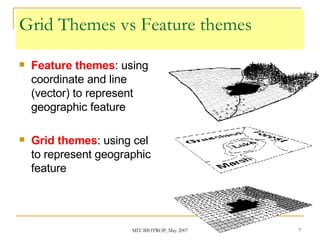
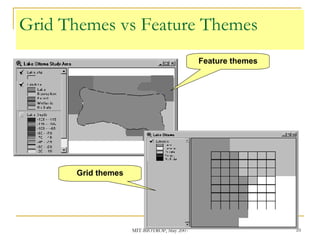
Grid Themes vs Feature themes Feature themes : using coordinate and line (vector) to represent geographic feature Grid themes : using cel to represent geographic feature
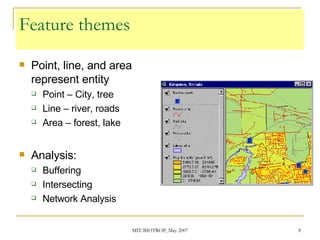
Feature themes Point, line, and area represent entity Point – City, tree Line – river, roads Area – forest, lake Analysis: Buffering Intersecting Network Analysis
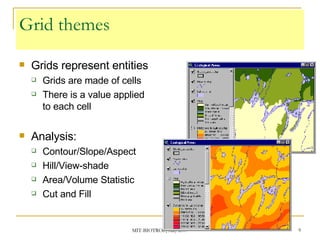
Grid themes Grids represent entities Grids are made of cells There is a value applied to each cell Analysis: Contour/Slope/Aspect Hill/View-shade Area/Volume Statistic Cut and Fill
Grid Themes vs Feature Themes Feature themes Grid themes
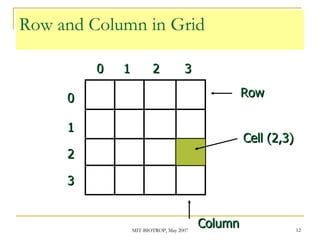
Grid: cell – row – column  Grid themes are matrix organized by cells Cells in row and column Cell and row have one index position Cell on Upper-left : [ 0, 0].
Row and Column in Grid 0 1 2 3 3 2 1 0 Row Column Cell (2,3)
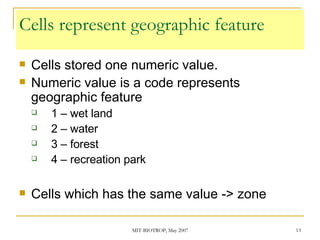
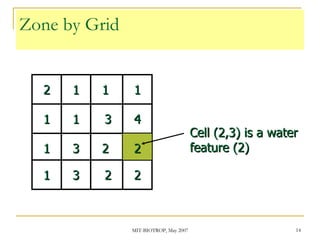
Cells represent geographic feature Cells stored one numeric value. Numeric value is a code represents geographic feature 1 – wet land 2 – water 3 – forest 4 – recreation park Cells which has the same value -> zone
Zone by Grid 1 2 3 1 1 1 1 1 1 3 3 2 2 2 2 4 Cell (2,3) is a water feature (2)
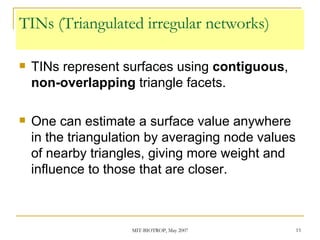
TINs (Triangulated irregular networks) TINs represent surfaces using  contiguous ,  non-overlapping  triangle facets. One can estimate a surface value anywhere in the triangulation by averaging node values of nearby triangles, giving more weight and influence to those that are closer.
TIN vs Grid The cell size of a grid is  consistent  throughout the entire grid The size of the triangles in the TINs can  vary . They are (TIN) usually: more detailed  in areas where  the surface is more complex and  less detailed  in areas where  the surface is simpler .
TIN dataset A TIN dataset  contains points with x, y, and z values  and  a series of edges joining these points to form triangles . The triangular mosaic forms  a continuous faceted surface , which can be used to analyze and display terrain and other types of surfaces. TINs offer an alternative to the raster data model for representing surfaces.
Displaying a TIN theme The 2D methods  allow for analysis of the distribution of the points, lines, and faces used to create a surface. The 2D methods are  useful for determining the reliability of a surface . The 3D methods  are particularly  useful for producing a realistic representation of a surface .
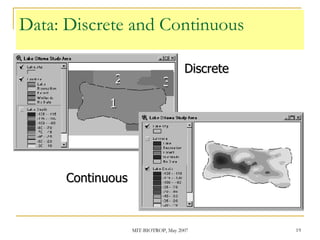
Data: Discrete and Continuous  Discrete Continuous 1 2 3
Discrete vs Continuous Discrete feature Store in integer Land cover, vegetation, lake, river Continuous phenomena  Continuous gradation values Store in floating point Elevation, air pollution, elevation, temperature
…..  Hartanto Sanjaya Center of Technology for Natural Resources Inventory (PTISDA, BPPT) E-mail: hartantosanjaya @ gmail.com Web: http://hartanto.wordpress.com Y!M/GTalk: hartantosanjaya

3 D Analyst

  • 1.
    3D Analyst f/ArcView Practical Topic: 3D Analysis “ Hartanto Sanjaya” <hartantosanjaya @ gmail.com>
  • 2.
    Practical topic: 3DAnalyst Software ArcView with 3D Analyst modul 3D Analyst: Creating 3D shapes, Surface analysis, Advanced visualizations, Creating gridded surface from points, Creating TIN, Creating slope and aspect, Making contour, Creating 3D features, Measuring height along line, Measuring areas and volumes, Analyzing visibility.
  • 3.
    What is theArcView 3D Analyst? The 3D Analyst is an extension that adds support for 3D shapes, surface modeling, and real-time perspective viewing to ArcView. We can create and visualize spatial data using a third dimension to provide insight, reveal trends, and solve problems.
  • 4.
    What is theArcView 3D Analyst? 3D Shapes adds support for new shape types. These store z coordinates, in addition to x and y, for every point used to define a feature. Surface Modeling Two types of surface models are available: grids and triangulated irregular networks (TINs). Real-time Perspective Viewing View and validate 3D data in perspective. See your 2D features in 3D by draping and extruding. Navigate and move around in real-time. Gain new insights.
  • 5.
    Types of dataused in 3D Analyst Grids (raster data) TINs (Triangulated irregular networks)
  • 6.
    Grid theme: whatis it? A grid theme represents a geographic layer where space is partitioned into square cells in a view. Each cell stores a numeric data value that conveys information about the geographic layer it represents. Depending on the information it represents, a grid theme may be created out of either integer or floating point values.
  • 7.
    Grid Themes vsFeature themes Feature themes : using coordinate and line (vector) to represent geographic feature Grid themes : using cel to represent geographic feature
  • 8.
    Feature themes Point,line, and area represent entity Point – City, tree Line – river, roads Area – forest, lake Analysis: Buffering Intersecting Network Analysis
  • 9.
    Grid themes Gridsrepresent entities Grids are made of cells There is a value applied to each cell Analysis: Contour/Slope/Aspect Hill/View-shade Area/Volume Statistic Cut and Fill
  • 10.
    Grid Themes vsFeature Themes Feature themes Grid themes
  • 11.
    Grid: cell –row – column Grid themes are matrix organized by cells Cells in row and column Cell and row have one index position Cell on Upper-left : [ 0, 0].
  • 12.
    Row and Columnin Grid 0 1 2 3 3 2 1 0 Row Column Cell (2,3)
  • 13.
    Cells represent geographicfeature Cells stored one numeric value. Numeric value is a code represents geographic feature 1 – wet land 2 – water 3 – forest 4 – recreation park Cells which has the same value -> zone
  • 14.
    Zone by Grid1 2 3 1 1 1 1 1 1 3 3 2 2 2 2 4 Cell (2,3) is a water feature (2)
  • 15.
    TINs (Triangulated irregularnetworks) TINs represent surfaces using contiguous , non-overlapping triangle facets. One can estimate a surface value anywhere in the triangulation by averaging node values of nearby triangles, giving more weight and influence to those that are closer.
  • 16.
    TIN vs GridThe cell size of a grid is consistent throughout the entire grid The size of the triangles in the TINs can vary . They are (TIN) usually: more detailed in areas where the surface is more complex and less detailed in areas where the surface is simpler .
  • 17.
    TIN dataset ATIN dataset contains points with x, y, and z values and a series of edges joining these points to form triangles . The triangular mosaic forms a continuous faceted surface , which can be used to analyze and display terrain and other types of surfaces. TINs offer an alternative to the raster data model for representing surfaces.
  • 18.
    Displaying a TINtheme The 2D methods allow for analysis of the distribution of the points, lines, and faces used to create a surface. The 2D methods are useful for determining the reliability of a surface . The 3D methods are particularly useful for producing a realistic representation of a surface .
  • 19.
    Data: Discrete andContinuous Discrete Continuous 1 2 3
  • 20.
    Discrete vs ContinuousDiscrete feature Store in integer Land cover, vegetation, lake, river Continuous phenomena Continuous gradation values Store in floating point Elevation, air pollution, elevation, temperature
  • 21.
    ….. HartantoSanjaya Center of Technology for Natural Resources Inventory (PTISDA, BPPT) E-mail: hartantosanjaya @ gmail.com Web: http://hartanto.wordpress.com Y!M/GTalk: hartantosanjaya