Communication
Networks
Network Layer Services
Packet Switching
Overview of Module - 2
• Framing
• What is Framing
• Types of Framing
• Methods for identifying the
boundaries
• Flow Control
• What is flow control
• Types of flow control
• Access Control
• What is access control
• Types of access control
• Ethernet – IEEE 802.3
• Evolution of Ethernet
• Frame Format of Ethernet
• Access Control for Ethernet
• Performance Evaluation of Ethernet
• WLAN – IEEE 802.11
• Architecture
• Bluetooth
• WIFI
• Zigbee
• 6LowPan
• Network Layer Services
• IPv4
• Packet switching
• Network Layer Protocols
Visit www.youtube.com/GURUKULA for Lecture Videos
Switching
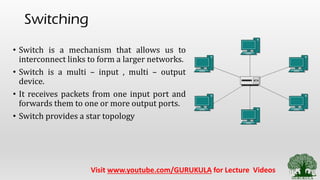
• Switch is a mechanism that allows us to
interconnect links to form a larger networks.
• Switch is a multi – input , multi – output
device.
• It receives packets from one input port and
forwards them to one or more output ports.
• Switch provides a star topology
Visit www.youtube.com/GURUKULA for Lecture Videos
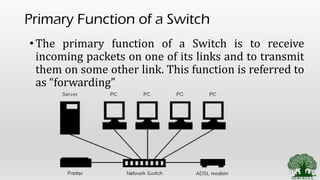
Primary Function of a Switch
•The primary function of a Switch is to receive
incoming packets on one of its links and to transmit
them on some other link. This function is referred to
as “forwarding”
Forwarding Approaches
• How does a switch decide which output link to place
each packets on ?
• There are 2 basic approaches from which switch knows
where to forward.
• Datagram (or) connection less approach
• Virtual circuit (or) connection oriented approach
Visit www.youtube.com/GURUKULA for Lecture Videos
Common Requirement for all 2 approach
• Forwarding can be done only if the switch knows 2
important parameters
• IP address of all the host connected to it
• This going to be a unique value so no problem.
• The port number on which a particular host is connected
• Can be done in 2 ways
• Numbering each ports (ie. Forward to Seat No : 10)
• Identifying each port by the name of the node connected to it (ie. Forward
to Seat on which Ram sat yesterday)
Visit www.youtube.com/GURUKULA for Lecture Videos
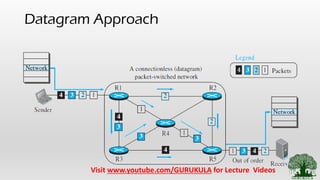
1. Datagram Approach @ Connection Less
Approach
• All the packets are included with enough information about
the destination. So that any switch will know how to take it to
the destination
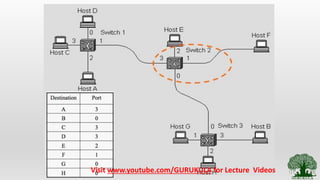
• Each and every switch on the network maintains a table which
indicates the details of connected hosts on all ports. This table
is referred to as “Forwarding Table” or “Switching Table”
Visit www.youtube.com/GURUKULA for Lecture Videos
Datagram Approach
Visit www.youtube.com/GURUKULA for Lecture Videos
Drawbacks of Datagram Approach
• Difficult to from a forwarding table for large network
• Not suitable for dynamically changing topologies
• Creates a problem when there are multiple paths available to
reach the destination.
Visit www.youtube.com/GURUKULA for Lecture Videos
Characteristics of datagram networks
• They are referred to as “connection less” because they do
not check for the dedicated link to destination before
transmission
• A host have no idea about the capability of the network
to deliver the packets
• All packets take the same path unless the entries on the
forwarding table is altered. This may overload the path
Visit www.youtube.com/GURUKULA for Lecture Videos
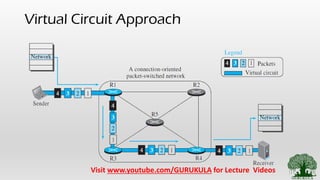
2. Virtual Circuit Switching
@
Connection Oriented Approach
• This is an another approach which uses a concept
of “Virtual Circuit”.
•This approach is referred to as connection
oriented approach as it establishes the virtual
circuit between the source and destination
Visit www.youtube.com/GURUKULA for Lecture Videos
Virtual Circuit Approach
Visit www.youtube.com/GURUKULA for Lecture Videos
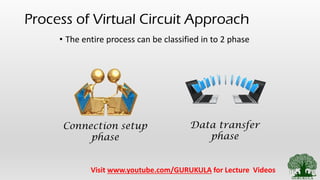
Process of Virtual Circuit Approach
• The entire process can be classified in to 2 phase
Connection setup
phase
Data transfer
phase
Visit www.youtube.com/GURUKULA for Lecture Videos
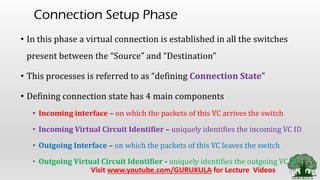
Connection Setup Phase
• In this phase a virtual connection is established in all the switches
present between the “Source” and “Destination”
• This processes is referred to as “defining Connection State”
• Defining connection state has 4 main components
• Incoming interface – on which the packets of this VC arrives the switch
• Incoming Virtual Circuit Identifier – uniquely identifies the incoming VC ID
• Outgoing Interface – on which the packets of this VC leaves the switch
• Outgoing Virtual Circuit Identifier - uniquely identifies the outgoing VC ID
Visit www.youtube.com/GURUKULA for Lecture Videos
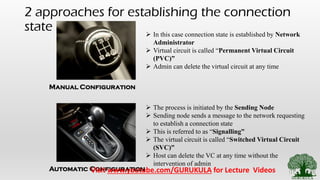
2 approaches for establishing the connection
state
Manual Configuration
Automatic Configuration
➢ In this case connection state is established by Network
Administrator
➢ Virtual circuit is called “Permanent Virtual Circuit
(PVC)”
➢ Admin can delete the virtual circuit at any time
➢ The process is initiated by the Sending Node
➢ Sending node sends a message to the network requesting
to establish a connection state
➢ This is referred to as “Signalling”
➢ The virtual circuit is called “Switched Virtual Circuit
(SVC)”
➢ Host can delete the VC at any time without the
intervention of admin
Visit www.youtube.com/GURUKULA for Lecture Videos
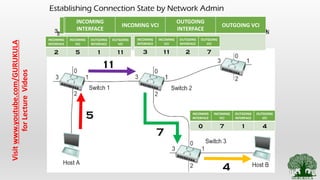
Establishing Connection State by Network Admin
1. Identify and Create Virtual Circuit from source to destination2. Assigning id for each virtual circuit which is not already used
5
11
7
4
3. Creation of VC table at each switch present between source and
destination3.1 VC table for switch 1
INCOMING
INTERFACE
INCOMING VCI
OUTGOING
INTERFACE
OUTGOING VCI
2 5 1 11
INCOMING
INTERFACE
INCOMING VCI
OUTGOING
INTERFACE
OUTGOING VCI
3 11 2 73.1 VC table for switch 2
3.1 VC table for switch 3
INCOMING
INTERFACE
INCOMING VCI
OUTGOING
INTERFACE
OUTGOING VCI
0 7 1 4INCOMING
INTERFACE
INCOMING
VCI
OUTGOING
INTERFACE
OUTGOING
VCI
2 5 1 11
INCOMING
INTERFACE
INCOMING
VCI
OUTGOING
INTERFACE
OUTGOING
VCI
3 11 2 7
INCOMING
INTERFACE
INCOMING
VCI
OUTGOING
INTERFACE
OUTGOING
VCI
0 7 1 4
Visitwww.youtube.com/GURUKULA
forLectureVideos
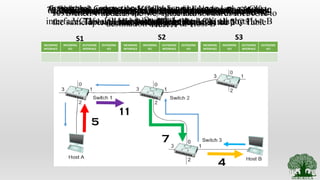
Establishing Connection State by Sending Node
INCOMING
INTERFACE
INCOMING
VCI
OUTGOING
INTERFACE
OUTGOING
VCI
2 5 1 11
INCOMING
INTERFACE
INCOMING
VCI
OUTGOING
INTERFACE
OUTGOING
VCI
3 11 2 7
INCOMING
INTERFACE
INCOMING
VCI
OUTGOING
INTERFACE
OUTGOING
VCI
0 7 1 4
5
11
7
4
S1 S2 S3
1. Host A sends a setup message into the network with the
destination address of Host B
2. When switch 1 receives the setup message it picks a
VCI1 value and forwards the packet at all ports
3. Switch 1 updates the incoming port number and VCI
chosen
4. Now , Switch 2 receives the setup message. It performs
the same operation as Switch 1 and updates the VC Table
5. Now ,switch 3 receives the setup message and performs
the same operation.
6. Then the setup message is forwarded to Host B. The host
choses the VCI value.
7. At this stage none of the switch knows about the outgoing
interface. This will be updated from the ACK sent by Host B
8. Now, Switch 3 updates its outgoing information on VC
Table and forwards the ACK to Switch 2
9. Switch 2 updates the VC Table and Forwards the ACK to
Switch 1
10. Switch 1 updates the VC Table and forwards the ACK to
Host A
11. By Receiving this ACK Host A knows the Complete
Virtual Path to reach Host B
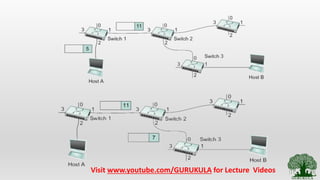
2. Data Transfer Phase
• Data transfer phase starts after the completion of connection setup
phase.
• Host A puts a value of 5 for outgoing VCI in the header of the packet.
• Switch 1 receives any such packets on interface 2 it refers to the VC
table and puts the VCI value of 11 and forwards.
• Similarly the packet reaches Host B.
• Once the data transfer is done Host A can tear down the connection
with Host B by sending “Tear Down Signal” to Host B
• This signal removes all the entries in the switches.
Visit www.youtube.com/GURUKULA for Lecture Videos
Session Summary
• What is Packet Switching
• Different Approaches [ Datagram Approach, Virtual
Circuit Approach]
References:
• Behrouz A. Forouzan, ―Data communication and Networking, Fifth
Edition, Tata McGraw – Hill, 2013
• Larry L. Peterson, Bruce S. Davie, ―Computer Networks: A Systems
Approach, Fifth Edition, Morgan Kaufmann Publishers, 2011.
• Few online References (Will be Mentioned in the description Section)
Thank You…

2.9 network layer services packet switching

  • 1.
  • 2.
    Overview of Module- 2 • Framing • What is Framing • Types of Framing • Methods for identifying the boundaries • Flow Control • What is flow control • Types of flow control • Access Control • What is access control • Types of access control • Ethernet – IEEE 802.3 • Evolution of Ethernet • Frame Format of Ethernet • Access Control for Ethernet • Performance Evaluation of Ethernet • WLAN – IEEE 802.11 • Architecture • Bluetooth • WIFI • Zigbee • 6LowPan • Network Layer Services • IPv4 • Packet switching • Network Layer Protocols Visit www.youtube.com/GURUKULA for Lecture Videos
  • 3.
    Switching • Switch isa mechanism that allows us to interconnect links to form a larger networks. • Switch is a multi – input , multi – output device. • It receives packets from one input port and forwards them to one or more output ports. • Switch provides a star topology Visit www.youtube.com/GURUKULA for Lecture Videos
  • 4.
    Primary Function ofa Switch •The primary function of a Switch is to receive incoming packets on one of its links and to transmit them on some other link. This function is referred to as “forwarding”
  • 5.
    Forwarding Approaches • Howdoes a switch decide which output link to place each packets on ? • There are 2 basic approaches from which switch knows where to forward. • Datagram (or) connection less approach • Virtual circuit (or) connection oriented approach Visit www.youtube.com/GURUKULA for Lecture Videos
  • 6.
    Common Requirement forall 2 approach • Forwarding can be done only if the switch knows 2 important parameters • IP address of all the host connected to it • This going to be a unique value so no problem. • The port number on which a particular host is connected • Can be done in 2 ways • Numbering each ports (ie. Forward to Seat No : 10) • Identifying each port by the name of the node connected to it (ie. Forward to Seat on which Ram sat yesterday) Visit www.youtube.com/GURUKULA for Lecture Videos
  • 7.
    1. Datagram Approach@ Connection Less Approach • All the packets are included with enough information about the destination. So that any switch will know how to take it to the destination • Each and every switch on the network maintains a table which indicates the details of connected hosts on all ports. This table is referred to as “Forwarding Table” or “Switching Table” Visit www.youtube.com/GURUKULA for Lecture Videos
  • 8.
  • 9.
  • 10.
    Drawbacks of DatagramApproach • Difficult to from a forwarding table for large network • Not suitable for dynamically changing topologies • Creates a problem when there are multiple paths available to reach the destination. Visit www.youtube.com/GURUKULA for Lecture Videos
  • 11.
    Characteristics of datagramnetworks • They are referred to as “connection less” because they do not check for the dedicated link to destination before transmission • A host have no idea about the capability of the network to deliver the packets • All packets take the same path unless the entries on the forwarding table is altered. This may overload the path Visit www.youtube.com/GURUKULA for Lecture Videos
  • 12.
    2. Virtual CircuitSwitching @ Connection Oriented Approach • This is an another approach which uses a concept of “Virtual Circuit”. •This approach is referred to as connection oriented approach as it establishes the virtual circuit between the source and destination Visit www.youtube.com/GURUKULA for Lecture Videos
  • 13.
    Virtual Circuit Approach Visitwww.youtube.com/GURUKULA for Lecture Videos
  • 14.
    Process of VirtualCircuit Approach • The entire process can be classified in to 2 phase Connection setup phase Data transfer phase Visit www.youtube.com/GURUKULA for Lecture Videos
  • 15.
    Connection Setup Phase •In this phase a virtual connection is established in all the switches present between the “Source” and “Destination” • This processes is referred to as “defining Connection State” • Defining connection state has 4 main components • Incoming interface – on which the packets of this VC arrives the switch • Incoming Virtual Circuit Identifier – uniquely identifies the incoming VC ID • Outgoing Interface – on which the packets of this VC leaves the switch • Outgoing Virtual Circuit Identifier - uniquely identifies the outgoing VC ID Visit www.youtube.com/GURUKULA for Lecture Videos
  • 16.
    2 approaches forestablishing the connection state Manual Configuration Automatic Configuration ➢ In this case connection state is established by Network Administrator ➢ Virtual circuit is called “Permanent Virtual Circuit (PVC)” ➢ Admin can delete the virtual circuit at any time ➢ The process is initiated by the Sending Node ➢ Sending node sends a message to the network requesting to establish a connection state ➢ This is referred to as “Signalling” ➢ The virtual circuit is called “Switched Virtual Circuit (SVC)” ➢ Host can delete the VC at any time without the intervention of admin Visit www.youtube.com/GURUKULA for Lecture Videos
  • 17.
    Establishing Connection Stateby Network Admin 1. Identify and Create Virtual Circuit from source to destination2. Assigning id for each virtual circuit which is not already used 5 11 7 4 3. Creation of VC table at each switch present between source and destination3.1 VC table for switch 1 INCOMING INTERFACE INCOMING VCI OUTGOING INTERFACE OUTGOING VCI 2 5 1 11 INCOMING INTERFACE INCOMING VCI OUTGOING INTERFACE OUTGOING VCI 3 11 2 73.1 VC table for switch 2 3.1 VC table for switch 3 INCOMING INTERFACE INCOMING VCI OUTGOING INTERFACE OUTGOING VCI 0 7 1 4INCOMING INTERFACE INCOMING VCI OUTGOING INTERFACE OUTGOING VCI 2 5 1 11 INCOMING INTERFACE INCOMING VCI OUTGOING INTERFACE OUTGOING VCI 3 11 2 7 INCOMING INTERFACE INCOMING VCI OUTGOING INTERFACE OUTGOING VCI 0 7 1 4 Visitwww.youtube.com/GURUKULA forLectureVideos
  • 18.
    Establishing Connection Stateby Sending Node INCOMING INTERFACE INCOMING VCI OUTGOING INTERFACE OUTGOING VCI 2 5 1 11 INCOMING INTERFACE INCOMING VCI OUTGOING INTERFACE OUTGOING VCI 3 11 2 7 INCOMING INTERFACE INCOMING VCI OUTGOING INTERFACE OUTGOING VCI 0 7 1 4 5 11 7 4 S1 S2 S3 1. Host A sends a setup message into the network with the destination address of Host B 2. When switch 1 receives the setup message it picks a VCI1 value and forwards the packet at all ports 3. Switch 1 updates the incoming port number and VCI chosen 4. Now , Switch 2 receives the setup message. It performs the same operation as Switch 1 and updates the VC Table 5. Now ,switch 3 receives the setup message and performs the same operation. 6. Then the setup message is forwarded to Host B. The host choses the VCI value. 7. At this stage none of the switch knows about the outgoing interface. This will be updated from the ACK sent by Host B 8. Now, Switch 3 updates its outgoing information on VC Table and forwards the ACK to Switch 2 9. Switch 2 updates the VC Table and Forwards the ACK to Switch 1 10. Switch 1 updates the VC Table and forwards the ACK to Host A 11. By Receiving this ACK Host A knows the Complete Virtual Path to reach Host B
  • 19.
    2. Data TransferPhase • Data transfer phase starts after the completion of connection setup phase. • Host A puts a value of 5 for outgoing VCI in the header of the packet. • Switch 1 receives any such packets on interface 2 it refers to the VC table and puts the VCI value of 11 and forwards. • Similarly the packet reaches Host B. • Once the data transfer is done Host A can tear down the connection with Host B by sending “Tear Down Signal” to Host B • This signal removes all the entries in the switches. Visit www.youtube.com/GURUKULA for Lecture Videos
  • 20.
  • 21.
    Session Summary • Whatis Packet Switching • Different Approaches [ Datagram Approach, Virtual Circuit Approach]
  • 22.
    References: • Behrouz A.Forouzan, ―Data communication and Networking, Fifth Edition, Tata McGraw – Hill, 2013 • Larry L. Peterson, Bruce S. Davie, ―Computer Networks: A Systems Approach, Fifth Edition, Morgan Kaufmann Publishers, 2011. • Few online References (Will be Mentioned in the description Section) Thank You…