Topic Outline
 What is multimedia Authoring tools.
 Multimedia tools features
 Categories of multimedia authoring
tools.
AUTHORING TOOLS
 Have 2 basic features:
Ability to create and edit product.
A presentation scheme for
delivering the product.
AUTHORING TOOLS
Four main perspectives in multimedia authoring tools
:
 Tool (any software package that could authors multimedia product)
 Product (the result of combining all multimedia components)
 Developer (designers, programmers, and multimedia authors)
 End user (customer or viewer)
MULTIMEDIA TOOL FEATURES
PAGE
 Different environments use different term
of page such as frame,stage, template,or
window
 Act as a container for other features or
object such as text or graphic content or
controls such as buttons.
MULTIMEDIA TOOL FEATURES
CONTROLS
 Enables interaction between user and
product.
 Managing or direct sequences of events
(data
 collection,data objects)
 3 categories of controls:
Navigation (buttons, hot spots, hypertext)
Input (radio button, check box, list box,
text)
MULTIMEDIA TOOL FEATURES
EXECUTION
 Process that control the presentations
and sequencing of the application.
 Linear sequenced:
Presentation control by user.
 Temporal control:
 Control by timer that initiates event in a
predetermine order.
 Interactive control:
 - wait for user to select a function such as
pressing button before continue.
CATEGORIES OF AUTHORING
TOOLS
 Simple authoring tools: word processor
and presentation software.
 Programming tools: enables developer
to create applications with data and
controls for basic interactivity.
 Simple interactive authoring tools:
enables the developer to create
applications with data and controls for
basic interactivity.
 Complex interactive authoring tools:
allow developer to use programming
SIMPLE AUTHORING &
DELIVERY TOOLS
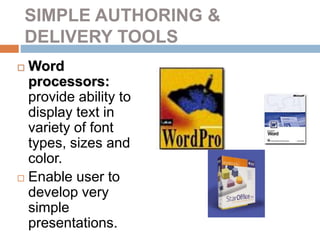
 Word
processors:
provide ability to
display text in
variety of font
types, sizes and
color.
 Enable user to
develop very
simple
presentations.
SIMPLE AUTHORING &
DELIVERY TOOLS
 Graphic software: ranges from simple to
complex, include powerful paint programs.
 Useful to create graphics that can be
placed in other applications.
 Avoid use red and green color as a cue
color because color blind individuals
cannot see them correctly.
SIMPLE AUTHORING &
DELIVERY TOOLS
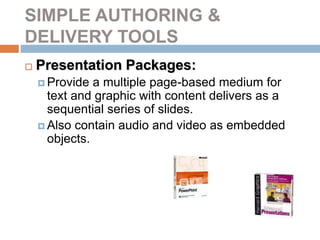
 Presentation Packages:
 Provide a multiple page-based medium for
text and graphic with content delivers as a
sequential series of slides.
 Also contain audio and video as embedded
objects.
PROGRAMMING LANGUAGES FOR
AUTHORING
 Multimedia
products can be
developed by
assembly
languages, C,
BASIC.
 Advantages:
 Languages like C
and assembly
languages very
efficient & fast.
 Easy integration
 Disadvantages:
 Programming
expertise is require
to create and
maintain the
product.
 Much more code is
required making
long term
maintenance
difficult &
SIMPLE INTERACTIVE
AUTHORING TOOLS
 Provide critical feature of being able to
interactivity navigate through a product.
 Simple refer to limited interaction available
for end user.
SIMPLE INTERACTIVE
AUTHORING TOOLS
 Advantages:
Easy to learn,
provide a
number of
powerful
interactive
features.
Reasonable
price
 Disadvantages:
Difficult to
integrate with
other
applications.
COMPLEX INTERACTIVE
AUTHORING TOOLS
 Combine feature in simple interactive
tools with programming features.
 3 categories:
Page/Card based layout
Temporal/Time based
Icon based.
PAGE/CARD BASED
AUTHORING
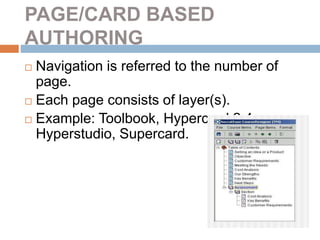
 Navigation is referred to the number of
page.
 Each page consists of layer(s).
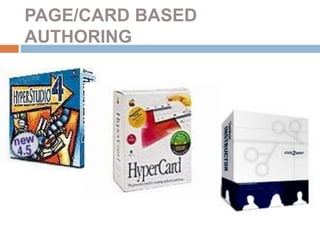
 Example: Toolbook, Hypercard 2.4,
Hyperstudio, Supercard.
PAGE/CARD BASED
AUTHORING
TEMPORAL/TIME BASED
AUTHORING
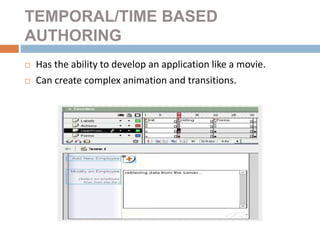
 Has the ability to develop an application like a movie.
 Can create complex animation and transitions.
TEMPORAL/TIME BASED
AUTHORING
 Features:
A page or display frame on which object
such as button, text or audio/video data
are placed.
An array for keeping track of
pages/frames including their sequence,
timing and content.
Controller for playing stopping, stepping
or rewind a presentations.
TEMPORAL/TIME BASED
AUTHORING
 Example: Macromedia Director, Flash
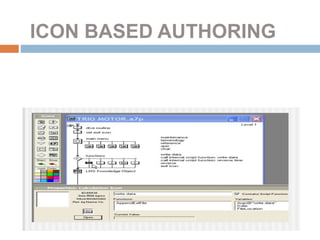
ICON BASED AUTHORING
 Enables complex interaction and layering
of multimedia products.
 Ability to graphically design complex
interaction for repetitive application.
 Example : Macromedia Authorware
ICON BASED AUTHORING

authoring tools 2015

  • 1.
    Topic Outline  Whatis multimedia Authoring tools.  Multimedia tools features  Categories of multimedia authoring tools.
  • 2.
    AUTHORING TOOLS  Have2 basic features: Ability to create and edit product. A presentation scheme for delivering the product.
  • 3.
    AUTHORING TOOLS Four mainperspectives in multimedia authoring tools :  Tool (any software package that could authors multimedia product)  Product (the result of combining all multimedia components)  Developer (designers, programmers, and multimedia authors)  End user (customer or viewer)
  • 4.
    MULTIMEDIA TOOL FEATURES PAGE Different environments use different term of page such as frame,stage, template,or window  Act as a container for other features or object such as text or graphic content or controls such as buttons.
  • 5.
    MULTIMEDIA TOOL FEATURES CONTROLS Enables interaction between user and product.  Managing or direct sequences of events (data  collection,data objects)  3 categories of controls: Navigation (buttons, hot spots, hypertext) Input (radio button, check box, list box, text)
  • 6.
    MULTIMEDIA TOOL FEATURES EXECUTION Process that control the presentations and sequencing of the application.  Linear sequenced: Presentation control by user.  Temporal control:  Control by timer that initiates event in a predetermine order.  Interactive control:  - wait for user to select a function such as pressing button before continue.
  • 7.
    CATEGORIES OF AUTHORING TOOLS Simple authoring tools: word processor and presentation software.  Programming tools: enables developer to create applications with data and controls for basic interactivity.  Simple interactive authoring tools: enables the developer to create applications with data and controls for basic interactivity.  Complex interactive authoring tools: allow developer to use programming
  • 8.
    SIMPLE AUTHORING & DELIVERYTOOLS  Word processors: provide ability to display text in variety of font types, sizes and color.  Enable user to develop very simple presentations.
  • 9.
    SIMPLE AUTHORING & DELIVERYTOOLS  Graphic software: ranges from simple to complex, include powerful paint programs.  Useful to create graphics that can be placed in other applications.  Avoid use red and green color as a cue color because color blind individuals cannot see them correctly.
  • 10.
    SIMPLE AUTHORING & DELIVERYTOOLS  Presentation Packages:  Provide a multiple page-based medium for text and graphic with content delivers as a sequential series of slides.  Also contain audio and video as embedded objects.
  • 11.
    PROGRAMMING LANGUAGES FOR AUTHORING Multimedia products can be developed by assembly languages, C, BASIC.  Advantages:  Languages like C and assembly languages very efficient & fast.  Easy integration  Disadvantages:  Programming expertise is require to create and maintain the product.  Much more code is required making long term maintenance difficult &
  • 12.
    SIMPLE INTERACTIVE AUTHORING TOOLS Provide critical feature of being able to interactivity navigate through a product.  Simple refer to limited interaction available for end user.
  • 13.
    SIMPLE INTERACTIVE AUTHORING TOOLS Advantages: Easy to learn, provide a number of powerful interactive features. Reasonable price  Disadvantages: Difficult to integrate with other applications.
  • 14.
    COMPLEX INTERACTIVE AUTHORING TOOLS Combine feature in simple interactive tools with programming features.  3 categories: Page/Card based layout Temporal/Time based Icon based.
  • 15.
    PAGE/CARD BASED AUTHORING  Navigationis referred to the number of page.  Each page consists of layer(s).  Example: Toolbook, Hypercard 2.4, Hyperstudio, Supercard.
  • 16.
  • 17.
    TEMPORAL/TIME BASED AUTHORING  Hasthe ability to develop an application like a movie.  Can create complex animation and transitions.
  • 18.
    TEMPORAL/TIME BASED AUTHORING  Features: Apage or display frame on which object such as button, text or audio/video data are placed. An array for keeping track of pages/frames including their sequence, timing and content. Controller for playing stopping, stepping or rewind a presentations.
  • 19.
  • 20.
    ICON BASED AUTHORING Enables complex interaction and layering of multimedia products.  Ability to graphically design complex interaction for repetitive application.  Example : Macromedia Authorware
  • 21.