Courseware
What is courseware?
 One of the educational software.
 Primary purpose - teaching or self-learning.
 courseware is a term that combines the words
'course' with 'software'.
 additional educational material for teachers or
trainers or as tutorials for students.
 Multimedia courseware develop an environment
surrounding the interactions and transformations of
the semantics (the meaning) through multimedia.
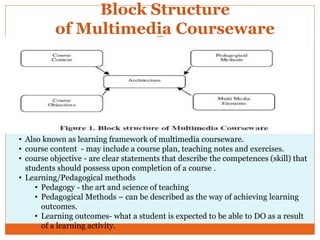
Block Structure
of Multimedia Courseware
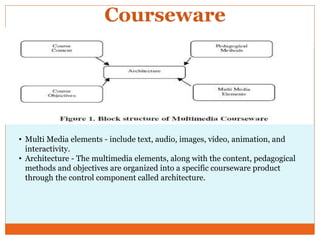
• Also known as learning framework of multimedia courseware.
• course content - may include a course plan, teaching notes and exercises.
• course objective - are clear statements that describe the competences (skill) that
students should possess upon completion of a course .
• Learning/Pedagogical methods
• Pedagogy - the art and science of teaching
• Pedagogical Methods – can be described as the way of achieving learning
outcomes.
• Learning outcomes- what a student is expected to be able to DO as a result
of a learning activity.
Courseware
• Multi Media elements - include text, audio, images, video, animation, and
interactivity.
• Architecture - The multimedia elements, along with the content, pedagogical
methods and objectives are organized into a specific courseware product
through the control component called architecture.
• The selection of teaching methods is dependent on the
learners, and the characteristics of the learning
situation. The chosen teaching methods should best
support the attainment of learning outcomes.
• The methods used by a teacher will depend on the skills
or information the teacher would like to convey to their
students.
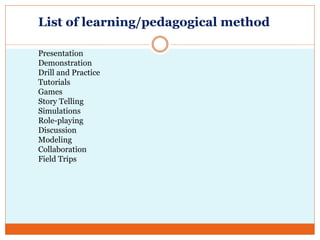
List of learning/pedagogical method
Presentation
Demonstration
Drill and Practice
Tutorials
Games
Story Telling
Simulations
Role-playing
Discussion
Modeling
Collaboration
Field Trips
Learning Method
Presentation
 A verbal report presented with illustrative material, such as slides,
graphs, etc: a presentation on the company results

Demonstration
 A description or explanation of a process. Etc:
 The act of showing the operation or use of a device,
machine, process, product, or the like, as to a prospective buyer.

Tutorial (computer)
 Programmed instruction provided to a user at a computer terminal,
often concerning the use of a
particular software package and built into that package.
A manual explaining how to use a particular software package or
computer system.
Learning Method
Drill and Practice
 Drill and practice is a behaviorist aligned technique in which students are given
the same materials repeatedly until mastery is achieved. In each iteration,
students are given similar questions to answer or activities to perform, with a
certain percentage of correct responses or actions moving the student to the
next level of difficulty.
Games
 A competitive activity involving skill, chance, or endurance on the part of two
or more persons who
play according to a set of rules, usually for their own pleasure or for that of
spectators.
Story Telling
 The telling of stories.
Learning Method
Simulations
 Maths, statistics, computing the construction of a mathematical
model for some process, situation,
etc, in order to estimate its characteristics or solve problems about
it probabilistically in terms of the model

Role-playing
 To assume the attitudes, actions, and discourse of (another),
especially in a make-believe situation
in an effort to understand a differing point of view or social
interaction: Management trainees were given a chance to role-
play labor negotiators.
 To experiment with or experience (a situation or viewpoint) by
playing a role: trainees role-playing management positions.

Learning Method
Discussion
 An act or instance of discussing; consideration by argement,
comment, etc., especially to explore solutions; informal debate.
Modeling
 A representation, generally in miniature.
Field Trips
 A trip by students to gain firsthand
knowledge away from the classroom, as to a museum, factory,
geological area, or environment of certain plants and animals.

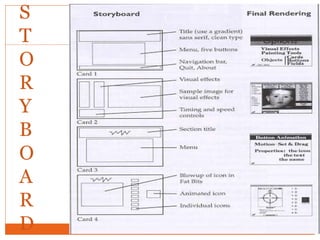
Storyboard
Storyboard
 Storyboarding can be use to plan, produce
and evaluate multimedia presentations or
any instructional materials.
 A storyboard is a written synopsis of text,
graphics, videos, animations, etc. shown in
the order they will appear in the finished
presentation. In other words all multimedia
resources are identified.
Storyboard
 The storyboard begin from the goal of the
project itself.
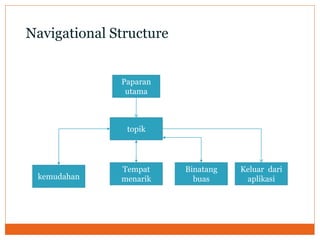
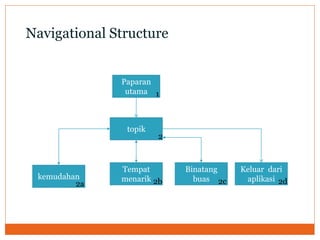
 Starts by developing a navigational
structures for the presentation itself.
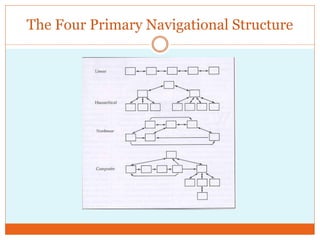
The Four Primary Navigational Structure
In storyboard, it should include
1. The interactivity of
slides
2. Hyperlinks
3. Any navigation tools
needed
4. Any needed
directions for the
user.
They allow the
makeup and structure
of a presentation
and/or its parts to be
detailed.
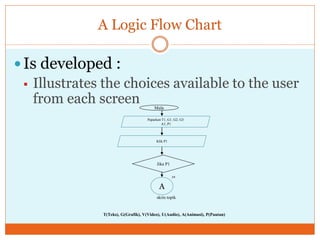
A Logic Flow Chart
 Is developed :
 Illustrates the choices available to the user
from each screen
T(Teks), G(Grafik), V(Video), U(Audio), A(Animasi), P(Pautan)
Mula
Jika P1
ya
A
skrin topik
Paparkan T1, G1, G2, G3
A1, P1
Klik P1
Editing with storyboard
 To increase the efficiency and effectiveness
of the editing process a storyboard can be
used to review and modify as necessary what
was planned.
Advantages
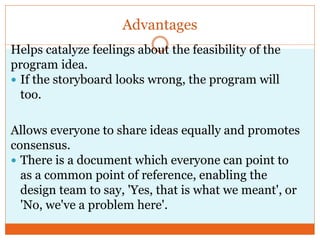
Helps catalyze feelings about the feasibility of the
program idea.
 If the storyboard looks wrong, the program will
too.
Allows everyone to share ideas equally and promotes
consensus.
 There is a document which everyone can point to
as a common point of reference, enabling the
design team to say, 'Yes, that is what we meant', or
'No, we've a problem here'.
Advantages
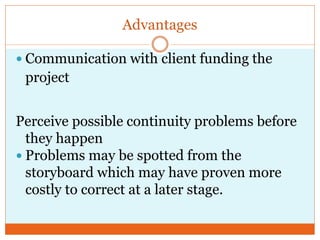
 Communication with client funding the
project
Perceive possible continuity problems before
they happen
 Problems may be spotted from the
storyboard which may have proven more
costly to correct at a later stage.
Advantages
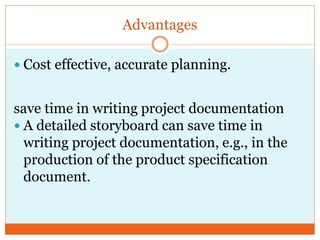
 Cost effective, accurate planning.
save time in writing project documentation
 A detailed storyboard can save time in
writing project documentation, e.g., in the
production of the product specification
document.
S
T
O
R
Y
B
O
A
R
D
Paparan
utama
topik
Keluar dari
aplikasi
Binatang
buas
Tempat
menarikkemudahan
Navigational Structure
Paparan
utama
topik
Keluar dari
aplikasi
Binatang
buas
Tempat
menarikkemudahan
Navigational Structure
1
2
2a 2b 2c 2d
REKA BENTUK PAPAN CERITA APLIKASI MULTIMEDIA
NOMBOR SKRINREKA BENTUK SKRIN
CARTA ALIR/ NOTA / ARAHAN :
SKRIP / SUMBER TEKS :
TAJUK
SUMBER IMEJ
SUMBER ANIMASI
Nama Fail :……………………………….
SUMBER KLIP VIDEO
Nama Fail : …………………………….
SUMBER AUDIO / SUARA LATAR
Nama Fail : …………………………….
Nama Fail : ……………………………….
Nama Fail : tex.doc (mengandungi
Jujukan teks dari T2 hingga T11)
LOKASI FAIL-FAIL SUMBER
DIRECTORY : …………………………….
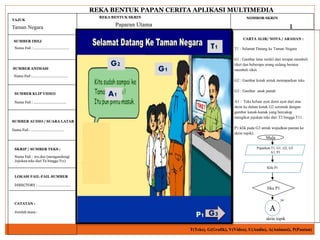
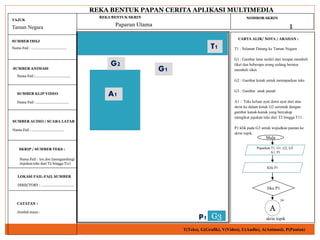
T1 : Selamat Datang ke Taman Negara
G1 : Gambar latar terdiri dari tempat membeli
tiket dan beberapa orang sedang beratur
membeli tiket.
G2 : Gambar kotak untuk memaparkan teks
G3 : Gambar anak panah
A1 : Teks keluar ayat demi ayat dari atas
skrin ke dalam kotak G2 serentak dengan
gambar kanak-kanak yang bercakap
mengikut jujukan teks dari T2 hingga T11.
P1:klik pada G3 untuk wujudkan pautan ke
skrin topik).
Taman Negara 1Paparan Utama
T(Teks), G(Grafik), V(Video), U(Audio), A(Animasi), P(Pautan)
CATATAN :
Jumlah masa :
T1
G1
G2
P1
A1
G3
Mula
Jika P1
ya
A
skrin topik
Paparkan T1, G1, G2, G3
A1, P1
Klik P1
REKA BENTUK PAPAN CERITA APLIKASI MULTIMEDIA
NOMBOR SKRINREKA BENTUK SKRIN
CARTA ALIR/ NOTA / ARAHAN :
SKRIP / SUMBER TEKS :
TAJUK
SUMBER IMEJ
SUMBER ANIMASI
Nama Fail :……………………………….
SUMBER KLIP VIDEO
Nama Fail : …………………………….
SUMBER AUDIO / SUARA LATAR
Nama Fail : …………………………….
Nama Fail : ……………………………….
Nama Fail : tex.doc (mengandungi
Jujukan teks dari T2 hingga T11)
LOKASI FAIL-FAIL SUMBER
DIRECTORY : …………………………….
T1 : Selamat Datang ke Taman Negara
G1 : Gambar latar terdiri dari tempat membeli
tiket dan beberapa orang sedang beratur
membeli tiket.
G2 : Gambar kotak untuk memaparkan teks
G3 : Gambar anak panah
A1 : Teks keluar ayat demi ayat dari atas
skrin ke dalam kotak G2 serentak dengan
gambar kanak-kanak yang bercakap
mengikut jujukan teks dari T2 hingga T11.
P1:klik pada G3 untuk wujudkan pautan ke
skrin topik.
Taman Negara 1Paparan Utama
T(Teks), G(Grafik), V(Video), U(Audio), A(Animasi), P(Pautan)
CATATAN :
Jumlah masa :
G1
G2
A1
T1
P1 G3
Mula
Jika P1
ya
A
skrin topik
Paparkan T1, G1, G2, G3
A1, P1
Klik P1
REKA BENTUK PAPAN CERITA APLIKASI MULTIMEDIA
NOMBOR SKRINREKA BENTUK SKRIN
CARTA ALIR/ NOTA / ARAHAN :
SKRIP / SUMBER TEKS :
TAJUK
SUMBER IMEJ
SUMBER ANIMASI
Nama Fail :……………………………….
SUMBER KLIP VIDEO
Nama Fail : …………………………….
SUMBER AUDIO / SUARA
LATAR
Nama Fail : lagu.mp3(mengandungi
lagu latar)
Nama Fail : ……………………………….
LOKASI FAIL-FAIL SUMBER
DIRECTORY : …………………………….
T4 : Kandungan
G4 : Gambar latar terdiri dari gambar di
Taman negara
G5 : Gambar pintu
T5: Kemudahan yang terdapat di Taman
Negara
T6 : Tempat menarik di Taman Negara
T7 : Binatang liar yang terdapat di
Taman Negara
P2:klik pada T5 untuk wujudkan pautan
ke skrin kemudahan
P3:klik pada T6 untuk wujudkan pautan
ke skrin tempat menarik
P4:klik pada T7 untuk wujudkan pautan
ke skrin binatang liar
P5:klik pada G5 untuk keluar dari
aplikasi ini
U1:memainkan lagu latar secara
automatik
Taman Negara 2Topik
T(Teks), G(Grafik), V(Video), U(Audio), A(Animasi), P(Pautan)
CATATAN :
Jumlah masa :
G4
T12
P5 G5
P2 T13
P3 T14
P4 T15
U1
Jika P2
ya
Jika P3
ya
Jika P4
ya
Tamat
Jika P5
ya
A
B C D
skrin kemudahan skrin tempat menarik skrin binatang liar
Paparkan T12, T13, T14,T15,
G4, G5, U1, P2,P3,P4,P5
Klik pautan

courseware and storyboard

  • 1.
  • 2.
    What is courseware? One of the educational software.  Primary purpose - teaching or self-learning.  courseware is a term that combines the words 'course' with 'software'.  additional educational material for teachers or trainers or as tutorials for students.  Multimedia courseware develop an environment surrounding the interactions and transformations of the semantics (the meaning) through multimedia.
  • 3.
    Block Structure of MultimediaCourseware • Also known as learning framework of multimedia courseware. • course content - may include a course plan, teaching notes and exercises. • course objective - are clear statements that describe the competences (skill) that students should possess upon completion of a course . • Learning/Pedagogical methods • Pedagogy - the art and science of teaching • Pedagogical Methods – can be described as the way of achieving learning outcomes. • Learning outcomes- what a student is expected to be able to DO as a result of a learning activity.
  • 4.
    Courseware • Multi Mediaelements - include text, audio, images, video, animation, and interactivity. • Architecture - The multimedia elements, along with the content, pedagogical methods and objectives are organized into a specific courseware product through the control component called architecture.
  • 5.
    • The selectionof teaching methods is dependent on the learners, and the characteristics of the learning situation. The chosen teaching methods should best support the attainment of learning outcomes. • The methods used by a teacher will depend on the skills or information the teacher would like to convey to their students.
  • 6.
    List of learning/pedagogicalmethod Presentation Demonstration Drill and Practice Tutorials Games Story Telling Simulations Role-playing Discussion Modeling Collaboration Field Trips
  • 7.
    Learning Method Presentation  Averbal report presented with illustrative material, such as slides, graphs, etc: a presentation on the company results  Demonstration  A description or explanation of a process. Etc:  The act of showing the operation or use of a device, machine, process, product, or the like, as to a prospective buyer.  Tutorial (computer)  Programmed instruction provided to a user at a computer terminal, often concerning the use of a particular software package and built into that package. A manual explaining how to use a particular software package or computer system.
  • 8.
    Learning Method Drill andPractice  Drill and practice is a behaviorist aligned technique in which students are given the same materials repeatedly until mastery is achieved. In each iteration, students are given similar questions to answer or activities to perform, with a certain percentage of correct responses or actions moving the student to the next level of difficulty. Games  A competitive activity involving skill, chance, or endurance on the part of two or more persons who play according to a set of rules, usually for their own pleasure or for that of spectators. Story Telling  The telling of stories.
  • 9.
    Learning Method Simulations  Maths,statistics, computing the construction of a mathematical model for some process, situation, etc, in order to estimate its characteristics or solve problems about it probabilistically in terms of the model  Role-playing  To assume the attitudes, actions, and discourse of (another), especially in a make-believe situation in an effort to understand a differing point of view or social interaction: Management trainees were given a chance to role- play labor negotiators.  To experiment with or experience (a situation or viewpoint) by playing a role: trainees role-playing management positions. 
  • 10.
    Learning Method Discussion  Anact or instance of discussing; consideration by argement, comment, etc., especially to explore solutions; informal debate. Modeling  A representation, generally in miniature. Field Trips  A trip by students to gain firsthand knowledge away from the classroom, as to a museum, factory, geological area, or environment of certain plants and animals. 
  • 11.
  • 12.
    Storyboard  Storyboarding canbe use to plan, produce and evaluate multimedia presentations or any instructional materials.  A storyboard is a written synopsis of text, graphics, videos, animations, etc. shown in the order they will appear in the finished presentation. In other words all multimedia resources are identified.
  • 13.
    Storyboard  The storyboardbegin from the goal of the project itself.  Starts by developing a navigational structures for the presentation itself.
  • 14.
    The Four PrimaryNavigational Structure
  • 15.
    In storyboard, itshould include 1. The interactivity of slides 2. Hyperlinks 3. Any navigation tools needed 4. Any needed directions for the user. They allow the makeup and structure of a presentation and/or its parts to be detailed.
  • 16.
    A Logic FlowChart  Is developed :  Illustrates the choices available to the user from each screen T(Teks), G(Grafik), V(Video), U(Audio), A(Animasi), P(Pautan) Mula Jika P1 ya A skrin topik Paparkan T1, G1, G2, G3 A1, P1 Klik P1
  • 17.
    Editing with storyboard To increase the efficiency and effectiveness of the editing process a storyboard can be used to review and modify as necessary what was planned.
  • 18.
    Advantages Helps catalyze feelingsabout the feasibility of the program idea.  If the storyboard looks wrong, the program will too. Allows everyone to share ideas equally and promotes consensus.  There is a document which everyone can point to as a common point of reference, enabling the design team to say, 'Yes, that is what we meant', or 'No, we've a problem here'.
  • 19.
    Advantages  Communication withclient funding the project Perceive possible continuity problems before they happen  Problems may be spotted from the storyboard which may have proven more costly to correct at a later stage.
  • 20.
    Advantages  Cost effective,accurate planning. save time in writing project documentation  A detailed storyboard can save time in writing project documentation, e.g., in the production of the product specification document.
  • 22.
  • 23.
  • 24.
  • 25.
    REKA BENTUK PAPANCERITA APLIKASI MULTIMEDIA NOMBOR SKRINREKA BENTUK SKRIN CARTA ALIR/ NOTA / ARAHAN : SKRIP / SUMBER TEKS : TAJUK SUMBER IMEJ SUMBER ANIMASI Nama Fail :………………………………. SUMBER KLIP VIDEO Nama Fail : ……………………………. SUMBER AUDIO / SUARA LATAR Nama Fail : ……………………………. Nama Fail : ………………………………. Nama Fail : tex.doc (mengandungi Jujukan teks dari T2 hingga T11) LOKASI FAIL-FAIL SUMBER DIRECTORY : ……………………………. T1 : Selamat Datang ke Taman Negara G1 : Gambar latar terdiri dari tempat membeli tiket dan beberapa orang sedang beratur membeli tiket. G2 : Gambar kotak untuk memaparkan teks G3 : Gambar anak panah A1 : Teks keluar ayat demi ayat dari atas skrin ke dalam kotak G2 serentak dengan gambar kanak-kanak yang bercakap mengikut jujukan teks dari T2 hingga T11. P1:klik pada G3 untuk wujudkan pautan ke skrin topik). Taman Negara 1Paparan Utama T(Teks), G(Grafik), V(Video), U(Audio), A(Animasi), P(Pautan) CATATAN : Jumlah masa : T1 G1 G2 P1 A1 G3 Mula Jika P1 ya A skrin topik Paparkan T1, G1, G2, G3 A1, P1 Klik P1
  • 26.
    REKA BENTUK PAPANCERITA APLIKASI MULTIMEDIA NOMBOR SKRINREKA BENTUK SKRIN CARTA ALIR/ NOTA / ARAHAN : SKRIP / SUMBER TEKS : TAJUK SUMBER IMEJ SUMBER ANIMASI Nama Fail :………………………………. SUMBER KLIP VIDEO Nama Fail : ……………………………. SUMBER AUDIO / SUARA LATAR Nama Fail : ……………………………. Nama Fail : ………………………………. Nama Fail : tex.doc (mengandungi Jujukan teks dari T2 hingga T11) LOKASI FAIL-FAIL SUMBER DIRECTORY : ……………………………. T1 : Selamat Datang ke Taman Negara G1 : Gambar latar terdiri dari tempat membeli tiket dan beberapa orang sedang beratur membeli tiket. G2 : Gambar kotak untuk memaparkan teks G3 : Gambar anak panah A1 : Teks keluar ayat demi ayat dari atas skrin ke dalam kotak G2 serentak dengan gambar kanak-kanak yang bercakap mengikut jujukan teks dari T2 hingga T11. P1:klik pada G3 untuk wujudkan pautan ke skrin topik. Taman Negara 1Paparan Utama T(Teks), G(Grafik), V(Video), U(Audio), A(Animasi), P(Pautan) CATATAN : Jumlah masa : G1 G2 A1 T1 P1 G3 Mula Jika P1 ya A skrin topik Paparkan T1, G1, G2, G3 A1, P1 Klik P1
  • 27.
    REKA BENTUK PAPANCERITA APLIKASI MULTIMEDIA NOMBOR SKRINREKA BENTUK SKRIN CARTA ALIR/ NOTA / ARAHAN : SKRIP / SUMBER TEKS : TAJUK SUMBER IMEJ SUMBER ANIMASI Nama Fail :………………………………. SUMBER KLIP VIDEO Nama Fail : ……………………………. SUMBER AUDIO / SUARA LATAR Nama Fail : lagu.mp3(mengandungi lagu latar) Nama Fail : ………………………………. LOKASI FAIL-FAIL SUMBER DIRECTORY : ……………………………. T4 : Kandungan G4 : Gambar latar terdiri dari gambar di Taman negara G5 : Gambar pintu T5: Kemudahan yang terdapat di Taman Negara T6 : Tempat menarik di Taman Negara T7 : Binatang liar yang terdapat di Taman Negara P2:klik pada T5 untuk wujudkan pautan ke skrin kemudahan P3:klik pada T6 untuk wujudkan pautan ke skrin tempat menarik P4:klik pada T7 untuk wujudkan pautan ke skrin binatang liar P5:klik pada G5 untuk keluar dari aplikasi ini U1:memainkan lagu latar secara automatik Taman Negara 2Topik T(Teks), G(Grafik), V(Video), U(Audio), A(Animasi), P(Pautan) CATATAN : Jumlah masa : G4 T12 P5 G5 P2 T13 P3 T14 P4 T15 U1
  • 28.
    Jika P2 ya Jika P3 ya JikaP4 ya Tamat Jika P5 ya A B C D skrin kemudahan skrin tempat menarik skrin binatang liar Paparkan T12, T13, T14,T15, G4, G5, U1, P2,P3,P4,P5 Klik pautan

Editor's Notes

  • #16 A navigational tool is everything that offers a user help to navigate (beside of the URL input field and hyperlinks within a text – which usually are placed by the author manually)