Programming in R 
?
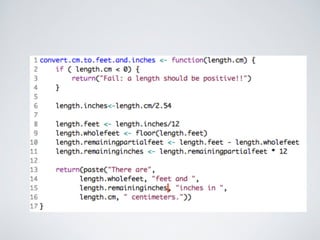
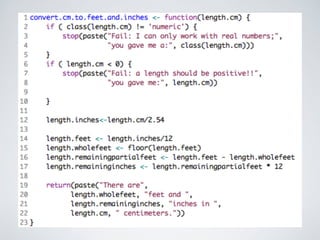
If/else
Logical Operators
going further
SBSM035 - Stats/ 
Bioinformatics/ 
Programming 
Reproducible Research & 
Sustainable Software 
@yannick__ http://yannick.poulet.org
Why care?
Aquaculture in 
Offshore Zones 
LETTERS I BOOKS I POLICY FORUM I EDUCATION FORUM I PERSPECTIVES 
operations that reveal little, if any, negative 
impact on the environment or local ecosys-tems 
(2, 3). Naylor criticizes the National 
industry governed by regulations with a rational 
basis in the ecology of the oceans and the eco-nomic 
realities of the marketplace. 
1878 
in the classroom 
1880 1882 
perspectives 
LETTERS 
edited by Etta Kavanagh 
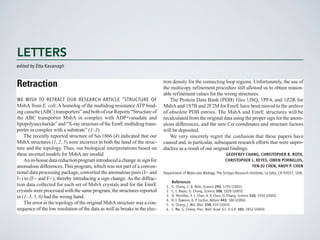
Retraction 
WE WISH TO RETRACT OUR RESEARCH ARTICLE “STRUCTURE OF 
MsbA from E. coli: A homolog of the multidrug resistance ATP bind-ing 
cassette (ABC) transporters” and both of our Reports “Structure of 
the ABC transporter MsbA in complex with ADP•vanadate and 
lipopolysaccharide” and “X-ray structure of the EmrE multidrug trans-porter 
in complex with a substrate” (1–3). 
The recently reported structure of Sav1866 (4) indicated that our 
MsbA structures (1, 2, 5) were incorrect in both the hand of the struc-ture 
and the topology. Thus, our biological interpretations based on 
these inverted models for MsbA are invalid. 
An in-house data reduction program introduced a change in sign for 
anomalous differences. This program, which was not part of a conven-tional 
data processing package, converted the anomalous pairs (I+ and 
I-) to (F- and F+), thereby introducing a sign change. As the diffrac-tion 
data collected for each set of MsbA crystals and for the EmrE 
crystals were processed with the same program, the structures reported 
in (1–3, 5, 6) had the wrong hand. 
The error in the topology of the original MsbA structure was a con-sequence 
of the low resolution of the data as well as breaks in the elec-tron 
density for the connecting loop regions. Unfortunately, the use of 
the multicopy refinement procedure still allowed us to obtain reason-able 
refinement values for the wrong structures. 
The Protein Data Bank (PDB) files 1JSQ, 1PF4, and 1Z2R for 
MsbA and 1S7B and 2F2M for EmrE have been moved to the archive 
of obsolete PDB entries. The MsbA and EmrE structures will be 
recalculated from the original data using the proper sign for the anom-alous 
differences, and the new Ca coordinates and structure factors 
will be deposited. 
We very sincerely regret the confusion that these papers have 
caused and, in particular, subsequent research efforts that were unpro-ductive 
as a result of our original findings. 
GEOFFREY CHANG, CHRISTOPHER B. ROTH, 
CHRISTOPHER L. REYES, OWEN PORNILLOS, 
YEN-JU CHEN, ANDY P. CHEN 
Department of Molecular Biology, The Scripps Research Institute, La Jolla, CA 92037, USA. 
References 
1. G. Chang, C. B. Roth, Science 293, 1793 (2001). 
2. C. L. Reyes, G. Chang, Science 308, 1028 (2005). 
3. O. Pornillos, Y.-J. Chen, A. P. Chen, G. Chang, Science 310, 1950 (2005). 
4. R. J. Dawson, K. P. Locher, Nature 443, 180 (2006). 
5. G. Chang, J. Mol. Biol. 330, 419 (2003). 
6. C. Ma, G. Chang, Proc. Natl. Acad. Sci. U.S.A. 101, 2852 (2004). 
Downloaded from www.sciencemag.org on September 24, 2014
Reproducible Research & 
Sustainable Software 
• Avoid costly mistakes 
• Be faster: “stand on the shoulders of giants” 
• Increase impact / visibility
“Big data” biology 
is hard.
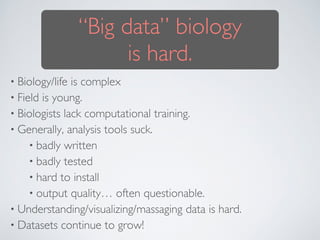
“Big data” biology 
is hard. 
• Biology/life is complex 
• Field is young. 
• Biologists lack computational training. 
• Generally, analysis tools suck. 
• badly written 
• badly tested 
• hard to install 
• output quality… often questionable. 
• Understanding/visualizing/massaging data is hard. 
• Datasets continue to grow!
We need great tools.
Some sources of inspiration
1210.0530v3 [cs.MS] 29 Nov 2012 
steve@practicalcomputing.org),††University ofWisconsin (khuff@cae.wisc.Mary University of London (mark.plumbley@eecs.qmul.ac.uk),¶¶University University (ethan@weecology.org), and †††University of Wisconsin (wilsonp@Scientists spend an increasing amount of time building and using 
software. However, most scientists are never taught how to do this 
efficiently. As a result, many are unaware of tools and practices that 
would allow them to write more reliable and maintainable code with 
less effort. We describe a set of best practices for scientific software 
development that have solid foundations in research and experience, 
and that improve scientists’ productivity and the reliability of their 
software. 
1. Write programs for people, not computers. 
Scientists writing software need to write correctly and can be easily read and programmers (especially the author’s future cannot be easily read and understood it is to know that it is actually doing what it is be productive, software developers must therefore aspects of human cognition into account: human working memory is limited, human (Best Practices for Scientific Computing 
Greg Wilson ∗, D.A. Aruliah †, C. Titus Brown ‡, Neil P. Chue Hong §, Matt Davis ¶, Richard T. Guy ∥, 
Steven H.D. Haddock ∗∗, Katy Huff ††, Ian M. Mitchell ‡‡, Mark D. Plumbley §§, Ben Waugh ¶¶, 
Ethan P. White ∗∗∗, Paul Wilson ††† 
∗Software Carpentry (gvwilson@software-carpentry.org),†University of Ontario Institute of Technology (Dhavide.Aruliah@State University (ctb@msu.edu),§Software Sustainability Institute (N.ChueHong@epcc.ed.ac.uk),¶Space Telescope (mrdavis@stsci.edu),∥University of Toronto (guy@cs.utoronto.ca),∗∗Monterey Bay Aquarium Research Institute 
(steve@practicalcomputing.org),††University ofWisconsin (khuff@cae.wisc.edu),‡‡University of British Columbia (mitchell@Mary University of London (mark.plumbley@eecs.qmul.ac.uk),¶¶University College London (b.waugh@ucl.ac.uk),∗∗∗University (ethan@weecology.org), and †††University of Wisconsin (wilsonp@engr.wisc.edu) 
Scientists spend an increasing amount of time building and using 
software. However, most scientists are never taught how to do this 
efficiently. As a result, many are unaware of tools and practices that 
would allow them to write more reliable and maintainable code with 
less effort. We describe a set of best practices for scientific software 
development that have solid foundations in research and experience, 
and that improve scientists’ productivity and the reliability of their 
software. 
Software is as important to modern scientific research as 
telescopes and test tubes. From groups that work exclusively 
on computational problems, to traditional laboratory and field 
scientists, more and more of the daily operation of science re-volves 
around computers. This includes the development of 
new algorithms, managing and analyzing the large amounts 
of data that are generated in single research projects, and 
combining disparate datasets to assess synthetic problems. 
Scientists typically develop their own software for these 
purposes because doing so requires substantial domain-specific 
and open source software development [61, studies of scientific computing [4, 31, development in general (summarized in practices will guarantee efficient, error-free but used in concert they will reduce errors in scientific software, make it easier the authors of the software time and effort focusing on the underlying scientific questions. 
Software is as important to modern scientific research as 
telescopes and test tubes. From groups that work exclusively 
on computational problems, to traditional laboratory and field 
scientists, more and more of the daily operation of science re-volves 
around computers. This includes the development of 
new algorithms, managing and analyzing the large amounts 
of data that are generated in single research projects, and 
combining disparate datasets to assess synthetic problems. 
arXiv:1210.0530v3 [cs.MS] 29 Nov 2012 
1. Write programs for people, not computers. 
2. Automate repetitive tasks. 
3. Use the computer to record history. 
4. Make incremental changes. 
5. Use version control. 
6. Don’t repeat yourself (or others). 
7. Plan for mistakes. 
8. Optimize software only after it works correctly. 
9. Document the design and purpose of code rather than its mechanics.! 
10. Conduct code reviews.
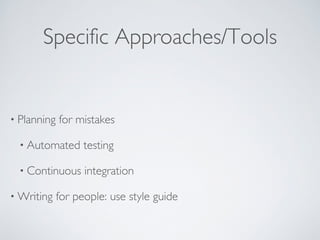
Specific Approaches/Tools 
• Planning for mistakes 
• Automated testing 
• Continuous integration 
•Writing for people: use style guide
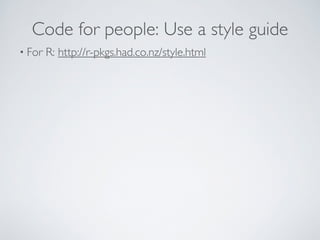
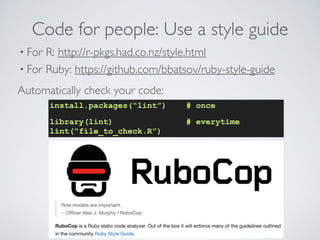
Code for people: Use a style guide 
• For R: http://r-pkgs.had.co.nz/style.html
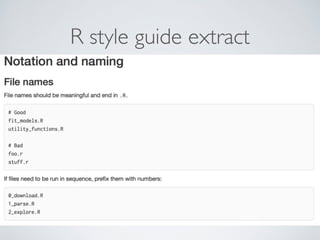
R style guide extract
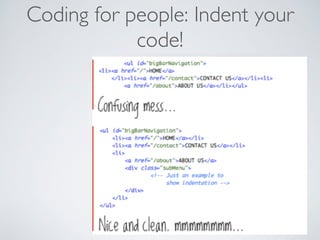
understand and improve your code in 6 
Coding for people: Indent your 
approximate Damian Conway 
code! 
characters 
http://github.com/
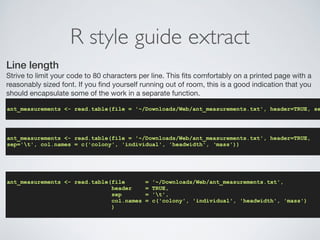
R style guide extract 
Line length 
Strive to limit your code to 80 characters per line. This fits comfortably on a printed page with a 
reasonably sized font. If you find yourself running out of room, this is a good indication that you 
should encapsulate some of the work in a separate function. 
! 
ant_measurements <- read.table(file = '~/Downloads/Web/ant_measurements.txt', header=TRUE, sep='! 
ant_measurements <- read.table(file = '~/Downloads/Web/ant_measurements.txt', header=TRUE, 
sep='t', col.names = c('colony', 'individual', 'headwidth', ‘mass')) 
! 
ant_measurements <- read.table(file = '~/Downloads/Web/ant_measurements.txt', 
header = TRUE, 
sep = 't', 
col.names = c('colony', 'individual', 'headwidth', 'mass') 
)
Code for people: Use a style guide 
• For R: http://r-pkgs.had.co.nz/style.html 
• For Ruby: https://github.com/bbatsov/ruby-style-guide 
Automatically check your code: 
install.packages(“lint”) # once 
library(lint) # everytime 
lint(“file_to_check.R”)
Eliminate redundancy 
DRY: Don’t Repeat Yourself
knitr (sweave)Analyzing & Reporting in a single file. 
analysis.Rmd 
A minimal R Markdown example 
I know the value of pi is 3.1416, and 2 times pi is 6.2832. To compile library(knitr); knit(minimal.Rmd) 
A paragraph here. A code chunk below: 
1+1 
## [1] 2 
### in R: 
library(knitr) 
knit(“analysis.Rmd”) 
# -- creates analysis.md 
### in shell: 
pandoc analysis.md -o analysis.pdf 
# -- creates MyFile.pdf 
.4-.7+.3 # what? it is not zero! 
## [1] 5.551e-17 
Graphics work too 
library(ggplot2) 
qplot(speed, dist, data = cars) + geom_smooth() 
● ● 
● 
● 
● 
● 
● ● ● 
● 
● 
● ● ● ● 
● 
● ● 
● 
● 
● 
● 
● 
● 
● ● 
● ● 
● 
● ● 
● ● 
● 
● 
● 
● 
● 
● ● ● ● 
● 
● 
120 
80 
40 
0 
5 10 15 20 speed 
dist 
Figure 1: A scatterplot of cars
Organize mindfully
Education 
A Quick Guide to Organizing Computational Biology 
Projects 
William Stafford Noble1,2* 
1 Department of Genome Sciences, School of Medicine, University of Washington, Seattle, Washington, United States of America, 2 Department of Computer Science and 
Engineering, University of Washington, Seattle, Washington, United States of America 
Introduction 
Most bioinformatics coursework focus-es 
on algorithms, with perhaps some 
components devoted to learning pro-gramming 
skills and learning how to 
use existing bioinformatics software. Un-fortunately, 
for students who are prepar-ing 
for a research career, this type of 
curriculum fails to address many of the 
day-to-day organizational challenges as-sociated 
with performing computational 
experiments. In practice, the principles 
behind organizing and documenting 
computational experiments are often 
learned on the fly, and this learning is 
strongly influenced by personal predilec-tions 
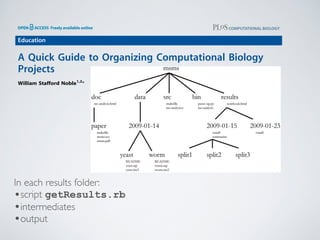
In each results folder: 
•script getResults.rb 
•intermediates 
•output 
Figure 1. Directory structure for a sample project. Directory names are in large typeface, and filenames are in smaller typeface. Only a subset of 
the files are shown here. Note that the dates are formatted ,year.-,month.-,day. so that they can be sorted in chronological order. The 
source code src/ms-analysis.c is compiled to create bin/ms-analysis and is documented in doc/ms-analysis.html. The README 
files in the data directories specify who downloaded the data files from what URL on what date. The driver script results/2009-01-15/runall 
automatically generates the three subdirectories split1, split2, and split3, corresponding to three cross-validation splits. The bin/parse-sqt. 
as well as by chance interactions 
with collaborators or colleagues. 
The purpose of this article is to describe 
one good strategy for carrying out com-putational 
experiments. I will not describe 
profound issues such as how to formulate 
hypotheses, design experiments, or draw 
conclusions. Rather, I will focus on 
understanding your work or who may be 
evaluating your research skills. Most com-monly, 
however, that ‘‘someone’’ is you. A 
few months from now, you may not 
remember what you were up to when you 
created a particular set of files, or you may 
not remember what conclusions you drew. 
You will either have to then spend time 
reconstructing your previous experiments 
or lose whatever insights you gained from 
those experiments. 
This leads to the second principle, 
which is actually more like a version of 
Murphy’s Law: Everything you do, you 
will probably have to do over again. 
Inevitably, you will discover some flaw in 
your initial preparation of the data being 
analyzed, or you will get access to new 
data, or you will decide that your param-eterization 
of a particular model was not 
broad enough. This means that the 
experiment you did last week, or even 
the set of experiments you’ve been work-ing 
on over the past month, will probably 
under a common root directory. The 
exception to this rule is source code or 
scripts that are used in multiple projects. 
Each such program might have a project 
directory of its own. 
Within a given project, I use a top-level 
organization that is logical, with chrono-logical 
organization at the next level, and 
logical organization below that. A sample 
project, called msms, is shown in Figure 1. 
At the root of most of my projects, I have a 
data directory for storing fixed data sets, a 
results directory for tracking computa-tional 
experiments peformed on that data, 
a doc directory with one subdirectory per 
manuscript, and directories such as src 
for source code and bin for compiled 
binaries or scripts. 
Within the data and results directo-ries, 
it is often tempting to apply a similar, 
logical organization. For example, you 
may have two or three data sets against 
which you plan to benchmark your 
algorithms, so you could create one 
directory for each of them under data. 
with this approach, the distinction be-tween 
data and results may not be useful. 
Instead, one could imagine a top-level 
directory called something like experi-ments, 
with subdirectories with names like 
2008-12-19. Optionally, the directory 
name might also include a word or two 
indicating the topic of the experiment 
The Lab Notebook 
In parallel with this chronological 
directory structure, I find it useful to 
maintain a chronologically organized lab 
notebook. This is a document that resides 
in the root of the results directory and 
that records your progress in detail. 
Entries in the notebook should be dated, 
These types of entries provide a complete 
picture of the development of the project 
over time. 
In practice, I ask members of my 
research group to put their lab notebooks 
online, behind password protection if 
necessary. When I meet with a member 
of my lab or a project team, we can refer 
py script is called by both of the runall driver scripts. 
doi:10.1371/journal.pcbi.1000424.g001
Track versions of everything
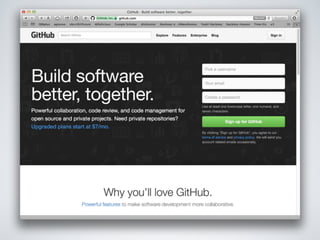
Github: Facebook for code
Github: Facebook for code 
• Easy versioning 
• Random people use your stuff 
• And find problems and fix and improve it! 
• Greater impact / better planet 
• Easily update 
• Easily collaborate 
• Identify trends 
• Build online reputation 
Demo
Learn how: 
https://try.github.io/levels/1/challenges/1
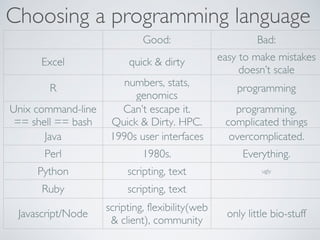
Programming languages
Choosing a programming language 
Good: Bad: 
Excel quick  dirty easy to make mistakes 
doesn’t scale 
R numbers, stats, 
genomics 
programming 
Unix command-line 
== shell == bash 
Can’t escape it. 
Quick  Dirty. HPC. 
programming, 
complicated things 
Java 1990s user interfaces overcomplicated. 
Perl 1980s. Everything. 
Python scripting, text ugly 
Ruby scripting, text 
Javascript/Node scripting, flexibility(web 
 client), community only little bio-stuff
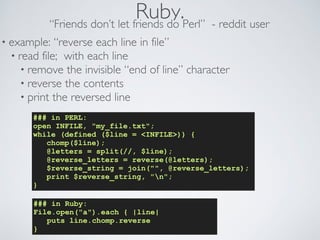
Ruby. “Friends don’t let friends do Perl” - reddit user 
• example: “reverse each line in file” 
• read file; with each line 
• remove the invisible “end of line” character 
• reverse the contents 
• print the reversed line 
### in PERL: 
open INFILE, my_file.txt; 
while (defined ($line = INFILE)) { 
chomp($line); 
@letters = split(//, $line); 
@reverse_letters = reverse(@letters); 
$reverse_string = join(, @reverse_letters); 
print $reverse_string, n; 
} 
### in Ruby: 
File.open(a).each { |line| 
puts line.chomp.reverse 
}
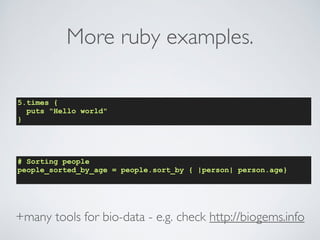
More ruby examples. 
5.times { 
puts Hello world 
} 
# Sorting people 
people_sorted_by_age = people.sort_by { |person| person.age} 
+many tools for bio-data - e.g. check http://biogems.info
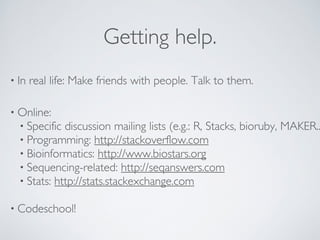
Getting help. 
• In real life: Make friends with people. Talk to them. 
• Online: 
• Specific discussion mailing lists (e.g.: R, Stacks, bioruby, MAKER...) 
• Programming: http://stackoverflow.com 
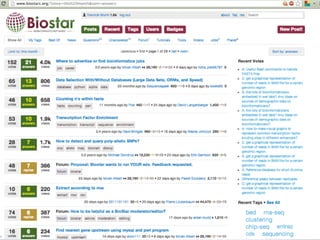
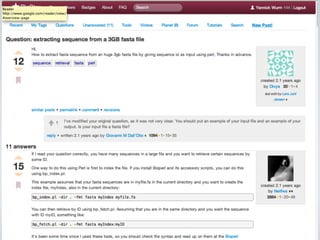
• Bioinformatics: http://www.biostars.org 
• Sequencing-related: http://seqanswers.com 
• Stats: http://stats.stackexchange.com 
! 
• Codeschool!
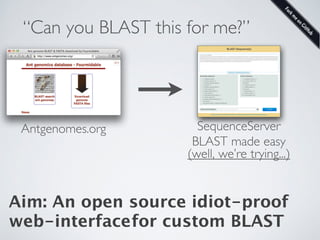
“Can you BLAST this for me?”
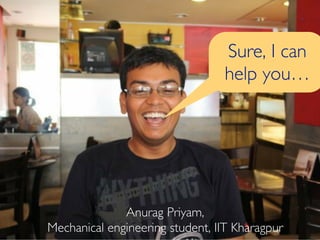
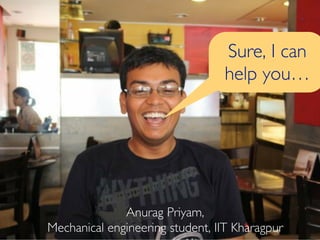
Anurag Priyam, 
Sure, I can 
help you… 
Mechanical engineering student, IIT Kharagpur
“Can you BLAST this for me?” 
Antgenomes.org SequenceServer 
BLAST made easy 
(well, we’re trying...) 
Aim: An open source idiot-proof 
web-interface for custom BLAST
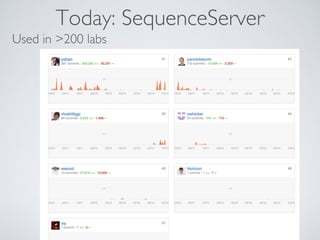
Today: SequenceServer 
Used in 200 labs
Anurag Priyam, 
Sure, I can 
help you… 
Mechanical engineering student, IIT Kharagpur
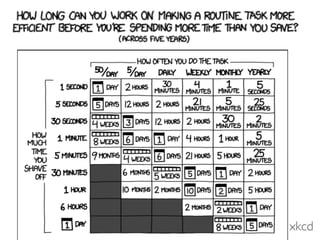
xkcd

2014 11-13-sbsm032-reproducible research

  • 1.
  • 2.
  • 3.
  • 7.
  • 9.
    SBSM035 - Stats/ Bioinformatics/ Programming Reproducible Research & Sustainable Software @yannick__ http://yannick.poulet.org
  • 10.
  • 13.
    Aquaculture in OffshoreZones LETTERS I BOOKS I POLICY FORUM I EDUCATION FORUM I PERSPECTIVES operations that reveal little, if any, negative impact on the environment or local ecosys-tems (2, 3). Naylor criticizes the National industry governed by regulations with a rational basis in the ecology of the oceans and the eco-nomic realities of the marketplace. 1878 in the classroom 1880 1882 perspectives LETTERS edited by Etta Kavanagh Retraction WE WISH TO RETRACT OUR RESEARCH ARTICLE “STRUCTURE OF MsbA from E. coli: A homolog of the multidrug resistance ATP bind-ing cassette (ABC) transporters” and both of our Reports “Structure of the ABC transporter MsbA in complex with ADP•vanadate and lipopolysaccharide” and “X-ray structure of the EmrE multidrug trans-porter in complex with a substrate” (1–3). The recently reported structure of Sav1866 (4) indicated that our MsbA structures (1, 2, 5) were incorrect in both the hand of the struc-ture and the topology. Thus, our biological interpretations based on these inverted models for MsbA are invalid. An in-house data reduction program introduced a change in sign for anomalous differences. This program, which was not part of a conven-tional data processing package, converted the anomalous pairs (I+ and I-) to (F- and F+), thereby introducing a sign change. As the diffrac-tion data collected for each set of MsbA crystals and for the EmrE crystals were processed with the same program, the structures reported in (1–3, 5, 6) had the wrong hand. The error in the topology of the original MsbA structure was a con-sequence of the low resolution of the data as well as breaks in the elec-tron density for the connecting loop regions. Unfortunately, the use of the multicopy refinement procedure still allowed us to obtain reason-able refinement values for the wrong structures. The Protein Data Bank (PDB) files 1JSQ, 1PF4, and 1Z2R for MsbA and 1S7B and 2F2M for EmrE have been moved to the archive of obsolete PDB entries. The MsbA and EmrE structures will be recalculated from the original data using the proper sign for the anom-alous differences, and the new Ca coordinates and structure factors will be deposited. We very sincerely regret the confusion that these papers have caused and, in particular, subsequent research efforts that were unpro-ductive as a result of our original findings. GEOFFREY CHANG, CHRISTOPHER B. ROTH, CHRISTOPHER L. REYES, OWEN PORNILLOS, YEN-JU CHEN, ANDY P. CHEN Department of Molecular Biology, The Scripps Research Institute, La Jolla, CA 92037, USA. References 1. G. Chang, C. B. Roth, Science 293, 1793 (2001). 2. C. L. Reyes, G. Chang, Science 308, 1028 (2005). 3. O. Pornillos, Y.-J. Chen, A. P. Chen, G. Chang, Science 310, 1950 (2005). 4. R. J. Dawson, K. P. Locher, Nature 443, 180 (2006). 5. G. Chang, J. Mol. Biol. 330, 419 (2003). 6. C. Ma, G. Chang, Proc. Natl. Acad. Sci. U.S.A. 101, 2852 (2004). Downloaded from www.sciencemag.org on September 24, 2014
  • 14.
    Reproducible Research & Sustainable Software • Avoid costly mistakes • Be faster: “stand on the shoulders of giants” • Increase impact / visibility
  • 15.
  • 16.
    “Big data” biology is hard. • Biology/life is complex • Field is young. • Biologists lack computational training. • Generally, analysis tools suck. • badly written • badly tested • hard to install • output quality… often questionable. • Understanding/visualizing/massaging data is hard. • Datasets continue to grow!
  • 17.
  • 18.
    Some sources ofinspiration
  • 20.
    1210.0530v3 [cs.MS] 29Nov 2012 steve@practicalcomputing.org),††University ofWisconsin (khuff@cae.wisc.Mary University of London (mark.plumbley@eecs.qmul.ac.uk),¶¶University University (ethan@weecology.org), and †††University of Wisconsin (wilsonp@Scientists spend an increasing amount of time building and using software. However, most scientists are never taught how to do this efficiently. As a result, many are unaware of tools and practices that would allow them to write more reliable and maintainable code with less effort. We describe a set of best practices for scientific software development that have solid foundations in research and experience, and that improve scientists’ productivity and the reliability of their software. 1. Write programs for people, not computers. Scientists writing software need to write correctly and can be easily read and programmers (especially the author’s future cannot be easily read and understood it is to know that it is actually doing what it is be productive, software developers must therefore aspects of human cognition into account: human working memory is limited, human (Best Practices for Scientific Computing Greg Wilson ∗, D.A. Aruliah †, C. Titus Brown ‡, Neil P. Chue Hong §, Matt Davis ¶, Richard T. Guy ∥, Steven H.D. Haddock ∗∗, Katy Huff ††, Ian M. Mitchell ‡‡, Mark D. Plumbley §§, Ben Waugh ¶¶, Ethan P. White ∗∗∗, Paul Wilson ††† ∗Software Carpentry (gvwilson@software-carpentry.org),†University of Ontario Institute of Technology (Dhavide.Aruliah@State University (ctb@msu.edu),§Software Sustainability Institute (N.ChueHong@epcc.ed.ac.uk),¶Space Telescope (mrdavis@stsci.edu),∥University of Toronto (guy@cs.utoronto.ca),∗∗Monterey Bay Aquarium Research Institute (steve@practicalcomputing.org),††University ofWisconsin (khuff@cae.wisc.edu),‡‡University of British Columbia (mitchell@Mary University of London (mark.plumbley@eecs.qmul.ac.uk),¶¶University College London (b.waugh@ucl.ac.uk),∗∗∗University (ethan@weecology.org), and †††University of Wisconsin (wilsonp@engr.wisc.edu) Scientists spend an increasing amount of time building and using software. However, most scientists are never taught how to do this efficiently. As a result, many are unaware of tools and practices that would allow them to write more reliable and maintainable code with less effort. We describe a set of best practices for scientific software development that have solid foundations in research and experience, and that improve scientists’ productivity and the reliability of their software. Software is as important to modern scientific research as telescopes and test tubes. From groups that work exclusively on computational problems, to traditional laboratory and field scientists, more and more of the daily operation of science re-volves around computers. This includes the development of new algorithms, managing and analyzing the large amounts of data that are generated in single research projects, and combining disparate datasets to assess synthetic problems. Scientists typically develop their own software for these purposes because doing so requires substantial domain-specific and open source software development [61, studies of scientific computing [4, 31, development in general (summarized in practices will guarantee efficient, error-free but used in concert they will reduce errors in scientific software, make it easier the authors of the software time and effort focusing on the underlying scientific questions. Software is as important to modern scientific research as telescopes and test tubes. From groups that work exclusively on computational problems, to traditional laboratory and field scientists, more and more of the daily operation of science re-volves around computers. This includes the development of new algorithms, managing and analyzing the large amounts of data that are generated in single research projects, and combining disparate datasets to assess synthetic problems. arXiv:1210.0530v3 [cs.MS] 29 Nov 2012 1. Write programs for people, not computers. 2. Automate repetitive tasks. 3. Use the computer to record history. 4. Make incremental changes. 5. Use version control. 6. Don’t repeat yourself (or others). 7. Plan for mistakes. 8. Optimize software only after it works correctly. 9. Document the design and purpose of code rather than its mechanics.! 10. Conduct code reviews.
  • 23.
    Specific Approaches/Tools •Planning for mistakes • Automated testing • Continuous integration •Writing for people: use style guide
  • 24.
    Code for people:Use a style guide • For R: http://r-pkgs.had.co.nz/style.html
  • 25.
  • 26.
    understand and improveyour code in 6 Coding for people: Indent your approximate Damian Conway code! characters http://github.com/
  • 27.
    R style guideextract Line length Strive to limit your code to 80 characters per line. This fits comfortably on a printed page with a reasonably sized font. If you find yourself running out of room, this is a good indication that you should encapsulate some of the work in a separate function. ! ant_measurements <- read.table(file = '~/Downloads/Web/ant_measurements.txt', header=TRUE, sep='! ant_measurements <- read.table(file = '~/Downloads/Web/ant_measurements.txt', header=TRUE, sep='t', col.names = c('colony', 'individual', 'headwidth', ‘mass')) ! ant_measurements <- read.table(file = '~/Downloads/Web/ant_measurements.txt', header = TRUE, sep = 't', col.names = c('colony', 'individual', 'headwidth', 'mass') )
  • 28.
    Code for people:Use a style guide • For R: http://r-pkgs.had.co.nz/style.html • For Ruby: https://github.com/bbatsov/ruby-style-guide Automatically check your code: install.packages(“lint”) # once library(lint) # everytime lint(“file_to_check.R”)
  • 29.
    Eliminate redundancy DRY:Don’t Repeat Yourself
  • 30.
    knitr (sweave)Analyzing &Reporting in a single file. analysis.Rmd A minimal R Markdown example I know the value of pi is 3.1416, and 2 times pi is 6.2832. To compile library(knitr); knit(minimal.Rmd) A paragraph here. A code chunk below: 1+1 ## [1] 2 ### in R: library(knitr) knit(“analysis.Rmd”) # -- creates analysis.md ### in shell: pandoc analysis.md -o analysis.pdf # -- creates MyFile.pdf .4-.7+.3 # what? it is not zero! ## [1] 5.551e-17 Graphics work too library(ggplot2) qplot(speed, dist, data = cars) + geom_smooth() ● ● ● ● ● ● ● ● ● ● ● ● ● ● ● ● ● ● ● ● ● ● ● ● ● ● ● ● ● ● ● ● ● ● ● ● ● ● ● ● ● ● ● ● 120 80 40 0 5 10 15 20 speed dist Figure 1: A scatterplot of cars
  • 31.
  • 32.
    Education A QuickGuide to Organizing Computational Biology Projects William Stafford Noble1,2* 1 Department of Genome Sciences, School of Medicine, University of Washington, Seattle, Washington, United States of America, 2 Department of Computer Science and Engineering, University of Washington, Seattle, Washington, United States of America Introduction Most bioinformatics coursework focus-es on algorithms, with perhaps some components devoted to learning pro-gramming skills and learning how to use existing bioinformatics software. Un-fortunately, for students who are prepar-ing for a research career, this type of curriculum fails to address many of the day-to-day organizational challenges as-sociated with performing computational experiments. In practice, the principles behind organizing and documenting computational experiments are often learned on the fly, and this learning is strongly influenced by personal predilec-tions In each results folder: •script getResults.rb •intermediates •output Figure 1. Directory structure for a sample project. Directory names are in large typeface, and filenames are in smaller typeface. Only a subset of the files are shown here. Note that the dates are formatted ,year.-,month.-,day. so that they can be sorted in chronological order. The source code src/ms-analysis.c is compiled to create bin/ms-analysis and is documented in doc/ms-analysis.html. The README files in the data directories specify who downloaded the data files from what URL on what date. The driver script results/2009-01-15/runall automatically generates the three subdirectories split1, split2, and split3, corresponding to three cross-validation splits. The bin/parse-sqt. as well as by chance interactions with collaborators or colleagues. The purpose of this article is to describe one good strategy for carrying out com-putational experiments. I will not describe profound issues such as how to formulate hypotheses, design experiments, or draw conclusions. Rather, I will focus on understanding your work or who may be evaluating your research skills. Most com-monly, however, that ‘‘someone’’ is you. A few months from now, you may not remember what you were up to when you created a particular set of files, or you may not remember what conclusions you drew. You will either have to then spend time reconstructing your previous experiments or lose whatever insights you gained from those experiments. This leads to the second principle, which is actually more like a version of Murphy’s Law: Everything you do, you will probably have to do over again. Inevitably, you will discover some flaw in your initial preparation of the data being analyzed, or you will get access to new data, or you will decide that your param-eterization of a particular model was not broad enough. This means that the experiment you did last week, or even the set of experiments you’ve been work-ing on over the past month, will probably under a common root directory. The exception to this rule is source code or scripts that are used in multiple projects. Each such program might have a project directory of its own. Within a given project, I use a top-level organization that is logical, with chrono-logical organization at the next level, and logical organization below that. A sample project, called msms, is shown in Figure 1. At the root of most of my projects, I have a data directory for storing fixed data sets, a results directory for tracking computa-tional experiments peformed on that data, a doc directory with one subdirectory per manuscript, and directories such as src for source code and bin for compiled binaries or scripts. Within the data and results directo-ries, it is often tempting to apply a similar, logical organization. For example, you may have two or three data sets against which you plan to benchmark your algorithms, so you could create one directory for each of them under data. with this approach, the distinction be-tween data and results may not be useful. Instead, one could imagine a top-level directory called something like experi-ments, with subdirectories with names like 2008-12-19. Optionally, the directory name might also include a word or two indicating the topic of the experiment The Lab Notebook In parallel with this chronological directory structure, I find it useful to maintain a chronologically organized lab notebook. This is a document that resides in the root of the results directory and that records your progress in detail. Entries in the notebook should be dated, These types of entries provide a complete picture of the development of the project over time. In practice, I ask members of my research group to put their lab notebooks online, behind password protection if necessary. When I meet with a member of my lab or a project team, we can refer py script is called by both of the runall driver scripts. doi:10.1371/journal.pcbi.1000424.g001
  • 33.
  • 34.
  • 36.
    Github: Facebook forcode • Easy versioning • Random people use your stuff • And find problems and fix and improve it! • Greater impact / better planet • Easily update • Easily collaborate • Identify trends • Build online reputation Demo
  • 37.
  • 38.
  • 39.
    Choosing a programminglanguage Good: Bad: Excel quick dirty easy to make mistakes doesn’t scale R numbers, stats, genomics programming Unix command-line == shell == bash Can’t escape it. Quick Dirty. HPC. programming, complicated things Java 1990s user interfaces overcomplicated. Perl 1980s. Everything. Python scripting, text ugly Ruby scripting, text Javascript/Node scripting, flexibility(web client), community only little bio-stuff
  • 40.
    Ruby. “Friends don’tlet friends do Perl” - reddit user • example: “reverse each line in file” • read file; with each line • remove the invisible “end of line” character • reverse the contents • print the reversed line ### in PERL: open INFILE, my_file.txt; while (defined ($line = INFILE)) { chomp($line); @letters = split(//, $line); @reverse_letters = reverse(@letters); $reverse_string = join(, @reverse_letters); print $reverse_string, n; } ### in Ruby: File.open(a).each { |line| puts line.chomp.reverse }
  • 41.
    More ruby examples. 5.times { puts Hello world } # Sorting people people_sorted_by_age = people.sort_by { |person| person.age} +many tools for bio-data - e.g. check http://biogems.info
  • 42.
    Getting help. •In real life: Make friends with people. Talk to them. • Online: • Specific discussion mailing lists (e.g.: R, Stacks, bioruby, MAKER...) • Programming: http://stackoverflow.com • Bioinformatics: http://www.biostars.org • Sequencing-related: http://seqanswers.com • Stats: http://stats.stackexchange.com ! • Codeschool!
  • 45.
    “Can you BLASTthis for me?”
  • 46.
    Anurag Priyam, Sure,I can help you… Mechanical engineering student, IIT Kharagpur
  • 47.
    “Can you BLASTthis for me?” Antgenomes.org SequenceServer BLAST made easy (well, we’re trying...) Aim: An open source idiot-proof web-interface for custom BLAST
  • 48.
  • 49.
    Anurag Priyam, Sure,I can help you… Mechanical engineering student, IIT Kharagpur
  • 51.