Critical Paths for GUI
Regression Testing

        Zheng-Wen Shen
          2005/07/13
References
   Critical Paths for GUI Regression
    Testing. Alexander K. Ames and Haward
    Jie. Univ. of California, Santa Cruz
   http://www.soe.ucsc.edu/~sasha/
    S’04 – Topics in Software Engineering
Outline
   1.   Introduction
   2.   Background
   3.   Methodology
   4.   Evaluation
   5.   Future Work
   6.   Conclusion
1. Introduction
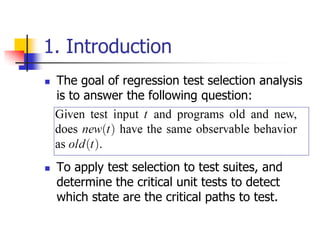
   The goal of regression test selection analysis
    is to answer the following question:


   To apply test selection to test suites, and
    determine the critical unit tests to detect
    which state are the critical paths to test.
   In describing GUI testing
       A state to be the result of a single user
        action or manipulation of the GUI.
       There are paths between states.
       Critical path
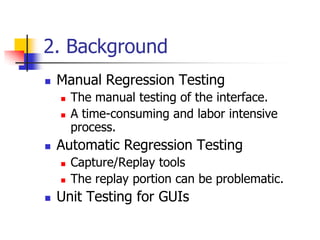
2. Background
   Manual Regression Testing
       The manual testing of the interface.
       A time-consuming and labor intensive
        process.
   Automatic Regression Testing
       Capture/Replay tools
       The replay portion can be problematic.
   Unit Testing for GUIs
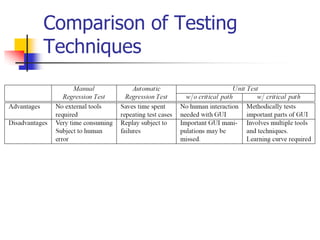
Comparison of Testing
Techniques
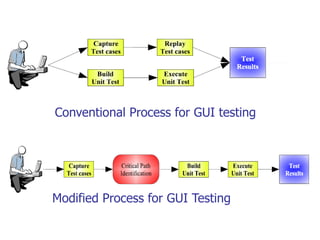
Conventional Process for GUI testing


Modified Process for GUI Testing
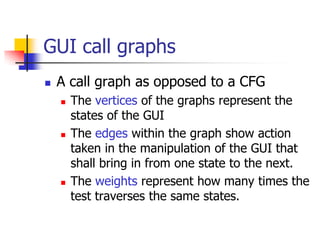
GUI call graphs
   A call graph as opposed to a CFG
       The vertices of the graphs represent the
        states of the GUI
       The edges within the graph show action
        taken in the manipulation of the GUI that
        shall bring in from one state to the next.
       The weights represent how many times the
        test traverses the same states.
   G = (V, S, e, x)
       p = [s1, s2, …, sn], n>2
       p = [s1, v1, s2, v2, …, vn-1, sn], n>2
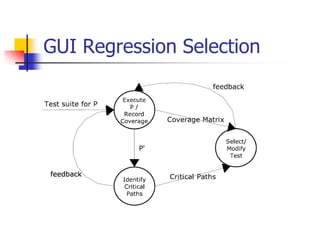
GUI Regression Selection
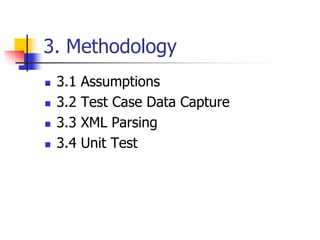
3. Methodology
   3.1   Assumptions
   3.2   Test Case Data Capture
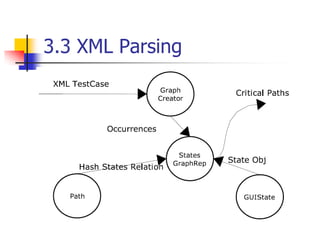
   3.3   XML Parsing
   3.4   Unit Test
3.1 Assumptions
   The test cases also have some
    redundancy paths.
   The Standard GUI classes perform
    according to the specification.
   The next version of the tested
    software will not have any dramatic
    changes.
       The applications being tested is that
        given an implementation of the
        applications with separate GUI and
        non-GUI components.
         Pure frontend for presentation V.S.
          backend or business logic layers.
       Our focus in testing is strictly on the
        functionality of the user-interface.
3.2 Test Case Data Capture
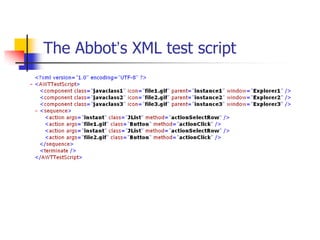
   To capture the test case data we use a
    capture/replay tool – Abbot.
   Abbot has provided us with the test
    case data in XML format.
   We introduce a testing aide that reads
    the XML data.
The Abbot’s XML test script
3.3 XML Parsing
3.4 Unit Test
   After the critical paths have been
    identified, we need to check the
    correctness of the states.
   Use a JUnit regression framework.
4. Evaluation
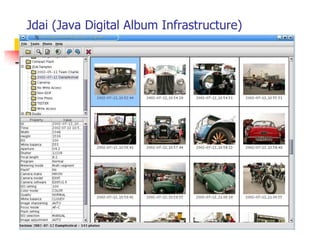
1.   Jdai
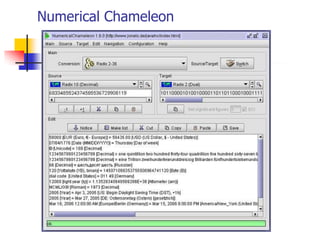
2.   Numerical Chameleon
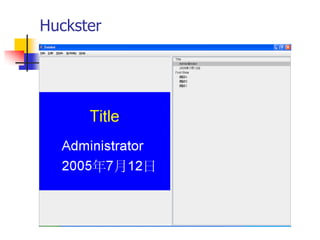
3.   Huckster
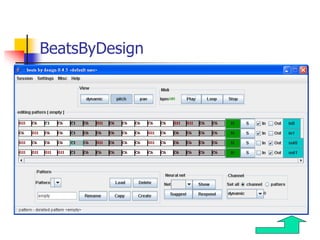
4.   BeatsByDesign
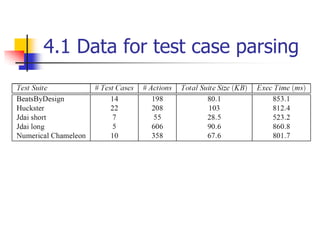
4.1 Data for test case parsing
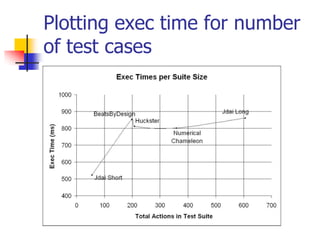
Plotting exec time for number
of test cases
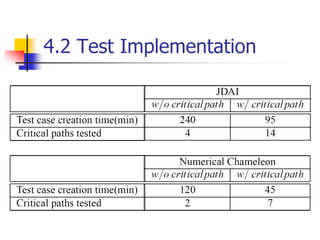
4.2 Test Implementation
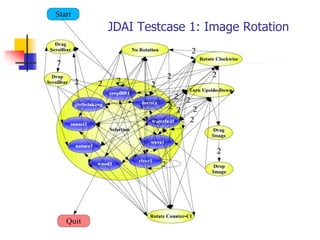
JDAI Testcase 1: Image Rotation
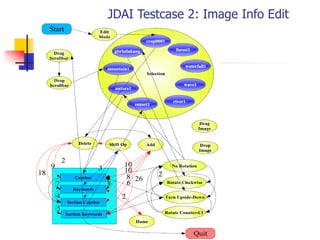
JDAI Testcase 2: Image Info Edit
5. Future Work
   To build the next version to be
    extensible with respect to the XML DTD.
   Automate the coding of the unit tests
    directly from processing the captured
    GUI test suites.
6. Conclusion
   We see that GUI regression tests have
    redundant steps which are critical to the
    functioning of the GUI and deserve sufficient
    testing.
   Performing the unit tests for critical states will
    save much time and testing versus manually
    trying to set up the tests without knowing
    them or going through the manual testing
    process.
Jdai (Java Digital Album Infrastructure)
Numerical Chameleon
Huckster
BeatsByDesign

20050713 critical paths for gui regression testing

  • 1.
    Critical Paths forGUI Regression Testing Zheng-Wen Shen 2005/07/13
  • 2.
    References  Critical Paths for GUI Regression Testing. Alexander K. Ames and Haward Jie. Univ. of California, Santa Cruz  http://www.soe.ucsc.edu/~sasha/ S’04 – Topics in Software Engineering
  • 3.
    Outline  1. Introduction  2. Background  3. Methodology  4. Evaluation  5. Future Work  6. Conclusion
  • 4.
    1. Introduction  The goal of regression test selection analysis is to answer the following question:  To apply test selection to test suites, and determine the critical unit tests to detect which state are the critical paths to test.
  • 5.
     In describing GUI testing  A state to be the result of a single user action or manipulation of the GUI.  There are paths between states.  Critical path
  • 6.
    2. Background  Manual Regression Testing  The manual testing of the interface.  A time-consuming and labor intensive process.  Automatic Regression Testing  Capture/Replay tools  The replay portion can be problematic.  Unit Testing for GUIs
  • 7.
  • 8.
    Conventional Process forGUI testing Modified Process for GUI Testing
  • 9.
    GUI call graphs  A call graph as opposed to a CFG  The vertices of the graphs represent the states of the GUI  The edges within the graph show action taken in the manipulation of the GUI that shall bring in from one state to the next.  The weights represent how many times the test traverses the same states.
  • 10.
     G = (V, S, e, x)  p = [s1, s2, …, sn], n>2  p = [s1, v1, s2, v2, …, vn-1, sn], n>2
  • 11.
  • 12.
    3. Methodology  3.1 Assumptions  3.2 Test Case Data Capture  3.3 XML Parsing  3.4 Unit Test
  • 13.
    3.1 Assumptions  The test cases also have some redundancy paths.  The Standard GUI classes perform according to the specification.  The next version of the tested software will not have any dramatic changes.
  • 14.
     The applications being tested is that given an implementation of the applications with separate GUI and non-GUI components.  Pure frontend for presentation V.S. backend or business logic layers.  Our focus in testing is strictly on the functionality of the user-interface.
  • 15.
    3.2 Test CaseData Capture  To capture the test case data we use a capture/replay tool – Abbot.  Abbot has provided us with the test case data in XML format.  We introduce a testing aide that reads the XML data.
  • 16.
  • 17.
  • 18.
    3.4 Unit Test  After the critical paths have been identified, we need to check the correctness of the states.  Use a JUnit regression framework.
  • 19.
    4. Evaluation 1. Jdai 2. Numerical Chameleon 3. Huckster 4. BeatsByDesign
  • 20.
    4.1 Data fortest case parsing
  • 21.
    Plotting exec timefor number of test cases
  • 22.
  • 23.
    JDAI Testcase 1:Image Rotation
  • 24.
    JDAI Testcase 2:Image Info Edit
  • 25.
    5. Future Work  To build the next version to be extensible with respect to the XML DTD.  Automate the coding of the unit tests directly from processing the captured GUI test suites.
  • 26.
    6. Conclusion  We see that GUI regression tests have redundant steps which are critical to the functioning of the GUI and deserve sufficient testing.  Performing the unit tests for critical states will save much time and testing versus manually trying to set up the tests without knowing them or going through the manual testing process.
  • 27.
    Jdai (Java DigitalAlbum Infrastructure)
  • 28.
  • 29.
  • 30.