REFWORKS
Presented and compiled by Jen Eidelman
               http://www.lib.uct.ac.za/
         Email: jen.eidelman@uct.ac.za
HOW DO WE GET REFERENCES
         INTO REFWORKS?
   Import directly from certain online data
    vendors.

   Import text files containing references from
    online databases.

   Manually enter the reference.

   Use ‘RefGrab It’ to import information from a
    website.
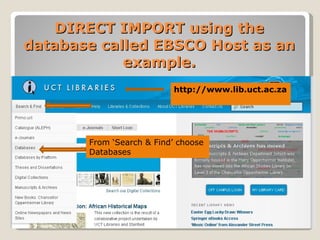
DIRECT IMPORT using the
database called EBSCO Host as an
            example.
                          http://www.lib.uct.ac.za


       From ‘Search & Find’ choose
       Databases
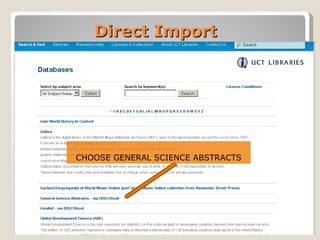
Direct Import


CHOOSE GENERAL SCIENCE ABSTRACTS
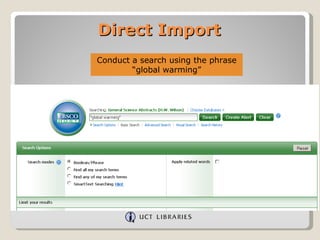
Direct Import
Conduct a search using the phrase
        “global warming”
Direct Import
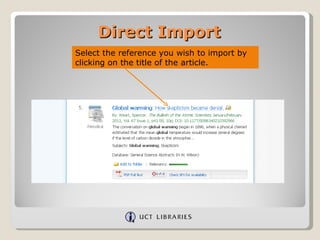
Select the reference you wish to import by
clicking on the title of the article.
Direct Import
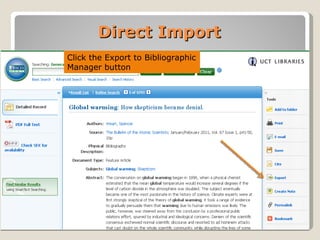
Click the Export to Bibliographic
Manager button
Direct Import


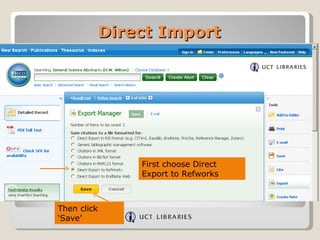
                 First choose Direct
                 Export to Refworks


Then click
‘Save’
Direct Import


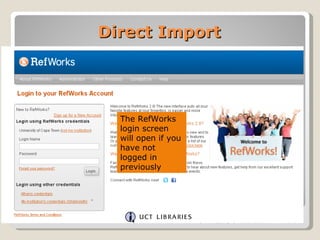
  The RefWorks
  login screen
  will open if you
  have not
  logged in
  previously
Direct Import


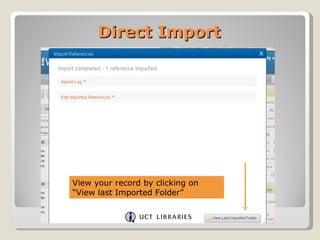
View your record by clicking on
“View last Imported Folder”
Direct Import


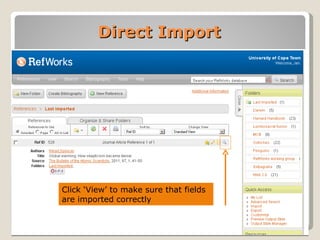
Click ‘View’ to make sure that fields
are imported correctly
Direct Import
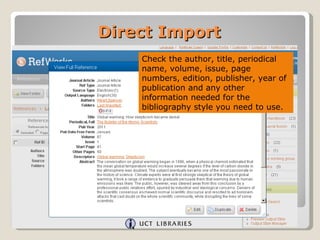
    Check the author, title, periodical
    name, volume, issue, page
    numbers, edition, publisher, year of
    publication and any other
    information needed for the
    bibliography style you need to use.

2 refworks 2.0 direct import

  • 1.
    REFWORKS Presented and compiledby Jen Eidelman http://www.lib.uct.ac.za/ Email: jen.eidelman@uct.ac.za
  • 2.
    HOW DO WEGET REFERENCES INTO REFWORKS?  Import directly from certain online data vendors.  Import text files containing references from online databases.  Manually enter the reference.  Use ‘RefGrab It’ to import information from a website.
  • 3.
    DIRECT IMPORT usingthe database called EBSCO Host as an example. http://www.lib.uct.ac.za From ‘Search & Find’ choose Databases
  • 4.
  • 5.
    Direct Import Conduct asearch using the phrase “global warming”
  • 6.
    Direct Import Select thereference you wish to import by clicking on the title of the article.
  • 7.
    Direct Import Click theExport to Bibliographic Manager button
  • 8.
    Direct Import First choose Direct Export to Refworks Then click ‘Save’
  • 9.
    Direct Import The RefWorks login screen will open if you have not logged in previously
  • 10.
    Direct Import View yourrecord by clicking on “View last Imported Folder”
  • 11.
    Direct Import Click ‘View’to make sure that fields are imported correctly
  • 12.
    Direct Import Check the author, title, periodical name, volume, issue, page numbers, edition, publisher, year of publication and any other information needed for the bibliography style you need to use.