1
INTRODUCTION TO UCT LIBRARIES
Presented by Jen Eidelman
E-mail: jen.eidelman@uct.ac.za
Telephone: 021 650 2773
This work is licensed under a Creative Commons Attribution-
NonCommercial-ShareAlike 4.0 Unported License.
Globalisation, Environment & Society
2017
What you can expect to learn today
 Save Time
– Learn what the libraries have to offer & how to use the library resources.
http://www.lib.uct.ac.za
 Work efficiently
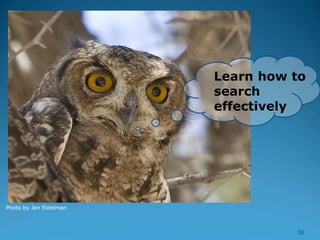
- Learn how to search effectively
http://libguides.lib.uct.ac.za/environment/databases
 Keep up to date
- Learn how to get Alerts to your email account and to Save Searches.
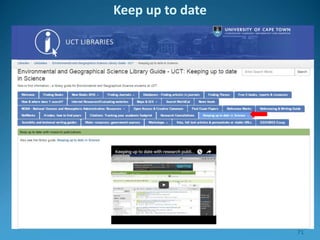
http://libguides.lib.uct.ac.za/sci-tech-uptodate
 Be organized. Organise the results of your searches.
- Introducing RefWorks to organise your work and create a reference list /
reference help.
http://proquest.libguides.com/newrefworks
http://libguides.lib.uct.ac.za/environment/referencing
 How to Write up
http://libguides.lib.uct.ac.za/environment/writing 2
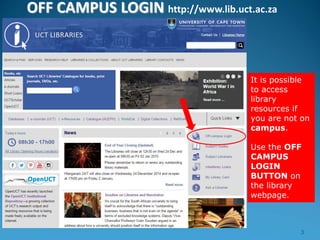
OFF CAMPUS LOGIN http://www.lib.uct.ac.za
It is possible
to access
library
resources if
you are not on
campus.
Use the OFF
CAMPUS
LOGIN
BUTTON on
the library
webpage.
3
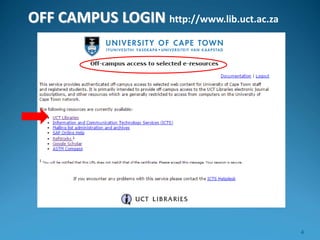
OFF CAMPUS LOGIN http://www.lib.uct.ac.za
4
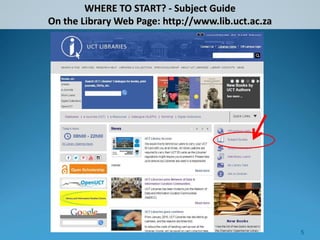
WHERE TO START? - Subject Guide
On the Library Web Page: http://www.lib.uct.ac.za
5
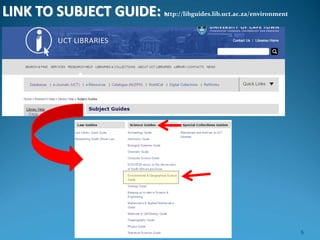
LINK TO SUBJECT GUIDE: http://libguides.lib.uct.ac.za/environment
6
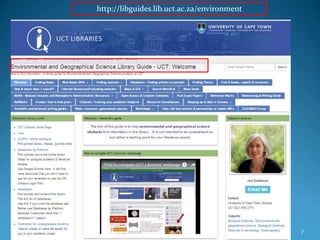
http://libguides.lib.uct.ac.za/environment
7
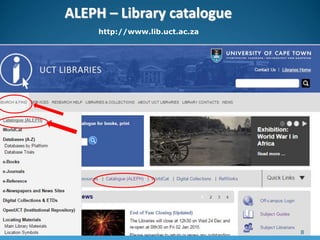
ALEPH – Library catalogue
http://www.lib.uct.ac.za
8
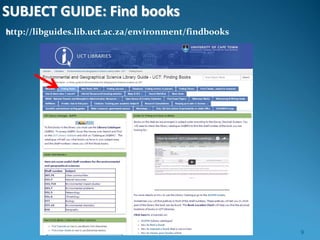
SUBJECT GUIDE: Find books
http://libguides.lib.uct.ac.za/environment/findbooks
9
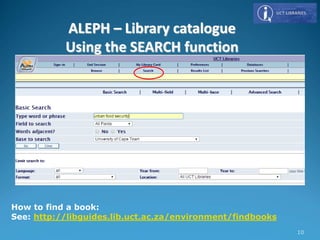
How to find a book:
See: http://libguides.lib.uct.ac.za/environment/findbooks
ALEPH – Library catalogue
Using the SEARCH function
10
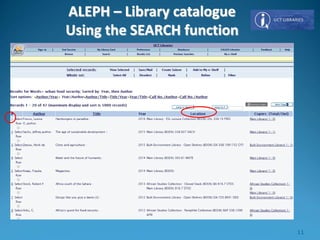
ALEPH – Library catalogue
Using the SEARCH function
11
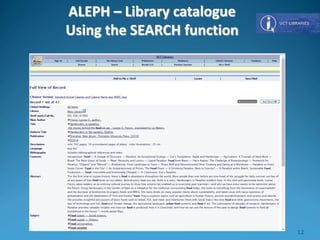
ALEPH – Library catalogue
Using the SEARCH function
12
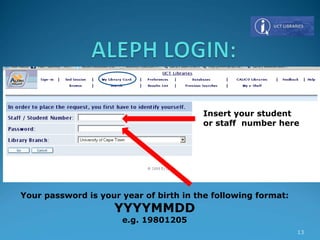
Insert your student
or staff number here
Your password is your year of birth in the following format:
YYYYMMDD
e.g. 19801205
13
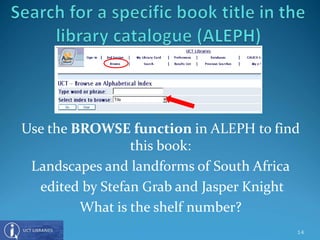
Use the BROWSE function in ALEPH to find
this book:
Landscapes and landforms of South Africa
edited by Stefan Grab and Jasper Knight
What is the shelf number?
14
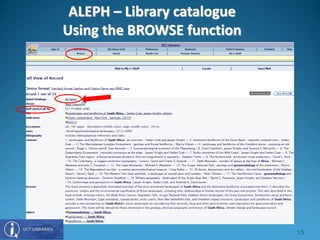
ALEPH – Library catalogue
Using the BROWSE function
15
16
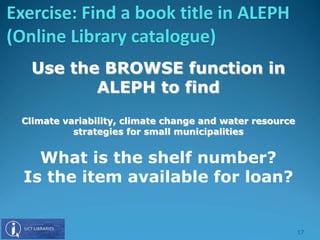
Use the BROWSE function in
ALEPH to find
Climate variability, climate change and water resource
strategies for small municipalities
What is the shelf number?
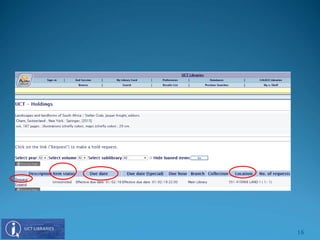
Is the item available for loan?
Exercise: Find a book title in ALEPH
(Online Library catalogue)
17
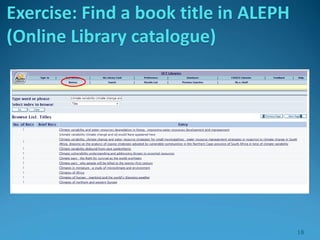
Exercise: Find a book title in ALEPH
(Online Library catalogue)
18
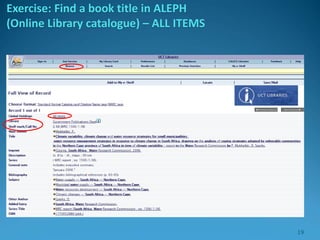
Exercise: Find a book title in ALEPH
(Online Library catalogue) – ALL ITEMS
19
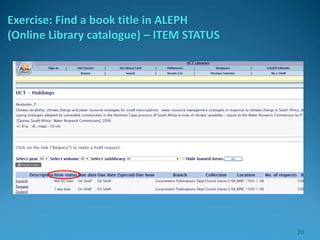
Exercise: Find a book title in ALEPH
(Online Library catalogue) – ITEM STATUS
20
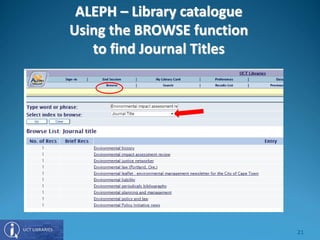
ALEPH – Library catalogue
Using the BROWSE function
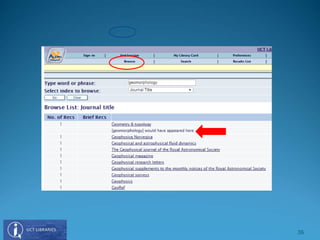
to find Journal Titles
21
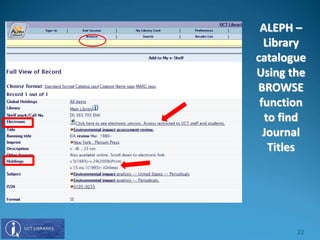
ALEPH –
Library
catalogue
Using the
BROWSE
function
to find
Journal
Titles
22
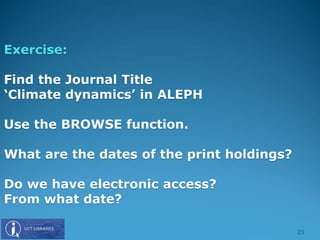
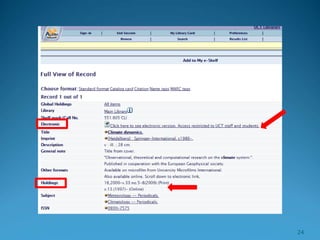
Exercise:
Find the Journal Title
‘Climate dynamics’ in ALEPH
Use the BROWSE function.
What are the dates of the print holdings?
Do we have electronic access?
From what date?
23
24
25
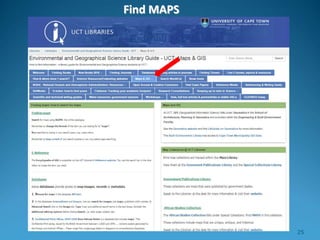
Find MAPS
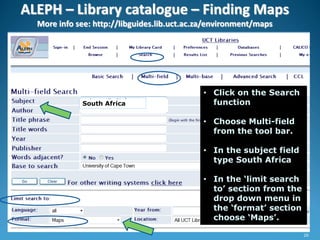
ALEPH – Library catalogue – Finding Maps
More info see: http://libguides.lib.uct.ac.za/environment/maps
• Click on the Search
function
• Choose Multi-field
from the tool bar.
• In the subject field
type South Africa
• In the ‘limit search
to’ section from the
drop down menu in
the ‘format’ section
choose ‘Maps’.
South Africa
26
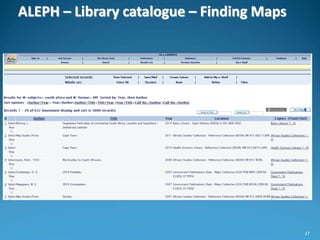
ALEPH – Library catalogue – Finding Maps
27
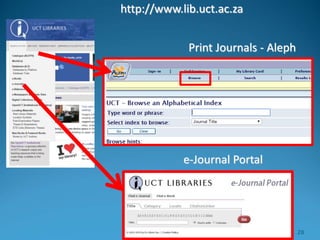
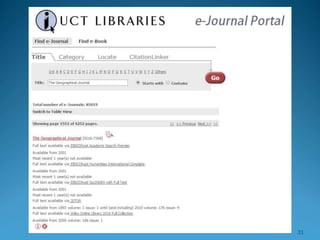
Print Journals - Aleph
e-Journal Portal
http://www.lib.uct.ac.za
28
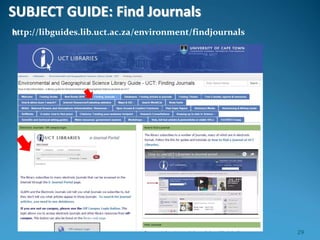
SUBJECT GUIDE: Find Journals
http://libguides.lib.uct.ac.za/environment/findjournals
29
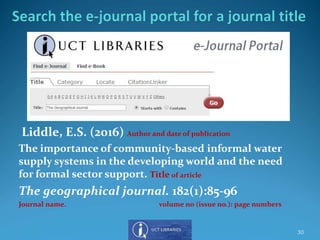
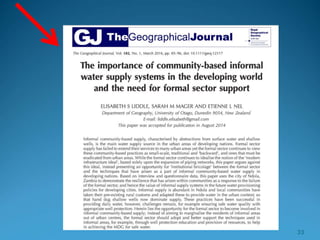
Liddle, E.S. (2016) Author and date of publication
The importance of community-based informal water
supply systems in the developing world and the need
for formal sector support. Title of article
The geographical journal. 182(1):85-96
Journal name. volume no (issue no.): page numbers
30
31
32
33
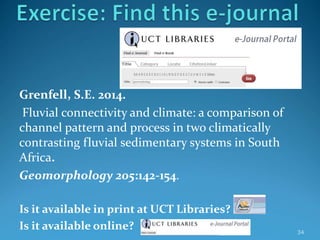
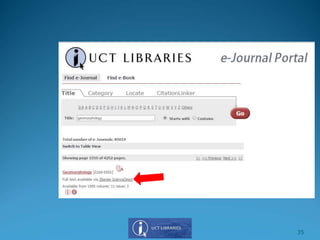
Grenfell, S.E. 2014.
Fluvial connectivity and climate: a comparison of
channel pattern and process in two climatically
contrasting fluvial sedimentary systems in South
Africa.
Geomorphology 205:142-154.
Is it available in print at UCT Libraries?
Is it available online? 34
35
36
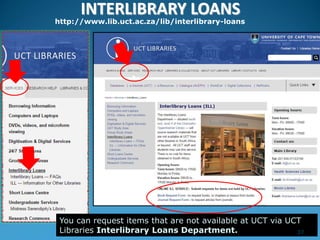
INTERLIBRARY LOANS
http://www.lib.uct.ac.za/lib/interlibrary-loans
You can request items that are not available at UCT via UCT
Libraries Interlibrary Loans Department. 37
Photo by Jen Eidelman
Learn how to
search
effectively
38
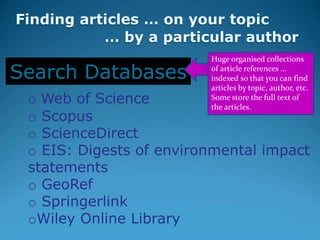
o Web of Science
o Scopus
o ScienceDirect
o EIS: Digests of environmental impact
statements
o GeoRef
o Springerlink
oWiley Online Library
Search Databases
Huge organised collections
of article references …
indexed so that you can find
articles by topic, author, etc.
Some store the full text of
the articles.
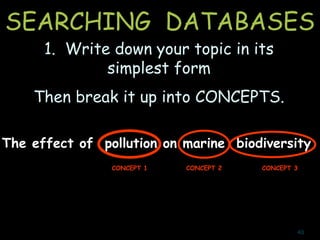
SEARCHING DATABASES
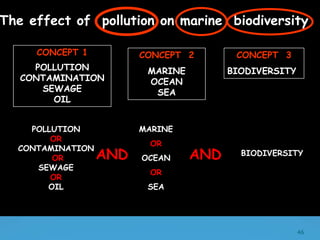
The effect of pollution on marine biodiversity
CONCEPT 2 CONCEPT 3CONCEPT 1
1. Write down your topic in its
simplest form
Then break it up into CONCEPTS.
40
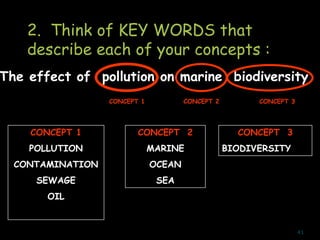
The effect of pollution on marine biodiversity
CONCEPT 2 CONCEPT 3CONCEPT 1
2. Think of KEY WORDS that
describe each of your concepts :
CONCEPT 1
POLLUTION
CONTAMINATION
SEWAGE
OIL
CONCEPT 2
MARINE
OCEAN
SEA
CONCEPT 3
BIODIVERSITY
41
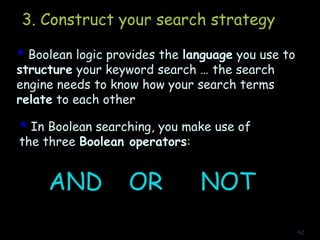
3. Construct your search strategy
 Boolean logic provides the language you use to
structure your keyword search … the search
engine needs to know how your search terms
relate to each other
 In Boolean searching, you make use of
the three Boolean operators:
AND OR NOT
42
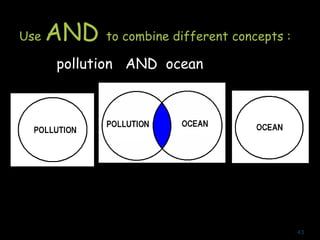
Use AND to combine different concepts :
pollution AND ocean
43
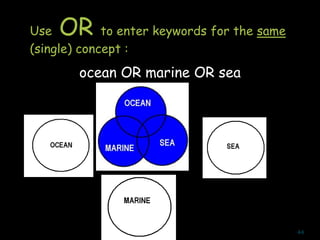
Use OR to enter keywords for the same
(single) concept :
ocean OR marine OR sea
44
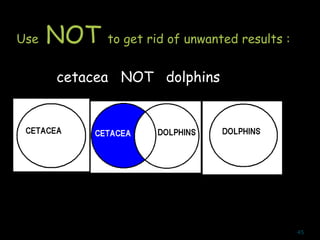
Use NOT to get rid of unwanted results :
cetacea NOT dolphins
45
POLLUTION
OR
CONTAMINATION
OR
SEWAGE
OR
OIL
MARINE
OR
OCEAN
OR
SEA
BIODIVERSITYAND
CONCEPT 1
POLLUTION
CONTAMINATION
SEWAGE
OIL
CONCEPT 2
MARINE
OCEAN
SEA
CONCEPT 3
BIODIVERSITY
The effect of pollution on marine biodiversity
AND
46
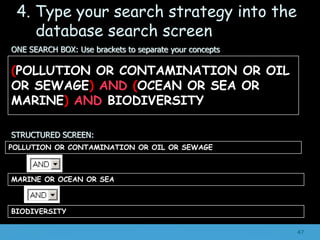
ONE SEARCH BOX: Use brackets to separate your concepts
STRUCTURED SCREEN:
POLLUTION OR CONTAMINATION OR OIL OR SEWAGE
MARINE OR OCEAN OR SEA
BIODIVERSITY
(POLLUTION OR CONTAMINATION OR OIL
OR SEWAGE) AND (OCEAN OR SEA OR
MARINE) AND BIODIVERSITY
4. Type your search strategy into the
database search screen
47
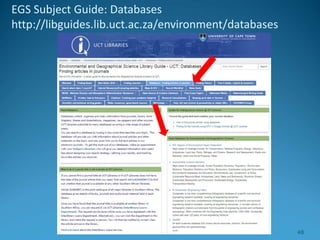
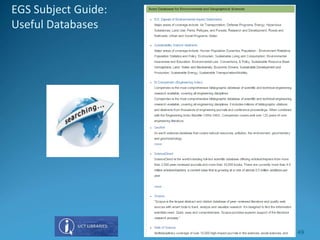
EGS Subject Guide: Databases
http://libguides.lib.uct.ac.za/environment/databases
48
EGS Subject Guide:
Useful Databases
49
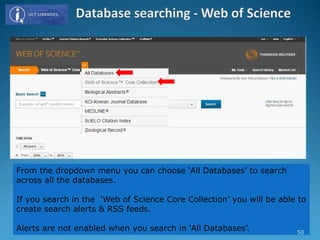
From the dropdown menu you can choose ‘All Databases’ to search
across all the databases.
If you search in the ‘Web of Science Core Collection’ you will be able to
create search alerts & RSS feeds.
Alerts are not enabled when you search in ‘All Databases’. 50
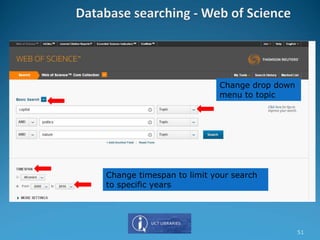
Change drop down
menu to topic
Change timespan to limit your search
to specific years
51
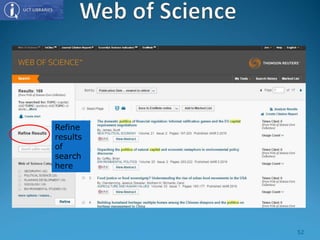
Refine
results
of
search
here
52
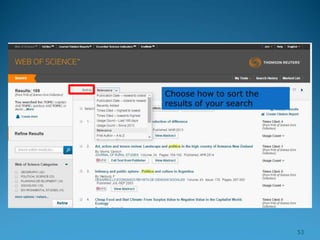
53
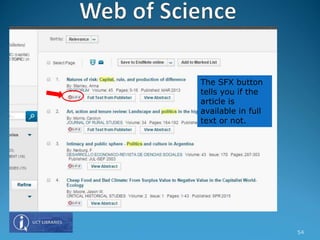
The SFX button
tells you if the
article is
available in full
text or not.
54
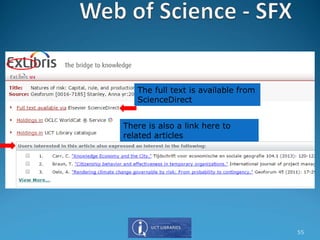
The full text is available from
ScienceDirect
There is also a link here to
related articles
55
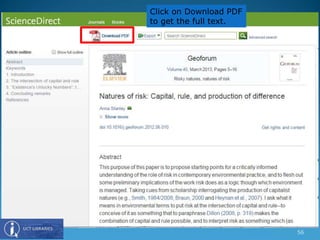
Click on Download PDF
to get the full text.
56
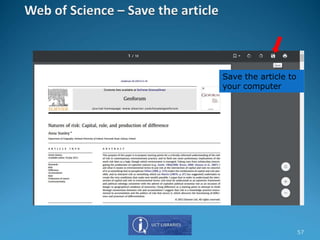
Save the article to
your computer
57
58
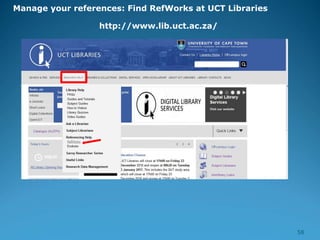
http://www.lib.uct.ac.za/
Manage your references: Find RefWorks at UCT Libraries
59
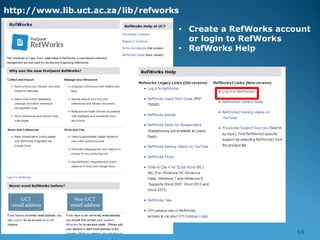
http://www.lib.uct.ac.za/lib/refworks
• Create a RefWorks account
or login to RefWorks
• RefWorks Help
60
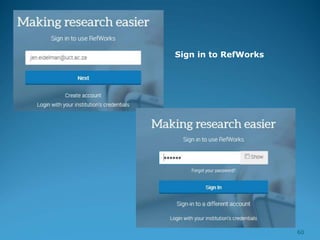
Sign in to RefWorks
61
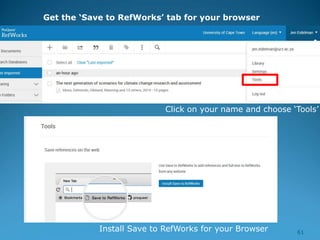
Get the ‘Save to RefWorks’ tab for your browser
Click on your name and choose ‘Tools’
Install Save to RefWorks for your Browser
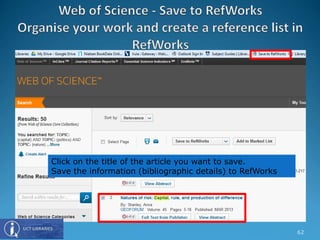
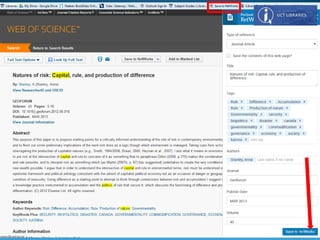
Click on the title of the article you want to save.
Save the information (bibliographic details) to RefWorks
62
63
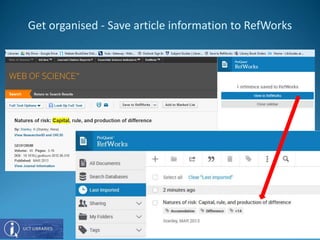
Get organised - Save article information to RefWorks
64
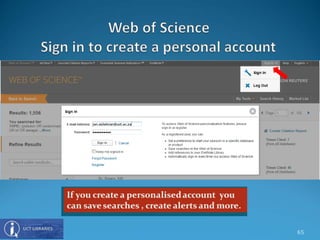
65
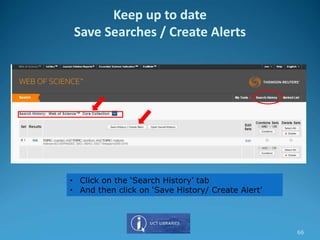
• Click on the ‘Search History’ tab
• And then click on ‘Save History/ Create Alert’
Keep up to date
Save Searches / Create Alerts
66
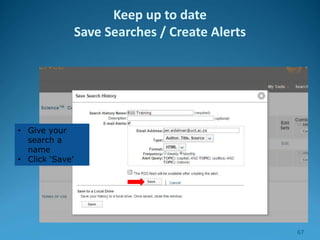
• Give your
search a
name
• Click ‘Save’
Keep up to date
Save Searches / Create Alerts
67
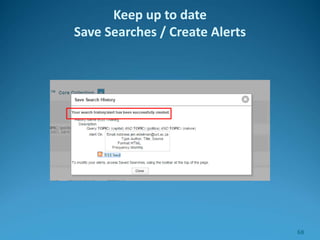
Keep up to date
Save Searches / Create Alerts
68
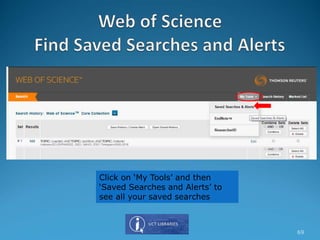
Click on ‘My Tools’ and then
‘Saved Searches and Alerts’ to
see all your saved searches
69
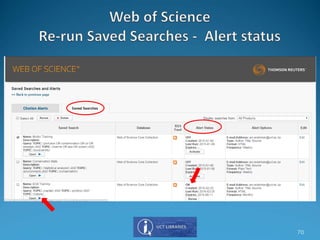
70
71
Keep up to date
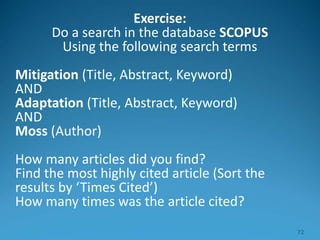
Exercise:
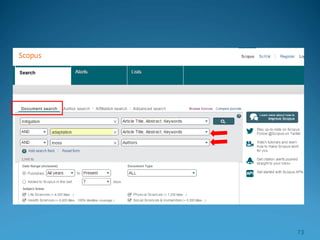
Do a search in the database SCOPUS
Using the following search terms
Mitigation (Title, Abstract, Keyword)
AND
Adaptation (Title, Abstract, Keyword)
AND
Moss (Author)
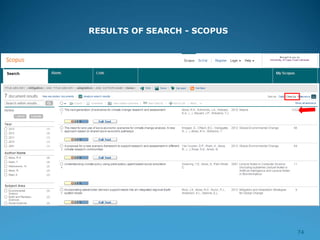
How many articles did you find?
Find the most highly cited article (Sort the
results by ‘Times Cited’)
How many times was the article cited?
72
73
RESULTS OF SEARCH - SCOPUS
74
Exercise:
1. Create an account in RefWorks
2. Do a keyword search of your choice in
ANY ONE of the database SCOPUS, WEB
of SCIENCE or GOOGLE SCHOLAR
3. Export one of the articles to RefWorks
75
Summary: Finding material in UCT Libraries :
ALEPH (library catalogue), E-Journal portal, Subject Guides
Doing your literature search : DATABASES (Boolean searching)
Retrieving materials: OFF CAMPUS LOGIN; SFX; Interlibrary Loans
Organising your results : RefWorks.
See: http://proquest.libguides.com/newrefworks
Writing help :
See: http://libguides.lib.uct.ac.za/environment/writing
Referencing help.
See: http://libguides.lib.uct.ac.za/environment/referencing
Keeping up to date : Current Awareness; Alerting services.
See: http://libguides.lib.uct.ac.za/sci-tech-uptodate
Off-campus access: Use the OFF CAMPUS LOGIN button on the library
page 76
Thank you!
This presentation is available
at:
http://libguides.lib.uct.ac.za/environment/workshops-2017
77

Globalisation, Environment & Society 2017

  • 1.
    1 INTRODUCTION TO UCTLIBRARIES Presented by Jen Eidelman E-mail: jen.eidelman@uct.ac.za Telephone: 021 650 2773 This work is licensed under a Creative Commons Attribution- NonCommercial-ShareAlike 4.0 Unported License. Globalisation, Environment & Society 2017
  • 2.
    What you canexpect to learn today  Save Time – Learn what the libraries have to offer & how to use the library resources. http://www.lib.uct.ac.za  Work efficiently - Learn how to search effectively http://libguides.lib.uct.ac.za/environment/databases  Keep up to date - Learn how to get Alerts to your email account and to Save Searches. http://libguides.lib.uct.ac.za/sci-tech-uptodate  Be organized. Organise the results of your searches. - Introducing RefWorks to organise your work and create a reference list / reference help. http://proquest.libguides.com/newrefworks http://libguides.lib.uct.ac.za/environment/referencing  How to Write up http://libguides.lib.uct.ac.za/environment/writing 2
  • 3.
    OFF CAMPUS LOGINhttp://www.lib.uct.ac.za It is possible to access library resources if you are not on campus. Use the OFF CAMPUS LOGIN BUTTON on the library webpage. 3
  • 4.
    OFF CAMPUS LOGINhttp://www.lib.uct.ac.za 4
  • 5.
    WHERE TO START?- Subject Guide On the Library Web Page: http://www.lib.uct.ac.za 5
  • 6.
    LINK TO SUBJECTGUIDE: http://libguides.lib.uct.ac.za/environment 6
  • 7.
  • 8.
    ALEPH – Librarycatalogue http://www.lib.uct.ac.za 8
  • 9.
    SUBJECT GUIDE: Findbooks http://libguides.lib.uct.ac.za/environment/findbooks 9
  • 10.
    How to finda book: See: http://libguides.lib.uct.ac.za/environment/findbooks ALEPH – Library catalogue Using the SEARCH function 10
  • 11.
    ALEPH – Librarycatalogue Using the SEARCH function 11
  • 12.
    ALEPH – Librarycatalogue Using the SEARCH function 12
  • 13.
    Insert your student orstaff number here Your password is your year of birth in the following format: YYYYMMDD e.g. 19801205 13
  • 14.
    Use the BROWSEfunction in ALEPH to find this book: Landscapes and landforms of South Africa edited by Stefan Grab and Jasper Knight What is the shelf number? 14
  • 15.
    ALEPH – Librarycatalogue Using the BROWSE function 15
  • 16.
  • 17.
    Use the BROWSEfunction in ALEPH to find Climate variability, climate change and water resource strategies for small municipalities What is the shelf number? Is the item available for loan? Exercise: Find a book title in ALEPH (Online Library catalogue) 17
  • 18.
    Exercise: Find abook title in ALEPH (Online Library catalogue) 18
  • 19.
    Exercise: Find abook title in ALEPH (Online Library catalogue) – ALL ITEMS 19
  • 20.
    Exercise: Find abook title in ALEPH (Online Library catalogue) – ITEM STATUS 20
  • 21.
    ALEPH – Librarycatalogue Using the BROWSE function to find Journal Titles 21
  • 22.
  • 23.
    Exercise: Find the JournalTitle ‘Climate dynamics’ in ALEPH Use the BROWSE function. What are the dates of the print holdings? Do we have electronic access? From what date? 23
  • 24.
  • 25.
  • 26.
    ALEPH – Librarycatalogue – Finding Maps More info see: http://libguides.lib.uct.ac.za/environment/maps • Click on the Search function • Choose Multi-field from the tool bar. • In the subject field type South Africa • In the ‘limit search to’ section from the drop down menu in the ‘format’ section choose ‘Maps’. South Africa 26
  • 27.
    ALEPH – Librarycatalogue – Finding Maps 27
  • 28.
    Print Journals -Aleph e-Journal Portal http://www.lib.uct.ac.za 28
  • 29.
    SUBJECT GUIDE: FindJournals http://libguides.lib.uct.ac.za/environment/findjournals 29
  • 30.
    Liddle, E.S. (2016)Author and date of publication The importance of community-based informal water supply systems in the developing world and the need for formal sector support. Title of article The geographical journal. 182(1):85-96 Journal name. volume no (issue no.): page numbers 30
  • 31.
  • 32.
  • 33.
  • 34.
    Grenfell, S.E. 2014. Fluvialconnectivity and climate: a comparison of channel pattern and process in two climatically contrasting fluvial sedimentary systems in South Africa. Geomorphology 205:142-154. Is it available in print at UCT Libraries? Is it available online? 34
  • 35.
  • 36.
  • 37.
    INTERLIBRARY LOANS http://www.lib.uct.ac.za/lib/interlibrary-loans You canrequest items that are not available at UCT via UCT Libraries Interlibrary Loans Department. 37
  • 38.
    Photo by JenEidelman Learn how to search effectively 38
  • 39.
    o Web ofScience o Scopus o ScienceDirect o EIS: Digests of environmental impact statements o GeoRef o Springerlink oWiley Online Library Search Databases Huge organised collections of article references … indexed so that you can find articles by topic, author, etc. Some store the full text of the articles.
  • 40.
    SEARCHING DATABASES The effectof pollution on marine biodiversity CONCEPT 2 CONCEPT 3CONCEPT 1 1. Write down your topic in its simplest form Then break it up into CONCEPTS. 40
  • 41.
    The effect ofpollution on marine biodiversity CONCEPT 2 CONCEPT 3CONCEPT 1 2. Think of KEY WORDS that describe each of your concepts : CONCEPT 1 POLLUTION CONTAMINATION SEWAGE OIL CONCEPT 2 MARINE OCEAN SEA CONCEPT 3 BIODIVERSITY 41
  • 42.
    3. Construct yoursearch strategy  Boolean logic provides the language you use to structure your keyword search … the search engine needs to know how your search terms relate to each other  In Boolean searching, you make use of the three Boolean operators: AND OR NOT 42
  • 43.
    Use AND tocombine different concepts : pollution AND ocean 43
  • 44.
    Use OR toenter keywords for the same (single) concept : ocean OR marine OR sea 44
  • 45.
    Use NOT toget rid of unwanted results : cetacea NOT dolphins 45
  • 46.
  • 47.
    ONE SEARCH BOX:Use brackets to separate your concepts STRUCTURED SCREEN: POLLUTION OR CONTAMINATION OR OIL OR SEWAGE MARINE OR OCEAN OR SEA BIODIVERSITY (POLLUTION OR CONTAMINATION OR OIL OR SEWAGE) AND (OCEAN OR SEA OR MARINE) AND BIODIVERSITY 4. Type your search strategy into the database search screen 47
  • 48.
    EGS Subject Guide:Databases http://libguides.lib.uct.ac.za/environment/databases 48
  • 49.
  • 50.
    From the dropdownmenu you can choose ‘All Databases’ to search across all the databases. If you search in the ‘Web of Science Core Collection’ you will be able to create search alerts & RSS feeds. Alerts are not enabled when you search in ‘All Databases’. 50
  • 51.
    Change drop down menuto topic Change timespan to limit your search to specific years 51
  • 52.
  • 53.
  • 54.
    The SFX button tellsyou if the article is available in full text or not. 54
  • 55.
    The full textis available from ScienceDirect There is also a link here to related articles 55
  • 56.
    Click on DownloadPDF to get the full text. 56
  • 57.
    Save the articleto your computer 57
  • 58.
  • 59.
    59 http://www.lib.uct.ac.za/lib/refworks • Create aRefWorks account or login to RefWorks • RefWorks Help
  • 60.
    60 Sign in toRefWorks
  • 61.
    61 Get the ‘Saveto RefWorks’ tab for your browser Click on your name and choose ‘Tools’ Install Save to RefWorks for your Browser
  • 62.
    Click on thetitle of the article you want to save. Save the information (bibliographic details) to RefWorks 62
  • 63.
  • 64.
    Get organised -Save article information to RefWorks 64
  • 65.
  • 66.
    • Click onthe ‘Search History’ tab • And then click on ‘Save History/ Create Alert’ Keep up to date Save Searches / Create Alerts 66
  • 67.
    • Give your searcha name • Click ‘Save’ Keep up to date Save Searches / Create Alerts 67
  • 68.
    Keep up todate Save Searches / Create Alerts 68
  • 69.
    Click on ‘MyTools’ and then ‘Saved Searches and Alerts’ to see all your saved searches 69
  • 70.
  • 71.
  • 72.
    Exercise: Do a searchin the database SCOPUS Using the following search terms Mitigation (Title, Abstract, Keyword) AND Adaptation (Title, Abstract, Keyword) AND Moss (Author) How many articles did you find? Find the most highly cited article (Sort the results by ‘Times Cited’) How many times was the article cited? 72
  • 73.
  • 74.
    RESULTS OF SEARCH- SCOPUS 74
  • 75.
    Exercise: 1. Create anaccount in RefWorks 2. Do a keyword search of your choice in ANY ONE of the database SCOPUS, WEB of SCIENCE or GOOGLE SCHOLAR 3. Export one of the articles to RefWorks 75
  • 76.
    Summary: Finding materialin UCT Libraries : ALEPH (library catalogue), E-Journal portal, Subject Guides Doing your literature search : DATABASES (Boolean searching) Retrieving materials: OFF CAMPUS LOGIN; SFX; Interlibrary Loans Organising your results : RefWorks. See: http://proquest.libguides.com/newrefworks Writing help : See: http://libguides.lib.uct.ac.za/environment/writing Referencing help. See: http://libguides.lib.uct.ac.za/environment/referencing Keeping up to date : Current Awareness; Alerting services. See: http://libguides.lib.uct.ac.za/sci-tech-uptodate Off-campus access: Use the OFF CAMPUS LOGIN button on the library page 76
  • 77.
    Thank you! This presentationis available at: http://libguides.lib.uct.ac.za/environment/workshops-2017 77