I/O File
and Web
Ahmed Nobi
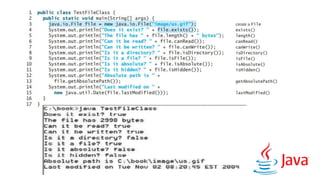
The File Class
“The File class contains the methods for obtaining the properties of a
file/directory and for renaming and deleting a file/directory. “
Why we need to use File
“Data stored in the program are temporary; they are lost when the program
terminates. To permanently store the data created in a program, you need to
save them in a file on a disk or other permanent storage device. The file can
then be transported and read later by other programs. Since data
are stored in files “
Syntax
File file = new File (“D:text.txt”);
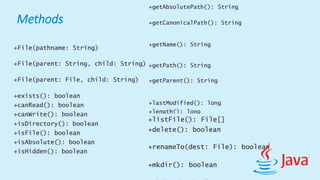
Methods
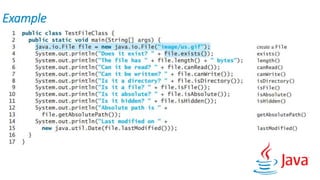
Example
File Input and Output
“Use the Scanner class for reading text data from a file and the PrintWriter class
for writing text data to a file. “
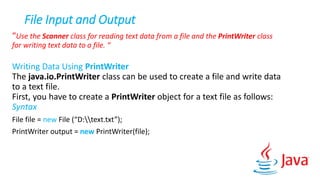
Writing Data Using PrintWriter
The java.io.PrintWriter class can be used to create a file and write data
to a text file.
First, you have to create a PrintWriter object for a text file as follows:
Syntax
File file = new File (“D:text.txt”);
PrintWriter output = new PrintWriter(file);
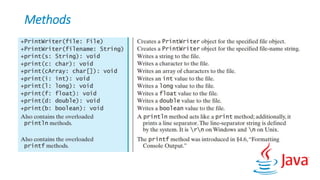
Methods
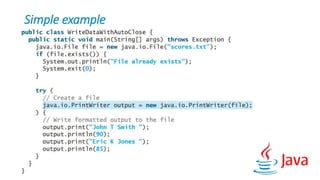
Simple example
Reading Data Using Scanner
The java.util.Scanner class was used to read strings and primitive
values from the console, Reading Input from the Console. A Scanner
breaks its input into tokens delimited by whitespace characters. To read
from the keyboard, you create a Scanner for
System.in, as follows:
Scanner input = new Scanner(System.in);
To read from a file, create a Scanner for a file, as follows:
Scanner input = new Scanner(file);
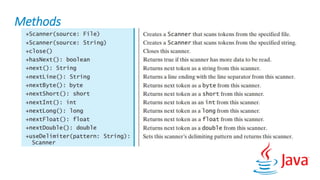
Methods
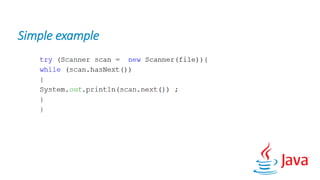
Simple example
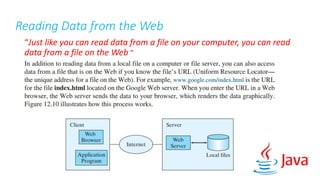
Reading Data from the Web
“Just like you can read data from a file on your computer, you can read
data from a file on the Web “
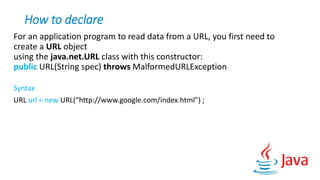
How to declare
For an application program to read data from a URL, you first need to
create a URL object
using the java.net.URL class with this constructor:
public URL(String spec) throws MalformedURLException
Syntax
URL url = new URL(“http://www.google.com/index.html”) ;
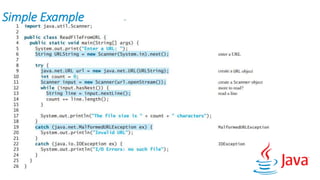
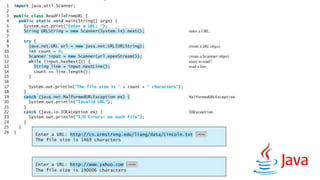
Simple Example
Note
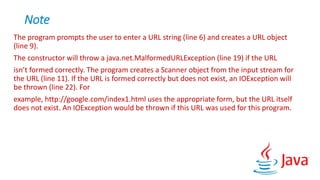
The program prompts the user to enter a URL string (line 6) and creates a URL object
(line 9).
The constructor will throw a java.net.MalformedURLException (line 19) if the URL
isn’t formed correctly. The program creates a Scanner object from the input stream for
the URL (line 11). If the URL is formed correctly but does not exist, an IOException will
be thrown (line 22). For
example, http://google.com/index1.html uses the appropriate form, but the URL itself
does not exist. An IOException would be thrown if this URL was used for this program.
Thanks for your Attention
That presentation is completely prepared from ” Introduction to Java
programming comprehensive version [Tenth Edition] written by Y. Daniel Liang”
source
Io files and web

Io files and web

  • 1.
  • 2.
    The File Class “TheFile class contains the methods for obtaining the properties of a file/directory and for renaming and deleting a file/directory. “ Why we need to use File “Data stored in the program are temporary; they are lost when the program terminates. To permanently store the data created in a program, you need to save them in a file on a disk or other permanent storage device. The file can then be transported and read later by other programs. Since data are stored in files “ Syntax File file = new File (“D:text.txt”);
  • 3.
  • 4.
  • 6.
    File Input andOutput “Use the Scanner class for reading text data from a file and the PrintWriter class for writing text data to a file. “ Writing Data Using PrintWriter The java.io.PrintWriter class can be used to create a file and write data to a text file. First, you have to create a PrintWriter object for a text file as follows: Syntax File file = new File (“D:text.txt”); PrintWriter output = new PrintWriter(file);
  • 7.
  • 8.
  • 9.
    Reading Data UsingScanner The java.util.Scanner class was used to read strings and primitive values from the console, Reading Input from the Console. A Scanner breaks its input into tokens delimited by whitespace characters. To read from the keyboard, you create a Scanner for System.in, as follows: Scanner input = new Scanner(System.in); To read from a file, create a Scanner for a file, as follows: Scanner input = new Scanner(file);
  • 10.
  • 11.
  • 12.
    Reading Data fromthe Web “Just like you can read data from a file on your computer, you can read data from a file on the Web “
  • 13.
    How to declare Foran application program to read data from a URL, you first need to create a URL object using the java.net.URL class with this constructor: public URL(String spec) throws MalformedURLException Syntax URL url = new URL(“http://www.google.com/index.html”) ;
  • 14.
  • 16.
    Note The program promptsthe user to enter a URL string (line 6) and creates a URL object (line 9). The constructor will throw a java.net.MalformedURLException (line 19) if the URL isn’t formed correctly. The program creates a Scanner object from the input stream for the URL (line 11). If the URL is formed correctly but does not exist, an IOException will be thrown (line 22). For example, http://google.com/index1.html uses the appropriate form, but the URL itself does not exist. An IOException would be thrown if this URL was used for this program.
  • 17.
    Thanks for yourAttention That presentation is completely prepared from ” Introduction to Java programming comprehensive version [Tenth Edition] written by Y. Daniel Liang” source