Introduction to Computers


                            1
What Is A Computer?

A computer is an electronic device, operating
under the control of instructions (software)
stored in its own memory unit, that can accept
data (input), manipulate data (process), and
produce information (output) from the
processing. Generally, the term is used to
describe a collection of devices that function
together as a system.


                                                 2
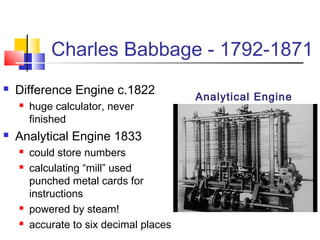
Charles Babbage - 1792-1871
   Difference Engine c.1822
                                         Analytical Engine
       huge calculator, never
        finished
   Analytical Engine 1833
       could store numbers
       calculating “mill” used
        punched metal cards for
        instructions
       powered by steam!
       accurate to six decimal places
Devices that comprise a computer system
                     Monitor               Speaker
                     (output)              (output)          System unit
                                                        (processor, memory…)

Printer
(output)


                                                                Storage devices
                                                                (CD-RW, Floppy,
                                                                Hard disk, zip,…)
                                              Mouse
                                              (input)
           Scanner              Keyboard
           (input)              (input)


                                                                                  4
What Does A Computer Do?

Computers can perform four general
operations, which comprise the information
processing cycle.

 Input
 Process

 Output

 Storage


                                             5
Data and Information
   All computer processing requires data, which is a collection of
    raw facts, figures and symbols, such as numbers, words,
    images, video and sound, given to the computer during the input
    phase.
   Computers manipulate data to create information. Information
    is data that is organized, meaningful, and useful.
   During the output Phase, the information that has been created
    is put into some form, such as a printed report.
   The information can also be put in computer storage for future
    use.


                                                                      6
Why Is A Computer So Powerful?
   The ability to perform the information
    processing cycle with amazing speed.
   Reliability (low failure rate).
   Accuracy.
   Ability to store huge amounts of data and
    information.
   Ability to communicate with other computers.


                                                   7
How Does a Computer Know
    what to do?
   It must be given a detailed list of instructions,
    called a compute program or software,
    that tells it exactly what to do.
   Before processing a specific job, the
    computer program corresponding to that job
    must be stored in memory.
   Once the program is stored in memory the
    computer can start the operation by executing
    the program instructions one after the other.
                                                        8
What Are The Primary
    Components Of A Computer ?
   Input devices.
   Central Processing Unit
    (containing the control
    unit and the
    arithmetic/logic unit).
   Memory.
   Output devices.
   Storage devices.


                                 9
Input Devices
 Keyboard.
 Mouse.


                10
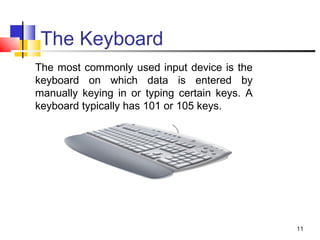
The Keyboard
The most commonly used input device is the
keyboard on which data is entered by
manually keying in or typing certain keys. A
keyboard typically has 101 or 105 keys.


                                               11
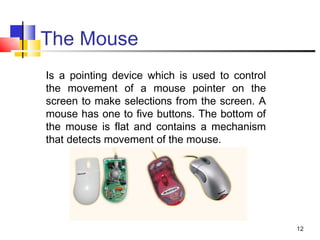
The Mouse
Is a pointing device which is used to control
the movement of a mouse pointer on the
screen to make selections from the screen. A
mouse has one to five buttons. The bottom of
the mouse is flat and contains a mechanism
that detects movement of the mouse.


                                                12
The Central processing Unit
The central processing unit (CPU) contains
electronic circuits that cause processing to
occur. The CPU interprets instructions to the
computer, performs the logical and arithmetic
processing operations, and causes the input
and output operations to occur. It is
considered the “brain” of the computer.


                                                13
Memory
Memory also called Random Access Memory
or RAM (temporary memory) is the main
memory of the computer. It consists of
electronic components that store data
including numbers, letters of the alphabet,
graphics and sound. Any information stored in
RAM is lost when the computer is turned off.

Read Only Memory or ROM is memory that
is etched on a chip that has start-up
directions for your computer. It is permanent
memory.
                                                14
Amount Of RAM In Computers
 The amount of memory in computers is
 typically measured in kilobytes or megabytes.
 One kilobyte (K or KB) equals approximately
 1,000 memory locations and one megabyte
 (M or MB) equals approximately one million
 locations A memory location, or byte, usually
 stores one character.
 Therefore, a computer with 8 MB of memory
 can store approximately 8 million characters.
 One megabyte can hold approximately 500
 pages of text information.

                                                 15
Output Devices
Output devices make the information resulting
from the processing available for use. The
two output devices more commonly used are
the printer and the computer screen.

The printer produces a hard copy of your
output, and the computer screen produces a
soft copy of your output.


                                                16
Storage Devices
Auxiliary storage devices are used to store
data when they are not being used in
memory. The most common types of auxiliary
storage used on personal computers are
floppy disks, hard disks and CD-ROM drives.


                                              17
Computer Software
Computer software is the key to
productive use of computers.
Software can be categorized into
two types:

 Operating system software
 Application software.


                                   18
Operating System Software
Operating system software tells the computer
how to perform the functions of loading,
storing and executing an application and how
to transfer data.
Today, many computers use an operating
system that has a graphical user interface
(GUI) that provides visual clues such as icon
symbols to help the user. Microsoft Windows
7 is a widely used graphical operating
system. DOS (Disk Operating System) is an
older but still used operating system that is
text-based.
                                                19
Application Software
 Application Software consists of programs
 that tell a computer how to produce
 information. Some of the more commonly
 used packages are:

    Word processing
    Electronic spreadsheet
    Database
    Presentation graphics


                                             20

1.introduction to computers

  • 1.
  • 2.
    What Is AComputer? A computer is an electronic device, operating under the control of instructions (software) stored in its own memory unit, that can accept data (input), manipulate data (process), and produce information (output) from the processing. Generally, the term is used to describe a collection of devices that function together as a system. 2
  • 3.
    Charles Babbage -1792-1871  Difference Engine c.1822 Analytical Engine  huge calculator, never finished  Analytical Engine 1833  could store numbers  calculating “mill” used punched metal cards for instructions  powered by steam!  accurate to six decimal places
  • 4.
    Devices that comprisea computer system Monitor Speaker (output) (output) System unit (processor, memory…) Printer (output) Storage devices (CD-RW, Floppy, Hard disk, zip,…) Mouse (input) Scanner Keyboard (input) (input) 4
  • 5.
    What Does AComputer Do? Computers can perform four general operations, which comprise the information processing cycle.  Input  Process  Output  Storage 5
  • 6.
    Data and Information  All computer processing requires data, which is a collection of raw facts, figures and symbols, such as numbers, words, images, video and sound, given to the computer during the input phase.  Computers manipulate data to create information. Information is data that is organized, meaningful, and useful.  During the output Phase, the information that has been created is put into some form, such as a printed report.  The information can also be put in computer storage for future use. 6
  • 7.
    Why Is AComputer So Powerful?  The ability to perform the information processing cycle with amazing speed.  Reliability (low failure rate).  Accuracy.  Ability to store huge amounts of data and information.  Ability to communicate with other computers. 7
  • 8.
    How Does aComputer Know what to do?  It must be given a detailed list of instructions, called a compute program or software, that tells it exactly what to do.  Before processing a specific job, the computer program corresponding to that job must be stored in memory.  Once the program is stored in memory the computer can start the operation by executing the program instructions one after the other. 8
  • 9.
    What Are ThePrimary Components Of A Computer ?  Input devices.  Central Processing Unit (containing the control unit and the arithmetic/logic unit).  Memory.  Output devices.  Storage devices. 9
  • 10.
  • 11.
    The Keyboard The mostcommonly used input device is the keyboard on which data is entered by manually keying in or typing certain keys. A keyboard typically has 101 or 105 keys. 11
  • 12.
    The Mouse Is apointing device which is used to control the movement of a mouse pointer on the screen to make selections from the screen. A mouse has one to five buttons. The bottom of the mouse is flat and contains a mechanism that detects movement of the mouse. 12
  • 13.
    The Central processingUnit The central processing unit (CPU) contains electronic circuits that cause processing to occur. The CPU interprets instructions to the computer, performs the logical and arithmetic processing operations, and causes the input and output operations to occur. It is considered the “brain” of the computer. 13
  • 14.
    Memory Memory also calledRandom Access Memory or RAM (temporary memory) is the main memory of the computer. It consists of electronic components that store data including numbers, letters of the alphabet, graphics and sound. Any information stored in RAM is lost when the computer is turned off. Read Only Memory or ROM is memory that is etched on a chip that has start-up directions for your computer. It is permanent memory. 14
  • 15.
    Amount Of RAMIn Computers The amount of memory in computers is typically measured in kilobytes or megabytes. One kilobyte (K or KB) equals approximately 1,000 memory locations and one megabyte (M or MB) equals approximately one million locations A memory location, or byte, usually stores one character. Therefore, a computer with 8 MB of memory can store approximately 8 million characters. One megabyte can hold approximately 500 pages of text information. 15
  • 16.
    Output Devices Output devicesmake the information resulting from the processing available for use. The two output devices more commonly used are the printer and the computer screen. The printer produces a hard copy of your output, and the computer screen produces a soft copy of your output. 16
  • 17.
    Storage Devices Auxiliary storagedevices are used to store data when they are not being used in memory. The most common types of auxiliary storage used on personal computers are floppy disks, hard disks and CD-ROM drives. 17
  • 18.
    Computer Software Computer softwareis the key to productive use of computers. Software can be categorized into two types:  Operating system software  Application software. 18
  • 19.
    Operating System Software Operatingsystem software tells the computer how to perform the functions of loading, storing and executing an application and how to transfer data. Today, many computers use an operating system that has a graphical user interface (GUI) that provides visual clues such as icon symbols to help the user. Microsoft Windows 7 is a widely used graphical operating system. DOS (Disk Operating System) is an older but still used operating system that is text-based. 19
  • 20.
    Application Software ApplicationSoftware consists of programs that tell a computer how to produce information. Some of the more commonly used packages are:  Word processing  Electronic spreadsheet  Database  Presentation graphics 20