ECG Signal Processing in
MATLAB - Detecting R-Peaks
SHANZA KAIMKHANI
MUET...
ELECTROCARDIOGRAM(ECG)
□ An electrocardiogram (ECG) is a test which
measures the electrical activity of your heart to
show whether or not it is working normally.
What can an ECG (electrocardiogram) show?
□ An electrocardiogram can be a useful way to find out whether your high blood pressure has
caused any damage to your heart or blood vessels. Because of this, you may be asked to have an
ECG when you are first diagnosed with high blood pressure.
Some of the things an ECG reading can detect are:
□ a heart attack in the past
□ enlargement of one side of the heart
□ abnormal heart rhythms
BASIC TASK
The basic task of electrocardiogram (ECG)
processing is R-peaks detection. There are some
difficulties one can encounter in processing
ECG: irregular distance between peaks, irregular
peak form, presence of low-frequency
component in ECG due to patient breathing etc.
To solve the task the processing pipeline should
contain particular stages to reduce influence of
those factors. Present sample demonstrates
such a pipeline. The aim is to show results of
processing in main pipeline stages.
□ An Ideal ECG Looks Like This And It Keeps Repeating Itself.
□ We Will Try To Detect The R-Peaks In This Project.
R-PEAKS DETECTION IN MATLAB
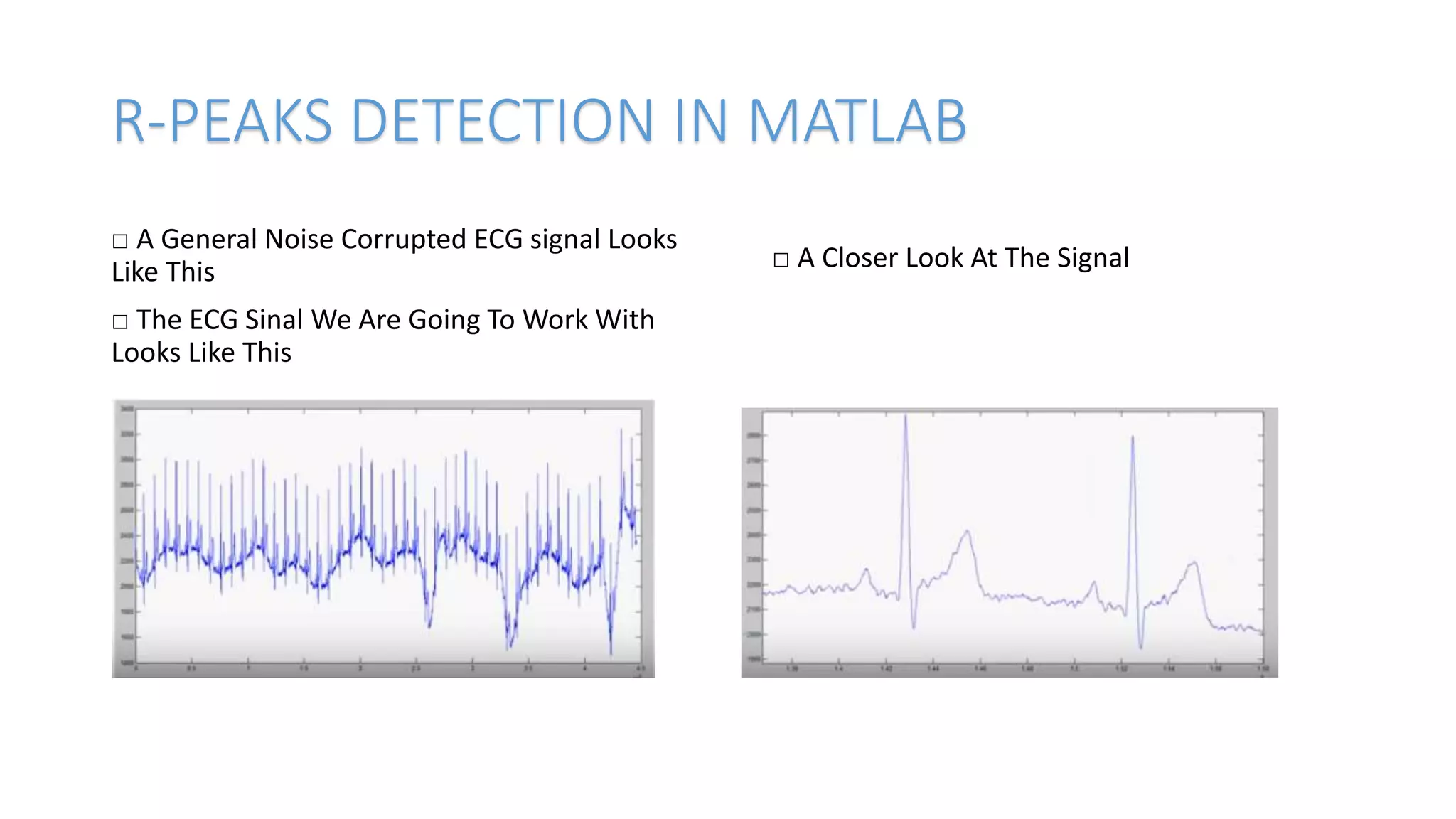
□ A General Noise Corrupted ECG signal Looks
Like This
□ The ECG Sinal We Are Going To Work With
Looks Like This
□ A Closer Look At The Signal
STEPS FOR DETECTION
1 Remove Low Frequency Components
1 Change to frequency domain using fft
2 Remove low frequency components
3 Back to time domain using fft
2 find local maxima using widowed filter
3 Remove Small values,store significant ones
4 Adjust filter size and repeat 2,3
HOW IT WORKS ?
MATLAB DEMONSTRATION
The demo package includes 5 files — two MatLab
scripts, two data samples and description
□ ecgdemo.m — main MatLab script,
□ ecgdemowinmax.m — window peak filter script,
□ ecgdemodata1.mat — first sample ECG data file,
□ ecgdemodata2.mat — second sample ECG data file,
□ readme.txt — description.
Some technical notes on demo:
□ To run the sample MatLab should be installed on
your computer.
□ Unpack the sample and copy .m and .mat files into
MatLab work directory.
□ Start up MatLab and type in:
>>ecgdemo
□ After open MATLAB You Have To Go To The
Directory Where You Have Downloaded The
Code.
□ Or Paste The Code In Script File.
% ECGDEMO ECG PROCESSING DEMONSTRATION - R-PEAKS DETECTION
%
% This file is a part of a package that contains 5 files:
%
% 1. ecgdemo.m - (this file) main script file;
% 2. ecgdemowinmax.m - window filter script file;
% 3. ecgdemodata1.mat - first ecg data sample;
% 4. ecgdemodata2.mat - second ecg data sample;
% 5. readme.txt - description.
%
% The package downloaded from http://www.librow.com
% To contact the author of the sample write to Sergey Chernenko:
% S.Chernenko@librow.com
%
% To run the demo put
%
% ecgdemo.m;
% ecgdemowinmax.m;
% ecgdemodata1.mat;
% ecgdemodata2.mat
%
% in MatLab's "work" directory, run MatLab and type in
%
% >> ecgdemo
%
% The code is property of LIBROW
% You can use it on your own
% When utilizing credit LIBROW site
% We are processing two data samples to demonstrate two different situations
for demo = 1:2:3
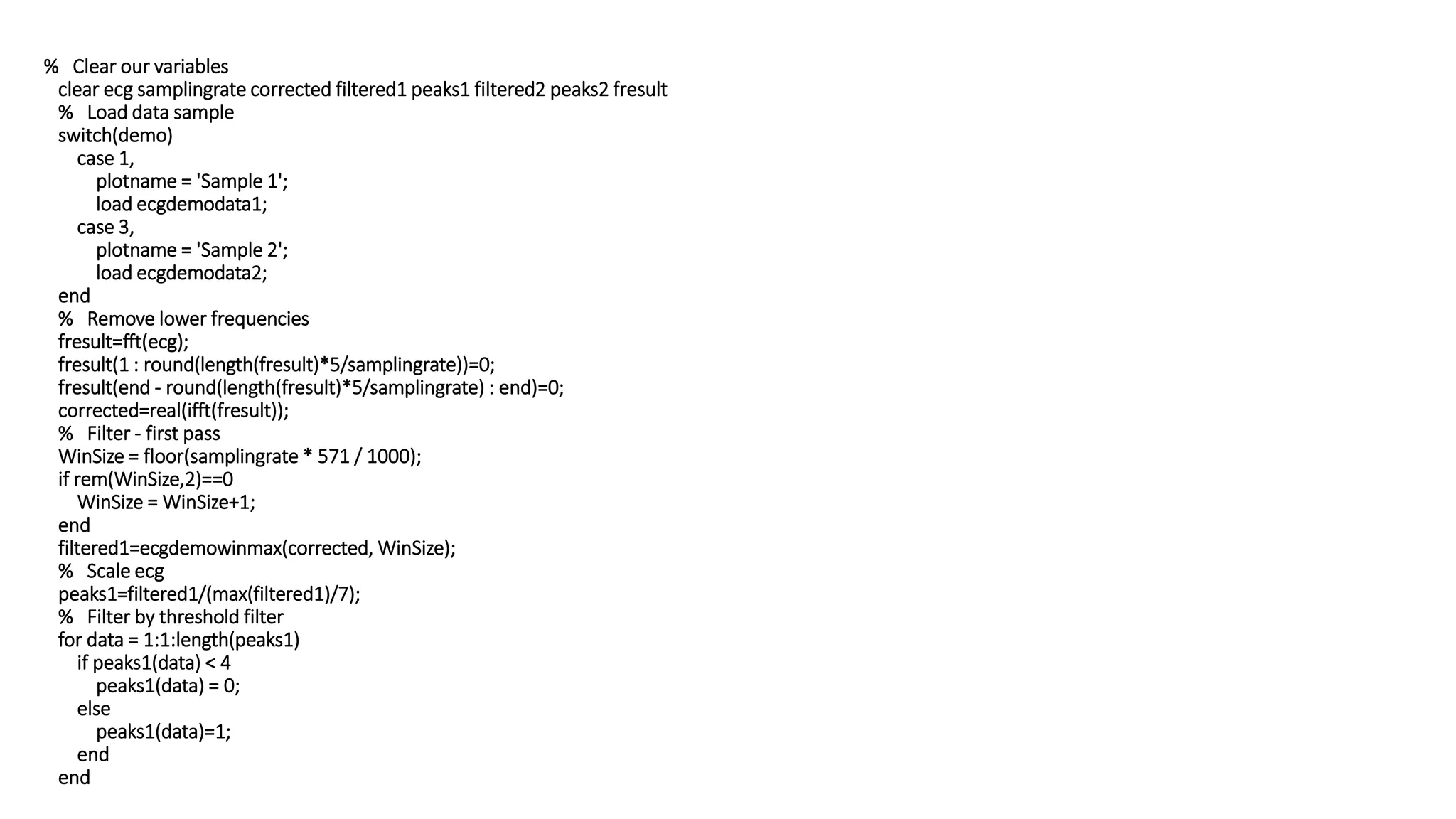
% Clear our variables
clear ecg samplingrate corrected filtered1 peaks1 filtered2 peaks2 fresult
% Load data sample
switch(demo)
case 1,
plotname = 'Sample 1';
load ecgdemodata1;
case 3,
plotname = 'Sample 2';
load ecgdemodata2;
end
% Remove lower frequencies
fresult=fft(ecg);
fresult(1 : round(length(fresult)*5/samplingrate))=0;
fresult(end - round(length(fresult)*5/samplingrate) : end)=0;
corrected=real(ifft(fresult));
% Filter - first pass
WinSize = floor(samplingrate * 571 / 1000);
if rem(WinSize,2)==0
WinSize = WinSize+1;
end
filtered1=ecgdemowinmax(corrected, WinSize);
% Scale ecg
peaks1=filtered1/(max(filtered1)/7);
% Filter by threshold filter
for data = 1:1:length(peaks1)
if peaks1(data) < 4
peaks1(data) = 0;
else
peaks1(data)=1;
end
end
positions=find(peaks1);
distance=positions(2)-positions(1);
for data=1:1:length(positions)-1
if positions(data+1)-positions(data)<distance
distance=positions(data+1)-positions(data);
end
end
% Optimize filter window size
QRdistance=floor(0.04*samplingrate);
if rem(QRdistance,2)==0
QRdistance=QRdistance+1;
end
WinSize=2*distance-QRdistance;
% Filter - second pass
filtered2=ecgdemowinmax(corrected, WinSize);
peaks2=filtered2;
for data=1:1:length(peaks2)
if peaks2(data)<4
peaks2(data)=0;
else
peaks2(data)=1;
end
end
% Create figure - stages of processing
figure(demo); set(demo, 'Name', strcat(plotname, ' - Processing Stages'));
% Original input ECG data
subplot(3, 2, 1); plot((ecg-min(ecg))/(max(ecg)-min(ecg)));
title('bf1. Original ECG'); ylim([-0.2 1.2]);
% ECG with removed low-frequency component
subplot(3, 2, 2); plot((corrected-min(corrected))/(max(corrected)-min(corrected)));
title('bf2. FFT Filtered ECG'); ylim([-0.2 1.2]);
% Filtered ECG (1-st pass) - filter has default window size
subplot(3, 2, 3); stem((filtered1-min(filtered1))/(max(filtered1)-min(filtered1)));
title('bf3. Filtered ECG - 1^{st} Pass'); ylim([0 1.4]);
% Detected peaks in filtered ECG
subplot(3, 2, 4); stem(peaks1);
title('bf4. Detected Peaks'); ylim([0 1.4]);
% Filtered ECG (2-d pass) - now filter has optimized window size
subplot(3, 2, 5); stem((filtered2-min(filtered2))/(max(filtered2)-min(filtered2)));
title('bf5. Filtered ECG - 2^d Pass'); ylim([0 1.4]);
% Detected peaks - final result
subplot(3, 2, 6); stem(peaks2);
title('bf6. Detected Peaks - Finally'); ylim([0 1.4]);
% Create figure - result
figure(demo+1); set(demo+1, 'Name', strcat(plotname, ' - Result'));
% Plotting ECG in green
plot((ecg-min(ecg))/(max(ecg)-min(ecg)), '-g'); title('bf Comparative ECG R-Peak Detection Plot');
% Show peaks in the same picture
hold on
% Stemming peaks in dashed black
stem(peaks2'.*((ecg-min(ecg))/(max(ecg)-min(ecg)))', ':k');
% Hold off the figure
hold off
end
TO RUN THE CODE JUST TYPE <<ecgdemo IN COMMAND WINDOW
WE FIND OUTPUTS
This is your result For Sample 1
This is your Result For Sample 2
TRAIN NETWORK
Now we have to train this code in
NEURAL NETWORK
TYPE nntool in command Window
THANKYOU

ECG

  • 1.
    ECG Signal Processingin MATLAB - Detecting R-Peaks SHANZA KAIMKHANI MUET...
  • 2.
    ELECTROCARDIOGRAM(ECG) □ An electrocardiogram(ECG) is a test which measures the electrical activity of your heart to show whether or not it is working normally.
  • 3.
    What can anECG (electrocardiogram) show? □ An electrocardiogram can be a useful way to find out whether your high blood pressure has caused any damage to your heart or blood vessels. Because of this, you may be asked to have an ECG when you are first diagnosed with high blood pressure. Some of the things an ECG reading can detect are: □ a heart attack in the past □ enlargement of one side of the heart □ abnormal heart rhythms
  • 4.
    BASIC TASK The basictask of electrocardiogram (ECG) processing is R-peaks detection. There are some difficulties one can encounter in processing ECG: irregular distance between peaks, irregular peak form, presence of low-frequency component in ECG due to patient breathing etc. To solve the task the processing pipeline should contain particular stages to reduce influence of those factors. Present sample demonstrates such a pipeline. The aim is to show results of processing in main pipeline stages. □ An Ideal ECG Looks Like This And It Keeps Repeating Itself. □ We Will Try To Detect The R-Peaks In This Project.
  • 5.
    R-PEAKS DETECTION INMATLAB □ A General Noise Corrupted ECG signal Looks Like This □ The ECG Sinal We Are Going To Work With Looks Like This □ A Closer Look At The Signal
  • 6.
    STEPS FOR DETECTION 1Remove Low Frequency Components 1 Change to frequency domain using fft 2 Remove low frequency components 3 Back to time domain using fft 2 find local maxima using widowed filter 3 Remove Small values,store significant ones 4 Adjust filter size and repeat 2,3
  • 7.
  • 8.
    MATLAB DEMONSTRATION The demopackage includes 5 files — two MatLab scripts, two data samples and description □ ecgdemo.m — main MatLab script, □ ecgdemowinmax.m — window peak filter script, □ ecgdemodata1.mat — first sample ECG data file, □ ecgdemodata2.mat — second sample ECG data file, □ readme.txt — description. Some technical notes on demo: □ To run the sample MatLab should be installed on your computer. □ Unpack the sample and copy .m and .mat files into MatLab work directory. □ Start up MatLab and type in: >>ecgdemo □ After open MATLAB You Have To Go To The Directory Where You Have Downloaded The Code. □ Or Paste The Code In Script File.
  • 9.
    % ECGDEMO ECGPROCESSING DEMONSTRATION - R-PEAKS DETECTION % % This file is a part of a package that contains 5 files: % % 1. ecgdemo.m - (this file) main script file; % 2. ecgdemowinmax.m - window filter script file; % 3. ecgdemodata1.mat - first ecg data sample; % 4. ecgdemodata2.mat - second ecg data sample; % 5. readme.txt - description. % % The package downloaded from http://www.librow.com % To contact the author of the sample write to Sergey Chernenko: % S.Chernenko@librow.com % % To run the demo put % % ecgdemo.m; % ecgdemowinmax.m; % ecgdemodata1.mat; % ecgdemodata2.mat % % in MatLab's "work" directory, run MatLab and type in % % >> ecgdemo % % The code is property of LIBROW % You can use it on your own % When utilizing credit LIBROW site % We are processing two data samples to demonstrate two different situations for demo = 1:2:3
  • 10.
    % Clear ourvariables clear ecg samplingrate corrected filtered1 peaks1 filtered2 peaks2 fresult % Load data sample switch(demo) case 1, plotname = 'Sample 1'; load ecgdemodata1; case 3, plotname = 'Sample 2'; load ecgdemodata2; end % Remove lower frequencies fresult=fft(ecg); fresult(1 : round(length(fresult)*5/samplingrate))=0; fresult(end - round(length(fresult)*5/samplingrate) : end)=0; corrected=real(ifft(fresult)); % Filter - first pass WinSize = floor(samplingrate * 571 / 1000); if rem(WinSize,2)==0 WinSize = WinSize+1; end filtered1=ecgdemowinmax(corrected, WinSize); % Scale ecg peaks1=filtered1/(max(filtered1)/7); % Filter by threshold filter for data = 1:1:length(peaks1) if peaks1(data) < 4 peaks1(data) = 0; else peaks1(data)=1; end end
  • 11.
    positions=find(peaks1); distance=positions(2)-positions(1); for data=1:1:length(positions)-1 if positions(data+1)-positions(data)<distance distance=positions(data+1)-positions(data); end end %Optimize filter window size QRdistance=floor(0.04*samplingrate); if rem(QRdistance,2)==0 QRdistance=QRdistance+1; end WinSize=2*distance-QRdistance; % Filter - second pass filtered2=ecgdemowinmax(corrected, WinSize); peaks2=filtered2; for data=1:1:length(peaks2) if peaks2(data)<4 peaks2(data)=0; else peaks2(data)=1; end end
  • 12.
    % Create figure- stages of processing figure(demo); set(demo, 'Name', strcat(plotname, ' - Processing Stages')); % Original input ECG data subplot(3, 2, 1); plot((ecg-min(ecg))/(max(ecg)-min(ecg))); title('bf1. Original ECG'); ylim([-0.2 1.2]); % ECG with removed low-frequency component subplot(3, 2, 2); plot((corrected-min(corrected))/(max(corrected)-min(corrected))); title('bf2. FFT Filtered ECG'); ylim([-0.2 1.2]); % Filtered ECG (1-st pass) - filter has default window size subplot(3, 2, 3); stem((filtered1-min(filtered1))/(max(filtered1)-min(filtered1))); title('bf3. Filtered ECG - 1^{st} Pass'); ylim([0 1.4]); % Detected peaks in filtered ECG subplot(3, 2, 4); stem(peaks1); title('bf4. Detected Peaks'); ylim([0 1.4]); % Filtered ECG (2-d pass) - now filter has optimized window size subplot(3, 2, 5); stem((filtered2-min(filtered2))/(max(filtered2)-min(filtered2))); title('bf5. Filtered ECG - 2^d Pass'); ylim([0 1.4]);
  • 13.
    % Detected peaks- final result subplot(3, 2, 6); stem(peaks2); title('bf6. Detected Peaks - Finally'); ylim([0 1.4]); % Create figure - result figure(demo+1); set(demo+1, 'Name', strcat(plotname, ' - Result')); % Plotting ECG in green plot((ecg-min(ecg))/(max(ecg)-min(ecg)), '-g'); title('bf Comparative ECG R-Peak Detection Plot'); % Show peaks in the same picture hold on % Stemming peaks in dashed black stem(peaks2'.*((ecg-min(ecg))/(max(ecg)-min(ecg)))', ':k'); % Hold off the figure hold off end TO RUN THE CODE JUST TYPE <<ecgdemo IN COMMAND WINDOW
  • 14.
    WE FIND OUTPUTS Thisis your result For Sample 1
  • 15.
    This is yourResult For Sample 2
  • 16.
    TRAIN NETWORK Now wehave to train this code in NEURAL NETWORK TYPE nntool in command Window
  • 17.