CI/CD Development in Kubernetes
- Skaffold
$whoami
 Suman Chakraborty - Senior Devops
Engineer @SAP Labs
 Community member & Speaker -
Docker Bangalore, Collabnix
 Tech Blogger on PaaS, Cloud-Native
& Microservices
https://www.linkedin.com/in/
schakraborty007/
@itsmesumanc
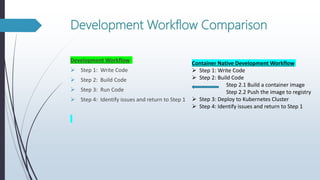
Development Workflow Comparison
Development Workflow
 Step 1: Write Code
 Step 2: Build Code
 Step 3: Run Code
 Step 4: Identify issues and return to Step 1
Container Native Development Workflow
 Step 1: Write Code
 Step 2: Build Code
Step 2.1 Build a container image
Step 2.2 Push the image to registry
 Step 3: Deploy to Kubernetes Cluster
 Step 4: Identify issues and return to Step 1
Current Challenges
 Developers creating Kubernetes-native applications spent a long time
building and managing container images across registries, manually updating
their Kubernetes manifests and redeploying their applications every time
they made even the smallest code changes
 Working on building cloud-native application means one has to take care the
complexity in managing the platform.
 Building a full-fledged CI/CD pipeline for local code testing is time-consuming
and takes manual effort.
 Integrating custom modules/plugins to existing CI/CD workflow involves
significant changes in pipeline steps that doubles the effort.
 Current local CI/CD management workflow doesn’t imitate experience close
to production setup.
Skaffold ~ personal ‘ops’ assistant
 Skaffold is an open-source Google Container tool, written in Golang (licensed under
Apache 2.0) that provides a toolkit for creating CI/CD pipelines. Alpha version – 8th
March,2018
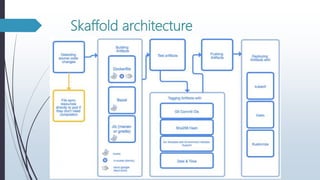
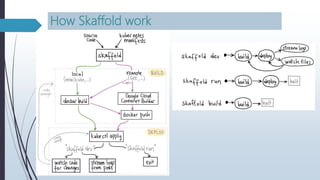
 Skaffold primarily simplifies the “build → deploy → refactor → repeat” cycle.
 Monitors the changes in the source code, starts an automatic process of building code
into container images, pushes these images to the Docker registry and deploys them to
the Kubernetes cluster while synchronizing files in source dir.
 Skaffold itself does not have cluster-side components, so you don’t need to configure
Kubernetes to use it.
 Skaffold not only can run on local Kubernetes cluster (minikube,docker for desktop) but
can build/push images locally with docker and run them on the remote clusters (such as
GKE, EKS,etc).
 Supports debugging applications written in Java, Node.js, Python, Go.
 Currently in GA ( v1.0.0) ( commits ~ 5000 , contributions ~ 150 )
Skaffold architecture
How Skaffold work
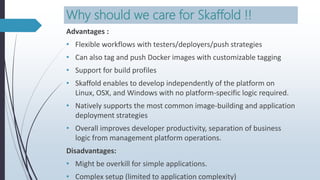
Why should we care for Skaffold !!
Advantages :
• Flexible workflows with testers/deployers/push strategies
• Can also tag and push Docker images with customizable tagging
• Support for build profiles
• Skaffold enables to develop independently of the platform on
Linux, OSX, and Windows with no platform-specific logic required.
• Natively supports the most common image-building and application
deployment strategies
• Overall improves developer productivity, separation of business
logic from management platform operations.
Disadvantages:
• Might be overkill for simple applications.
• Complex setup (limited to application complexity)
Adoptions of Skaffold
"Our customers love [Kubernetes], but consistently gave us
feedback that developing on Kubernetes was cumbersome.
Skaffold hit the mark in addressing this problem. Changes to a
docker image or a configuration that previously took several
minutes to deploy now take seconds. Skaffold's plugin
architecture gives us the ability to deploy to Helm or Kustomize,
and to use various docker build plugins such as Kaniko” -
Warren Strange, Engineering Director
“When we evaluated what workflows we could use with
Kubernetes, Skaffold stood out as a tool we'd want for both
development and deployment. It gives us a common entry
point across applications that we can also reuse for CI/CD” -
Taylor Barrella, Software Engineer
“Skaffold is an amazing tool that simplified development and
delivery for us. Skaffold hit our sweet spot by covering two
dimensions: First, the entire development cycle from local
development, integration testing to delivery. Second,
Skaffold enabled us to develop independently of the
platform on Linux, OSX, and Windows, with no platform
specific logic required” - Martin Höfling, Principal Consultant
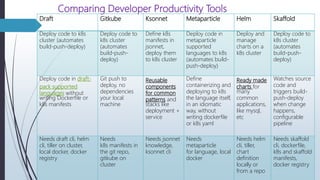
Comparing Developer Productivity Tools
Draft Gitkube Ksonnet Metaparticle Helm Skaffold
Deploy code to k8s
cluster (automates
build-push-deploy)
Deploy code to
k8s cluster
(automates
build-push-
deploy)
Define k8s
manifests in
jsonnet,
deploy them
to k8s cluster
Deploy code in
metaparticle
supported
languages to k8s
(automates build-
push-deploy)
Deploy and
manage
charts on a
k8s cluster
Deploy code to
k8s cluster
(automates
build-push-
deploy)
Deploy code in draft-
pack supported
languages without
writing Dockerfile or
k8s manifests
Git push to
deploy, no
dependencies
your local
machine
Reusable
components
for common
patterns and
stacks like
deployment +
service
Define
containerizing and
deploying to k8s
the language itself,
in an idiomatic
way, without
writing dockerfile
or k8s yaml
Ready made
charts for
many
common
applications,
like mysql,
etc
Watches source
code and
triggers build-
push-deploy
when change
happens,
configurable
pipeline
Needs draft cli, helm
cli, tiller on cluster,
local docker, docker
registry
Needs
k8s manifests in
the git repo,
gitkube on
cluster
Needs jsonnet
knowledge,
ksonnet cli
Needs
metaparticle
for language, local
docker
Needs helm
cli, tiller,
chart
definition
locally or
from a repo
Needs skaffold
cli, dockerfile,
k8s and skaffold
manifests,
docker registry
References
 https://github.com/GoogleContainerTools/skaffold
 https://skaffold.dev/docs/quickstart/
 https://ahmet.im/blog/skaffold/
HAPPY SKAFFOLDING

CI/CD Development in Kubernetes - Skaffold

  • 1.
    CI/CD Development inKubernetes - Skaffold
  • 2.
    $whoami  Suman Chakraborty- Senior Devops Engineer @SAP Labs  Community member & Speaker - Docker Bangalore, Collabnix  Tech Blogger on PaaS, Cloud-Native & Microservices https://www.linkedin.com/in/ schakraborty007/ @itsmesumanc
  • 3.
    Development Workflow Comparison DevelopmentWorkflow  Step 1: Write Code  Step 2: Build Code  Step 3: Run Code  Step 4: Identify issues and return to Step 1 Container Native Development Workflow  Step 1: Write Code  Step 2: Build Code Step 2.1 Build a container image Step 2.2 Push the image to registry  Step 3: Deploy to Kubernetes Cluster  Step 4: Identify issues and return to Step 1
  • 4.
    Current Challenges  Developerscreating Kubernetes-native applications spent a long time building and managing container images across registries, manually updating their Kubernetes manifests and redeploying their applications every time they made even the smallest code changes  Working on building cloud-native application means one has to take care the complexity in managing the platform.  Building a full-fledged CI/CD pipeline for local code testing is time-consuming and takes manual effort.  Integrating custom modules/plugins to existing CI/CD workflow involves significant changes in pipeline steps that doubles the effort.  Current local CI/CD management workflow doesn’t imitate experience close to production setup.
  • 5.
    Skaffold ~ personal‘ops’ assistant  Skaffold is an open-source Google Container tool, written in Golang (licensed under Apache 2.0) that provides a toolkit for creating CI/CD pipelines. Alpha version – 8th March,2018  Skaffold primarily simplifies the “build → deploy → refactor → repeat” cycle.  Monitors the changes in the source code, starts an automatic process of building code into container images, pushes these images to the Docker registry and deploys them to the Kubernetes cluster while synchronizing files in source dir.  Skaffold itself does not have cluster-side components, so you don’t need to configure Kubernetes to use it.  Skaffold not only can run on local Kubernetes cluster (minikube,docker for desktop) but can build/push images locally with docker and run them on the remote clusters (such as GKE, EKS,etc).  Supports debugging applications written in Java, Node.js, Python, Go.  Currently in GA ( v1.0.0) ( commits ~ 5000 , contributions ~ 150 )
  • 6.
  • 7.
  • 9.
    Why should wecare for Skaffold !! Advantages : • Flexible workflows with testers/deployers/push strategies • Can also tag and push Docker images with customizable tagging • Support for build profiles • Skaffold enables to develop independently of the platform on Linux, OSX, and Windows with no platform-specific logic required. • Natively supports the most common image-building and application deployment strategies • Overall improves developer productivity, separation of business logic from management platform operations. Disadvantages: • Might be overkill for simple applications. • Complex setup (limited to application complexity)
  • 10.
    Adoptions of Skaffold "Ourcustomers love [Kubernetes], but consistently gave us feedback that developing on Kubernetes was cumbersome. Skaffold hit the mark in addressing this problem. Changes to a docker image or a configuration that previously took several minutes to deploy now take seconds. Skaffold's plugin architecture gives us the ability to deploy to Helm or Kustomize, and to use various docker build plugins such as Kaniko” - Warren Strange, Engineering Director “When we evaluated what workflows we could use with Kubernetes, Skaffold stood out as a tool we'd want for both development and deployment. It gives us a common entry point across applications that we can also reuse for CI/CD” - Taylor Barrella, Software Engineer “Skaffold is an amazing tool that simplified development and delivery for us. Skaffold hit our sweet spot by covering two dimensions: First, the entire development cycle from local development, integration testing to delivery. Second, Skaffold enabled us to develop independently of the platform on Linux, OSX, and Windows, with no platform specific logic required” - Martin Höfling, Principal Consultant
  • 11.
    Comparing Developer ProductivityTools Draft Gitkube Ksonnet Metaparticle Helm Skaffold Deploy code to k8s cluster (automates build-push-deploy) Deploy code to k8s cluster (automates build-push- deploy) Define k8s manifests in jsonnet, deploy them to k8s cluster Deploy code in metaparticle supported languages to k8s (automates build- push-deploy) Deploy and manage charts on a k8s cluster Deploy code to k8s cluster (automates build-push- deploy) Deploy code in draft- pack supported languages without writing Dockerfile or k8s manifests Git push to deploy, no dependencies your local machine Reusable components for common patterns and stacks like deployment + service Define containerizing and deploying to k8s the language itself, in an idiomatic way, without writing dockerfile or k8s yaml Ready made charts for many common applications, like mysql, etc Watches source code and triggers build- push-deploy when change happens, configurable pipeline Needs draft cli, helm cli, tiller on cluster, local docker, docker registry Needs k8s manifests in the git repo, gitkube on cluster Needs jsonnet knowledge, ksonnet cli Needs metaparticle for language, local docker Needs helm cli, tiller, chart definition locally or from a repo Needs skaffold cli, dockerfile, k8s and skaffold manifests, docker registry
  • 12.
  • 13.