Demystifying Cloud Native Buildpacks
Developer’s life without Dockerfile
$whoami
 Suman Chakraborty - Senior Devops
Engineer @SAP Labs
 Community member & Speaker -
Docker Bangalore, CNCF Bangalore
group, KonfHub TechCommunity
 Tech Blogger on PaaS, Cloud-Native
& Microservices
Agenda
 Dockerfile 101
 Shortcomings of the current approach
 Intro to Buildpacks
 Cloud-Native Buildpacks (CNB)
 Demo & Use-Case
 Why should we consider CNB over traditional Dockerfile
Dockerfile 101
• Executed as a set of runnable instructions by the docker daemon creating the
final build image
• Considered as developer’s best friend to “dockerize” polyglot application
Dockerfile native advantages :
 Faster app development
 Speeding up incremental builds
 Easier management and scaling of containers
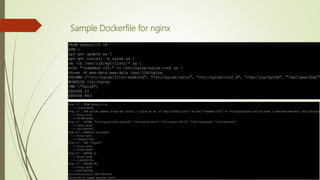
Sample Dockerfile for nginx
Shortcomings !!!!
 Application image is bloated with extraneous cache directories.
 Performance bottleneck comes in speed builds
 Composability – Building multiple docker images, where the binary/dependencies from primary image
need to be copied to second image. Using multi-stage builds, it is achievable, but again susceptible to
following :
> No environment variables.
> Doesn’t follow symlinks
> Only copying FS layers manually (can’t copy arbitrary layers/files/dir)
 Leaky Abstraction -
a) Poor tool for app developers who want to write code
b) Not application aware
c) Mix of operation and application developer concerns
 Maintenance is a problem in managing multiple versions of an app as this leads to copy-pasting
code which can be error-prone and introduces the low-level concerns on the quality of the image
produced. Moreover this is tedious and time-consuming.
Intro to Buildpacks
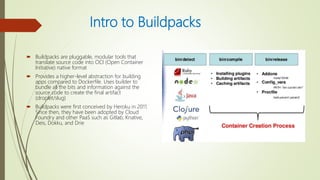
 Buildpacks are pluggable, modular tools that
translate source code into OCI (Open Container
Initiative) native format
 Provides a higher-level abstraction for building
apps compared to Dockerfile. Uses builder to
bundle all the bits and information against the
source code to create the final artifact
(droplet/slug)
 Buildpacks were first conceived by Heroku in 2011.
Since then, they have been adopted by Cloud
Foundry and other PaaS such as Gitlab, Knative,
Deis, Dokku, and Drie
Cloud Native Buildpacks
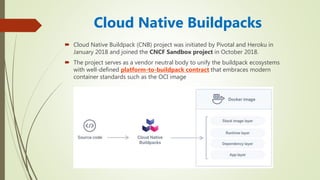
 Cloud Native Buildpack (CNB) project was initiated by Pivotal and Heroku in
January 2018 and joined the CNCF Sandbox project in October 2018.
 The project serves as a vendor neutral body to unify the buildpack ecosystems
with well-defined platform-to-buildpack contract that embraces modern
container standards such as the OCI image
Buildpack Components
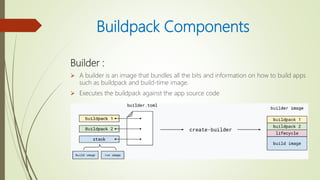
Builder :
 A builder is an image that bundles all the bits and information on how to build apps
such as buildpack and build-time image.
 Executes the buildpack against the app source code
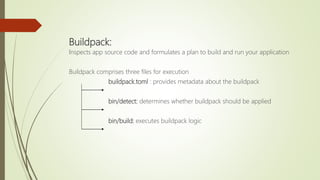
Buildpack:
Inspects app source code and formulates a plan to build and run your application
Buildpack comprises three files for execution
buildpack.toml : provides metadata about the buildpack
bin/detect: determines whether buildpack should be applied
bin/build: executes buildpack logic
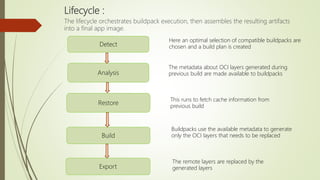
Lifecycle :
The lifecycle orchestrates buildpack execution, then assembles the resulting artifacts
into a final app image.
Detect
Export
Analysis
Build
Here an optimal selection of compatible buildpacks are
chosen and a build plan is created
The metadata about OCI layers generated during
previous build are made available to buildpacks
Buildpacks use the available metadata to generate
only the OCI layers that needs to be replaced
The remote layers are replaced by the
generated layers
Restore
This runs to fetch cache information from
previous build
Stack:
 Provides a buildpack lifecycle with build-time and run-time environment in the
form of images.
 Stacks are used by builders and configured through it’s configuration file
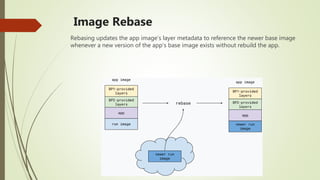
Image Rebase
Rebasing updates the app image’s layer metadata to reference the newer base image
whenever a new version of the app’s base image exists without rebuild the app.
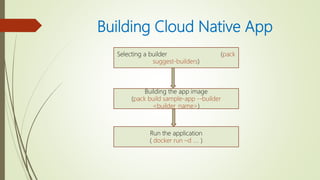
Building Cloud Native App
Selecting a builder (pack
suggest-builders)
Building the app image
(pack build sample-app --builder
<builder_name>)
Run the application
( docker run –d …. )
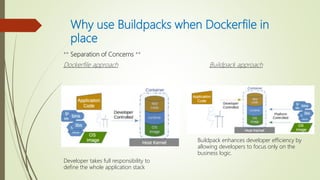
Why use Buildpacks when Dockerfile in
place
** Separation of Concerns **
Dockerfile approach Buildpack approach
Developer takes full responsibility to
define the whole application stack
Buildpack enhances developer efficiency by
allowing developers to focus only on the
business logic.
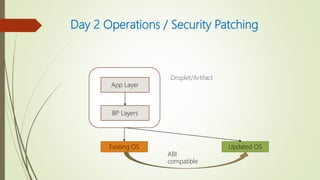
Day 2 Operations / Security Patching
Droplet/Artifact
App Layer
BP Layers
Existing OS Updated OS
ABI
compatible
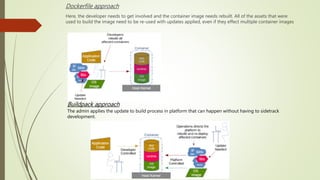
Dockerfile approach
Here, the developer needs to get involved and the container image needs rebuilt. All of the assets that were
used to build the image need to be re-used with updates applied, even if they effect multiple container images
Buildpack approach
The admin applies the update to build process in platform that can happen without having to sidetrack
development.
Advantages of Buildpacks
 Ensures that app meet security and compliance requirements without developer
intervention.
 Provide automated delivery of both OS-level and application-level dependency
upgrades.
 Efficient handles day-2 app operations that are often difficult to manage with
Dockerfile
 Rely on compatibility guarantees to safely apply patches without rebuilding
artifacts and without unintentionally changing application behavior.
 Only re-builds and uploads layers when necessary.
 Supports cross-repository block mounting on Docker Registry v2
Thank You !!!
……Questions Please??
https://www.linkedin.com/in/schakraborty007/
@itsmesumanc

Cloud native buildpacks-cncf

  • 1.
    Demystifying Cloud NativeBuildpacks Developer’s life without Dockerfile
  • 2.
    $whoami  Suman Chakraborty- Senior Devops Engineer @SAP Labs  Community member & Speaker - Docker Bangalore, CNCF Bangalore group, KonfHub TechCommunity  Tech Blogger on PaaS, Cloud-Native & Microservices
  • 3.
    Agenda  Dockerfile 101 Shortcomings of the current approach  Intro to Buildpacks  Cloud-Native Buildpacks (CNB)  Demo & Use-Case  Why should we consider CNB over traditional Dockerfile
  • 4.
    Dockerfile 101 • Executedas a set of runnable instructions by the docker daemon creating the final build image • Considered as developer’s best friend to “dockerize” polyglot application Dockerfile native advantages :  Faster app development  Speeding up incremental builds  Easier management and scaling of containers
  • 5.
  • 6.
    Shortcomings !!!!  Applicationimage is bloated with extraneous cache directories.  Performance bottleneck comes in speed builds  Composability – Building multiple docker images, where the binary/dependencies from primary image need to be copied to second image. Using multi-stage builds, it is achievable, but again susceptible to following : > No environment variables. > Doesn’t follow symlinks > Only copying FS layers manually (can’t copy arbitrary layers/files/dir)  Leaky Abstraction - a) Poor tool for app developers who want to write code b) Not application aware c) Mix of operation and application developer concerns  Maintenance is a problem in managing multiple versions of an app as this leads to copy-pasting code which can be error-prone and introduces the low-level concerns on the quality of the image produced. Moreover this is tedious and time-consuming.
  • 7.
    Intro to Buildpacks Buildpacks are pluggable, modular tools that translate source code into OCI (Open Container Initiative) native format  Provides a higher-level abstraction for building apps compared to Dockerfile. Uses builder to bundle all the bits and information against the source code to create the final artifact (droplet/slug)  Buildpacks were first conceived by Heroku in 2011. Since then, they have been adopted by Cloud Foundry and other PaaS such as Gitlab, Knative, Deis, Dokku, and Drie
  • 8.
    Cloud Native Buildpacks Cloud Native Buildpack (CNB) project was initiated by Pivotal and Heroku in January 2018 and joined the CNCF Sandbox project in October 2018.  The project serves as a vendor neutral body to unify the buildpack ecosystems with well-defined platform-to-buildpack contract that embraces modern container standards such as the OCI image
  • 9.
    Buildpack Components Builder : A builder is an image that bundles all the bits and information on how to build apps such as buildpack and build-time image.  Executes the buildpack against the app source code
  • 10.
    Buildpack: Inspects app sourcecode and formulates a plan to build and run your application Buildpack comprises three files for execution buildpack.toml : provides metadata about the buildpack bin/detect: determines whether buildpack should be applied bin/build: executes buildpack logic
  • 11.
    Lifecycle : The lifecycleorchestrates buildpack execution, then assembles the resulting artifacts into a final app image. Detect Export Analysis Build Here an optimal selection of compatible buildpacks are chosen and a build plan is created The metadata about OCI layers generated during previous build are made available to buildpacks Buildpacks use the available metadata to generate only the OCI layers that needs to be replaced The remote layers are replaced by the generated layers Restore This runs to fetch cache information from previous build
  • 12.
    Stack:  Provides abuildpack lifecycle with build-time and run-time environment in the form of images.  Stacks are used by builders and configured through it’s configuration file
  • 13.
    Image Rebase Rebasing updatesthe app image’s layer metadata to reference the newer base image whenever a new version of the app’s base image exists without rebuild the app.
  • 14.
    Building Cloud NativeApp Selecting a builder (pack suggest-builders) Building the app image (pack build sample-app --builder <builder_name>) Run the application ( docker run –d …. )
  • 16.
    Why use Buildpackswhen Dockerfile in place ** Separation of Concerns ** Dockerfile approach Buildpack approach Developer takes full responsibility to define the whole application stack Buildpack enhances developer efficiency by allowing developers to focus only on the business logic.
  • 17.
    Day 2 Operations/ Security Patching Droplet/Artifact App Layer BP Layers Existing OS Updated OS ABI compatible
  • 18.
    Dockerfile approach Here, thedeveloper needs to get involved and the container image needs rebuilt. All of the assets that were used to build the image need to be re-used with updates applied, even if they effect multiple container images Buildpack approach The admin applies the update to build process in platform that can happen without having to sidetrack development.
  • 19.
    Advantages of Buildpacks Ensures that app meet security and compliance requirements without developer intervention.  Provide automated delivery of both OS-level and application-level dependency upgrades.  Efficient handles day-2 app operations that are often difficult to manage with Dockerfile  Rely on compatibility guarantees to safely apply patches without rebuilding artifacts and without unintentionally changing application behavior.  Only re-builds and uploads layers when necessary.  Supports cross-repository block mounting on Docker Registry v2
  • 20.
    Thank You !!! ……QuestionsPlease?? https://www.linkedin.com/in/schakraborty007/ @itsmesumanc