Pre-Production
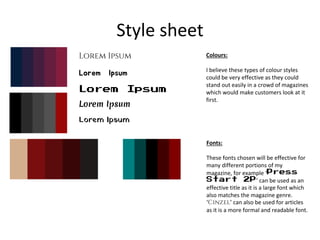
Style sheet
Lorem Ipsum
Lorem Ipsum
Lorem Ipsum
Lorem Ipsum
Lorem Ipsum
Colours:
I believe these types of colour styles
could be very effective as they could
stand out easily in a crowd of magazines
which would make customers look at it
first.
Fonts:
These fonts chosen will be effective for
many different portions of my
magazine, for example ‘Press
Start 2P’ can be used as an
effective title as it is a large font which
also matches the magazine genre.
‘Cinzel’ can also be used for articles
as it is a more formal and readable font.
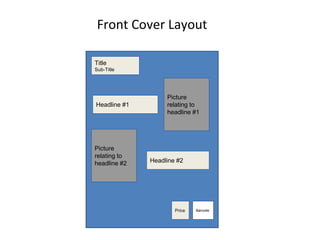
Front Cover Layout
Title
Sub-Title
Headline #1
Headline #2
Barcode
Picture
relating to
headline #2
Picture
relating to
headline #1
Price
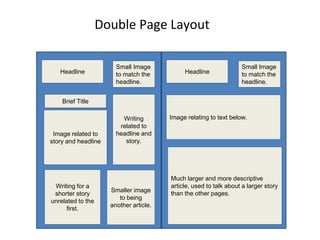
Double Page Layout
Headline Headline
Image related to
story and headline
Brief Title
Writing
related to
headline and
story.
Smaller image
to being
another article.
Writing for a
shorter story
unrelated to the
first.
Small Image
to match the
headline.
Small Image
to match the
headline.
Image relating to text below.
Much larger and more descriptive
article, used to talk about a larger story
than the other pages.
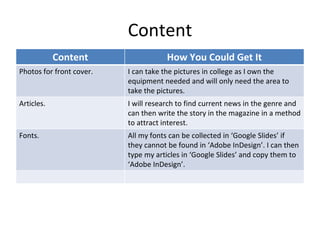
Content
Content How You Could Get It
Photos for front cover. I can take the pictures in college as I own the
equipment needed and will only need the area to
take the pictures.
Articles. I will research to find current news in the genre and
can then write the story in the magazine in a method
to attract interest.
Fonts. All my fonts can be collected in ‘Google Slides’ if
they cannot be found in ‘Adobe InDesign’. I can then
type my articles in ‘Google Slides’ and copy them to
‘Adobe InDesign’.
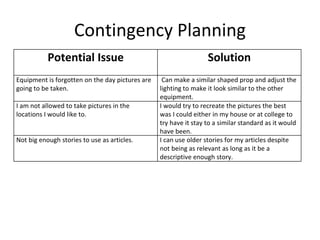
Contingency Planning
Potential Issue Solution
Equipment is forgotten on the day pictures are
going to be taken.
Can make a similar shaped prop and adjust the
lighting to make it look similar to the other
equipment.
I am not allowed to take pictures in the
locations I would like to.
I would try to recreate the pictures the best
was I could either in my house or at college to
try have it stay to a similar standard as it would
have been.
Not big enough stories to use as articles. I can use older stories for my articles despite
not being as relevant as long as it be a
descriptive enough story.
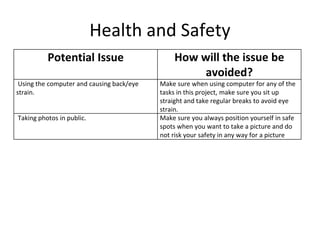
Health and Safety
Potential Issue How will the issue be
avoided?
Using the computer and causing back/eye
strain.
Make sure when using computer for any of the
tasks in this project, make sure you sit up
straight and take regular breaks to avoid eye
strain.
Taking photos in public. Make sure you always position yourself in safe
spots when you want to take a picture and do
not risk your safety in any way for a picture

5. pre production(1)

  • 1.
  • 2.
    Style sheet Lorem Ipsum LoremIpsum Lorem Ipsum Lorem Ipsum Lorem Ipsum Colours: I believe these types of colour styles could be very effective as they could stand out easily in a crowd of magazines which would make customers look at it first. Fonts: These fonts chosen will be effective for many different portions of my magazine, for example ‘Press Start 2P’ can be used as an effective title as it is a large font which also matches the magazine genre. ‘Cinzel’ can also be used for articles as it is a more formal and readable font.
  • 3.
    Front Cover Layout Title Sub-Title Headline#1 Headline #2 Barcode Picture relating to headline #2 Picture relating to headline #1 Price
  • 4.
    Double Page Layout HeadlineHeadline Image related to story and headline Brief Title Writing related to headline and story. Smaller image to being another article. Writing for a shorter story unrelated to the first. Small Image to match the headline. Small Image to match the headline. Image relating to text below. Much larger and more descriptive article, used to talk about a larger story than the other pages.
  • 5.
    Content Content How YouCould Get It Photos for front cover. I can take the pictures in college as I own the equipment needed and will only need the area to take the pictures. Articles. I will research to find current news in the genre and can then write the story in the magazine in a method to attract interest. Fonts. All my fonts can be collected in ‘Google Slides’ if they cannot be found in ‘Adobe InDesign’. I can then type my articles in ‘Google Slides’ and copy them to ‘Adobe InDesign’.
  • 6.
    Contingency Planning Potential IssueSolution Equipment is forgotten on the day pictures are going to be taken. Can make a similar shaped prop and adjust the lighting to make it look similar to the other equipment. I am not allowed to take pictures in the locations I would like to. I would try to recreate the pictures the best was I could either in my house or at college to try have it stay to a similar standard as it would have been. Not big enough stories to use as articles. I can use older stories for my articles despite not being as relevant as long as it be a descriptive enough story.
  • 7.
    Health and Safety PotentialIssue How will the issue be avoided? Using the computer and causing back/eye strain. Make sure when using computer for any of the tasks in this project, make sure you sit up straight and take regular breaks to avoid eye strain. Taking photos in public. Make sure you always position yourself in safe spots when you want to take a picture and do not risk your safety in any way for a picture