


AJAX Data Transfer
Client-Server Apps - The Easy Way
Agenda
JSON

Modify DOM by Server Data

Web Sockets
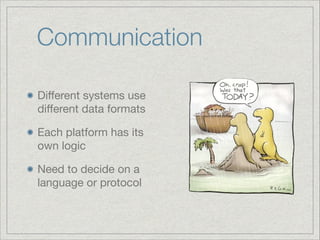
Communication
Different systems use
different data formats

Each platform has its
own logic

Need to decide on a
language or protocol
Requirements

What do we need from
such a protocol ?
Requirements
Wide server support

Wide client support

Easy to debug

Pass firewalls
Meet JSON
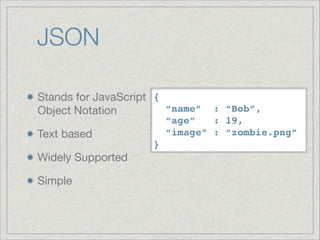
JSON
Stands for JavaScript {!
“name”
Object Notation

Text based

Widely Supported

Simple

: “Bob”,!
“age”
: 19,!
“image” : “zombie.png”


}
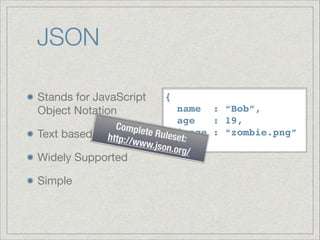
JSON
Stands for JavaScript
Object Notation

Text based


name : “Bob”,!
age
: 19,!
Comple
te Rule image : “zombie.png”

set:
http://w
ww.jso}
n.org/

Widely Supported

Simple

{!
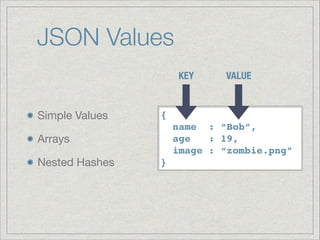
JSON Values
KEY

Simple Values


{!
name : “Bob”,!
age
: 19,!
image : “zombie.png”


Arrays

Nested Hashes

VALUE

}
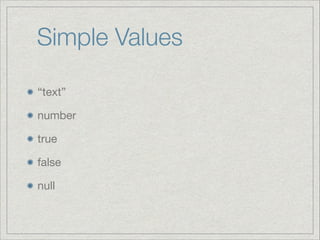
Simple Values
“text”

number

true

false

null
Arrays
A list of comma separated values enclosed in
brackets

[1, 2, 3]

[“a”, “b”, “c”]

[1, 2, [“a”, “b”], “hello”, true]
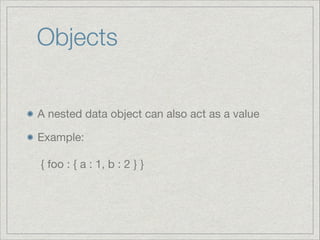
Objects
A nested data object can also act as a value

Example:


{ foo : { a : 1, b : 2 } }
JSON - Getting Better
No need to write JSON by hand

Here’s a partial list of languages which produce
JSON objects for you:

ASP, ActionScript, BlitzMax, C, C++, C#, Clojure,
ColdFusion, Delphi, Eiffel, Erlang, Go, Haskell,
Java, JavaScript, Lasso, Lisp, LotusScript, Lua,
Objective C, Objective CAML, Perl, PHP, Python,
Qt, Ruby, Tcl, Visual Basic, And More...
JSON Alternatives

XML

Dedicated Format
Using JSON
JSON Use Case
Flights To Paris

Client
Results

Server
App

{ Flights: [
{ departure: “02:00”, price: 600 },
{ departure: “06:00”, price: 800 },
{ departure: “00:00”, price: 999 }
]}

Server

DB
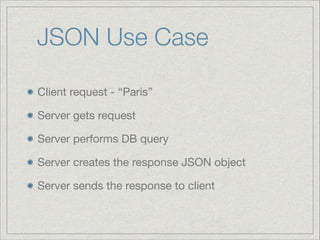
JSON Use Case
Client request - “Paris”

Server gets request

Server performs DB query

Server creates the response JSON object

Server sends the response to client
Demo: Time Server

Server returning time of day using Ruby & Sinatra

App which shows the data
jQuery Functions
$.get - sends a get request to the server. 

Takes a url, optional data, success handler and
data type.

$.post - sends a post request to the server. 

Takes a url, optional data, success handler and
data type.
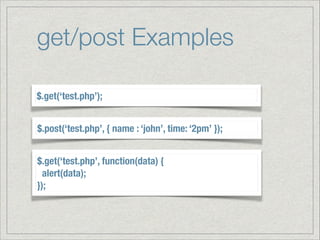
get/post Examples
$.get(‘test.php’);
$.post(‘test.php’, { name : ‘john’, time: ‘2pm’ });
$.get(‘test.php’, function(data) {
alert(data);

});
$.ajax
Gain full control over the request

Can handle errors

get/post are actually just shortcuts for this one

Takes url and settings object
$.ajax Settings
error: error handler callback

success: success handler callback

context: the ‘this’ pointer of callbacks

data: data object to send

url: the url to use

Full docs: http://api.jquery.com/jQuery.ajax/
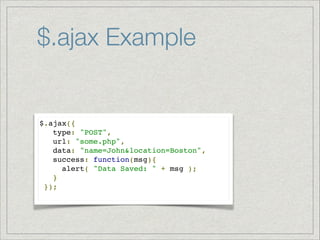
$.ajax Example

$.ajax({!
   type: "POST",!
   url: "some.php",!
   data: "name=John&location=Boston",!
   success: function(msg){!
     alert( "Data Saved: " + msg );!
   }!
 });!
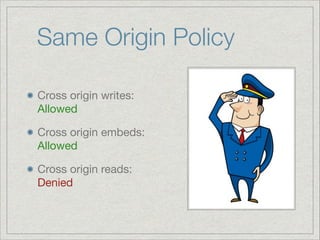
Same Origin Policy
Cross origin writes:
Allowed

Cross origin embeds: 

Allowed

Cross origin reads:

Denied
But I Want To
Implement an API
Use JSONP

Use CORS
JSONP Explained
Use cross origin embeds:


<script src="http://www.myapi.com/places"></script>


Script returns function, not data:


callback(['home', 'work', 'mobile']);
What’s wrong with
JSONP ?
Need to specify a callback as global function

Need to add <script> tag dynamically

Can’t post
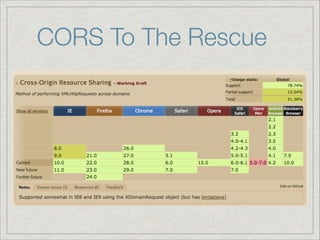
CORS To The Rescue
CORS Goal

Differentiate good cross origin request from a
malicious one
CORS How

I come from www.friend.com
Please send me /contacts/all.json
CORS How
Browser sends Origin: request header

Server checks Origin to check it’s allowed

Server sends Access-Control-Allow-Origin
to let browser know the request was OK
CORS Keep In Mind
Be sure to verify Origin on the server

ASP.NET Howto:


http://www.asp.net/web-api/overview/security/
enabling-cross-origin-requests-in-web-api
Q&A
Practice
Use your favorite Server Side Technology

Implement a mobile wall:

App displays a long list of sentences (the wall)

Each user can add a sentence to the wall

Everyone shares the same wall
Handlebar
Mustache
JS Templating lib that rocks
Concepts
Create parts of the DOM dynamically by using
JavaScript, based on data that is stored as JS
objects

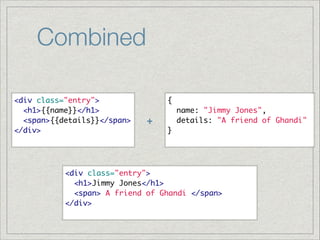
Template + Data = HTML
Use Cases
Data is collected from
the server

Data is retrieved form
local storage

Data is aggregated
from multiple sources

Translations
http://loveandasandwich.deviantart.com/art/MustacheMonsterssss-201209873
Selected Libraries
mustache.js

handlebars

ejs

pure.js

underscore.js

And many more...
The How
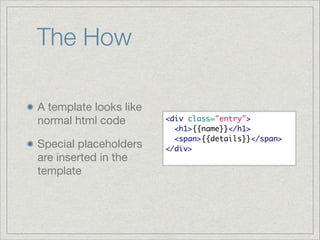
A template looks like
normal html code

Special placeholders
are inserted in the
template

<div class="entry">	
  <h1>{{name}}</h1>	
  <span>{{details}}</span>	
</div>
The How
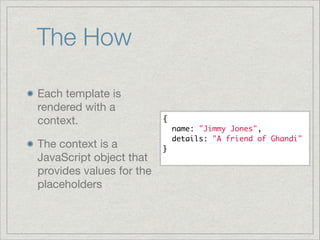
Each template is
rendered with a
context.

The context is a
JavaScript object that
provides values for the
placeholders

{	
  name: "Jimmy Jones",	
  details: "A friend of Ghandi"	
}
Combined
<div class="entry">	
  <h1>{{name}}</h1>	
  <span>{{details}}</span>	
</div>	

+

{	
  name: "Jimmy Jones",	
  details: "A friend of Ghandi"	
}	

<div class="entry">	
  <h1>Jimmy Jones</h1>	
  <span> A friend of Ghandi </span>	
</div>
Demo
Using a template
embedded inside the
html file as a script

Code: ajax/
Handlebars/Demo1/
Using Handlebars
Rendering Objects

Rendering Arrays

Conditional Rendering (if)

Helpers
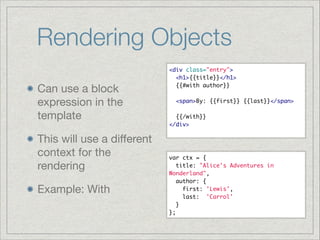
Rendering Objects
Can use a block
expression in the
template

This will use a different
context for the
rendering

Example: With

<div class="entry">	
  <h1>{{title}}</h1>	
  {{#with author}}	

!
  <span>By: {{first}} {{last}}</span>	

!
  {{/with}}	
</div>	

var ctx = {	
  title: "Alice's Adventures in
Wonderland",	
  author: {	
    first: 'Lewis',	
    last: 'Carrol'	
  }	
};
Rendering Arrays
The each block helper
renders each element
in an array in its own
entry

Inside the block, this
refers to the current
element

<ul class="people_list">	
  {{#each people}}	
!
  <li>{{this}}</li>	
!
  {{/each}}	
</ul>
{	
  people: [	
    "Yehuda Katz",	
    "Alan Johnson",	
    "Charles Jolley"	
  ]	
}
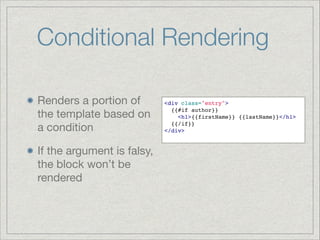
Conditional Rendering
Renders a portion of
the template based on
a condition

If the argument is falsy,
the block won’t be
rendered

<div class="entry">!
  {{#if author}}!
    <h1>{{firstName}} {{lastName}}</h1>!
  {{/if}}!
</div>!
Helpers
Run JS Code and put
its result inside the
mustache

The code is predefined
as a helper

Demo: ajax/
Handlebars/Demo2
Demo: Handlebars data
from server
Exercise
Write a simple todo manager using Handlebars

Use a form to add a todo item

Use localStorage to save all items

Use a handlebar template to create the todo list
from the local storage
Server To Client

HTTP is only one way client to server protocol

How can the server tell all clients that something
new has happened ?
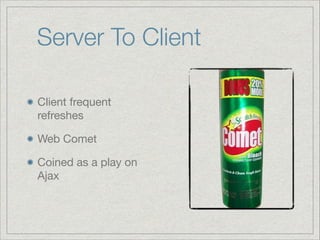
Server To Client
Client frequent
refreshes

Web Comet

Coined as a play on
Ajax
Web Sockets
Demo:
http://rumpetroll.com/
Web Sockets
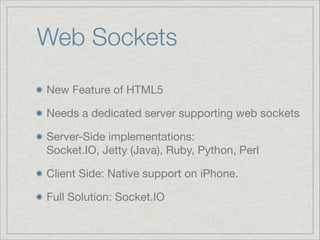
New Feature of HTML5

Needs a dedicated server supporting web sockets 

Server-Side implementations:

Socket.IO, Jetty (Java), Ruby, Python, Perl

Client Side: Native support on iPhone. 

Full Solution: Socket.IO
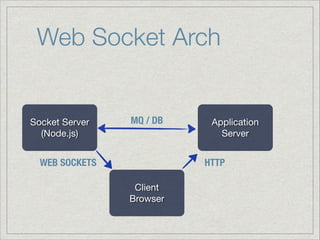
Web Socket Arch

Socket Server

(Node.js)

MQ / DB

WEB SOCKETS

Application
Server

HTTP
Client

Browser
Web Sockets Paradigm
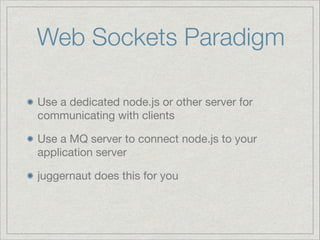
Use a dedicated node.js or other server for
communicating with clients

Use a MQ server to connect node.js to your
application server

juggernaut does this for you
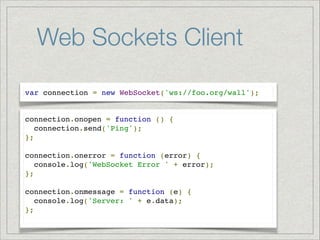
Web Sockets Client
var connection = new WebSocket('ws://foo.org/wall');

connection.onopen = function () {!
connection.send('Ping'); !
};!
!
connection.onerror = function (error) {!
console.log('WebSocket Error ' + error);!
};!
!
connection.onmessage = function (e) {!
console.log('Server: ' + e.data);!
};!
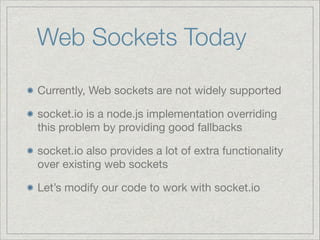
Web Sockets Today
Currently, Web sockets are not widely supported

socket.io is a node.js implementation overriding
this problem by providing good fallbacks

socket.io also provides a lot of extra functionality
over existing web sockets

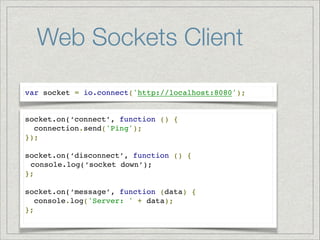
Let’s modify our code to work with socket.io
Web Sockets Client
var socket = io.connect('http://localhost:8080');

socket.on(‘connect’, function () {!
connection.send('Ping'); !
});!
!
socket.on(‘disconnect’, function () {!
console.log(‘socket down’);!
};!
!
socket.on(‘message’, function (data) {!
console.log('Server: ' + data);!
};!
Demo: Echo Socket
Q&A
Thank You

Ynon Perek

ynonperek@yahoo.com

ynonperek.com

08 ajax

  • 1.
  • 2.
    Agenda JSON Modify DOM byServer Data Web Sockets
  • 3.
    Communication Different systems use differentdata formats Each platform has its own logic Need to decide on a language or protocol
  • 4.
    Requirements What do weneed from such a protocol ?
  • 5.
    Requirements Wide server support Wideclient support Easy to debug Pass firewalls
  • 6.
  • 7.
    JSON Stands for JavaScript{! “name” Object Notation Text based Widely Supported Simple : “Bob”,! “age” : 19,! “image” : “zombie.png”
 }
  • 8.
    JSON Stands for JavaScript ObjectNotation Text based name : “Bob”,! age : 19,! Comple te Rule image : “zombie.png”
 set: http://w ww.jso} n.org/ Widely Supported Simple {!
  • 9.
    JSON Values KEY Simple Values {! name: “Bob”,! age : 19,! image : “zombie.png”
 Arrays Nested Hashes VALUE }
  • 10.
  • 11.
    Arrays A list ofcomma separated values enclosed in brackets [1, 2, 3] [“a”, “b”, “c”] [1, 2, [“a”, “b”], “hello”, true]
  • 12.
    Objects A nested dataobject can also act as a value Example:
 
 { foo : { a : 1, b : 2 } }
  • 13.
    JSON - GettingBetter No need to write JSON by hand Here’s a partial list of languages which produce JSON objects for you: ASP, ActionScript, BlitzMax, C, C++, C#, Clojure, ColdFusion, Delphi, Eiffel, Erlang, Go, Haskell, Java, JavaScript, Lasso, Lisp, LotusScript, Lua, Objective C, Objective CAML, Perl, PHP, Python, Qt, Ruby, Tcl, Visual Basic, And More...
  • 14.
  • 15.
  • 16.
    JSON Use Case FlightsTo Paris Client Results Server App { Flights: [ { departure: “02:00”, price: 600 }, { departure: “06:00”, price: 800 }, { departure: “00:00”, price: 999 } ]} Server DB
  • 17.
    JSON Use Case Clientrequest - “Paris” Server gets request Server performs DB query Server creates the response JSON object Server sends the response to client
  • 18.
    Demo: Time Server Serverreturning time of day using Ruby & Sinatra App which shows the data
  • 19.
    jQuery Functions $.get -sends a get request to the server. 
 Takes a url, optional data, success handler and data type. $.post - sends a post request to the server. 
 Takes a url, optional data, success handler and data type.
  • 20.
    get/post Examples $.get(‘test.php’); $.post(‘test.php’, {name : ‘john’, time: ‘2pm’ }); $.get(‘test.php’, function(data) { alert(data);
 });
  • 21.
    $.ajax Gain full controlover the request Can handle errors get/post are actually just shortcuts for this one Takes url and settings object
  • 22.
    $.ajax Settings error: errorhandler callback success: success handler callback context: the ‘this’ pointer of callbacks data: data object to send url: the url to use Full docs: http://api.jquery.com/jQuery.ajax/
  • 23.
    $.ajax Example $.ajax({!    type:"POST",!    url: "some.php",!    data: "name=John&location=Boston",!    success: function(msg){!      alert( "Data Saved: " + msg );!    }!  });!
  • 24.
    Same Origin Policy Crossorigin writes: Allowed Cross origin embeds: 
 Allowed Cross origin reads:
 Denied
  • 25.
    But I WantTo Implement an API Use JSONP Use CORS
  • 26.
    JSONP Explained Use crossorigin embeds:
 
 <script src="http://www.myapi.com/places"></script> Script returns function, not data:
 
 callback(['home', 'work', 'mobile']);
  • 27.
    What’s wrong with JSONP? Need to specify a callback as global function Need to add <script> tag dynamically Can’t post
  • 28.
  • 29.
    CORS Goal Differentiate goodcross origin request from a malicious one
  • 30.
    CORS How I comefrom www.friend.com Please send me /contacts/all.json
  • 31.
    CORS How Browser sendsOrigin: request header Server checks Origin to check it’s allowed Server sends Access-Control-Allow-Origin to let browser know the request was OK
  • 32.
    CORS Keep InMind Be sure to verify Origin on the server ASP.NET Howto:
 
 http://www.asp.net/web-api/overview/security/ enabling-cross-origin-requests-in-web-api
  • 33.
  • 34.
    Practice Use your favoriteServer Side Technology Implement a mobile wall: App displays a long list of sentences (the wall) Each user can add a sentence to the wall Everyone shares the same wall
  • 35.
  • 36.
    Concepts Create parts ofthe DOM dynamically by using JavaScript, based on data that is stored as JS objects Template + Data = HTML
  • 37.
    Use Cases Data iscollected from the server Data is retrieved form local storage Data is aggregated from multiple sources Translations http://loveandasandwich.deviantart.com/art/MustacheMonsterssss-201209873
  • 38.
  • 39.
    The How A templatelooks like normal html code Special placeholders are inserted in the template <div class="entry">   <h1>{{name}}</h1>   <span>{{details}}</span> </div>
  • 40.
    The How Each templateis rendered with a context. The context is a JavaScript object that provides values for the placeholders {   name: "Jimmy Jones",   details: "A friend of Ghandi" }
  • 41.
    Combined <div class="entry">   <h1>{{name}}</h1>   <span>{{details}}</span> </div> + {   name: "JimmyJones",   details: "A friend of Ghandi" } <div class="entry">   <h1>Jimmy Jones</h1>   <span> A friend of Ghandi </span> </div>
  • 42.
    Demo Using a template embeddedinside the html file as a script Code: ajax/ Handlebars/Demo1/
  • 43.
    Using Handlebars Rendering Objects RenderingArrays Conditional Rendering (if) Helpers
  • 44.
    Rendering Objects Can usea block expression in the template This will use a different context for the rendering Example: With <div class="entry">   <h1>{{title}}</h1>   {{#with author}} !   <span>By: {{first}} {{last}}</span> !   {{/with}} </div> var ctx = {   title: "Alice's Adventures in Wonderland",   author: {     first: 'Lewis',     last: 'Carrol'   } };
  • 45.
    Rendering Arrays The eachblock helper renders each element in an array in its own entry Inside the block, this refers to the current element <ul class="people_list">   {{#each people}} !   <li>{{this}}</li> !   {{/each}} </ul> {   people: [     "Yehuda Katz",     "Alan Johnson",     "Charles Jolley"   ] }
  • 46.
    Conditional Rendering Renders aportion of the template based on a condition If the argument is falsy, the block won’t be rendered <div class="entry">!   {{#if author}}!     <h1>{{firstName}} {{lastName}}</h1>!   {{/if}}! </div>!
  • 47.
    Helpers Run JS Codeand put its result inside the mustache The code is predefined as a helper Demo: ajax/ Handlebars/Demo2
  • 48.
  • 49.
    Exercise Write a simpletodo manager using Handlebars Use a form to add a todo item Use localStorage to save all items Use a handlebar template to create the todo list from the local storage
  • 50.
    Server To Client HTTPis only one way client to server protocol How can the server tell all clients that something new has happened ?
  • 51.
    Server To Client Clientfrequent refreshes Web Comet Coined as a play on Ajax
  • 52.
  • 53.
    Web Sockets New Featureof HTML5 Needs a dedicated server supporting web sockets Server-Side implementations:
 Socket.IO, Jetty (Java), Ruby, Python, Perl Client Side: Native support on iPhone. Full Solution: Socket.IO
  • 54.
    Web Socket Arch SocketServer (Node.js) MQ / DB WEB SOCKETS Application Server HTTP Client Browser
  • 55.
    Web Sockets Paradigm Usea dedicated node.js or other server for communicating with clients Use a MQ server to connect node.js to your application server juggernaut does this for you
  • 56.
    Web Sockets Client varconnection = new WebSocket('ws://foo.org/wall'); connection.onopen = function () {! connection.send('Ping'); ! };! ! connection.onerror = function (error) {! console.log('WebSocket Error ' + error);! };! ! connection.onmessage = function (e) {! console.log('Server: ' + e.data);! };!
  • 57.
    Web Sockets Today Currently,Web sockets are not widely supported socket.io is a node.js implementation overriding this problem by providing good fallbacks socket.io also provides a lot of extra functionality over existing web sockets Let’s modify our code to work with socket.io
  • 58.
    Web Sockets Client varsocket = io.connect('http://localhost:8080'); socket.on(‘connect’, function () {! connection.send('Ping'); ! });! ! socket.on(‘disconnect’, function () {! console.log(‘socket down’);! };! ! socket.on(‘message’, function (data) {! console.log('Server: ' + data);! };!
  • 59.
  • 60.
  • 61.