
Mocha First Steps
Installing and running tests
Agenda
• JS Unit Testing	

• A first Mocha test	

• Running tests with Karma	

• IDE integration
Getting Ready To Test
• JS Unit tests (try) make sure our JS code
works well
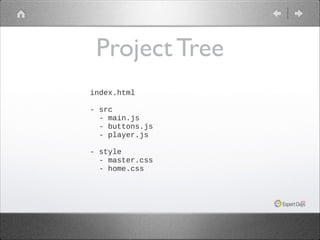
Project Tree
index.html
 
- src
  - main.js
  - buttons.js
  - player.js
 
- style
  - master.css
  - home.css
 
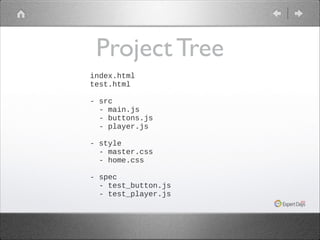
Project Tree
index.html
test.html
 
- src
  - main.js
  - buttons.js
  - player.js
 
- style
  - master.css
  - home.css
 
- spec
  - test_button.js
  - test_player.js
What Mocha Isn’t
• No UI / CSS testing 	

• No server testing
Testing How
Testing Libraries
• Let’s try to write test program for Array	

• Verify indexOf(...) actually works
Array#indexof
var arr1 = [10, 20, 30, 40];
 
if ( arr1.indexOf(20) === 1 ) {
  console.log('success!');
} else {
  console.log('error');
}
What Went Wrong
• Hard to debug	

• Hard to run automatically
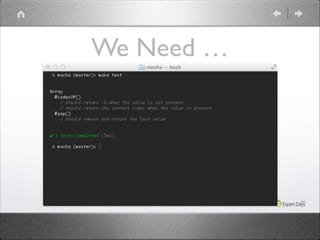
We Need …
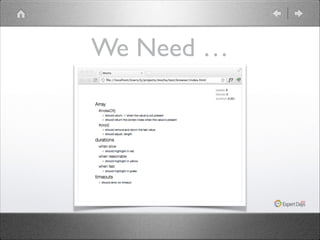
We Need …
Testing Libraries
• A testing library tells you how to structure
your testing code	


• We’ll use mocha


http://visionmedia.github.io/mocha/
Hello Mocha
var assert = chai.assert;
var array = [10,20,30,40];
 
describe('Array', function() {
!
  describe('#indexOf()', function() {
!
    it('should return -1 when the value is not present',
function() {      
     
assert.equal(array.indexOf(7), -1);
   
}
);
  });
});
Hello Mocha
• describe() defines a block	

• it() defines functionality
Assertions

•

Uses a separate assertions
library	


•
•

I went with Chai	

http://chaijs.com/
Running Our Test:
Karma
Meet Karma
• A test runner for JS	

• Integrates with many IDEs	

• Integrates with CI servers	

• http://karma-runner.github.io/0.10/
index.html
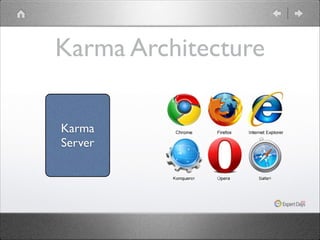
Karma Architecture
Karma
Server
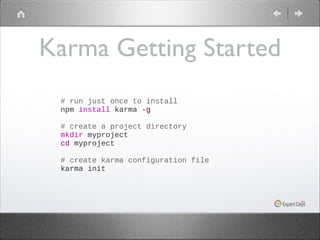
Karma Getting Started
# run just once to install
npm install karma -g
 
# create a project directory
mkdir myproject
cd myproject
 
# create karma configuration file
karma init
Karma Config
• Just a JavaScript file	

• keys determine how test should run
Karma Config
• files is a list of JS files to include in the test	

• Can use wildcards
Karma Config
• browsers is a list of supported browsers
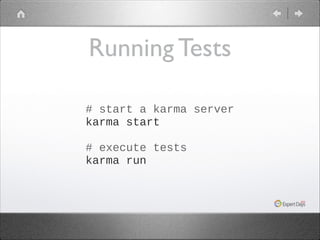
Running Tests
# start a karma server
karma start
 
# execute tests
karma run
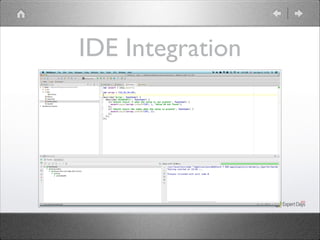
IDE Integration
What We Learned
• Mocha is a JS library that helps us write
unit tests	


• Karma is a JS library that helps us run them
Q &A
Advanced Mocha
How to write awesome tests
Agenda
• Flow control: before, after, beforeEach,
afterEach	


• Writing async tests	

• Fixtures and DOM testing
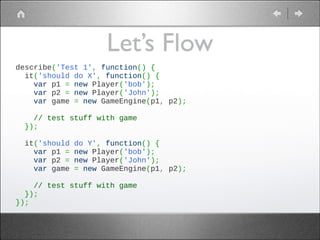
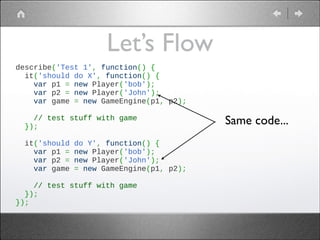
Let’s Flow
describe('Test 1', function() {
  it('should do X', function() {
    var p1 = new Player('bob');
    var p2 = new Player('John');
    var game = new GameEngine(p1, p2);
 
    // test stuff with game
  });
 
  it('should do Y', function() {
    var p1 = new Player('bob');
    var p2 = new Player('John');
    var game = new GameEngine(p1, p2);
 
    // test stuff with game
  });
});
Let’s Flow
describe('Test 1', function() {
  it('should do X', function() {
    var p1 = new Player('bob');
    var p2 = new Player('John');
    var game = new GameEngine(p1, p2);
 
    // test stuff with game
  });
 
  it('should do Y', function() {
    var p1 = new Player('bob');
    var p2 = new Player('John');
    var game = new GameEngine(p1, p2);
 
    // test stuff with game
  });
});

Same code...
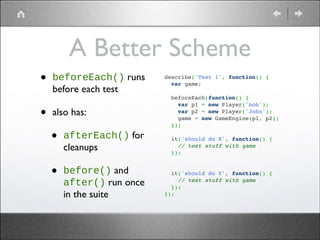
A Better Scheme
•

beforeEach() runs
before each test	


•

also has:	


•
•

afterEach() for
cleanups	


describe('Test 1', function() {!
  var game;!
 !
  beforeEach(function() {!
    var p1 = new Player('bob');!
    var p2 = new Player('John');!
    game = new GameEngine(p1, p2);!
  });!
 !
  it('should do X', function() {!
    // test stuff with game!
  });!

!

before() and
after() run once
in the suite

 !
  it('should do Y', function() {!
    // test stuff with game!
  });!
});
Async Testing
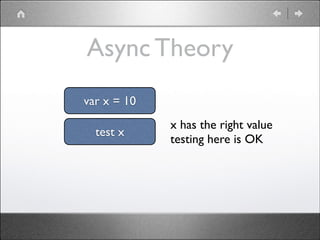
Async Theory
var x = 10
test x

x has the right value	

testing here is OK
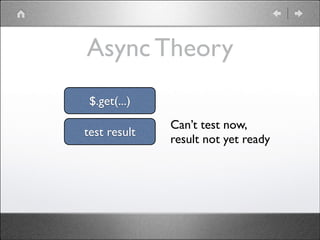
Async Theory
$.get(...)
test result

Can’t test now, 	

result not yet ready
Async Theory
• Async calls take callbacks	

• We should tell mocha to wait
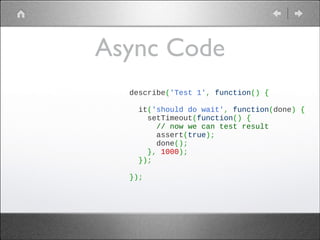
Async Code
describe('Test 1', function() {
 
  it('should do wait', function(done) {
    setTimeout(function() {
      // now we can test result
      assert(true);
      done();
    }, 1000);
  });
 
});
Async Code
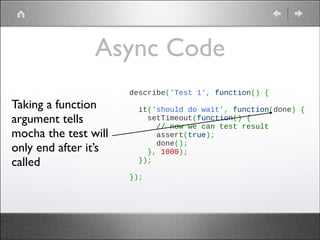
Taking a function
argument tells
mocha the test will
only end after it’s
called

describe('Test 1', function() {
 
  it('should do wait', function(done) {
    setTimeout(function() {
      // now we can test result
      assert(true);
      done();
    }, 1000);
  });
 
});
Async Code
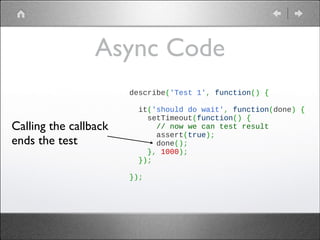
Calling the callback
ends the test

describe('Test 1', function() {
 
  it('should do wait', function(done) {
    setTimeout(function() {
      // now we can test result
      assert(true);
      done();
    }, 1000);
  });
 
});
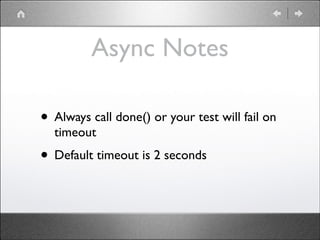
Async Notes
• Always call done() or your test will fail on
timeout	


• Default timeout is 2 seconds
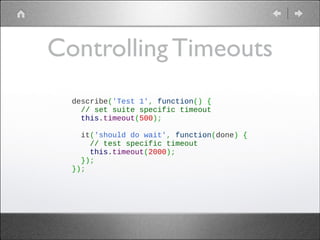
Controlling Timeouts
describe('Test 1', function() {
  // set suite specific timeout
  this.timeout(500);
 
  it('should do wait', function(done) {
    // test specific timeout
    this.timeout(2000);    
  });
});
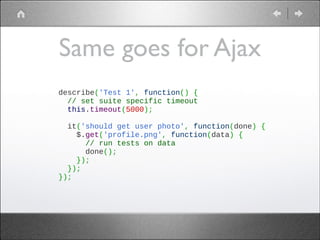
Same goes for Ajax
describe('Test 1', function() {
  // set suite specific timeout
  this.timeout(5000);
 
  it('should get user photo', function(done) {
    $.get('profile.png', function(data) {
      // run tests on data
      done();
    });
  });
});
DOM Testing
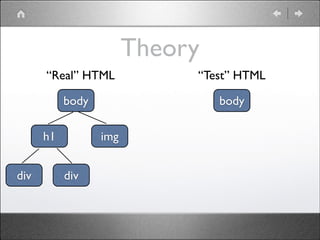
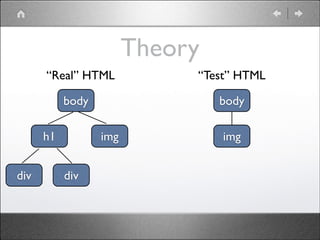
Theory
“Real” HTML
body
h1
div

body
img

div

“Test” HTML
Theory
“Real” HTML
body
h1
div

body
img

div

“Test” HTML

img
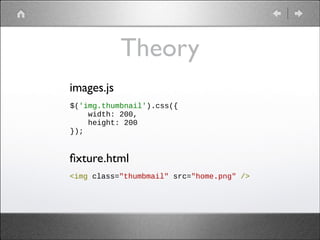
Theory
images.js
$('img.thumbnail').css({
width: 200,
height: 200
});

fixture.html
<img class="thumbmail" src="home.png" />
Using Fixtures
before(function() {
fixture_el = document.createElement('div');
fixture_el.id = "fixture";
!
document.body.appendChild(fixture_el);
});
!
beforeEach(function() {
fixture_el.innerHTML = window.__html__["fixture.html"];
});
!
Almost Ready
• HTML files are not served by default	

• We need to tell karma to serve it
Serving HTMLs
• Modify files section to include the last
(HTML) pattern

// list of files / patterns to load in the browser
files: [
'lib/**/*.js',
'plugins/**/*.js',
'test/fixtures/*.html',
'spec/*.js'
],
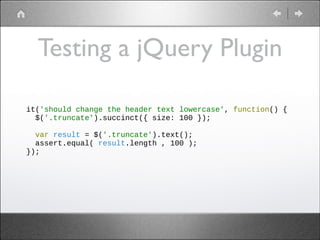
Testing a jQuery Plugin
it('should change the header text lowercase', function() {
$('.truncate').succinct({ size: 100 });
!
var result = $('.truncate').text();
assert.equal( result.length , 100 );
});
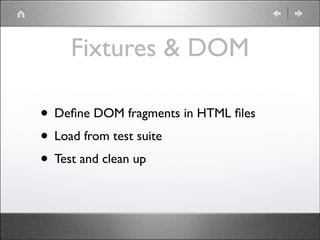
Fixtures & DOM
• Define DOM fragments in HTML files	

• Load from test suite	

• Test and clean up
Spying With Sinon
Stubs, Spies and Mock Objects explained
Agenda
• Reasons to mock	

• Vanilla mocking	

• How sinon can help	

• Stubs and Spies	

• Faking timers	

• Faking the server
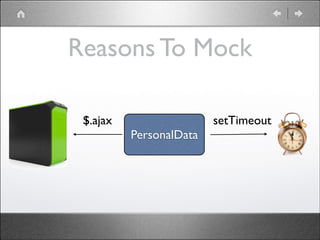
Reasons To Mock
Reasons To Mock
$.ajax

setTimeout
PersonalData
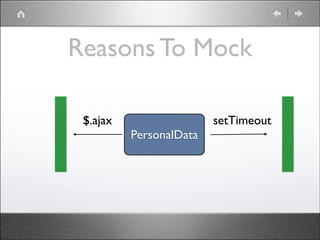
Reasons To Mock
$.ajax

setTimeout
PersonalData
Reasons To Mock
• PersonalData object can save data to
server	


• If saving failed, it retries 3 times
Reasons To Mock
• Both server and clock are external	

• We prefer to test in isolation
What We Can Do
• Provide our own $.ajax, that won’t go to
the server	


• Provide our own setTimeout that won’t
wait for the time to pass
What We Can Do
• Lab: Given the class here


https://gist.github.com/ynonp/6667146	


• Write a test case to verify sendData
actually retried 3 times
What We Can Do
• Solution:


https://gist.github.com/ynonp/6667284
Mocking Notes
• Solution is far from perfect. 	

• After the test our “fake” methods remain	

• Writing “fake” methods was not trivial
This Calls for Sinon
About Sinon
• A JS mocking library	

• Helps create fake objects	

• Helps tracking them
About Sinon
• Homepage:


http://sinonjs.org/	


• Google Group:


http://groups.google.com/group/sinonjs	


• IRC Channel:


#sinon.js on freenode
Solving with Sinon
• Here’s how sinon might help us with the
previous task	


• Code:


https://gist.github.com/ynonp/6667378
Solution Notes
• Sinon’s fake timer was easier to use than
writing our own	


• Now we have a synchronous test (instead
of async)
Let’s Talk About Sinon
Spies
• A spy is a function that provides the test
code with info about how it was used
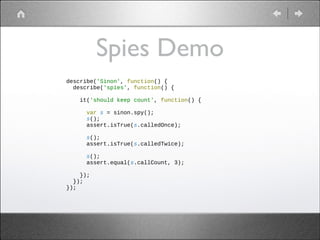
Spies Demo
describe('Sinon', function() {
describe('spies', function() {

!
!
!
!
!

it('should keep count', function() {
var s = sinon.spy();
s();
assert.isTrue(s.calledOnce);
s();
assert.isTrue(s.calledTwice);
s();
assert.equal(s.callCount, 3);

});
});
});
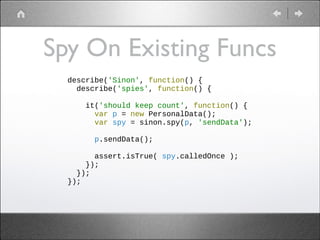
Spy On Existing Funcs
describe('Sinon', function() {
describe('spies', function() {
!
it('should keep count', function() {
var p = new PersonalData();
var spy = sinon.spy(p, 'sendData');
!
p.sendData();
!
assert.isTrue( spy.calledOnce );
});
});
});
Spies Notes
• Full API:


http://sinonjs.org/docs/#spies	


• Tip: Use as callbacks
Spy + Action = Stub
Stub Demo
• Let’s fix our starting example	

• We’ll replace $.ajax with a stub	

• That stub always fails
Stub Demo
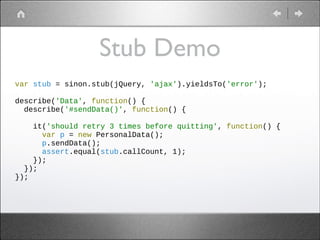
var stub = sinon.stub(jQuery, 'ajax').yieldsTo('error');
!
describe('Data', function() {
describe('#sendData()', function() {
!
it('should retry 3 times before quitting', function() {
var p = new PersonalData();
p.sendData();
assert.equal(stub.callCount, 1);
});
});
});
What Can Stubs Do
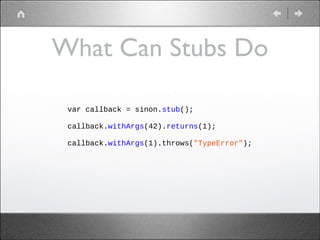
var callback = sinon.stub();
!
callback.withArgs(42).returns(1);
!
callback.withArgs(1).throws("TypeError");
!
Stubs API
• Full Stubs API docs:


http://sinonjs.org/docs/#stubs	


• Main actions:	

• return stuff	

• throw stuff	

• call stuff
Spies Lab
• Given code here:


https://gist.github.com/ynonp/7101081	


• Fill in the blanks to make the tests pass
Fake Timers
• Use sinon.useFakeTimers() to create a
fake timer	


• Use clock.restore() to clear fake timers
Fake Timers
• Use tick(...) to advance	

• Affected methods:	

• setTimeout, setInterval, clearTimeout,
clearInterval	


• Date constructor
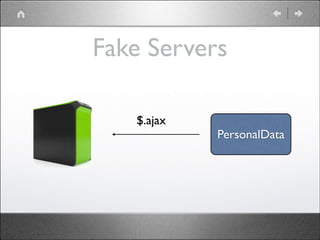
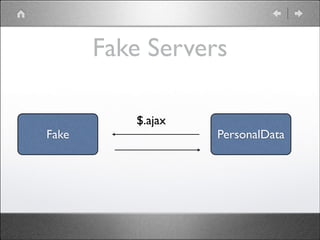
Fake Servers
• Testing client/server communication is hard	

• Use fake servers to simplify it
Fake Servers
$.ajax

PersonalData
Fake Servers
Fake

$.ajax

PersonalData
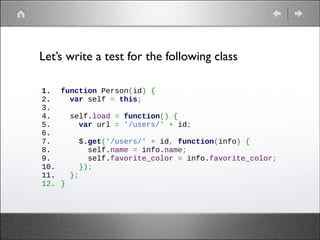
Let’s write a test for the following class
1.
2.
3.
4.
5.
6.
7.
8.
9.
10.
11.
12.

function Person(id) {
  var self = this;
 
  self.load = function() {
    var url = '/users/' + id;
 
    $.get('/users/' + id, function(info) {
      self.name = info.name;
      self.favorite_color = info.favorite_color;
    });
  };
}
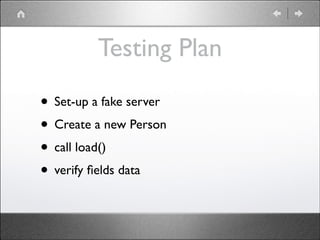
Testing Plan
• Set-up a fake server	

• Create a new Person	

• call load()	

• verify fields data
Setting Up The Server
1.
2.
3.
4.
5.
6.
7.
8.
9.

var server = sinon.fakeServer.create();
 
var headers  = {"Content-Type" : "application/json"};
var response = JSON.stringify(
                {"name" : "joe", "favorite_color": "blue" });
 
server.respondWith("GET", "/users/7",
                   [200, headers, response]);
// now requesting /user/info.php returns joe's info as a JSON
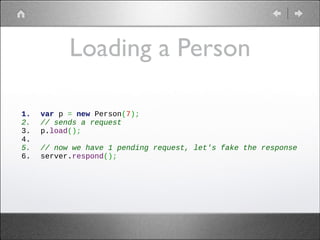
Loading a Person
1.
2.
3.
4.
5.
6.

var p = new Person(7);
// sends a request
p.load();
 
// now we have 1 pending request, let's fake the response
server.respond();
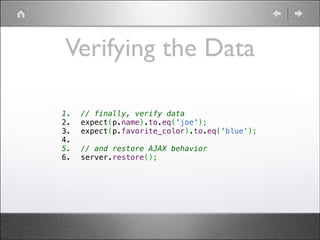
Verifying the Data
1.
2.
3.
4.
5.
6.

// finally, verify data
expect(p.name).to.eq('joe');
expect(p.favorite_color).to.eq('blue');
 
// and restore AJAX behavior
server.restore();
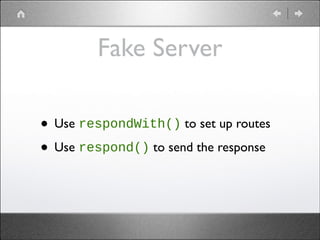
Fake Server
• Use respondWith() to set up routes	

• Use respond() to send the response
Fake Server
• Regexps are also supported, so this works:
1.
2.
3.
4.
5.
6.

server.respondWith(//todo-items/(d+)/, function (xhr, id) {
    xhr.respond(
      200,
      { "Content-Type": "application/json" },
      '[{ "id": ' + id + ' }]');
});
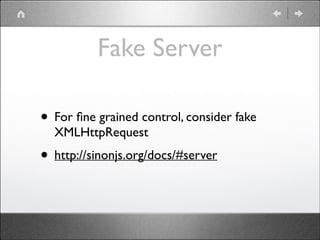
Fake Server
• For fine grained control, consider fake
XMLHttpRequest 	


• http://sinonjs.org/docs/#server
Wrapping Up
Wrapping Up
• Unit tests work best in isolation	

• Sinon will help you isolate units, by faking
their dependencies
Wrapping Up
• Write many tests	

• Each test verifies a small chunk of code	

• Don’t test everything
Online Resources

• Chai:


http://chaijs.com/	


• Mocha:


http://visionmedia.github.io/mocha/	


• Sinon:


http://sinonjs.org/	


• Karma (test runner):


http://karma-runner.github.io/0.10/index.html
Thanks For Listening
• Ynon Perek	

• http://ynonperek.com	

• ynon@ynonperek.com

Unit Testing JavaScript Applications

  • 1.
  • 2.
    Agenda • JS UnitTesting • A first Mocha test • Running tests with Karma • IDE integration
  • 3.
    Getting Ready ToTest • JS Unit tests (try) make sure our JS code works well
  • 4.
    Project Tree index.html   - src  - main.js   - buttons.js   - player.js   - style   - master.css   - home.css  
  • 5.
    Project Tree index.html test.html   - src  - main.js   - buttons.js   - player.js   - style   - master.css   - home.css   - spec   - test_button.js   - test_player.js
  • 6.
    What Mocha Isn’t •No UI / CSS testing • No server testing
  • 7.
  • 8.
    Testing Libraries • Let’stry to write test program for Array • Verify indexOf(...) actually works
  • 9.
    Array#indexof var arr1 =[10, 20, 30, 40];   if ( arr1.indexOf(20) === 1 ) {   console.log('success!'); } else {   console.log('error'); }
  • 10.
    What Went Wrong •Hard to debug • Hard to run automatically
  • 11.
  • 12.
  • 13.
    Testing Libraries • Atesting library tells you how to structure your testing code • We’ll use mocha
 http://visionmedia.github.io/mocha/
  • 14.
    Hello Mocha var assert= chai.assert; var array = [10,20,30,40];   describe('Array', function() { !   describe('#indexOf()', function() { !     it('should return -1 when the value is not present', function() {             assert.equal(array.indexOf(7), -1);     } );   }); });
  • 15.
    Hello Mocha • describe()defines a block • it() defines functionality
  • 16.
    Assertions • Uses a separateassertions library • • I went with Chai http://chaijs.com/
  • 17.
  • 18.
    Meet Karma • Atest runner for JS • Integrates with many IDEs • Integrates with CI servers • http://karma-runner.github.io/0.10/ index.html
  • 19.
  • 20.
    Karma Getting Started #run just once to install npm install karma -g   # create a project directory mkdir myproject cd myproject   # create karma configuration file karma init
  • 21.
    Karma Config • Justa JavaScript file • keys determine how test should run
  • 22.
    Karma Config • filesis a list of JS files to include in the test • Can use wildcards
  • 23.
    Karma Config • browsersis a list of supported browsers
  • 24.
    Running Tests # starta karma server karma start   # execute tests karma run
  • 25.
  • 26.
    What We Learned •Mocha is a JS library that helps us write unit tests • Karma is a JS library that helps us run them
  • 27.
  • 28.
    Advanced Mocha How towrite awesome tests
  • 29.
    Agenda • Flow control:before, after, beforeEach, afterEach • Writing async tests • Fixtures and DOM testing
  • 30.
    Let’s Flow describe('Test 1',function() {   it('should do X', function() {     var p1 = new Player('bob');     var p2 = new Player('John');     var game = new GameEngine(p1, p2);       // test stuff with game   });     it('should do Y', function() {     var p1 = new Player('bob');     var p2 = new Player('John');     var game = new GameEngine(p1, p2);       // test stuff with game   }); });
  • 31.
    Let’s Flow describe('Test 1',function() {   it('should do X', function() {     var p1 = new Player('bob');     var p2 = new Player('John');     var game = new GameEngine(p1, p2);       // test stuff with game   });     it('should do Y', function() {     var p1 = new Player('bob');     var p2 = new Player('John');     var game = new GameEngine(p1, p2);       // test stuff with game   }); }); Same code...
  • 32.
    A Better Scheme • beforeEach()runs before each test • also has: • • afterEach() for cleanups describe('Test 1', function() {!   var game;!  !   beforeEach(function() {!     var p1 = new Player('bob');!     var p2 = new Player('John');!     game = new GameEngine(p1, p2);!   });!  !   it('should do X', function() {!     // test stuff with game!   });! ! before() and after() run once in the suite  !   it('should do Y', function() {!     // test stuff with game!   });! });
  • 33.
  • 34.
    Async Theory var x= 10 test x x has the right value testing here is OK
  • 35.
    Async Theory $.get(...) test result Can’ttest now, result not yet ready
  • 36.
    Async Theory • Asynccalls take callbacks • We should tell mocha to wait
  • 37.
    Async Code describe('Test 1',function() {     it('should do wait', function(done) {     setTimeout(function() {       // now we can test result       assert(true);       done();     }, 1000);   });   });
  • 38.
    Async Code Taking afunction argument tells mocha the test will only end after it’s called describe('Test 1', function() {     it('should do wait', function(done) {     setTimeout(function() {       // now we can test result       assert(true);       done();     }, 1000);   });   });
  • 39.
    Async Code Calling thecallback ends the test describe('Test 1', function() {     it('should do wait', function(done) {     setTimeout(function() {       // now we can test result       assert(true);       done();     }, 1000);   });   });
  • 40.
    Async Notes • Alwayscall done() or your test will fail on timeout • Default timeout is 2 seconds
  • 41.
    Controlling Timeouts describe('Test 1',function() {   // set suite specific timeout   this.timeout(500);     it('should do wait', function(done) {     // test specific timeout     this.timeout(2000);       }); });
  • 42.
    Same goes forAjax describe('Test 1', function() {   // set suite specific timeout   this.timeout(5000);     it('should get user photo', function(done) {     $.get('profile.png', function(data) {       // run tests on data       done();     });   }); });
  • 43.
  • 44.
  • 45.
  • 46.
  • 47.
    Using Fixtures before(function() { fixture_el= document.createElement('div'); fixture_el.id = "fixture"; ! document.body.appendChild(fixture_el); }); ! beforeEach(function() { fixture_el.innerHTML = window.__html__["fixture.html"]; }); !
  • 48.
    Almost Ready • HTMLfiles are not served by default • We need to tell karma to serve it
  • 49.
    Serving HTMLs • Modifyfiles section to include the last (HTML) pattern // list of files / patterns to load in the browser files: [ 'lib/**/*.js', 'plugins/**/*.js', 'test/fixtures/*.html', 'spec/*.js' ],
  • 50.
    Testing a jQueryPlugin it('should change the header text lowercase', function() { $('.truncate').succinct({ size: 100 }); ! var result = $('.truncate').text(); assert.equal( result.length , 100 ); });
  • 51.
    Fixtures & DOM •Define DOM fragments in HTML files • Load from test suite • Test and clean up
  • 52.
    Spying With Sinon Stubs,Spies and Mock Objects explained
  • 53.
    Agenda • Reasons tomock • Vanilla mocking • How sinon can help • Stubs and Spies • Faking timers • Faking the server
  • 54.
  • 55.
  • 56.
  • 57.
    Reasons To Mock •PersonalData object can save data to server • If saving failed, it retries 3 times
  • 58.
    Reasons To Mock •Both server and clock are external • We prefer to test in isolation
  • 59.
    What We CanDo • Provide our own $.ajax, that won’t go to the server • Provide our own setTimeout that won’t wait for the time to pass
  • 60.
    What We CanDo • Lab: Given the class here
 https://gist.github.com/ynonp/6667146 • Write a test case to verify sendData actually retried 3 times
  • 61.
    What We CanDo • Solution:
 https://gist.github.com/ynonp/6667284
  • 62.
    Mocking Notes • Solutionis far from perfect. • After the test our “fake” methods remain • Writing “fake” methods was not trivial
  • 63.
  • 64.
    About Sinon • AJS mocking library • Helps create fake objects • Helps tracking them
  • 65.
    About Sinon • Homepage:
 http://sinonjs.org/ •Google Group:
 http://groups.google.com/group/sinonjs • IRC Channel:
 #sinon.js on freenode
  • 66.
    Solving with Sinon •Here’s how sinon might help us with the previous task • Code:
 https://gist.github.com/ynonp/6667378
  • 67.
    Solution Notes • Sinon’sfake timer was easier to use than writing our own • Now we have a synchronous test (instead of async)
  • 68.
  • 69.
    Spies • A spyis a function that provides the test code with info about how it was used
  • 70.
    Spies Demo describe('Sinon', function(){ describe('spies', function() { ! ! ! ! ! it('should keep count', function() { var s = sinon.spy(); s(); assert.isTrue(s.calledOnce); s(); assert.isTrue(s.calledTwice); s(); assert.equal(s.callCount, 3); }); }); });
  • 71.
    Spy On ExistingFuncs describe('Sinon', function() { describe('spies', function() { ! it('should keep count', function() { var p = new PersonalData(); var spy = sinon.spy(p, 'sendData'); ! p.sendData(); ! assert.isTrue( spy.calledOnce ); }); }); });
  • 72.
    Spies Notes • FullAPI:
 http://sinonjs.org/docs/#spies • Tip: Use as callbacks
  • 73.
  • 74.
    Stub Demo • Let’sfix our starting example • We’ll replace $.ajax with a stub • That stub always fails
  • 75.
    Stub Demo var stub= sinon.stub(jQuery, 'ajax').yieldsTo('error'); ! describe('Data', function() { describe('#sendData()', function() { ! it('should retry 3 times before quitting', function() { var p = new PersonalData(); p.sendData(); assert.equal(stub.callCount, 1); }); }); });
  • 76.
    What Can StubsDo var callback = sinon.stub(); ! callback.withArgs(42).returns(1); ! callback.withArgs(1).throws("TypeError"); !
  • 77.
    Stubs API • FullStubs API docs:
 http://sinonjs.org/docs/#stubs • Main actions: • return stuff • throw stuff • call stuff
  • 78.
    Spies Lab • Givencode here:
 https://gist.github.com/ynonp/7101081 • Fill in the blanks to make the tests pass
  • 79.
    Fake Timers • Usesinon.useFakeTimers() to create a fake timer • Use clock.restore() to clear fake timers
  • 80.
    Fake Timers • Usetick(...) to advance • Affected methods: • setTimeout, setInterval, clearTimeout, clearInterval • Date constructor
  • 81.
    Fake Servers • Testingclient/server communication is hard • Use fake servers to simplify it
  • 82.
  • 83.
  • 84.
    Let’s write atest for the following class 1. 2. 3. 4. 5. 6. 7. 8. 9. 10. 11. 12. function Person(id) {   var self = this;     self.load = function() {     var url = '/users/' + id;       $.get('/users/' + id, function(info) {       self.name = info.name;       self.favorite_color = info.favorite_color;     });   }; }
  • 85.
    Testing Plan • Set-upa fake server • Create a new Person • call load() • verify fields data
  • 86.
    Setting Up TheServer 1. 2. 3. 4. 5. 6. 7. 8. 9. var server = sinon.fakeServer.create();   var headers  = {"Content-Type" : "application/json"}; var response = JSON.stringify(                 {"name" : "joe", "favorite_color": "blue" });   server.respondWith("GET", "/users/7",                    [200, headers, response]); // now requesting /user/info.php returns joe's info as a JSON
  • 87.
    Loading a Person 1. 2. 3. 4. 5. 6. varp = new Person(7); // sends a request p.load();   // now we have 1 pending request, let's fake the response server.respond();
  • 88.
    Verifying the Data 1. 2. 3. 4. 5. 6. //finally, verify data expect(p.name).to.eq('joe'); expect(p.favorite_color).to.eq('blue');   // and restore AJAX behavior server.restore();
  • 89.
    Fake Server • UserespondWith() to set up routes • Use respond() to send the response
  • 90.
    Fake Server • Regexpsare also supported, so this works: 1. 2. 3. 4. 5. 6. server.respondWith(//todo-items/(d+)/, function (xhr, id) {     xhr.respond(       200,       { "Content-Type": "application/json" },       '[{ "id": ' + id + ' }]'); });
  • 91.
    Fake Server • Forfine grained control, consider fake XMLHttpRequest • http://sinonjs.org/docs/#server
  • 92.
  • 93.
    Wrapping Up • Unittests work best in isolation • Sinon will help you isolate units, by faking their dependencies
  • 94.
    Wrapping Up • Writemany tests • Each test verifies a small chunk of code • Don’t test everything
  • 95.
    Online Resources • Chai:
 http://chaijs.com/ •Mocha:
 http://visionmedia.github.io/mocha/ • Sinon:
 http://sinonjs.org/ • Karma (test runner):
 http://karma-runner.github.io/0.10/index.html
  • 96.
    Thanks For Listening •Ynon Perek • http://ynonperek.com • ynon@ynonperek.com