Making Django sites more
responsive with REST and
AngularJS
August 27th, 2014
Hi, I’m Hannes.
@hanneshapke

hanneshapke.github.io
A regular Django site
Github: https://github.com/hanneshapke/fruitloop_django
A Django site using REST and AngularJS
Github: https://github.com/hanneshapke/fruitloop_angular
Sync vs. Async
… is synchronous.
The Python heroes are 

working on a fix
PEP 3156
!
http://python-notes.curiousefficiency.org/en/latest/pep_ideas/async_programming.html
But what is the solution
in the mean time?
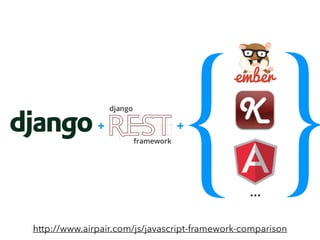
{ }+ +
…
http://www.airpair.com/js/javascript-framework-comparison
Don’t change your project …
• … because it is hip
• Creates new and larger code base, time consuming
• Requires a different eco system
• Do it if your Django site should become
responsive and more user-friendly
If you still think it’s a good
idea, here are the steps.
Step #1
Create an API endpoint
to your Django model
REST
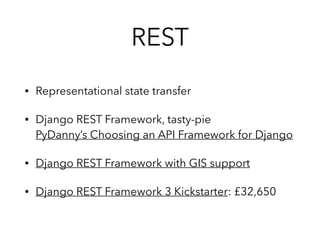
• Representational state transfer
• Django REST Framework, tasty-pie

PyDanny’s Choosing an API Framework for Django
• Django REST Framework with GIS support
• Django REST Framework 3 Kickstarter: £32,650
What to do?
• `pip install djangorestframework`
• Add to your settings.py
• Create a REST serializers for your models
• Create API views for your serializers
• Update your urls.py
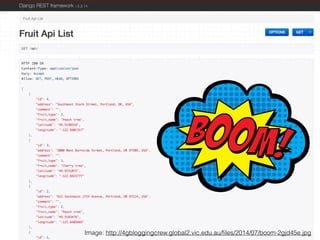
Image: http://4gbloggingcrew.global2.vic.edu.au/files/2014/07/boom-2gjd45e.jpg
That’s it with Django.
Hey Django,

meet AngularJS.
Step #2
Set up your js environment
and install AngularJS
What?
A new eco system!

Based on node.js?
Bower.io
• Package manager for front-end js
• Works like pip, but it’s pip, can be configured
• Install it with `npm install -g bower`
• Run `bower init`
• Install packages: 

`bower install [package] --save`
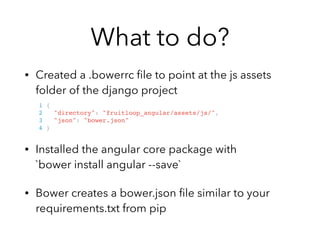
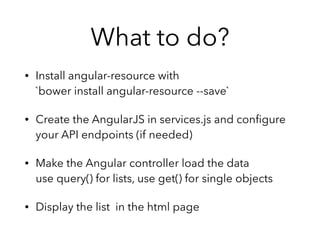
What to do?
• Created a .bowerrc file to point at the js assets
folder of the django project


• Installed the angular core package with 

`bower install angular --save`
• Bower creates a bower.json file similar to your
requirements.txt from pip
1 {!
2 "directory": "fruitloop_angular/assets/js/",!
3 "json": "bower.json"!
4 }!
Step #3
Create a 

static AngularJS site
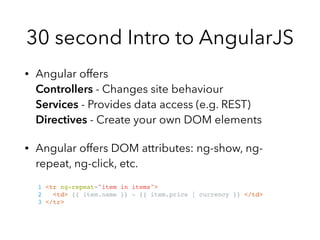
30 second Intro to AngularJS
• Angular offers

Controllers - Changes site behaviour

Services - Provides data access (e.g. REST)

Directives - Create your own DOM elements
• Angular offers DOM attributes: ng-show, ng-
repeat, ng-click, etc.
1 <tr ng-repeat="item in items">!
2 <td> {{ item.name }} - {{ item.price | currency }} </td>!
3 </tr>!
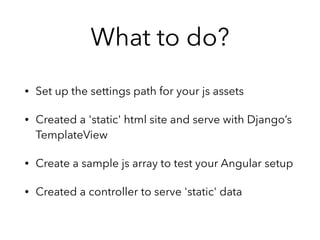
What to do?
• Set up the settings path for your js assets
• Created a 'static' html site and serve with Django’s

TemplateView
• Create a sample js array to test your Angular setup
• Created a controller to serve 'static' data
Arhhh, it does’t work!
Step #4
Use {% verbatim %}
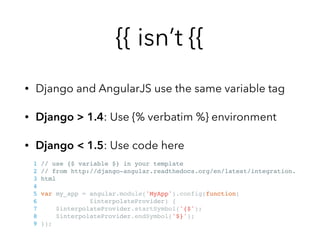
{{ isn’t {{
• Django and AngularJS use the same variable tag
• Django > 1.4: Use {% verbatim %} environment
• Django < 1.5: Use code here
1 // use {$ variable $} in your template!
2 // from http://django-angular.readthedocs.org/en/latest/integration.!
3 html!
4 !
5 var my_app = angular.module('MyApp').config(function(!
6 $interpolateProvider) {!
7 $interpolateProvider.startSymbol('{$');!
8 $interpolateProvider.endSymbol('$}');!
9 });!
Step #5
Make AngularJS talk 

to your API
What to do?
• Install angular-resource with 

`bower install angular-resource --save`
• Create the AngularJS in services.js and configure
your API endpoints (if needed)
• Make the Angular controller load the data

use query() for lists, use get() for single objects
• Display the list in the html page
Sample code
1 var fruitServices = angular.module('fruitServices', ['ngResource']);!
2 fruitServices.factory('FruitLocationService', ['$resource',!
3 function($resource){!
4 return $resource('api/', {}, {!
5 query: {method:'GET', params:{}, isArray: true}!
6 });!
7 }!
8 ]);!
• ngResource loaded, $resource becomes available
• Notice `$resource (‘api/’, {}, {…});`
• Configure more API methods here, e.g. PUT,
DELETE, etc., if needed
Step #6
Take full advantage of the
Django REST Framework
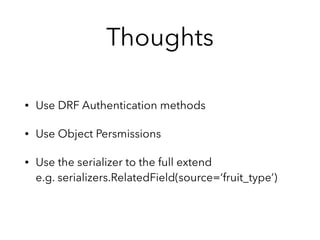
Thoughts
• Use DRF Authentication methods
• Use Object Persmissions
• Use the serializer to the full extend

e.g. serializers.RelatedField(source=‘fruit_type’)
Step #7
Use $promise,

but don’t promise too much
Example
Thoughts
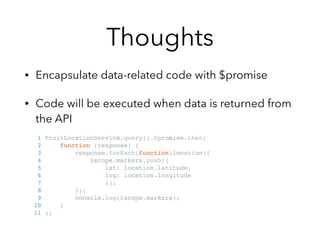
• Encapsulate data-related code with $promise
• Code will be executed when data is returned from
the API
1 FruitLocationService.query().$promise.then(!
2 function (response) {!
3 response.forEach(function(location){!
4 $scope.markers.push({!
5 lat: location.latitude,!
6 lng: location.longitude!
7 });!
8 });!
9 console.log($scope.markers);!
10 }!
11 );!
Step #8
Make your form 

talk to your API
What to do?
• Bind your form data with Angular’s ng-model
• Check your API service config and see if the
trailing slash doesn’t get eliminated
• Set up your authentication classes for the Django
REST framework
1 # Required for POST/PUT requests by the Django REST Framework!
2 REST_FRAMEWORK = {!
3 'DEFAULT_AUTHENTICATION_CLASSES': []!
4 }!
Step #9
Clean up your settings.py
What to do?
• Make Django lightweight
• Remove unnecessary middleware and packages
• Check if you still need i18n and l18n support

Turn it off if you can
Step #10
Document your API
What to do?
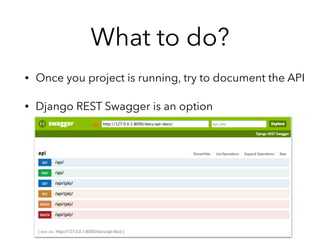
• Once you project is running, try to document the API
• Django REST Swagger is an option
Small Hints
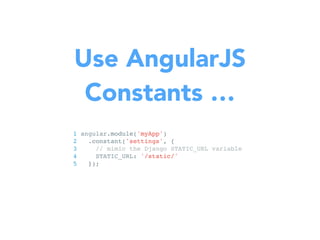
Use AngularJS
Constants …
1 angular.module('myApp')!
2 .constant('settings', {!
3 // mimic the Django STATIC_URL variable!
4 STATIC_URL: '/static/'!
5 });!
Decide!
urls.py vs. ng-route
What about 

site performance?
Then why using
Django?
Is that the end of
Django?
Vielen Dank.
hannes.hapke@gmail.com
@hanneshapke

hanneshapke.github.io
Resources
• PyDanny comments on JS and Django: https://pydanny-event-notes.readthedocs.org/en/
latest/DjangoConEurope2013/javascript_django.html
• Lightweight Django: 

http://shop.oreilly.com/product/0636920032502.do#
• Using Tasty-pie: 

http://glynjackson.org/weblog/entry/django-angular.html
• Django, Angular and Authentication: http://richardtier.com/2014/03/15/authenticate-
using-django-rest-framework-endpoint-and-angularjs/
• How the Django REST framework changed my life: http://www.ngenworks.com/blog/how-
django-rest-framework-changed-my-life

Create responsive websites with Django, REST and AngularJS

  • 1.
    Making Django sitesmore responsive with REST and AngularJS August 27th, 2014
  • 2.
  • 4.
    A regular Djangosite Github: https://github.com/hanneshapke/fruitloop_django
  • 5.
    A Django siteusing REST and AngularJS Github: https://github.com/hanneshapke/fruitloop_angular
  • 6.
  • 7.
  • 8.
    The Python heroesare 
 working on a fix PEP 3156 ! http://python-notes.curiousefficiency.org/en/latest/pep_ideas/async_programming.html
  • 9.
    But what isthe solution in the mean time?
  • 10.
  • 11.
    Don’t change yourproject … • … because it is hip • Creates new and larger code base, time consuming • Requires a different eco system • Do it if your Django site should become responsive and more user-friendly
  • 12.
    If you stillthink it’s a good idea, here are the steps.
  • 13.
    Step #1 Create anAPI endpoint to your Django model
  • 14.
    REST • Representational statetransfer • Django REST Framework, tasty-pie
 PyDanny’s Choosing an API Framework for Django • Django REST Framework with GIS support • Django REST Framework 3 Kickstarter: £32,650
  • 15.
    What to do? •`pip install djangorestframework` • Add to your settings.py • Create a REST serializers for your models • Create API views for your serializers • Update your urls.py
  • 16.
  • 17.
  • 18.
  • 19.
    Step #2 Set upyour js environment and install AngularJS
  • 20.
    What? A new ecosystem!
 Based on node.js?
  • 21.
    Bower.io • Package managerfor front-end js • Works like pip, but it’s pip, can be configured • Install it with `npm install -g bower` • Run `bower init` • Install packages: 
 `bower install [package] --save`
  • 22.
    What to do? •Created a .bowerrc file to point at the js assets folder of the django project
 
 • Installed the angular core package with 
 `bower install angular --save` • Bower creates a bower.json file similar to your requirements.txt from pip 1 {! 2 "directory": "fruitloop_angular/assets/js/",! 3 "json": "bower.json"! 4 }!
  • 23.
    Step #3 Create a
 static AngularJS site
  • 24.
    30 second Introto AngularJS • Angular offers
 Controllers - Changes site behaviour
 Services - Provides data access (e.g. REST)
 Directives - Create your own DOM elements • Angular offers DOM attributes: ng-show, ng- repeat, ng-click, etc. 1 <tr ng-repeat="item in items">! 2 <td> {{ item.name }} - {{ item.price | currency }} </td>! 3 </tr>!
  • 25.
    What to do? •Set up the settings path for your js assets • Created a 'static' html site and serve with Django’s
 TemplateView • Create a sample js array to test your Angular setup • Created a controller to serve 'static' data
  • 26.
  • 27.
    Step #4 Use {%verbatim %}
  • 28.
    {{ isn’t {{ •Django and AngularJS use the same variable tag • Django > 1.4: Use {% verbatim %} environment • Django < 1.5: Use code here 1 // use {$ variable $} in your template! 2 // from http://django-angular.readthedocs.org/en/latest/integration.! 3 html! 4 ! 5 var my_app = angular.module('MyApp').config(function(! 6 $interpolateProvider) {! 7 $interpolateProvider.startSymbol('{$');! 8 $interpolateProvider.endSymbol('$}');! 9 });!
  • 29.
    Step #5 Make AngularJStalk 
 to your API
  • 30.
    What to do? •Install angular-resource with 
 `bower install angular-resource --save` • Create the AngularJS in services.js and configure your API endpoints (if needed) • Make the Angular controller load the data
 use query() for lists, use get() for single objects • Display the list in the html page
  • 31.
    Sample code 1 varfruitServices = angular.module('fruitServices', ['ngResource']);! 2 fruitServices.factory('FruitLocationService', ['$resource',! 3 function($resource){! 4 return $resource('api/', {}, {! 5 query: {method:'GET', params:{}, isArray: true}! 6 });! 7 }! 8 ]);! • ngResource loaded, $resource becomes available • Notice `$resource (‘api/’, {}, {…});` • Configure more API methods here, e.g. PUT, DELETE, etc., if needed
  • 32.
    Step #6 Take fulladvantage of the Django REST Framework
  • 33.
    Thoughts • Use DRFAuthentication methods • Use Object Persmissions • Use the serializer to the full extend
 e.g. serializers.RelatedField(source=‘fruit_type’)
  • 34.
    Step #7 Use $promise,
 butdon’t promise too much
  • 35.
  • 36.
    Thoughts • Encapsulate data-relatedcode with $promise • Code will be executed when data is returned from the API 1 FruitLocationService.query().$promise.then(! 2 function (response) {! 3 response.forEach(function(location){! 4 $scope.markers.push({! 5 lat: location.latitude,! 6 lng: location.longitude! 7 });! 8 });! 9 console.log($scope.markers);! 10 }! 11 );!
  • 37.
    Step #8 Make yourform 
 talk to your API
  • 38.
    What to do? •Bind your form data with Angular’s ng-model • Check your API service config and see if the trailing slash doesn’t get eliminated • Set up your authentication classes for the Django REST framework 1 # Required for POST/PUT requests by the Django REST Framework! 2 REST_FRAMEWORK = {! 3 'DEFAULT_AUTHENTICATION_CLASSES': []! 4 }!
  • 39.
    Step #9 Clean upyour settings.py
  • 40.
    What to do? •Make Django lightweight • Remove unnecessary middleware and packages • Check if you still need i18n and l18n support
 Turn it off if you can
  • 41.
  • 42.
    What to do? •Once you project is running, try to document the API • Django REST Swagger is an option
  • 43.
  • 44.
    Use AngularJS Constants … 1angular.module('myApp')! 2 .constant('settings', {! 3 // mimic the Django STATIC_URL variable! 4 STATIC_URL: '/static/'! 5 });!
  • 45.
  • 46.
    What about 
 siteperformance?
  • 47.
  • 48.
    Is that theend of Django?
  • 49.
  • 50.
    Resources • PyDanny commentson JS and Django: https://pydanny-event-notes.readthedocs.org/en/ latest/DjangoConEurope2013/javascript_django.html • Lightweight Django: 
 http://shop.oreilly.com/product/0636920032502.do# • Using Tasty-pie: 
 http://glynjackson.org/weblog/entry/django-angular.html • Django, Angular and Authentication: http://richardtier.com/2014/03/15/authenticate- using-django-rest-framework-endpoint-and-angularjs/ • How the Django REST framework changed my life: http://www.ngenworks.com/blog/how- django-rest-framework-changed-my-life