


Primitive Data
Types and Variables
Integer, Floating-Point, Text
Data, Variables, Literals
Svetlin Nakov
Technical Trainer
www.nakov.com
Software University
http://softuni.bg
Table of Contents
1. Primitive Data Types
 Integer
 Floating-Point / Decimal Floating-Point
 Boolean
 Character
 String
 Object
2. Declaring and Using Variables
 Identifiers, Variables, Literals
3. Nullable Types
2
Primitive Data Types
4
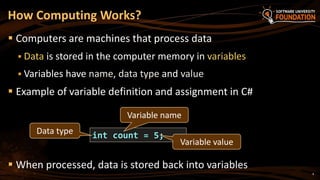
 Computers are machines that process data
 Data is stored in the computer memory in variables
 Variables have name, data type and value
 Example of variable definition and assignment in C#
 When processed, data is stored back into variables
How Computing Works?
int count = 5;Data type
Variable name
Variable value
5
 A data type:
 Is a domain of values of similar characteristics
 Defines the type of information stored in the computer memory
(in a variable)
 Examples:
 Positive integers: 1, 2, 3, …
 Alphabetical characters: a, b, c, …
 Days of week: Monday, Tuesday, …
What Is a Data Type?
6
 A data type has:
 Name (C# keyword or .NET type)
 Size (how much memory is used)
 Default value
 Example:
 Integer numbers in C#
 Name: int
 Size: 32 bits (4 bytes)
 Default value: 0
Data Type Characteristics
int: sequence of 32
bits in the memory
int: 4 sequential
bytes in the memory
Integer Types
8
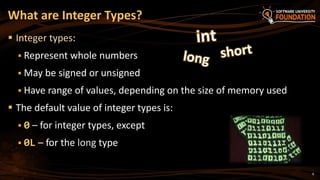
 Integer types:
 Represent whole numbers
 May be signed or unsigned
 Have range of values, depending on the size of memory used
 The default value of integer types is:
 0 – for integer types, except
 0L – for the long type
What are Integer Types?
9
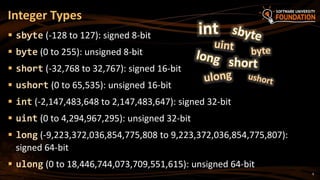
 sbyte (-128 to 127): signed 8-bit
 byte (0 to 255): unsigned 8-bit
 short (-32,768 to 32,767): signed 16-bit
 ushort (0 to 65,535): unsigned 16-bit
 int (-2,147,483,648 to 2,147,483,647): signed 32-bit
 uint (0 to 4,294,967,295): unsigned 32-bit
 long (-9,223,372,036,854,775,808 to 9,223,372,036,854,775,807):
signed 64-bit
 ulong (0 to 18,446,744,073,709,551,615): unsigned 64-bit
Integer Types
10
 Depending on the unit of measure we may use different data
types:
Measuring Time – Example
byte centuries = 20; // A small number (up to 255)
ushort years = 2000; // A small number (up to 32767)
uint days = 730480; // A large number (up to 4.3 billions)
ulong hours = 17531520; // A very big number (up to 18.4*10^18)
Console.WriteLine(
"{0} centuries is {1} years, or {2} days, or {3} hours.",
centuries, years, days, hours);
Integer Types
Live Demo
Floating-Point and
Decimal Floating-Point Types
13
 Floating-point types:
 Represent real numbers
 May be signed or unsigned
 Have range of values and different precision depending on the
used memory
 Can behave abnormally in the calculations
What are Floating-Point Types?
14
 Floating-point types are:
 float (±1.5 × 10−45 to ±3.4 × 1038)
 32-bits, precision of 7 digits
 double (±5.0 × 10−324 to ±1.7 × 10308)
 64-bits, precision of 15-16 digits
 The default value of floating-point types:
 Is 0.0F for the float type
 Is 0.0D for the double type
Floating-Point Types
15
 Difference in precision when using float and double:
 NOTE: The “f” suffix in the first statement!
 Real numbers are by default interpreted as double!
 One should explicitly convert them to float
PI Precision – Example
float floatPI = 3.141592653589793238f;
double doublePI = 3.141592653589793238;
Console.WriteLine("Float PI is: {0}", floatPI);
Console.WriteLine("Double PI is: {0}", doublePI);
16
 Sometimes abnormalities can be observed when using floating-
point numbers
 Comparing floating-point numbers can not be performed directly
with the == operator
Abnormalities in the Floating-Point Calculations
double a = 1.0f;
double b = 0.33f;
double sum = 1.33f;
bool equal = (a+b == sum); // False!!!
Console.WriteLine("a+b={0} sum={1} equal={2}", a+b, sum, equal);
17
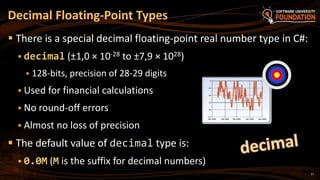
 There is a special decimal floating-point real number type in C#:
 decimal (±1,0 × 10⁻²⁸ to ±7,9 × 1028)
 128-bits, precision of 28-29 digits
 Used for financial calculations
 No round-off errors
 Almost no loss of precision
 The default value of decimal type is:
 0.0M (M is the suffix for decimal numbers)
Decimal Floating-Point Types
Floating-Point and Decimal
Floating-Point Types
Live Demo
Boolean Type
20
 The Boolean data type:
 Is declared by the bool keyword
 Has two possible values: true and false
 Is useful in logical expressions
 The default value is false
The Boolean Data Type
21
 Example of boolean variables taking values of true or false:
Boolean Values – Example
int a = 1;
int b = 2;
bool greaterAB = (a > b);
Console.WriteLine(greaterAB); // False
bool equalA1 = (a == 1);
Console.WriteLine(equalA1); // True
Boolean Type
Live Demo
Character Type
24
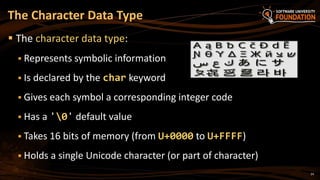
 The character data type:
 Represents symbolic information
 Is declared by the char keyword
 Gives each symbol a corresponding integer code
 Has a '0' default value
 Takes 16 bits of memory (from U+0000 to U+FFFF)
 Holds a single Unicode character (or part of character)
The Character Data Type
25
 The example below shows that every
character has an unique Unicode code:
Characters and Codes
char symbol = 'a';
Console.WriteLine("The code of '{0}' is: {1}", symbol, (int) symbol);
symbol = 'b';
Console.WriteLine("The code of '{0}' is: {1}", symbol, (int) symbol);
symbol = 'A';
Console.WriteLine("The code of '{0}' is: {1}", symbol, (int) symbol);
symbol = 'щ'; // Cyrillic letter 'sht'
Console.WriteLine("The code of '{0}' is: {1}", symbol, (int)symbol);
Character Type
Live Demo
String Type
28
 The string data type:
 Represents a sequence of characters
 Is declared by the string keyword
 Has a default value null (no value)
 Strings are enclosed in quotes:
 Strings can be concatenated
 Using the + operator
The String Data Type
string s = "Hello, C#";
29
 Concatenating the names of a person to obtain the full name:
 We can concatenate strings and numbers as well:
Saying Hello – Example
string firstName = "Ivan";
string lastName = "Ivanov";
Console.WriteLine("Hello, {0}!", firstName);
string fullName = firstName + " " + lastName;
Console.WriteLine("Your full name is {0}.", fullName);
int age = 21;
Console.WriteLine("Hello, I am " + age + " years old");
String Type
Live Demo
Object Type
32
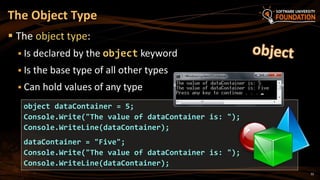
 The object type:
 Is declared by the object keyword
 Is the base type of all other types
 Can hold values of any type
The Object Type
object dataContainer = 5;
Console.Write("The value of dataContainer is: ");
Console.WriteLine(dataContainer);
dataContainer = "Five";
Console.Write("The value of dataContainer is: ");
Console.WriteLine(dataContainer);
Objects
Live Demo
Introducing Variables
 Variables keep data in the computer memory
 A variable is a:
 Placeholder of information that can be changed at run-time
 Variables allow you to:
 Store information
 Retrieve the stored information
 Change the stored information
35
What Is a Variable?
36
 A variable has:
 Name
 Type (of stored data)
 Value
 Example:
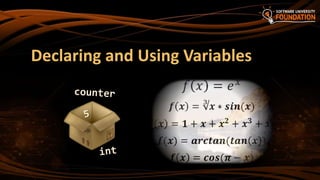
 Name: counter
 Type: int
 Value: 5
Variable Characteristics
int counter = 5;
Declaring and Using Variables
38
 When declaring a variable we:
 Specify its type
 Specify its name (called identifier)
 May give it an initial value
 The syntax is the following:
 Example:
Declaring Variables
<data_type> <identifier> [= <initialization>];
int height = 200;
39
 Identifiers may consist of:
 Letters (Unicode)
 Digits [0-9]
 Underscore "_"
 Examples: count, firstName, Page
 Identifiers
 Can begin only with a letter or an underscore
 Cannot be a C# keyword (like int and class)
Identifiers
40
 Identifiers
 Should have a descriptive name
 E.g. firstName, not dasfas or p17
 It is recommended to use only Latin letters
 Should be neither too long nor too short
 Note:
 In C# small letters are considered different
than the capital letters (case sensitivity)
Identifiers (2)
41
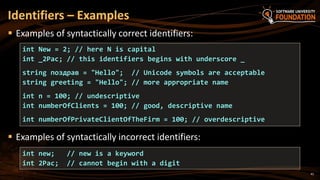
 Examples of syntactically correct identifiers:
 Examples of syntactically incorrect identifiers:
Identifiers – Examples
int new; // new is a keyword
int 2Pac; // cannot begin with a digit
int New = 2; // here N is capital
int _2Pac; // this identifiers begins with underscore _
string поздрав = "Hello"; // Unicode symbols are acceptable
string greeting = "Hello"; // more appropriate name
int n = 100; // undescriptive
int numberOfClients = 100; // good, descriptive name
int numberOfPrivateClientOfTheFirm = 100; // overdescriptive
Assigning Values
To Variables
43
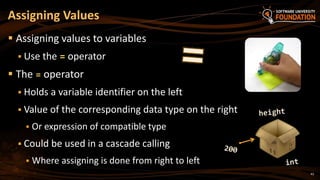
 Assigning values to variables
 Use the = operator
 The = operator
 Holds a variable identifier on the left
 Value of the corresponding data type on the right
 Or expression of compatible type
 Could be used in a cascade calling
 Where assigning is done from right to left
Assigning Values
44
Assigning Values – Examples
int firstValue = 5;
int secondValue;
int thirdValue;
// Using an already declared variable:
secondValue = firstValue;
// The following cascade calling assigns
// 3 to firstValue and then firstValue
// to thirdValue, so both variables have
// the value 3 as a result:
thirdValue = firstValue = 3; // Avoid cascading assignments!
45
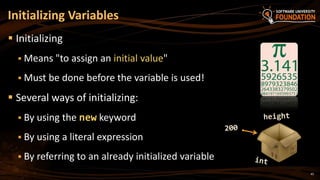
 Initializing
 Means "to assign an initial value"
 Must be done before the variable is used!
 Several ways of initializing:
 By using the new keyword
 By using a literal expression
 By referring to an already initialized variable
Initializing Variables
46
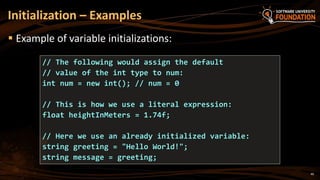
 Example of variable initializations:
Initialization – Examples
// The following would assign the default
// value of the int type to num:
int num = new int(); // num = 0
// This is how we use a literal expression:
float heightInMeters = 1.74f;
// Here we use an already initialized variable:
string greeting = "Hello World!";
string message = greeting;
Assigning and
Initializing Variables
Live Demo
Literals
49
 Literals are:
 Representations of values in the source code
 There are several types of literals
 Boolean
 Integer
 Real
 Character
 String
 The null literal
What are Literals?
50
 The boolean literals are:
 true
 false
 The integer literals:
 Are used for variables of type int, uint, long, and ulong
 Consist of digits
 May have a sign (+,-)
 May be in a hexadecimal format
Boolean and Integer Literals
51
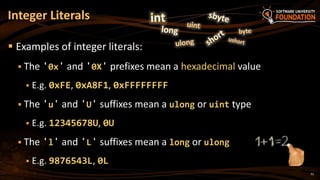
 Examples of integer literals:
 The '0x' and '0X' prefixes mean a hexadecimal value
 E.g. 0xFE, 0xA8F1, 0xFFFFFFFF
 The 'u' and 'U' suffixes mean a ulong or uint type
 E.g. 12345678U, 0U
 The 'l' and 'L' suffixes mean a long or ulong
 E.g. 9876543L, 0L
Integer Literals
52
 Note: the letter ‘l’ is easily confused with the digit ‘1’
 So it’s better to use ‘L’
Integer Literals – Examples
// The following variables are initialized with the same value:
int numberInHex = -0x10;
int numberInDec = -16;
// The following causes an error, because 234u is of type uint
int unsignedInt = 234u;
// The following causes an error, because 234L is of type long
int longInt = 234L;
53
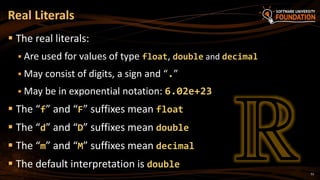
 The real literals:
 Are used for values of type float, double and decimal
 May consist of digits, a sign and “.”
 May be in exponential notation: 6.02e+23
 The “f” and “F” suffixes mean float
 The “d” and “D” suffixes mean double
 The “m” and “M” suffixes mean decimal
 The default interpretation is double
Real Literals
54
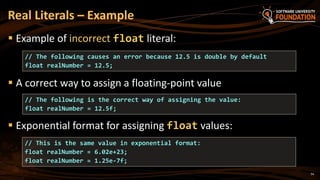
 Example of incorrect float literal:
 A correct way to assign a floating-point value
 Exponential format for assigning float values:
Real Literals – Example
// The following causes an error because 12.5 is double by default
float realNumber = 12.5;
// The following is the correct way of assigning the value:
float realNumber = 12.5f;
// This is the same value in exponential format:
float realNumber = 6.02e+23;
float realNumber = 1.25e-7f;
55
 The character literals:
 Are used for values of the char type
 Consist of two single quotes surrounding the character value:
 The value may be:
 Symbol
 The code of the symbol
 Escaping sequence
Character Literals
'<value>'
56
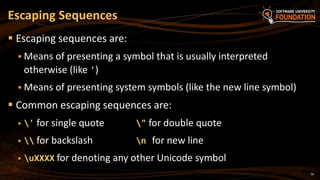
 Escaping sequences are:
 Means of presenting a symbol that is usually interpreted
otherwise (like ')
 Means of presenting system symbols (like the new line symbol)
 Common escaping sequences are:
 ' for single quote " for double quote
  for backslash n for new line
 uXXXX for denoting any other Unicode symbol
Escaping Sequences
57
 Examples of different character literals:
Character Literals – Example
char symbol = 'a'; // An ordinary symbol
symbol = 'u006F'; // Unicode symbol code in a
// hexadecimal format (letter 'o')
symbol = 'u8449'; // 葉 (Leaf in Traditional Chinese)
symbol = '''; // Assigning the single quote symbol
symbol = ''; // Assigning the backslash symbol
symbol = 'n'; // Assigning new line symbol
symbol = 't'; // Assigning TAB symbol
symbol = "a"; // Incorrect: use single quotes
58
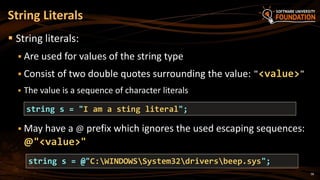
 String literals:
 Are used for values of the string type
 Consist of two double quotes surrounding the value: "<value>"
 The value is a sequence of character literals
 May have a @ prefix which ignores the used escaping sequences:
@"<value>"
String Literals
string s = "I am a sting literal";
string s = @"C:WINDOWSSystem32driversbeep.sys";
59
 Benefits of quoted strings (with the @ prefix):
 In quoted strings "" is used instead of "!
String Literals – Examples
// Here is a string literal using escape sequences
string quotation = ""Hello, Jude", he said.";
string path = "C:Windowsnotepad.exe";
// Here is an example of the usage of @
quotation = @"""Hello, Jimmy!"", she answered.";
path = @"C:Windowsnotepad.exe";
string str = @"some
text";
String Literals
Live Demo
Nullable Types
61
62
 Nullable types are instances of the System.Nullable
structure
 Wrapper around the primitive types
 E.g. int?, double?, etc.
 Nullabe type can represent the normal range of values for its
underlying value type, plus an additional null value
 Useful when dealing with databases or other structures that
have default value null
Nullable Types
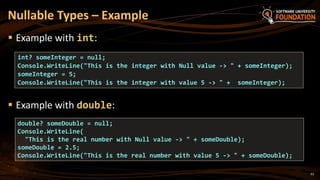
 Example with int:
 Example with double:
Nullable Types – Example
int? someInteger = null;
Console.WriteLine("This is the integer with Null value -> " + someInteger);
someInteger = 5;
Console.WriteLine("This is the integer with value 5 -> " + someInteger);
double? someDouble = null;
Console.WriteLine(
"This is the real number with Null value -> " + someDouble);
someDouble = 2.5;
Console.WriteLine("This is the real number with value 5 -> " + someDouble);
63
Nullable Types
Live Demo
65
 Data types are domains of possible values
 E.g. number, character, date, string
 Integer types hold whole numbers
 E.g. 5, -2, 32768
 Float and double hold floating-point numbers
 E.g. 3.14159206, 6.02e+23
 Decimal type holds money and financial information, e.g. 12.80
 Boolean type holds true or false
Summary
66
 Character type holds a single Unicode character
 E.g. 'A', 'n', '0', '€', 'u0AF4'
 String type hold a text, e.g. "Hello C#"
 Object type hold any value
 E.g. string, number, character, date, …
 Variables are named pieces of memory that hold a value
 Identifiers are the names of variables, classes, methods, etc.
 Literals are the values of the primitive types, e.g. 0xFE, 'uF7B3'
 Nullable types can hold a value or null (absence of value)
Summary (2)
?
http://softuni.bg/courses/csharp-basics/
Primitive Data Types and Variables
License
 This course (slides, examples, demos, videos, homework, etc.)
is licensed under the "Creative Commons Attribution-
NonCommercial-ShareAlike 4.0 International" license
68
 Attribution: this work may contain portions from
 "Fundamentals of Computer Programming with C#" book by Svetlin Nakov & Co. under CC-BY-SA license
 "C# Part I" course by Telerik Academy under CC-BY-NC-SA license
Free Trainings @ Software University
 Software University Foundation – softuni.org
 Software University – High-Quality Education,
Profession and Job for Software Developers
 softuni.bg
 Software University @ Facebook
 facebook.com/SoftwareUniversity
 Software University @ YouTube
 youtube.com/SoftwareUniversity
 Software University Forums – forum.softuni.bg

02. Primitive Data Types and Variables

  • 1.
    Primitive Data Types andVariables Integer, Floating-Point, Text Data, Variables, Literals Svetlin Nakov Technical Trainer www.nakov.com Software University http://softuni.bg
  • 2.
    Table of Contents 1.Primitive Data Types  Integer  Floating-Point / Decimal Floating-Point  Boolean  Character  String  Object 2. Declaring and Using Variables  Identifiers, Variables, Literals 3. Nullable Types 2
  • 3.
  • 4.
    4  Computers aremachines that process data  Data is stored in the computer memory in variables  Variables have name, data type and value  Example of variable definition and assignment in C#  When processed, data is stored back into variables How Computing Works? int count = 5;Data type Variable name Variable value
  • 5.
    5  A datatype:  Is a domain of values of similar characteristics  Defines the type of information stored in the computer memory (in a variable)  Examples:  Positive integers: 1, 2, 3, …  Alphabetical characters: a, b, c, …  Days of week: Monday, Tuesday, … What Is a Data Type?
  • 6.
    6  A datatype has:  Name (C# keyword or .NET type)  Size (how much memory is used)  Default value  Example:  Integer numbers in C#  Name: int  Size: 32 bits (4 bytes)  Default value: 0 Data Type Characteristics int: sequence of 32 bits in the memory int: 4 sequential bytes in the memory
  • 7.
  • 8.
    8  Integer types: Represent whole numbers  May be signed or unsigned  Have range of values, depending on the size of memory used  The default value of integer types is:  0 – for integer types, except  0L – for the long type What are Integer Types?
  • 9.
    9  sbyte (-128to 127): signed 8-bit  byte (0 to 255): unsigned 8-bit  short (-32,768 to 32,767): signed 16-bit  ushort (0 to 65,535): unsigned 16-bit  int (-2,147,483,648 to 2,147,483,647): signed 32-bit  uint (0 to 4,294,967,295): unsigned 32-bit  long (-9,223,372,036,854,775,808 to 9,223,372,036,854,775,807): signed 64-bit  ulong (0 to 18,446,744,073,709,551,615): unsigned 64-bit Integer Types
  • 10.
    10  Depending onthe unit of measure we may use different data types: Measuring Time – Example byte centuries = 20; // A small number (up to 255) ushort years = 2000; // A small number (up to 32767) uint days = 730480; // A large number (up to 4.3 billions) ulong hours = 17531520; // A very big number (up to 18.4*10^18) Console.WriteLine( "{0} centuries is {1} years, or {2} days, or {3} hours.", centuries, years, days, hours);
  • 11.
  • 12.
  • 13.
    13  Floating-point types: Represent real numbers  May be signed or unsigned  Have range of values and different precision depending on the used memory  Can behave abnormally in the calculations What are Floating-Point Types?
  • 14.
    14  Floating-point typesare:  float (±1.5 × 10−45 to ±3.4 × 1038)  32-bits, precision of 7 digits  double (±5.0 × 10−324 to ±1.7 × 10308)  64-bits, precision of 15-16 digits  The default value of floating-point types:  Is 0.0F for the float type  Is 0.0D for the double type Floating-Point Types
  • 15.
    15  Difference inprecision when using float and double:  NOTE: The “f” suffix in the first statement!  Real numbers are by default interpreted as double!  One should explicitly convert them to float PI Precision – Example float floatPI = 3.141592653589793238f; double doublePI = 3.141592653589793238; Console.WriteLine("Float PI is: {0}", floatPI); Console.WriteLine("Double PI is: {0}", doublePI);
  • 16.
    16  Sometimes abnormalitiescan be observed when using floating- point numbers  Comparing floating-point numbers can not be performed directly with the == operator Abnormalities in the Floating-Point Calculations double a = 1.0f; double b = 0.33f; double sum = 1.33f; bool equal = (a+b == sum); // False!!! Console.WriteLine("a+b={0} sum={1} equal={2}", a+b, sum, equal);
  • 17.
    17  There isa special decimal floating-point real number type in C#:  decimal (±1,0 × 10⁻²⁸ to ±7,9 × 1028)  128-bits, precision of 28-29 digits  Used for financial calculations  No round-off errors  Almost no loss of precision  The default value of decimal type is:  0.0M (M is the suffix for decimal numbers) Decimal Floating-Point Types
  • 18.
  • 19.
  • 20.
    20  The Booleandata type:  Is declared by the bool keyword  Has two possible values: true and false  Is useful in logical expressions  The default value is false The Boolean Data Type
  • 21.
    21  Example ofboolean variables taking values of true or false: Boolean Values – Example int a = 1; int b = 2; bool greaterAB = (a > b); Console.WriteLine(greaterAB); // False bool equalA1 = (a == 1); Console.WriteLine(equalA1); // True
  • 22.
  • 23.
  • 24.
    24  The characterdata type:  Represents symbolic information  Is declared by the char keyword  Gives each symbol a corresponding integer code  Has a '0' default value  Takes 16 bits of memory (from U+0000 to U+FFFF)  Holds a single Unicode character (or part of character) The Character Data Type
  • 25.
    25  The examplebelow shows that every character has an unique Unicode code: Characters and Codes char symbol = 'a'; Console.WriteLine("The code of '{0}' is: {1}", symbol, (int) symbol); symbol = 'b'; Console.WriteLine("The code of '{0}' is: {1}", symbol, (int) symbol); symbol = 'A'; Console.WriteLine("The code of '{0}' is: {1}", symbol, (int) symbol); symbol = 'щ'; // Cyrillic letter 'sht' Console.WriteLine("The code of '{0}' is: {1}", symbol, (int)symbol);
  • 26.
  • 27.
  • 28.
    28  The stringdata type:  Represents a sequence of characters  Is declared by the string keyword  Has a default value null (no value)  Strings are enclosed in quotes:  Strings can be concatenated  Using the + operator The String Data Type string s = "Hello, C#";
  • 29.
    29  Concatenating thenames of a person to obtain the full name:  We can concatenate strings and numbers as well: Saying Hello – Example string firstName = "Ivan"; string lastName = "Ivanov"; Console.WriteLine("Hello, {0}!", firstName); string fullName = firstName + " " + lastName; Console.WriteLine("Your full name is {0}.", fullName); int age = 21; Console.WriteLine("Hello, I am " + age + " years old");
  • 30.
  • 31.
  • 32.
    32  The objecttype:  Is declared by the object keyword  Is the base type of all other types  Can hold values of any type The Object Type object dataContainer = 5; Console.Write("The value of dataContainer is: "); Console.WriteLine(dataContainer); dataContainer = "Five"; Console.Write("The value of dataContainer is: "); Console.WriteLine(dataContainer);
  • 33.
  • 34.
  • 35.
     Variables keepdata in the computer memory  A variable is a:  Placeholder of information that can be changed at run-time  Variables allow you to:  Store information  Retrieve the stored information  Change the stored information 35 What Is a Variable?
  • 36.
    36  A variablehas:  Name  Type (of stored data)  Value  Example:  Name: counter  Type: int  Value: 5 Variable Characteristics int counter = 5;
  • 37.
  • 38.
    38  When declaringa variable we:  Specify its type  Specify its name (called identifier)  May give it an initial value  The syntax is the following:  Example: Declaring Variables <data_type> <identifier> [= <initialization>]; int height = 200;
  • 39.
    39  Identifiers mayconsist of:  Letters (Unicode)  Digits [0-9]  Underscore "_"  Examples: count, firstName, Page  Identifiers  Can begin only with a letter or an underscore  Cannot be a C# keyword (like int and class) Identifiers
  • 40.
    40  Identifiers  Shouldhave a descriptive name  E.g. firstName, not dasfas or p17  It is recommended to use only Latin letters  Should be neither too long nor too short  Note:  In C# small letters are considered different than the capital letters (case sensitivity) Identifiers (2)
  • 41.
    41  Examples ofsyntactically correct identifiers:  Examples of syntactically incorrect identifiers: Identifiers – Examples int new; // new is a keyword int 2Pac; // cannot begin with a digit int New = 2; // here N is capital int _2Pac; // this identifiers begins with underscore _ string поздрав = "Hello"; // Unicode symbols are acceptable string greeting = "Hello"; // more appropriate name int n = 100; // undescriptive int numberOfClients = 100; // good, descriptive name int numberOfPrivateClientOfTheFirm = 100; // overdescriptive
  • 42.
  • 43.
    43  Assigning valuesto variables  Use the = operator  The = operator  Holds a variable identifier on the left  Value of the corresponding data type on the right  Or expression of compatible type  Could be used in a cascade calling  Where assigning is done from right to left Assigning Values
  • 44.
    44 Assigning Values –Examples int firstValue = 5; int secondValue; int thirdValue; // Using an already declared variable: secondValue = firstValue; // The following cascade calling assigns // 3 to firstValue and then firstValue // to thirdValue, so both variables have // the value 3 as a result: thirdValue = firstValue = 3; // Avoid cascading assignments!
  • 45.
    45  Initializing  Means"to assign an initial value"  Must be done before the variable is used!  Several ways of initializing:  By using the new keyword  By using a literal expression  By referring to an already initialized variable Initializing Variables
  • 46.
    46  Example ofvariable initializations: Initialization – Examples // The following would assign the default // value of the int type to num: int num = new int(); // num = 0 // This is how we use a literal expression: float heightInMeters = 1.74f; // Here we use an already initialized variable: string greeting = "Hello World!"; string message = greeting;
  • 47.
  • 48.
  • 49.
    49  Literals are: Representations of values in the source code  There are several types of literals  Boolean  Integer  Real  Character  String  The null literal What are Literals?
  • 50.
    50  The booleanliterals are:  true  false  The integer literals:  Are used for variables of type int, uint, long, and ulong  Consist of digits  May have a sign (+,-)  May be in a hexadecimal format Boolean and Integer Literals
  • 51.
    51  Examples ofinteger literals:  The '0x' and '0X' prefixes mean a hexadecimal value  E.g. 0xFE, 0xA8F1, 0xFFFFFFFF  The 'u' and 'U' suffixes mean a ulong or uint type  E.g. 12345678U, 0U  The 'l' and 'L' suffixes mean a long or ulong  E.g. 9876543L, 0L Integer Literals
  • 52.
    52  Note: theletter ‘l’ is easily confused with the digit ‘1’  So it’s better to use ‘L’ Integer Literals – Examples // The following variables are initialized with the same value: int numberInHex = -0x10; int numberInDec = -16; // The following causes an error, because 234u is of type uint int unsignedInt = 234u; // The following causes an error, because 234L is of type long int longInt = 234L;
  • 53.
    53  The realliterals:  Are used for values of type float, double and decimal  May consist of digits, a sign and “.”  May be in exponential notation: 6.02e+23  The “f” and “F” suffixes mean float  The “d” and “D” suffixes mean double  The “m” and “M” suffixes mean decimal  The default interpretation is double Real Literals
  • 54.
    54  Example ofincorrect float literal:  A correct way to assign a floating-point value  Exponential format for assigning float values: Real Literals – Example // The following causes an error because 12.5 is double by default float realNumber = 12.5; // The following is the correct way of assigning the value: float realNumber = 12.5f; // This is the same value in exponential format: float realNumber = 6.02e+23; float realNumber = 1.25e-7f;
  • 55.
    55  The characterliterals:  Are used for values of the char type  Consist of two single quotes surrounding the character value:  The value may be:  Symbol  The code of the symbol  Escaping sequence Character Literals '<value>'
  • 56.
    56  Escaping sequencesare:  Means of presenting a symbol that is usually interpreted otherwise (like ')  Means of presenting system symbols (like the new line symbol)  Common escaping sequences are:  ' for single quote " for double quote  for backslash n for new line  uXXXX for denoting any other Unicode symbol Escaping Sequences
  • 57.
    57  Examples ofdifferent character literals: Character Literals – Example char symbol = 'a'; // An ordinary symbol symbol = 'u006F'; // Unicode symbol code in a // hexadecimal format (letter 'o') symbol = 'u8449'; // 葉 (Leaf in Traditional Chinese) symbol = '''; // Assigning the single quote symbol symbol = ''; // Assigning the backslash symbol symbol = 'n'; // Assigning new line symbol symbol = 't'; // Assigning TAB symbol symbol = "a"; // Incorrect: use single quotes
  • 58.
    58  String literals: Are used for values of the string type  Consist of two double quotes surrounding the value: "<value>"  The value is a sequence of character literals  May have a @ prefix which ignores the used escaping sequences: @"<value>" String Literals string s = "I am a sting literal"; string s = @"C:WINDOWSSystem32driversbeep.sys";
  • 59.
    59  Benefits ofquoted strings (with the @ prefix):  In quoted strings "" is used instead of "! String Literals – Examples // Here is a string literal using escape sequences string quotation = ""Hello, Jude", he said."; string path = "C:Windowsnotepad.exe"; // Here is an example of the usage of @ quotation = @"""Hello, Jimmy!"", she answered."; path = @"C:Windowsnotepad.exe"; string str = @"some text";
  • 60.
  • 61.
  • 62.
    62  Nullable typesare instances of the System.Nullable structure  Wrapper around the primitive types  E.g. int?, double?, etc.  Nullabe type can represent the normal range of values for its underlying value type, plus an additional null value  Useful when dealing with databases or other structures that have default value null Nullable Types
  • 63.
     Example withint:  Example with double: Nullable Types – Example int? someInteger = null; Console.WriteLine("This is the integer with Null value -> " + someInteger); someInteger = 5; Console.WriteLine("This is the integer with value 5 -> " + someInteger); double? someDouble = null; Console.WriteLine( "This is the real number with Null value -> " + someDouble); someDouble = 2.5; Console.WriteLine("This is the real number with value 5 -> " + someDouble); 63
  • 64.
  • 65.
    65  Data typesare domains of possible values  E.g. number, character, date, string  Integer types hold whole numbers  E.g. 5, -2, 32768  Float and double hold floating-point numbers  E.g. 3.14159206, 6.02e+23  Decimal type holds money and financial information, e.g. 12.80  Boolean type holds true or false Summary
  • 66.
    66  Character typeholds a single Unicode character  E.g. 'A', 'n', '0', '€', 'u0AF4'  String type hold a text, e.g. "Hello C#"  Object type hold any value  E.g. string, number, character, date, …  Variables are named pieces of memory that hold a value  Identifiers are the names of variables, classes, methods, etc.  Literals are the values of the primitive types, e.g. 0xFE, 'uF7B3'  Nullable types can hold a value or null (absence of value) Summary (2)
  • 67.
  • 68.
    License  This course(slides, examples, demos, videos, homework, etc.) is licensed under the "Creative Commons Attribution- NonCommercial-ShareAlike 4.0 International" license 68  Attribution: this work may contain portions from  "Fundamentals of Computer Programming with C#" book by Svetlin Nakov & Co. under CC-BY-SA license  "C# Part I" course by Telerik Academy under CC-BY-NC-SA license
  • 69.
    Free Trainings @Software University  Software University Foundation – softuni.org  Software University – High-Quality Education, Profession and Job for Software Developers  softuni.bg  Software University @ Facebook  facebook.com/SoftwareUniversity  Software University @ YouTube  youtube.com/SoftwareUniversity  Software University Forums – forum.softuni.bg

Editor's Notes

  • #4 (c) 2007 National Academy for Software Development - http://academy.devbg.org. All rights reserved. Unauthorized copying or re-distribution is strictly prohibited.*
  • #8 (c) 2007 National Academy for Software Development - http://academy.devbg.org. All rights reserved. Unauthorized copying or re-distribution is strictly prohibited.*
  • #13 (c) 2007 National Academy for Software Development - http://academy.devbg.org. All rights reserved. Unauthorized copying or re-distribution is strictly prohibited.*
  • #20 (c) 2007 National Academy for Software Development - http://academy.devbg.org. All rights reserved. Unauthorized copying or re-distribution is strictly prohibited.*
  • #24 (c) 2007 National Academy for Software Development - http://academy.devbg.org. All rights reserved. Unauthorized copying or re-distribution is strictly prohibited.*
  • #28 (c) 2007 National Academy for Software Development - http://academy.devbg.org. All rights reserved. Unauthorized copying or re-distribution is strictly prohibited.*
  • #32 (c) 2007 National Academy for Software Development - http://academy.devbg.org. All rights reserved. Unauthorized copying or re-distribution is strictly prohibited.*
  • #35 (c) 2007 National Academy for Software Development - http://academy.devbg.org. All rights reserved. Unauthorized copying or re-distribution is strictly prohibited.*
  • #38 (c) 2007 National Academy for Software Development - http://academy.devbg.org. All rights reserved. Unauthorized copying or re-distribution is strictly prohibited.*
  • #39 (c) 2007 National Academy for Software Development - http://academy.devbg.org. All rights reserved. Unauthorized copying or re-distribution is strictly prohibited.*
  • #43 (c) 2007 National Academy for Software Development - http://academy.devbg.org. All rights reserved. Unauthorized copying or re-distribution is strictly prohibited.*
  • #49 (c) 2007 National Academy for Software Development - http://academy.devbg.org. All rights reserved. Unauthorized copying or re-distribution is strictly prohibited.*