Chapter 2Getting Started with C#
What is a variable?Variable:  imagine like a box to store one thing (data)Eg: int age;         age = 5;
What is a variable?Variable:  imagine like a box to store one thing (data)Eg: int age;         age = 5;int - Size of variable must be big enough to store Integer
What is a variable?Variable:  imagine like a box to store one thing (data)Eg: int age;         age = 5;int - Size of variable must be big enough to store Integerage - Name of variableage
What is a variable?Variable:  imagine like a box to store one thing (data)Eg: int age;         age = 5;5int - Size of variable must be big enough to store Integerage - Name of variableageage = 5 – Put a data 5 into the variable
Value Type Vs Reference TypeVariables:  two typesValue type (simple type like what you just saw)Only need to store one thing (5, 3.5, true/false, ‘C’ and “string”)Reference type (complex type for objects)Need to store more than one thing (age + height + run() + … )
Reference TypeReference type (complex type for objects)Eg: Human john;         john = new Human();Compare this to int age;age = 5;
Reference TypeReference type (complex type for objects)Eg: Human john;         john = new Human();Human - Size of variable must be big enough to store an Address
johnReference TypeReference type (complex type for objects)Eg: Human john;         john = new Human();Human - Size of variable must be big enough to store an Addressjohn - Name of variable
Reference TypeReference type (complex type for objects)Eg: Human john;         john = new Human();Human - Size of variable must be big enough to store an AddressD403john - Name of variable…ageheightjohn = new Human() – Get a house with enough space for john (age, height, etc)john
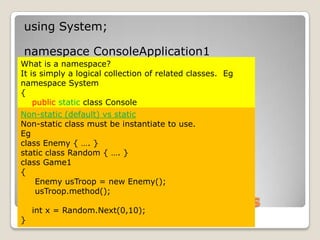
Non-Static Vs Static ClassNon-Static: need New() to instantiate / create an object – like what you see just nowStatic: NO need to use New() to use, there is just one copy of the class.  This type of class basically to provide special functions for other objects  So if you see a class being used without New(): it is a static classEgMathclass   age = Math.Round(18.5);  // Math rounding
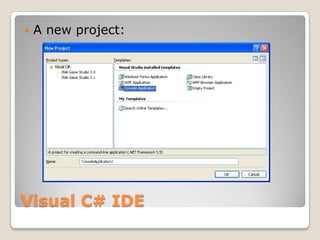
First Console ProgramA new project:
Understanding Program.csusing System;namespace ConsoleApplication1{    class Program    {        static void Main(string[] args)        {        }    }}
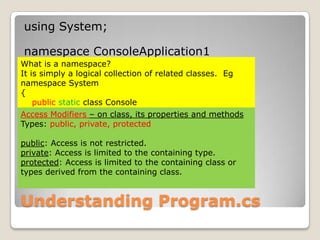
Understanding Program.csusing System;namespace ConsoleApplication1{    class Program    {        static void Main(string[] args)        {        }    }}What is a namespace?It is simply a logical collection of related classes.  Egnamespace System{publicstatic class Console    {        …. // with properties and methods    }    class xxxx    {         …. // with properties and methods    }}
Understanding Program.csusing System;namespace ConsoleApplication1{    class Program    {        static void Main(string[] args)        {        }    }}What is a namespace?It is simply a logical collection of related classes.  Egnamespace System{publicstatic class Console    {        …. // with properties and methods    }    class xxxx    {         …. // with properties and methods    }}Access Modifiers – on class, its properties and methodsTypes: public, private, protectedpublic: Access is not restricted.private: Access is limited to the containing type.protected: Access is limited to the containing class or types derived from the containing class.
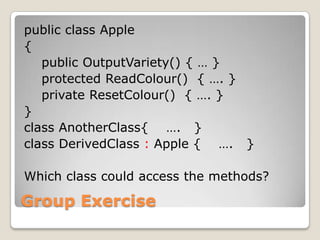
Group Exercisepublic class Apple{    public OutputVariety() { … }    protected ReadColour()  { …. }    private ResetColour()  { …. }}class AnotherClass{    ….   }class DerivedClass: Apple {    ….   }Which class could access the 3 methods?
Understanding Program.csusing System;namespace ConsoleApplication1{    class Program    {static void Main(string[] args)        {        }    }}
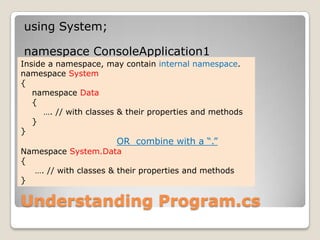
Understanding Program.csusing System;namespace ConsoleApplication1{    class Program    {        static void Main(string[] args)        {        }    }}Inside a namespace, may contain internal namespace.namespace System{    namespace Data    {        …. // with classes & their properties and methods    }}OR  combine with a “.”Namespace System.Data{     …. // with classes & their properties and methods}
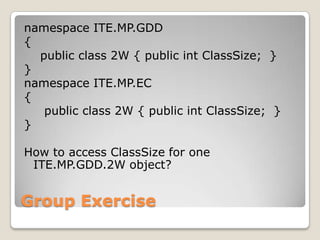
Group Exercisenamespace ITE.MP.GDD{    public class 2W { public intClassSize;  }}namespace ITE.MP.EC{     public class 2W { public intClassSize;  }}How to access ClassSize for one ITE.MP.GDD.2W object?
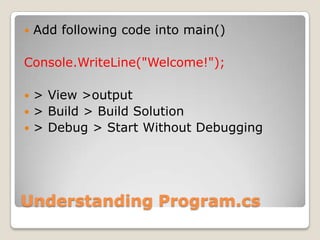
Add code and run programAdd following code into main()Console.WriteLine("Welcome!"); > View >output> Build > Build Solution> Debug > Start Without Debugging
Understanding Program.csDemo: Remove all “using” statements and correct error - instead of Console.WriteLine(), change to System.Console.WriteLine()  Demo: Using refactor to rename “Program” to “HelloWorld”Demo: Right click on Console > Go To Definition- take a look at the Console class and its WriteLine method
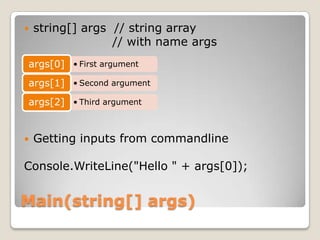
Main(string[] args)string[] args  // string array 			      // with name argsGetting inputs from commandlineConsole.WriteLine("Hello " + args[0]);
Setting ArgumentsArgument is what user key in after the program fileEg for Unreal Tournament, to use the editor, user type “ut.exe  editor” => editor is an argumentIn console program, there are two ways to key in arguments for running the program:1. Using IDE    2. Use command prompt
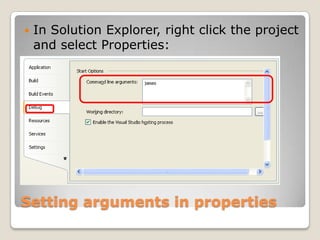
Setting arguments using IDEIn Solution Explorer, right click the project and select Properties:
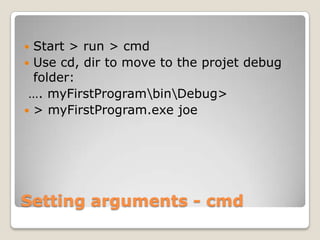
Setting arguments using cmdStart > run > cmdUse cd, dir to move to the projet debug folder: …. myFirstProgram\bin\Debug>> myFirstProgram.exe   joe
C# Application Programming Interface (API)C# APIor.NET Framework Class Library Referencehttp://msdn.microsoft.com/en-us/library/ms229335.aspx
RecapConsole program:SimpleProcedural (from top to bottom)Inputs:  Arguments: How?Eg      Unreal Tournament Editor:                   > UT.exe  editorMore useful to take inputs from Keyboard: How?
Guided Hands onLaunch Visual Studio 2008 – C#Create a new console projectAdd the following line into main(..)Console.WriteLine("Hello " + args[0]);Add argument “James“Build and run
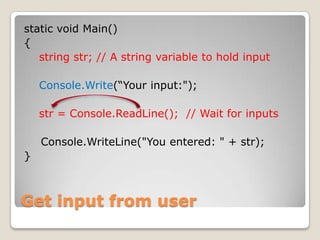
Get input from keyboardstatic void Main() { string str; // A string variable to hold inputConsole.Write(“Your input:"); str = Console.ReadLine();  // Wait for inputsConsole.WriteLine("You entered: " + str); }
Exercise 2.1Create your first console programRemove the unused namespacesUse refactor to rename your class to YourFullName  Refer to the following URL for Naming Convention for Class:http://alturl.com/6uzphttp://alturl.com/o7fiWhat you see on screen (blue by computer, red by user)Your Input: 3Output: 3  3  3  3  3
Type conversionNeed to tell computer to convert fromstring to integer/doublestring str;  // a string variablestr = Console.Readline(); // get inputintnumberInteger; // an integer variable// convert string type to integer typenumberInteger = int.Parse(str);double numberDouble; // a decimal variable// convert string type to decimal typenumberDouble = double.Parse(str)
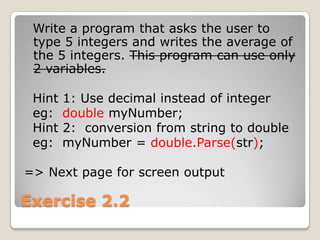
Exercise 2.2   Write a program that asks the user to type 5 integers and writes the average of the 5 integers. This program can use only 2 variables.  Hint 1: Use decimal instead of integereg:  doublemyNumber;    Hint 2:  conversion from string to doubleeg:  myNumber = double.Parse(str);=> Next page for screen output
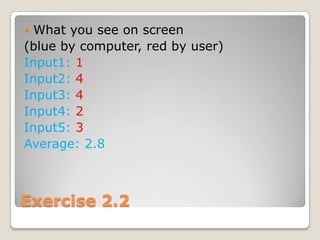
Exercise 2.2 What you see on screen (blue by computer, red by user)Input1: 1Input2: 4Input3: 4Input4: 2Input5: 3Average: 2.8
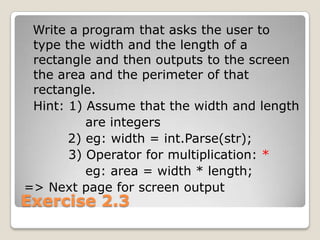
Exercise 2.3   Write a program that asks the user to type the width and the length of a rectangle and then outputs to the screen the area and the perimeter of that rectangle.	Hint: 1) Assume that the width and length               are integers          2) eg: width = int.Parse(str);	        3) Operator for multiplication: *eg: area = width * length;=> Next page for screen output
Exercise 2.3 What you see on screen (blue by computer, red by user)Width: 5Length: 4Area:20 and Perimeter:18
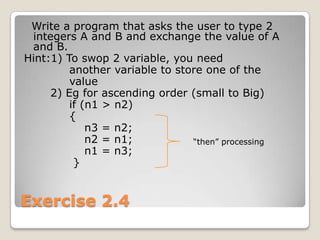
Exercise 2.4   Write a program that asks the user to type 2 integers A and B and exchange the value of A and B.Hint:1) To swop 2 variable, you need             another variable to store one of the             value       2) Eg for ascending order (small to Big)            if (n1 > n2)            {                n3 = n2;                n2 = n1;                n1 = n3;             }  “then” processing
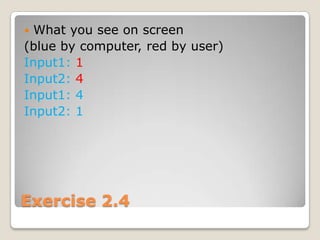
Exercise 2.4 What you see on screen (blue by computer, red by user)Input1: 1Input2: 4Input1: 4 Input2: 1
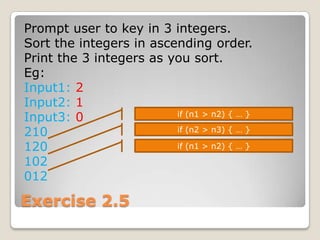
Exercise 2.5Prompt user to key in 3 integers.Sort the integers in ascending order.Print the 3 integers as you sort.Eg:Input1: 2Input2: 1Input3: 0210120102012if (n1 > n2) { … }if (n2 > n3) { … }if (n1 > n2) { … }
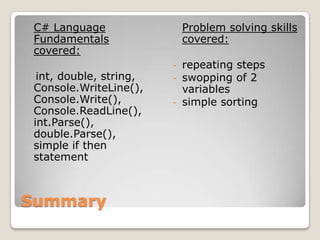
SummaryC# Language Fundamentals covered:int, double, string, Console.WriteLine(), Console.Write(), Console.ReadLine(), int.Parse(), double.Parse(), simple if then statementProblem solving skills covered:repeating steps

SPF Getting Started - Console Program

  • 1.
  • 2.
    What is avariable?Variable: imagine like a box to store one thing (data)Eg: int age; age = 5;
  • 3.
    What is avariable?Variable: imagine like a box to store one thing (data)Eg: int age; age = 5;int - Size of variable must be big enough to store Integer
  • 4.
    What is avariable?Variable: imagine like a box to store one thing (data)Eg: int age; age = 5;int - Size of variable must be big enough to store Integerage - Name of variableage
  • 5.
    What is avariable?Variable: imagine like a box to store one thing (data)Eg: int age; age = 5;5int - Size of variable must be big enough to store Integerage - Name of variableageage = 5 – Put a data 5 into the variable
  • 6.
    Value Type VsReference TypeVariables: two typesValue type (simple type like what you just saw)Only need to store one thing (5, 3.5, true/false, ‘C’ and “string”)Reference type (complex type for objects)Need to store more than one thing (age + height + run() + … )
  • 7.
    Reference TypeReference type(complex type for objects)Eg: Human john; john = new Human();Compare this to int age;age = 5;
  • 8.
    Reference TypeReference type(complex type for objects)Eg: Human john; john = new Human();Human - Size of variable must be big enough to store an Address
  • 9.
    johnReference TypeReference type(complex type for objects)Eg: Human john; john = new Human();Human - Size of variable must be big enough to store an Addressjohn - Name of variable
  • 10.
    Reference TypeReference type(complex type for objects)Eg: Human john; john = new Human();Human - Size of variable must be big enough to store an AddressD403john - Name of variable…ageheightjohn = new Human() – Get a house with enough space for john (age, height, etc)john
  • 11.
    Non-Static Vs StaticClassNon-Static: need New() to instantiate / create an object – like what you see just nowStatic: NO need to use New() to use, there is just one copy of the class. This type of class basically to provide special functions for other objects So if you see a class being used without New(): it is a static classEgMathclass age = Math.Round(18.5); // Math rounding
  • 12.
  • 13.
    Understanding Program.csusing System;namespaceConsoleApplication1{ class Program { static void Main(string[] args) { } }}
  • 14.
    Understanding Program.csusing System;namespaceConsoleApplication1{ class Program { static void Main(string[] args) { } }}What is a namespace?It is simply a logical collection of related classes. Egnamespace System{publicstatic class Console { …. // with properties and methods } class xxxx { …. // with properties and methods }}
  • 15.
    Understanding Program.csusing System;namespaceConsoleApplication1{ class Program { static void Main(string[] args) { } }}What is a namespace?It is simply a logical collection of related classes. Egnamespace System{publicstatic class Console { …. // with properties and methods } class xxxx { …. // with properties and methods }}Access Modifiers – on class, its properties and methodsTypes: public, private, protectedpublic: Access is not restricted.private: Access is limited to the containing type.protected: Access is limited to the containing class or types derived from the containing class.
  • 16.
    Group Exercisepublic classApple{ public OutputVariety() { … } protected ReadColour() { …. } private ResetColour() { …. }}class AnotherClass{ …. }class DerivedClass: Apple { …. }Which class could access the 3 methods?
  • 17.
    Understanding Program.csusing System;namespaceConsoleApplication1{ class Program {static void Main(string[] args) { } }}
  • 18.
    Understanding Program.csusing System;namespaceConsoleApplication1{ class Program { static void Main(string[] args) { } }}Inside a namespace, may contain internal namespace.namespace System{ namespace Data { …. // with classes & their properties and methods }}OR combine with a “.”Namespace System.Data{ …. // with classes & their properties and methods}
  • 19.
    Group Exercisenamespace ITE.MP.GDD{ public class 2W { public intClassSize; }}namespace ITE.MP.EC{ public class 2W { public intClassSize; }}How to access ClassSize for one ITE.MP.GDD.2W object?
  • 20.
    Add code andrun programAdd following code into main()Console.WriteLine("Welcome!"); > View >output> Build > Build Solution> Debug > Start Without Debugging
  • 21.
    Understanding Program.csDemo: Removeall “using” statements and correct error - instead of Console.WriteLine(), change to System.Console.WriteLine() Demo: Using refactor to rename “Program” to “HelloWorld”Demo: Right click on Console > Go To Definition- take a look at the Console class and its WriteLine method
  • 22.
    Main(string[] args)string[] args // string array // with name argsGetting inputs from commandlineConsole.WriteLine("Hello " + args[0]);
  • 23.
    Setting ArgumentsArgument iswhat user key in after the program fileEg for Unreal Tournament, to use the editor, user type “ut.exe editor” => editor is an argumentIn console program, there are two ways to key in arguments for running the program:1. Using IDE 2. Use command prompt
  • 24.
    Setting arguments usingIDEIn Solution Explorer, right click the project and select Properties:
  • 25.
    Setting arguments usingcmdStart > run > cmdUse cd, dir to move to the projet debug folder: …. myFirstProgram\bin\Debug>> myFirstProgram.exe joe
  • 26.
    C# Application ProgrammingInterface (API)C# APIor.NET Framework Class Library Referencehttp://msdn.microsoft.com/en-us/library/ms229335.aspx
  • 27.
    RecapConsole program:SimpleProcedural (fromtop to bottom)Inputs: Arguments: How?Eg Unreal Tournament Editor: > UT.exe editorMore useful to take inputs from Keyboard: How?
  • 28.
    Guided Hands onLaunchVisual Studio 2008 – C#Create a new console projectAdd the following line into main(..)Console.WriteLine("Hello " + args[0]);Add argument “James“Build and run
  • 29.
    Get input fromkeyboardstatic void Main() { string str; // A string variable to hold inputConsole.Write(“Your input:"); str = Console.ReadLine(); // Wait for inputsConsole.WriteLine("You entered: " + str); }
  • 30.
    Exercise 2.1Create yourfirst console programRemove the unused namespacesUse refactor to rename your class to YourFullName Refer to the following URL for Naming Convention for Class:http://alturl.com/6uzphttp://alturl.com/o7fiWhat you see on screen (blue by computer, red by user)Your Input: 3Output: 3 3 3 3 3
  • 31.
    Type conversionNeed totell computer to convert fromstring to integer/doublestring str; // a string variablestr = Console.Readline(); // get inputintnumberInteger; // an integer variable// convert string type to integer typenumberInteger = int.Parse(str);double numberDouble; // a decimal variable// convert string type to decimal typenumberDouble = double.Parse(str)
  • 32.
    Exercise 2.2 Write a program that asks the user to type 5 integers and writes the average of the 5 integers. This program can use only 2 variables. Hint 1: Use decimal instead of integereg: doublemyNumber; Hint 2: conversion from string to doubleeg: myNumber = double.Parse(str);=> Next page for screen output
  • 33.
    Exercise 2.2 Whatyou see on screen (blue by computer, red by user)Input1: 1Input2: 4Input3: 4Input4: 2Input5: 3Average: 2.8
  • 34.
    Exercise 2.3 Write a program that asks the user to type the width and the length of a rectangle and then outputs to the screen the area and the perimeter of that rectangle. Hint: 1) Assume that the width and length are integers 2) eg: width = int.Parse(str); 3) Operator for multiplication: *eg: area = width * length;=> Next page for screen output
  • 35.
    Exercise 2.3 Whatyou see on screen (blue by computer, red by user)Width: 5Length: 4Area:20 and Perimeter:18
  • 36.
    Exercise 2.4 Write a program that asks the user to type 2 integers A and B and exchange the value of A and B.Hint:1) To swop 2 variable, you need another variable to store one of the value 2) Eg for ascending order (small to Big) if (n1 > n2) { n3 = n2; n2 = n1; n1 = n3; } “then” processing
  • 37.
    Exercise 2.4 Whatyou see on screen (blue by computer, red by user)Input1: 1Input2: 4Input1: 4 Input2: 1
  • 38.
    Exercise 2.5Prompt userto key in 3 integers.Sort the integers in ascending order.Print the 3 integers as you sort.Eg:Input1: 2Input2: 1Input3: 0210120102012if (n1 > n2) { … }if (n2 > n3) { … }if (n1 > n2) { … }
  • 39.
    SummaryC# Language Fundamentalscovered:int, double, string, Console.WriteLine(), Console.Write(), Console.ReadLine(), int.Parse(), double.Parse(), simple if then statementProblem solving skills covered:repeating steps