
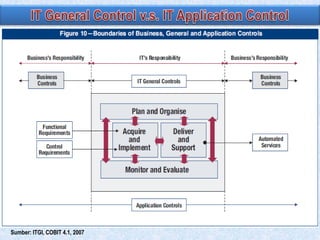
Sumber: ITGI, COBIT 4.1, 2007
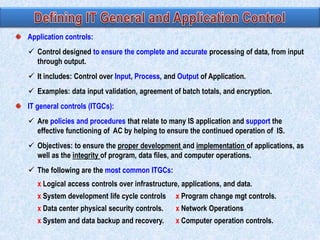
Application controls:
 Control designed to ensure the complete and accurate processing of data, from input
through output.
 It includes: Control over Input, Process, and Output of Application.
 Examples: data input validation, agreement of batch totals, and encryption.
IT general controls (ITGCs):
 Are policies and procedures that relate to many IS application and support the
effective functioning of AC by helping to ensure the continued operation of IS.
 Objectives: to ensure the proper development and implementation of applications, as
well as the integrity of program, data files, and computer operations.

 The following are the most common ITGCs:
x Logical access controls over infrastructure, applications, and data.
x System development life cycle controls

x Program change mgt controls.

x Data center physical security controls.

x Network Operations

x System and data backup and recovery.

x Computer operation controls.
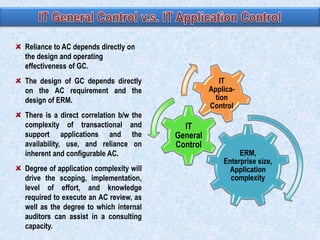
Reliance to AC depends directly on
the design and operating
effectiveness of GC.
IT
Application
Control

The design of GC depends directly
on the AC requirement and the
design of ERM.
There is a direct correlation b/w the
complexity of transactional and
support applications and the
availability, use, and reliance on
inherent and configurable AC.
Degree of application complexity will
drive the scoping, implementation,
level of effort, and knowledge
required to execute an AC review, as
well as the degree to which internal
auditors can assist in a consulting
capacity.

IT
General
Control

ERM,
Enterprise size,
Application
complexity
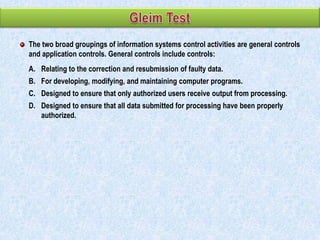
The two broad groupings of information systems control activities are general controls
and application controls. General controls include controls:
A. Relating to the correction and resubmission of faulty data.
B. For developing, modifying, and maintaining computer programs.
C. Designed to ensure that only authorized users receive output from processing.

D. Designed to ensure that all data submitted for processing have been properly
authorized.
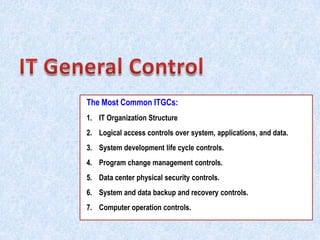
The Most Common ITGCs:
1. IT Organization Structure
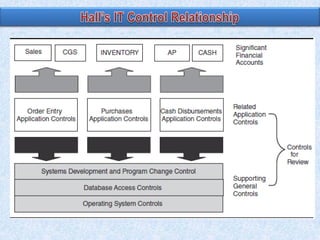
2. Logical access controls over system, applications, and data.
3. System development life cycle controls.
4. Program change management controls.

5. Data center physical security controls.
6. System and data backup and recovery controls.
7. Computer operation controls.
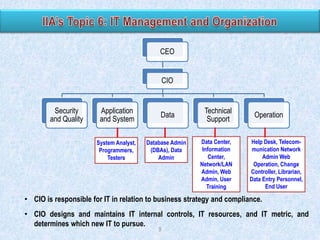
CEO
CIO

Security
and Quality

Application
and System

Data

System Analyst,
Programmers,
Testers

Database Admin
(DBAs), Data
Admin

Technical
Support
Data Center,
Information
Center,
Network/LAN
Admin, Web
Admin, User
Training

Operation
Help Desk, Telecommunication Network
Admin Web
Operation, Change
Controller, Librarian,
Data Entry Personnel,
End User

• CIO is responsible for IT in relation to business strategy and compliance.
• CIO designs and maintains IT internal controls, IT resources, and IT metric, and
determines which new IT to pursue.
9
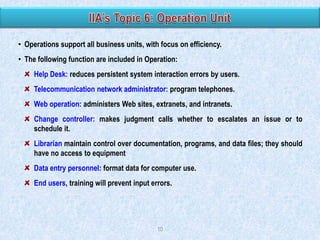
• Operations support all business units, with focus on efficiency.
• The following function are included in Operation:
Help Desk: reduces persistent system interaction errors by users.
Telecommunication network administrator: program telephones.
Web operation: administers Web sites, extranets, and intranets.
Change controller: makes judgment calls whether to escalates an issue or to
schedule it.
Librarian maintain control over documentation, programs, and data files; they should
have no access to equipment
Data entry personnel: format data for computer use.
End users, training will prevent input errors.

10
Technical supports keeps back-end system functioning and train end-users.
• Data center: secure location where servers or mainframes are kept, including controls
over electricity, HV AC, and physical access.
• Information center: a centralized location to supports staff, traditionally relating to enduser training and ongoing technical support.
• Network/LAN administrator: monitors and maintain network usage.
• Web administrator: develops the company web site, monitor it for inappropriate usage
by employee or others, and maintains appropriate bandwidth and availability.
• User training: take place in computer class rooms with a “sandbox” environment, or an
area in which application can be used in a testing mode.

11
• Database administrator (DBAs):
 Centrally organized, maintain their data resources in a central location that is shared
by all end users. Responsible for the security and integrity of the database,

 Trained to design, implement, and maintain databases, set database policy, and train
users. The DBA help auditors review raw data.
• Data administrator:
 Monitor data use and sets policies on how data can be stored, secured, and
released. They plan for future data needs and oversee database design and data
dictionary development.

12
Data security must be maintained while data is on site, while data is being transmitted
, when it is being stored.
User training in use of email and internet.
Prohibit user to install new application.
Application is kept in program libraries.
Use of special file deletion software.
Backing up data: data is backed up to an off-site storage facility, away from
operations.
 Include the grandfather, father, son concept.
 Control applied is similar with physical controls of primary operations.
 Physical form of back up (CD, USB) should be labeled in standard format.
Electronic vaulting: electronically transmit change-to-data to an off-site facility, and
then create backup tapes, so it eliminates physical transportation of the backup
tapes.
The functions include system analyst, programmers, and testers.
• System analyst: determine the necessary system outputs and how to achieve these
goals, either by HW/SW acquisition, upgrade planning, or internal development.
• Programmers: translate the system analysts‟ plans by creating or adapting applications.
Categories include:
Application developers (end-user application).

System developers (back-end system and networking)
Web developers (Web functionality, Web-based applications).
• Testers: test at the unit and system level. Programmers should not be used to test code
that they wrote themselves.

14
System Development:
 Systems prof include systems analyst, database designer, and programmer who
design and build the system (see IIA‟s).
 End users are those for whom the system is built. They are the managers and the
operations personnel.
 Stakeholders are individuals inside or outside the firm who have an interest in the
system, but are not end users.
System Maintenance:
 Once a new system has been designed and implemented, the systems maintenance
group assumes responsibility for keeping it current with user needs.
 The term maintenance refers to making changes to program logic to accommodate
shifts in user needs over time.

15
The focus of segregation control shifts from the operational level (transaction processing
tasks that computers now perform) to higher-level organizational relationships within the
computer services function.
Separating Systems Development from Computer Operations

 The segregation of systems development (both new systems development and
maintenance) and operations activities is of the greatest importance.
 Systems development and maintenance should create (and maintain) systems for
users, and should have no involvement in entering data, or running applications.

 Operations staff should run these systems and have no involvement in their design.
Separating Database Administration from Other Functions
 The DBA function is responsible for a number of critical tasks pertaining to
database security, including creating the database schema and user views,
assigning database access authority to users, monitoring database usage, and
planning for future expansion.
 Delegating these responsibilities to others who perform incompatible tasks
threatens database integrity. Thus, DBA function is organizationally independent of
operations, systems development, and maintenance.
16
When the programmer who codes the original programs also maintains the system (see
IIA), there will be control problems: inadequate documentation and the potential fraud.
Inadequate Documentation. Poor-quality systems documentation is a chronic IT
problem and a significant challenge for many organizations seeking SOX compliance.
When a system is poorly documented, it is difficult to interpret, test, and debug.
Therefore, the programmer who understands the system (the one who coded it)
maintains bargaining power and becomes relatively indispensable.
Program Fraud, involves making unauthorized changes to program modules for the
purpose of committing an illegal act. For the fraud to work successfully, however, the
programmer must be able to control the situation through exclusive and unrestricted
access to the application‟s programs.

17
In the organization of the IT function, the most important separation of duties is
A. Not allowing the data librarian to assist in data processing operations.
B. Ensuring that those responsible for programming the system do not have access
to data processing operations.
C. Having a separate information officer at the top level of the organization outside
of the accounting function.
D. Using different programming personnel to maintain utility programs from those
who maintain the application programs.
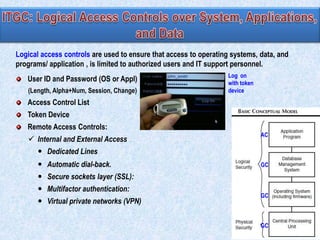
Logical access controls are used to ensure that access to operating systems, data, and
programs/ application , is limited to authorized users and IT support personnel.

User ID and Password (OS or Appl)
(Length, Alpha+Num, Session, Change)

Log on
with token
device

Access Control List
Token Device
Remote Access Controls:
 Internal and External Access

AC

 Dedicated Lines
 Automatic dial-back.

GC

 Secure sockets layer (SSL):
 Multifactor authentication:
 Virtual private networks (VPN)

GC

GC
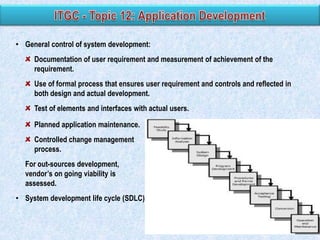
• General control of system development:
Documentation of user requirement and measurement of achievement of the
requirement.
Use of formal process that ensures user requirement and controls and reflected in
both design and actual development.

Test of elements and interfaces with actual users.
Planned application maintenance.
Controlled change management
process.
For out-sources development,
vendor‟s on going viability is
assessed.
• System development life cycle (SDLC)
• System Planning
Executives and IT mgt establish a long-term tech strategy that measures success of
IT fulfillment of business strategy.
SC set IT policy, approve plan, monitor and oversight, and assess the impact of IT.

• Systems Analysis
Point out deficiencies and opportunities in existing IT systems.
The result is request for system designs or selection, submitted to SC or IT mgt.
Feasibility studies:
- Identify the needs of all related parties and develop metrics for future assessment.
- Analyze proposal against: needs, resources, additional cost and future impact
(e.g. on existing system/HW, training), tech trend, alignment w/ strategy and obj.
- Perform cost-benefit analysis.

- Identify the best risk-based alternatives (e.g. no change, development, purchase)
Require approval from SC and IT mgt. Auditor involved to ensure that control and
auditability requirement is included in the project.
• System design/system selection
System design occurs in 2 phases: high level SD and detailed SD. Include
prototyping.
High level: 1. analyze inputs, process, and output of existing or proposed system, 2.
breakdown user requirement, 3.define functional .
• IA‟s review of SDLC activities

Auditor should examine controls specifically related to:
User approval, but the efficient one.
Authorization procedures for program changes and new code development.
Software testing and quality control.
Project staff proficiency.
If the standards are not being met or if IT managers are reluctant to fix an internal
control gap, the auditor should report the findings to top management.
• If internal development is selected (system is being adapted or purchased), to customize
and configure the system, programmers should follow the detailed system blueprint to
write or resuse code, debug code, convert existing data and processes to the new
system, reconfigure and require HW as needed, and train staff.
• Risks of customization and configuration:
 Creation of multiple version of programs.
 Unauthorized access.
 Overwriting of valid code.
• Control: programmers must get sign-off from superiors and source of code must be
protected during the project by a librarian.
• Computer-aided software engineering (CASE) tools automate systems development. It
can enforce an org‟s standards and provide an efficient audit trail and doc resources of
auditors.

• Auditors asses controls over compiling, storage of source code, and cataloging activity.
• Testing involves: (a) creating a testing plan, (b) collecting or creating testing scenarios,
(c) executing the test and managing test conditions, (d) collecting and evaluating
feedback, and (e) reporting the results.

• Testing and quality assurance are done in two phases:
 Unit/performance testing
It keeps the application in isolation to find internal bugs (problem in SW/HW).
 System testing
It strings together all program in application to find intercommunication bugs. The
new system‟s operation must be tested in an interface with other related system.
Before implementation, system faces final test for quality assurance and user
acceptance (implementation control).

• Testing terminology includes: load testing, throughput testing, alpha testing, beta
testing, pilot testing, regression testing, sociability testing (SOCT), and security testing.
• Testing may involve hacking, trying to make the system fail.
• Conversion: the process of closing down the old sys and migrating any data to the new
sys.
 Errors can be introduced at this points, include: incorrectly converting code,
truncating fields, use of the wrong decimal, or loss records.
 To reduce data migrating errors: use hash total, records count, visual inspection.
• Implementation: turning on the new system. Implementation approach:
 Bigbang/cutover: the entire system go “live” at the same time.
 Phased: implement by department or plant
 Pilot: implement a test version and run it for a given period prior full implementation.
 Parallel: run the old and new systems simultaneously for a period, requiring double
entry of all transactions.
• Documentation: record specification, security features, backup process, and prevent
fraud.
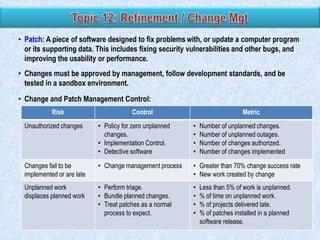
• Patch: A piece of software designed to fix problems with, or update a computer program
or its supporting data. This includes fixing security vulnerabilities and other bugs, and
improving the usability or performance.
• Changes must be approved by management, follow development standards, and be
tested in a sandbox environment.
• Change and Patch Management Control:
Risk

Control

Metric

Unauthorized changes

• Policy for zero unplanned
changes.
• Implementation Control.
• Detective software

•
•
•
•

Number of unplanned changes.
Number of unplanned outages.
Number of changes authorized.
Number of changes implemented

Changes fail to be
implemented or are late

• Change management process

• Greater than 70% change success rate
• New work created by change

Unplanned work
displaces planned work

• Perform triage.
• Bundle planned changes.
• Treat patches as a normal
process to expect.

•
•
•
•

Less than 5% of work is unplanned.
% of time on unplanned work.
% of projects delivered late.
% of patches installed in a planned
software release.
• Cost and benefit of IT investment can be tangible and intangible.
• The first part of IT selection process is feasibility study (cost-benefit analysis)
• Feasibility study starts by stating objectives and the requirement of the system.
Include identification of end-user‟s and management‟s needs.
• Feasibility studies can be subdivided:
 Scheduling: determine the schedule for IT staff and other IT resources.
 Operational: determine information requirements for operations.
 Technical: determine if system have required capacity, ability to upgrade, and
maintenance.
 Economic: determine if the organization has the available resources for a project and
sets a required return.
• IT out-sourcing should be considered when the same result can be achieved for the
lower cost and/or higher quality. But, IAr still need to perform TOC of the out-sourced IT.
Physical Location
The physical location of the computer center directly affects the risk of destruction to a
natural or man-made disaster.
Construction
A computer center should be located in a single-story building of solid construction
with controlled access. Utility lines should be underground and an air filtration system
should be in place that is capable of extracting pollens, dust, and dust mites.
(Physical) Access
Physical controls, such as locked doors, should be employed to limit access to the
center. Access should be controlled by a keypad or swipe card, and based on their
roles and responsibilities.
Air Conditioning
Logic errors can occur in computer hardware when temperatures depart significantly
from this optimal range. Also, the risk of circuit damage from static electricity is
increased when humidity drops. In contrast, high humidity can cause molds to grow
and paper products (such as source documents) to swell and jam equipment.
28
• The choice of networks types will affect IT control design.
• Computer network:
The sum of all infrastructure and applications required to connect two or more
networks nodes, which are computers and devices:

Computers (own processing power), servers (powerful computer with high
bandwidth), and client (recipient of server function) /server infrastructure (data
request server, database server).
Mainframe (large, scalable computer to process and store large amount of data)
and data terminal (input/output node for a mainframe system)

• Data Processing method:
Centralized: all data processing is performed by one or more large computers
housed at a central site that serves users throughout the organization.
Decentralized.

Distributed (decentralized processing, but networked together/centralized).
29
Fire Suppression
Some of the major features of such a system include the following:
1. Automatic and manual alarms should be placed in strategic locations.

2. There must be an automatic fire extinguishing system.
3. Manual fire extinguishers should be placed at strategic locations.
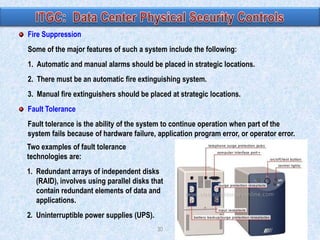
Fault Tolerance
Fault tolerance is the ability of the system to continue operation when part of the
system fails because of hardware failure, application program error, or operator error.
Two examples of fault tolerance
technologies are:
1. Redundant arrays of independent disks
(RAID), involves using parallel disks that
contain redundant elements of data and
applications.
2. Uninterruptible power supplies (UPS).
30
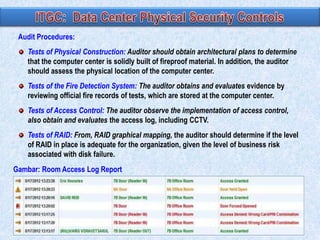
Audit Procedures:
Tests of Physical Construction: Auditor should obtain architectural plans to determine
that the computer center is solidly built of fireproof material. In addition, the auditor
should assess the physical location of the computer center.
Tests of the Fire Detection System: The auditor obtains and evaluates evidence by
reviewing official fire records of tests, which are stored at the computer center.
Tests of Access Control: The auditor observe the implementation of access control,
also obtain and evaluates the access log, including CCTV.
Tests of RAID: From, RAID graphical mapping, the auditor should determine if the level
of RAID in place is adequate for the organization, given the level of business risk
associated with disk failure.

Gambar: Room Access Log Report

31
• Elements of information security:
Confidentiality: policies for privacy and safeguarding confidential information and
protection against unauthorized interception.

Integrity: data is both complete and correct.
Availability: no/little downtime + recovery of data after disruptions, disaster, data
corruption.
• IT general controls and application controls are the basis for information protection.

• Information security has two aspects:
Data security: only authorized users can access, user access is restricted by user‟s
role, unauthorized is denied, and all changes to system are logged.
Security infrastructure: can be part of end-user application, and/or can be integral to
servers and mainframes, called security software (i.e.: computer program whose
purpose is to (help) secure a computer system or computer network). Example:
• Change list of authorized employee only from computer within the payroll dept.
• Terminal available only during business hours, automatically time out.
• Tell users when they last accessed the system.
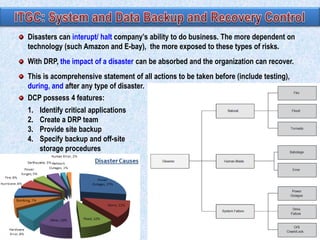
Disasters can interupt/ halt company‟s ability to do business. The more dependent on
technology (such Amazon and E-bay), the more exposed to these types of risks.

With DRP, the impact of a disaster can be absorbed and the organization can recover.
This is acomprehensive statement of all actions to be taken before (include testing),
during, and after any type of disaster.
DCP possess 4 features:
1.
2.
3.
4.

Identify critical applications
Create a DRP team
Provide site backup
Specify backup and off-site
storage procedures

33
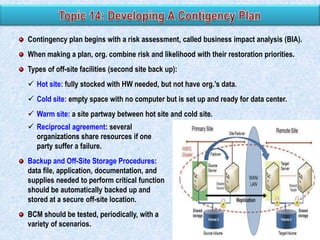
Contingency plan begins with a risk assessment, called business impact analysis (BIA).
When making a plan, org. combine risk and likelihood with their restoration priorities.
Types of off-site facilities (second site back up):
 Hot site: fully stocked with HW needed, but not have org.‟s data.
 Cold site: empty space with no computer but is set up and ready for data center.
 Warm site: a site partway between hot site and cold site.
 Reciprocal agreement: several
organizations share resources if one
party suffer a failure.
Backup and Off-Site Storage Procedures:
data file, application, documentation, and
supplies needed to perform critical function
should be automatically backed up and
stored at a secure off-site location.
BCM should be tested, periodically, with a
variety of scenarios.
If OS integrity is compromised, controls within individual accounting applications that
impact financial reporting may also be compromised. For this reason, the design and
assessment of OS security controls are SOX compliance issues.

OS Controls areas: access privileges, PW control, virus control, and audit trail control.
 Controlling Access Privileges
 Privileges determine which directories, files, applications, and other resources
an individual or group may access and do actions, according to their roles.

 For example, a cash receipts clerk who is granted the right to access and make
changes to the accounts receivable file.
 Password Control, should be controlled by a program / system
 Regular change.

 One-Time Passwords.
 Length
 Use the combination of alpha (small and caps) and numeric.
OS Controls areas: access privileges, PW control, virus control, and audit trail control.
 Virus Control (Controlling against Malicious and Destructive Programs)

 Types: viruses, worms, logic bombs, back doors, and Trojan horses, etc.
 Purchase SW and antivirus program , from reputable vendors.
 Contol end-user installation, download, internet access.
 System Audit Trail Controls

 System audit trails are logs that record significant activity at the system,
application, and user level, consist of 2 types of audit logs monitoring:
(1) logs of individual keystrokes (consider privacy): monitoring keystrokes.
(2) event-oriented logs: monitoring user ID acces, time, duration, access to
programs, files, databases, printers, and other resources accessed.
 Control: Unauthorized or terminated user; Periods of inactivity; Activity by user,
workgroup, or department; Log-on and log-off times; Failed log-on attempts;
Access to specific files or applications.
• Six indicators of poor vulnerability management:
Higher number of security incidents.
An inability to identify IT vulnerabilities systematically.
An inability to assess risks associated w/ vulnerabilities and to prioritize mitigation
efforts.
Poor working relationship between IT management and IT security.
Lack of an asset management.
Lack of a configuration mgt process integrated with vulnerability mitigation efforts.

• To improve management of vulnerability:
Enlist senior management support.
Inventory all IT assets and their associated vulnerabilities.
Prioritize mitigation/remediation steps according to risks.
Remediate vulnerabilities by presenting planned work projects to IT Management.

Continually update asset discovery, vulnerability testing and remediation processes.
Use automated patch management (to fix problem) and vulnerability discovery tools.
• Malware: design to gain access to a computer system w/o owner‟s permission w/ the purpose
of controlling or damaging the system or stealing data (financial and non financial).
• Virus: code that attaches itself to storage media, documents, or executable files and is spread
when the files are shared with others.
• Worms: self-replicating that disrupt networks or computers; does not attach itself to an
existing program or code; spread by sending copies of itself to terminals throughout a
network. Worms may act to open holes in networks security and. They may also trigger a
flood of illegitimate Denial of Service data transmissions that take up system bandwidth.
• Trojan horses: disguised to be innocuous/useful using social engineering (= set of rhetorical
techniques used to make fraudulent messages seem inviting and is initiated through
deceptive e-mails, instant messages, or phone contact).
Once installed, can install more harmful software for long-term use by the writer.
Banker programs: steal bank account data.
Backdoor or trapdoor: bypass normal authentication for remote access. Backdoor canbe
worm.
Root kits: tools installed at the root (administrator level)
Trojan-proxies: use an infected computer as a proxy to send spam.
Piggyback: allows unauthorized users to enter network by attaching data to authorized
packet.
Logic bomb: dormant malware activated by specified variable (action, date, size) to
destroy data.
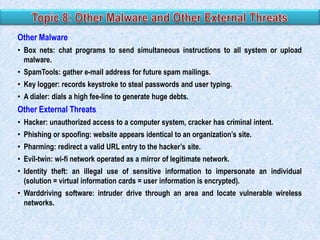
Other Malware
• Box nets: chat programs to send simultaneous instructions to all system or upload
malware.
• SpamTools: gather e-mail address for future spam mailings.
• Key logger: records keystroke to steal passwords and user typing.
• A dialer: dials a high fee-line to generate huge debts.

Other External Threats
• Hacker: unauthorized access to a computer system, cracker has criminal intent.
• Phishing or spoofing: website appears identical to an organization‟s site.
• Pharming: redirect a valid URL entry to the hacker‟s site.
• Evil-twin: wi-fi network operated as a mirror of legitimate network.
• Identity theft: an illegal use of sensitive information to impersonate an individual
(solution = virtual information cards = user information is encrypted).
• Warddriving software: intruder drive through an area and locate vulnerable wireless
networks.
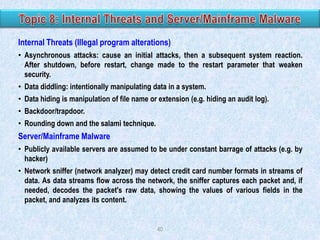
Internal Threats (Illegal program alterations)
• Asynchronous attacks: cause an initial attacks, then a subsequent system reaction.
After shutdown, before restart, change made to the restart parameter that weaken
security.
• Data diddling: intentionally manipulating data in a system.
• Data hiding is manipulation of file name or extension (e.g. hiding an audit log).
• Backdoor/trapdoor.

• Rounding down and the salami technique.

Server/Mainframe Malware
• Publicly available servers are assumed to be under constant barrage of attacks (e.g. by
hacker)
• Network sniffer (network analyzer) may detect credit card number formats in streams of
data. As data streams flow across the network, the sniffer captures each packet and, if
needed, decodes the packet's raw data, showing the values of various fields in the
packet, and analyzes its content.

40
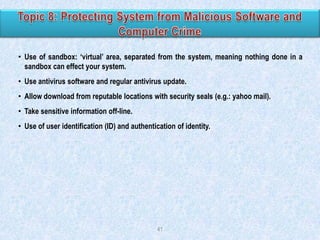
• Use of sandbox: „virtual‟ area, separated from the system, meaning nothing done in a
sandbox can effect your system.
• Use antivirus software and regular antivirus update.
• Allow download from reputable locations with security seals (e.g.: yahoo mail).

• Take sensitive information off-line.
• Use of user identification (ID) and authentication of identity.

41
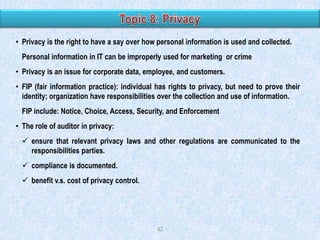
• Privacy is the right to have a say over how personal information is used and collected.
Personal information in IT can be improperly used for marketing or crime

• Privacy is an issue for corporate data, employee, and customers.
• FIP (fair information practice): individual has rights to privacy, but need to prove their
identity; organization have responsibilities over the collection and use of information.
FIP include: Notice, Choice, Access, Security, and Enforcement

• The role of auditor in privacy:
 ensure that relevant privacy laws and other regulations are communicated to the
responsibilities parties.
 compliance is documented.

 benefit v.s. cost of privacy control.

42
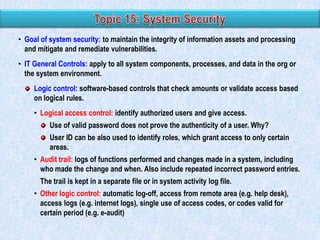
• Goal of system security: to maintain the integrity of information assets and processing
and mitigate and remediate vulnerabilities.
• IT General Controls: apply to all system components, processes, and data in the org or
the system environment.
Logic control: software-based controls that check amounts or validate access based
on logical rules.
• Logical access control: identify authorized users and give access.
Use of valid password does not prove the authenticity of a user. Why?
User ID can be also used to identify roles, which grant access to only certain
areas.
• Audit trail: logs of functions performed and changes made in a system, including
who made the change and when. Also include repeated incorrect password entries.
The trail is kept in a separate file or in system activity log file.
• Other logic control: automatic log-off, access from remote area (e.g. help desk),
access logs (e.g. internet logs), single use of access codes, or codes valid for
certain period (e.g. e-audit)
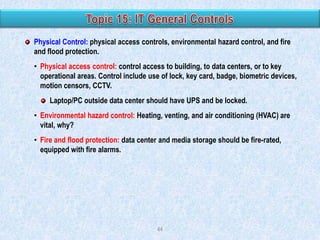
Physical Control: physical access controls, environmental hazard control, and fire
and flood protection.
• Physical access control: control access to building, to data centers, or to key
operational areas. Control include use of lock, key card, badge, biometric devices,
motion censors, CCTV.
Laptop/PC outside data center should have UPS and be locked.
• Environmental hazard control: Heating, venting, and air conditioning (HVAC) are
vital, why?
• Fire and flood protection: data center and media storage should be fire-rated,
equipped with fire alarms.

44
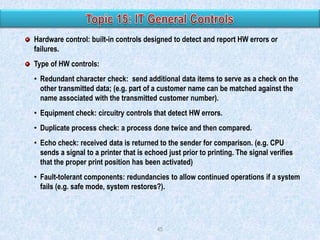
Hardware control: built-in controls designed to detect and report HW errors or
failures.
Type of HW controls:
• Redundant character check: send additional data items to serve as a check on the
other transmitted data; (e.g. part of a customer name can be matched against the
name associated with the transmitted customer number).
• Equipment check: circuitry controls that detect HW errors.
• Duplicate process check: a process done twice and then compared.
• Echo check: received data is returned to the sender for comparison. (e.g. CPU
sends a signal to a printer that is echoed just prior to printing. The signal verifies
that the proper print position has been activated)
• Fault-tolerant components: redundancies to allow continued operations if a system
fails (e.g. safe mode, system restores?).

45
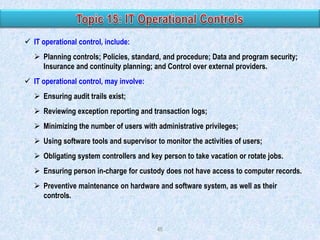
 IT operational control, include:
 Planning controls; Policies, standard, and procedure; Data and program security;
Insurance and continuity planning; and Control over external providers.
 IT operational control, may involve:
 Ensuring audit trails exist;
 Reviewing exception reporting and transaction logs;

 Minimizing the number of users with administrative privileges;
 Using software tools and supervisor to monitor the activities of users;
 Obligating system controllers and key person to take vacation or rotate jobs.
 Ensuring person in-charge for custody does not have access to computer records.

 Preventive maintenance on hardware and software system, as well as their
controls.

46
03.1 general control

03.1 general control

  • 3.
  • 4.
    Application controls:  Controldesigned to ensure the complete and accurate processing of data, from input through output.  It includes: Control over Input, Process, and Output of Application.  Examples: data input validation, agreement of batch totals, and encryption. IT general controls (ITGCs):  Are policies and procedures that relate to many IS application and support the effective functioning of AC by helping to ensure the continued operation of IS.  Objectives: to ensure the proper development and implementation of applications, as well as the integrity of program, data files, and computer operations.  The following are the most common ITGCs: x Logical access controls over infrastructure, applications, and data. x System development life cycle controls x Program change mgt controls. x Data center physical security controls. x Network Operations x System and data backup and recovery. x Computer operation controls.
  • 5.
    Reliance to ACdepends directly on the design and operating effectiveness of GC. IT Application Control The design of GC depends directly on the AC requirement and the design of ERM. There is a direct correlation b/w the complexity of transactional and support applications and the availability, use, and reliance on inherent and configurable AC. Degree of application complexity will drive the scoping, implementation, level of effort, and knowledge required to execute an AC review, as well as the degree to which internal auditors can assist in a consulting capacity. IT General Control ERM, Enterprise size, Application complexity
  • 7.
    The two broadgroupings of information systems control activities are general controls and application controls. General controls include controls: A. Relating to the correction and resubmission of faulty data. B. For developing, modifying, and maintaining computer programs. C. Designed to ensure that only authorized users receive output from processing. D. Designed to ensure that all data submitted for processing have been properly authorized.
  • 8.
    The Most CommonITGCs: 1. IT Organization Structure 2. Logical access controls over system, applications, and data. 3. System development life cycle controls. 4. Program change management controls. 5. Data center physical security controls. 6. System and data backup and recovery controls. 7. Computer operation controls.
  • 9.
    CEO CIO Security and Quality Application and System Data SystemAnalyst, Programmers, Testers Database Admin (DBAs), Data Admin Technical Support Data Center, Information Center, Network/LAN Admin, Web Admin, User Training Operation Help Desk, Telecommunication Network Admin Web Operation, Change Controller, Librarian, Data Entry Personnel, End User • CIO is responsible for IT in relation to business strategy and compliance. • CIO designs and maintains IT internal controls, IT resources, and IT metric, and determines which new IT to pursue. 9
  • 10.
    • Operations supportall business units, with focus on efficiency. • The following function are included in Operation: Help Desk: reduces persistent system interaction errors by users. Telecommunication network administrator: program telephones. Web operation: administers Web sites, extranets, and intranets. Change controller: makes judgment calls whether to escalates an issue or to schedule it. Librarian maintain control over documentation, programs, and data files; they should have no access to equipment Data entry personnel: format data for computer use. End users, training will prevent input errors. 10
  • 11.
    Technical supports keepsback-end system functioning and train end-users. • Data center: secure location where servers or mainframes are kept, including controls over electricity, HV AC, and physical access. • Information center: a centralized location to supports staff, traditionally relating to enduser training and ongoing technical support. • Network/LAN administrator: monitors and maintain network usage. • Web administrator: develops the company web site, monitor it for inappropriate usage by employee or others, and maintains appropriate bandwidth and availability. • User training: take place in computer class rooms with a “sandbox” environment, or an area in which application can be used in a testing mode. 11
  • 12.
    • Database administrator(DBAs):  Centrally organized, maintain their data resources in a central location that is shared by all end users. Responsible for the security and integrity of the database,  Trained to design, implement, and maintain databases, set database policy, and train users. The DBA help auditors review raw data. • Data administrator:  Monitor data use and sets policies on how data can be stored, secured, and released. They plan for future data needs and oversee database design and data dictionary development. 12
  • 13.
    Data security mustbe maintained while data is on site, while data is being transmitted , when it is being stored. User training in use of email and internet. Prohibit user to install new application. Application is kept in program libraries. Use of special file deletion software. Backing up data: data is backed up to an off-site storage facility, away from operations.  Include the grandfather, father, son concept.  Control applied is similar with physical controls of primary operations.  Physical form of back up (CD, USB) should be labeled in standard format. Electronic vaulting: electronically transmit change-to-data to an off-site facility, and then create backup tapes, so it eliminates physical transportation of the backup tapes.
  • 14.
    The functions includesystem analyst, programmers, and testers. • System analyst: determine the necessary system outputs and how to achieve these goals, either by HW/SW acquisition, upgrade planning, or internal development. • Programmers: translate the system analysts‟ plans by creating or adapting applications. Categories include: Application developers (end-user application). System developers (back-end system and networking) Web developers (Web functionality, Web-based applications). • Testers: test at the unit and system level. Programmers should not be used to test code that they wrote themselves. 14
  • 15.
    System Development:  Systemsprof include systems analyst, database designer, and programmer who design and build the system (see IIA‟s).  End users are those for whom the system is built. They are the managers and the operations personnel.  Stakeholders are individuals inside or outside the firm who have an interest in the system, but are not end users. System Maintenance:  Once a new system has been designed and implemented, the systems maintenance group assumes responsibility for keeping it current with user needs.  The term maintenance refers to making changes to program logic to accommodate shifts in user needs over time. 15
  • 16.
    The focus ofsegregation control shifts from the operational level (transaction processing tasks that computers now perform) to higher-level organizational relationships within the computer services function. Separating Systems Development from Computer Operations  The segregation of systems development (both new systems development and maintenance) and operations activities is of the greatest importance.  Systems development and maintenance should create (and maintain) systems for users, and should have no involvement in entering data, or running applications.  Operations staff should run these systems and have no involvement in their design. Separating Database Administration from Other Functions  The DBA function is responsible for a number of critical tasks pertaining to database security, including creating the database schema and user views, assigning database access authority to users, monitoring database usage, and planning for future expansion.  Delegating these responsibilities to others who perform incompatible tasks threatens database integrity. Thus, DBA function is organizationally independent of operations, systems development, and maintenance. 16
  • 17.
    When the programmerwho codes the original programs also maintains the system (see IIA), there will be control problems: inadequate documentation and the potential fraud. Inadequate Documentation. Poor-quality systems documentation is a chronic IT problem and a significant challenge for many organizations seeking SOX compliance. When a system is poorly documented, it is difficult to interpret, test, and debug. Therefore, the programmer who understands the system (the one who coded it) maintains bargaining power and becomes relatively indispensable. Program Fraud, involves making unauthorized changes to program modules for the purpose of committing an illegal act. For the fraud to work successfully, however, the programmer must be able to control the situation through exclusive and unrestricted access to the application‟s programs. 17
  • 18.
    In the organizationof the IT function, the most important separation of duties is A. Not allowing the data librarian to assist in data processing operations. B. Ensuring that those responsible for programming the system do not have access to data processing operations. C. Having a separate information officer at the top level of the organization outside of the accounting function. D. Using different programming personnel to maintain utility programs from those who maintain the application programs.
  • 19.
    Logical access controlsare used to ensure that access to operating systems, data, and programs/ application , is limited to authorized users and IT support personnel. User ID and Password (OS or Appl) (Length, Alpha+Num, Session, Change) Log on with token device Access Control List Token Device Remote Access Controls:  Internal and External Access AC  Dedicated Lines  Automatic dial-back. GC  Secure sockets layer (SSL):  Multifactor authentication:  Virtual private networks (VPN) GC GC
  • 20.
    • General controlof system development: Documentation of user requirement and measurement of achievement of the requirement. Use of formal process that ensures user requirement and controls and reflected in both design and actual development. Test of elements and interfaces with actual users. Planned application maintenance. Controlled change management process. For out-sources development, vendor‟s on going viability is assessed. • System development life cycle (SDLC)
  • 21.
    • System Planning Executivesand IT mgt establish a long-term tech strategy that measures success of IT fulfillment of business strategy. SC set IT policy, approve plan, monitor and oversight, and assess the impact of IT. • Systems Analysis Point out deficiencies and opportunities in existing IT systems. The result is request for system designs or selection, submitted to SC or IT mgt. Feasibility studies: - Identify the needs of all related parties and develop metrics for future assessment. - Analyze proposal against: needs, resources, additional cost and future impact (e.g. on existing system/HW, training), tech trend, alignment w/ strategy and obj. - Perform cost-benefit analysis. - Identify the best risk-based alternatives (e.g. no change, development, purchase) Require approval from SC and IT mgt. Auditor involved to ensure that control and auditability requirement is included in the project.
  • 22.
    • System design/systemselection System design occurs in 2 phases: high level SD and detailed SD. Include prototyping. High level: 1. analyze inputs, process, and output of existing or proposed system, 2. breakdown user requirement, 3.define functional . • IA‟s review of SDLC activities Auditor should examine controls specifically related to: User approval, but the efficient one. Authorization procedures for program changes and new code development. Software testing and quality control. Project staff proficiency. If the standards are not being met or if IT managers are reluctant to fix an internal control gap, the auditor should report the findings to top management.
  • 23.
    • If internaldevelopment is selected (system is being adapted or purchased), to customize and configure the system, programmers should follow the detailed system blueprint to write or resuse code, debug code, convert existing data and processes to the new system, reconfigure and require HW as needed, and train staff. • Risks of customization and configuration:  Creation of multiple version of programs.  Unauthorized access.  Overwriting of valid code. • Control: programmers must get sign-off from superiors and source of code must be protected during the project by a librarian. • Computer-aided software engineering (CASE) tools automate systems development. It can enforce an org‟s standards and provide an efficient audit trail and doc resources of auditors. • Auditors asses controls over compiling, storage of source code, and cataloging activity.
  • 24.
    • Testing involves:(a) creating a testing plan, (b) collecting or creating testing scenarios, (c) executing the test and managing test conditions, (d) collecting and evaluating feedback, and (e) reporting the results. • Testing and quality assurance are done in two phases:  Unit/performance testing It keeps the application in isolation to find internal bugs (problem in SW/HW).  System testing It strings together all program in application to find intercommunication bugs. The new system‟s operation must be tested in an interface with other related system. Before implementation, system faces final test for quality assurance and user acceptance (implementation control). • Testing terminology includes: load testing, throughput testing, alpha testing, beta testing, pilot testing, regression testing, sociability testing (SOCT), and security testing. • Testing may involve hacking, trying to make the system fail.
  • 25.
    • Conversion: theprocess of closing down the old sys and migrating any data to the new sys.  Errors can be introduced at this points, include: incorrectly converting code, truncating fields, use of the wrong decimal, or loss records.  To reduce data migrating errors: use hash total, records count, visual inspection. • Implementation: turning on the new system. Implementation approach:  Bigbang/cutover: the entire system go “live” at the same time.  Phased: implement by department or plant  Pilot: implement a test version and run it for a given period prior full implementation.  Parallel: run the old and new systems simultaneously for a period, requiring double entry of all transactions. • Documentation: record specification, security features, backup process, and prevent fraud.
  • 26.
    • Patch: Apiece of software designed to fix problems with, or update a computer program or its supporting data. This includes fixing security vulnerabilities and other bugs, and improving the usability or performance. • Changes must be approved by management, follow development standards, and be tested in a sandbox environment. • Change and Patch Management Control: Risk Control Metric Unauthorized changes • Policy for zero unplanned changes. • Implementation Control. • Detective software • • • • Number of unplanned changes. Number of unplanned outages. Number of changes authorized. Number of changes implemented Changes fail to be implemented or are late • Change management process • Greater than 70% change success rate • New work created by change Unplanned work displaces planned work • Perform triage. • Bundle planned changes. • Treat patches as a normal process to expect. • • • • Less than 5% of work is unplanned. % of time on unplanned work. % of projects delivered late. % of patches installed in a planned software release.
  • 27.
    • Cost andbenefit of IT investment can be tangible and intangible. • The first part of IT selection process is feasibility study (cost-benefit analysis) • Feasibility study starts by stating objectives and the requirement of the system. Include identification of end-user‟s and management‟s needs. • Feasibility studies can be subdivided:  Scheduling: determine the schedule for IT staff and other IT resources.  Operational: determine information requirements for operations.  Technical: determine if system have required capacity, ability to upgrade, and maintenance.  Economic: determine if the organization has the available resources for a project and sets a required return. • IT out-sourcing should be considered when the same result can be achieved for the lower cost and/or higher quality. But, IAr still need to perform TOC of the out-sourced IT.
  • 28.
    Physical Location The physicallocation of the computer center directly affects the risk of destruction to a natural or man-made disaster. Construction A computer center should be located in a single-story building of solid construction with controlled access. Utility lines should be underground and an air filtration system should be in place that is capable of extracting pollens, dust, and dust mites. (Physical) Access Physical controls, such as locked doors, should be employed to limit access to the center. Access should be controlled by a keypad or swipe card, and based on their roles and responsibilities. Air Conditioning Logic errors can occur in computer hardware when temperatures depart significantly from this optimal range. Also, the risk of circuit damage from static electricity is increased when humidity drops. In contrast, high humidity can cause molds to grow and paper products (such as source documents) to swell and jam equipment. 28
  • 29.
    • The choiceof networks types will affect IT control design. • Computer network: The sum of all infrastructure and applications required to connect two or more networks nodes, which are computers and devices: Computers (own processing power), servers (powerful computer with high bandwidth), and client (recipient of server function) /server infrastructure (data request server, database server). Mainframe (large, scalable computer to process and store large amount of data) and data terminal (input/output node for a mainframe system) • Data Processing method: Centralized: all data processing is performed by one or more large computers housed at a central site that serves users throughout the organization. Decentralized. Distributed (decentralized processing, but networked together/centralized). 29
  • 30.
    Fire Suppression Some ofthe major features of such a system include the following: 1. Automatic and manual alarms should be placed in strategic locations. 2. There must be an automatic fire extinguishing system. 3. Manual fire extinguishers should be placed at strategic locations. Fault Tolerance Fault tolerance is the ability of the system to continue operation when part of the system fails because of hardware failure, application program error, or operator error. Two examples of fault tolerance technologies are: 1. Redundant arrays of independent disks (RAID), involves using parallel disks that contain redundant elements of data and applications. 2. Uninterruptible power supplies (UPS). 30
  • 31.
    Audit Procedures: Tests ofPhysical Construction: Auditor should obtain architectural plans to determine that the computer center is solidly built of fireproof material. In addition, the auditor should assess the physical location of the computer center. Tests of the Fire Detection System: The auditor obtains and evaluates evidence by reviewing official fire records of tests, which are stored at the computer center. Tests of Access Control: The auditor observe the implementation of access control, also obtain and evaluates the access log, including CCTV. Tests of RAID: From, RAID graphical mapping, the auditor should determine if the level of RAID in place is adequate for the organization, given the level of business risk associated with disk failure. Gambar: Room Access Log Report 31
  • 32.
    • Elements ofinformation security: Confidentiality: policies for privacy and safeguarding confidential information and protection against unauthorized interception. Integrity: data is both complete and correct. Availability: no/little downtime + recovery of data after disruptions, disaster, data corruption. • IT general controls and application controls are the basis for information protection. • Information security has two aspects: Data security: only authorized users can access, user access is restricted by user‟s role, unauthorized is denied, and all changes to system are logged. Security infrastructure: can be part of end-user application, and/or can be integral to servers and mainframes, called security software (i.e.: computer program whose purpose is to (help) secure a computer system or computer network). Example: • Change list of authorized employee only from computer within the payroll dept. • Terminal available only during business hours, automatically time out. • Tell users when they last accessed the system.
  • 33.
    Disasters can interupt/halt company‟s ability to do business. The more dependent on technology (such Amazon and E-bay), the more exposed to these types of risks. With DRP, the impact of a disaster can be absorbed and the organization can recover. This is acomprehensive statement of all actions to be taken before (include testing), during, and after any type of disaster. DCP possess 4 features: 1. 2. 3. 4. Identify critical applications Create a DRP team Provide site backup Specify backup and off-site storage procedures 33
  • 34.
    Contingency plan beginswith a risk assessment, called business impact analysis (BIA). When making a plan, org. combine risk and likelihood with their restoration priorities. Types of off-site facilities (second site back up):  Hot site: fully stocked with HW needed, but not have org.‟s data.  Cold site: empty space with no computer but is set up and ready for data center.  Warm site: a site partway between hot site and cold site.  Reciprocal agreement: several organizations share resources if one party suffer a failure. Backup and Off-Site Storage Procedures: data file, application, documentation, and supplies needed to perform critical function should be automatically backed up and stored at a secure off-site location. BCM should be tested, periodically, with a variety of scenarios.
  • 35.
    If OS integrityis compromised, controls within individual accounting applications that impact financial reporting may also be compromised. For this reason, the design and assessment of OS security controls are SOX compliance issues. OS Controls areas: access privileges, PW control, virus control, and audit trail control.  Controlling Access Privileges  Privileges determine which directories, files, applications, and other resources an individual or group may access and do actions, according to their roles.  For example, a cash receipts clerk who is granted the right to access and make changes to the accounts receivable file.  Password Control, should be controlled by a program / system  Regular change.  One-Time Passwords.  Length  Use the combination of alpha (small and caps) and numeric.
  • 36.
    OS Controls areas:access privileges, PW control, virus control, and audit trail control.  Virus Control (Controlling against Malicious and Destructive Programs)  Types: viruses, worms, logic bombs, back doors, and Trojan horses, etc.  Purchase SW and antivirus program , from reputable vendors.  Contol end-user installation, download, internet access.  System Audit Trail Controls  System audit trails are logs that record significant activity at the system, application, and user level, consist of 2 types of audit logs monitoring: (1) logs of individual keystrokes (consider privacy): monitoring keystrokes. (2) event-oriented logs: monitoring user ID acces, time, duration, access to programs, files, databases, printers, and other resources accessed.  Control: Unauthorized or terminated user; Periods of inactivity; Activity by user, workgroup, or department; Log-on and log-off times; Failed log-on attempts; Access to specific files or applications.
  • 37.
    • Six indicatorsof poor vulnerability management: Higher number of security incidents. An inability to identify IT vulnerabilities systematically. An inability to assess risks associated w/ vulnerabilities and to prioritize mitigation efforts. Poor working relationship between IT management and IT security. Lack of an asset management. Lack of a configuration mgt process integrated with vulnerability mitigation efforts. • To improve management of vulnerability: Enlist senior management support. Inventory all IT assets and their associated vulnerabilities. Prioritize mitigation/remediation steps according to risks. Remediate vulnerabilities by presenting planned work projects to IT Management. Continually update asset discovery, vulnerability testing and remediation processes. Use automated patch management (to fix problem) and vulnerability discovery tools.
  • 38.
    • Malware: designto gain access to a computer system w/o owner‟s permission w/ the purpose of controlling or damaging the system or stealing data (financial and non financial). • Virus: code that attaches itself to storage media, documents, or executable files and is spread when the files are shared with others. • Worms: self-replicating that disrupt networks or computers; does not attach itself to an existing program or code; spread by sending copies of itself to terminals throughout a network. Worms may act to open holes in networks security and. They may also trigger a flood of illegitimate Denial of Service data transmissions that take up system bandwidth. • Trojan horses: disguised to be innocuous/useful using social engineering (= set of rhetorical techniques used to make fraudulent messages seem inviting and is initiated through deceptive e-mails, instant messages, or phone contact). Once installed, can install more harmful software for long-term use by the writer. Banker programs: steal bank account data. Backdoor or trapdoor: bypass normal authentication for remote access. Backdoor canbe worm. Root kits: tools installed at the root (administrator level) Trojan-proxies: use an infected computer as a proxy to send spam. Piggyback: allows unauthorized users to enter network by attaching data to authorized packet. Logic bomb: dormant malware activated by specified variable (action, date, size) to destroy data.
  • 39.
    Other Malware • Boxnets: chat programs to send simultaneous instructions to all system or upload malware. • SpamTools: gather e-mail address for future spam mailings. • Key logger: records keystroke to steal passwords and user typing. • A dialer: dials a high fee-line to generate huge debts. Other External Threats • Hacker: unauthorized access to a computer system, cracker has criminal intent. • Phishing or spoofing: website appears identical to an organization‟s site. • Pharming: redirect a valid URL entry to the hacker‟s site. • Evil-twin: wi-fi network operated as a mirror of legitimate network. • Identity theft: an illegal use of sensitive information to impersonate an individual (solution = virtual information cards = user information is encrypted). • Warddriving software: intruder drive through an area and locate vulnerable wireless networks.
  • 40.
    Internal Threats (Illegalprogram alterations) • Asynchronous attacks: cause an initial attacks, then a subsequent system reaction. After shutdown, before restart, change made to the restart parameter that weaken security. • Data diddling: intentionally manipulating data in a system. • Data hiding is manipulation of file name or extension (e.g. hiding an audit log). • Backdoor/trapdoor. • Rounding down and the salami technique. Server/Mainframe Malware • Publicly available servers are assumed to be under constant barrage of attacks (e.g. by hacker) • Network sniffer (network analyzer) may detect credit card number formats in streams of data. As data streams flow across the network, the sniffer captures each packet and, if needed, decodes the packet's raw data, showing the values of various fields in the packet, and analyzes its content. 40
  • 41.
    • Use ofsandbox: „virtual‟ area, separated from the system, meaning nothing done in a sandbox can effect your system. • Use antivirus software and regular antivirus update. • Allow download from reputable locations with security seals (e.g.: yahoo mail). • Take sensitive information off-line. • Use of user identification (ID) and authentication of identity. 41
  • 42.
    • Privacy isthe right to have a say over how personal information is used and collected. Personal information in IT can be improperly used for marketing or crime • Privacy is an issue for corporate data, employee, and customers. • FIP (fair information practice): individual has rights to privacy, but need to prove their identity; organization have responsibilities over the collection and use of information. FIP include: Notice, Choice, Access, Security, and Enforcement • The role of auditor in privacy:  ensure that relevant privacy laws and other regulations are communicated to the responsibilities parties.  compliance is documented.  benefit v.s. cost of privacy control. 42
  • 43.
    • Goal ofsystem security: to maintain the integrity of information assets and processing and mitigate and remediate vulnerabilities. • IT General Controls: apply to all system components, processes, and data in the org or the system environment. Logic control: software-based controls that check amounts or validate access based on logical rules. • Logical access control: identify authorized users and give access. Use of valid password does not prove the authenticity of a user. Why? User ID can be also used to identify roles, which grant access to only certain areas. • Audit trail: logs of functions performed and changes made in a system, including who made the change and when. Also include repeated incorrect password entries. The trail is kept in a separate file or in system activity log file. • Other logic control: automatic log-off, access from remote area (e.g. help desk), access logs (e.g. internet logs), single use of access codes, or codes valid for certain period (e.g. e-audit)
  • 44.
    Physical Control: physicalaccess controls, environmental hazard control, and fire and flood protection. • Physical access control: control access to building, to data centers, or to key operational areas. Control include use of lock, key card, badge, biometric devices, motion censors, CCTV. Laptop/PC outside data center should have UPS and be locked. • Environmental hazard control: Heating, venting, and air conditioning (HVAC) are vital, why? • Fire and flood protection: data center and media storage should be fire-rated, equipped with fire alarms. 44
  • 45.
    Hardware control: built-incontrols designed to detect and report HW errors or failures. Type of HW controls: • Redundant character check: send additional data items to serve as a check on the other transmitted data; (e.g. part of a customer name can be matched against the name associated with the transmitted customer number). • Equipment check: circuitry controls that detect HW errors. • Duplicate process check: a process done twice and then compared. • Echo check: received data is returned to the sender for comparison. (e.g. CPU sends a signal to a printer that is echoed just prior to printing. The signal verifies that the proper print position has been activated) • Fault-tolerant components: redundancies to allow continued operations if a system fails (e.g. safe mode, system restores?). 45
  • 46.
     IT operationalcontrol, include:  Planning controls; Policies, standard, and procedure; Data and program security; Insurance and continuity planning; and Control over external providers.  IT operational control, may involve:  Ensuring audit trails exist;  Reviewing exception reporting and transaction logs;  Minimizing the number of users with administrative privileges;  Using software tools and supervisor to monitor the activities of users;  Obligating system controllers and key person to take vacation or rotate jobs.  Ensuring person in-charge for custody does not have access to computer records.  Preventive maintenance on hardware and software system, as well as their controls. 46