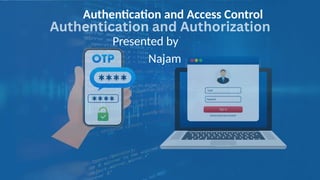
Authentication and Access Control
Presented by
Najam
Functionality vs Security
Authentication
The process of confirming that a user is who
they claim to be. For example, a user or
computer might prove their identity to a
server or client by using a username and
password.
Authorization (Access Control)
The process of determining what resources a
user can access and granting access based on
that level. For example, a user might have
access to a restaurant, but there are specific
things they are not allowed to do.
Authentication and Access Control
• Authentication is the process of verifying the identity of a user, device, or system through the presentation of
credentials, such as passwords, biometrics, or tokens.
• Key Elements of Authentication
• Authentication Factors:
– Knowledge-Based: Something the user knows (e.g., passwords, PINs).
– Possession-Based: Something the user has (e.g., smart cards, hardware tokens).
– Inherence-Based: Something the user is (e.g., biometrics like fingerprints, retina scans).
• Multifactor Authentication (MFA):
– Combines two or more authentication factors to increase security.
– Example: Using a password (knowledge-based) and a smartphone app (possession-based) for login.
• Single Sign-On (SSO):
– Allows users to log in once and access multiple systems without re-authenticating.
– Reduces password fatigue but concentrates risk if the primary account is compromised.
• Authentication Protocols:
– Examples include Kerberos, OAuth, and OpenID Connect, which secure the authentication process
during data exchange.
Common Authentication Methods
• Passwords:
– The most widely used method but vulnerable to brute force, phishing, and
dictionary attacks.
– Best practices include using strong, unique passwords and storing them securely
(e.g., hashing with salt).
• Biometrics:
– Includes fingerprints, voice recognition, and facial scans.
– Offers high security but raises privacy concerns and potential risks of spoofing.
• Two-Factor Authentication (2FA):
– Adds an extra layer of security by requiring a secondary verification step, such as a
one-time password (OTP) sent to a device.
• Public Key Infrastructure (PKI):
– Uses cryptographic techniques to authenticate entities, ensuring secure
communication.
Emerging Trends in Authentication Methods
• Passwordless Authentication:
– Relies on technologies like biometrics and security keys,
reducing dependency on traditional passwords.
• Behavioral Biometrics:
– Analyzes patterns like typing speed and mouse
movements for continuous authentication.
• Decentralized Authentication:
– Blockchain-based systems that eliminate central
authorities, reducing risks of breaches.
Challenges in Authentication
• Credential Theft:
• Stolen credentials through phishing or social engineering
pose significant risks.
• Usability vs. Security:
• Balancing user convenience with robust security measures
is challenging.
• Scalability:
• Adapting authentication systems for large-scale
environments with diverse users and devices.
Best Practices for Authentication
• Employ MFA (Multi-factor authentication) wherever
possible.
• Regularly audit and update authentication policies.
• Educate users on recognizing and avoiding phishing
attempts.
• Use adaptive authentication systems that assess the
context and risk level (e.g., unusual locations or
devices).
Authentication is not a one-size-fits-all solution but a continuously evolving
component of information security, adapting to new threats and technologies.
Access Control Models
• 1. Discretionary Access Control (DAC)
• 2. Mandatory Access Control (MAC)
• 3. Role-Based Access Control (RBAC)
• 4. Attribute-Based Access Control (ABAC)
Discretionary Access Control (DAC)
• Definition
• Discretionary Access Control allows resource owners to dictate who has access to
their resources. Access is determined by the resource owner's discretion.
– Key Features
• Ownership-Based: The owner of the resource has full control over its permissions.
• Flexible and Granular: Permissions can be assigned to individual users or groups.
• Access Control Lists (ACLs): Often implemented using lists that specify who can access the resource and
what actions they can perform (e.g., read, write, execute).
• Advantages
• Simple and user-friendly.
• Offers high granularity in access control.
• Disadvantages
• Vulnerable to privilege escalation and insider threats.
• Lack of centralized control makes it hard to enforce organization-wide policies.
• Example
• A user who creates a file on their computer can specify which other users can read, write, or execute it.
Mandatory Access Control (MAC)
• . Definition
• Mandatory Access Control enforces strict policies defined by a central authority, and users cannot override these
policies.
• Key Features
• Labels and Levels: Resources and users are assigned security labels (e.g., "Top Secret," "Confidential"). Access is
granted based on matching these labels.
• Non-Discretionary: Users cannot change access permissions.
• Strong Centralized Control: Only administrators can modify access policies.
• Advantages
• Provides robust security.
• Ideal for environments requiring strict confidentiality, such as military or government systems.
• Disadvantages
• Inflexible and less user-friendly.
• Difficult to implement and manage in dynamic environments.
• Example
• A military document labeled as "Top Secret" can only be accessed by users with the "Top Secret" clearance level.
Role-Based Access Control (RBAC)
• Definition
• Role-Based Access Control assigns permissions based on roles rather than individual
users, streamlining access management.
– Key Features
• Role-Centric: Users are assigned roles (e.g., Admin, Editor, Viewer), and roles have predefined permissions.
• Scalable: Suitable for large organizations with complex structures.
• Separation of Duties: Roles can be designed to prevent conflict of interest (e.g., a user cannot both approve
and audit transactions).
• Advantages
• Easier to manage in large organizations.
• Simplifies auditing and compliance processes.
• Disadvantages
• Initial role setup can be complex.
• Does not account for context or dynamic conditions.
• Example
• In a company, an "HR Manager" role might have access to employee records, while a "Finance Manager" role
has access to payroll data.
Attribute-Based Access Control (ABAC)
• Definition
• Attribute-Based Access Control uses attributes (characteristics of the user, resource, or
environment) to make access decisions dynamically.
– Key Features
• Policy-Based: Access decisions are based on policies that evaluate attributes.
• Dynamic and Context-Aware: Considers attributes like time, location, device type, and user role.
• Fine-Grained Control: Allows highly specific and conditional access policies.
• Advantages
• Highly flexible and adaptable to dynamic environments.
• Supports complex policies involving multiple attributes.
• Disadvantages
• High computational overhead.
• Complexity in defining and managing policies.
• Example
• A policy could grant access to a system only if the user is an employee (attribute: role) working during office
hours (attribute: time) from a company device (attribute: device type).
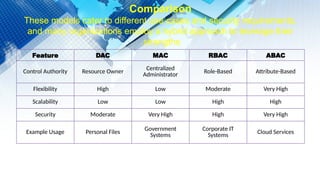
Feature DAC MAC RBAC ABAC
Control Authority Resource Owner
Centralized
Administrator Role-Based Attribute-Based
Flexibility High Low Moderate Very High
Scalability Low Low High High
Security Moderate Very High High Very High
Example Usage Personal Files
Government
Systems
Corporate IT
Systems
Cloud Services
Comparison
These models cater to different use cases and security requirements,
and many organizations employ a hybrid approach to leverage their
strengths
.

009 Authentication and Access Control.pptx

  • 1.
    Authentication and AccessControl Presented by Najam
  • 2.
    Functionality vs Security Authentication Theprocess of confirming that a user is who they claim to be. For example, a user or computer might prove their identity to a server or client by using a username and password. Authorization (Access Control) The process of determining what resources a user can access and granting access based on that level. For example, a user might have access to a restaurant, but there are specific things they are not allowed to do.
  • 3.
    Authentication and AccessControl • Authentication is the process of verifying the identity of a user, device, or system through the presentation of credentials, such as passwords, biometrics, or tokens. • Key Elements of Authentication • Authentication Factors: – Knowledge-Based: Something the user knows (e.g., passwords, PINs). – Possession-Based: Something the user has (e.g., smart cards, hardware tokens). – Inherence-Based: Something the user is (e.g., biometrics like fingerprints, retina scans). • Multifactor Authentication (MFA): – Combines two or more authentication factors to increase security. – Example: Using a password (knowledge-based) and a smartphone app (possession-based) for login. • Single Sign-On (SSO): – Allows users to log in once and access multiple systems without re-authenticating. – Reduces password fatigue but concentrates risk if the primary account is compromised. • Authentication Protocols: – Examples include Kerberos, OAuth, and OpenID Connect, which secure the authentication process during data exchange.
  • 4.
    Common Authentication Methods •Passwords: – The most widely used method but vulnerable to brute force, phishing, and dictionary attacks. – Best practices include using strong, unique passwords and storing them securely (e.g., hashing with salt). • Biometrics: – Includes fingerprints, voice recognition, and facial scans. – Offers high security but raises privacy concerns and potential risks of spoofing. • Two-Factor Authentication (2FA): – Adds an extra layer of security by requiring a secondary verification step, such as a one-time password (OTP) sent to a device. • Public Key Infrastructure (PKI): – Uses cryptographic techniques to authenticate entities, ensuring secure communication.
  • 5.
    Emerging Trends inAuthentication Methods • Passwordless Authentication: – Relies on technologies like biometrics and security keys, reducing dependency on traditional passwords. • Behavioral Biometrics: – Analyzes patterns like typing speed and mouse movements for continuous authentication. • Decentralized Authentication: – Blockchain-based systems that eliminate central authorities, reducing risks of breaches.
  • 6.
    Challenges in Authentication •Credential Theft: • Stolen credentials through phishing or social engineering pose significant risks. • Usability vs. Security: • Balancing user convenience with robust security measures is challenging. • Scalability: • Adapting authentication systems for large-scale environments with diverse users and devices.
  • 7.
    Best Practices forAuthentication • Employ MFA (Multi-factor authentication) wherever possible. • Regularly audit and update authentication policies. • Educate users on recognizing and avoiding phishing attempts. • Use adaptive authentication systems that assess the context and risk level (e.g., unusual locations or devices). Authentication is not a one-size-fits-all solution but a continuously evolving component of information security, adapting to new threats and technologies.
  • 8.
    Access Control Models •1. Discretionary Access Control (DAC) • 2. Mandatory Access Control (MAC) • 3. Role-Based Access Control (RBAC) • 4. Attribute-Based Access Control (ABAC)
  • 9.
    Discretionary Access Control(DAC) • Definition • Discretionary Access Control allows resource owners to dictate who has access to their resources. Access is determined by the resource owner's discretion. – Key Features • Ownership-Based: The owner of the resource has full control over its permissions. • Flexible and Granular: Permissions can be assigned to individual users or groups. • Access Control Lists (ACLs): Often implemented using lists that specify who can access the resource and what actions they can perform (e.g., read, write, execute). • Advantages • Simple and user-friendly. • Offers high granularity in access control. • Disadvantages • Vulnerable to privilege escalation and insider threats. • Lack of centralized control makes it hard to enforce organization-wide policies. • Example • A user who creates a file on their computer can specify which other users can read, write, or execute it.
  • 10.
    Mandatory Access Control(MAC) • . Definition • Mandatory Access Control enforces strict policies defined by a central authority, and users cannot override these policies. • Key Features • Labels and Levels: Resources and users are assigned security labels (e.g., "Top Secret," "Confidential"). Access is granted based on matching these labels. • Non-Discretionary: Users cannot change access permissions. • Strong Centralized Control: Only administrators can modify access policies. • Advantages • Provides robust security. • Ideal for environments requiring strict confidentiality, such as military or government systems. • Disadvantages • Inflexible and less user-friendly. • Difficult to implement and manage in dynamic environments. • Example • A military document labeled as "Top Secret" can only be accessed by users with the "Top Secret" clearance level.
  • 11.
    Role-Based Access Control(RBAC) • Definition • Role-Based Access Control assigns permissions based on roles rather than individual users, streamlining access management. – Key Features • Role-Centric: Users are assigned roles (e.g., Admin, Editor, Viewer), and roles have predefined permissions. • Scalable: Suitable for large organizations with complex structures. • Separation of Duties: Roles can be designed to prevent conflict of interest (e.g., a user cannot both approve and audit transactions). • Advantages • Easier to manage in large organizations. • Simplifies auditing and compliance processes. • Disadvantages • Initial role setup can be complex. • Does not account for context or dynamic conditions. • Example • In a company, an "HR Manager" role might have access to employee records, while a "Finance Manager" role has access to payroll data.
  • 12.
    Attribute-Based Access Control(ABAC) • Definition • Attribute-Based Access Control uses attributes (characteristics of the user, resource, or environment) to make access decisions dynamically. – Key Features • Policy-Based: Access decisions are based on policies that evaluate attributes. • Dynamic and Context-Aware: Considers attributes like time, location, device type, and user role. • Fine-Grained Control: Allows highly specific and conditional access policies. • Advantages • Highly flexible and adaptable to dynamic environments. • Supports complex policies involving multiple attributes. • Disadvantages • High computational overhead. • Complexity in defining and managing policies. • Example • A policy could grant access to a system only if the user is an employee (attribute: role) working during office hours (attribute: time) from a company device (attribute: device type).
  • 13.
    Feature DAC MACRBAC ABAC Control Authority Resource Owner Centralized Administrator Role-Based Attribute-Based Flexibility High Low Moderate Very High Scalability Low Low High High Security Moderate Very High High Very High Example Usage Personal Files Government Systems Corporate IT Systems Cloud Services Comparison These models cater to different use cases and security requirements, and many organizations employ a hybrid approach to leverage their strengths .