2
Access Control
• “Theprevention of unauthorized use of a
resource, including the prevention of use of a
resource in an unauthorized manner“
• Central element of computer security
• Assume have users and groups
– authenticate to system
– assigned access rights to certain resources on system
4
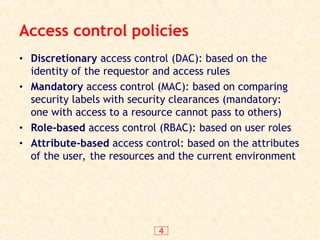
Access control policies
•Discretionary access control (DAC): based on the
identity of the requestor and access rules
• Mandatory access control (MAC): based on comparing
security labels with security clearances (mandatory:
one with access to a resource cannot pass to others)
• Role-based access control (RBAC): based on user roles
• Attribute-based access control: based on the attributes
of the user, the resources and the current environment
5.
5
Access Control Requirements
•Reliable input: a mechanism to authenticate
• Fine and coarse specifications: regulate access at
varying levels (e.g., an attribute or entire DB)
• Least privilege: min authorization to do its work
• Separation of duty: divide steps among different
individuals
• Open and closed policies: accesses specifically
authorized or all accesses except those prohibited
• Administrative policies: who can add, delete, modify
rules
6.
6
Access Control Elements
•Subject: entity that can access objects
– a process representing user/application
– often have 3 classes: owner, group, world
• Object: access controlled resource
– e.g. files, directories, records, programs etc
– number/type depend on environment
• Access right: way in which subject accesses an
object
– e.g. read, write, execute, delete, create, search
7.
7
Discretionary Access Control
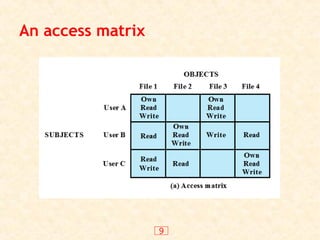
•Often provided using an access matrix
– lists subjects in one dimension (rows)
– lists objects in the other dimension (columns)
– each entry specifies access rights of the specified
subject to that object
• Access matrix is often sparse
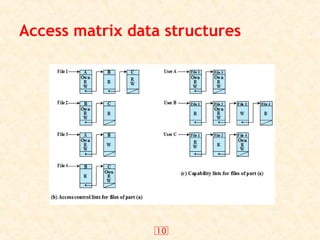
• Can decompose by either row or column
8.
8
Access Control Structures
•Access control lists (decomposed by column)
• Capability tickets (decomposed by row)
• See page 119
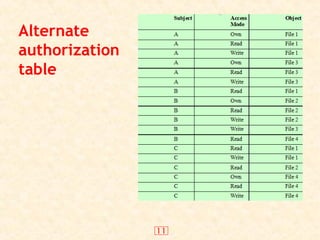
• Also see alternative table representation on
page 120 (tabular but not sparse)
15
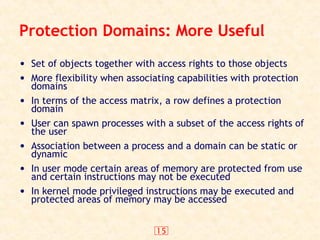
Protection Domains: MoreUseful
• Set of objects together with access rights to those objects
• More flexibility when associating capabilities with protection
domains
• In terms of the access matrix, a row defines a protection
domain
• User can spawn processes with a subset of the access rights of
the user
• Association between a process and a domain can be static or
dynamic
• In user mode certain areas of memory are protected from use
and certain instructions may not be executed
• In kernel mode privileged instructions may be executed and
protected areas of memory may be accessed
16.
16
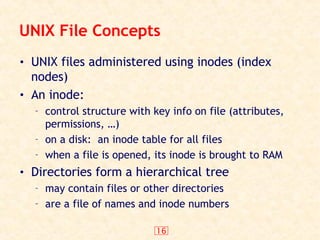
UNIX File Concepts
•UNIX files administered using inodes (index
nodes)
• An inode:
– control structure with key info on file (attributes,
permissions, …)
– on a disk: an inode table for all files
– when a file is opened, its inode is brought to RAM
• Directories form a hierarchical tree
– may contain files or other directories
– are a file of names and inode numbers
17.
17
UNIX File AccessControl
• Unique user identification number
(user ID)
• Member of a primary group
identified by a group ID
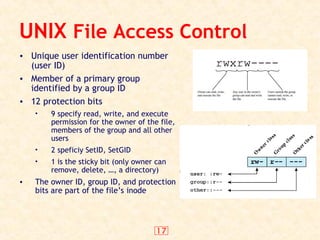
• 12 protection bits
• 9 specify read, write, and execute
permission for the owner of the file,
members of the group and all other
users
• 2 speficiy SetID, SetGID
• 1 is the sticky bit (only owner can
remove, delete, …, a directory)
• The owner ID, group ID, and protection
bits are part of the file’s inode
18.
18
UNIX File AccessControl
• “set user ID”(SetUID) or “set group ID”(SetGID)
– system temporarily uses rights of the file owner/group in
addition to the real user’s rights when making access control
decisions
– enables privileged programs to access files/resources not
generally accessible
• Sticky bit
– on directory limits rename/move/delete to owner
• Superuser
– is exempt from usual access control restrictions
19.
19
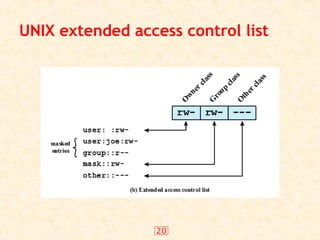
UNIX Access ControlLists
• Modern UNIX systems support ACLs
• Can specify any number of additional users/groups
and associated rwx permissions
• When access is required
– select most appropriate ACL
• owner, named users, owning/named groups, others
– check if have sufficient permissions for access
23
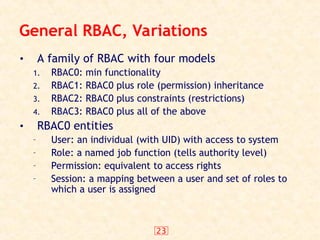
General RBAC, Variations
•A family of RBAC with four models
1. RBAC0: min functionality
2. RBAC1: RBAC0 plus role (permission) inheritance
3. RBAC2: RBAC0 plus constraints (restrictions)
4. RBAC3: RBAC0 plus all of the above
• RBAC0 entities
– User: an individual (with UID) with access to system
– Role: a named job function (tells authority level)
– Permission: equivalent to access rights
– Session: a mapping between a user and set of roles to
which a user is assigned
25
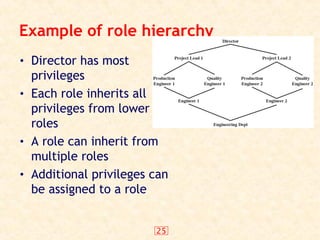
Example of rolehierarchy
• Director has most
privileges
• Each role inherits all
privileges from lower
roles
• A role can inherit from
multiple roles
• Additional privileges can
be assigned to a role
26.
26
Constraints
• A condition(restriction) on a role or between
roles
– Mutually exclusive
• role sets such that a user can be assigned to only one of the
role in the set
• Any permission can be granted to only one role in the set
– Cardinality: set a maximum number (of users) wrt a
role (e.g., a department chair role)
– Prerequisite role: a user can be assigned a role only
if that user already has been assigned to some other
role
27.
27
Attribute-based access control
•Fairly recent
• Define authorizations that express conditions on
properties of both the resource and the subject
– Each resource has an attribute (e.g., the subject that
created it)
– A single rule states ownership privileges for the
creators
• Strength: its flexibility and expressive power
• Considerable interest in applying the model to
cloud services
29
Subject attributes
• Asubject is an active entity that causes
information to flow among objects or changes
the system state
• Attributes define the identity and
characteristics of the subject
– Name
– Organization
– Job title
30.
30
Object attribute
• Anobject (or resource) is a passive information
system-related entity containing or receiving
information
• Objects have attributes that can be leveraged
to make access control decisions
– Title
– Author
– Date
31.
31
Environment attributes
• Describethe operational, technical, and even
situational environment or context in which the
information access occurs
– Current date
– Current virus/hacker activities
– Network security level
– Not associated with a resource or subject
• These attributes have so far been largely
ignored in most access control policies
32.
32
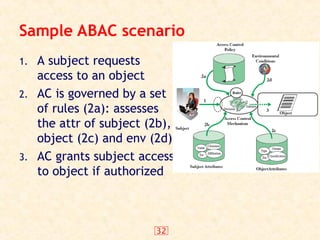
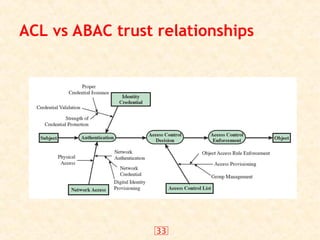
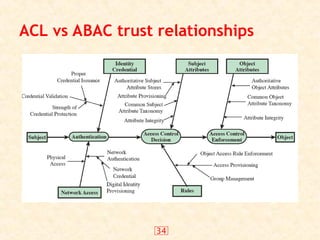
Sample ABAC scenario
1.A subject requests
access to an object
2. AC is governed by a set
of rules (2a): assesses
the attr of subject (2b),
object (2c) and env (2d)
3. AC grants subject access
to object if authorized
35
Identity, Credential, andAccess
Management (ICAM)
• A comprehensive approach to managing and
implementing digital identities, credentials, and
access control
• Developed by the U.S. government
• Designed to create trusted digital identity
representations of individuals and nonperson
entities (NPEs)
• A credential is an object or data structure that
authoritatively binds an identity to a token
possessed and controlled by a subscriber
• Use the credentials to provide authorized access to
an agency’s resources
36.
36
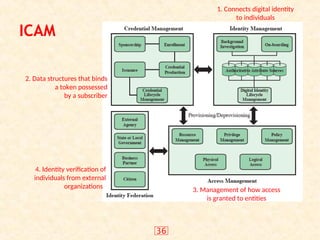
ICAM
1. Connects digitalidentity
to individuals
2. Data structures that binds
a token possessed
by a subscriber
3. Management of how access
is granted to entities
4. Identity verification of
individuals from external
organizations
41
Summary
• introduced accesscontrol principles
– subjects, objects, access rights
• discretionary access controls
– access matrix, access control lists (ACLs), capability
tickets
– UNIX traditional and ACL mechanisms
• role-based access control
• case study
Editor's Notes
#2 This lesson focuses on access control enforcement within a computer system. We can view access control as the central element of computer security. ITU-T Recommendation X.800 defines access control as shown on the slide. The principal objectives of computer security are to prevent unauthorized users from gaining access to resources, to prevent legitimate users from accessing resources in an unauthorized manner, and to enable legitimate users to access resources in an authorized manner. We consider the situation of a population of users and user groups that are able to authenticated to a system and are then assigned access rights to certain resources on the system.
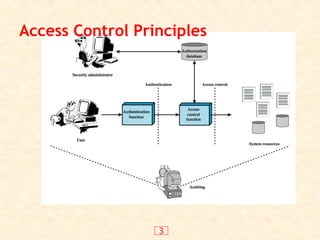
#3 This chapter deals with a narrower, more specific concept of access control which implements a security policy that specifies who or what may have access to each specific system resource and the type of access that is permitted in each instance. Figure 4.1 from the text shows the broader context of access control. In addition to access control, this broader context involves the following entities and functions:
• Authentication: The verification an identity claimed by or for a system entity.
• Authorization: The granting of a right or permission to a system entity to access a system resource. This function determines who is trusted for a given purpose.
• Audit: An independent review and examination of system records and activities in order to test for adequacy of system controls, to ensure compliance with established policy and operational procedures, to detect breaches in security, and to recommend any indicated changes in control, policy and procedures.
An access control mechanism mediates between a user (or a process executing on behalf of a user) and system resources, such as files and database. The system must first authenticate a user seeking access. Then, the access control function determines if the specific requested access by this user is permitted. A security administrator maintains an authorization database that specifies what type of access to which resources is allowed for this user. The access control function consults this database to determine whether to grant access. An auditing function monitors and keeps a record of user accesses to system resources. All operating systems have at least a rudimentary, and in many cases a quite robust, access control component. Particular applications or utilities, such as a database management system, also incorporate access control functions.
#4 This lesson focuses on access control enforcement within a computer system. We can view access control as the central element of computer security. ITU-T Recommendation X.800 defines access control as shown on the slide. The principal objectives of computer security are to prevent unauthorized users from gaining access to resources, to prevent legitimate users from accessing resources in an unauthorized manner, and to enable legitimate users to access resources in an authorized manner. We consider the situation of a population of users and user groups that are able to authenticated to a system and are then assigned access rights to certain resources on the system.
#5 [VIME06] lists the following concepts features of an access control system:
• Reliable input: it assumes that a user is authentic; thus, an authentication mechanism is needed as a front end to an access control system. Other inputs to the access control system must also be reliable.
• Support for fine and coarse specifications: fine-grained specifications allow access regulated at the level of individual fields / records in files; and each individual access by a user rather than a sequence of accesses. System administrators should also be able to choose coarse-grain specification for some classes of resource access.
• Least privilege: it should be implemented so that each system entity is granted the minimum system resources and authorizations needed to do its work. This principle tends to limit damage that can be caused by an accident, error, or unauthorized act.
• Separation of duty: should divide steps in a system function among different individuals, so as to keep a single individual from subverting the process.
• Open and closed policies: a closed policy only allows accesses that are specifically authorized; an open policy allows all accesses except those expressly prohibited.
• Policy combinations and conflict resolution: may apply multiple policies to a given class of resources, and need a procedure to resolves conflicts between policies.
• Administrative policies: to specify who can add, delete, or modify authorization rules, and also need access control and other control mechanisms to enforce these administrative policies.
#6 The basic elements of access control are: subject, object, and access right.
A subject is an entity capable of accessing objects, usually a process. Any user or application actually gains access to an object by means of a process that represents it. A subject is typically held accountable for the actions they have initiated, and an audit trail may be used to associate with a subject and security-relevant actions performed on an object. Basis access control systems typically define three classes of subject:
• Owner: This may be the creator of a resource, such as a file. For system resources, ownership may belong to a system administrator. For project resources, a project administrator or leader my be assigned ownership.
• Group: In addition to the privileges assigned to an owner, a named group of users may also be granted access rights, such that membership in the group is sufficient to exercise these access rights.
• World: The least amount of access is granted to users who are able to access the system but are not included in the categories owner and group for this resource.
An object is any resource to which access is controlled. In general, and object is an entity used to contain and/or receive information. Examples include records, blocks, pages, segments, files, portions of files, directories, directory trees, mailboxes, messages, and programs. The number and types of objects to be protected by an access control system depends on the environment in which access control.
An access right describes the way in which a subject may access an object. Access rights could include the following: read, write, execute, delete, create, search.
#7 For discretionary access control, a general approach to access control as exercised by an operating system or a database management system is that of an access matrix. One dimension of the matrix consists of identified subjects that may attempt data access. Typically, this list will consist of individual users or user groups, although access could be controlled for terminals, hosts, or applications instead of or in addition to users. The other dimension lists the objects that may be accessed. At the greatest level of detail, objects may be individual data fields. More aggregate groupings, such as records, files, or even the entire database, may also be objects in the matrix. Each entry in the matrix indicates the access rights of that subject for that object. In practice, an access matrix is usually sparse and is implemented by decomposition in one of two ways, as we show on the next slide.
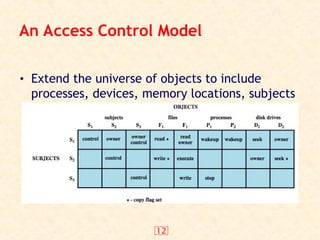
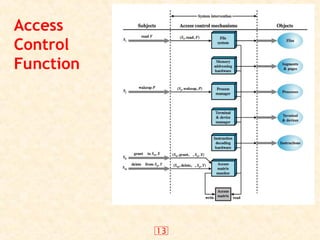
#13 From a logical or functional point of view, a separate access control module is associated with each type of object, as shown in Figure 4.5. The module evaluates each request by a subject to an object to determine if the access right exists. An access attempt triggers the following steps:
A subject S0 issues a request of type for object X.
The request causes the system (operating system or an access control interface module) to generate a message of the form (S0, , X) to the controller for X
The controller interrogates the access matrix A to determine if is in A[S0, X]. If so, the access is allowed, if not the access is denied and a protection violation occurs.
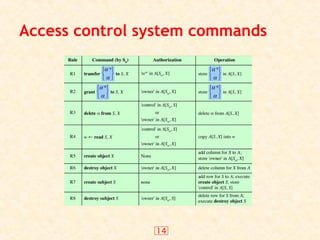
Figure 4.5 suggests that every access by a subject to an object is mediated by the controller for that object, and that the controller's decision is based on the current contents of the matrix. In addition, certain subjects have the authority to make specific changes to the access matrix. A request to modify the access matrix is treated as an access to the matrix, with the individual entries in the matrix treated as objects. Such accesses are mediated by an access matrix controller, which controls updates to the matrix. The model also includes a set of rules that govern modifications to the access matrix, such as those shown in Table 4.2 in the text. These include means of accessing, transferring, granting, and deleting access rights; and with who can create and delete subjects and objects. The ability of one subject to create another subject and to have 'owner' access right to that subject can be used to define a hierarchy of subjects. For example, in Figure 4.4 on the previous slide, S1 owns S2 and S3, so that S2 and S3 are subordinate to S1.
#15 The access control matrix model that we have discussed so far associates a set of capabilities with a user. A more general and more flexible approach, proposed in is to associate capabilities with protection domains. A protection domain is a set of objects together with access rights to those objects. In terms of the access matrix, a row defines a protection domain. So far, we have equated each row with a specific user. So, in this limited model, each user has a protection domain, and any processes spawned by the user have access rights defined by the same protection domain.
A more general concept of protection domain provides more flexibility. For example, a user can spawn processes with a subset of the access rights of the user, defined as a new protection domain. This limits the capability of the process. Such a scheme could be used by a server process to spawn processes for different classes of users. Also a user could define a protection domain for a program that is not fully trusted, so that its access is limited to a safe subset of the user's access rights.
The association between a process and a domain can be static or dynamic. For example, a process may execute a sequence of procedures and require different access rights for each procedure, such as read file and write file. In general, we would like to minimize the access rights that any user or process has at any one time; the use of protection domains provides a simple means to satisfy this requirement.
#16 Now define some basic concepts concerning UNIX files and directories.
All types of UNIX files are administered by the operating system by means of inodes. An inode (index node) is a control structure that contains the key information needed by the operating system for a particular file. Several file names may be associated with a single inode, but an active inode is associated with exactly one file, and each file is controlled by exactly one inode. The attributes of the file as well as its permissions and other control information are stored in the inode. On the disk, there is an inode table, or inode list, that contains the inodes of all the files in the file system. When a file is opened, its inode is brought into main memory and stored in a memory-resident inode table.
Directories are structured in a hierarchical tree. Each directory can contain files and/or other directories. A directory that is inside another directory is referred to as a subdirectory. A directory is simply a file that contains a list of file names plus pointers to associated inodes. Thus, associated with each directory is its own inode.
#18 If the “set user ID”(SetUID) and “set group ID”(SetGID) are set on an executable file, the operating system functions as follows. When a user (with execute privileges for this file) executes the file,the system temporarily allocates the rights of the user’s ID of the file creator, or the file’s group, respectively, to those of the user executing the file. These are known as the “effective user ID”and “effective group ID” and are used in addition to the “real user ID” and “real group ID” of the executing user when making access control decisions for this program. This change is only effective while the program is being executed. This feature enables the creation and use of privileged programs that may use files normally inaccessible to other users. It enables users to access certain files in a controlled fashion. Alternatively, when applied to a directory, the SetGID permission indicates that newly created files will inherit the group of this directory. The SetUID permission is ignored. The final permission bit is the “Sticky”bit. When set on a file, this originally indicated that the system should retain the file contents in memory following execution. This is no longer used. When applied to a directory, though, it specifies that only the owner of any file in the directory can rename, move, or delete that file. This is useful for managing files in shared temporary directories.
One particular user ID is designated as “superuser.” The superuser is exempt from the usual file access control constraints and has systemwide access. Any program that is owned by, and SetUID to, the “superuser” potentially grants unrestricted access to the system to any user executing that program. Hence great care is needed when writing such programs. This access scheme is adequate when file access requirements align with users and a modest number of groups of users.
#19 Many modern UNIX and UNIX-based operating systems support access control lists, including FreeBSD, OpenBSD, Linux, and Solaris. FreeBSD allows the administrator to assign a list of UNIX user IDs and groups to a file by using the setfacl command. Any number of users and groups can be associated with a file, each with three protection bits (read, write, execute), offering a flexible mechanism for assigning access rights. A file need not have an ACL but may be protected solely by the traditional UNIX file access mechanism. FreeBSD files include an additional protection bit that indicates whether the file has an extended ACL. FreeBSD and most UNIX implementations that support extended ACLs use the following strategy:
The owner / other class entries have the same meaning as normal.
The group class entry in specifies group permissions. These permissions represent the maximum permissions that can be assigned to named users or named groups, other than the owning user, and hence functions as a mask.
Additional named users and named groups may be associated with the file, each with a 3-bit permission field.
When a process requests access to a file system object, two steps are performed. Step 1 selects the ACL entry that most closely matches the requesting process. The ACL entries are looked at in the following order: owner, named users, (owning or named) groups, others. Only a single entry determines access. Step 2 checks if the matching entry (which may be one of several group entries) contains sufficient permissions.
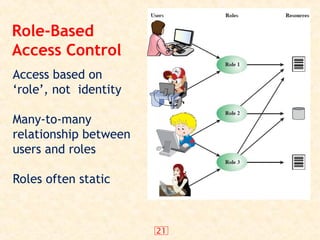
#21 Traditional DAC systems define the access rights of individual users and groups of users. In contrast, RBAC is based on the roles that users assume in a system rather than the user's identity. Typically, RBAC models define a role as a job function within an organization. RBAC systems assign access rights to roles instead of individual users. In turn, users are assigned to different roles, either statically or dynamically, according to their responsibilities. RBAC now enjoys widespread commercial use and remains an area of active research.
The relationship of users to roles is many to many, as is the relationship of roles to resources, or system objects, as shown here in Figure 4.7 from the text. The set of users changes, in some environments frequently and the assignment of a user to one or more roles may also be dynamic. The set of roles in the system in most environments is likely to be static, with only occasional additions or deletions. Each role will have specific access rights to one or more resources. The set of resources and the specific access rights associated with a particular role are also likely to change only infrequently.
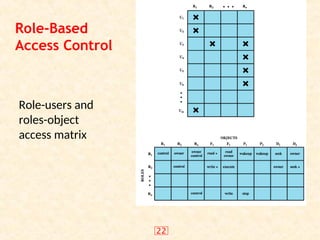
#22 We can use the access matrix representation to depict the key elements of an RBAC system in simple terms, as shown in Figure 4.8. The upper matrix relates individual users to roles. Typically there are many more users than roles. Each matrix entry is either blank or marked, the latter indicating that this user is assigned to this role. Note that a single user may be assigned multiple roles (more than one mark in a row) and that multiple users may be assigned to a single role (more than one mark in a column). The lower matrix has the same structure as the DAC access control matrix, with roles as subjects. Typically, there are few roles and many objects, or resources. In this matrix the entries are the specific access rights enjoyed by the roles. Note that a role can be treated as an object, allowing the definition of role hierarchies.
RBAC lends itself to an effective implementation of the principle of least privilege. Each role should contain the minimum set of access rights needed for that role. A user is assigned to a role that enables him or her to perform only what is required for that role. Multiple users assigned to the same role, enjoy the same minimal set of access rights.
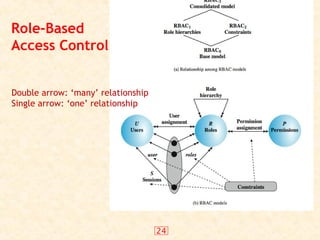
#24 A variety of functions and services can be included under the general RBAC approach. [SAND 96] defines a family of reference models, that consists of four models that are related to each other as shown in Figure 4.9a. and in Table 4.3 in the text. RBAC0 is contains the minimum functionality for an RBAC system. RBAC1 includes the RBAC0 functionality and adds role hierarchies, which enable one role to inherit permissions from another role. RBAC2 includes RBAC0 and adds constraints, which restricts the ways in which the components of a RBAC system may be configured. RBAC3 includes RBAC0 plus the added functionality of both RBAC1 and RBAC2. An RBAC0 system contains the four types of entities:
• User: An individuals that has access to this computer system, & associated user ID.
• Role: A named job function within the organization that controls this computer system. Typically, associated with each role is a description of the authority and responsibility conferred on this role, and on any user who assumes this role.
• Permission: An approval of a particular mode of access to one or more objects. Equivalent terms are access right, privilege, and authorization.
• Session: A mapping between a user and an activated subset of the set of roles to which the user is assigned.
The solid lines in Figure 4.9b indicate relationships, or mappings, with a single arrowhead indicating one and a double arrowhead indicating many. Thus, there is a many-to-many relationship between users and roles: one user may have multiple roles, and multiple users may be assigned to a single role. Similarly, there is a many-to-many relationship between roles and permissions. See text for more details.
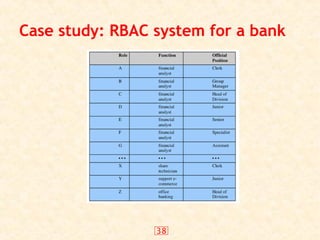
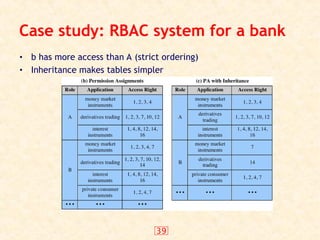
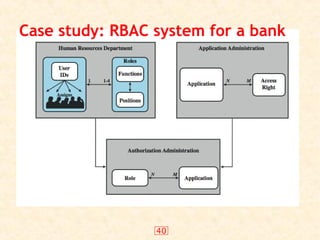
#40 The Dresdner Bank has implemented an RBAC system which is system wide and in which the determination of access rights is compartmentalized into three different administrative units for greater security. Roles within the organization are defined by a combination of official position and job function, and form a role hierarchy in which one role is superior to another if its position is superior and their functions are identical. This makes it possible to economize on access rights definitions.
When a user invokes an application, the application grants access on the basis of a centrally provided security profile. A separate authorization administration associated access rights with roles and creates the security profile for a use on the basis of the user's role. A user is statically assigned to up to 4 roles, and selects a given role for use in invoking a particular application. The user/role information is provided to the Authorization Administration, which creates a security profile for each user that associates the User ID and role with a set of access rights. A role may be used to access several applications. Thus, the set of access rights associated with a role may include access rights that are not associated with one of the applications the user invokes. All of these ingredients are depicted here in Figure 4.12.
Some figures about this system are of interest. Within the bank, there are 65 official positions. These positions are combined with 368 different job functions provided by the human resources database. Potentially, there are 23,920 different roles, but the number of roles in current use is about 1300. This is in line with the experience other RBAC implementations. On average, 42,000 security profiles are distributed to applications each day by the Authorization Administration module.



![Security policy(DAS, MAS, PAS) model [in]](https://cdn.slidesharecdn.com/ss_thumbnails/lectureno05-260108015939-e0fede22-thumbnail.jpg?width=640&height=640&fit=bounds)


