COMPUTER GRAPHICS & IMAGE PROCESSING
COM 2304
Introduction to Computer Vision & Image Processing
K.A.S.H.Kulathilake
B.Sc. (Hons) IT (SLIIT), MCS (UCSC), M.Phil(UOM), SEDA(UK)
Rajarata University of Sri Lanka
Faculty of Applied Sciences
Department of Physical Sciences
Learning Outcomes
COM 2304 - Computer Graphics & Image
Processing
• At the end of this lecture, you should be able
to;
– Describe image.
– Describe digital image processing and computer
vision.
– Compare and Contrast image processing and
computer vision.
– Describe image sources.
– Identify the array of imaging application under the
EM Image source.
– Describe the components of Image processing
system and computer vision system.
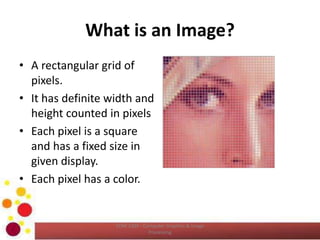
What is an Image?
• A rectangular grid of
pixels.
• It has definite width and
height counted in pixels
• Each pixel is a square
and has a fixed size in
given display.
• Each pixel has a color.
COM 2304 - Computer Graphics & Image
Processing
What is an Image? (Cont…)
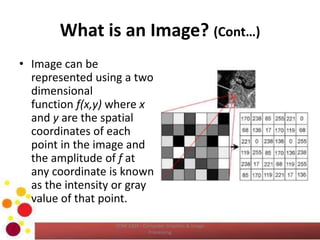
• Image can be
represented using a two
dimensional
function f(x,y) where x
and y are the spatial
coordinates of each
point in the image and
the amplitude of f at
any coordinate is known
as the intensity or gray
value of that point.
COM 2304 - Computer Graphics & Image
Processing
What is an Image? (Cont…)
COM 2304 - Computer Graphics & Image
Processing
What is Digital Image Processing?
• If the image has discrete and finite quantities of
coordinates and intensity, we call it as a Digital Image.
• Each image contains a finite number of elements each
of which has a location and value. These elements are
referred to as Pixels or Picture elements.
• What is digital image processing?
– Processing a digital image by means of computer is
known as digital image processing.
– Basically we can identify two stems of image processing,
• Processing pictorial information for the human interpretation and
• Processing image data to store transmit and represent for
autonomous machine perception.
COM 2304 - Computer Graphics & Image
Processing
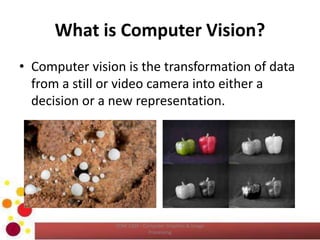
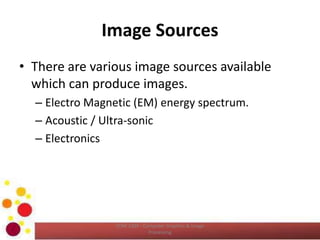
What is Computer Vision?
• Computer vision is the transformation of data
from a still or video camera into either a
decision or a new representation.
COM 2304 - Computer Graphics & Image
Processing
What is Computer Vision? (cont…)
• Visual scene  extract  a task relevent
information
• Examples
– Optical character recognition
– Analysis of medical, satellite and microscopic
images
– Surveillance
– Identity verification
– Quality control in manufacturing
COM 2304 - Computer Graphics & Image
Processing
What is Computer Vision? (cont…)
COM 2304 - Computer Graphics & Image
Processing
Image Sources
• There are various image sources available
which can produce images.
– Electro Magnetic (EM) energy spectrum.
– Acoustic / Ultra-sonic
– Electronics
COM 2304 - Computer Graphics & Image
Processing
Imaging in Electro Magnetic (EM)
Energy Spectrum
• Electromagnetic waves are conceptually
sinusoidal and formation of different wave
lengths.
• It can be thought of as a stream of massless
particles, each travelling in a wave like pattern
and moving at the speed of light.
• Each massless particle contains a certain
amount of energy and a bundle of energy is
known as photon.
COM 2304 - Computer Graphics & Image
Processing
Imaging in Electro Magnetic (EM)
Energy Spectrum (Cont…)
COM 2304 - Computer Graphics & Image
Processing
Imaging in Electro Magnetic (EM)
Energy Spectrum (Cont…)
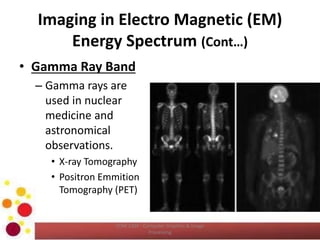
• Gamma Ray Band
– Gamma rays are
used in nuclear
medicine and
astronomical
observations.
• X-ray Tomography
• Positron Emmition
Tomography (PET)
COM 2304 - Computer Graphics & Image
Processing
Imaging in Electro Magnetic (EM)
Energy Spectrum (Cont…)
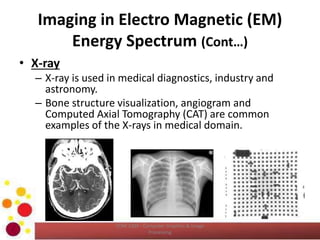
• X-ray
– X-ray is used in medical diagnostics, industry and
astronomy.
– Bone structure visualization, angiogram and
Computed Axial Tomography (CAT) are common
examples of the X-rays in medical domain.
COM 2304 - Computer Graphics & Image
Processing
Imaging in Electro Magnetic (EM)
Energy Spectrum (Cont…)
• Ultra Violet Band
– Imaging in Ultra Violet band includes lithography,
industrial inspections, microscopy, lacers,
biological imaging and astronomical observations.
– One good example of Ultra Violet imaging is
Fluorescence Microscopy.
COM 2304 - Computer Graphics & Image
Processing
Imaging in Electro Magnetic (EM)
Energy Spectrum (Cont…)
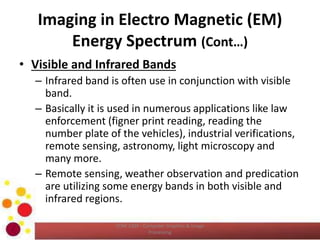
• Visible and Infrared Bands
– Infrared band is often use in conjunction with visible
band.
– Basically it is used in numerous applications like law
enforcement (figner print reading, reading the
number plate of the vehicles), industrial verifications,
remote sensing, astronomy, light microscopy and
many more.
– Remote sensing, weather observation and predication
are utilizing some energy bands in both visible and
infrared regions.
COM 2304 - Computer Graphics & Image
Processing
Imaging in Electro Magnetic (EM)
Energy Spectrum (Cont…)
COM 2304 - Computer Graphics & Image
Processing
Imaging in Electro Magnetic (EM)
Energy Spectrum (Cont…)
• Microwave Band
– The common utilization of Microwave is radar.
– Radar can form images virtually any region at any
time.
– It does not care about the lighting conditions and
the weather conditions.
COM 2304 - Computer Graphics & Image
Processing
Imaging in Electro Magnetic (EM)
Energy Spectrum (Cont…)
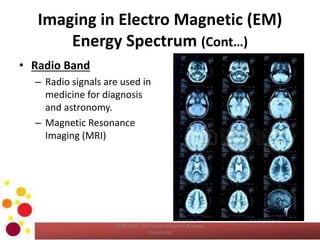
• Radio Band
– Radio signals are used in
medicine for diagnosis
and astronomy.
– Magnetic Resonance
Imaging (MRI)
COM 2304 - Computer Graphics & Image
Processing
Components of an Image Processing
System
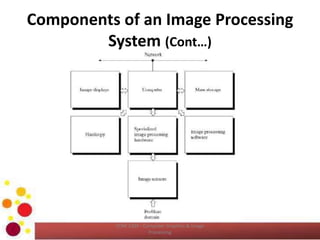
• With reference to sensing, two devices are required to
acquire digital images.
• The first is a physical device that is sensitive to the
energy radiated by the object we wish to image.
• The second, called the digitizer, is the device for
converting the output of the physical sensing device
into digital form.
– For instance, in a digital video camera the sensors produce
electrical output proportional to the light intensity and the
digitizer converts these outputs to digital data.
COM 2304 - Computer Graphics & Image
Processing
Components of an Image Processing
System (Cont…)
• Digitizer and Arithmetic and Logical Unit (ALU)
can be considered as specialized image
processing hardware.
• In the image processing applications, the
computers can be scaling from general
purpose computer to super computer
depending on the nature of the application.
COM 2304 - Computer Graphics & Image
Processing
Components of an Image Processing
System (Cont…)
• Software for image processing applications
indicates the specific software modules that help
to the programmer to write efficient programs
easily.
• Storage is required to store the image
temporarily, online storage for fast recall and
archival storage for rarely access.
• Displays are the units which visualize the output
of the image processing application.
• It may be color monitor or graphic card.
COM 2304 - Computer Graphics & Image
Processing
Components of an Image Processing
System (Cont…)
• Hardcopy devices are important to recording
images includes laser printers, film cameras,
heat sensitive devices, inkjet units or digital
units such as optical disk or CD-ROM.
• Network provides the media to interchange
the image processing outputs.
COM 2304 - Computer Graphics & Image
Processing
Components of an Image Processing
System (Cont…)
COM 2304 - Computer Graphics & Image
Processing
Computer Vision System
COM 2304 - Computer Graphics & Image
Processing
Your Reflection
• Your reflection on “Imaging with different
Image sources”?
COM 2304 - Computer Graphics & Image
Processing
Reference
• Chapter 01 and 02 of Gonzalez, R.C., Woods,
R.E., Digital Image Processing, 3rd ed.
Addison-Wesley Pub.
COM 2304 - Computer Graphics & Image
Processing
Learning Outcomes Revisit
• Now, you should be able to;
– Describe image.
– Describe digital image processing and computer
vision.
– Compare and Contrast image processing and
computer vision.
– Describe image sources.
– Identify the array of imaging application under the
EM Image source.
– Describe the components of Image processing
system and computer vision system.
COM 2304 - Computer Graphics & Image
Processing
QUESTIONS ?
Next Lecture – Digital Image Fundamentals
COM 2304 - Computer Graphics & Image
Processing

COM2304: Introduction to Computer Vision & Image Processing

  • 1.
    COMPUTER GRAPHICS &IMAGE PROCESSING COM 2304 Introduction to Computer Vision & Image Processing K.A.S.H.Kulathilake B.Sc. (Hons) IT (SLIIT), MCS (UCSC), M.Phil(UOM), SEDA(UK) Rajarata University of Sri Lanka Faculty of Applied Sciences Department of Physical Sciences
  • 2.
    Learning Outcomes COM 2304- Computer Graphics & Image Processing • At the end of this lecture, you should be able to; – Describe image. – Describe digital image processing and computer vision. – Compare and Contrast image processing and computer vision. – Describe image sources. – Identify the array of imaging application under the EM Image source. – Describe the components of Image processing system and computer vision system.
  • 3.
    What is anImage? • A rectangular grid of pixels. • It has definite width and height counted in pixels • Each pixel is a square and has a fixed size in given display. • Each pixel has a color. COM 2304 - Computer Graphics & Image Processing
  • 4.
    What is anImage? (Cont…) • Image can be represented using a two dimensional function f(x,y) where x and y are the spatial coordinates of each point in the image and the amplitude of f at any coordinate is known as the intensity or gray value of that point. COM 2304 - Computer Graphics & Image Processing
  • 5.
    What is anImage? (Cont…) COM 2304 - Computer Graphics & Image Processing
  • 6.
    What is DigitalImage Processing? • If the image has discrete and finite quantities of coordinates and intensity, we call it as a Digital Image. • Each image contains a finite number of elements each of which has a location and value. These elements are referred to as Pixels or Picture elements. • What is digital image processing? – Processing a digital image by means of computer is known as digital image processing. – Basically we can identify two stems of image processing, • Processing pictorial information for the human interpretation and • Processing image data to store transmit and represent for autonomous machine perception. COM 2304 - Computer Graphics & Image Processing
  • 7.
    What is ComputerVision? • Computer vision is the transformation of data from a still or video camera into either a decision or a new representation. COM 2304 - Computer Graphics & Image Processing
  • 8.
    What is ComputerVision? (cont…) • Visual scene  extract  a task relevent information • Examples – Optical character recognition – Analysis of medical, satellite and microscopic images – Surveillance – Identity verification – Quality control in manufacturing COM 2304 - Computer Graphics & Image Processing
  • 9.
    What is ComputerVision? (cont…) COM 2304 - Computer Graphics & Image Processing
  • 10.
    Image Sources • Thereare various image sources available which can produce images. – Electro Magnetic (EM) energy spectrum. – Acoustic / Ultra-sonic – Electronics COM 2304 - Computer Graphics & Image Processing
  • 11.
    Imaging in ElectroMagnetic (EM) Energy Spectrum • Electromagnetic waves are conceptually sinusoidal and formation of different wave lengths. • It can be thought of as a stream of massless particles, each travelling in a wave like pattern and moving at the speed of light. • Each massless particle contains a certain amount of energy and a bundle of energy is known as photon. COM 2304 - Computer Graphics & Image Processing
  • 12.
    Imaging in ElectroMagnetic (EM) Energy Spectrum (Cont…) COM 2304 - Computer Graphics & Image Processing
  • 13.
    Imaging in ElectroMagnetic (EM) Energy Spectrum (Cont…) • Gamma Ray Band – Gamma rays are used in nuclear medicine and astronomical observations. • X-ray Tomography • Positron Emmition Tomography (PET) COM 2304 - Computer Graphics & Image Processing
  • 14.
    Imaging in ElectroMagnetic (EM) Energy Spectrum (Cont…) • X-ray – X-ray is used in medical diagnostics, industry and astronomy. – Bone structure visualization, angiogram and Computed Axial Tomography (CAT) are common examples of the X-rays in medical domain. COM 2304 - Computer Graphics & Image Processing
  • 15.
    Imaging in ElectroMagnetic (EM) Energy Spectrum (Cont…) • Ultra Violet Band – Imaging in Ultra Violet band includes lithography, industrial inspections, microscopy, lacers, biological imaging and astronomical observations. – One good example of Ultra Violet imaging is Fluorescence Microscopy. COM 2304 - Computer Graphics & Image Processing
  • 16.
    Imaging in ElectroMagnetic (EM) Energy Spectrum (Cont…) • Visible and Infrared Bands – Infrared band is often use in conjunction with visible band. – Basically it is used in numerous applications like law enforcement (figner print reading, reading the number plate of the vehicles), industrial verifications, remote sensing, astronomy, light microscopy and many more. – Remote sensing, weather observation and predication are utilizing some energy bands in both visible and infrared regions. COM 2304 - Computer Graphics & Image Processing
  • 17.
    Imaging in ElectroMagnetic (EM) Energy Spectrum (Cont…) COM 2304 - Computer Graphics & Image Processing
  • 18.
    Imaging in ElectroMagnetic (EM) Energy Spectrum (Cont…) • Microwave Band – The common utilization of Microwave is radar. – Radar can form images virtually any region at any time. – It does not care about the lighting conditions and the weather conditions. COM 2304 - Computer Graphics & Image Processing
  • 19.
    Imaging in ElectroMagnetic (EM) Energy Spectrum (Cont…) • Radio Band – Radio signals are used in medicine for diagnosis and astronomy. – Magnetic Resonance Imaging (MRI) COM 2304 - Computer Graphics & Image Processing
  • 20.
    Components of anImage Processing System • With reference to sensing, two devices are required to acquire digital images. • The first is a physical device that is sensitive to the energy radiated by the object we wish to image. • The second, called the digitizer, is the device for converting the output of the physical sensing device into digital form. – For instance, in a digital video camera the sensors produce electrical output proportional to the light intensity and the digitizer converts these outputs to digital data. COM 2304 - Computer Graphics & Image Processing
  • 21.
    Components of anImage Processing System (Cont…) • Digitizer and Arithmetic and Logical Unit (ALU) can be considered as specialized image processing hardware. • In the image processing applications, the computers can be scaling from general purpose computer to super computer depending on the nature of the application. COM 2304 - Computer Graphics & Image Processing
  • 22.
    Components of anImage Processing System (Cont…) • Software for image processing applications indicates the specific software modules that help to the programmer to write efficient programs easily. • Storage is required to store the image temporarily, online storage for fast recall and archival storage for rarely access. • Displays are the units which visualize the output of the image processing application. • It may be color monitor or graphic card. COM 2304 - Computer Graphics & Image Processing
  • 23.
    Components of anImage Processing System (Cont…) • Hardcopy devices are important to recording images includes laser printers, film cameras, heat sensitive devices, inkjet units or digital units such as optical disk or CD-ROM. • Network provides the media to interchange the image processing outputs. COM 2304 - Computer Graphics & Image Processing
  • 24.
    Components of anImage Processing System (Cont…) COM 2304 - Computer Graphics & Image Processing
  • 25.
    Computer Vision System COM2304 - Computer Graphics & Image Processing
  • 26.
    Your Reflection • Yourreflection on “Imaging with different Image sources”? COM 2304 - Computer Graphics & Image Processing
  • 27.
    Reference • Chapter 01and 02 of Gonzalez, R.C., Woods, R.E., Digital Image Processing, 3rd ed. Addison-Wesley Pub. COM 2304 - Computer Graphics & Image Processing
  • 28.
    Learning Outcomes Revisit •Now, you should be able to; – Describe image. – Describe digital image processing and computer vision. – Compare and Contrast image processing and computer vision. – Describe image sources. – Identify the array of imaging application under the EM Image source. – Describe the components of Image processing system and computer vision system. COM 2304 - Computer Graphics & Image Processing
  • 29.
    QUESTIONS ? Next Lecture– Digital Image Fundamentals COM 2304 - Computer Graphics & Image Processing