Linux OS Vs Windows OS
Linux OS

Windows OS
General Info

 The Linux kernel released on
17th September, 1991

 Windows was first released in
1985.

 Linux was developed by
Linus Torvalds

 Windows OS was developed
by Microsoft

 The

 The

first version of Linux was
Version 0.01
 Linux

first version of Windows
OS was Windows 1.0

combined with the GNU  Windows OS is neither open
system to produce a complete
source nor free OS and is the
free operating system
property of Microsoft Company
Windows and Linux
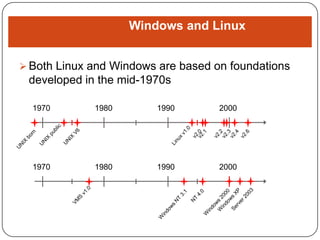
 Both Linux and Windows are based on foundations

developed in the mid-1970s
1970

1980

1990

2000

1970

1980

1990

2000
Linux OS

Windows OS

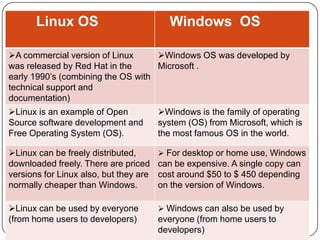
A commercial version of Linux
Windows OS was developed by
was released by Red Hat in the
Microsoft .
early 1990’s (combining the OS with
technical support and
documentation)
Linux is an example of Open
Source software development and
Free Operating System (OS).

Windows is the family of operating
system (OS) from Microsoft, which is
the most famous OS in the world.

Linux can be freely distributed,
downloaded freely. There are priced
versions for Linux also, but they are
normally cheaper than Windows.

 For desktop or home use, Windows

Linux can be used by everyone
(from home users to developers)

 Windows can also be used by

can be expensive. A single copy can
cost around $50 to $ 450 depending
on the version of Windows.

everyone (from home users to
developers)
Linux OS

Windows OS

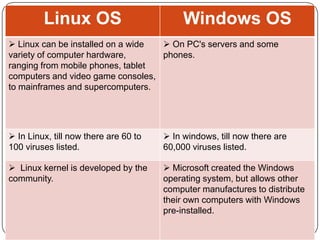
 Linux can be installed on a wide
 On PC's servers and some
variety of computer hardware,
phones.
ranging from mobile phones, tablet
computers and video game consoles,
to mainframes and supercomputers.

 In Linux, till now there are 60 to
100 viruses listed.

 In windows, till now there are
60,000 viruses listed.

 Linux kernel is developed by the
community.

 Microsoft created the Windows
operating system, but allows other
computer manufactures to distribute
their own computers with Windows
pre-installed.
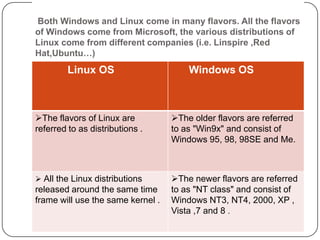
Both Windows and Linux come in many flavors. All the flavors
of Windows come from Microsoft, the various distributions of
Linux come from different companies (i.e. Linspire ,Red
Hat,Ubuntu…)

Linux OS

Windows OS

The flavors of Linux are
referred to as distributions .

The older flavors are referred
to as "Win9x" and consist of
Windows 95, 98, 98SE and Me.

 All the Linux distributions

The newer flavors are referred
to as "NT class" and consist of
Windows NT3, NT4, 2000, XP ,
Vista ,7 and 8 .

released around the same time
frame will use the same kernel .
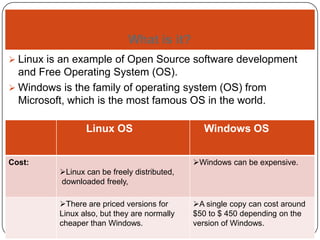
What is it?
 Linux is an example of Open Source software development

and Free Operating System (OS).
 Windows is the family of operating system (OS) from
Microsoft, which is the most famous OS in the world.
Linux OS

Windows OS
Windows can be expensive.

Cost:

Linux can be freely distributed,
downloaded freely,
There are priced versions for
Linux also, but they are normally
cheaper than Windows.

A single copy can cost around
$50 to $ 450 depending on the
version of Windows.
Linux OS

Windows OS

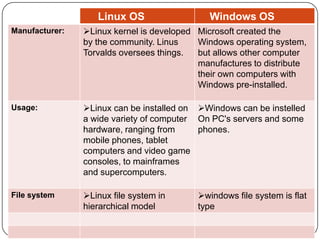
Manufacturer:

Linux kernel is developed Microsoft created the
by the community. Linus
Windows operating system,
Torvalds oversees things.
but allows other computer
manufactures to distribute
their own computers with
Windows pre-installed.

Usage:

Linux can be installed on Windows can be instelled
a wide variety of computer On PC's servers and some
hardware, ranging from
phones.
mobile phones, tablet
computers and video game
consoles, to mainframes
and supercomputers.

File system

Linux file system in
hierarchical model

windows file system is flat
type
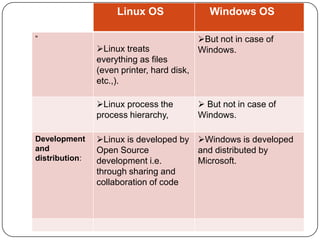
Linux OS
“

Linux treats
everything as files
(even printer, hard disk,
etc.,).
Linux process the
process hierarchy,
Development
and
distribution:

Windows OS
But not in case of
Windows.

 But not in case of
Windows.

Linux is developed by Windows is developed
Open Source
and distributed by
development i.e.
Microsoft.
through sharing and
collaboration of code
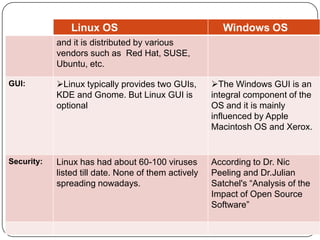
Linux OS

Windows OS

and it is distributed by various
vendors such as Red Hat, SUSE,
Ubuntu, etc.
GUI:

Linux typically provides two GUIs,
KDE and Gnome. But Linux GUI is
optional

The Windows GUI is an
integral component of the
OS and it is mainly
influenced by Apple
Macintosh OS and Xerox.

Security:

Linux has had about 60-100 viruses
listed till date. None of them actively
spreading nowadays.

According to Dr. Nic
Peeling and Dr.Julian
Satchel's “Analysis of the
Impact of Open Source
Software”
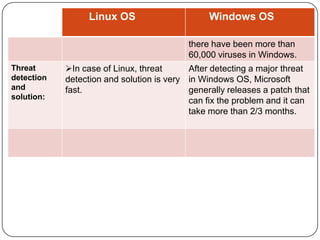
Linux OS

Windows OS
there have been more than
60,000 viruses in Windows.

Threat
detection
and
solution:

In case of Linux, threat
After detecting a major threat
detection and solution is very in Windows OS, Microsoft
fast.
generally releases a patch that
can fix the problem and it can
take more than 2/3 months.
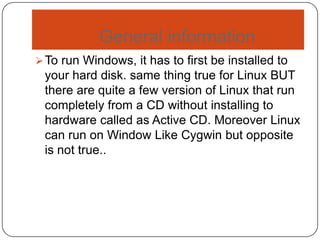
General information
 To run Windows, it has to first be installed to

your hard disk. same thing true for Linux BUT
there are quite a few version of Linux that run
completely from a CD without installing to
hardware called as Active CD. Moreover Linux
can run on Window Like Cygwin but opposite
is not true..
Comparing the Architectures
Both Linux and Windows are monolithic
 All core operating system services run in a shared address space in

kernel-mode.
 All core operating system services are part of a single module.

Windowing is handled differently:
 Windows has a kernel-mode Windowing subsystem.
 Linux has a user-mode X-Windowing system.
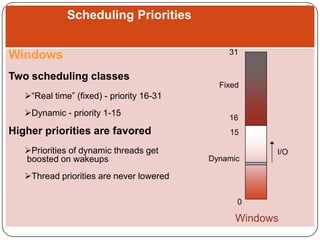
Scheduling Priorities
Windows

31

Two scheduling classes
Fixed

“Real time” (fixed) - priority 16-31
Dynamic - priority 1-15

Higher priorities are favored
Priorities of dynamic threads get
boosted on wakeups

16
15
Dynamic

I/O

Thread priorities are never lowered
0

Windows
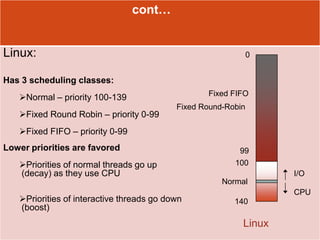
cont…

Linux:

0

Has 3 scheduling classes:
Fixed FIFO

Normal – priority 100-139

Fixed Round Robin – priority 0-99

Fixed Round-Robin

Fixed FIFO – priority 0-99
Lower priorities are favored

Priorities of normal threads go up
(decay) as they use CPU

99
100
I/O

Normal

Priorities of interactive threads go down
(boost)

CPU
140

Linux
System Components of Linux
 Kernel: responsible for maintaining all the

important abstractions of the operating
system, including such things as virtual
memory and processes
 System libraries: a standard set of functions
through which applications can interact with
the kernel, and which implement much of the
operating system functionality that does not
need the full privileges of kernel code
 System utilities: programs that perform
individual, specialized management tasks.
System Components of
Windows
 The architecture of windows is a layered

system of modules.
 The main layers are the hardware, abstraction
layer, the kernel and the executive that run in
protected mode, and a large collection of
subsystems that run in user mode.
Memory Management of Linux
Two components to memory management
are :
a. First: Physical memory-management

system deals with allocating and freeing
pages, groups of pages, and small blocks
of memory.
b. Second: Handles virtual memory, which is
memory mapped into the address space
of running processes.
Memory Management of
Windows
 The Win32 API provides several ways for an

application to use memory: virtual memory,
memory-mapped files, heaps, and threadlocal storages.
 One way to use memory is by memory
mapping a file into its address space. Memory
mapping is also a convenient way for two
processes to share memory – both processes
map the same file into their virtual memory.
Memory mapping is a multistage process.
File Systems of Linux
 Linux kernel handles various different types of

file by hiding the implementation details of any
single file type behind a layer of software, the
virtual file system (VFS)
File Systems of Windows
 Historically, MS-DOS systems have used the file-

allocation table (FAT) file system. The 16-bit FAT
file system has several shortcomings, including
internal fragmentation, a size limitation of 2 GB,
and a lack of access protection for files. The 32bit FAT file system has solved the size and
fragmentation problems, but the performance and
features are still weak by comparison with
modern file systems. The NTFS is much better. It
was designed with many features in mind,
including data recovery, security, fault tolerance,
large files and file systems, multiple data streams,
UNICODE names, and file compression.
Security of Linux
It’s security model can be classified in two
groups:
a. Authentication: Making sure that nobody

can access the system without first
providing that he has entry rights
b. Access control: Providing a mechanism
for checking whether a user has the right
to access a certain object, and preventing
access to objects as required
Security of Windows
 Security of an NTFS volume is derived from

the windows object model. Each file object
has a security descriptor attribute stored in its
MFT record. This attribute contains the access
token of the owner of the file, and an accesscontrol list that states the access privileges
that are granted to each user that has access
to the file.
Linux OS Vs Windows OS

Thanking You !!!!

Rajan Kandel

Linux vs windows

  • 1.
    Linux OS VsWindows OS
  • 2.
    Linux OS Windows OS GeneralInfo  The Linux kernel released on 17th September, 1991  Windows was first released in 1985.  Linux was developed by Linus Torvalds  Windows OS was developed by Microsoft  The  The first version of Linux was Version 0.01  Linux first version of Windows OS was Windows 1.0 combined with the GNU  Windows OS is neither open system to produce a complete source nor free OS and is the free operating system property of Microsoft Company
  • 3.
    Windows and Linux Both Linux and Windows are based on foundations developed in the mid-1970s 1970 1980 1990 2000 1970 1980 1990 2000
  • 4.
    Linux OS Windows OS Acommercial version of Linux Windows OS was developed by was released by Red Hat in the Microsoft . early 1990’s (combining the OS with technical support and documentation) Linux is an example of Open Source software development and Free Operating System (OS). Windows is the family of operating system (OS) from Microsoft, which is the most famous OS in the world. Linux can be freely distributed, downloaded freely. There are priced versions for Linux also, but they are normally cheaper than Windows.  For desktop or home use, Windows Linux can be used by everyone (from home users to developers)  Windows can also be used by can be expensive. A single copy can cost around $50 to $ 450 depending on the version of Windows. everyone (from home users to developers)
  • 5.
    Linux OS Windows OS Linux can be installed on a wide  On PC's servers and some variety of computer hardware, phones. ranging from mobile phones, tablet computers and video game consoles, to mainframes and supercomputers.  In Linux, till now there are 60 to 100 viruses listed.  In windows, till now there are 60,000 viruses listed.  Linux kernel is developed by the community.  Microsoft created the Windows operating system, but allows other computer manufactures to distribute their own computers with Windows pre-installed.
  • 6.
    Both Windows andLinux come in many flavors. All the flavors of Windows come from Microsoft, the various distributions of Linux come from different companies (i.e. Linspire ,Red Hat,Ubuntu…) Linux OS Windows OS The flavors of Linux are referred to as distributions . The older flavors are referred to as "Win9x" and consist of Windows 95, 98, 98SE and Me.  All the Linux distributions The newer flavors are referred to as "NT class" and consist of Windows NT3, NT4, 2000, XP , Vista ,7 and 8 . released around the same time frame will use the same kernel .
  • 7.
    What is it? Linux is an example of Open Source software development and Free Operating System (OS).  Windows is the family of operating system (OS) from Microsoft, which is the most famous OS in the world. Linux OS Windows OS Windows can be expensive. Cost: Linux can be freely distributed, downloaded freely, There are priced versions for Linux also, but they are normally cheaper than Windows. A single copy can cost around $50 to $ 450 depending on the version of Windows.
  • 8.
    Linux OS Windows OS Manufacturer: Linuxkernel is developed Microsoft created the by the community. Linus Windows operating system, Torvalds oversees things. but allows other computer manufactures to distribute their own computers with Windows pre-installed. Usage: Linux can be installed on Windows can be instelled a wide variety of computer On PC's servers and some hardware, ranging from phones. mobile phones, tablet computers and video game consoles, to mainframes and supercomputers. File system Linux file system in hierarchical model windows file system is flat type
  • 9.
    Linux OS “ Linux treats everythingas files (even printer, hard disk, etc.,). Linux process the process hierarchy, Development and distribution: Windows OS But not in case of Windows.  But not in case of Windows. Linux is developed by Windows is developed Open Source and distributed by development i.e. Microsoft. through sharing and collaboration of code
  • 10.
    Linux OS Windows OS andit is distributed by various vendors such as Red Hat, SUSE, Ubuntu, etc. GUI: Linux typically provides two GUIs, KDE and Gnome. But Linux GUI is optional The Windows GUI is an integral component of the OS and it is mainly influenced by Apple Macintosh OS and Xerox. Security: Linux has had about 60-100 viruses listed till date. None of them actively spreading nowadays. According to Dr. Nic Peeling and Dr.Julian Satchel's “Analysis of the Impact of Open Source Software”
  • 11.
    Linux OS Windows OS therehave been more than 60,000 viruses in Windows. Threat detection and solution: In case of Linux, threat After detecting a major threat detection and solution is very in Windows OS, Microsoft fast. generally releases a patch that can fix the problem and it can take more than 2/3 months.
  • 12.
    General information  Torun Windows, it has to first be installed to your hard disk. same thing true for Linux BUT there are quite a few version of Linux that run completely from a CD without installing to hardware called as Active CD. Moreover Linux can run on Window Like Cygwin but opposite is not true..
  • 13.
    Comparing the Architectures BothLinux and Windows are monolithic  All core operating system services run in a shared address space in kernel-mode.  All core operating system services are part of a single module. Windowing is handled differently:  Windows has a kernel-mode Windowing subsystem.  Linux has a user-mode X-Windowing system.
  • 14.
    Scheduling Priorities Windows 31 Two schedulingclasses Fixed “Real time” (fixed) - priority 16-31 Dynamic - priority 1-15 Higher priorities are favored Priorities of dynamic threads get boosted on wakeups 16 15 Dynamic I/O Thread priorities are never lowered 0 Windows
  • 15.
    cont… Linux: 0 Has 3 schedulingclasses: Fixed FIFO Normal – priority 100-139 Fixed Round Robin – priority 0-99 Fixed Round-Robin Fixed FIFO – priority 0-99 Lower priorities are favored Priorities of normal threads go up (decay) as they use CPU 99 100 I/O Normal Priorities of interactive threads go down (boost) CPU 140 Linux
  • 16.
    System Components ofLinux  Kernel: responsible for maintaining all the important abstractions of the operating system, including such things as virtual memory and processes  System libraries: a standard set of functions through which applications can interact with the kernel, and which implement much of the operating system functionality that does not need the full privileges of kernel code  System utilities: programs that perform individual, specialized management tasks.
  • 17.
    System Components of Windows The architecture of windows is a layered system of modules.  The main layers are the hardware, abstraction layer, the kernel and the executive that run in protected mode, and a large collection of subsystems that run in user mode.
  • 18.
    Memory Management ofLinux Two components to memory management are : a. First: Physical memory-management system deals with allocating and freeing pages, groups of pages, and small blocks of memory. b. Second: Handles virtual memory, which is memory mapped into the address space of running processes.
  • 19.
    Memory Management of Windows The Win32 API provides several ways for an application to use memory: virtual memory, memory-mapped files, heaps, and threadlocal storages.  One way to use memory is by memory mapping a file into its address space. Memory mapping is also a convenient way for two processes to share memory – both processes map the same file into their virtual memory. Memory mapping is a multistage process.
  • 20.
    File Systems ofLinux  Linux kernel handles various different types of file by hiding the implementation details of any single file type behind a layer of software, the virtual file system (VFS)
  • 21.
    File Systems ofWindows  Historically, MS-DOS systems have used the file- allocation table (FAT) file system. The 16-bit FAT file system has several shortcomings, including internal fragmentation, a size limitation of 2 GB, and a lack of access protection for files. The 32bit FAT file system has solved the size and fragmentation problems, but the performance and features are still weak by comparison with modern file systems. The NTFS is much better. It was designed with many features in mind, including data recovery, security, fault tolerance, large files and file systems, multiple data streams, UNICODE names, and file compression.
  • 22.
    Security of Linux It’ssecurity model can be classified in two groups: a. Authentication: Making sure that nobody can access the system without first providing that he has entry rights b. Access control: Providing a mechanism for checking whether a user has the right to access a certain object, and preventing access to objects as required
  • 23.
    Security of Windows Security of an NTFS volume is derived from the windows object model. Each file object has a security descriptor attribute stored in its MFT record. This attribute contains the access token of the owner of the file, and an accesscontrol list that states the access privileges that are granted to each user that has access to the file.
  • 24.
    Linux OS VsWindows OS Thanking You !!!! Rajan Kandel