Prepared By : Syed Ovais Ali 
Roll No : 959 
Department : Computer Science 
Section : BS(CS 1-D)
WINDOWS : AN INTRO
AN INTRO TO LINUX
WHY... 
WINDOWS vs LINUX!!! 
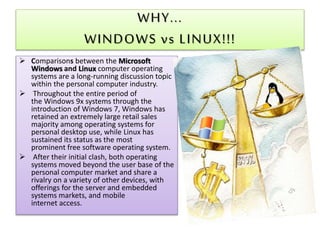
 Comparisons between the Microsoft 
Windows and Linux computer operating 
systems are a long-running discussion topic 
within the personal computer industry. 
 Throughout the entire period of 
the Windows 9x systems through the 
introduction of Windows 7, Windows has 
retained an extremely large retail sales 
majority among operating systems for 
personal desktop use, while Linux has 
sustained its status as the most 
prominent free software operating system. 
 After their initial clash, both operating 
systems moved beyond the user base of the 
personal computer market and share a 
rivalry on a variety of other devices, with 
offerings for the server and embedded 
systems markets, and mobile 
internet access.
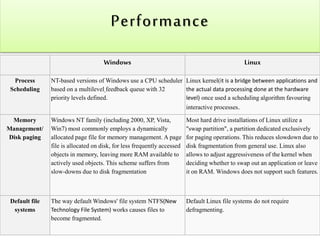
Performance 
Windows Linux 
Process 
Scheduling 
NT-based versions of Windows use a CPU scheduler 
based on a multilevel feedback queue with 32 
priority levels defined. 
Linux kernel(it is a bridge between applications and 
the actual data processing done at the hardware 
level) once used a scheduling algorithm favouring 
interactive processes. 
Memory 
Management/ 
Disk paging 
Windows NT family (including 2000, XP, Vista, 
Win7) most commonly employs a dynamically 
allocated page file for memory management. A page 
file is allocated on disk, for less frequently accessed 
objects in memory, leaving more RAM available to 
actively used objects. This scheme suffers from 
slow-downs due to disk fragmentation 
Most hard drive installations of Linux utilize a 
"swap partition", a partition dedicated exclusively 
for paging operations. This reduces slowdown due to 
disk fragmentation from general use. Linux also 
allows to adjust aggressiveness of the kernel when 
deciding whether to swap out an application or leave 
it on RAM. Windows does not support such features. 
Default file 
systems 
The way default Windows' file system NTFS(New 
Technology File System) works causes files to 
become fragmented. 
Default Linux file systems do not require 
defragmenting.
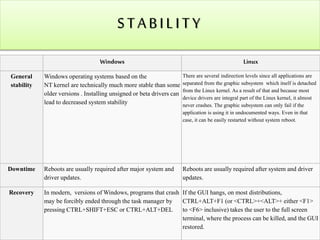
S T A B I L I T Y 
Windows Linux 
General 
stability 
Windows operating systems based on the 
NT kernel are technically much more stable than some 
older versions . Installing unsigned or beta drivers can 
lead to decreased system stability 
There are several indirection levels since all applications are 
separated from the graphic subsystem which itself is detached 
from the Linux kernel. As a result of that and because most 
device drivers are integral part of the Linux kernel, it almost 
never crashes. The graphic subsystem can only fail if the 
application is using it in undocumented ways. Even in that 
case, it can be easily restarted without system reboot. 
Downtime Reboots are usually required after major system and 
driver updates. 
Reboots are usually required after system and driver 
updates. 
Recovery In modern, versions of Windows, programs that crash 
may be forcibly ended through the task manager by 
pressing CTRL+SHIFT+ESC or CTRL+ALT+DEL 
If the GUI hangs, on most distributions, 
CTRL+ALT+F1 (or <CTRL>+<ALT>+ either <F1> 
to <F6> inclusive) takes the user to the full screen 
terminal, where the process can be killed, and the GUI 
restored.
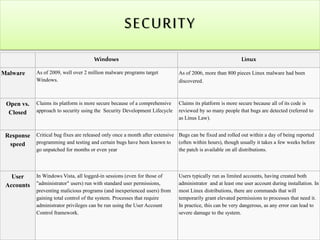
SECURITY 
Windows Linux 
Malware As of 2009, well over 2 million malware programs target 
Windows. 
As of 2006, more than 800 pieces Linux malware had been 
discovered. 
Open vs. 
Closed 
Claims its platform is more secure because of a comprehensive 
approach to security using the Security Development Lifecycle 
Claims its platform is more secure because all of its code is 
reviewed by so many people that bugs are detected (referred to 
as Linus Law). 
Response 
speed 
Critical bug fixes are released only once a month after extensive 
programming and testing and certain bugs have been known to 
go unpatched for months or even year 
Bugs can be fixed and rolled out within a day of being reported 
(often within hours), though usually it takes a few weeks before 
the patch is available on all distributions. 
User 
Accounts 
In Windows Vista, all logged-in sessions (even for those of 
"administrator" users) run with standard user permissions, 
preventing malicious programs (and inexperienced users) from 
gaining total control of the system. Processes that require 
administrator privileges can be run using the User Account 
Control framework. 
Users typically run as limited accounts, having created both 
administrator and at least one user account during installation. In 
most Linux distributions, there are commands that will 
temporarily grant elevated permissions to processes that need it. 
In practice, this can be very dangerous, as any error can lead to 
severe damage to the system.
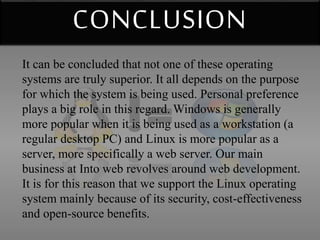
CONCLUSION 
It can be concluded that not one of these operating 
systems are truly superior. It all depends on the purpose 
for which the system is being used. Personal preference 
plays a big role in this regard. Windows is generally 
more popular when it is being used as a workstation (a 
regular desktop PC) and Linux is more popular as a 
server, more specifically a web server. Our main 
business at Into web revolves around web development. 
It is for this reason that we support the Linux operating 
system mainly because of its security, cost-effectiveness 
and open-source benefits.
Windows vs linuxe

Windows vs linuxe

  • 1.
    Prepared By :Syed Ovais Ali Roll No : 959 Department : Computer Science Section : BS(CS 1-D)
  • 2.
  • 3.
  • 4.
    WHY... WINDOWS vsLINUX!!!  Comparisons between the Microsoft Windows and Linux computer operating systems are a long-running discussion topic within the personal computer industry.  Throughout the entire period of the Windows 9x systems through the introduction of Windows 7, Windows has retained an extremely large retail sales majority among operating systems for personal desktop use, while Linux has sustained its status as the most prominent free software operating system.  After their initial clash, both operating systems moved beyond the user base of the personal computer market and share a rivalry on a variety of other devices, with offerings for the server and embedded systems markets, and mobile internet access.
  • 5.
    Performance Windows Linux Process Scheduling NT-based versions of Windows use a CPU scheduler based on a multilevel feedback queue with 32 priority levels defined. Linux kernel(it is a bridge between applications and the actual data processing done at the hardware level) once used a scheduling algorithm favouring interactive processes. Memory Management/ Disk paging Windows NT family (including 2000, XP, Vista, Win7) most commonly employs a dynamically allocated page file for memory management. A page file is allocated on disk, for less frequently accessed objects in memory, leaving more RAM available to actively used objects. This scheme suffers from slow-downs due to disk fragmentation Most hard drive installations of Linux utilize a "swap partition", a partition dedicated exclusively for paging operations. This reduces slowdown due to disk fragmentation from general use. Linux also allows to adjust aggressiveness of the kernel when deciding whether to swap out an application or leave it on RAM. Windows does not support such features. Default file systems The way default Windows' file system NTFS(New Technology File System) works causes files to become fragmented. Default Linux file systems do not require defragmenting.
  • 6.
    S T AB I L I T Y Windows Linux General stability Windows operating systems based on the NT kernel are technically much more stable than some older versions . Installing unsigned or beta drivers can lead to decreased system stability There are several indirection levels since all applications are separated from the graphic subsystem which itself is detached from the Linux kernel. As a result of that and because most device drivers are integral part of the Linux kernel, it almost never crashes. The graphic subsystem can only fail if the application is using it in undocumented ways. Even in that case, it can be easily restarted without system reboot. Downtime Reboots are usually required after major system and driver updates. Reboots are usually required after system and driver updates. Recovery In modern, versions of Windows, programs that crash may be forcibly ended through the task manager by pressing CTRL+SHIFT+ESC or CTRL+ALT+DEL If the GUI hangs, on most distributions, CTRL+ALT+F1 (or <CTRL>+<ALT>+ either <F1> to <F6> inclusive) takes the user to the full screen terminal, where the process can be killed, and the GUI restored.
  • 7.
    SECURITY Windows Linux Malware As of 2009, well over 2 million malware programs target Windows. As of 2006, more than 800 pieces Linux malware had been discovered. Open vs. Closed Claims its platform is more secure because of a comprehensive approach to security using the Security Development Lifecycle Claims its platform is more secure because all of its code is reviewed by so many people that bugs are detected (referred to as Linus Law). Response speed Critical bug fixes are released only once a month after extensive programming and testing and certain bugs have been known to go unpatched for months or even year Bugs can be fixed and rolled out within a day of being reported (often within hours), though usually it takes a few weeks before the patch is available on all distributions. User Accounts In Windows Vista, all logged-in sessions (even for those of "administrator" users) run with standard user permissions, preventing malicious programs (and inexperienced users) from gaining total control of the system. Processes that require administrator privileges can be run using the User Account Control framework. Users typically run as limited accounts, having created both administrator and at least one user account during installation. In most Linux distributions, there are commands that will temporarily grant elevated permissions to processes that need it. In practice, this can be very dangerous, as any error can lead to severe damage to the system.
  • 8.
    CONCLUSION It canbe concluded that not one of these operating systems are truly superior. It all depends on the purpose for which the system is being used. Personal preference plays a big role in this regard. Windows is generally more popular when it is being used as a workstation (a regular desktop PC) and Linux is more popular as a server, more specifically a web server. Our main business at Into web revolves around web development. It is for this reason that we support the Linux operating system mainly because of its security, cost-effectiveness and open-source benefits.