Kostas Voudouris
Maxus / GroupM
Performance-Based Optimisation Using
Google Search Console API
@kvonweb
https://www.slideshare.net/kvonweb
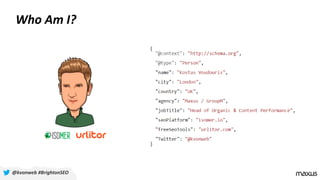
Who Am I?
@kvonweb #BrightonSEO
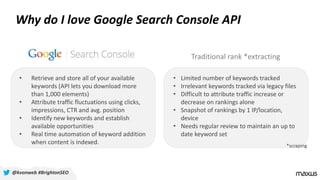
Why do I love Google Search Console API
• Limited number of keywords tracked
• Irrelevant keywords tracked via legacy files
• Difficult to attribute traffic increase or
decrease on rankings alone
• Snapshot of rankings by 1 IP/location,
device
• Needs regular review to maintain an up to
date keyword set
• Retrieve and store all of your available
keywords (API lets you download more
than 1,000 elements)
• Attribute traffic fluctuations using clicks,
impressions, CTR and avg. position
• Identify new keywords and establish
available opportunities
• Real time automation of keyword addition
when content is indexed.
Traditional rank *extracting
*scraping
@kvonweb #BrightonSEO
Track and analyse the keywords
you have content for, not the
ones you wish to rank for.
@kvonweb #BrightonSEO
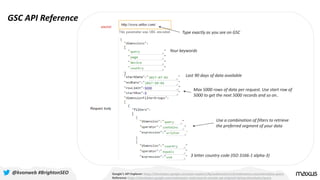
GSC API Reference
Google’s API Explorer: https://developers.google.com/apis-explorer/#p/webmasters/v3/webmasters.searchanalytics.query
Reference: https://developers.google.com/webmaster-tools/search-console-api-original/v3/searchanalytics/query
@kvonweb #BrightonSEO
Type exactly as you see on GSC
Last 90 days of data available
Max 5000 rows of data per request. Use start row of
5000 to get the next 5000 records and so on..
3 letter country code (ISO 3166-1 alpha-3)
Your keywords
Use a combination of filters to retrieve
the preferred segment of your data
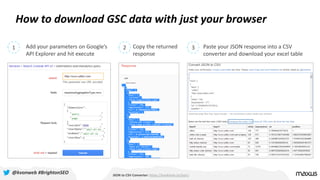
How to download GSC data with just your browser
JSON to CSV Converter: https://konklone.io/json/
1 2 3Add your parameters on Google’s
API Explorer and hit execute
Copy the returned
response
Paste your JSON response into a CSV
converter and download your excel table
@kvonweb #BrightonSEO
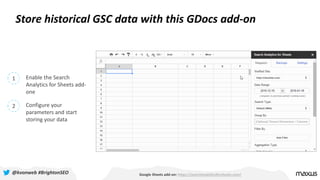
Store historical GSC data with this GDocs add-on
Google Sheets add-on: https://searchanalyticsforsheets.com/
1 Enable the Search
Analytics for Sheets add-
one
2 Configure your
parameters and start
storing your data
@kvonweb #BrightonSEO
Start harvesting Google Search
Console data now
@kvonweb #BrightonSEO
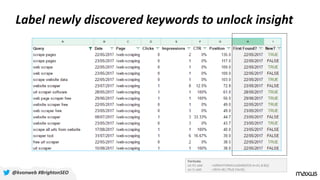
Label newly discovered keywords to unlock insight
@kvonweb #BrightonSEO
Formulas
on H1 add: =ARRAYFORMULA(MIN(IF(A:A=A1,B:B)))
on I1 add: =if(H1=B1,TRUE,FALSE)
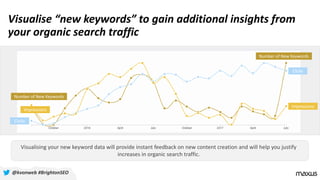
Visualise “new keywords” to gain additional insights from
your organic search traffic
Visualising your new keyword data will provide instant feedback on new content creation and will help you justify
increases in organic search traffic.
Impressions
Clicks
Number of New Keywords
Impressions
Clicks
Number of New Keywords
@kvonweb #BrightonSEO
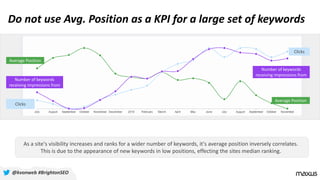
Do not use Avg. Position as a KPI for a large set of keywords
As a site's visibility increases and ranks for a wider number of keywords, it's average position inversely correlates.
This is due to the appearance of new keywords in low positions, effecting the sites median ranking.
Average Position
Number of keywords
receiving impressions from
Clicks
Average Position
Number of keywords
receiving impressions from
Clicks
@kvonweb #BrightonSEO
The ability to read Google Search
Console charts is the single most
important thing you can do to
understand your Google traffic
@kvonweb #BrightonSEO
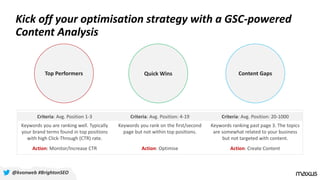
Kick off your optimisation strategy with a GSC-powered
Content Analysis
@kvonweb #BrightonSEO
Top Performers Quick Wins Content Gaps
Criteria: Avg. Position 1-3 Criteria: Avg. Position: 4-19 Criteria: Avg. Position: 20-1000
Keywords you are ranking well. Typically
your brand terms found in top positions
with high Click-Through (CTR) rate.
Keywords you rank on the first/second
page but not within top positions.
Keywords ranking past page 3. The topics
are somewhat related to your business
but not targeted with content.
Action: Monitor/Increase CTR Action: Optimise Action: Create Content
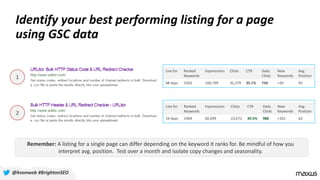
Identify your best performing listing for a page
using GSC data
Remember: A listing for a single page can differ depending on the keyword it ranks for. Be mindful of how you
interpret avg. position. Test over a month and isolate copy changes and seasonality.
@kvonweb #BrightonSEO
1
2
Live for Ranked
Keywords
Impressions Clicks CTR Daily
Clicks
New
Keywords
Avg.
Position
48 days 1303 100,799 35,279 35.1% 734 +20 45
Live for Ranked
Keywords
Impressions Clicks CTR Daily
Clicks
New
Keywords
Avg.
Position
24 days 1404 60,699 23,672 39.5% 986 +101 62
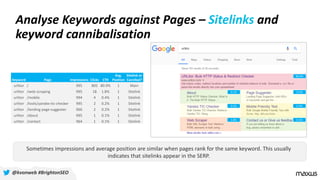
Analyse Keywords against Pages – Sitelinks and
keyword cannibalisation
Keyword Page Impressions Clicks CTR
Avg.
Position
Sitelink or
Cannibal?
urlitor / 995 805 80.9% 1 Main
urlitor /web-scraping 995 18 1.8% 1 Sitelink
urlitor /mobile 994 4 0.4% 1 Sitelink
urlitor /tools/yandex-tic-checker 995 2 0.2% 1 Sitelink
urlitor /landing-page-suggester 966 2 0.2% 1 Sitelink
urlitor /about 995 1 0.1% 1 Sitelink
urlitor /contact 964 1 0.1% 1 Sitelink
80.9%
0.2%
0.4%
0.1%
0.1%
0.2%
1.8%
Sometimes impressions and average position are similar when pages rank for the same keyword. This usually
indicates that sitelinks appear in the SERP.
@kvonweb #BrightonSEO
Keyword Page Impressions Clicks CTR
Avg.
Position
Sitelink or
Cannibal?
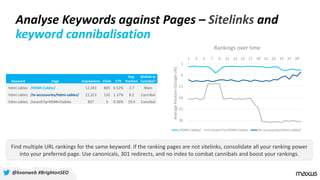
hdmi cables /HDMI-Cables/ 12,343 805 6.52% 2.7 Main
hdmi cables /tv-accessories/hdmi-cables/ 11,323 132 1.17% 8.2 Cannibal
hdmi cables /search?q=HDMI+Cables 837 3 0.36% 19.4 Cannibal
1
6
11
16
21
26
1 3 5 7 9 11 13 15 17 19 21 23 25 27 29
AveragePosition(GoogleUK)
Rankings over time
/HDMI-Cables/ /search?q=HDMI+Cables /tv-accessories/hdmi-cables/
Find multiple URL rankings for the same keyword. If the ranking pages are not sitelinks, consolidate all your ranking power
into your preferred page. Use canonicals, 301 redirects, and no index to combat cannibals and boost your rankings.
Analyse Keywords against Pages – Sitelinks and
keyword cannibalisation
@kvonweb #BrightonSEO
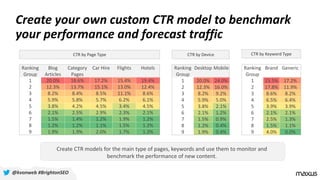
Create your own custom CTR model to benchmark
your performance and forecast traffic
Ranking
Group
Blog
Articles
Category
Pages
Car Hire Flights Hotels
1 20.0% 18.6% 17.2% 15.4% 19.4%
2 12.3% 13.7% 15.1% 13.0% 12.4%
3 8.2% 8.4% 8.5% 11.1% 8.6%
4 5.9% 5.8% 5.7% 6.2% 6.1%
5 3.8% 4.2% 4.5% 3.4% 4.5%
6 2.1% 2.5% 2.9% 2.3% 2.1%
7 1.5% 1.4% 1.2% 1.9% 1.2%
8 1.2% 1.2% 1.1% 1.5% 1.2%
9 1.9% 1.9% 2.0% 1.7% 1.3%
Ranking
Group
Brand Generic
1 23.5% 17.2%
2 17.8% 11.9%
3 8.6% 8.2%
4 6.5% 6.4%
5 3.9% 3.9%
6 2.1% 2.1%
7 2.5% 1.3%
8 1.5% 1.1%
9 4.0% 0.0%
Ranking
Group
Desktop Mobile
1 20.0% 24.0%
2 12.3% 16.0%
3 8.2% 9.2%
4 5.9% 5.0%
5 3.8% 2.1%
6 2.1% 1.2%
7 1.5% 0.9%
8 1.2% 0.4%
9 1.9% 0.4%
CTR by Page Type CTR by Device CTR by Keyword Type
Create CTR models for the main type of pages, keywords and use them to monitor and
benchmark the performance of new content.
@kvonweb #BrightonSEO
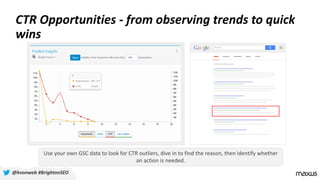
CTR Opportunities - from observing trends to quick
wins
@kvonweb #BrightonSEO
Use your own GSC data to look for CTR outliers, dive in to find the reason, then identify whether
an action is needed.
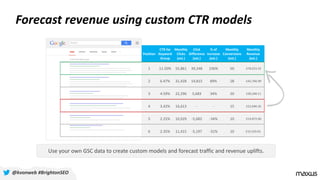
Forecast revenue using custom CTR models
Position
CTR for
Keyword
Group
Monthly
Clicks
(est.)
Click
Difference
(est.)
% of
Increase
(est.)
Monthly
Conversions
(est.)
Monthly
Revenue
(est.)
1 11.50% 55,861 39,248 236% 50 £76,015.52
2 6.47% 31,428 14,815 89% 28 £42,766.99
3 4.59% 22,296 5,683 34% 20 £30,340.11
4 3.42% 16,613 - - 15 £22,606.35
5 2.25% 10,929 -5,683 -34% 10 £14,872.60
6 2.35% 11,415 -5,197 -31% 10 £15,533.61
Use your own GSC data to create custom models and forecast traffic and revenue uplifts.
@kvonweb #BrightonSEO
{ "message": "Thank you"}
@kvonweb #BrightonSEO
Go through the presentation in slow motion:
https://www.slideshare.net/kvonweb
Get in touch:
https://www.linkedin.com/in/kostasvoudouris/
https://twitter.com/kvonweb
Free SEO tools: www.urlitor.com
My GSC SEO Platform: http://isomer.io/

Kostas Voudouris - BrightonSEO - Perfromance-based optimisation using Google Search Console and the API

  • 1.
    Kostas Voudouris Maxus /GroupM Performance-Based Optimisation Using Google Search Console API @kvonweb https://www.slideshare.net/kvonweb
  • 2.
    Who Am I? @kvonweb#BrightonSEO
  • 3.
    Why do Ilove Google Search Console API • Limited number of keywords tracked • Irrelevant keywords tracked via legacy files • Difficult to attribute traffic increase or decrease on rankings alone • Snapshot of rankings by 1 IP/location, device • Needs regular review to maintain an up to date keyword set • Retrieve and store all of your available keywords (API lets you download more than 1,000 elements) • Attribute traffic fluctuations using clicks, impressions, CTR and avg. position • Identify new keywords and establish available opportunities • Real time automation of keyword addition when content is indexed. Traditional rank *extracting *scraping @kvonweb #BrightonSEO
  • 4.
    Track and analysethe keywords you have content for, not the ones you wish to rank for. @kvonweb #BrightonSEO
  • 5.
    GSC API Reference Google’sAPI Explorer: https://developers.google.com/apis-explorer/#p/webmasters/v3/webmasters.searchanalytics.query Reference: https://developers.google.com/webmaster-tools/search-console-api-original/v3/searchanalytics/query @kvonweb #BrightonSEO Type exactly as you see on GSC Last 90 days of data available Max 5000 rows of data per request. Use start row of 5000 to get the next 5000 records and so on.. 3 letter country code (ISO 3166-1 alpha-3) Your keywords Use a combination of filters to retrieve the preferred segment of your data
  • 6.
    How to downloadGSC data with just your browser JSON to CSV Converter: https://konklone.io/json/ 1 2 3Add your parameters on Google’s API Explorer and hit execute Copy the returned response Paste your JSON response into a CSV converter and download your excel table @kvonweb #BrightonSEO
  • 7.
    Store historical GSCdata with this GDocs add-on Google Sheets add-on: https://searchanalyticsforsheets.com/ 1 Enable the Search Analytics for Sheets add- one 2 Configure your parameters and start storing your data @kvonweb #BrightonSEO
  • 8.
    Start harvesting GoogleSearch Console data now @kvonweb #BrightonSEO
  • 9.
    Label newly discoveredkeywords to unlock insight @kvonweb #BrightonSEO Formulas on H1 add: =ARRAYFORMULA(MIN(IF(A:A=A1,B:B))) on I1 add: =if(H1=B1,TRUE,FALSE)
  • 10.
    Visualise “new keywords”to gain additional insights from your organic search traffic Visualising your new keyword data will provide instant feedback on new content creation and will help you justify increases in organic search traffic. Impressions Clicks Number of New Keywords Impressions Clicks Number of New Keywords @kvonweb #BrightonSEO
  • 11.
    Do not useAvg. Position as a KPI for a large set of keywords As a site's visibility increases and ranks for a wider number of keywords, it's average position inversely correlates. This is due to the appearance of new keywords in low positions, effecting the sites median ranking. Average Position Number of keywords receiving impressions from Clicks Average Position Number of keywords receiving impressions from Clicks @kvonweb #BrightonSEO
  • 12.
    The ability toread Google Search Console charts is the single most important thing you can do to understand your Google traffic @kvonweb #BrightonSEO
  • 13.
    Kick off youroptimisation strategy with a GSC-powered Content Analysis @kvonweb #BrightonSEO Top Performers Quick Wins Content Gaps Criteria: Avg. Position 1-3 Criteria: Avg. Position: 4-19 Criteria: Avg. Position: 20-1000 Keywords you are ranking well. Typically your brand terms found in top positions with high Click-Through (CTR) rate. Keywords you rank on the first/second page but not within top positions. Keywords ranking past page 3. The topics are somewhat related to your business but not targeted with content. Action: Monitor/Increase CTR Action: Optimise Action: Create Content
  • 14.
    Identify your bestperforming listing for a page using GSC data Remember: A listing for a single page can differ depending on the keyword it ranks for. Be mindful of how you interpret avg. position. Test over a month and isolate copy changes and seasonality. @kvonweb #BrightonSEO 1 2 Live for Ranked Keywords Impressions Clicks CTR Daily Clicks New Keywords Avg. Position 48 days 1303 100,799 35,279 35.1% 734 +20 45 Live for Ranked Keywords Impressions Clicks CTR Daily Clicks New Keywords Avg. Position 24 days 1404 60,699 23,672 39.5% 986 +101 62
  • 15.
    Analyse Keywords againstPages – Sitelinks and keyword cannibalisation Keyword Page Impressions Clicks CTR Avg. Position Sitelink or Cannibal? urlitor / 995 805 80.9% 1 Main urlitor /web-scraping 995 18 1.8% 1 Sitelink urlitor /mobile 994 4 0.4% 1 Sitelink urlitor /tools/yandex-tic-checker 995 2 0.2% 1 Sitelink urlitor /landing-page-suggester 966 2 0.2% 1 Sitelink urlitor /about 995 1 0.1% 1 Sitelink urlitor /contact 964 1 0.1% 1 Sitelink 80.9% 0.2% 0.4% 0.1% 0.1% 0.2% 1.8% Sometimes impressions and average position are similar when pages rank for the same keyword. This usually indicates that sitelinks appear in the SERP. @kvonweb #BrightonSEO
  • 16.
    Keyword Page ImpressionsClicks CTR Avg. Position Sitelink or Cannibal? hdmi cables /HDMI-Cables/ 12,343 805 6.52% 2.7 Main hdmi cables /tv-accessories/hdmi-cables/ 11,323 132 1.17% 8.2 Cannibal hdmi cables /search?q=HDMI+Cables 837 3 0.36% 19.4 Cannibal 1 6 11 16 21 26 1 3 5 7 9 11 13 15 17 19 21 23 25 27 29 AveragePosition(GoogleUK) Rankings over time /HDMI-Cables/ /search?q=HDMI+Cables /tv-accessories/hdmi-cables/ Find multiple URL rankings for the same keyword. If the ranking pages are not sitelinks, consolidate all your ranking power into your preferred page. Use canonicals, 301 redirects, and no index to combat cannibals and boost your rankings. Analyse Keywords against Pages – Sitelinks and keyword cannibalisation @kvonweb #BrightonSEO
  • 17.
    Create your owncustom CTR model to benchmark your performance and forecast traffic Ranking Group Blog Articles Category Pages Car Hire Flights Hotels 1 20.0% 18.6% 17.2% 15.4% 19.4% 2 12.3% 13.7% 15.1% 13.0% 12.4% 3 8.2% 8.4% 8.5% 11.1% 8.6% 4 5.9% 5.8% 5.7% 6.2% 6.1% 5 3.8% 4.2% 4.5% 3.4% 4.5% 6 2.1% 2.5% 2.9% 2.3% 2.1% 7 1.5% 1.4% 1.2% 1.9% 1.2% 8 1.2% 1.2% 1.1% 1.5% 1.2% 9 1.9% 1.9% 2.0% 1.7% 1.3% Ranking Group Brand Generic 1 23.5% 17.2% 2 17.8% 11.9% 3 8.6% 8.2% 4 6.5% 6.4% 5 3.9% 3.9% 6 2.1% 2.1% 7 2.5% 1.3% 8 1.5% 1.1% 9 4.0% 0.0% Ranking Group Desktop Mobile 1 20.0% 24.0% 2 12.3% 16.0% 3 8.2% 9.2% 4 5.9% 5.0% 5 3.8% 2.1% 6 2.1% 1.2% 7 1.5% 0.9% 8 1.2% 0.4% 9 1.9% 0.4% CTR by Page Type CTR by Device CTR by Keyword Type Create CTR models for the main type of pages, keywords and use them to monitor and benchmark the performance of new content. @kvonweb #BrightonSEO
  • 18.
    CTR Opportunities -from observing trends to quick wins @kvonweb #BrightonSEO Use your own GSC data to look for CTR outliers, dive in to find the reason, then identify whether an action is needed.
  • 19.
    Forecast revenue usingcustom CTR models Position CTR for Keyword Group Monthly Clicks (est.) Click Difference (est.) % of Increase (est.) Monthly Conversions (est.) Monthly Revenue (est.) 1 11.50% 55,861 39,248 236% 50 £76,015.52 2 6.47% 31,428 14,815 89% 28 £42,766.99 3 4.59% 22,296 5,683 34% 20 £30,340.11 4 3.42% 16,613 - - 15 £22,606.35 5 2.25% 10,929 -5,683 -34% 10 £14,872.60 6 2.35% 11,415 -5,197 -31% 10 £15,533.61 Use your own GSC data to create custom models and forecast traffic and revenue uplifts. @kvonweb #BrightonSEO
  • 20.
    { "message": "Thankyou"} @kvonweb #BrightonSEO Go through the presentation in slow motion: https://www.slideshare.net/kvonweb Get in touch: https://www.linkedin.com/in/kostasvoudouris/ https://twitter.com/kvonweb Free SEO tools: www.urlitor.com My GSC SEO Platform: http://isomer.io/