Some of the tools to use in course gamification
» Groups
» Progress Bar
» Checklist
» Certificate
» Activity Completion
» Conditional Access
» Badges
» Groups can have icons associated with them
» ICONS show up on forum posts
˃ (group icon block)
» Can manually assign students to a group
˃ Group, Batch
» Can programmatically assign to a group
» Example
˃ Moodle.org “Particularly Helpful Moodler”
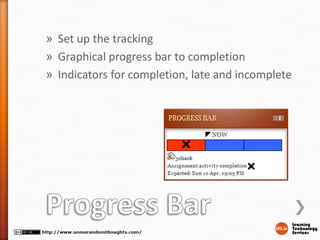
» Set up the tracking
» Graphical progress bar to completion
» Indicators for completion, late and incomplete
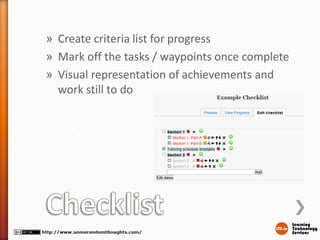
» Create criteria list for progress
» Mark off the tasks / waypoints once complete
» Visual representation of achievements and
work still to do
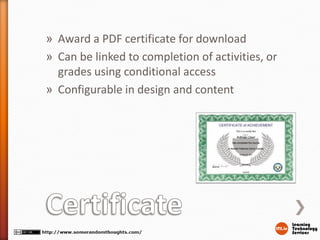
» Award a PDF certificate for download
» Can be linked to completion of activities, or
grades using conditional access
» Configurable in design and content
» Activities and Resources have completion status
» Manually complete (student)
» Automatically complete by action
˃ forum post
˃ File upload
˃ View
» Displays tick-box on course overview page
» Uses Cron to process
» Restrict access to resource/activity/section
» Activity Completion
» Grade
» Time
» Profile field
“if a resumé or CV is a bunch of claims, Open Badges
are a bunch of evidence”
» Award graphical badges based on criteria
˃ Finishing a course, completing your profile, completing an activity in a
course, ad-hoc assignment by teacher
» Learner can download or export badge
˃ Badge Backpack
» Badge holds metadata for verification
» Learner can display badges elsewhere
See http://www.somerandomthoughts.com/blog/2013/05/06/open-badges-and-
moodle/
Gavin Henrick
E: gavin@lts.ie
T: @ghenrick
B: www.somerandomthoughts.com
S: http://www.slideshare.net/ghenrick/
L: http://ie.linkedin.com/in/gavinhenrick
W: http://www.lts.ie

Moodle gamification tools edtech 2013

  • 1.
    Some of thetools to use in course gamification
  • 2.
    » Groups » ProgressBar » Checklist » Certificate » Activity Completion » Conditional Access » Badges
  • 3.
    » Groups canhave icons associated with them » ICONS show up on forum posts ˃ (group icon block) » Can manually assign students to a group ˃ Group, Batch » Can programmatically assign to a group » Example ˃ Moodle.org “Particularly Helpful Moodler”
  • 4.
    » Set upthe tracking » Graphical progress bar to completion » Indicators for completion, late and incomplete
  • 5.
    » Create criterialist for progress » Mark off the tasks / waypoints once complete » Visual representation of achievements and work still to do
  • 6.
    » Award aPDF certificate for download » Can be linked to completion of activities, or grades using conditional access » Configurable in design and content
  • 7.
    » Activities andResources have completion status » Manually complete (student) » Automatically complete by action ˃ forum post ˃ File upload ˃ View » Displays tick-box on course overview page » Uses Cron to process
  • 8.
    » Restrict accessto resource/activity/section » Activity Completion » Grade » Time » Profile field
  • 9.
    “if a resuméor CV is a bunch of claims, Open Badges are a bunch of evidence” » Award graphical badges based on criteria ˃ Finishing a course, completing your profile, completing an activity in a course, ad-hoc assignment by teacher » Learner can download or export badge ˃ Badge Backpack » Badge holds metadata for verification » Learner can display badges elsewhere See http://www.somerandomthoughts.com/blog/2013/05/06/open-badges-and- moodle/
  • 10.
    Gavin Henrick E: gavin@lts.ie T:@ghenrick B: www.somerandomthoughts.com S: http://www.slideshare.net/ghenrick/ L: http://ie.linkedin.com/in/gavinhenrick W: http://www.lts.ie