Pentesting Mobile Applications


                      Prashant Verma
                  Security Consultant & Competency Lead
Target Mobile
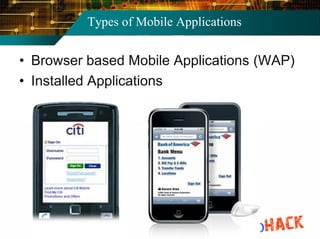
Types of Mobile Applications


• Browser based Mobile Applications (WAP)
• Installed Applications
Android architecture

• DVM
  • ~JVM
  • dex files
• Sandboxing
  • Apps run
    with its user,
    group
• Apps may
  share data, if
  run with same
  user
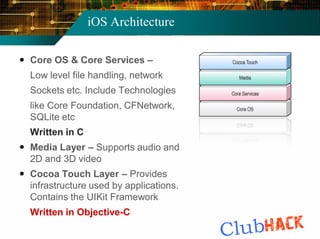
iOS Architecture

 Core OS & Core Services –
  Low level file handling, network
  Sockets etc. Include Technologies
  like Core Foundation, CFNetwork,
  SQLite etc
  Written in C
 Media Layer – Supports audio and
  2D and 3D video
 Cocoa Touch Layer – Provides
  infrastructure used by applications.
  Contains the UIKit Framework
  Written in Objective-C
Pentesting Mobile Applications


•   Reading Stored Data
•   Capturing Requests
•   Reversing the Application Package
•   Platform Specific Issues
Reading Stored Data
Reading Stored Data


• Mobile applications store data in local
  memory of handset
• This data is stored by developers in files
  locally and is used by the application
• Look out for the persistent stored
  information in the mobiles for sensitive
  data (pwd, keys, account details etc.)
• This may involve hacking / jailbreaking the
  phone
Reading Stored Data: Android


• Android Applications store the data in
  directory /data/data/[PACKAGE_NAME]
• sharedpreferences
    • Context.MODE_PRIVATE
    • Context.MODE_WORLD_READABLE
    • Context.MODE_WORLD_WRITEABLE
• Files may be stored using the filesystem at
  /data/data/[PACKAGE_NAME]/files/filenam
• Storage in the SQLite databases
    • Can be read using SQLite browser
Reading Stored Data: Android


• Demo 1
 • Let us see how the stored data can be
   accessed in an Android phone

 • <Connect the phone via USB debugging
   mode, show the storage directory in Android,
   browser to show the different storage formats,
   read the files, read the databases using
   SQLite browser>
Reading Stored Data: iOS


• iPhone too stores the data in the
  application directory
     • /private/var/mobile/Applications/ApplicationID/
• Plist files ..can be read using
     • Property List Editor
     • plutil
• Sqlite databases
     • Same procedure to read as Android
Capturing the Traffic
Capturing The Traffic


• Capture HTTP requests & responses
• Carry out Parameter Manipulation and
  other attacks
• Set up a proxy in between the server & the
  client to intercept.
• This can be achieved by
    • Proxying the real devices
    • Proxying the emulators
Capturing The Traffic : Android


• Proxying Android Device
   • Root your phone 
   • Install Superuser
   • Install a proxy tool like ProxyDroid or Auto Proxy
      • Set the proxy IP address & port no.


• Emulators can also be proxied
Capturing The Traffic
Capturing The Traffic : iPhones


• Proxying Apple iPhone / iPAD
 • Setup a proxy ipaddress and port for the wifi
   connection
 • Entire traffic is routed through this proxy
• Proxying Simulators
 • Open the Simulator within the xcode IDE
 • GUI option to set proxy ipaddress and port
Capturing The Traffic: iPhones


• Demo 2
 • Let us now see how to proxy an iPhone
   device to capture the traffic

 • <connect the phone & laptop to the wifi, setup
   laptop as proxy for the phone, show the
   captured traffic in the laptop, demonstrate the
   parameter manipulation attack>
Capturing The Traffic: iPhones
Reversing the Application Package


• Reverse Engineer the application logic and
  source code
• Identify the flaws in the code base to
  exploit them
• Look for sensitive data like passwords,
  encryption algorithms and keys
• Nokia jar files & Android apk packages are
  easy to reverse
Reversing the Android Package


• Two step process
    • apk to dex conversion
    • dex to java conversion
Reversing the Android Package


• Demo 3
   • Let us now see how to reverse engineer an
     Android application package


 • <Take a .apk Android Package, demonstrate
   the reversing process to convert it to readable
   java files, show the sample vulnerability in the
   java file>
Platform Specific Issues


• Android the prime target of malwares
 • ZITMO
 • Android Market had malicious apps


• Apple iOS
 • iOS URL Schemes
 • Screenshot Caching issue
Malware: ZITMO


• User logs in to his banking application
• ZITMO, in background, listens to the incoming
  SMS
• ZITMO obtains the SMS
• ZITMO forwards the SMS to the attacker’s web
  address
• SMS contains the one time password (the
  second factor of the two factor authentication)
• Attacker can use it to bypass the two factor
  authentication
Android Market


• Recently, Google Android Market was in
  news for distributing Malicious Applications
• Google had to remove these infected
  applications from the Market
• Lack of Proper Vetting Process by Google,
  as opposed to Apple App Store
• Experts have advised Google for
  establishing the same
iOS URL Schemes


• iOS URL schemes
 • URL schemes are used for web server
   connections, without additional parameters
 • This involves sending the required parameters
   in the URL, which makes it a vulnerable
   implementation
 • Sometimes username-password is also send
   this way
 • Prefer other implementations, if easily
   possible without URL schemes
iOS Screenshot Caching


• Whenever users press the Home button
  while using an Application
   • iOS takes screenshot of application
   • This is required for the zoom-out animation while
     leaving the app
   • This same screenshot used to simulate zoom-in
     animation while returning to app
   • This is store in the device memory and can be
     used by anyone having access to rooted device
• Black out the View whenever Home button
  is pressed while using the application.
Securing Mobile Applications
Security Best Practices


• Do not hardcode sensitive information
• Do not store sensitive information locally
• If required to be stored, do not store at
  easily readable location like memory card.
• Encrypt the stored data
• Implement SSL
• Protect the webserver against application
  layer attacks
Security Best Practices


• Sanitize inputs, use prepared statements
  (protection against client side injection)
• Implement Proper Authentication. Do not
  use UDID or other hardware IDs for auth.
• Prefer encryption over encoding or
  obfuscation
OWASP Mobile Top 10 Risks
References


• Android official documentation
• Apple iOS code guide
• OWASP Mobile Top 10 Project
• Palisade – The application security
  magazine
• GoatDroid Project
• iGoat Project
Thank you
                         Prashant Verma
      Security Consultant & Competency Lead
               verma.prashantkumar@gmail.com

Pentesting Mobile Applications (Prashant Verma)

  • 1.
    Pentesting Mobile Applications Prashant Verma Security Consultant & Competency Lead
  • 2.
  • 3.
    Types of MobileApplications • Browser based Mobile Applications (WAP) • Installed Applications
  • 4.
    Android architecture • DVM • ~JVM • dex files • Sandboxing • Apps run with its user, group • Apps may share data, if run with same user
  • 5.
    iOS Architecture  CoreOS & Core Services – Low level file handling, network Sockets etc. Include Technologies like Core Foundation, CFNetwork, SQLite etc Written in C  Media Layer – Supports audio and 2D and 3D video  Cocoa Touch Layer – Provides infrastructure used by applications. Contains the UIKit Framework Written in Objective-C
  • 6.
    Pentesting Mobile Applications • Reading Stored Data • Capturing Requests • Reversing the Application Package • Platform Specific Issues
  • 7.
  • 8.
    Reading Stored Data •Mobile applications store data in local memory of handset • This data is stored by developers in files locally and is used by the application • Look out for the persistent stored information in the mobiles for sensitive data (pwd, keys, account details etc.) • This may involve hacking / jailbreaking the phone
  • 9.
    Reading Stored Data:Android • Android Applications store the data in directory /data/data/[PACKAGE_NAME] • sharedpreferences • Context.MODE_PRIVATE • Context.MODE_WORLD_READABLE • Context.MODE_WORLD_WRITEABLE • Files may be stored using the filesystem at /data/data/[PACKAGE_NAME]/files/filenam • Storage in the SQLite databases • Can be read using SQLite browser
  • 10.
    Reading Stored Data:Android • Demo 1 • Let us see how the stored data can be accessed in an Android phone • <Connect the phone via USB debugging mode, show the storage directory in Android, browser to show the different storage formats, read the files, read the databases using SQLite browser>
  • 11.
    Reading Stored Data:iOS • iPhone too stores the data in the application directory • /private/var/mobile/Applications/ApplicationID/ • Plist files ..can be read using • Property List Editor • plutil • Sqlite databases • Same procedure to read as Android
  • 12.
  • 13.
    Capturing The Traffic •Capture HTTP requests & responses • Carry out Parameter Manipulation and other attacks • Set up a proxy in between the server & the client to intercept. • This can be achieved by • Proxying the real devices • Proxying the emulators
  • 14.
    Capturing The Traffic: Android • Proxying Android Device • Root your phone  • Install Superuser • Install a proxy tool like ProxyDroid or Auto Proxy • Set the proxy IP address & port no. • Emulators can also be proxied
  • 15.
  • 16.
    Capturing The Traffic: iPhones • Proxying Apple iPhone / iPAD • Setup a proxy ipaddress and port for the wifi connection • Entire traffic is routed through this proxy • Proxying Simulators • Open the Simulator within the xcode IDE • GUI option to set proxy ipaddress and port
  • 17.
    Capturing The Traffic:iPhones • Demo 2 • Let us now see how to proxy an iPhone device to capture the traffic • <connect the phone & laptop to the wifi, setup laptop as proxy for the phone, show the captured traffic in the laptop, demonstrate the parameter manipulation attack>
  • 18.
  • 19.
  • 20.
    Reversing the ApplicationPackage • Reverse Engineer the application logic and source code • Identify the flaws in the code base to exploit them • Look for sensitive data like passwords, encryption algorithms and keys • Nokia jar files & Android apk packages are easy to reverse
  • 21.
    Reversing the AndroidPackage • Two step process • apk to dex conversion • dex to java conversion
  • 22.
    Reversing the AndroidPackage • Demo 3 • Let us now see how to reverse engineer an Android application package • <Take a .apk Android Package, demonstrate the reversing process to convert it to readable java files, show the sample vulnerability in the java file>
  • 23.
  • 24.
    Platform Specific Issues •Android the prime target of malwares • ZITMO • Android Market had malicious apps • Apple iOS • iOS URL Schemes • Screenshot Caching issue
  • 25.
    Malware: ZITMO • Userlogs in to his banking application • ZITMO, in background, listens to the incoming SMS • ZITMO obtains the SMS • ZITMO forwards the SMS to the attacker’s web address • SMS contains the one time password (the second factor of the two factor authentication) • Attacker can use it to bypass the two factor authentication
  • 26.
    Android Market • Recently,Google Android Market was in news for distributing Malicious Applications • Google had to remove these infected applications from the Market • Lack of Proper Vetting Process by Google, as opposed to Apple App Store • Experts have advised Google for establishing the same
  • 27.
    iOS URL Schemes •iOS URL schemes • URL schemes are used for web server connections, without additional parameters • This involves sending the required parameters in the URL, which makes it a vulnerable implementation • Sometimes username-password is also send this way • Prefer other implementations, if easily possible without URL schemes
  • 28.
    iOS Screenshot Caching •Whenever users press the Home button while using an Application • iOS takes screenshot of application • This is required for the zoom-out animation while leaving the app • This same screenshot used to simulate zoom-in animation while returning to app • This is store in the device memory and can be used by anyone having access to rooted device • Black out the View whenever Home button is pressed while using the application.
  • 29.
  • 30.
    Security Best Practices •Do not hardcode sensitive information • Do not store sensitive information locally • If required to be stored, do not store at easily readable location like memory card. • Encrypt the stored data • Implement SSL • Protect the webserver against application layer attacks
  • 31.
    Security Best Practices •Sanitize inputs, use prepared statements (protection against client side injection) • Implement Proper Authentication. Do not use UDID or other hardware IDs for auth. • Prefer encryption over encoding or obfuscation
  • 32.
  • 33.
    References • Android officialdocumentation • Apple iOS code guide • OWASP Mobile Top 10 Project • Palisade – The application security magazine • GoatDroid Project • iGoat Project
  • 34.
    Thank you Prashant Verma Security Consultant & Competency Lead verma.prashantkumar@gmail.com