Android Penetration Testing
Topics covered
• Android Security Model
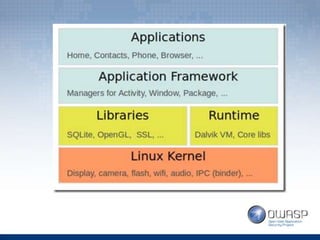
• Android software stack
• Content provider
Android Software stack
Android Security Model
Android security model
• Linux-based platform.
• App programming – done in Java
• App isolation.
• OS software stack consists of Java apps
running on a Dalvik Virtual Machine.
• Each app has its own DVM
Android security model (contd)
• Data storage location: /data/data/<package-
name>
• AndroidManifest.xml – very important
– Contains information about package, components
like activities, services, content providers, etc
– Responsible to protect the application by defining
permissions
Content Provider
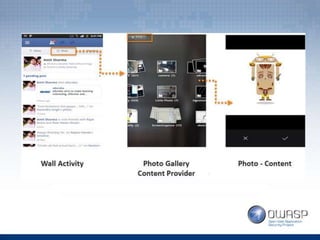
Content providers
• Used to manage access to a structured set of
data.
• Provide mechanism for defining data security.
• Standard interface that connects data in one
process with code running in another process
(Inter process communication)
Android debug bridge (ADB)
• Command line tool that lets you communicate
with an android device/emulator.
~demo
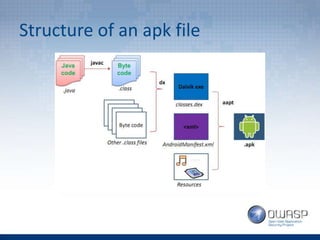
Structure of an apk file
App security testing – how?
• Reverse engineering the apk file.
• Examining permissions, services, activities, etc
• Test sensitive data storage.
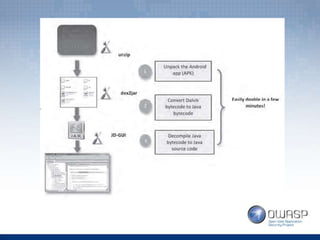
Reverse engineering the apk
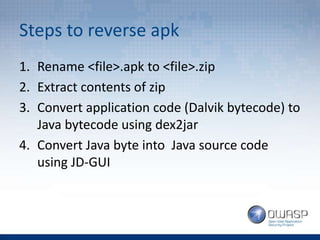
Steps to reverse apk
1. Rename <file>.apk to <file>.zip
2. Extract contents of zip
3. Convert application code (Dalvik bytecode) to
Java bytecode using dex2jar
4. Convert Java byte into Java source code
using JD-GUI
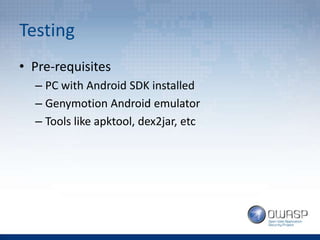
Testing
• Pre-requisites
– PC with Android SDK installed
– Genymotion Android emulator
– Tools like apktool, dex2jar, etc
~demo
Common insecure practices
• Hardcoding sensitive information
• Encrypting passwords
• Lack of binary protection
• Insecure data storage. (~demo)
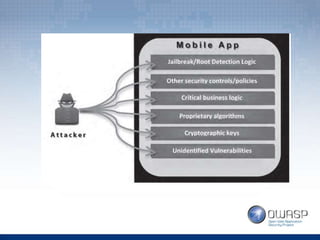
Application integrity challenges
• Hackers/malwares gaining physical access to
application binaries.
• “My application contains no programming
flaws”. But, application binaries are still open
to reverse-engineering and hacking tools.
• Most commonly found attack scenario:
• Attempt to insert malware and rebuild the original app(eg.
whatsapp, flappybird, etc) to create malicious apk.
• Spread malicious apk through email, social
network/forums.
• Victim installs apk and is compromised.
Examples
• Bypassing Android lock-screen
• Insecure data storage
Secure Coding Practices
• Code obfuscation
• Symbol stripping
• Symbol renaming
• String encryption
• Anti-debug
And much more
References
• Google Developers
• Mobile App Integrity Protection by Arxan
• Learning PenTest for Android – Aditya Gupta
Principle of least privilege

Android pen test basics

  • 1.
  • 2.
    Topics covered • AndroidSecurity Model • Android software stack • Content provider
  • 3.
  • 5.
  • 6.
    Android security model •Linux-based platform. • App programming – done in Java • App isolation. • OS software stack consists of Java apps running on a Dalvik Virtual Machine. • Each app has its own DVM
  • 7.
    Android security model(contd) • Data storage location: /data/data/<package- name> • AndroidManifest.xml – very important – Contains information about package, components like activities, services, content providers, etc – Responsible to protect the application by defining permissions
  • 8.
  • 9.
    Content providers • Usedto manage access to a structured set of data. • Provide mechanism for defining data security. • Standard interface that connects data in one process with code running in another process (Inter process communication)
  • 11.
    Android debug bridge(ADB) • Command line tool that lets you communicate with an android device/emulator. ~demo
  • 12.
  • 13.
    App security testing– how? • Reverse engineering the apk file. • Examining permissions, services, activities, etc • Test sensitive data storage.
  • 14.
  • 15.
    Steps to reverseapk 1. Rename <file>.apk to <file>.zip 2. Extract contents of zip 3. Convert application code (Dalvik bytecode) to Java bytecode using dex2jar 4. Convert Java byte into Java source code using JD-GUI
  • 17.
    Testing • Pre-requisites – PCwith Android SDK installed – Genymotion Android emulator – Tools like apktool, dex2jar, etc
  • 18.
  • 19.
    Common insecure practices •Hardcoding sensitive information • Encrypting passwords • Lack of binary protection • Insecure data storage. (~demo)
  • 20.
    Application integrity challenges •Hackers/malwares gaining physical access to application binaries. • “My application contains no programming flaws”. But, application binaries are still open to reverse-engineering and hacking tools. • Most commonly found attack scenario: • Attempt to insert malware and rebuild the original app(eg. whatsapp, flappybird, etc) to create malicious apk. • Spread malicious apk through email, social network/forums. • Victim installs apk and is compromised.
  • 22.
    Examples • Bypassing Androidlock-screen • Insecure data storage
  • 23.
    Secure Coding Practices •Code obfuscation • Symbol stripping • Symbol renaming • String encryption • Anti-debug And much more
  • 24.
    References • Google Developers •Mobile App Integrity Protection by Arxan • Learning PenTest for Android – Aditya Gupta
  • 25.