Try Real-time Shader for artist.
  Claim back Shader to Softimage artist.


                            CSR&D Support Dept.
                                          Artist
                             Fumoto Kazuhiro
Summary

•   Self-introduction
•   The Advantage to the artist
•   The Realtime-Shader to perform on Softimage
•   Hurdles on learning Shader
    – Shading
    – NormalMap, EnvironmentMap
    – Calculation for expression

•   Goal>Result (to Cgfx)
Self-introduction

•   About CS R&D Support Dept.
    – Graphic library development, Developmental
      environment, Investigation and experiment of the next
      generation graphic

•   About me
       Real-time graphic development.
       In-house tool (such as plug-in) development and
    support (mainly Softimage) for the artist.
          → Technical artist.
An advantage to the artist.

•   The adjustment of the Shader parameter is easy.

•   WYSIWYG - You can see Game Graphics through data
    making.

•   You can get clear knowledge about shader.
    Express higher graphic by learning about the shader
    It doesn’t matter if you can’t write shader code
Face Shader Demo…

•   About Fake image based lighting, Fake sub surface
    scattering…
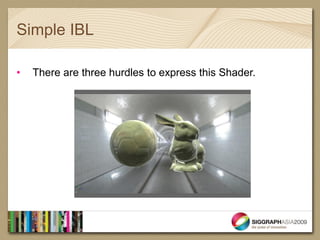
Simple IBL

•   There are three hurdles to express this Shader.
Hurdle1

• Dot (Inner) product
Hurdle1

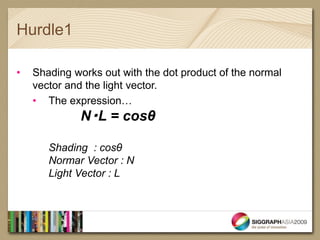
•   Shading works out with the dot product of the normal
    vector and the light vector.
    • The expression…
              N・L = cosθ

       Shading : cosθ
       Normar Vector : N
       Light Vector : L
Hurdle1

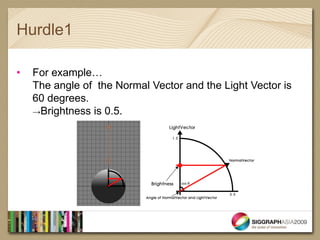
•   For example…
    The angle of the Normal Vector and the Light Vector is
    60 degrees.
    →Brightness is 0.5.
Hurdle1

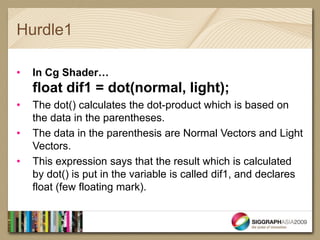
•   In Cg Shader…
    float dif1 = dot(normal, light);
•   The dot() calculates the dot-product which is based on
    the data in the parentheses.
•   The data in the parenthesis are Normal Vectors and Light
    Vectors.
•   This expression says that the result which is calculated
    by dot() is put in the variable is called dif1, and declares
    float (few floating mark).
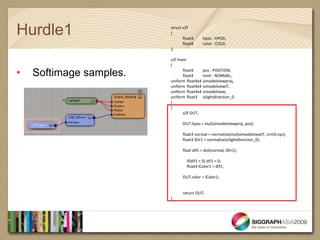
Hurdle1                  struct v2f
                         {
                                float4     hpos : HPOS;
                                float4     color : COL0;
                         };

                         v2f main
                         (

•   Softimage samples.         float4
                               float4
                                          pos : POSITION,
                                          nrml : NORMAL,
                         uniform float4x4 simodelviewproj,
                         uniform float4x4 simodelviewIT,
                         uniform float4x4 simodelview,
                         uniform float3 silightdirection_0
                         )
                         {
                               v2f OUT;

                               OUT.hpos = mul(simodelviewproj, pos);

                               float3 normal = normalize(mul(simodelviewIT, nrml).xyz);
                               float3 lDir1 = normalize(silightdirection_0);

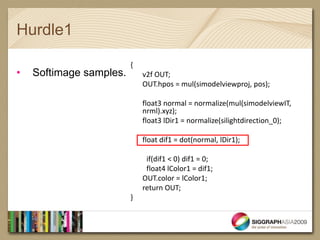
                               float dif1 = dot(normal, lDir1);

                                  if(dif1 < 0) dif1 = 0;
                                  float4 lColor1 = dif1;

                               OUT.color = lColor1;


                               return OUT;
                         }
Hurdle1

                         {
•   Softimage samples.       v2f OUT;
                             OUT.hpos = mul(simodelviewproj, pos);

                             float3 normal = normalize(mul(simodelviewIT,
                             nrml).xyz);
                             float3 lDir1 = normalize(silightdirection_0);

                             float dif1 = dot(normal, lDir1);

                              if(dif1 < 0) dif1 = 0;
                              float4 lColor1 = dif1;
                             OUT.color = lColor1;
                             return OUT;
                         }
Hurdle1

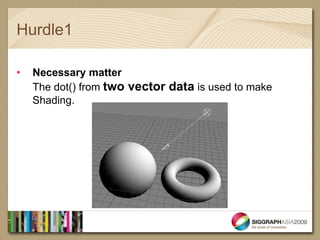
•   Necessary matter
    The dot() from two vector data is used to make
    Shading.
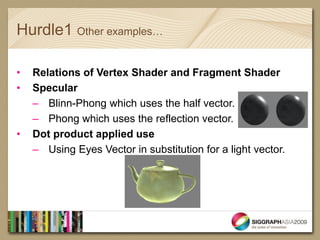
Hurdle1 Other examples…

•   Relations of Vertex Shader and Fragment Shader
•   Specular
    – Blinn-Phong which uses the half vector.
    – Phong which uses the reflection vector.
•   Dot product applied use
    – Using Eyes Vector in substitution for a light vector.
Hurdle2

• Normal Map
  1. Object space
  2. Tangent space
• Environment map
Hurdle2

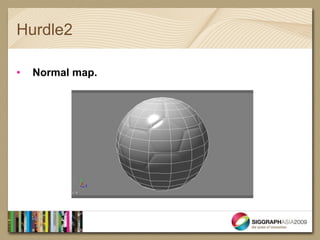
•   Normal map.
Hurdle2

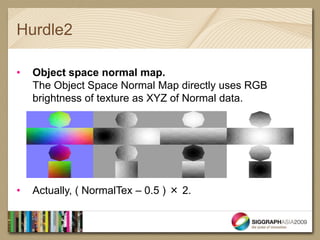
•   Object space normal map.
    The Object Space Normal Map directly uses RGB
    brightness of texture as XYZ of Normal data.


•   Actually, ( NormalTex – 0.5 ) × 2.
Hurdle2

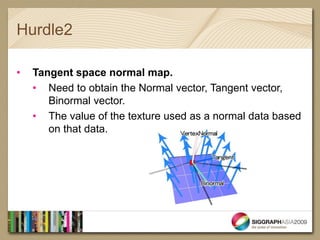
•   Tangent space normal map.
    • Need to obtain the Normal vector, Tangent vector,
       Binormal vector.
    • The value of the texture used as a normal data based
       on that data.
Hurdle2

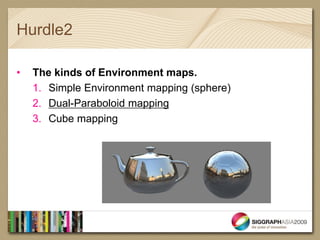
•   The kinds of Environment maps.
    1. Simple Environment mapping (sphere)
    2. Dual-Paraboloid mapping
    3. Cube mapping
Hurdle2

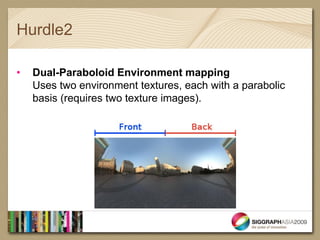
•   Dual-Paraboloid Environment mapping
    Uses two environment textures, each with a parabolic
    basis (requires two texture images).
Hurdle1

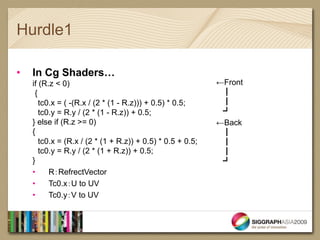
•   In Cg Shaders…
    if (R.z < 0)                                            ←Front
     {                                                       ┃
       tc0.x = ( -(R.x / (2 * (1 - R.z))) + 0.5) * 0.5;      ┃
       tc0.y = R.y / (2 * (1 - R.z)) + 0.5;                  ┛
    } else if (R.z >= 0)                                    ←Back
    {                                                        ┃
       tc0.x = (R.x / (2 * (1 + R.z)) + 0.5) * 0.5 + 0.5;    ┃
       tc0.y = R.y / (2 * (1 + R.z)) + 0.5;                  ┃
    }                                                        ┛
    •     R:RefrectVector
    •     Tc0.x:U to UV
    •     Tc0.y:V to UV
Hurdle3

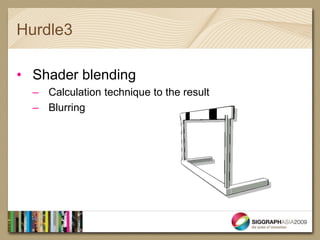
• Shader blending
  – Calculation technique to the result
  – Blurring
Hurdle3

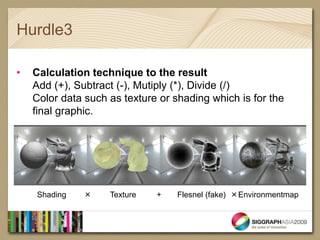
•   Calculation technique to the result
    Add (+), Subtract (-), Mutiply (*), Divide (/)
    Color data such as texture or shading which is for the
    final graphic.


    Shading   ×     Texture   +    Flesnel (fake) ×Environmentmap
Hurdle3

•   Image Based Lighting (Fake)…
Hurdle3

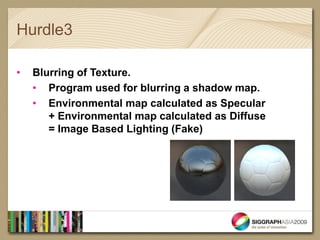
•   Blurring of Texture.
    • Program used for blurring a shadow map.
    • Environmental map calculated as Specular
       + Environmental map calculated as Diffuse
       = Image Based Lighting (Fake)
Hurdle3
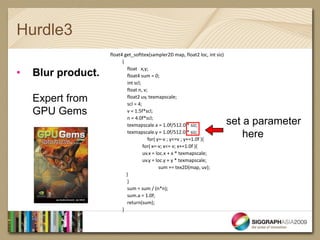
                    float4 get_softtex(sampler2D map, float2 loc, int siz)
                          {

•
                             float x,y;
    Blur product.            float4 sum = 0;
                             int scl;
                             float n, v;
    Expert from              float2 uv, texmapscale;
                             scl = 4;
    GPU Gems                 v = 1.5f*scl;
                             n = 4.0f*scl;
                             texmapscale.x = 1.0f/512.0 * siz;               set a parameter
                             texmapscale.y = 1.0f/512.0 * siz;
                                        for( y=-v ; y<=v ; y+=1.0f ){
                                                                                 here
                                      for( x=-v; x<= v; x+=1.0f ){
                                      uv.x = loc.x + x * texmapscale;
                                      uv.y = loc.y + y * texmapscale;
                                              sum += tex2D(map, uv);
                            }
                             }
                             sum = sum / (n*n);
                             sum.a = 1.0f;
                             return(sum);
                          }
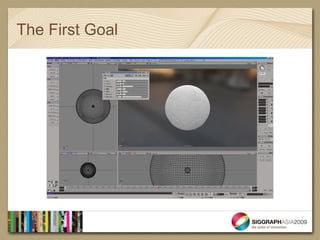
The First Goal
An appendix

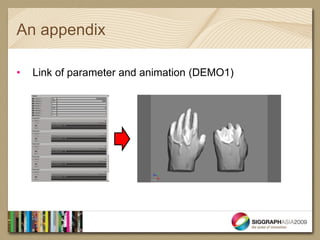
•   Link of parameter and animation (DEMO1)
An appendix

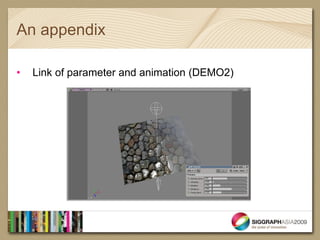
•   Link of parameter and animation (DEMO2)
Next step

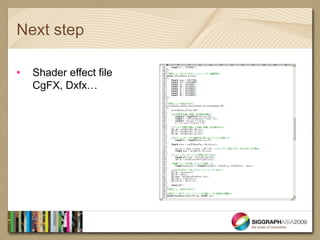
•   Shader effect file
    CgFX, Dxfx…
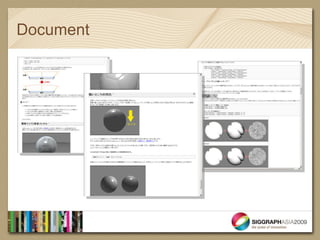
Document
Q & A…

 Thank you…


 Fumoto_Kazuhiro@sega.co.jp

SA09 Realtime education

  • 2.
    Try Real-time Shaderfor artist. Claim back Shader to Softimage artist. CSR&D Support Dept. Artist Fumoto Kazuhiro
  • 3.
    Summary • Self-introduction • The Advantage to the artist • The Realtime-Shader to perform on Softimage • Hurdles on learning Shader – Shading – NormalMap, EnvironmentMap – Calculation for expression • Goal>Result (to Cgfx)
  • 4.
    Self-introduction • About CS R&D Support Dept. – Graphic library development, Developmental environment, Investigation and experiment of the next generation graphic • About me Real-time graphic development. In-house tool (such as plug-in) development and support (mainly Softimage) for the artist. → Technical artist.
  • 5.
    An advantage tothe artist. • The adjustment of the Shader parameter is easy. • WYSIWYG - You can see Game Graphics through data making. • You can get clear knowledge about shader. Express higher graphic by learning about the shader It doesn’t matter if you can’t write shader code
  • 6.
    Face Shader Demo… • About Fake image based lighting, Fake sub surface scattering…
  • 7.
    Simple IBL • There are three hurdles to express this Shader.
  • 8.
  • 9.
    Hurdle1 • Shading works out with the dot product of the normal vector and the light vector. • The expression… N・L = cosθ Shading : cosθ Normar Vector : N Light Vector : L
  • 10.
    Hurdle1 • For example… The angle of the Normal Vector and the Light Vector is 60 degrees. →Brightness is 0.5.
  • 11.
    Hurdle1 • In Cg Shader… float dif1 = dot(normal, light); • The dot() calculates the dot-product which is based on the data in the parentheses. • The data in the parenthesis are Normal Vectors and Light Vectors. • This expression says that the result which is calculated by dot() is put in the variable is called dif1, and declares float (few floating mark).
  • 12.
    Hurdle1 struct v2f { float4 hpos : HPOS; float4 color : COL0; }; v2f main ( • Softimage samples. float4 float4 pos : POSITION, nrml : NORMAL, uniform float4x4 simodelviewproj, uniform float4x4 simodelviewIT, uniform float4x4 simodelview, uniform float3 silightdirection_0 ) { v2f OUT; OUT.hpos = mul(simodelviewproj, pos); float3 normal = normalize(mul(simodelviewIT, nrml).xyz); float3 lDir1 = normalize(silightdirection_0); float dif1 = dot(normal, lDir1); if(dif1 < 0) dif1 = 0; float4 lColor1 = dif1; OUT.color = lColor1; return OUT; }
  • 13.
    Hurdle1 { • Softimage samples. v2f OUT; OUT.hpos = mul(simodelviewproj, pos); float3 normal = normalize(mul(simodelviewIT, nrml).xyz); float3 lDir1 = normalize(silightdirection_0); float dif1 = dot(normal, lDir1); if(dif1 < 0) dif1 = 0; float4 lColor1 = dif1; OUT.color = lColor1; return OUT; }
  • 14.
    Hurdle1 • Necessary matter The dot() from two vector data is used to make Shading.
  • 15.
    Hurdle1 Other examples… • Relations of Vertex Shader and Fragment Shader • Specular – Blinn-Phong which uses the half vector. – Phong which uses the reflection vector. • Dot product applied use – Using Eyes Vector in substitution for a light vector.
  • 16.
    Hurdle2 • Normal Map 1. Object space 2. Tangent space • Environment map
  • 17.
    Hurdle2 • Normal map.
  • 18.
    Hurdle2 • Object space normal map. The Object Space Normal Map directly uses RGB brightness of texture as XYZ of Normal data. • Actually, ( NormalTex – 0.5 ) × 2.
  • 19.
    Hurdle2 • Tangent space normal map. • Need to obtain the Normal vector, Tangent vector, Binormal vector. • The value of the texture used as a normal data based on that data.
  • 20.
    Hurdle2 • The kinds of Environment maps. 1. Simple Environment mapping (sphere) 2. Dual-Paraboloid mapping 3. Cube mapping
  • 21.
    Hurdle2 • Dual-Paraboloid Environment mapping Uses two environment textures, each with a parabolic basis (requires two texture images).
  • 22.
    Hurdle1 • In Cg Shaders… if (R.z < 0) ←Front { ┃ tc0.x = ( -(R.x / (2 * (1 - R.z))) + 0.5) * 0.5; ┃ tc0.y = R.y / (2 * (1 - R.z)) + 0.5; ┛ } else if (R.z >= 0) ←Back { ┃ tc0.x = (R.x / (2 * (1 + R.z)) + 0.5) * 0.5 + 0.5; ┃ tc0.y = R.y / (2 * (1 + R.z)) + 0.5; ┃ } ┛ • R:RefrectVector • Tc0.x:U to UV • Tc0.y:V to UV
  • 23.
    Hurdle3 • Shader blending – Calculation technique to the result – Blurring
  • 24.
    Hurdle3 • Calculation technique to the result Add (+), Subtract (-), Mutiply (*), Divide (/) Color data such as texture or shading which is for the final graphic. Shading × Texture + Flesnel (fake) ×Environmentmap
  • 25.
    Hurdle3 • Image Based Lighting (Fake)…
  • 26.
    Hurdle3 • Blurring of Texture. • Program used for blurring a shadow map. • Environmental map calculated as Specular + Environmental map calculated as Diffuse = Image Based Lighting (Fake)
  • 27.
    Hurdle3 float4 get_softtex(sampler2D map, float2 loc, int siz) { • float x,y; Blur product. float4 sum = 0; int scl; float n, v; Expert from float2 uv, texmapscale; scl = 4; GPU Gems v = 1.5f*scl; n = 4.0f*scl; texmapscale.x = 1.0f/512.0 * siz; set a parameter texmapscale.y = 1.0f/512.0 * siz; for( y=-v ; y<=v ; y+=1.0f ){ here for( x=-v; x<= v; x+=1.0f ){ uv.x = loc.x + x * texmapscale; uv.y = loc.y + y * texmapscale; sum += tex2D(map, uv); } } sum = sum / (n*n); sum.a = 1.0f; return(sum); }
  • 28.
  • 29.
    An appendix • Link of parameter and animation (DEMO1)
  • 30.
    An appendix • Link of parameter and animation (DEMO2)
  • 31.
    Next step • Shader effect file CgFX, Dxfx…
  • 32.
  • 33.
    Q & A… Thank you… Fumoto_Kazuhiro@sega.co.jp