
Manufacturing Excellence
Visual Factory
2
Visual Factory
“Tell me and I will forget.
Show me and I will remember.
Involve me and I will understand.
Step back and I will act.”
(Old Chinese proverb)
Why Visual Factory?
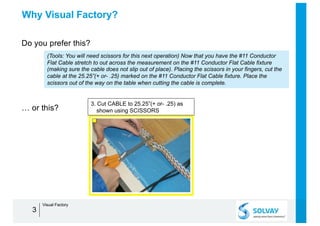
Do you prefer this?
3
(Tools: You will need scissors for this next operation) Now that you have the #11 Conductor
Flat Cable stretch to out across the measurement on the #11 Conductor Flat Cable fixture
(making sure the cable does not slip out of place). Placing the scissors in your fingers, cut the
cable at the 25.25”(+ or- .25) marked on the #11 Conductor Flat Cable fixture. Place the
scissors out of the way on the table when cutting the cable is complete.
… or this?
3. Cut CABLE to 25.25”(+ or- .25) as
shown using SCISSORS
Visual Factory
Why Visual Factory?
• Do you know we remember only 10% of what we read?
Ä If we add images then it doubles. Video and interaction make it
even better.
Ä This is why knowledge transfer in work situations is most effective
when it is based on images and videos..
4
Learning Pyramid
Visual Factory
What means Visual Factory?
• Visual Factory is a concept focused on the visual perception.
• Purpose = replace texts by communicating via “visual signals”:
- in work instructions and checklists (pictures of the equipment with control
points)
- with local signage: tags, labels (what to measure, range, …), pictures
• Benefits:
- quick and easy instructions
- reductions in injuries and strain
- increased efficiency and reactivity
- reduction of the variability and the non-conformity rate
- decreased training time…
• Scope: HSE, production, maintenance, QC, …
5
Testimony
Gilles B., Producer Manager:
“Regarding the number of measurements to read, the Visual Management makes the
use of the checklist simple and efficient [...] however, the labels on the measurement
tools are essential for the understanding of all technicians.”
Visual Factory
Visual Factory
• Standard Visual Work Instructions
• Round Cheklists
• Local Signage (sample points, maintenance check, …)
6
Visual Factory
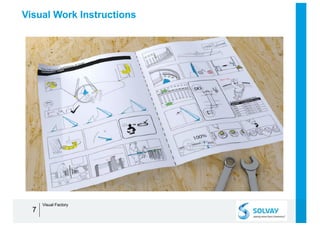
Visual Work Instructions
7
Visual Factory
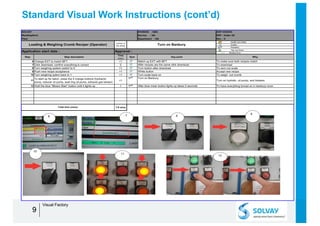
Standard Visual Work Instructions
DIVISION : GBU SOP XXXXXX
Service : NA REP : folder XX
Department : NA Rev. : 0
Health and safety
Quality
Reliability
Tips and tricks
( ) Masked time
Step Step description
Time
(min)
Sym Key point Why
1 Check email to know which recipe to use 2 PPE Required- Safety Glasses Find recipe
2
Banbury operator downloads recipe from “Production
Formulation” sheet
<1
Find recipe print out hard copy
To have a hard copy of reciipe present
3 On Banbury select “edit recipe” <1 Click Edit recipe To find the recipe for designated job
4 Make sure numbers match those of desired formula <1 Read off of printed out email To match masterbatcg/ crumb inventory correctly
5 Select “EXT recipe” <1 EXT Recipe To match download recipe
6Total time (mins)
Application start date : Approval :
SOLVAY
WestDeptford
Plant
Loading & Weighing Crumb Reciper (Operator)
number of
the phase Retrieving Recipe
1 2
3
4
5
Visual Standard Work
plays a major role in the
Visual Factory Process.
By defining a standard
with visual cues the
variation between
operators and over time
is reduced or removed
allowing for a more
stable operation.
The Standard work is
also audited on a weekly
basis to ensure
adherence to the
standard.
The document receives a
regular review to ensure
the latest best practices
are in place.
88
Visual Factory
Standard Visual Work Instructions (cont’d)
DIVISION : GBU SOP XXXXXX
Service : NA REP : folder XX
Department : NA Rev. : 0
Health and safety
Quality
Reliability
Tips and tricks
( ) Masked time
Step Step description
Time
(min)
Sym Key point Why
6 Change EXT to match BFT <1 Match up EXT with BFT To make sure both recipes match
7 Click download, confirm everything is correct 2 After recipes are the same click download To download
8 Turn weighing system switch to 0 <1 Turn button after download To zero out scale
9 Push new recipe acceptance <1 White button Accept new recipe
10 Turn weighing sytem back to 1 <1 Turn scale back on To weigh out crumb
11
To start up for batch, press the 4 orange buttons (hydraulic
pump, reducer oil pump, seal ring oil pump, exhaust gas blower)
<1
Turn on Banbury
Turn on hydralic, oil pump, and blowers
12 Hold the blue “Mixers Start” button until it lights up 1 After blue mixer button lights up takes 5 seconds To have everything turned on in banbury room
7-8 mins
SOLVAY
WestDeptford
Plant
Loading & Weighing Crumb Reciper (Operator)
number of
the phase Turn on Banbury
Total time (mins)
Application start date : Approval :
6 7 8
9
10
11
12
99
Visual Factory
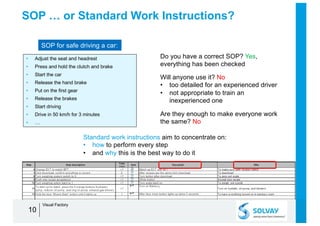
SOP … or Standard Work Instructions?
• Adjust the seat and headrest
• Press and hold the clutch and brake
• Start the car
• Release the hand brake
• Put on the first gear
• Release the brakes
• Start driving
• Drive in 50 km/h for 3 minutes
• …
10
SOP for safe driving a car:
Do you have a correct SOP? Yes,
everything has been checked
Will anyone use it? No
• too detailed for an experienced driver
• not appropriate to train an
inexperienced one
Are they enough to make everyone work
the same? No
Standard work instructions aim to concentrate on:
• how to perform every step
• and why this is the best way to do it
Visual Factory
Visual Factory
• Standard Visual Work Instructions
• Round Cheklists
• Local Signage (sample points, maintenance check, …)
11
Visual Factory
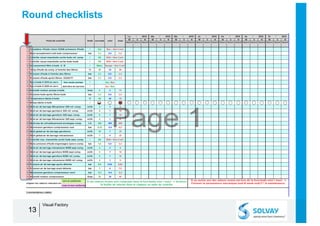
Round checklists
1212
Start
Start
End
End
Visual Factory
Round checklists
1313
Visual Factory
Visual Factory
• Standard Visual Work Instructions
• Round Cheklists
• Local Signage (sample points, maintenance check, …)
Examples:
1. labels on control points
2. safety instructions
3. management of lubricants
14
Visual Factory
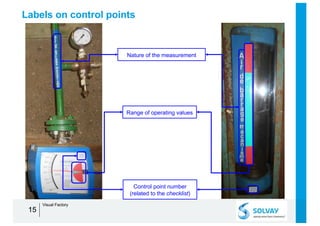
Labels on control points
1515
Nature of the measurement
Range of operating values
Control point number
(related to the checklist)
Visual Factory
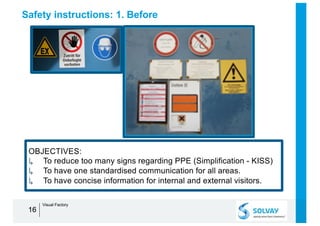
Safety instructions: 1. Before
1616
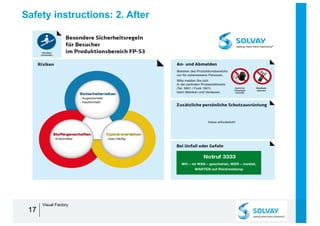
OBJECTIVES:
↳ To reduce too many signs regarding PPE (Simplification - KISS)
↳ To have one standardised communication for all areas.
↳ To have concise information for internal and external visitors.
Visual Factory
Safety instructions: 2. After
1717
Visual Factory
Management of lubricants
• Scope
- Assure a systematic and standardized delivery of well identified and clean
lubricants from drum storage to the point of application on equipment.
• Targets
- Improve workplace organisation.
- Avoid lubricants contamination (cross or external).
- Avoid mistakes during lubrication.
- Improve efficiency and productivity of lubrication tasks.
- Waste reduction.
- Improve equipment uptime.
18
Visual Factory
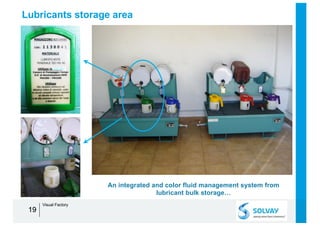
Lubricants storage area
1919
An integrated and color fluid management system from
lubricant bulk storage…
Visual Factory
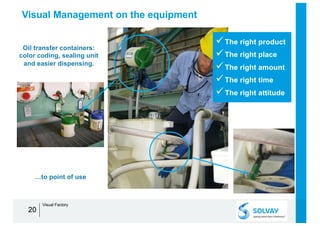
Visual Management on the equipment
2020
Oil transfer containers:
color coding, sealing unit
and easier dispensing.
…to point of use
üThe right product
üThe right place
üThe right amount
üThe right time
üThe right attitude
Visual Factory
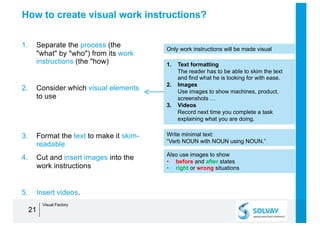
How to create visual work instructions?
1. Separate the process (the
"what" by "who") from its work
instructions (the "how)
2. Consider which visual elements
to use
3. Format the text to make it skim-
readable
4. Cut and insert images into the
work instructions
5. Insert videos.
21
1. Text formatting
The reader has to be able to skim the text
and find what he is looking for with ease.
2. Images
Use images to show machines, product,
screenshots …
3. Videos
Record next time you complete a task
explaining what you are doing.
Only work instructions will be made visual
Also use images to show
• before and after states
• right or wrong situations
Write minimal text:
“Verb NOUN with NOUN using NOUN.”
Visual Factory
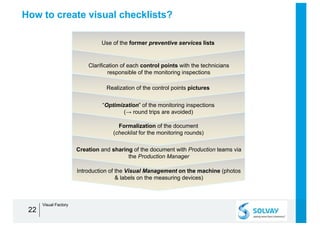
How to create visual checklists?
22
Use of the former preventive services lists
“Optimization” of the monitoring inspections
(→ round trips are avoided)
Formalization of the document
(checklist for the monitoring rounds)
Creation and sharing of the document with Production teams via
the Production Manager
Clarification of each control points with the technicians
responsible of the monitoring inspections
Realization of the control points pictures
Introduction of the Visual Management on the machine (photos
& labels on the measuring devices)
Visual Factory
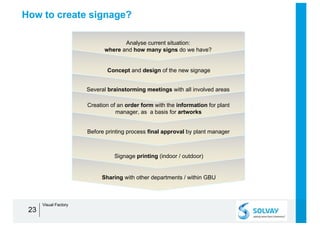
How to create signage?
23
Analyse current situation:
where and how many signs do we have?
Creation of an order form with the information for plant
manager, as a basis for artworks
Before printing process final approval by plant manager
Signage printing (indoor / outdoor)
Concept and design of the new signage
Several brainstorming meetings with all involved areas
Sharing with other departments / within GBU
Visual Factory
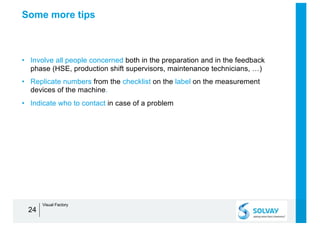
Some more tips
• Involve all people concerned both in the preparation and in the feedback
phase (HSE, production shift supervisors, maintenance technicians, …)
• Replicate numbers from the checklist on the label on the measurement
devices of the machine.
• Indicate who to contact in case of a problem
24
Visual Factory
Visual Factory – Self Assessment
2525
HAND-OUT
Theme Question Yes No
▪ Are standard work instructions located at the point use, visible, and graphically displayed when
possible? Do these work instructions include quality inspection criteria?
▪ Are machine gauges marked visually for acceptable levels of operation?
▪ Are machine parameters identified and posted at the point of use and monitored daily?
▪ Are preventive maintenance schedules written for each machine/tool and is the status clearly
displayed on the equipment?
Point of use
▪ (focus on user) Are you sure your work instructions are not encumbered with content to satisfy
auditors, engineers, quality managers...?
▪ (clarity) Can your work instructions be understood by the operator with a minimum of effort?
▪ (usefulness) Do your work instructions concentrate on how to perform every step? and why this
is the best way to do it?
Skim-
readable text
▪ Do you illustrate one simple idea with each visual?
▪ Are your pictures of "good enough" quality?
▪ Are your visuals focused on what to illustrate? Are they not cluttered with too much information?
Pictures &
drawings
▪ Are tools and supplies shadowed/outlined with their address so it is obvious when they are
missing?
▪ Do you illustrate the "right" and "wrong" states? the "before" and "after" situation (5S)?
▪ (clarity) Do your work instructions explain mostly with graphics or pictures, using only minimal
clarifying text (“Verb NOUN with NOUN using NOUN.”)?
▪ Do you widely use pictures & drawings for your work instructions? ("A picture is worth a
thousand words")
Visual Factory

Manufacturing Excellence - Visual Factory

  • 1.
  • 2.
    2 Visual Factory “Tell meand I will forget. Show me and I will remember. Involve me and I will understand. Step back and I will act.” (Old Chinese proverb)
  • 3.
    Why Visual Factory? Doyou prefer this? 3 (Tools: You will need scissors for this next operation) Now that you have the #11 Conductor Flat Cable stretch to out across the measurement on the #11 Conductor Flat Cable fixture (making sure the cable does not slip out of place). Placing the scissors in your fingers, cut the cable at the 25.25”(+ or- .25) marked on the #11 Conductor Flat Cable fixture. Place the scissors out of the way on the table when cutting the cable is complete. … or this? 3. Cut CABLE to 25.25”(+ or- .25) as shown using SCISSORS Visual Factory
  • 4.
    Why Visual Factory? •Do you know we remember only 10% of what we read? Ä If we add images then it doubles. Video and interaction make it even better. Ä This is why knowledge transfer in work situations is most effective when it is based on images and videos.. 4 Learning Pyramid Visual Factory
  • 5.
    What means VisualFactory? • Visual Factory is a concept focused on the visual perception. • Purpose = replace texts by communicating via “visual signals”: - in work instructions and checklists (pictures of the equipment with control points) - with local signage: tags, labels (what to measure, range, …), pictures • Benefits: - quick and easy instructions - reductions in injuries and strain - increased efficiency and reactivity - reduction of the variability and the non-conformity rate - decreased training time… • Scope: HSE, production, maintenance, QC, … 5 Testimony Gilles B., Producer Manager: “Regarding the number of measurements to read, the Visual Management makes the use of the checklist simple and efficient [...] however, the labels on the measurement tools are essential for the understanding of all technicians.” Visual Factory
  • 6.
    Visual Factory • StandardVisual Work Instructions • Round Cheklists • Local Signage (sample points, maintenance check, …) 6 Visual Factory
  • 7.
  • 8.
    Standard Visual WorkInstructions DIVISION : GBU SOP XXXXXX Service : NA REP : folder XX Department : NA Rev. : 0 Health and safety Quality Reliability Tips and tricks ( ) Masked time Step Step description Time (min) Sym Key point Why 1 Check email to know which recipe to use 2 PPE Required- Safety Glasses Find recipe 2 Banbury operator downloads recipe from “Production Formulation” sheet <1 Find recipe print out hard copy To have a hard copy of reciipe present 3 On Banbury select “edit recipe” <1 Click Edit recipe To find the recipe for designated job 4 Make sure numbers match those of desired formula <1 Read off of printed out email To match masterbatcg/ crumb inventory correctly 5 Select “EXT recipe” <1 EXT Recipe To match download recipe 6Total time (mins) Application start date : Approval : SOLVAY WestDeptford Plant Loading & Weighing Crumb Reciper (Operator) number of the phase Retrieving Recipe 1 2 3 4 5 Visual Standard Work plays a major role in the Visual Factory Process. By defining a standard with visual cues the variation between operators and over time is reduced or removed allowing for a more stable operation. The Standard work is also audited on a weekly basis to ensure adherence to the standard. The document receives a regular review to ensure the latest best practices are in place. 88 Visual Factory
  • 9.
    Standard Visual WorkInstructions (cont’d) DIVISION : GBU SOP XXXXXX Service : NA REP : folder XX Department : NA Rev. : 0 Health and safety Quality Reliability Tips and tricks ( ) Masked time Step Step description Time (min) Sym Key point Why 6 Change EXT to match BFT <1 Match up EXT with BFT To make sure both recipes match 7 Click download, confirm everything is correct 2 After recipes are the same click download To download 8 Turn weighing system switch to 0 <1 Turn button after download To zero out scale 9 Push new recipe acceptance <1 White button Accept new recipe 10 Turn weighing sytem back to 1 <1 Turn scale back on To weigh out crumb 11 To start up for batch, press the 4 orange buttons (hydraulic pump, reducer oil pump, seal ring oil pump, exhaust gas blower) <1 Turn on Banbury Turn on hydralic, oil pump, and blowers 12 Hold the blue “Mixers Start” button until it lights up 1 After blue mixer button lights up takes 5 seconds To have everything turned on in banbury room 7-8 mins SOLVAY WestDeptford Plant Loading & Weighing Crumb Reciper (Operator) number of the phase Turn on Banbury Total time (mins) Application start date : Approval : 6 7 8 9 10 11 12 99 Visual Factory
  • 10.
    SOP … orStandard Work Instructions? • Adjust the seat and headrest • Press and hold the clutch and brake • Start the car • Release the hand brake • Put on the first gear • Release the brakes • Start driving • Drive in 50 km/h for 3 minutes • … 10 SOP for safe driving a car: Do you have a correct SOP? Yes, everything has been checked Will anyone use it? No • too detailed for an experienced driver • not appropriate to train an inexperienced one Are they enough to make everyone work the same? No Standard work instructions aim to concentrate on: • how to perform every step • and why this is the best way to do it Visual Factory
  • 11.
    Visual Factory • StandardVisual Work Instructions • Round Cheklists • Local Signage (sample points, maintenance check, …) 11 Visual Factory
  • 12.
  • 13.
  • 14.
    Visual Factory • StandardVisual Work Instructions • Round Cheklists • Local Signage (sample points, maintenance check, …) Examples: 1. labels on control points 2. safety instructions 3. management of lubricants 14 Visual Factory
  • 15.
    Labels on controlpoints 1515 Nature of the measurement Range of operating values Control point number (related to the checklist) Visual Factory
  • 16.
    Safety instructions: 1.Before 1616 OBJECTIVES: ↳ To reduce too many signs regarding PPE (Simplification - KISS) ↳ To have one standardised communication for all areas. ↳ To have concise information for internal and external visitors. Visual Factory
  • 17.
    Safety instructions: 2.After 1717 Visual Factory
  • 18.
    Management of lubricants •Scope - Assure a systematic and standardized delivery of well identified and clean lubricants from drum storage to the point of application on equipment. • Targets - Improve workplace organisation. - Avoid lubricants contamination (cross or external). - Avoid mistakes during lubrication. - Improve efficiency and productivity of lubrication tasks. - Waste reduction. - Improve equipment uptime. 18 Visual Factory
  • 19.
    Lubricants storage area 1919 Anintegrated and color fluid management system from lubricant bulk storage… Visual Factory
  • 20.
    Visual Management onthe equipment 2020 Oil transfer containers: color coding, sealing unit and easier dispensing. …to point of use üThe right product üThe right place üThe right amount üThe right time üThe right attitude Visual Factory
  • 21.
    How to createvisual work instructions? 1. Separate the process (the "what" by "who") from its work instructions (the "how) 2. Consider which visual elements to use 3. Format the text to make it skim- readable 4. Cut and insert images into the work instructions 5. Insert videos. 21 1. Text formatting The reader has to be able to skim the text and find what he is looking for with ease. 2. Images Use images to show machines, product, screenshots … 3. Videos Record next time you complete a task explaining what you are doing. Only work instructions will be made visual Also use images to show • before and after states • right or wrong situations Write minimal text: “Verb NOUN with NOUN using NOUN.” Visual Factory
  • 22.
    How to createvisual checklists? 22 Use of the former preventive services lists “Optimization” of the monitoring inspections (→ round trips are avoided) Formalization of the document (checklist for the monitoring rounds) Creation and sharing of the document with Production teams via the Production Manager Clarification of each control points with the technicians responsible of the monitoring inspections Realization of the control points pictures Introduction of the Visual Management on the machine (photos & labels on the measuring devices) Visual Factory
  • 23.
    How to createsignage? 23 Analyse current situation: where and how many signs do we have? Creation of an order form with the information for plant manager, as a basis for artworks Before printing process final approval by plant manager Signage printing (indoor / outdoor) Concept and design of the new signage Several brainstorming meetings with all involved areas Sharing with other departments / within GBU Visual Factory
  • 24.
    Some more tips •Involve all people concerned both in the preparation and in the feedback phase (HSE, production shift supervisors, maintenance technicians, …) • Replicate numbers from the checklist on the label on the measurement devices of the machine. • Indicate who to contact in case of a problem 24 Visual Factory
  • 25.
    Visual Factory –Self Assessment 2525 HAND-OUT Theme Question Yes No ▪ Are standard work instructions located at the point use, visible, and graphically displayed when possible? Do these work instructions include quality inspection criteria? ▪ Are machine gauges marked visually for acceptable levels of operation? ▪ Are machine parameters identified and posted at the point of use and monitored daily? ▪ Are preventive maintenance schedules written for each machine/tool and is the status clearly displayed on the equipment? Point of use ▪ (focus on user) Are you sure your work instructions are not encumbered with content to satisfy auditors, engineers, quality managers...? ▪ (clarity) Can your work instructions be understood by the operator with a minimum of effort? ▪ (usefulness) Do your work instructions concentrate on how to perform every step? and why this is the best way to do it? Skim- readable text ▪ Do you illustrate one simple idea with each visual? ▪ Are your pictures of "good enough" quality? ▪ Are your visuals focused on what to illustrate? Are they not cluttered with too much information? Pictures & drawings ▪ Are tools and supplies shadowed/outlined with their address so it is obvious when they are missing? ▪ Do you illustrate the "right" and "wrong" states? the "before" and "after" situation (5S)? ▪ (clarity) Do your work instructions explain mostly with graphics or pictures, using only minimal clarifying text (“Verb NOUN with NOUN using NOUN.”)? ▪ Do you widely use pictures & drawings for your work instructions? ("A picture is worth a thousand words") Visual Factory