OMA Device Management Protocol
Hamdamboy Urunov, a Ph.D. Researcher.
Special Communication Research Center.,
Kookmin University
Seoul, South Korea
Approved Version 2.0 – 09 Feb 2016
Open Mobile Alliance
OMA-TS-DM_Protocol-V2_0-20160209-A
DM 2.0 Protocol
 OMA DM 2.0 is the next generation of the OMA DM 1.x Protocol
 It provides the interface between the DM Server and the DM Client to manage the device
 OMA DM 2.0 leverages a RESTful architecture for scalability and management performance
 OMA DM 2.0 is also designed to work efficiently on less capable devices.
2
5.1.4 Management Data Delivery using HTTP
 The DM Server can send specific DM Commands (defined in this specification) to the DM Client
 for retrieving or sending management data from or to the Data Repository: this management is
carried over HTTP protocol.
 In this specification some serialization formats (MIME) allowing the transfer of management data
over HTTP protocol are defined, but others are not precluded.
5.2 Package Flow
3
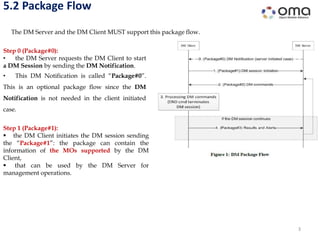
The DM Server and the DM Client MUST support this package flow.
Step 1 (Package#1):
 the DM Client initiates the DM session sending
the “Package#1”: the package can contain the
information of the MOs supported by the DM
Client,
 that can be used by the DM Server for
management operations.
Step 0 (Package#0):
• the DM Server requests the DM Client to start
a DM Session by sending the DM Notification.
• This DM Notification is called “Package#0”.
This is an optional package flow since the DM
Notification is not needed in the client initiated
case.
5.2 Package Flow (cont…)
4
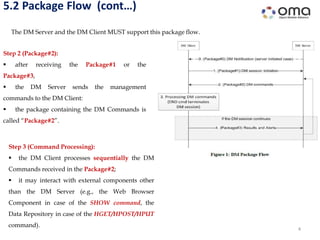
The DM Server and the DM Client MUST support this package flow.
Step 3 (Command Processing):
 the DM Client processes sequentially the DM
Commands received in the Package#2;
 it may interact with external components other
than the DM Server (e.g., the Web Browser
Component in case of the SHOW command, the
Data Repository in case of the HGET/HPOST/HPUT
command).
Step 2 (Package#2):
 after receiving the Package#1 or the
Package#3,
 the DM Server sends the management
commands to the DM Client:
 the package containing the DM Commands is
called “Package#2”.
5.2 Package Flow (cont…)
5
The DM Server and the DM Client MUST support this package flow.
Step 4 (Package#3):
 if the Package#2 does not include the END
command,
 the DM Session continues and the DM Client
responses to the DM Server sending the “Package#3”,
 which contains the results of the DM Command
execution.
 After the Package#3, the package flow goes back to
the Step 2, with the Package#2 sent by the DM Server.
 The DM Session is defined by the Package#1 to Package#3 flow;
 the Package#0 and the HTTP transactions initiated by DM Client to execute the provided DM
Commands are not formally part of the DM Session.
Package#0: DM Notification
6
 Many devices cannot continuously listen for connections from a management server.
 Other devices simply do not wish to “open a port” (i.e. accept connections) for security reasons.
 However, most devices can receive unsolicited messages, sometimes called “notifications”.
 Some handsets, for example, can receive SMS messages.
 Other devices may have the ability to receive other, similar datagram messages.
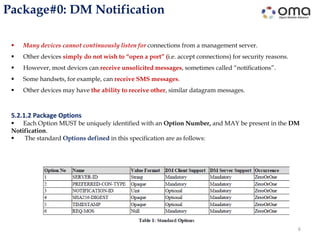
5.2.1.2 Package Options
 Each Option MUST be uniquely identified with an Option Number, and MAY be present in the DM
Notification.
 The standard Options defined in this specification are as follows:
7
Package#0: DM Notification (cont…)
5.2.1.2 Package Options
Uint:
 A non-negative integer which is represented in network byte order using the bytes which Option
Length decides.
 The Option Value range is calculated by 2 to the power of Option Length in bit. For example if the
Option Length is 2, Option Value range is 0-65535 in decimal.
String:
 A Unicode string which is encoded using UTF-8 [RFC3629] in Net-Unicode form [RFC5198].
 Note that ASCII strings (that do not make use of special control characters) are always valid UTF-8 Net-
Unicode strings.
Opaque:
 An opaque sequence of bytes. This type could be used when the other types than Uint or String is
required.
 How to handle this type depends on the Option using this type.
Null: The Option carries no value.
8
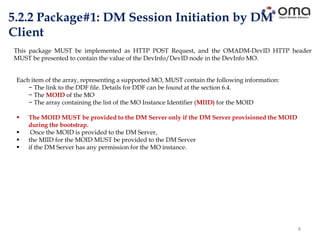
5.2.2 Package#1: DM Session Initiation by DM
Client
This package MUST be implemented as HTTP POST Request, and the OMADM-DevID HTTP header
MUST be presented to contain the value of the DevInfo/DevID node in the DevInfo MO.
Each item of the array, representing a supported MO, MUST contain the following information:
− The link to the DDF file. Details for DDF can be found at the section 6.4.
− The MOID of the MO
− The array containing the list of the MO Instance Identifier (MIID) for the MOID
 The MOID MUST be provided to the DM Server only if the DM Server provisioned the MOID
during the bootstrap.
 Once the MOID is provided to the DM Server,
 the MIID for the MOID MUST be provided to the DM Server
 if the DM Server has any permission for the MO instance.
9
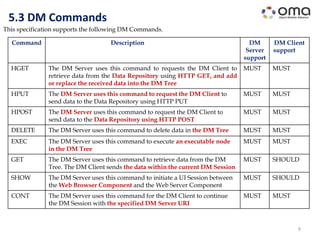
5.3 DM Commands
This specification supports the following DM Commands.
Command Description DM
Server
support
DM Client
support
HGET The DM Server uses this command to requests the DM Client to
retrieve data from the Data Repository using HTTP GET, and add
or replace the received data into the DM Tree
MUST MUST
HPUT The DM Server uses this command to request the DM Client to
send data to the Data Repository using HTTP PUT
MUST MUST
HPOST The DM Server uses this command to request the DM Client to
send data to the Data Repository using HTTP POST
MUST MUST
DELETE The DM Server uses this command to delete data in the DM Tree MUST MUST
EXEC The DM Server uses this command to execute an executable node
in the DM Tree
MUST MUST
GET The DM Server uses this command to retrieve data from the DM
Tree. The DM Client sends the data within the current DM Session
MUST SHOULD
SHOW The DM Server uses this command to initiate a UI Session between
the Web Browser Component and the Web Server Component
MUST SHOULD
CONT The DM Server uses this command for the DM Client to continue
the DM Session with the specified DM Server URI
MUST MUST
10
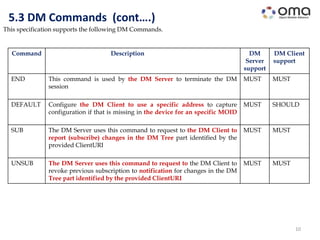
5.3 DM Commands (cont….)
This specification supports the following DM Commands.
Command Description DM
Server
support
DM Client
support
END This command is used by the DM Server to terminate the DM
session
MUST MUST
DEFAULT Configure the DM Client to use a specific address to capture
configuration if that is missing in the device for an specific MOID
MUST SHOULD
SUB The DM Server uses this command to request to the DM Client to
report (subscribe) changes in the DM Tree part identified by the
provided ClientURI
MUST MUST
UNSUB The DM Server uses this command to request to the DM Client to
revoke previous subscription to notification for changes in the DM
Tree part identified by the provided ClientURI
MUST MUST
11
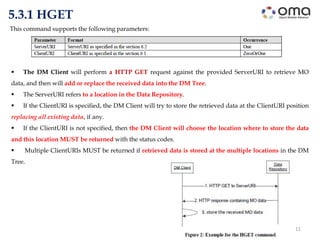
5.3.1 HGET
 The DM Client will perform a HTTP GET request against the provided ServerURI to retrieve MO
data, and then will add or replace the received data into the DM Tree.
 The ServerURI refers to a location in the Data Repository.
 If the ClientURI is specified, the DM Client will try to store the retrieved data at the ClientURI position
replacing all existing data, if any.
 If the ClientURI is not specified, then the DM Client will choose the location where to store the data
and this location MUST be returned with the status codes.
 Multiple ClientURIs MUST be returned if retrieved data is stored at the multiple locations in the DM
Tree.
This command supports the following parameters:
12
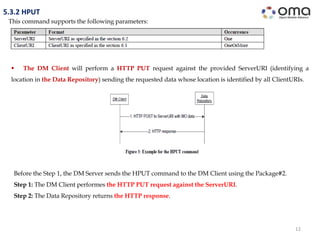
5.3.2 HPUT
This command supports the following parameters:
 The DM Client will perform a HTTP PUT request against the provided ServerURI (identifying a
location in the Data Repository) sending the requested data whose location is identified by all ClientURIs.
Before the Step 1, the DM Server sends the HPUT command to the DM Client using the Package#2.
Step 1: The DM Client performes the HTTP PUT request against the ServerURI.
Step 2: The Data Repository returns the HTTP response.
13
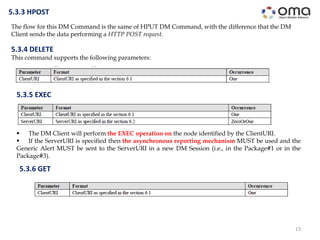
The flow for this DM Command is the same of HPUT DM Command, with the difference that the DM
Client sends the data performing a HTTP POST request.
5.3.3 HPOST
5.3.4 DELETE
This command supports the following parameters:
5.3.5 EXEC
 The DM Client will perform the EXEC operation on the node identified by the ClientURI.
 If the ServerURI is specified then the asynchronous reporting mechanism MUST be used and the
Generic Alert MUST be sent to the ServerURI in a new DM Session (i.e., in the Package#1 or in the
Package#3).
5.3.6 GET
14
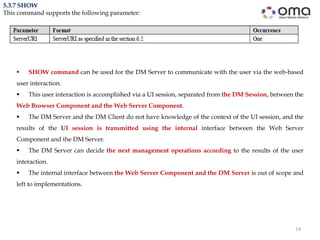
5.3.7 SHOW
This command supports the following parameter:
 SHOW command can be used for the DM Server to communicate with the user via the web-based
user interaction.
 This user interaction is accomplished via a UI session, separated from the DM Session, between the
Web Browser Component and the Web Server Component.
 The DM Server and the DM Client do not have knowledge of the context of the UI session, and the
results of the UI session is transmitted using the internal interface between the Web Server
Component and the DM Server.
 The DM Server can decide the next management operations according to the results of the user
interaction.
 The internal interface between the Web Server Component and the DM Server is out of scope and
left to implementations.
15
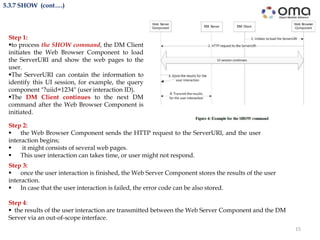
5.3.7 SHOW (cont….)
Step 3:
 once the user interaction is finished, the Web Server Component stores the results of the user
interaction.
 In case that the user interaction is failed, the error code can be also stored.
Step 4:
 the results of the user interaction are transmitted between the Web Server Component and the DM
Server via an out-of-scope interface.
Step 1:
to process the SHOW command, the DM Client
initiates the Web Browser Component to load
the ServerURI and show the web pages to the
user.
The ServerURI can contain the information to
identify this UI session, for example, the query
component "?uiid=1234" (user interaction ID).
The DM Client continues to the next DM
command after the Web Browser Component is
initiated.
Step 2:
 the Web Browser Component sends the HTTP request to the ServerURI, and the user
interaction begins;
 it might consists of several web pages.
 This user interaction can takes time, or user might not respond.
16
5.3.8 CONT
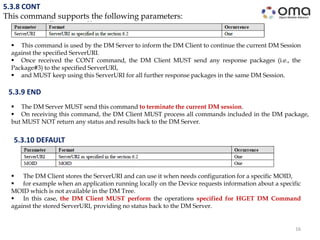
This command supports the following parameters:
 This command is used by the DM Server to inform the DM Client to continue the current DM Session
against the specified ServerURI.
 Once received the CONT command, the DM Client MUST send any response packages (i.e., the
Package#3) to the specified ServerURI,
 and MUST keep using this ServerURI for all further response packages in the same DM Session.
5.3.9 END
 The DM Server MUST send this command to terminate the current DM session.
 On receiving this command, the DM Client MUST process all commands included in the DM package,
but MUST NOT return any status and results back to the DM Server.
5.3.10 DEFAULT
 The DM Client stores the ServerURI and can use it when needs configuration for a specific MOID,
 for example when an application running locally on the Device requests information about a specific
MOID which is not available in the DM Tree.
 In this case, the DM Client MUST perform the operations specified for HGET DM Command
against the stored ServerURI, providing no status back to the DM Server.
17
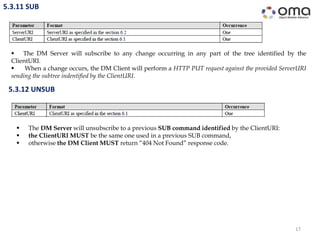
5.3.11 SUB
 The DM Server will subscribe to any change occurring in any part of the tree identified by the
ClientURI.
 When a change occurs, the DM Client will perform a HTTP PUT request against the provided ServerURI
sending the subtree indentified by the ClientURI.
5.3.12 UNSUB
 The DM Server will unsubscribe to a previous SUB command identified by the ClientURI:
 the ClientURI MUST be the same one used in a previous SUB command,
 otherwise the DM Client MUST return “404 Not Found” response code.
18
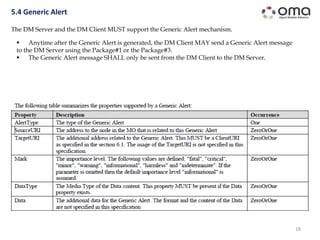
5.4 Generic Alert
The DM Server and the DM Client MUST support the Generic Alert mechanism.
 Anytime after the Generic Alert is generated, the DM Client MAY send a Generic Alert message
to the DM Server using the Package#1 or the Package#3.
 The Generic Alert message SHALL only be sent from the DM Client to the DM Server.
19
6. Device Management Object
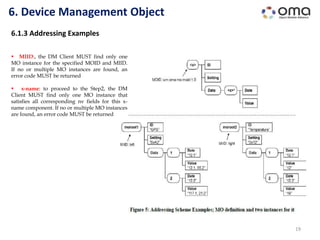
6.1.3 Addressing Examples
 MIID:, the DM Client MUST find only one
MO instance for the specified MOID and MIID.
If no or multiple MO instances are found, an
error code MUST be returned
 x-name: to proceed to the Step2, the DM
Client MUST find only one MO instance that
satisfies all corresponding nv fields for this x-
name component. If no or multiple MO instances
are found, an error code MUST be returned
Management Object Definition
20
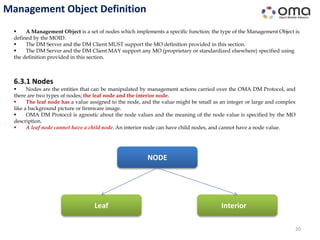
 A Management Object is a set of nodes which implements a specific function; the type of the Management Object is
defined by the MOID.
 The DM Server and the DM Client MUST support the MO definition provided in this section.
 The DM Server and the DM Client MAY support any MO (proprietary or standardized elsewhere) specified using
the definition provided in this section.
6.3.1 Nodes
 Nodes are the entities that can be manipulated by management actions carried over the OMA DM Protocol, and
there are two types of nodes; the leaf node and the interior node.
 The leaf node has a value assigned to the node, and the value might be small as an integer or large and complex
like a background picture or firmware image.
 OMA DM Protocol is agnostic about the node values and the meaning of the node value is specified by the MO
description.
 A leaf node cannot have a child node. An interior node can have child nodes, and cannot have a node value.
NODE
Leaf Interior
6.3.1.1 Node Access Control
21
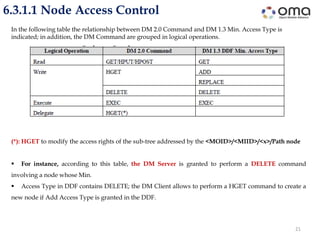
In the following table the relationship between DM 2.0 Command and DM 1.3 Min. Access Type is
indicated; in addition, the DM Command are grouped in logical operations.
(*): HGET to modify the access rights of the sub-tree addressed by the <MOID>/<MIID>/<x>/Path node
 For instance, according to this table, the DM Server is granted to perform a DELETE command
involving a node whose Min.
 Access Type in DDF contains DELETE; the DM Client allows to perform a HGET command to create a
new node if Add Access Type is granted in the DDF.
22
6.3.1.2 Permanent node Permanent and Dynamics Nodes
Nodes in the Management Object can be either permanent or dynamic.
 Permanent node cannot be created, deleted or modified at run-time by the DM Server: any attempt by
the DM Server to delete a permanent node MUST return status "405 Command Not Allowed". The
same status code will also be returned for all attempts to modify the name of a permanent node.
 Dynamic nodes can be created and deleted at run-time by the DM Servers. The HGET command
is used to create new dynamic nodes: the DELETE command is used to delete the dynamic node and
all its properties. If an interior node with child nodes is deleted, all child nodes MUST also be deleted.
 The permanent node MAY be the child of either a dynamic or a permanent node. In such cases,
the permanent child node is created at the same time its parent node is created.
6.3.1.5 Graphical Representation of MO
23
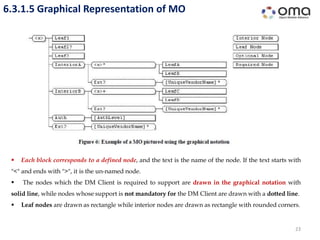
 Each block corresponds to a defined node, and the text is the name of the node. If the text starts with
"<" and ends with ">", it is the un-named node.
 The nodes which the DM Client is required to support are drawn in the graphical notation with
solid line, while nodes whose support is not mandatory for the DM Client are drawn with a dotted line.
 Leaf nodes are drawn as rectangle while interior nodes are drawn as rectangle with rounded corners.
24
6.3.2 Device Description Framework
 In an ideal world, all devices would display the same structure and behaviour to the management
system.
 But since different vendors are competing with each other on the market for various kinds of devices,
it seems very unlikely that this would ever happen.
 But management systems still need to understand each individual device even though they do
appear to have different internal structures and behaviors.
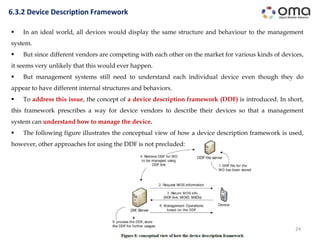
 To address this issue, the concept of a device description framework (DDF) is introduced. In short,
this framework prescribes a way for device vendors to describe their devices so that a management
system can understand how to manage the device.
 The following figure illustrates the conceptual view of how a device description framework is used,
however, other approaches for using the DDF is not precluded:
Thank you
hamdamboy.urunov@gmail.com
25

oma dm-protocol

  • 1.
    OMA Device ManagementProtocol Hamdamboy Urunov, a Ph.D. Researcher. Special Communication Research Center., Kookmin University Seoul, South Korea Approved Version 2.0 – 09 Feb 2016 Open Mobile Alliance OMA-TS-DM_Protocol-V2_0-20160209-A
  • 2.
    DM 2.0 Protocol OMA DM 2.0 is the next generation of the OMA DM 1.x Protocol  It provides the interface between the DM Server and the DM Client to manage the device  OMA DM 2.0 leverages a RESTful architecture for scalability and management performance  OMA DM 2.0 is also designed to work efficiently on less capable devices. 2 5.1.4 Management Data Delivery using HTTP  The DM Server can send specific DM Commands (defined in this specification) to the DM Client  for retrieving or sending management data from or to the Data Repository: this management is carried over HTTP protocol.  In this specification some serialization formats (MIME) allowing the transfer of management data over HTTP protocol are defined, but others are not precluded.
  • 3.
    5.2 Package Flow 3 TheDM Server and the DM Client MUST support this package flow. Step 1 (Package#1):  the DM Client initiates the DM session sending the “Package#1”: the package can contain the information of the MOs supported by the DM Client,  that can be used by the DM Server for management operations. Step 0 (Package#0): • the DM Server requests the DM Client to start a DM Session by sending the DM Notification. • This DM Notification is called “Package#0”. This is an optional package flow since the DM Notification is not needed in the client initiated case.
  • 4.
    5.2 Package Flow(cont…) 4 The DM Server and the DM Client MUST support this package flow. Step 3 (Command Processing):  the DM Client processes sequentially the DM Commands received in the Package#2;  it may interact with external components other than the DM Server (e.g., the Web Browser Component in case of the SHOW command, the Data Repository in case of the HGET/HPOST/HPUT command). Step 2 (Package#2):  after receiving the Package#1 or the Package#3,  the DM Server sends the management commands to the DM Client:  the package containing the DM Commands is called “Package#2”.
  • 5.
    5.2 Package Flow(cont…) 5 The DM Server and the DM Client MUST support this package flow. Step 4 (Package#3):  if the Package#2 does not include the END command,  the DM Session continues and the DM Client responses to the DM Server sending the “Package#3”,  which contains the results of the DM Command execution.  After the Package#3, the package flow goes back to the Step 2, with the Package#2 sent by the DM Server.  The DM Session is defined by the Package#1 to Package#3 flow;  the Package#0 and the HTTP transactions initiated by DM Client to execute the provided DM Commands are not formally part of the DM Session.
  • 6.
    Package#0: DM Notification 6 Many devices cannot continuously listen for connections from a management server.  Other devices simply do not wish to “open a port” (i.e. accept connections) for security reasons.  However, most devices can receive unsolicited messages, sometimes called “notifications”.  Some handsets, for example, can receive SMS messages.  Other devices may have the ability to receive other, similar datagram messages. 5.2.1.2 Package Options  Each Option MUST be uniquely identified with an Option Number, and MAY be present in the DM Notification.  The standard Options defined in this specification are as follows:
  • 7.
    7 Package#0: DM Notification(cont…) 5.2.1.2 Package Options Uint:  A non-negative integer which is represented in network byte order using the bytes which Option Length decides.  The Option Value range is calculated by 2 to the power of Option Length in bit. For example if the Option Length is 2, Option Value range is 0-65535 in decimal. String:  A Unicode string which is encoded using UTF-8 [RFC3629] in Net-Unicode form [RFC5198].  Note that ASCII strings (that do not make use of special control characters) are always valid UTF-8 Net- Unicode strings. Opaque:  An opaque sequence of bytes. This type could be used when the other types than Uint or String is required.  How to handle this type depends on the Option using this type. Null: The Option carries no value.
  • 8.
    8 5.2.2 Package#1: DMSession Initiation by DM Client This package MUST be implemented as HTTP POST Request, and the OMADM-DevID HTTP header MUST be presented to contain the value of the DevInfo/DevID node in the DevInfo MO. Each item of the array, representing a supported MO, MUST contain the following information: − The link to the DDF file. Details for DDF can be found at the section 6.4. − The MOID of the MO − The array containing the list of the MO Instance Identifier (MIID) for the MOID  The MOID MUST be provided to the DM Server only if the DM Server provisioned the MOID during the bootstrap.  Once the MOID is provided to the DM Server,  the MIID for the MOID MUST be provided to the DM Server  if the DM Server has any permission for the MO instance.
  • 9.
    9 5.3 DM Commands Thisspecification supports the following DM Commands. Command Description DM Server support DM Client support HGET The DM Server uses this command to requests the DM Client to retrieve data from the Data Repository using HTTP GET, and add or replace the received data into the DM Tree MUST MUST HPUT The DM Server uses this command to request the DM Client to send data to the Data Repository using HTTP PUT MUST MUST HPOST The DM Server uses this command to request the DM Client to send data to the Data Repository using HTTP POST MUST MUST DELETE The DM Server uses this command to delete data in the DM Tree MUST MUST EXEC The DM Server uses this command to execute an executable node in the DM Tree MUST MUST GET The DM Server uses this command to retrieve data from the DM Tree. The DM Client sends the data within the current DM Session MUST SHOULD SHOW The DM Server uses this command to initiate a UI Session between the Web Browser Component and the Web Server Component MUST SHOULD CONT The DM Server uses this command for the DM Client to continue the DM Session with the specified DM Server URI MUST MUST
  • 10.
    10 5.3 DM Commands(cont….) This specification supports the following DM Commands. Command Description DM Server support DM Client support END This command is used by the DM Server to terminate the DM session MUST MUST DEFAULT Configure the DM Client to use a specific address to capture configuration if that is missing in the device for an specific MOID MUST SHOULD SUB The DM Server uses this command to request to the DM Client to report (subscribe) changes in the DM Tree part identified by the provided ClientURI MUST MUST UNSUB The DM Server uses this command to request to the DM Client to revoke previous subscription to notification for changes in the DM Tree part identified by the provided ClientURI MUST MUST
  • 11.
    11 5.3.1 HGET  TheDM Client will perform a HTTP GET request against the provided ServerURI to retrieve MO data, and then will add or replace the received data into the DM Tree.  The ServerURI refers to a location in the Data Repository.  If the ClientURI is specified, the DM Client will try to store the retrieved data at the ClientURI position replacing all existing data, if any.  If the ClientURI is not specified, then the DM Client will choose the location where to store the data and this location MUST be returned with the status codes.  Multiple ClientURIs MUST be returned if retrieved data is stored at the multiple locations in the DM Tree. This command supports the following parameters:
  • 12.
    12 5.3.2 HPUT This commandsupports the following parameters:  The DM Client will perform a HTTP PUT request against the provided ServerURI (identifying a location in the Data Repository) sending the requested data whose location is identified by all ClientURIs. Before the Step 1, the DM Server sends the HPUT command to the DM Client using the Package#2. Step 1: The DM Client performes the HTTP PUT request against the ServerURI. Step 2: The Data Repository returns the HTTP response.
  • 13.
    13 The flow forthis DM Command is the same of HPUT DM Command, with the difference that the DM Client sends the data performing a HTTP POST request. 5.3.3 HPOST 5.3.4 DELETE This command supports the following parameters: 5.3.5 EXEC  The DM Client will perform the EXEC operation on the node identified by the ClientURI.  If the ServerURI is specified then the asynchronous reporting mechanism MUST be used and the Generic Alert MUST be sent to the ServerURI in a new DM Session (i.e., in the Package#1 or in the Package#3). 5.3.6 GET
  • 14.
    14 5.3.7 SHOW This commandsupports the following parameter:  SHOW command can be used for the DM Server to communicate with the user via the web-based user interaction.  This user interaction is accomplished via a UI session, separated from the DM Session, between the Web Browser Component and the Web Server Component.  The DM Server and the DM Client do not have knowledge of the context of the UI session, and the results of the UI session is transmitted using the internal interface between the Web Server Component and the DM Server.  The DM Server can decide the next management operations according to the results of the user interaction.  The internal interface between the Web Server Component and the DM Server is out of scope and left to implementations.
  • 15.
    15 5.3.7 SHOW (cont….) Step3:  once the user interaction is finished, the Web Server Component stores the results of the user interaction.  In case that the user interaction is failed, the error code can be also stored. Step 4:  the results of the user interaction are transmitted between the Web Server Component and the DM Server via an out-of-scope interface. Step 1: to process the SHOW command, the DM Client initiates the Web Browser Component to load the ServerURI and show the web pages to the user. The ServerURI can contain the information to identify this UI session, for example, the query component "?uiid=1234" (user interaction ID). The DM Client continues to the next DM command after the Web Browser Component is initiated. Step 2:  the Web Browser Component sends the HTTP request to the ServerURI, and the user interaction begins;  it might consists of several web pages.  This user interaction can takes time, or user might not respond.
  • 16.
    16 5.3.8 CONT This commandsupports the following parameters:  This command is used by the DM Server to inform the DM Client to continue the current DM Session against the specified ServerURI.  Once received the CONT command, the DM Client MUST send any response packages (i.e., the Package#3) to the specified ServerURI,  and MUST keep using this ServerURI for all further response packages in the same DM Session. 5.3.9 END  The DM Server MUST send this command to terminate the current DM session.  On receiving this command, the DM Client MUST process all commands included in the DM package, but MUST NOT return any status and results back to the DM Server. 5.3.10 DEFAULT  The DM Client stores the ServerURI and can use it when needs configuration for a specific MOID,  for example when an application running locally on the Device requests information about a specific MOID which is not available in the DM Tree.  In this case, the DM Client MUST perform the operations specified for HGET DM Command against the stored ServerURI, providing no status back to the DM Server.
  • 17.
    17 5.3.11 SUB  TheDM Server will subscribe to any change occurring in any part of the tree identified by the ClientURI.  When a change occurs, the DM Client will perform a HTTP PUT request against the provided ServerURI sending the subtree indentified by the ClientURI. 5.3.12 UNSUB  The DM Server will unsubscribe to a previous SUB command identified by the ClientURI:  the ClientURI MUST be the same one used in a previous SUB command,  otherwise the DM Client MUST return “404 Not Found” response code.
  • 18.
    18 5.4 Generic Alert TheDM Server and the DM Client MUST support the Generic Alert mechanism.  Anytime after the Generic Alert is generated, the DM Client MAY send a Generic Alert message to the DM Server using the Package#1 or the Package#3.  The Generic Alert message SHALL only be sent from the DM Client to the DM Server.
  • 19.
    19 6. Device ManagementObject 6.1.3 Addressing Examples  MIID:, the DM Client MUST find only one MO instance for the specified MOID and MIID. If no or multiple MO instances are found, an error code MUST be returned  x-name: to proceed to the Step2, the DM Client MUST find only one MO instance that satisfies all corresponding nv fields for this x- name component. If no or multiple MO instances are found, an error code MUST be returned
  • 20.
    Management Object Definition 20 A Management Object is a set of nodes which implements a specific function; the type of the Management Object is defined by the MOID.  The DM Server and the DM Client MUST support the MO definition provided in this section.  The DM Server and the DM Client MAY support any MO (proprietary or standardized elsewhere) specified using the definition provided in this section. 6.3.1 Nodes  Nodes are the entities that can be manipulated by management actions carried over the OMA DM Protocol, and there are two types of nodes; the leaf node and the interior node.  The leaf node has a value assigned to the node, and the value might be small as an integer or large and complex like a background picture or firmware image.  OMA DM Protocol is agnostic about the node values and the meaning of the node value is specified by the MO description.  A leaf node cannot have a child node. An interior node can have child nodes, and cannot have a node value. NODE Leaf Interior
  • 21.
    6.3.1.1 Node AccessControl 21 In the following table the relationship between DM 2.0 Command and DM 1.3 Min. Access Type is indicated; in addition, the DM Command are grouped in logical operations. (*): HGET to modify the access rights of the sub-tree addressed by the <MOID>/<MIID>/<x>/Path node  For instance, according to this table, the DM Server is granted to perform a DELETE command involving a node whose Min.  Access Type in DDF contains DELETE; the DM Client allows to perform a HGET command to create a new node if Add Access Type is granted in the DDF.
  • 22.
    22 6.3.1.2 Permanent nodePermanent and Dynamics Nodes Nodes in the Management Object can be either permanent or dynamic.  Permanent node cannot be created, deleted or modified at run-time by the DM Server: any attempt by the DM Server to delete a permanent node MUST return status "405 Command Not Allowed". The same status code will also be returned for all attempts to modify the name of a permanent node.  Dynamic nodes can be created and deleted at run-time by the DM Servers. The HGET command is used to create new dynamic nodes: the DELETE command is used to delete the dynamic node and all its properties. If an interior node with child nodes is deleted, all child nodes MUST also be deleted.  The permanent node MAY be the child of either a dynamic or a permanent node. In such cases, the permanent child node is created at the same time its parent node is created.
  • 23.
    6.3.1.5 Graphical Representationof MO 23  Each block corresponds to a defined node, and the text is the name of the node. If the text starts with "<" and ends with ">", it is the un-named node.  The nodes which the DM Client is required to support are drawn in the graphical notation with solid line, while nodes whose support is not mandatory for the DM Client are drawn with a dotted line.  Leaf nodes are drawn as rectangle while interior nodes are drawn as rectangle with rounded corners.
  • 24.
    24 6.3.2 Device DescriptionFramework  In an ideal world, all devices would display the same structure and behaviour to the management system.  But since different vendors are competing with each other on the market for various kinds of devices, it seems very unlikely that this would ever happen.  But management systems still need to understand each individual device even though they do appear to have different internal structures and behaviors.  To address this issue, the concept of a device description framework (DDF) is introduced. In short, this framework prescribes a way for device vendors to describe their devices so that a management system can understand how to manage the device.  The following figure illustrates the conceptual view of how a device description framework is used, however, other approaches for using the DDF is not precluded:
  • 25.