Presented By :
Arachchi N.C.R. (148205J)
Dilruk G.A. (148209B)
Thursday, April 23, 2015 1
Index …
 Microsoft Windows Overview
 History
 Single-User Multitasking
 Architecture
 Operating System Organization
 User-Mode Processes
 Client/Server Model
 Threads and SMP
 Windows Objects
Thursday, April 23, 2015 2
History
 MS-DOS/PC-DOS 1.0- 1981
 Developed for first IBM PC
 Consist of 4000 lines of assembly source code
 Ran in 8KB
 Used Intel 8086 microprocessor
 DOS 2.0- 1983
 Released with IBM PC XT
 Support Hard Disk and provided hierarchical directories
 Memory resident portion up to 24KB
Thursday, April 23, 2015 3
History cont.…
 MS-DOS 3.0/Windows 1.0- 1984
 Introduced with IBM AT PC
 Support for new Keyboard and Hard Disk peripherals
 Memory requirement 36KB
 MS-DOS 3.1- 1984
 Support for Networking of PC’s
 MS-DOS 3.3- 1987
 Support for IBM PS/2
 Memory resident portion grown minimum of 46KB
Thursday, April 23, 2015 4
History cont.…
 Windows 3.0- 1990
 Introduced GUI
 Support for new Keyboard and Hard Disk peripherals
 Memory requirement 36KB
 MS-DOS 3.1- 1984
 Support for Networking of PC’s
 MS-DOS 3.3- 1987
 Support for IBM PS/2
 Memory resident portion grown minimum of 46KB
Thursday, April 23, 2015 5
History cont.…
 Windows 95- 1995
 Introduced Taskbar, Start menu, Explorer file manager
 Windows 98- 1998
 Usage of WDM (Windows Driver Model)
 USB Support
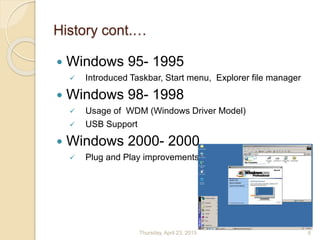
 Windows 2000- 2000
 Plug and Play improvements
Thursday, April 23, 2015 6
History cont.…
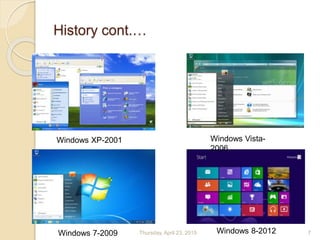
Windows XP-2001 Windows Vista-
2006
Windows 7-2009 Windows 8-2012Thursday, April 23, 2015 7
Single-User Multitasking
The operating system is designed mainly with a single user in
mind, but it can deal with many applications running at the same
time.
What happens if a user wishes to create a drawing and paste it
into a word processing document without multitasking??
Potentials
 Increased speed and memory capacity of microprocessors.
 Growth of client/server computing
1. Open the drawing program.
2. Create the drawing and save it in a file or on a temporary
clipboard.
3. Close the drawing program.
4. Open the word processing program.
5. Insert the drawing in the correct location
Thursday, April 23, 2015 8
Architecture
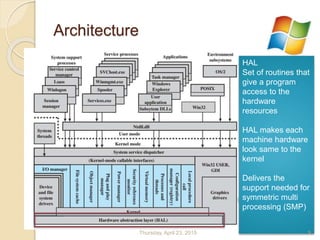
HAL
Set of routines that
give a program
access to the
hardware
resources
HAL makes each
machine hardware
look same to the
kernel
Delivers the
support needed for
symmetric multi
processing (SMP)
Thursday, April 23, 2015 9
Architecture cont.…
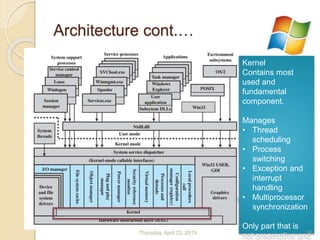
Kernel
Contains most
used and
fundamental
component.
Manages
• Thread
scheduling
• Process
switching
• Exception and
interrupt
handling
• Multiprocessor
synchronization
Only part that is
not preemptive andThursday, April 23, 2015 10
Architecture cont....
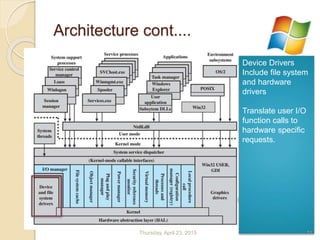
Device Drivers
Include file system
and hardware
drivers
Translate user I/O
function calls to
hardware specific
requests.
Thursday, April 23, 2015 11
Architecture cont....
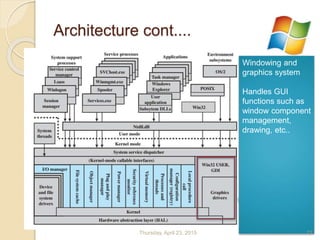
Windowing and
graphics system
Handles GUI
functions such as
window component
management,
drawing, etc..
Thursday, April 23, 2015 12
Architecture cont....
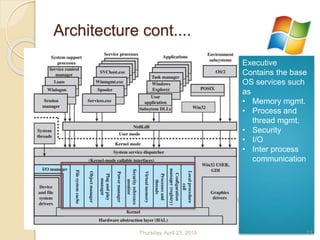
Executive
Contains the base
OS services such
as
• Memory mgmt.
• Process and
thread mgmt.
• Security
• I/O
• Inter process
communication
Thursday, April 23, 2015 13
Architecture cont....
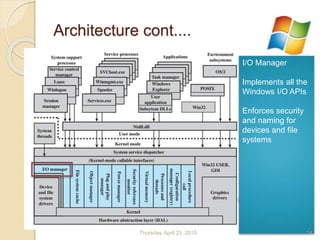
I/O Manager
Implements all the
Windows I/O APIs
Enforces security
and naming for
devices and file
systems
Thursday, April 23, 2015 14
Architecture cont....
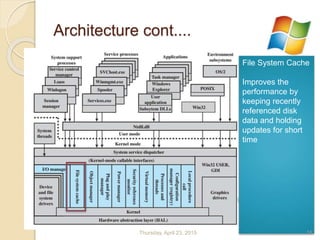
File System Cache
Improves the
performance by
keeping recently
referenced disk
data and holding
updates for short
time
Thursday, April 23, 2015 15
Architecture cont....
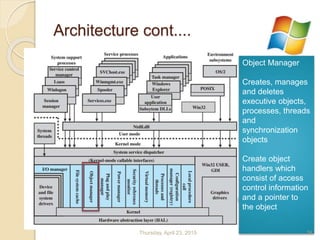
Object Manager
Creates, manages
and deletes
executive objects,
processes, threads
and
synchronization
objects
Create object
handlers which
consist of access
control information
and a pointer to
the object
Thursday, April 23, 2015 16
Architecture cont....
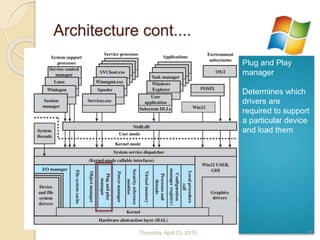
Plug and Play
manager
Determines which
drivers are
required to support
a particular device
and load them
Thursday, April 23, 2015 17
Architecture cont....
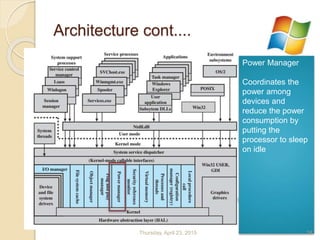
Power Manager
Coordinates the
power among
devices and
reduce the power
consumption by
putting the
processor to sleep
on idle
Thursday, April 23, 2015 18
Architecture cont....
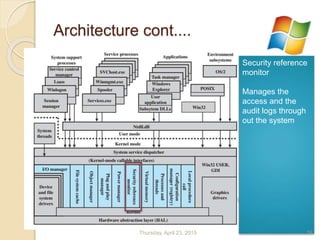
Security reference
monitor
Manages the
access and the
audit logs through
out the system
Thursday, April 23, 2015 19
Architecture cont....
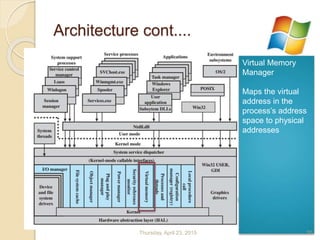
Virtual Memory
Manager
Maps the virtual
address in the
process’s address
space to physical
addresses
Thursday, April 23, 2015 20
Architecture cont....
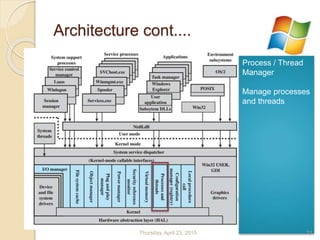
Process / Thread
Manager
Manage processes
and threads
Thursday, April 23, 2015 21
Architecture cont....
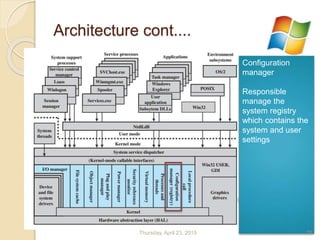
Configuration
manager
Responsible
manage the
system registry
which contains the
system and user
settings
Thursday, April 23, 2015 22
Architecture cont....
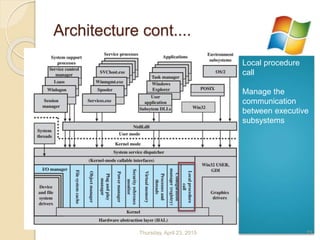
Local procedure
call
Manage the
communication
between executive
subsystems
Thursday, April 23, 2015 23
Architecture cont....
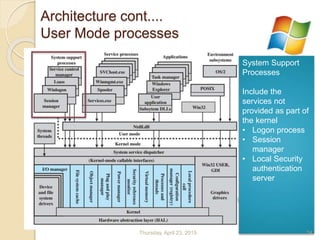
User Mode processes
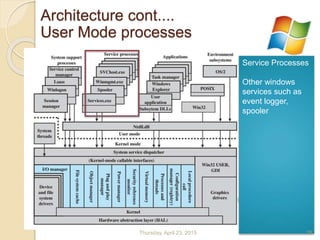
System Support
Processes
Include the
services not
provided as part of
the kernel
• Logon process
• Session
manager
• Local Security
authentication
server
Thursday, April 23, 2015 24
Service Processes
Other windows
services such as
event logger,
spooler
Architecture cont....
User Mode processes
Thursday, April 23, 2015 25
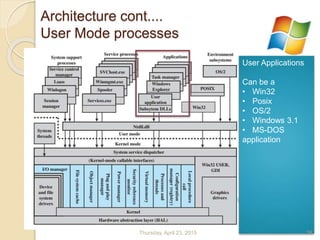
User Applications
Can be a
• Win32
• Posix
• OS/2
• Windows 3.1
• MS-DOS
application
Architecture cont....
User Mode processes
Thursday, April 23, 2015 26
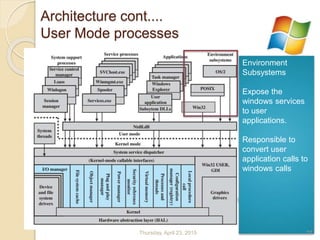
Environment
Subsystems
Expose the
windows services
to user
applications.
Responsible to
convert user
application calls to
windows calls
Architecture cont....
User Mode processes
Thursday, April 23, 2015 27
Client/Server Model
 Each environment and a execute service subsystem is
implemented as one or more processes
 Each process waits for a request from a client for one of its
services
 Client requests a service by sending a message
 Server performs the requested operation and returns the
result
 Advantages
 Simplifies the Executive
 Improves Reliability
 Provides suitable base for distributed computing
Thursday, April 23, 2015 28
Threads and SMP
 OS routines can run on any available processor
 Windows supports multiple threads execution within a single
process
 Server processes may use multiple threads to process
request from more than one client simultaneously
 Windows provides mechanisms for sharing data resources
between processes and flexible interprocess communication
capabilities
Thursday, April 23, 2015 29
Windows Objects
 The approach of object-oriented design facilitates the sharing
of resources and data among processes and the protection of
resources from unauthorized access
 Encapsulation
 Object class and instance
 Inheritance
 Polymorphism
 Object may be either named or unnamed
 Eg. of objects managed by kernel (two categories)
1. Control objetcs
2. Dispatcher objects
Thursday, April 23, 2015 30
Continue …
 Windows Threads
 Process & Thread Objects
 Multithreading
 Thread States
 Symmetric Multiprocessing
 Windows Memory Management
 Virtual Address Map
 Paging
 Windows Scheduling
 Process & Thread Priorities
 Multiprocessor Scheduling
Thursday, April 23, 2015 31
Windows Process & Thread
Objects
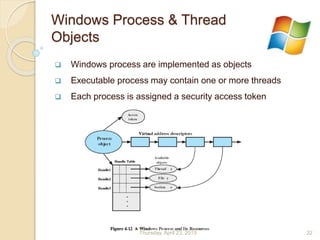
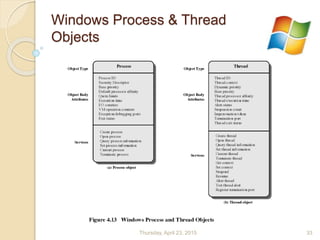
 Windows process are implemented as objects
 Executable process may contain one or more threads
 Each process is assigned a security access token
Thursday, April 23, 2015 32
Windows Process & Thread
Objects
Thursday, April 23, 2015 33
Multithreading
 Threads in different process can execute
concurrently
 Moreover, multiple threads within the same
process execute simultaneously in different
processors
 Threads within same process can exchange
information through their common address space
 Ex : In server application each client can have a
separate thread to service
Thursday, April 23, 2015 34
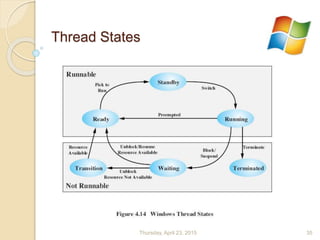
Thread States
Thursday, April 23, 2015 35
Symmetric Multiprocessing
 Threads of any process can run on any processor
 Windows microkernel assigns a ready thread to
the next available processor in case of absence
of affinity restrictions
 Two Affinity policies
 Soft affinity
 Hard affinity
Thursday, April 23, 2015 36
Windows Memory Management
 Each process on 32-bit Microsoft Windows has its
own virtual address space that enables
addressing up to 4 gigabytes of memory
 Memory manager controls memory allocation and
how paging is performed
 Only some parts of the program and data that are
currently in active use need to be held in physical
RAM and other parts are in a swap file
Thursday, April 23, 2015 37
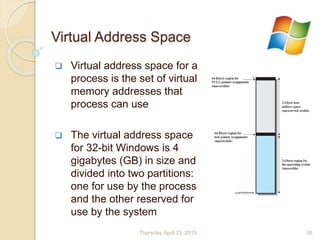
Virtual Address Space
 Virtual address space for a
process is the set of virtual
memory addresses that
process can use
 The virtual address space
for 32-bit Windows is 4
gigabytes (GB) in size and
divided into two partitions:
one for use by the process
and the other reserved for
use by the system
Thursday, April 23, 2015 38
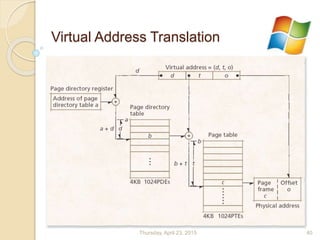
Windows Paging
 Page sizes are ranging from 4Kb to 64Kb for different
platforms
 Two-level hierarchical memory map
 Page directory table
• Page directory entries (PDEs) point to page table
• One page directory table per process
• Location in page directory register
 Page table
• Page table entries (PTEs) point to page frames
 TLB (translation look aside buffer) accelerates address
translation
 Windows use local page replacementThursday, April 23, 2015 39
Virtual Address Translation
Thursday, April 23, 2015 40
Windows Scheduling
 Mainly consider responsiveness in highly
interactive environment.
 Preemptive scheduling
 Priority levels
 Round-robin scheduling Algorithms
Thursday, April 23, 2015 41
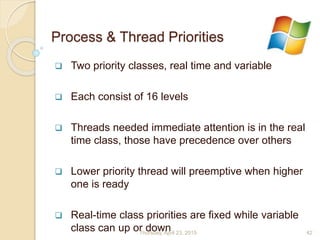
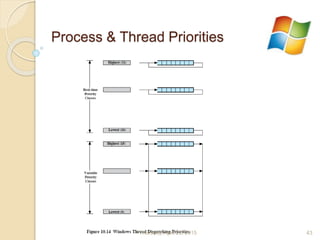
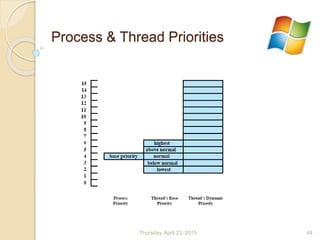
Process & Thread Priorities
 Two priority classes, real time and variable
 Each consist of 16 levels
 Threads needed immediate attention is in the real
time class, those have precedence over others
 Lower priority thread will preemptive when higher
one is ready
 Real-time class priorities are fixed while variable
class can up or downThursday, April 23, 2015 42
Process & Thread Priorities
Thursday, April 23, 2015 43
Process & Thread Priorities
Thursday, April 23, 2015 44
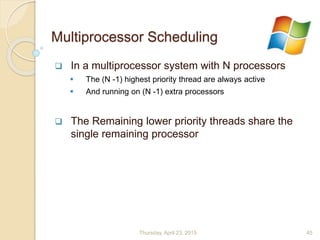
Multiprocessor Scheduling
 In a multiprocessor system with N processors
 The (N -1) highest priority thread are always active
 And running on (N -1) extra processors
 The Remaining lower priority threads share the
single remaining processor
Thursday, April 23, 2015 45
Thursday, April 23, 2015 46

Windows OS Architecture in Summery

  • 1.
    Presented By : ArachchiN.C.R. (148205J) Dilruk G.A. (148209B) Thursday, April 23, 2015 1
  • 2.
    Index …  MicrosoftWindows Overview  History  Single-User Multitasking  Architecture  Operating System Organization  User-Mode Processes  Client/Server Model  Threads and SMP  Windows Objects Thursday, April 23, 2015 2
  • 3.
    History  MS-DOS/PC-DOS 1.0-1981  Developed for first IBM PC  Consist of 4000 lines of assembly source code  Ran in 8KB  Used Intel 8086 microprocessor  DOS 2.0- 1983  Released with IBM PC XT  Support Hard Disk and provided hierarchical directories  Memory resident portion up to 24KB Thursday, April 23, 2015 3
  • 4.
    History cont.…  MS-DOS3.0/Windows 1.0- 1984  Introduced with IBM AT PC  Support for new Keyboard and Hard Disk peripherals  Memory requirement 36KB  MS-DOS 3.1- 1984  Support for Networking of PC’s  MS-DOS 3.3- 1987  Support for IBM PS/2  Memory resident portion grown minimum of 46KB Thursday, April 23, 2015 4
  • 5.
    History cont.…  Windows3.0- 1990  Introduced GUI  Support for new Keyboard and Hard Disk peripherals  Memory requirement 36KB  MS-DOS 3.1- 1984  Support for Networking of PC’s  MS-DOS 3.3- 1987  Support for IBM PS/2  Memory resident portion grown minimum of 46KB Thursday, April 23, 2015 5
  • 6.
    History cont.…  Windows95- 1995  Introduced Taskbar, Start menu, Explorer file manager  Windows 98- 1998  Usage of WDM (Windows Driver Model)  USB Support  Windows 2000- 2000  Plug and Play improvements Thursday, April 23, 2015 6
  • 7.
    History cont.… Windows XP-2001Windows Vista- 2006 Windows 7-2009 Windows 8-2012Thursday, April 23, 2015 7
  • 8.
    Single-User Multitasking The operatingsystem is designed mainly with a single user in mind, but it can deal with many applications running at the same time. What happens if a user wishes to create a drawing and paste it into a word processing document without multitasking?? Potentials  Increased speed and memory capacity of microprocessors.  Growth of client/server computing 1. Open the drawing program. 2. Create the drawing and save it in a file or on a temporary clipboard. 3. Close the drawing program. 4. Open the word processing program. 5. Insert the drawing in the correct location Thursday, April 23, 2015 8
  • 9.
    Architecture HAL Set of routinesthat give a program access to the hardware resources HAL makes each machine hardware look same to the kernel Delivers the support needed for symmetric multi processing (SMP) Thursday, April 23, 2015 9
  • 10.
    Architecture cont.… Kernel Contains most usedand fundamental component. Manages • Thread scheduling • Process switching • Exception and interrupt handling • Multiprocessor synchronization Only part that is not preemptive andThursday, April 23, 2015 10
  • 11.
    Architecture cont.... Device Drivers Includefile system and hardware drivers Translate user I/O function calls to hardware specific requests. Thursday, April 23, 2015 11
  • 12.
    Architecture cont.... Windowing and graphicssystem Handles GUI functions such as window component management, drawing, etc.. Thursday, April 23, 2015 12
  • 13.
    Architecture cont.... Executive Contains thebase OS services such as • Memory mgmt. • Process and thread mgmt. • Security • I/O • Inter process communication Thursday, April 23, 2015 13
  • 14.
    Architecture cont.... I/O Manager Implementsall the Windows I/O APIs Enforces security and naming for devices and file systems Thursday, April 23, 2015 14
  • 15.
    Architecture cont.... File SystemCache Improves the performance by keeping recently referenced disk data and holding updates for short time Thursday, April 23, 2015 15
  • 16.
    Architecture cont.... Object Manager Creates,manages and deletes executive objects, processes, threads and synchronization objects Create object handlers which consist of access control information and a pointer to the object Thursday, April 23, 2015 16
  • 17.
    Architecture cont.... Plug andPlay manager Determines which drivers are required to support a particular device and load them Thursday, April 23, 2015 17
  • 18.
    Architecture cont.... Power Manager Coordinatesthe power among devices and reduce the power consumption by putting the processor to sleep on idle Thursday, April 23, 2015 18
  • 19.
    Architecture cont.... Security reference monitor Managesthe access and the audit logs through out the system Thursday, April 23, 2015 19
  • 20.
    Architecture cont.... Virtual Memory Manager Mapsthe virtual address in the process’s address space to physical addresses Thursday, April 23, 2015 20
  • 21.
    Architecture cont.... Process /Thread Manager Manage processes and threads Thursday, April 23, 2015 21
  • 22.
    Architecture cont.... Configuration manager Responsible manage the systemregistry which contains the system and user settings Thursday, April 23, 2015 22
  • 23.
    Architecture cont.... Local procedure call Managethe communication between executive subsystems Thursday, April 23, 2015 23
  • 24.
    Architecture cont.... User Modeprocesses System Support Processes Include the services not provided as part of the kernel • Logon process • Session manager • Local Security authentication server Thursday, April 23, 2015 24
  • 25.
    Service Processes Other windows servicessuch as event logger, spooler Architecture cont.... User Mode processes Thursday, April 23, 2015 25
  • 26.
    User Applications Can bea • Win32 • Posix • OS/2 • Windows 3.1 • MS-DOS application Architecture cont.... User Mode processes Thursday, April 23, 2015 26
  • 27.
    Environment Subsystems Expose the windows services touser applications. Responsible to convert user application calls to windows calls Architecture cont.... User Mode processes Thursday, April 23, 2015 27
  • 28.
    Client/Server Model  Eachenvironment and a execute service subsystem is implemented as one or more processes  Each process waits for a request from a client for one of its services  Client requests a service by sending a message  Server performs the requested operation and returns the result  Advantages  Simplifies the Executive  Improves Reliability  Provides suitable base for distributed computing Thursday, April 23, 2015 28
  • 29.
    Threads and SMP OS routines can run on any available processor  Windows supports multiple threads execution within a single process  Server processes may use multiple threads to process request from more than one client simultaneously  Windows provides mechanisms for sharing data resources between processes and flexible interprocess communication capabilities Thursday, April 23, 2015 29
  • 30.
    Windows Objects  Theapproach of object-oriented design facilitates the sharing of resources and data among processes and the protection of resources from unauthorized access  Encapsulation  Object class and instance  Inheritance  Polymorphism  Object may be either named or unnamed  Eg. of objects managed by kernel (two categories) 1. Control objetcs 2. Dispatcher objects Thursday, April 23, 2015 30
  • 31.
    Continue …  WindowsThreads  Process & Thread Objects  Multithreading  Thread States  Symmetric Multiprocessing  Windows Memory Management  Virtual Address Map  Paging  Windows Scheduling  Process & Thread Priorities  Multiprocessor Scheduling Thursday, April 23, 2015 31
  • 32.
    Windows Process &Thread Objects  Windows process are implemented as objects  Executable process may contain one or more threads  Each process is assigned a security access token Thursday, April 23, 2015 32
  • 33.
    Windows Process &Thread Objects Thursday, April 23, 2015 33
  • 34.
    Multithreading  Threads indifferent process can execute concurrently  Moreover, multiple threads within the same process execute simultaneously in different processors  Threads within same process can exchange information through their common address space  Ex : In server application each client can have a separate thread to service Thursday, April 23, 2015 34
  • 35.
  • 36.
    Symmetric Multiprocessing  Threadsof any process can run on any processor  Windows microkernel assigns a ready thread to the next available processor in case of absence of affinity restrictions  Two Affinity policies  Soft affinity  Hard affinity Thursday, April 23, 2015 36
  • 37.
    Windows Memory Management Each process on 32-bit Microsoft Windows has its own virtual address space that enables addressing up to 4 gigabytes of memory  Memory manager controls memory allocation and how paging is performed  Only some parts of the program and data that are currently in active use need to be held in physical RAM and other parts are in a swap file Thursday, April 23, 2015 37
  • 38.
    Virtual Address Space Virtual address space for a process is the set of virtual memory addresses that process can use  The virtual address space for 32-bit Windows is 4 gigabytes (GB) in size and divided into two partitions: one for use by the process and the other reserved for use by the system Thursday, April 23, 2015 38
  • 39.
    Windows Paging  Pagesizes are ranging from 4Kb to 64Kb for different platforms  Two-level hierarchical memory map  Page directory table • Page directory entries (PDEs) point to page table • One page directory table per process • Location in page directory register  Page table • Page table entries (PTEs) point to page frames  TLB (translation look aside buffer) accelerates address translation  Windows use local page replacementThursday, April 23, 2015 39
  • 40.
  • 41.
    Windows Scheduling  Mainlyconsider responsiveness in highly interactive environment.  Preemptive scheduling  Priority levels  Round-robin scheduling Algorithms Thursday, April 23, 2015 41
  • 42.
    Process & ThreadPriorities  Two priority classes, real time and variable  Each consist of 16 levels  Threads needed immediate attention is in the real time class, those have precedence over others  Lower priority thread will preemptive when higher one is ready  Real-time class priorities are fixed while variable class can up or downThursday, April 23, 2015 42
  • 43.
    Process & ThreadPriorities Thursday, April 23, 2015 43
  • 44.
    Process & ThreadPriorities Thursday, April 23, 2015 44
  • 45.
    Multiprocessor Scheduling  Ina multiprocessor system with N processors  The (N -1) highest priority thread are always active  And running on (N -1) extra processors  The Remaining lower priority threads share the single remaining processor Thursday, April 23, 2015 45
  • 46.