PRESENTED BY:
EZZAH BINT-E- SHAUKAT
TAYYABA ILYAS
M. SULEMAN TANVEER
THREADS:
 A thread is the entity within a process that
can be scheduled for execution. All threads
of a process share its virtual address space
and system resources. Each process is
started with a single thread, but can create
additional threads from any of its threads.
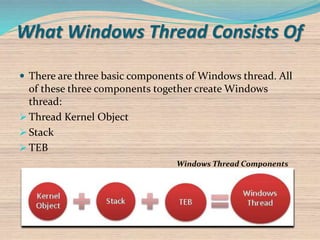
 There are three basic components of Windows thread. All
of these three components together create Windows
thread:
 Thread Kernel Object
 Stack
 TEB
Windows Thread Components
What Windows Thread Consists Of
Thread Kernel Object
 Operating systems use
thread kernel objects for
managing and executing
threads across the system.
Keeps all the statistical
information about the
thread.
 Some of the important
properties of thread
kernel object are:
Thread Context
 Each thread kernel object contains set of CPU
registers, called the thread's context. The context
reflects state of the CPU registers when the thread last
executed.
 OS use kernel object context information while
performing thread context switching.
 Some of other important information held in thread
kernel object about the thread.
Stack
Used for maintaining local variables and functions.
Types of stack
User-mode stack
o Used for local variables and arguments passed to methods. Contains
the address indicating what the thread should execute next.
o By default, Windows allocates 1 MB of memory for each thread’s user-
mode stack
Kernel-mode stack
o Used when application code passes arguments to a kernel function in
the operating system.
o The kernel calls methods within itself and uses the kernel-mode stack
to pass its own arguments.
o The kernel-mode stack is 12 KB when running on a 32-bit Windows
system and 24 KB when running on a 64-bit Windows system.
Thread Environment Block (TEB)
 TEB is a block of memory
allocated and initialized in
user mode.
 The TEB consumes 1 page of
memory (4 KB on x86 and
x64 CPUs).
 TEB contains information
about exception handling
which is used by SEH
(Microsoft Structured
Exception Handling).
Thread State
Operating system uses these states that are relevant to performance; these are:
 Running - thread is using CPU
 Blocked - thread is waiting for input
 Ready - thread is ready to run (not Blocked or Running)
 Exited - thread has exited but not been destroyed
Thread State Diagram
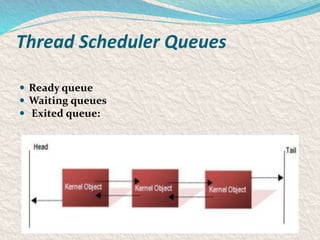
Thread Scheduler Queues
 Ready queue
 Waiting queues
 Exited queue:
How OS runs Threads
 Every 20 milliseconds or so, OS thread scheduler looks at all the thread
kernel objects currently inside Ready Queue.
Introduction to windows os
 Microsoft Windows came to dominate the world's
personal computer market.
 The most recent version of Windows is Windows 8.
 Windows uses demand paging with Clustering.
 Clustering handles page faults by bringing in not only
the faulting page but also the multiple pages
surrounding the faulting page.
 Windows uses clock algorithm.
What is Virtual Memory?
Memory that appears to exits as Main Memory.
CPU can address up to 3GB of memory, using its full
32 bits.
The hardware provides for programs to operate in
terms of as much as they wish of this full 4GB space
as Virtual Memory, those parts of the program and
data which are currently active being loaded into
Physical Random Access Memory (RAM).
Why virtual memory?
The first is to allow the use of programs that are
too big to physically fit in the memory.
The other reason is to allow for multitasking –
multiple programs running at once.
Virtual Memory in Windows
 In Windows the processor manages the mapping in
terms of pages.
 Page size of 4 KB each.
 Only some parts of the program and data that are
currently in active needs to be held in physical RAM.
 Other parts are then held in a swap file or page file.
Address space of Windows
32-bit Address Space
32-bits = 2^32 = 4 GB
 3 GB for address space
 1 GB for kernel mode
64-bit Address space
64-bits = 2^64 = 17,179,869,184 GB
 x64 today supports 48 bits virtual = 262,144 GB = 256 TB
 IA-64 today support 50 bits virtual = 1,048,576 GB = 1024 TB
 64-bit Windows supports 44 bits = 16,384 GB = 16 TB
Virtual Address Space (V.A.S.)
 Process space contains:
 The application you are running
(.EXE + .DLLs (dynamic link
library ))
 A user-mode stack for each thread
User
Accessible
Kernel-mode
accessible
00000000
7FFFFFFF
80000000
Unique per
process
System-
wide
Virtual Address Space (V.A.S.)
 System space contains:
 Executive, Kernel
 Statically-allocated system-
wide data cells
 Page tables
 Kernel-mode device drivers
 File system cache
 A kernel-mode stack
for every thread
in every
process
User
Accessible
Kernel-mode
accessible
00000000
7FFFFFFF
80000000
FFFFFFFF
Unique per
process
System-
wide
Virtual Address Translation
 Hardware converts each valid virtual address to a physical
address
Address translation
(hardware)
Virtual page number Byte within page
Byte within pagePhysical page number
Page
Tables
Translation
Lookaside
Buffer
Page
Directory
virtual address
physical address
If page
not valid
Page
fault
.
Virtual Address Translation
What is loaded in RAM?
Items of RAM can be divided into two parts :
-Non paged area
 Parts of system which are very important . This cannot
be paged out.
-page pool
 Program code, Data pages that had actual data written
to them.
Disadvantages of virtual memory
 Virtual memory can slow down performance.
 If the size of virtual memory is quite large in comparison to the real
memory, then more swapping to and from the hard disk will occur as a
result.
 Accessing the hard disk is far slower than using system memory.
 Using too many programs at once in a system with an insufficient
amount of RAM results in constant disk swapping – also
called thrashing.
Page faults
 When the program needs the page which is not in main
memory the page fault interrupt will be invoked.
 If this is available on disk then it will be swapped.
 If it is not available due to some hardware problems the
system will have ‘invalid page fault error’.
 It may manifest itself as a ‘blue screen’ failure with a STOP
code.
Page Faults
 A page fault occurs when there is a reference to a page that isn’t
mapped to a physical page
 The system goes to the appropriate block in the associated file to find
the contents of the page:
 Physical page is allocated
 Block is read into physical page
 Page table entry is filled in
 Exception is dismissed
 Processor re-executes the instruction that caused the page fault
 The page has now been “faulted into” the process “working set”
 Pages are only brought into memory as a result of page faults
Working Set
Each process has a default working set minimum and maximum
 Can change with SetProcessWorkingSet
 Working set minimum controls maximum number of locked
pages (Virtual Lock)
 Minimum is also reserved from RAM as a guarantee to the
process
 Working set maximum is ignored
If there’s ample memory, process working set represents all the
memory it has referenced (but not freed)
Working Set List
 All the physical pages “owned” by a process
 E.g. the pages the process can reference without incurring a page
fault
A process always starts with an empty working set
 It then incurs page faults when referencing a page that isn’t in its
working set
Working Set
newer pages older pages
Working Set Replacement
 When memory manager decides the process is large enough, it
give up pages to make room for new pages
 Local page replacement policy
o Means that a single process cannot take over all of physical
memory unless other processes aren’t using it
o Page replacement algorithm is least recently accessed
(pages are aged when available memory is low)
Working Set
To standby
or modified
page list
Working Set Breakdown
 Consists of 2 types of pages:
 Shareable (of which some may be shared)
 Private
 Four performance counters available:
 Working Set Shareable
o Working Set Shared (subset of shareable that are currently shared)
 Working Set Private
 Working Set Size (total of WS Shareable+Private)
o Note: adding this up for each process over counts shared pages
Standby and Modified Page Lists
 Modified pages go to modified (dirty) list
 Avoids writing pages back to disk too soon
 Unmodified pages go to standby (clean) lists
 They form a system-wide cache of “pages likely to be needed again”
 Pages can be faulted back into a process from the standby and
modified page list
 These are counted as page faults, but not page reads
Modified Page Writer
 When modified list reaches certain size, modified page writer system
thread is awoken to write pages out
o Also triggered when memory is overcommitted (too few free pages)
o Does not flush entire modified page list
 Pages move from the modified list to the standby list
o E.g. can still be soft faulted into a working set
Thank you

Windows

  • 1.
    PRESENTED BY: EZZAH BINT-E-SHAUKAT TAYYABA ILYAS M. SULEMAN TANVEER
  • 2.
    THREADS:  A threadis the entity within a process that can be scheduled for execution. All threads of a process share its virtual address space and system resources. Each process is started with a single thread, but can create additional threads from any of its threads.
  • 3.
     There arethree basic components of Windows thread. All of these three components together create Windows thread:  Thread Kernel Object  Stack  TEB Windows Thread Components What Windows Thread Consists Of
  • 4.
    Thread Kernel Object Operating systems use thread kernel objects for managing and executing threads across the system. Keeps all the statistical information about the thread.  Some of the important properties of thread kernel object are:
  • 5.
    Thread Context  Eachthread kernel object contains set of CPU registers, called the thread's context. The context reflects state of the CPU registers when the thread last executed.  OS use kernel object context information while performing thread context switching.  Some of other important information held in thread kernel object about the thread.
  • 6.
    Stack Used for maintaininglocal variables and functions.
  • 7.
    Types of stack User-modestack o Used for local variables and arguments passed to methods. Contains the address indicating what the thread should execute next. o By default, Windows allocates 1 MB of memory for each thread’s user- mode stack Kernel-mode stack o Used when application code passes arguments to a kernel function in the operating system. o The kernel calls methods within itself and uses the kernel-mode stack to pass its own arguments. o The kernel-mode stack is 12 KB when running on a 32-bit Windows system and 24 KB when running on a 64-bit Windows system.
  • 8.
    Thread Environment Block(TEB)  TEB is a block of memory allocated and initialized in user mode.  The TEB consumes 1 page of memory (4 KB on x86 and x64 CPUs).  TEB contains information about exception handling which is used by SEH (Microsoft Structured Exception Handling).
  • 9.
    Thread State Operating systemuses these states that are relevant to performance; these are:  Running - thread is using CPU  Blocked - thread is waiting for input  Ready - thread is ready to run (not Blocked or Running)  Exited - thread has exited but not been destroyed Thread State Diagram
  • 10.
    Thread Scheduler Queues Ready queue  Waiting queues  Exited queue:
  • 11.
    How OS runsThreads  Every 20 milliseconds or so, OS thread scheduler looks at all the thread kernel objects currently inside Ready Queue.
  • 12.
    Introduction to windowsos  Microsoft Windows came to dominate the world's personal computer market.  The most recent version of Windows is Windows 8.  Windows uses demand paging with Clustering.  Clustering handles page faults by bringing in not only the faulting page but also the multiple pages surrounding the faulting page.  Windows uses clock algorithm.
  • 13.
    What is VirtualMemory? Memory that appears to exits as Main Memory. CPU can address up to 3GB of memory, using its full 32 bits. The hardware provides for programs to operate in terms of as much as they wish of this full 4GB space as Virtual Memory, those parts of the program and data which are currently active being loaded into Physical Random Access Memory (RAM).
  • 14.
    Why virtual memory? Thefirst is to allow the use of programs that are too big to physically fit in the memory. The other reason is to allow for multitasking – multiple programs running at once.
  • 15.
    Virtual Memory inWindows  In Windows the processor manages the mapping in terms of pages.  Page size of 4 KB each.  Only some parts of the program and data that are currently in active needs to be held in physical RAM.  Other parts are then held in a swap file or page file.
  • 16.
    Address space ofWindows 32-bit Address Space 32-bits = 2^32 = 4 GB  3 GB for address space  1 GB for kernel mode 64-bit Address space 64-bits = 2^64 = 17,179,869,184 GB  x64 today supports 48 bits virtual = 262,144 GB = 256 TB  IA-64 today support 50 bits virtual = 1,048,576 GB = 1024 TB  64-bit Windows supports 44 bits = 16,384 GB = 16 TB
  • 17.
    Virtual Address Space(V.A.S.)  Process space contains:  The application you are running (.EXE + .DLLs (dynamic link library ))  A user-mode stack for each thread User Accessible Kernel-mode accessible 00000000 7FFFFFFF 80000000 Unique per process System- wide
  • 18.
    Virtual Address Space(V.A.S.)  System space contains:  Executive, Kernel  Statically-allocated system- wide data cells  Page tables  Kernel-mode device drivers  File system cache  A kernel-mode stack for every thread in every process User Accessible Kernel-mode accessible 00000000 7FFFFFFF 80000000 FFFFFFFF Unique per process System- wide
  • 19.
    Virtual Address Translation Hardware converts each valid virtual address to a physical address Address translation (hardware) Virtual page number Byte within page Byte within pagePhysical page number Page Tables Translation Lookaside Buffer Page Directory virtual address physical address If page not valid Page fault
  • 20.
  • 21.
    What is loadedin RAM? Items of RAM can be divided into two parts : -Non paged area  Parts of system which are very important . This cannot be paged out. -page pool  Program code, Data pages that had actual data written to them.
  • 22.
    Disadvantages of virtualmemory  Virtual memory can slow down performance.  If the size of virtual memory is quite large in comparison to the real memory, then more swapping to and from the hard disk will occur as a result.  Accessing the hard disk is far slower than using system memory.  Using too many programs at once in a system with an insufficient amount of RAM results in constant disk swapping – also called thrashing.
  • 23.
    Page faults  Whenthe program needs the page which is not in main memory the page fault interrupt will be invoked.  If this is available on disk then it will be swapped.  If it is not available due to some hardware problems the system will have ‘invalid page fault error’.  It may manifest itself as a ‘blue screen’ failure with a STOP code.
  • 24.
    Page Faults  Apage fault occurs when there is a reference to a page that isn’t mapped to a physical page  The system goes to the appropriate block in the associated file to find the contents of the page:  Physical page is allocated  Block is read into physical page  Page table entry is filled in  Exception is dismissed  Processor re-executes the instruction that caused the page fault  The page has now been “faulted into” the process “working set”  Pages are only brought into memory as a result of page faults
  • 25.
    Working Set Each processhas a default working set minimum and maximum  Can change with SetProcessWorkingSet  Working set minimum controls maximum number of locked pages (Virtual Lock)  Minimum is also reserved from RAM as a guarantee to the process  Working set maximum is ignored If there’s ample memory, process working set represents all the memory it has referenced (but not freed)
  • 26.
    Working Set List All the physical pages “owned” by a process  E.g. the pages the process can reference without incurring a page fault A process always starts with an empty working set  It then incurs page faults when referencing a page that isn’t in its working set Working Set newer pages older pages
  • 27.
    Working Set Replacement When memory manager decides the process is large enough, it give up pages to make room for new pages  Local page replacement policy o Means that a single process cannot take over all of physical memory unless other processes aren’t using it o Page replacement algorithm is least recently accessed (pages are aged when available memory is low) Working Set To standby or modified page list
  • 28.
    Working Set Breakdown Consists of 2 types of pages:  Shareable (of which some may be shared)  Private  Four performance counters available:  Working Set Shareable o Working Set Shared (subset of shareable that are currently shared)  Working Set Private  Working Set Size (total of WS Shareable+Private) o Note: adding this up for each process over counts shared pages
  • 29.
    Standby and ModifiedPage Lists  Modified pages go to modified (dirty) list  Avoids writing pages back to disk too soon  Unmodified pages go to standby (clean) lists  They form a system-wide cache of “pages likely to be needed again”  Pages can be faulted back into a process from the standby and modified page list  These are counted as page faults, but not page reads
  • 30.
    Modified Page Writer When modified list reaches certain size, modified page writer system thread is awoken to write pages out o Also triggered when memory is overcommitted (too few free pages) o Does not flush entire modified page list  Pages move from the modified list to the standby list o E.g. can still be soft faulted into a working set
  • 31.