Amy Watson
PROCESS: TAKING
PICTURES
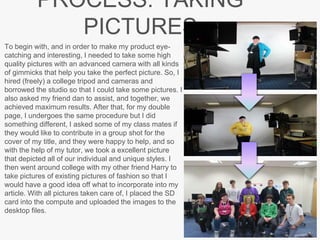
To begin with, and in order to make my product eye-
catching and interesting, I needed to take some high
quality pictures with an advanced camera with all kinds
of gimmicks that help you take the perfect picture. So, I
hired (freely) a college tripod and cameras and
borrowed the studio so that I could take some pictures. I
also asked my friend dan to assist, and together, we
achieved maximum results. After that, for my double
page, I undergoes the same procedure but I did
something different, I asked some of my class mates if
they would like to contribute in a group shot for the
cover of my title, and they were happy to help, and so
with the help of my tutor, we took a excellent picture
that depicted all of our individual and unique styles. I
then went around college with my other friend Harry to
take pictures of existing pictures of fashion so that I
would have a good idea off what to incorporate into my
article. With all pictures taken care of, I placed the SD
card into the compute and uploaded the images to the
desktop files.
ROCESS: FRONT COVER
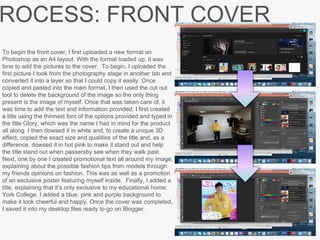
To begin the front cover, I first uploaded a new format on
Photoshop as an A4 layout. With the format loaded up, it was
time to add the pictures to the cover. To begin, I uploaded the
first picture I took from the photography stage in another tab and
converted it into a layer so that I could copy it easily. Once
copied and pasted into the main format, I then used the cut out
tool to delete the background of the image so the only thing
present is the image of myself. Once that was taken care of, it
was time to add the text and information provided. I first created
a title using the thinnest font of the options provided and typed in
the title Glory, which was the name I had in mind for the product
all along. I then dowsed it in white and, to create a unique 3D
effect, copied the exact size and qualities of the title and, as a
difference, dowsed it in hot pink to make it stand out and help
the title stand out when passersby see when they walk past.
Next, one by one I created promotional text all around my image,
explaining about the possible fashion tips from models through
my friends opinions on fashion. This was as well as a promotion
of an exclusive poster featuring myself inside. Finally, I added a
title, explaining that it’s only exclusive to my educational home;
York College. I added a blue, pink and purple background to
make it look cheerful and happy. Once the cover was completed,
I saved it into my desktop files ready to go on Blogger.
ROCESS: DOUBLE PAGE
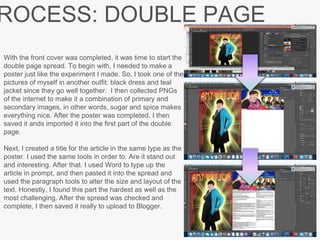
With the front cover was completed, it was time to start the
double page spread. To begin with, I needed to make a
poster just like the experiment I made. So, I took one of the
pictures of myself in another outfit: black dress and teal
jacket since they go well together. I then collected PNGs
of the internet to make it a combination of primary and
secondary images, in other words, sugar and spice makes
everything nice. After the poster was completed, I then
saved it ands imported it into the first part of the double
page.
Next, I created a title for the article in the same type as the
poster. I used the same tools in order to. Are it stand out
and interesting. After that. I used Word to type up the
article in prompt, and then pasted it into the spread and
used the paragraph tools to alter the size and layout of the
text. Honestly, I found this part the hardest as well as the
most challenging. After the spread was checked and
complete, I then saved it really to upload to Blogger.
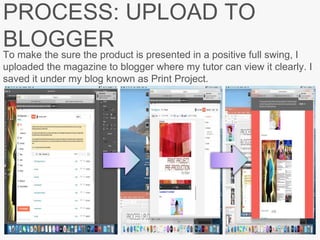
PROCESS: UPLOAD TO
BLOGGER
To make the sure the product is presented in a positive full swing, I
uploaded the magazine to blogger where my tutor can view it clearly. I
saved it under my blog known as Print Project.

6. production reflection(1) 3 2

  • 1.
  • 2.
    PROCESS: TAKING PICTURES To beginwith, and in order to make my product eye- catching and interesting, I needed to take some high quality pictures with an advanced camera with all kinds of gimmicks that help you take the perfect picture. So, I hired (freely) a college tripod and cameras and borrowed the studio so that I could take some pictures. I also asked my friend dan to assist, and together, we achieved maximum results. After that, for my double page, I undergoes the same procedure but I did something different, I asked some of my class mates if they would like to contribute in a group shot for the cover of my title, and they were happy to help, and so with the help of my tutor, we took a excellent picture that depicted all of our individual and unique styles. I then went around college with my other friend Harry to take pictures of existing pictures of fashion so that I would have a good idea off what to incorporate into my article. With all pictures taken care of, I placed the SD card into the compute and uploaded the images to the desktop files.
  • 3.
    ROCESS: FRONT COVER Tobegin the front cover, I first uploaded a new format on Photoshop as an A4 layout. With the format loaded up, it was time to add the pictures to the cover. To begin, I uploaded the first picture I took from the photography stage in another tab and converted it into a layer so that I could copy it easily. Once copied and pasted into the main format, I then used the cut out tool to delete the background of the image so the only thing present is the image of myself. Once that was taken care of, it was time to add the text and information provided. I first created a title using the thinnest font of the options provided and typed in the title Glory, which was the name I had in mind for the product all along. I then dowsed it in white and, to create a unique 3D effect, copied the exact size and qualities of the title and, as a difference, dowsed it in hot pink to make it stand out and help the title stand out when passersby see when they walk past. Next, one by one I created promotional text all around my image, explaining about the possible fashion tips from models through my friends opinions on fashion. This was as well as a promotion of an exclusive poster featuring myself inside. Finally, I added a title, explaining that it’s only exclusive to my educational home; York College. I added a blue, pink and purple background to make it look cheerful and happy. Once the cover was completed, I saved it into my desktop files ready to go on Blogger.
  • 4.
    ROCESS: DOUBLE PAGE Withthe front cover was completed, it was time to start the double page spread. To begin with, I needed to make a poster just like the experiment I made. So, I took one of the pictures of myself in another outfit: black dress and teal jacket since they go well together. I then collected PNGs of the internet to make it a combination of primary and secondary images, in other words, sugar and spice makes everything nice. After the poster was completed, I then saved it ands imported it into the first part of the double page. Next, I created a title for the article in the same type as the poster. I used the same tools in order to. Are it stand out and interesting. After that. I used Word to type up the article in prompt, and then pasted it into the spread and used the paragraph tools to alter the size and layout of the text. Honestly, I found this part the hardest as well as the most challenging. After the spread was checked and complete, I then saved it really to upload to Blogger.
  • 5.
    PROCESS: UPLOAD TO BLOGGER Tomake the sure the product is presented in a positive full swing, I uploaded the magazine to blogger where my tutor can view it clearly. I saved it under my blog known as Print Project.

Editor's Notes

  • #3 Discuss the tools and processes used in your production. Log your thoughts and feelings about your work.
  • #4 Discuss the tools and processes used in your production. Log your thoughts and feelings about your work.
  • #5 Discuss the tools and processes used in your production. Log your thoughts and feelings about your work.
  • #6 Discuss the tools and processes used in your production. Log your thoughts and feelings about your work.